You run a short program on a laptop with 16 GB of RAM. It asks the operating system for a 4 GB block of memory and gets it back at once, with no wait and no error. Then it stores the number 1 in one byte of that block, at the address 0x3A7C, and that works too. (The 0x means the number is written in hexadecimal, the usual way to write addresses. Real blocks start at addresses with far more digits, but small ones are easier to follow, and we're going to follow this one byte for the whole chapter.)
It's natural to picture that address as a position on the RAM chips, as if byte 0x3A7C were one particular spot on one particular chip. The chips know nothing about it. Nobody went looking for 4 GB of free RAM either, and with other programs already using most of the 16 GB there may not have been 4 GB free to find. A second program running at the same moment can store a different number at its own 0x3A7C, and neither will ever see the other's. The address only means something inside your program. Every time the program does a load (reads a byte from memory) or a store (writes one), the processor translates the address into a real position on the chips, using tables that the operating system keeps.
The core of the operating system, the kernel, builds and maintains those tables, and the whole arrangement is called virtual memory. This chapter follows our one byte through it, asking a single question: when my program uses an address, what does the machine do with it, and when does real memory show up? We'll begin by watching the 4 GB block do almost nothing, then work out why it has to be built this way.
01What asking for 4 GB gets you
1.1Asking is cheap, touching is not
Let's run the opening program for real. It's a dozen lines of Python, and it prints how much real memory the program holds at three moments: before it asks for anything, after it asks for 4 GiB, and after it writes into part of the block. (A GiB is 2^30 bytes, a little over a billion, so we'll say GB loosely from here on.)
A few things in the code need explaining first. The block comes from mmap, a system call, which is a request from a program to the kernel. mmap can make a file's contents appear in memory, and passing -1 in place of a file means no file stands behind the block, so it's plain working memory, which the kernel calls anonymous memory. The size 4 << 30 is 4 shifted left by 30 bits, which is 4 × 2^30 bytes, or 4 GiB, and 256 << 20 is 256 MiB in the same way. The kernel doesn't hand out memory a byte at a time. It works in fixed-size chunks called pages, and mmap.PAGESIZE reports their size. The loop in the script writes one byte into each page of the first 256 MiB, which we'll call touching a page.
The numbers the script prints are about the running program. A running program, together with the memory it uses, is called a process. The script prints the process's RSS, its resident set size, meaning how much of its memory is sitting in RAM at that moment, and it gets the figure by asking the ps tool.
import mmap, os, subprocess

def rss_mb():
    kb = int(subprocess.check_output(["ps", "-o", "rss=", "-p", str(os.getpid())]))
    return kb / 1024

page = mmap.PAGESIZE
print(f"page size            : {page // 1024} KB")
print(f"RSS at start         : {rss_mb():7.1f} MB")

buf = mmap.mmap(-1, 4 << 30)                    # ask for 4 GiB of address space
print(f"after mmap of 4 GiB  : {rss_mb():7.1f} MB")

for off in range(0, 256 << 20, page):           # touch the first 256 MiB, one byte per page
    buf[off] = 1
print(f"after touching 256 MB: {rss_mb():7.1f} MB")page size : 16 KB
RSS at start : 16.0 MB
after mmap of 4 GiB : 16.0 MB
after touching 256 MB: 272.0 MBRead the three RSS lines in order. At the start the process holds about 16 MB, which is the Python interpreter itself. After mmap of 4 GiB it still holds about 16 MB: the call returned immediately and nothing moved into RAM. After touching 256 MiB, RSS has risen by almost exactly 256 MB. The last digit changes by a tenth of a megabyte or so from run to run. On Linux on x86-64 the first line prints 4 KB instead of 16 KB, and the loop runs four times as often to touch the same 256 MiB.
1.2What that shows
The kernel handed back 4 GB of addresses instantly and did no other work. RAM was found one page at a time, at the moment each page was first touched, which is why only the touched 256 MB shows up in RSS. The page size printed on the first line, 16 KB on a recent Mac, is the unit it works in.
That one behaviour explains three things that otherwise look like bugs: a process that shows 40 GB of virtual memory on a 16 GB machine, a container (a program run inside a memory limit) that gets killed while its heap looks half empty, and Redis (an in-memory database) taking a snapshot of a 50 GB dataset without running out of RAM. We'll meet each of them again before the chapter ends.
It also raises a question. If 4 GB of addresses can exist with no memory behind them, an address can't be a position on the RAM chips. So what is it, and who decides where the byte ends up?
02Why addresses get translated
2.1A machine without translation
To see why the kernel does it this way, start with a computer that doesn't. Early computers worked like that, and the problems they had are the reason everything in this chapter exists.
On such a machine an address is a position on the RAM chips, so 0x3A7C is byte number 14,972 of physical memory, whoever asks for it. With one program running that works well. Now run two at once. Ours are process A, the program from the opening, and process B, some other program. Three things go wrong, and it's worth walking through each on our example.
- They collide. Suppose both programs were built to keep their data starting at
0x3A7C. The machine has only one byte number 14,972. A's store of 1 lands where B keeps its own number, and B reads back a 1 it never wrote. Moving one program somewhere else is hard, because a program that has saved its own addresses in its data can't easily be shifted. - Nothing protects them from each other. Say A has a bug and ends up with a stray pointer holding the address of one of B's bytes. Its next store silently overwrites B's data. The kernel's own memory sits on the same chips, so one buggy program can corrupt the operating system as easily as another program.
- Memory has to be real and in one piece. A asked for a 4 GB block. On such a machine that means finding 4 GB of unbroken free memory and keeping it reserved, even though A only touches a few bytes of it. On our 16 GB laptop, with other programs already running, there's no such stretch to find.
2.2One idea: translate every address
An office phone system solved the same problem long ago. Extension 1000 rings a different desk in every office, and two offices can both use 1000 without a clash, because the switchboard turns each extension into a real line before connecting the call. Nobody dials a real line directly, so nobody can reach another office's desk by guessing numbers.
A computer can do the same. Put a translation step between the address a program uses and the position the chips see, and make the translation depend on which process is asking. A's 0x3A7C goes to one place, and B's 0x3A7C goes to another. The addresses programs use are called virtual addresses. The real positions on the chips that they get translated into are physical addresses. A circuit in the CPU called the memory management unit, or MMU, does the translation on every load and store, using tables the kernel fills in.
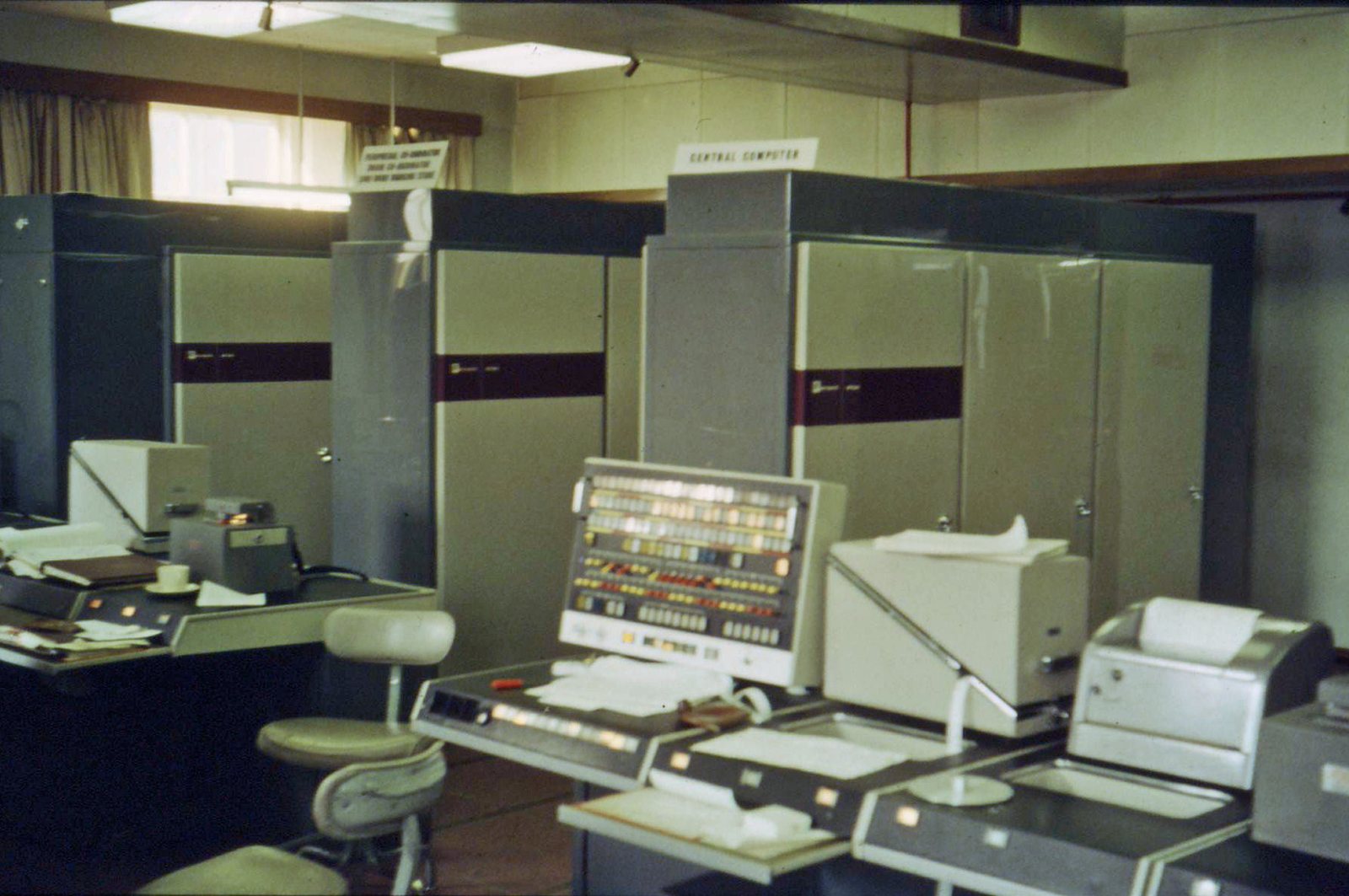
The first machine built this way was the Atlas computer at the University of Manchester, in service from 1962.
?Why translate in pages and not byte by byte?
A table with one row per byte would need at least as many rows as there are bytes of memory, so it would be bigger than the memory it describes. So the MMU translates in fixed-size chunks. A chunk of virtual addresses is a page, which we met in section 1, and a chunk of RAM of the same size is a frame. Pages are 4 KB on most x86-64 Linux machines, and we'll use that size for our worked example. (Apple Silicon uses 16 KB, as the output in section 1 showed.)
Because a 4 KB page holds 4,096 bytes, and 4,096 is 2^12, the low 12 bits of an address say where the byte sits inside its page, which is called the offset. The remaining high bits say which page. In hexadecimal each digit is 4 bits, so the last three digits are the offset: 0x3A7C is page 0x3 and offset 0xA7C.
The kernel keeps a page table for each process, with one row per page saying which frame holds it. A row is a page table entry, or PTE. Suppose A's row for page 3 says frame 0x51. Then A's load from 0x3A7C goes to physical address 0x51A7C, which is the frame number followed by the unchanged offset. Only the page number was swapped for a frame number. B has its own page table with its own row for page 3, say frame 0x2B, so B's 0x3A7C goes to 0x2BA7C.
2.3The same address in two programs
Step through this scene to watch A and then B use the same address. The top row is what each program sees, the middle row is the two page tables, and the bottom row is the frames in RAM.
0x3A7C, which is in their page 3. The kernel keeps one page table for each. A's table maps page 3 to frame 0x51, and B's maps page 3 to frame 0x2B.Each of the three problems from 2.1 is gone. A and B don't collide, because their tables send the same address to different frames. Neither can touch the other's memory, because the only frames a program can reach are the ones its own table lists. And A's 4 GB block doesn't need 4 GB of unbroken chips, because its consecutive pages can sit in frames scattered all over RAM. Better still, a page with no row at all needs no frame, which is the trick behind section 1.
| Problem | How a page table per process fixes it |
|---|---|
| Collisions | Each process has its own table, so two processes' 0x3A7C map to different frames |
| No protection | A process can only reach the frames listed in its own table |
| Contiguous RAM | Consecutive virtual pages can sit in frames scattered all over RAM |
2.4Seeing it on a real machine
You can see the same effect with a few lines of Python. The call os.fork() makes a second process that starts as a copy of the first (section 6 explains how that can be so cheap). In CPython, id(x) is the address of the object x. The parent below creates a one-byte value, forks, lets the child change it to 2, and then looks at its own copy again.
import os

x = bytearray(b"1")                      # one byte of memory in this process
print(f"parent before: address {hex(id(x))}, value {x.decode()}", flush=True)

pid = os.fork()                          # make a second process, a copy of this one
if pid == 0:                             # the child
    x[0] = ord("2")
    print(f"child        : address {hex(id(x))}, value {x.decode()}", flush=True)
    os._exit(0)

os.waitpid(pid, 0)                       # wait for the child to finish
print(f"parent after : address {hex(id(x))}, value {x.decode()}")parent before: address 0x1026d7fb0, value 1
child : address 0x1026d7fb0, value 2
parent after : address 0x1026d7fb0, value 1All three lines show the same address, so parent and child are using one virtual address. Yet the child's store of 2 never reached the parent, which still reads 1. Two page tables send one address to two different bytes. (Your address will differ from the one printed here, but it will be the same on all three lines.)
2.5What you get, and what it doesn't give you
The whole range of virtual addresses a process may use, together with what each one maps to, is called its address space. Each process gets its own address space, and the contract between a program and the machine comes down to three things about it. Most people only notice the first.
| You get | What it means in practice |
|---|---|
| A private address space | Your pointers mean nothing in another process |
| More address space than RAM | Allocation reserves addresses; frames arrive later, or never |
| Protection and sharing | Each page has permission flags, such as whether it may be written, and one frame can appear in many address spaces at different addresses |
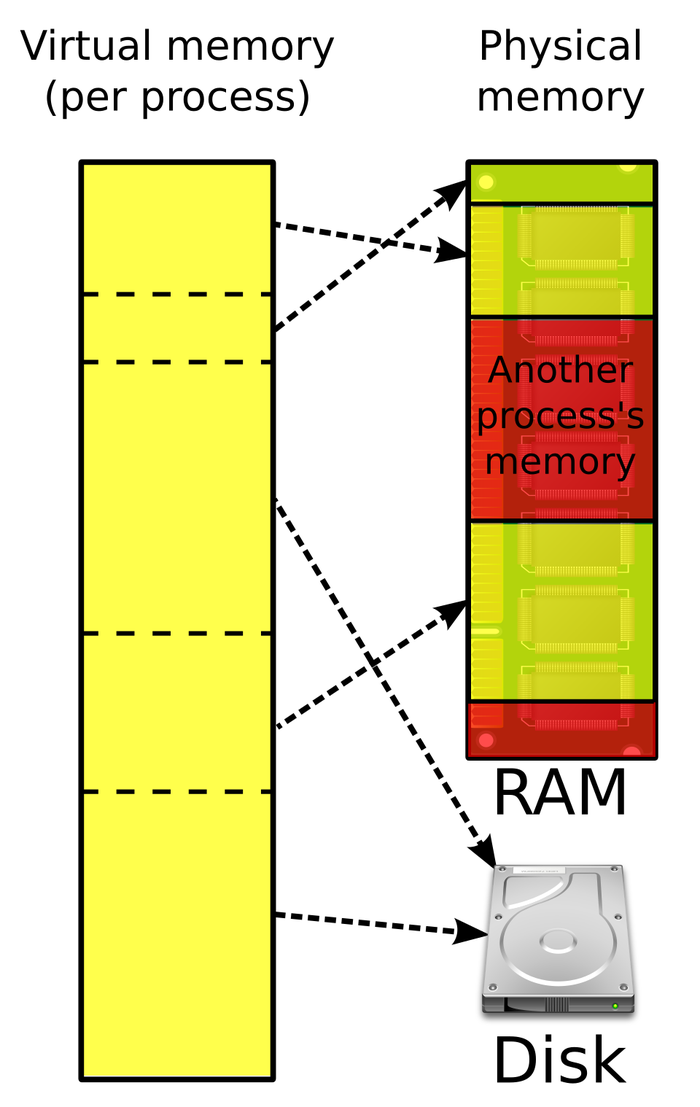
What the contract doesn't give you is free translation. Every load and store needs a lookup in a page table, and the table has to live somewhere. So where does it live, and how big does it get?
03Page tables are trees
3.1Why one flat table won't do
A page table has one entry per page, so the size of the table depends on how many pages a process could have. On x86-64 a virtual address uses 48 bits, which is 2^48 bytes, or 256 TB of addresses. Cut into 4 KB pages that's 2^36 pages, about 69 billion. At 8 bytes per entry, a flat table with one slot for every page would take 512 GB, for every process. Almost all of it would be empty, too, because a program using a few megabytes touches a few thousand pages out of those 69 billion.
?Why not store only the entries a process uses?
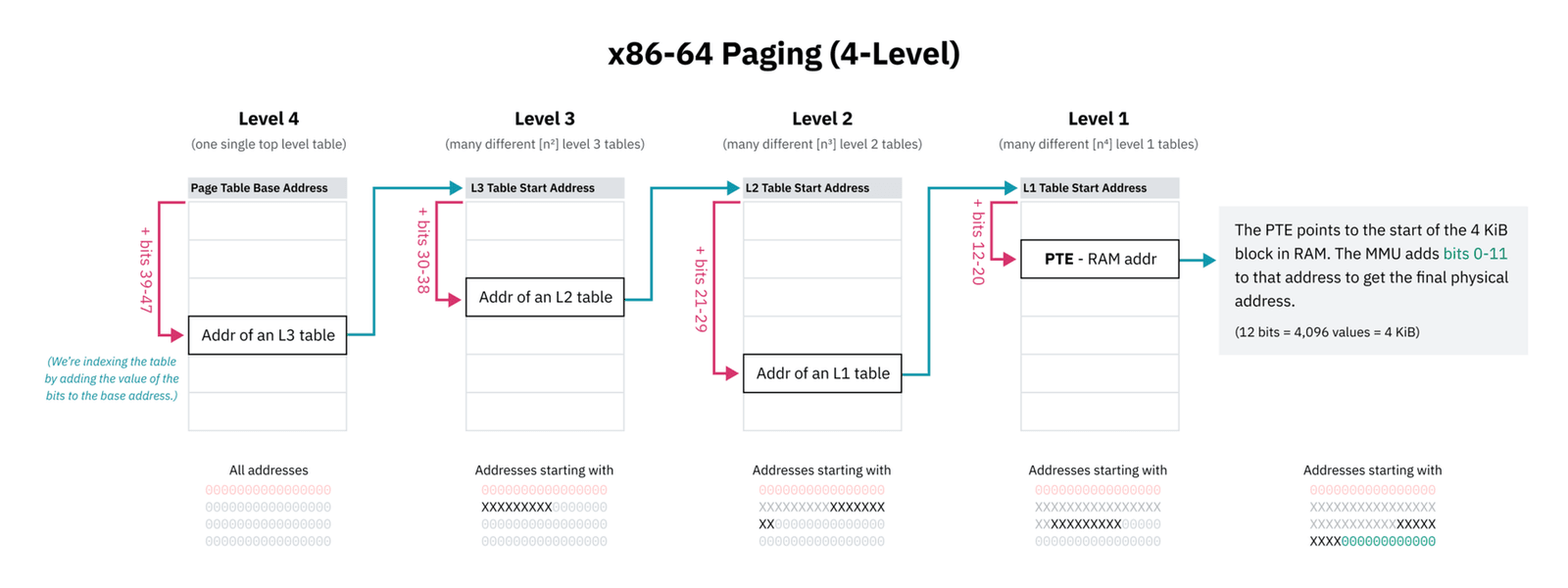
We could, but the MMU has to find an entry on every access, and indexing straight into a table is much simpler and faster for hardware than searching a list. The compromise is to split the page number into pieces and use each piece to pick an entry in a smaller table. On x86-64 the 36 bits of page number are cut into four pieces of 9 bits, and the page table becomes a tree of four levels. Each table has 512 entries (9 bits' worth) of 8 bytes, so each table is exactly 4 KB and fits in one page of memory.
The top table is indexed by bits 47 to 39 of the address. Each of its entries either points to a table at the next level, or is marked absent, meaning nothing is mapped in that part of the address space. Bits 38 to 30 pick an entry in the second table, bits 29 to 21 in the third, and bits 20 to 12 in the fourth, whose entries hold frame numbers. Linux names the four levels, from the top, the page global directory, page upper directory, page middle directory and page table, and shortens them to PGD, PUD, PMD and PTE, the same name as an entry in the last level. Bits 11 to 0 are the offset, as before.
For our address 0x3A7C, the page number is 3, which written as 36 bits is all zeros except the last two. So the first three pieces are 0 and the last is 3: entry 0 in the top table, entry 0 in the second, entry 0 in the third, and entry 3 in the fourth, which says frame 0x51.
An absent branch costs nothing, which is how a process can reserve terabytes and use kilobytes. Our 4 GB block from section 1 is the example. The kernel noted in its own records that the range is valid, and the page table contains no entries for it at all. The first page a process touches needs a path of four tables, 16 KB, and every other page in the same 2 MB neighbourhood shares the last table. Linux gives user programs the lower half of the 256 TB, 128 TB, and keeps the upper half for the kernel. Even so, the page tables for a process that uses a few widely spaced regions of that 128 TB come to tens of kilobytes.
3.2Walking the tree
Finding one translation now means starting at the top table, whose address the CPU keeps in a register, a small storage slot inside the CPU (on x86-64 this one is called CR3), and following the pieces of the address down. This is called a walk. For 0x3A7C it reads entry 0 of the top table, which gives the address of the second table, then entry 0 there, then entry 0 of the third, and finally entry 3 of the fourth. That's four loads, and each one needs the answer from the one before, so they can't overlap. Any of them can also miss the CPU cache (chapter 02) and have to wait for RAM.
Then the real load, of your actual byte, comes on top of the walk. Without some shortcut, every load and store in every program would cost about five memory accesses instead of one. The shortcut comes from noticing how programs behave.
04Remembering translations
4.1A cache for translations
Programs reuse the same pages over and over. A loop over an array of 4-byte numbers touches the same 4 KB page for 1,024 iterations in a row, so it would walk the tree 1,024 times to get the same answer. The fix is the one chapter 02 used for data: keep recent results close.
The CPU holds a small cache of recent translations, called the TLB (translation lookaside buffer). Before walking, the MMU looks the page number up in the TLB. If the entry is there, that's a hit, and the frame number comes back almost for free. If not, that's a miss: the MMU walks the tree, and puts the result into the TLB for next time.
4.2One load, miss and then hit
Here's one load of our byte, followed from start to finish, and then a second load from the same page. The top row is the CPU and its TLB, and the bottom row is RAM, which holds both the page table and the data.
0x3A7C, which it stored earlier. With 4 KB pages that's page 3, offset 0xA7C. The TLB holds one old entry for some other page, and the page table sits in RAM.Notice the two costs. A hit adds almost nothing to a load. A miss adds a chain of four dependent loads, and a program that misses often pays that chain over and over.
4.3Reach, and why page size matters
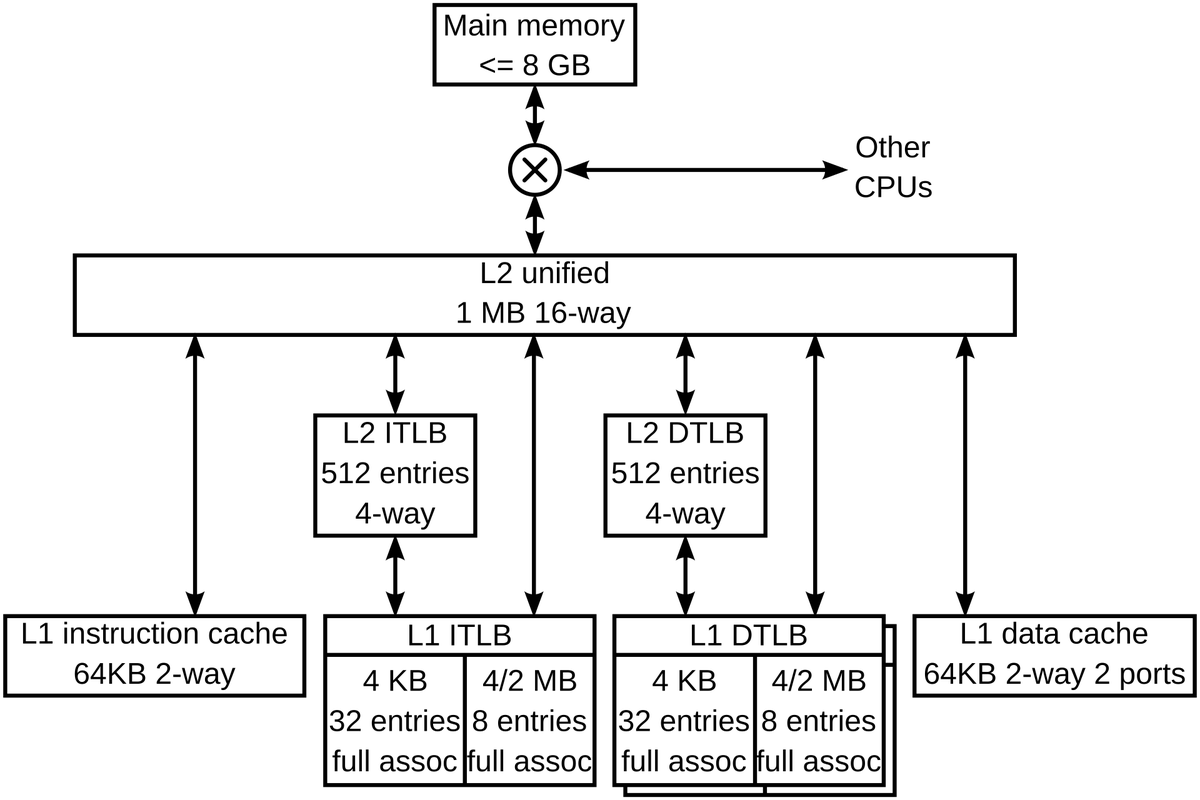
How much memory can a program use before its translations stop fitting in the TLB? The TLB holds a fixed number of entries, and each entry covers one page, so the answer is entries multiplied by page size. This is the TLB's reach. Most CPUs have two TLBs, a tiny fast one checked first and a larger, slower one behind it, called the second-level or L2 TLB. The figures below are typical ones for the L2 TLB, and real chips differ.
| Configuration | Entries (typical) | Reach |
|---|---|---|
| x86-64, 4 KB pages | ~1,500 L2 TLB | ~6 MB |
| x86-64, 2 MB huge pages | ~1,500 | ~3 GB |
| Apple Silicon, 16 KB pages | ~3,000 (undocumented) | ~48 MB |
Look at the first two rows. The same TLB, on the same silicon, has about 500 times the reach, purely because of the page size. The x86-64 hardware lets one entry map a 2 MB page instead of a 4 KB one, which covers 512 times as much memory, and the walk for such a page ends a level early. Pages of that size are called huge pages. Linux can hand them out automatically for large regions of memory, a feature called transparent huge pages, or THP. Section 7 covers what THP costs.
?How many translations does 1 GB need?
If a process touches 1 GB of memory at random with 4 KB pages, it needs 262,144 different translations. No TLB holds anywhere near that many, so most of those accesses will walk the tree. That arithmetic is behind most of the performance story in sections 7 and 8.
4.4When the tables change under the TLB
A TLB entry says "page 3 is frame 0x51", and that's true only for process A. When the CPU switches to process B, the old entries would send B's loads to A's frames. So on a switch the kernel either flushes the TLB or tags each entry with the process it belongs to (x86 calls the tag a PCID). Either way, a switch between processes has a translation cost, which is one reason a switch between two processes is more expensive than one between two threads that share a page table (chapter 06).
A milder version happens on every system call. The kernel's own memory is mapped into each process's page table, out of reach of user code by permission flags. In 2018 the Meltdown flaw showed that some CPUs could be tricked into reading around that protection. The fix on those CPUs, KPTI (kernel page-table isolation), removes most kernel pages from the page table used while your code runs, so every system call has to switch to a different page table and back. On CPUs without PCID each switch also flushes translations. That made virtual memory bookkeeping visible in ordinary application latency: if a 2017 syscall benchmark won't reproduce on a current kernel, page-table isolation is a likely reason.
Everything so far assumed the walk finds an entry. The last frame of the scene showed the other outcome, an entry marked absent, and that's the state a freshly mapped 4 GB block is in.
05Pages arrive when they're first touched
5.1The first store to a new page
The block in section 1 has no page table entries at all, so the first store to any page ends in a dead end, a page fault. What the kernel does then is the answer to when real memory shows up. Before we watch it, try a prediction. malloc is the function C programs call to get memory, and for a large block it ends up asking the kernel for address space with mmap, just like our script.
On a machine with 8 GB of RAM, you call malloc(1_000_000_000) and never touch the memory. What happens?
Now the touch itself. In the scene below the program has mapped its block and is about to store 1 to 0x3A7C. The kernel's own record of the valid range sits in the second box, and the program's page table in the third.
0x51 is free.The hardware stopped the program with a trap, a jump from the program into the kernel with the program's place saved. The kernel routine that takes over is the page fault handler. It begins with the kernel's own record of which address ranges the process may use, written when mmap returned. If the faulting address is in no valid range, the program used a bad pointer, and the kernel ends it with the segmentation fault you've probably met. In our scene the address is valid, so the handler fills the gap and returns, and the CPU re-runs the instruction that faulted.
?Why zero the page first?
Because the frame last belonged to someone else. Handing it over with another process's data still in it would undo the protection from section 2: a program could allocate memory and read its way through whatever other programs, or the kernel, had left behind.
5.2Counting faults, minor and major
If every first touch of a page is one fault, then touching 256 MiB should cost exactly one fault per page. The kernel counts the faults of each process, and Python can read the count. resource.getrusage returns the kernel's accounting for the current process, and its ru_minflt field is the number of minor faults so far. The script below maps the same 4 GiB, reads the counter, touches the same 256 MiB one byte per page, and reads the counter again.
import mmap, resource

def faults():
    return resource.getrusage(resource.RUSAGE_SELF).ru_minflt

page = mmap.PAGESIZE
buf = mmap.mmap(-1, 4 << 30)                    # ask for 4 GiB of address space
before = faults()
for off in range(0, 256 << 20, page):           # touch the first 256 MiB, one byte per page
    buf[off] = 1
print(f"pages touched : {(256 << 20) // page}")
print(f"faults taken : {faults() - before}")pages touched : 16384
faults taken : 16384The two numbers match. Dividing 256 MiB by the 16 KB page size gives 16,384 pages, and the kernel counted 16,384 faults, one per page and nothing else. On a Linux x86-64 machine both lines would usually read 65,536, because the pages are a quarter the size. (If transparent huge pages from section 4.3 are switched on for all memory, Linux may hand out 2 MB pages instead, and the fault count can drop as low as 128, one per 2 MB.)
A minor fault is one that needs no disk read, because the kernel can either find a free frame, zero it and install the mapping, as we saw, or map a frame that already holds the page's contents. Not every fault can be settled that way. If the contents have to come from disk, because the page was moved out to swap (an area of disk the kernel uses as overflow for memory) or belongs to a file that hasn't been read yet, the fault is a major fault.
| Fault | What the kernel does | Cost |
|---|---|---|
| Minor | Finds a free frame, zeroes it and installs a mapping, or maps a page of file data the kernel already holds in memory | About 570 ns on a fast laptop with 16 KB pages (section 8) |
| Major | Reads the page from disk | Tens of microseconds or more |
Minor faults are normal. A program reading a file through mmap takes some major faults as it goes, which is expected too. A high and steady major fault rate in ordinary memory means the machine is swapping, and nothing else you measure will make sense until it stops.
5.3What lazy allocation does on a real machine
Two consequences of faulting pages in one at a time show up in production.
- Memory use appears at touch time, not at allocation time. RSS climbs while your code is doing something that doesn't look like allocating, such as filling in a big array it reserved earlier.
- Overcommit. Handing out more address space than there is memory to back it is called overcommit, and Linux does it by default, refusing only requests that are plainly impossible. When the pages that programs eventually touch add up to more than physical memory, the kernel's OOM killer (out-of-memory killer) picks a process and kills it. It decides late, at a touch, long after the allocation that caused the problem returned successfully.
A fault can do more than fetch a fresh frame. Since an entry is only a pointer, the kernel can also point an entry at a frame that already exists. That's what makes it possible to copy a whole process without copying its memory.
06Sharing frames: fork and copy-on-write
6.1How Redis snapshots 50 GB
Redis keeps its whole dataset in memory, and from time to time it writes a snapshot of that data to disk. The data can't change under the writer, but Redis has to keep answering requests while the snapshot is written. The simple answer is fork(), the call we used in 2.4. The child process is an exact copy of Redis frozen at that instant, so it can write its copy to disk in peace while the parent carries on and changes its own data.
If a copy meant copying 50 GB, that would take another 50 GB of RAM and many seconds. The kernel avoids both by copying only the page table. After fork() the child's entries point at the same frames as the parent's, and the kernel marks every entry in both tables read-only. Reading is fine for both. The first time either side writes to a page, the CPU faults, because the entry is read-only. The kernel then copies that one page into a new frame, points the writer's entry at the copy, makes it writable, and lets the write finish. This is called copy-on-write, and here it is on two pages of the dataset:
0x51 and page 4 in frame 0x08, both writable (rw).?So what does a snapshot cost in memory?
One page for every page the parent writes while the child is running. A mostly-read workload barely grows. A write-heavy one can approach a second copy of the dataset, and those copies show up as RSS climbing during code that is only serving requests.
6.2Copy-on-write with huge pages
The copy is one page, so the page size sets the bill. Before Linux 5.8, the first write to a huge page shared after fork() copied all 2 MB, which is 512 times the memory traffic of a 4 KB page for the same one-byte write.
For Redis that turned a cheap snapshot into a memory spike and a latency cliff, and "disable THP" went into every guide. Kirill Shutemov's commit 3917c80280c9 changed that. The kernel now splits the huge page into small ones and copies only 4 KB, and the commit message names Redis as an example of a workload for which THP had been unusable.
What's left is the split itself, and the loss of the huge page in that range until khugepaged, a background kernel thread that merges small pages back into huge ones, rebuilds it. That is one of several prices of huge pages, and ordinary pages have costs of their own.
07When translation gets expensive
Each mechanism so far has a way of going wrong, and the trouble shows up somewhere you wouldn't look first. We start with the one that section 4 set up, a program whose pages outrun the TLB.
7.1TLB thrashing
A program's working set is the memory it keeps coming back to. Suppose that working set fits in the CPU's caches but needs more pages than the TLB can hold. Random access over a few hundred megabytes on a server chip with a large L3 (the last and biggest CPU cache, from chapter 02) is the usual shape. The data may be sitting in cache, and every access still has to pay a page walk.
That's hard to spot, because of how slowness usually gets diagnosed. CPUs count events such as cache misses in hardware performance counters, and on Linux the perf tool reads them. The counter people check first, cache-misses, counts only data that wasn't in cache, so in this situation it looks healthy. A separate counter, dTLB-load-misses, counts misses in the TLB used for data loads.
Your working set is 200 MB, fits in L3, and random access is still slow. With 4 KB pages, which counter do you expect to be high?
The symptom is dTLB-load-misses high while cache-misses looks reasonable. There are two fixes. One is huge pages, which multiply the reach. The other is making the access pattern sequential, so one translation serves many accesses within a page. Section 8 puts numbers on the slowdown.
7.2Huge pages, and their cost
Transparent huge pages promote 2 MB regions to huge pages automatically, and reach improves enormously. Three costs come with them. One needs a word of explanation first: a huge page needs 2 MB of physically contiguous frames, and when RAM is too scattered to supply them, the kernel may run compaction, which moves pages around to make a free 2 MB stretch.
| Cost | What happens | Still true? |
|---|---|---|
| Compaction stalls | Finding a contiguous 2 MB physical region can require compaction, which can stall the faulting thread for milliseconds | Yes |
| COW after fork | The first write to a shared huge page copied 2 MB | Fixed in Linux 5.8 (section 6.2) |
| RSS bloat on sparse data | A sparse heap touching one byte per huge page holds 2 MB for each | Yes |
7.3Memory wasted inside pages
Pages are the smallest unit the kernel hands out, so a 16 KB page that holds one live 32-byte object is 16 KB of resident memory. A long-running process whose live objects are scattered across many pages can hold far more RSS than the sum of its live allocations. The allocator, the library code behind malloc that carves pages into small objects, won't show it in its statistics, because its own accounting of live objects is correct. Chapter 05 covers the allocator side of this.
Every benefit in this chapter comes with a bill like these, and each bill arrives somewhere different:
| You get | You pay | When the bill arrives |
|---|---|---|
| A private, contiguous-looking address space | A translation on every access | As TLB misses nobody profiles for |
| Allocate now, commit later | RSS grows while your code appears idle | When the OOM killer arrives, late |
| Huge pages, 500× the reach | Compaction stalls, RSS bloat on sparse data | The first fault that has to compact memory |
| Per-page protection and sharing | Memory wasted inside partly used pages | As RSS far above your live objects |
Two of these bills, the page fault and the TLB miss, can be put in nanoseconds, and that's the next section.
08What it costs
The numbers below come from a fast laptop with 16 KB pages. The exact values vary between machines, but the shapes are the same everywhere.
8.1A minor page fault
Section 5 said a minor fault costs about 570 nanoseconds. That figure comes from touching 20,000 fresh pages once each, then touching the same pages again straight afterwards:
?Why is a resident write 116 ns?
Be careful reading the second row. It's high because the loop strides 16 KB, so every access is a CPU cache miss and probably a TLB miss too. Subtracting it leaves roughly 570 ns for the kernel's fault handling: the trap, finding a frame, zeroing 16 KB, installing the entry, and returning. Zeroing 16 KB is part of that cost.
Now put the numbers to work. Take a program that touches 1 GiB of fresh memory, one byte per page as in section 5, and then touches it all again:
| Pages in 1 GiB | 1 GiB ÷ 16 KB | 65,536 |
| First pass, one fault per page | 65,536 × 686 ns | 45 ms |
| Second pass, pages already resident | 65,536 × 116 ns | 7.6 ms |
| Spent in the fault handler on the first pass | 65,536 × 570 ns | 37 ms |
| first touch costs about six times the second | 45 ms vs 7.6 ms | |
8.2Running out of TLB
Now the translation side. Each point on the curve comes from a loop that chases pointers: every page holds the address of the next page to visit, so each load has to wait for the one before it and nothing overlaps. The loop reads one cache line (chapter 02) per page, so almost every load needs a fresh translation. The x-axis is how many pages the loop cycles through.
| Pages | Span | ns/access | Reading |
|---|---|---|---|
| 4 | 64 KB | 0.68 | Everything in L1, translations cached |
| 16–128 | 256 KB – 2 MB | 5.5 – 5.8 | Out of L1, translations still cached |
| 256–512 | 4 – 8 MB | ~8.1 | Cache pressure rising |
| 1024 | 16 MB | 18.96 | Steep rise: cache and translation misses together |
| 4096 | 64 MB | 34.36 | Page walks on most accesses |
The last row costs about fifty times the first, and its 64 MB span is past the roughly 48 MB reach estimated for Apple Silicon in section 4.3. These numbers mix two effects, TLB misses and CPU cache misses. At 1,024 pages the span is 16 MB, roughly where chapter 02's curve also leaves L2, so both effects arrive together, and separating them takes hardware counters that macOS doesn't readily expose. On Linux, perf stat -e dTLB-load-misses separates them in one command.
09Seeing translation pressure
9.1What to look at
Each question this chapter raised has a tool that answers it on a running machine.
# Is it translation or data? (sections 4 and 7)
perf stat -e dTLB-load-misses,dtlb_load_misses.walk_active,page-faults ./app

# Minor versus major faults. Major means disk (section 5)
/usr/bin/time -v ./app 2>&1 | grep -i fault    # Linux; time reports on stderr

# What's mapped, and how much of it is resident (sections 1 and 5)
cat /proc/$PID/smaps_rollup          # Linux
vmmap $PID | tail -30                # macOS

# Which page size, and is THP on? (sections 4 and 7)
getconf PAGE_SIZE
cat /sys/kernel/mm/transparent_hugepage/enabled
grep -i huge /proc/meminfo9.2Reducing translation pressure
- Shrink the working set. Same advice as chapter 02, and it helps twice here: fewer pages means fewer translations.
- Make access sequential. One translation then serves many accesses within the page.
- Consider huge pages for large, long-lived, randomly accessed regions. A database buffer pool is the textbook case. Check whether you
fork()first. - Pre-fault if latency matters.
MAP_POPULATEor a warm-up pass moves the fault cost off the critical path.
9.3Symptom, cause, fix
| Symptom | Likely cause | Fix |
|---|---|---|
dTLB-load-misses high, cache-misses fine | Working set past TLB reach | Huge pages, or sequential access |
| RSS climbs while the code does nothing that allocates | First touch of reserved pages, or copy-on-write after fork() | Expected; pre-fault with MAP_POPULATE if latency matters |
| Everything slow, measurements make no sense | High major fault rate: swapping | Stop the swapping first |
| Millisecond stalls on page faults | THP compaction | Check transparent_hugepage/enabled; use madvise for chosen regions |
| Memory spike during a fork-based snapshot | Huge-page COW on a kernel before 5.8 | Upgrade, or disable THP for that process |
| RSS far above the live objects | Memory wasted inside partly used pages (section 7.3) | Chapter 05's mitigations |
10Summary
- Asking for memory is cheap and touching it is not. A 4 GB
mmapleft RSS at 16 MB, and touching 256 MiB raised it by 256 MB. - Every address your program uses is virtual. The MMU translates it, page by page, through a table the kernel keeps for each process.
- Translation fixes collisions, protection and contiguity with one mechanism: each process can only reach the frames in its own table, and
0x3A7Cin A and in B lead to different bytes. - Page tables are trees. Absent branches cost nothing, so a process can reserve terabytes and consume kilobytes.
- The TLB makes translation nearly free, until it misses. Reach is entries × page size, and 2 MB pages give the same TLB 500× the reach of 4 KB ones.
- Allocation is lazy.
mallocreserves addresses, and frames arrive on first touch, one minor fault at a time, about 570 ns each on a fast laptop with 16 KB pages. - Major faults mean disk. A high major fault rate means swapping, and nothing else you measure will make sense.
fork()copies page tables, not pages. A page is duplicated only when one side writes to it, which is how Redis snapshots 50 GB.- Huge-page copy-on-write copied 2 MB before Linux 5.8. Since then it splits the page and copies 4 KB, so check which reasons for "disable THP" still apply.
- TLB thrashing hides from cache counters. Look at
dTLB-load-misses, not justcache-misses. - Page size isn't always 4 KB. Apple Silicon uses 16 KB, so query it.
11Build this
Find your machine's TLB reach.
mmapan anonymous region and touch one byte per page, chasing pointers in a random page order so each translation is on the critical path.- Sweep from 4 pages to 16,384 and plot ns per access.
- On Linux, run it under
perf stat -e dTLB-load-missesso you can prove the knee is translation and not cache, which can't be done cleanly on macOS. - Then enable huge pages with
madvise(MADV_HUGEPAGE)and rerun.
The huge-page run should push the knee out by roughly the page size ratio. Watch the first-touch cost go up at the same time, and you'll have both halves of the trade in your own numbers.
12Interview questions
beginnerWhy does malloc of a gigabyte succeed on a machine with less free RAM?›
Because allocation reserves addresses, not physical memory. The kernel records that a range is valid and returns immediately, and the page table gets no entries for it. Frames arrive on first touch, one page at a time, through minor faults. That's also why resident memory climbs later, during code that isn't obviously allocating.
intermediateWhat is TLB reach and why do huge pages help?›
Reach is entries × page size: how much memory you can touch before translations start missing. A TLB with 1,500 entries covers about 6 MB with 4 KB pages and about 3 GB with 2 MB pages. Same hardware, 500× the reach.
That's why databases and JVMs with large heaps chase huge pages: a random access pattern over a multi-gigabyte buffer pool misses the TLB on nearly every access otherwise.
intermediateMinor fault versus major fault?›
A minor fault needs no I/O. The kernel finds a free frame, zeroes it and installs a mapping, or maps a file page the kernel already holds in memory. On a fast laptop with 16 KB pages that costs about 570 ns beyond the access itself.
A major fault reads from disk and costs tens of microseconds at best. A high major fault rate means swapping, and no other measurement you take will be meaningful until it stops.
deepWhy did Redis tell you to disable transparent huge pages, and is the reason still true?›
Redis forks for snapshots and relies on copy-on-write to keep that cheap. Before Linux 5.8, a parent's write to a huge page copied the full 2 MB: 512× the memory traffic of a 4 KB page for the same logical write, so a snapshot turned into a memory spike and a latency cliff.
Since 5.8 the kernel splits the huge page and copies 4 KB, so that particular reason is gone on a modern kernel. Two remain: compaction stalls when a contiguous 2 MB region has to be assembled at fault time, and RSS bloat when a sparse heap touches one byte per huge page. A good answer names the kernel version.
deepYour working set is 200 MB, fits in L3, and random access is still slow. What do you check?›
TLB misses. Two hundred megabytes is roughly 50,000 pages at 4 KB, far past any TLB's entry count, so a random access pattern pays a page walk almost every time even though the data itself is cached. Cache-miss counters look fine and the code looks fine.
Check dTLB-load-misses against dTLB-loads. If that ratio is high, try huge pages, or restructure so access is sequential within a page.
13Go deeper
What is the base page size on Apple Silicon?›
16 KB, not 4 KB. It changes TLB reach, space wasted inside pages and fault counts, so query it instead of assuming the x86 value.
RSS is climbing but your code is only reading. How?›
Copy-on-write, or first-touch of pages mapped earlier. Reserved address space becomes resident when touched, not when allocated.
Why can the page tables for a 128 TB address space take only tens of kilobytes?›
The page table is a tree and absent branches don't exist. Only populated regions cost anything: one mapped page needs a path of four 4 KB tables, and neighbouring pages share them.
Huge pages fixed your TLB misses and your fork-based snapshot got much worse. Why?›
On a kernel older than 5.8, COW copies 2 MB per faulting write instead of 4 KB. On 5.8 and later the huge page is split and only 4 KB is copied, so look at compaction stalls and khugepaged instead.
Address spaces, address translation, paging, TLBs, multi-level page tables and swapping, built up one step at a time, ending with a tour of a complete VM system. Free online at pages.cs.wisc.edu/~remzi/OSTEP.
The virtual memory sections, with the clearest page-walk diagrams available.
How THP behaves, including the compaction stalls the marketing material omits.
Dated in its kernel version, unmatched in depth on the data structures.
One command that separates translation cost from data cost, a measurement macOS doesn't readily allow.
14Related chapters
The cache curve that sits one level below this chapter's TLB curve, and the working-set advice that helps twice here. Chapter 02.
What sits between mmap's pages and your malloc calls, and why freed
memory doesn't lower RSS. Chapter 05.
Why a switch between processes costs more than one between threads: the page-table swap. Chapter 06.
Meltdown, and the page-table isolation that made every syscall switch page tables. Chapter 44.