You open a terminal on your Mac and run docker run alpine uname -sr. The command starts a small container and asks it which kernel it's running on. The kernel is the core of an operating system, the one program that controls the hardware and decides which other programs get the CPU, the memory and the disk. The answer comes back as Linux 6.10.14-linuxkit. Your Mac doesn't run Linux, though. Its kernel is called Darwin.
A container, as chapter 11 explained, is only a group of ordinary processes that the host's own kernel has fenced off, so it has no kernel of its own to report. The Linux kernel in that answer is real, and it's running on your laptop, but not the way your browser runs. Docker started a virtual machine, a whole computer simulated well enough that an operating system can boot inside it, and your container lives in there. That Linux kernel boots believing it's the only kernel in the world: it sets up memory, handles interrupts and drives the disk and the network card. Two kernels doing that to one machine, macOS and Linux, should wreck each other within a second. Yet they run side by side, and the one inside the virtual machine runs almost as fast as if it were alone.
What makes this possible is a thin layer of software called the hypervisor. It sits underneath the guest kernel, lets it run directly on the real CPU, and steps in only when the guest reaches for something that belongs to the whole machine. This chapter asks how a second kernel can run as if it owned the machine, how fast it runs, and what each reach for the real hardware costs.
We'll follow one ping through that machinery. ping is the little program that sends a single small packet to another machine and times how long the reply takes. It runs inside the container, builds its packet (adding up numbers for a checksum as it goes), touches memory, and finally hands the packet to the network card. Those three steps meet the hypervisor in three different ways. We start by finding the virtual machine on your laptop, then work out the trick that lets a kernel share a machine, what the CPU and the memory hardware do to help, and what one packet costs on its way out.
01A second kernel on your laptop
1.1Looking for the virtual machine
Docker Desktop on a Mac needs a Linux kernel, and macOS doesn't have one, so it must be getting one from somewhere. Four commands let us ask both sides what they are. uname -sr prints a kernel's name and release. sysctl kern.hv_support asks macOS whether the CPU supports running guests ("hv" stands for hypervisor). docker run --rm alpine … runs a command in a fresh container built from alpine, a tiny Linux image, and --rm deletes the container afterwards. The last command adds --privileged, which lets the container see the kernel's own messages, then runs dmesg, which prints the kernel's boot log, and keeps the first three lines that mention virtio-pci.
uname -sr                                    # the Mac
sysctl kern.hv_support                       # can this Mac's CPU run guests?
docker run --rm alpine uname -sr             # a container
docker run --rm --privileged alpine sh -c 'dmesg | grep virtio-pci | head -3'Darwin 25.5.0
kern.hv_support: 1
Linux 6.10.14-linuxkit
[ 0.049820] virtio-pci 0000:00:01.0: enabling device (0000 -> 0002)
[ 0.052534] virtio-pci 0000:00:05.0: enabling device (0000 -> 0002)
[ 0.055603] virtio-pci 0000:00:06.0: enabling device (0000 -> 0002)The first line says the Mac runs Darwin. The third says a container on that same Mac reports Linux. Chapter 11 said containers share the host's kernel, so this container must be sharing a Linux kernel that is running somewhere other than on the Mac's own: inside a virtual machine. The second line, kern.hv_support: 1, says the CPU offers the hardware features a hypervisor needs, and section 3 looks at what those are.
The last three lines are the Linux guest's boot log. Each one is a virtio-pci device: a network card or a disk, attached the way real cards are attached (over PCI, the standard bus that connects devices to a computer), but existing only as software provided by the hypervisor. The name "virtio" is the standard these virtual devices follow, and section 5 opens it up. The guest kernel boots as if it had real hardware, finds these devices and loads drivers for them. Every time it touches one, the hypervisor gets a call. We'll come back to what a call costs; first we need to see why it works at all.
1.2What the guest believes
Let's fix the words we'll use. The operating system running inside the virtual machine is the guest. The real machine, together with the software that is in charge of it, is the host. The hypervisor is the part of the host that owns the hardware and decides what each guest gets to do with it.
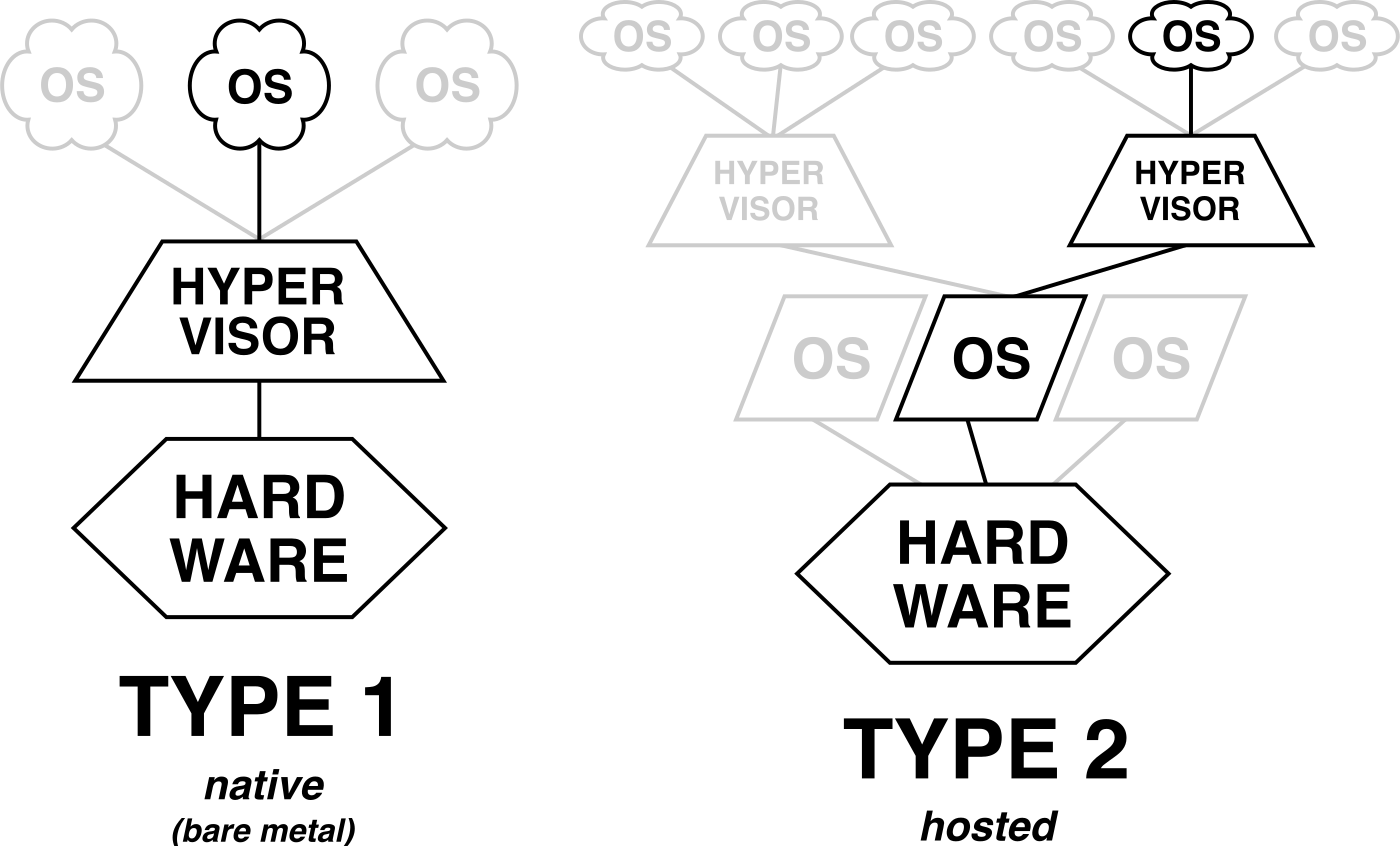
Why not give every kernel its own real machine? Because machines are expensive. A cloud provider with ten customers' Linux kernels to run would need ten servers, mostly idle, and you couldn't run Linux next to macOS on one laptop at all. Sharing one machine is the whole point, and sharing is hard for a particular reason. Every kernel was written believing it owns the hardware. It builds page tables, the tables that translate the addresses programs use into real memory addresses (chapter 04). It switches interrupts on and off, where an interrupt is a signal from a device ("a packet arrived") that makes the CPU stop what it's doing and run the kernel's handler for it. It talks to the disk controller directly. If two kernels did these things to the same machine, each would overwrite the other's page tables and swallow the other's interrupts.
So the hypervisor has to let each kernel keep believing it owns a machine while the real machine stays under control. There are two ways to do that, and one of them is far better than the other.
02Letting the guest run directly
2.1Simulate, or deprivilege
?Why not just simulate the CPU?
You can. A program that reads each of the guest's instructions and does in software what the CPU would have done never lets the guest touch real hardware. That's correct, and it's many times slower than running natively, because every addition the guest kernel does takes many instructions of the simulator.
The better idea is from 1974, when Gerald Popek and Robert Goldberg wrote down the conditions for doing it properly. Most of what a kernel does is ordinary: additions, loads, stores and branches. Let all of that run directly on the real CPU at full speed. Only a few instructions touch machine state that has to stay under control, like the register holding the address of the page tables or the flag that switches interrupts on and off.
A CPU already has a way to stop the wrong code from running those instructions. It has privilege levels: the kernel runs at the most privileged one and your programs run at a lower one. When a lower-level program tries a privileged instruction, the CPU refuses to run it and jumps instead to a handler the kernel set up, which is called a trap (chapter 07 shows the same mechanism at work for system calls). The hypervisor reuses this. It runs the guest kernel with less privilege than the guest thinks it has, so every one of those instructions traps, this time into the hypervisor. The hypervisor then does what the instruction would have done, but to the guest's virtual copy of the machine's state, and resumes the guest at the next instruction. Doing the instruction's work in software is called emulating it, and the whole scheme is trap-and-emulate. One trip out of the guest and back is a VM exit.
Think of a hotel. Inside the room a guest can do what they like: move the furniture, cook, sleep with the lights on. When they want something that belongs to the whole building, like the safe, the front door or an outside phone line, they call the front desk, which does it and lets them carry on. The guest kernel is the guest, the hypervisor is the front desk, and each call is an exit. Nearly all the performance questions about virtual machines come down to how often the guest calls and how long the desk takes to answer.
| Term | Meaning |
|---|---|
| Guest | The operating system being run inside the VM |
| Host | The real machine, and the software in charge of it |
| Hypervisor | The program that owns the hardware and handles the guest's traps |
| VM exit | The trap out of the guest into the hypervisor |
Here's a case where we can reason about the cost. Apple provides an interface for writing a hypervisor on a Mac, called Hypervisor.framework. Suppose we write the smallest possible VM with it, whose guest does nothing but add numbers in a loop.
A loop of a billion additions takes 245 ms on an Apple-silicon Mac. You run the same loop as the guest in a minimal VM built on Hypervisor.framework. How long does it take?
2.2What a hypervisor has to promise
Popek and Goldberg's CACM paper still reads well. It calls the hypervisor a virtual machine monitor and names three properties it has to provide:
| Property | What it means |
|---|---|
| Equivalence | A program in the VM behaves as it would on the real machine, apart from timing and resource availability |
| Resource control | The monitor stays in charge of all the hardware, and a guest can't grab memory or devices it wasn't given |
| Efficiency | Most instructions run directly on the CPU, with no monitor involvement |
The 246 ms against 245 ms loop is the efficiency property in action. Their theorem is the part people cite. A machine can be virtualized by plain trap-and-emulate if every sensitive instruction (one that reads or changes machine state the monitor owns) is also privileged, meaning it traps when run outside the most privileged mode. Run the guest kernel deprivileged, let every sensitive instruction trap, emulate it, resume.
Notice what the three properties leave out: timing. Popek and Goldberg exempted it explicitly, and it's probably the part tenants notice first, as stolen CPU time and jittery I/O (section 9 returns to both).
The theorem has a condition, and hardware has to meet it: every sensitive instruction must trap. For one very popular architecture, that wasn't true for a long time.
03Hardware that traps
3.1Seventeen instructions that did not trap
The original x86 failed the test. In 2000, John Robin and Cynthia Irvine went through the Pentium instruction set and found seventeen sensitive instructions that run in user mode without trapping. A guest kernel can't be deprivileged cleanly if some of its sensitive instructions just run and the hypervisor never hears about them.
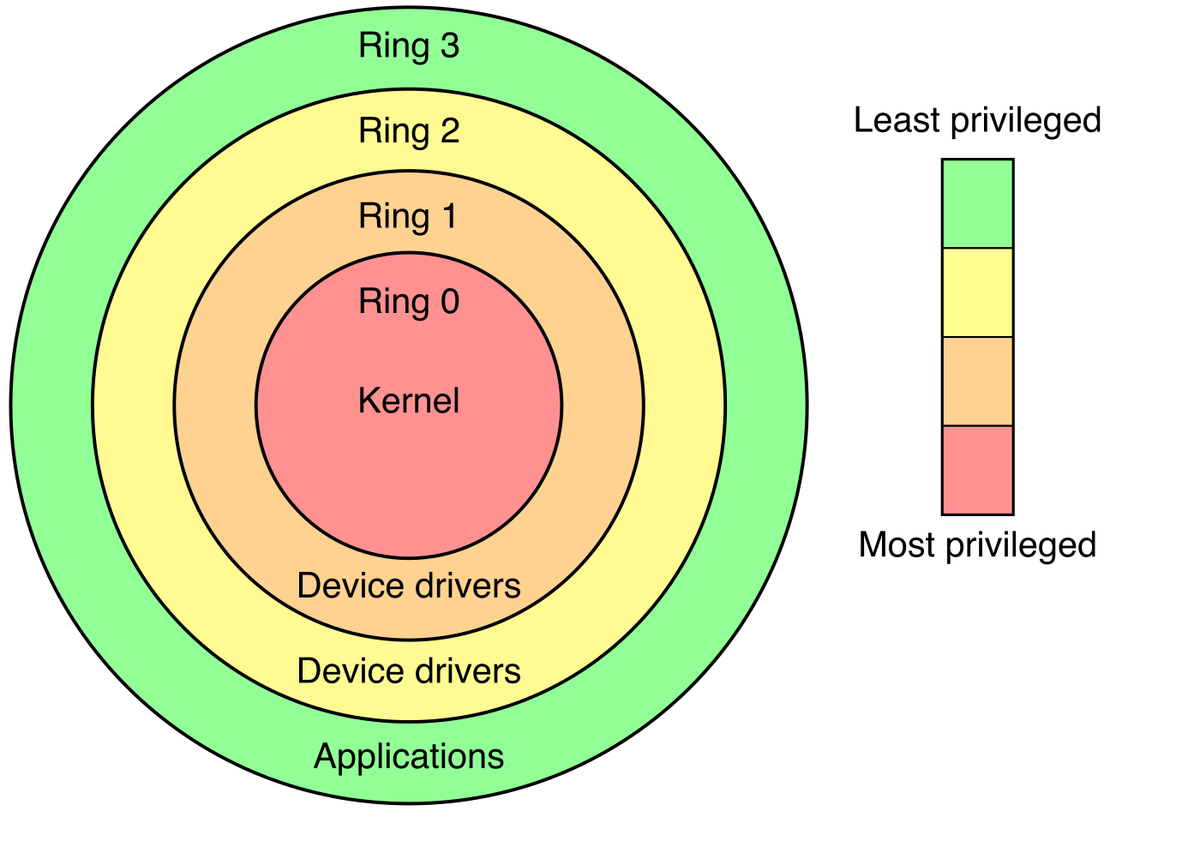
x86 numbers its privilege levels as rings 0 to 3. Kernels run in ring 0 and programs in ring 3, so a deprivileged guest kernel has to run in a less privileged ring, such as ring 3.
?Why was popf the famous one?
popf loads the CPU's flags register from the stack, and one of those flags, IF, is the switch that turns interrupts on and off. In ring 0 the instruction changes IF. Run the same guest kernel in ring 3 and popf silently ignores the IF bit, so the hypervisor never learns the guest tried to disable interrupts, and the guest believes it succeeded.
In the words of VMware's Keith Adams and Ole Agesen (ASPLOS 2006): "a deprivileged popf, like any user-mode popf, … suppresses attempts to modify IF; no trap happens."
Three workarounds followed, roughly in this order:
| Approach | How it works | Cost |
|---|---|---|
| Binary translation (VMware, 1999) | Rewrite guest kernel code just before it runs, swapping the problem instructions for calls into the monitor, and cache the result. User code runs unmodified. | A translator inside the monitor |
| Paravirtualization (Xen, SOSP 2003) | Modify the guest kernel so it calls the hypervisor directly (a hypercall) instead of executing sensitive instructions | You need the guest source, so no unmodified Windows |
| Hardware assist (Intel VT-x 2005, AMD-V 2006) | A new mode lets the guest kernel run at ring 0, and the CPU itself decides what exits | Early on, expensive exits |
Hardware assist sounds like the clear winner, since the CPU does the work. It wasn't, at first.
?Why did first-generation VT-x lose to binary translation?
That's the surprise in the Adams and Agesen paper: on real workloads, it did. Their table has a VM entry costing 2,409 cycles on a 3.8 GHz Pentium 4, where a cycle is one tick of the CPU's clock, so the entry alone took about 0.6 µs.
Worse, VT-x did nothing for the MMU, the part of the CPU that translates addresses with page tables. Every guest page table write still had to be tracked in software, now with an expensive exit attached. Hardware only won once the MMU got help too, which is the subject of section 4.
3.2VMX root, non-root, and the VMCS
Intel's VT-x leaves the four rings alone and gives the CPU a second complete set of them. A hypervisor runs in VMX root mode, a guest runs in VMX non-root mode, and each mode has its own rings 0 to 3. So a guest kernel sits in non-root ring 0 and believes it owns the machine, while the CPU watches for the moments it reaches beyond it.
Two more names before we look at one of those moments. On Linux the hypervisor is part of the kernel itself and is called KVM (Kernel-based Virtual Machine). KVM handles the exits it can on its own and hands the rest to an ordinary program running on the host, which today is what people mean by a VMM (virtual machine monitor). Popek and Goldberg used that name for the whole hypervisor; on Linux the job is split, with KVM in the kernel and a VMM such as QEMU or Firecracker creating the VM and emulating its devices. The guest's processor is a vCPU, a virtual CPU that the host schedules like a thread.
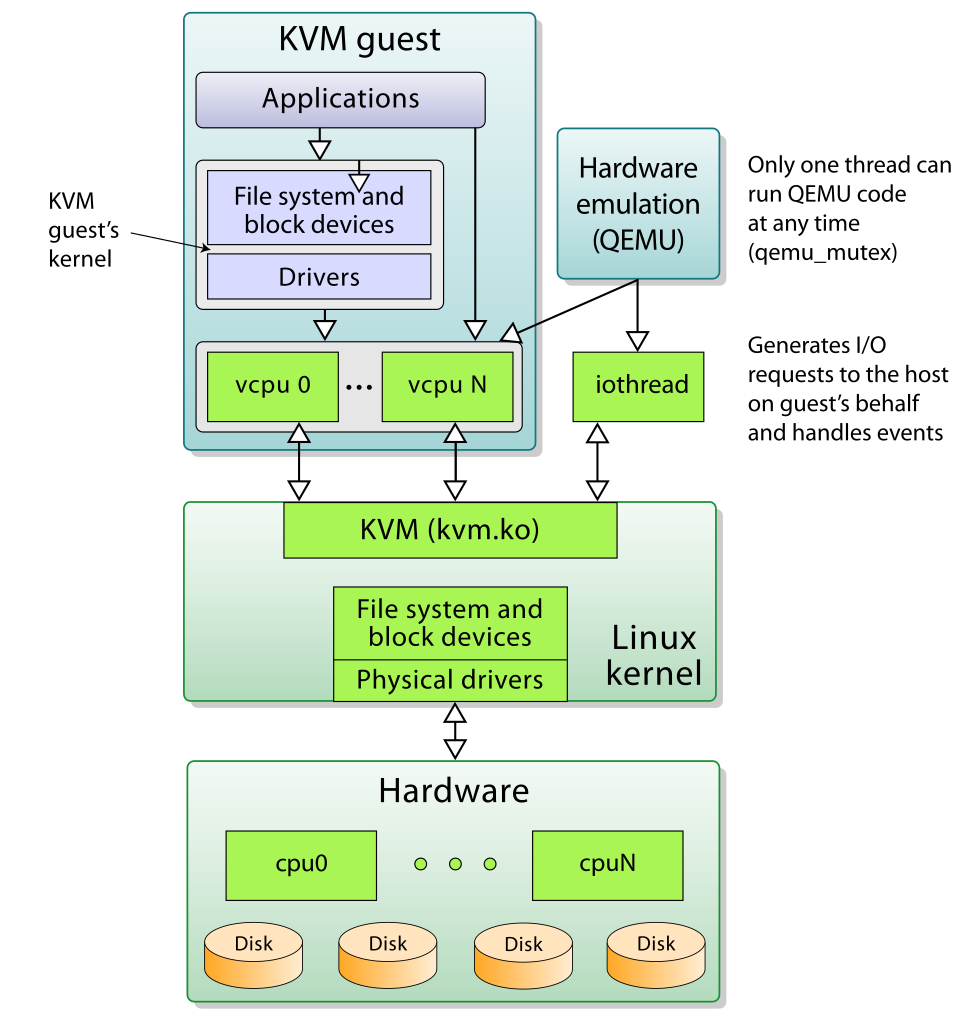
How does the CPU know which moments to stop at? The switch between the two modes is governed by an in-memory structure for each vCPU, the VMCS (virtual machine control structure). You don't read it with ordinary loads; you use the instructions VMREAD and VMWRITE. It has four parts:
| Part | What it holds |
|---|---|
| Guest state | Registers saved on exit, loaded on entry: RIP (the next instruction), CR3 (the page-table address) and the rest |
| Host state | Where the CPU lands in root mode on an exit |
| Execution controls | What exits: HLT (wait for the next interrupt)? CPUID (the instruction a kernel uses to ask the CPU what it can do; this one always exits, so the hypervisor controls the answer)? Which I/O ports (the separate numbered addresses older devices are reached through, with their own in and out instructions)? Which MSRs (the CPU's configuration registers)? |
| Exit information | Why the last exit happened, and a qualification (which port, which address) |
VMLAUNCH and VMRESUME enter the guest. An exit is the CPU saving the guest's state into the VMCS and jumping to the host's saved instruction address.
Now we can follow one exit on ping's own path. Devices are controlled by storing numbers into their registers, small control cells at fixed addresses. Modern devices put those registers at ordinary-looking memory addresses, which is called memory-mapped I/O (MMIO), because to the CPU each one looks like a plain store to memory. Once the guest kernel has built ping's packet it stores to the virtual network card's notify register to say "there's a packet to send". No memory sits behind that address, so the CPU can't complete the store and it exits.
Your Mac's guest runs on ARM, which section 3.3 covers, but the steps are the same there. Here they are on Intel's hardware, where the names are best known:
ping's packet. It adds, loads, stores and branches, and all of it runs directly on the real CPU with no hypervisor involved. The guest's registers are live in the CPU.The table in the middle of that picture is real. KVM's exit dispatch is a plain array indexed by the exit reason:
static int (*kvm_vmx_exit_handlers[])(struct kvm_vcpu *vcpu) = {
	[EXIT_REASON_EXCEPTION_NMI]           = handle_exception_nmi,
	[EXIT_REASON_EXTERNAL_INTERRUPT]      = handle_external_interrupt,
	[EXIT_REASON_IO_INSTRUCTION]          = handle_io,      /* in/out */
	[EXIT_REASON_CR_ACCESS]               = handle_cr,
	[EXIT_REASON_CPUID]                   = kvm_emulate_cpuid,
	[EXIT_REASON_MSR_READ]                = kvm_emulate_rdmsr,
	[EXIT_REASON_MSR_WRITE]               = kvm_emulate_wrmsr,
	[EXIT_REASON_HLT]                     = kvm_emulate_halt,
	[EXIT_REASON_VMCALL]                  = kvm_emulate_hypercall,
	[EXIT_REASON_EPT_VIOLATION]	      = handle_ept_violation,
	[EXIT_REASON_EPT_MISCONFIG]           = handle_ept_misconfig, /* MMIO */
	[EXIT_REASON_PAUSE_INSTRUCTION]       = handle_pause,   /* spinning guest */
	/* ... 52 entries in all at v6.12 ... */
};
This is an excerpt, and the /* … */ comments are annotations. The list is the whole boundary between guest and host written down as a table, which matters in section 8. Two of the entries mention EPT, the hypervisor's own page table, which is the subject of the next section. For now, notice EPT_MISCONFIG, marked "MMIO": it's how KVM spots a guest's device access cheaply. MMIO pages get a deliberately invalid entry in that second table, so an access exits with a reason KVM can recognise without walking anything.
3.3ARM: a separate exception level, and VHE
The Docker VM on an Apple-silicon Mac is an ARM guest, so it's worth seeing how ARM does the same job. ARMv8 was designed with virtualization in mind. It has a dedicated exception level for the hypervisor, EL2, above the kernel's EL1 and the user programs' EL0.
A trap from the guest lands at EL2 with a syndrome register (ESR_EL2) saying what happened. The Mac test in section 6.2 reads exactly that field: exception class 0x16 for hvc (a deliberate call from the guest to the hypervisor), 0x24 for a data abort from a lower level (a memory access that failed).
KVM itself was the awkward part. Linux is a normal kernel that runs at EL1, so the original KVM on ARM had to bounce between a small stub at EL2 and the kernel for every exit.
ARMv8.1 added the Virtualization Host Extensions (VHE): set HCR_EL2.E2H and the host kernel runs directly at EL2, with its EL1 register accesses redirected to their EL2 twins. Linux gained VHE support in 2016, and KVM on ARM became what it is on x86: pretty much a kernel module.
That settles the CPU. Every sensitive instruction can now trap. The next problem is memory, where the guest believes it controls the page tables but the hypervisor can't allow that.
04Memory: two page tables at once
4.1Guest-physical isn't physical
Chapter 04 walked one 4-level page table. When a program reads an address, the CPU consults that table: four reads, one per level, to find the page's physical address. Because that is slow, the CPU keeps recent answers in a small cache called the TLB, and only when the address isn't there (a TLB miss) does it walk the table.
Now put ping inside a guest. Its buffer has a virtual address, and the guest kernel's page tables map that to what the kernel believes is physical memory, a guest-physical address. But the guest-physical address isn't real either. If it were, the guest could read any memory on the host. A second table, owned by the hypervisor, maps guest-physical to host-physical, the real thing. It's called EPT on Intel, NPT on AMD and stage-2 on ARM.
There are two ways to arrange the two tables, and the first was tried first.
| Approach | How it works | Cost |
|---|---|---|
| Shadow page tables (before 2008) | The hypervisor keeps a merged guest-virtual → host-physical table, rebuilt by trapping every guest page table write | An exit per guest page table write: the software MMU tracking that made early VT-x slow |
| Nested paging (Intel EPT with Nehalem, 2008) | The hardware walks both tables itself | Longer page walks on a TLB miss |
Nested paging removes the exits, and it has a price that shows up on every TLB miss.
4.2The two-dimensional walk
With nested paging the hardware walks both tables. Here's the catch: every pointer in the guest's page table is a guest-physical address, so each one needs its own trip through the host's table before the CPU can read it. Follow one TLB miss for a byte of ping's buffer, with four levels in the guest's table and four in the host's:
ping reads a byte of its buffer and the TLB doesn't have the page. The guest's CR3 holds the address of its top-level table, but that is a guest-physical address, which the CPU can't use directly. Memory reads so far: 0.Written as a sum, the same walk looks like this (gPA and hPA are short for guest-physical and host-physical address):
| Guest CR3 → gPA of level-4 table | walk host table: 4 reads | 4 |
| Read guest level-4 entry | 1 read, yields gPA of level 3 | 1 |
| Levels 3, 2, 1: same again | 3 × (4 host + 1 guest) | 15 |
| Final gPA of the data → hPA | walk host table: 4 reads | 4 |
| Worst-case references per TLB miss, 4-level on 4-level | 24 | |
In general it's (n + 1)(m + 1) − 1 for n guest levels and m host levels, the shape Bhargava and colleagues at AMD analysed in ASPLOS 2008. Native is 4. A guest and a host each add a level and the cost grows by far more than one.
Both the guest and the host move to 5-level page tables. What's the worst-case number of memory references per TLB miss?
4.3Cutting the walk down
Twenty-four references would make every TLB miss in a guest painful, so how do real guests get by?
?Why doesn't every TLB miss cost 24 references?
Because hardware caches the pieces. Page-walk caches hold the upper levels of recent walks, and TLB entries carry a tag saying which guest they belong to (VPID on Intel, VMID on ARM), so one guest's entries survive while another guest runs. The full worst-case walk is the rare case.
Huge pages cut it from both ends. A huge page is a larger page, 2 MB or 1 GB in place of 4 KB, and it needs fewer levels of table to describe, so each level removed on either side shortens the walk:
| Guest pages | Host pages | Worst-case references |
|---|---|---|
| 4 KB, 4-level | 4 KB, 4-level | (4 + 1)(4 + 1) − 1 = 24 |
| 2 MB (one guest level fewer) | 4 KB, 4-level | (3 + 1)(4 + 1) − 1 = 19 |
| 2 MB | 1 GB (two host levels fewer) | (3 + 1)(2 + 1) − 1 = 11 |
| 5-level | 5-level | 35 |
With the CPU and the memory sorted out, one kind of exit is left that hardware can't make cheaper by itself: the guest talking to devices.
05Devices: one packet through virtio
5.1A virtqueue, as bytes
The kernel's last step with ping's packet is to hand it to the network card, and we've seen that a single store to a card's register costs one exit. A real network card driver touches a lot of registers per packet. If the guest drove an emulated copy of such a card one register at a time, every packet would cost a pile of exits.
So modern guests use paravirtual devices, devices designed to be driven from inside a VM, and the standard one is virtio. Instead of poking registers one at a time, the guest and the host share a region of memory and pass whole batches of requests through it, exiting only to say "there's more". Rusty Russell's 2008 paper introduced it, and it's now an OASIS standard. Its unit is the virtqueue, a queue of requests in guest memory that both sides can read. In virtio's original layout, called split (a later packed layout merges the pieces), a virtqueue is three arrays.
The first array holds descriptors. A descriptor is a 16-byte entry that says where one buffer sits in guest memory and how long it is, so the device can find ping's packet without being told byte by byte:
The other two arrays are rings, arrays used as circular queues, and they carry the hand-offs. The guest offers work in one and the device reports finished work in the other:
| Array | What's in it | Who writes it |
|---|---|---|
| Descriptor table | 16 bytes per entry, above | The guest |
| Available ring | flags, idx (where the guest will write next), then the index of the first descriptor of each request the guest has offered | Only the guest |
| Used ring | (id, len) pairs the device has finished | Only the device |
Each side owns exactly one ring's write side, so there's no lock. What's left is telling the other side that something changed, and that's where the exits come back.
5.2The guest's side of a transmit
Here is ping's packet going out through a virtqueue, and then a second packet following it. The "device side" in the picture is the host software playing the network card. Once the guest has put a packet in the rings, it has to wake that software up with one store to the card's notify register, the same store whose exit we followed in section 3.2. That wake-up store is called a kick. Watch for the one kick that happens, and for the one that could have and doesn't:
ping's packet sits in a buffer in guest memory. The three arrays of the virtqueue are empty.In the code, the driver fills a descriptor, publishes its index in the available ring, bumps avail->idx, and then has to decide whether to wake the device at all:
static bool virtqueue_kick_prepare_split(struct virtqueue *_vq)
{
	...
	/* We need to expose available array entries before checking avail
	 * event. */
	virtio_mb(vq->weak_barriers);

	old = vq->split.avail_idx_shadow - vq->num_added;
	new = vq->split.avail_idx_shadow;
	vq->num_added = 0;
	...
	if (vq->event) {
		needs_kick = vring_need_event(virtio16_to_cpu(_vq->vdev,
					vring_avail_event(&vq->split.vring)),
					      new, old);
	} else {
		needs_kick = !(vq->split.vring.used->flags &
					cpu_to_virtio16(_vq->vdev,
						VRING_USED_F_NO_NOTIFY));
	}
	...
	return needs_kick;
}?Why doesn't the guest kick the device for every packet?
Because a kick is an exit, and the device may not need one. This is the most important optimisation in virtio, and it's a few lines long. If the device is already busy draining the ring, it says so (NO_NOTIFY, or an event index further ahead), and the guest skips the kick. Under load a thousand packets can go out on one exit.
When a kick is needed, it's one 16-bit store:
bool vp_notify(struct virtqueue *vq)
{
	/* we write the queue's selector into the notification register to
	 * signal the other end */
	iowrite16(vq->index, (void __iomem *)vq->priv);
	return true;
}
That iowrite16 targets an address with no RAM behind it in the second-level table. So the store can't complete, and the CPU exits.
5.3From the store to the host, and back
The exit in the scene reaches KVM, and the interesting question is how far it has to travel before the packet is on its way. KVM can be told in advance that a store to a particular address should only signal an eventfd, a kernel counter that another thread can wait on, and should not go back to the VMM at all. That registration is an ioeventfd. The reverse is an irqfd: a thread signals it, and KVM injects an interrupt into the guest. A kernel thread called vhost-net uses both to do the network device's work for the VMM, and a tap device is the virtual network interface it hands packets to. Here's the whole transmit with vhost-net on KVM/x86:
avail->idx. These are ordinary memory writes; nothing exits.The ioeventfd mechanism is in the KVM API docs, and the data plane is in drivers/vhost/net.c.
Without vhost, the right-hand lane moves out of the kernel. KVM still signals the eventfd and resumes the guest, but the thread waiting on that eventfd belongs to the VMM process, which reads the ring and does the device work in ordinary user code. Firecracker works this way. It registers an ioeventfd and an irqfd per queue (device_manager/mmio.rs) and does the device work in its own process.
Any other MMIO access, a config register read for instance, has no eventfd registered for it. KVM hands it all the way up to the VMM, whose vCPU thread was waiting in a call named KVM_RUN (section 6 opens it up). The call returns with exit_reason = KVM_EXIT_MMIO, and in Firecracker it lands here, the userspace mirror of KVM's table:
fn handle_kvm_exit(
    peripherals: &mut Peripherals,
    emulation_result: Result<VcpuExit, errno::Error>,
) -> Result<VcpuEmulation, VcpuError> {
    match emulation_result {
        Ok(run) => match run {
            VcpuExit::MmioRead(addr, data) => {
                if let Some(mmio_bus) = &peripherals.mmio_bus {
                    let _metric = METRICS.vcpu.exit_mmio_read_agg.record_latency_metrics();
                    mmio_bus.read(addr, data);
                    METRICS.vcpu.exit_mmio_read.inc();
                }
                Ok(VcpuEmulation::Handled)
            }
            VcpuExit::MmioWrite(addr, data) => {
                if let Some(mmio_bus) = &peripherals.mmio_bus {
                    let _metric = METRICS.vcpu.exit_mmio_write_agg.record_latency_metrics();
                    mmio_bus.write(addr, data);
                    METRICS.vcpu.exit_mmio_write.inc();
                }
                Ok(VcpuEmulation::Handled)
            }
            VcpuExit::Hlt => {
                info!("Received KVM_EXIT_HLT signal");
                Ok(VcpuEmulation::Stopped)
            }
            ...
Notice the latency metric wrapped around every MMIO exit. Firecracker records exit timing for every microVM, which is probably the cheapest observability anyone ever got.
That Rust function is the VMM's side of the exit. Underneath it, the whole conversation between a VMM and KVM takes only a handful of system calls, and we can write them out.
06The loop at the bottom, and an exit you can time
6.1A handful of ioctls
An ioctl is a system call that sends a device-specific command to an open file or device, and the KVM API is built from a handful of them. Josh Triplett's Using the KVM API (LWN, 2015) builds a complete VM in one short C file; its guest adds two numbers and writes the result to a serial port.
Here's the program condensed and quoted from the article. It needs /dev/kvm, which only exists on a Linux machine with KVM enabled:
kvm = open("/dev/kvm", O_RDWR | O_CLOEXEC);
ioctl(kvm, KVM_GET_API_VERSION, NULL); /* must return 12 */
vmfd = ioctl(kvm, KVM_CREATE_VM, 0); /* new EPT, no vCPUs yet */
struct kvm_userspace_memory_region region = {
.slot = 0, .guest_phys_addr = 0x1000,
.memory_size = 0x1000, .userspace_addr = (uint64_t)mem,
};
ioctl(vmfd, KVM_SET_USER_MEMORY_REGION, ®ion); /* guest RAM = our mmap */
vcpufd = ioctl(vmfd, KVM_CREATE_VCPU, 0);
run = mmap(NULL, ioctl(kvm, KVM_GET_VCPU_MMAP_SIZE, NULL),
PROT_READ | PROT_WRITE, MAP_SHARED, vcpufd, 0);
/* ...KVM_SET_SREGS / KVM_SET_REGS: rip = 0x1000, rax = rbx = 2 ... */
while (1) {
ioctl(vcpufd, KVM_RUN, NULL); /* returns on an exit */
switch (run->exit_reason) {
case KVM_EXIT_HLT: return 0;
case KVM_EXIT_IO: /* the guest's out to 0x3f8 */
putchar(*(((char *)run) + run->io.data_offset));
break;
}
}The loop at the bottom is the entire relationship between a VMM and the hypervisor. KVM_RUN enters the guest and returns only when the guest does something the kernel won't handle alone; the VMM looks at why, deals with it and calls KVM_RUN again.
| Object | What it is |
|---|---|
| Guest RAM | Memory the VMM got from mmap, the system call that maps memory into a process |
| A vCPU | A file descriptor, the small number a program uses to refer to an open file or device |
KVM_RUN | A syscall that returns when the guest does something the kernel won't handle alone |
QEMU, Firecracker and crosvm are, at the bottom, this loop. The loop makes one thing easy to ask: how long does one trip around it take?
6.2The same loop on a Mac, and what one exit costs
Hypervisor.framework has the same shape as the KVM API: hv_vm_create, hv_vm_map, hv_vcpu_create, then hv_vcpu_run in a loop. So it's easy to time an exit on a Mac, where there's no /dev/kvm.
The guest in this program is two instructions. One version runs hvc #0, a deliberate call from the guest to the hypervisor (the ARM instruction that plays the part of a syscall one level up), followed by a branch back to the start. The other stores to an unmapped guest-physical address, which is the same event as ping's store to the notify register, followed by a branch back. On the host side the loop calls hv_vcpu_run 200,000 times, reads the exception class out of the syndrome register to see why the guest stopped, and for the store case "emulates" it by advancing the program counter (PC, the address of the next instruction) past it. The total time divided by 200,000 gives the cost of one round trip. It's a bit of a toy, and that's the point.
// Build: clang++ -std=c++20 -O2 hvexit.cpp -framework Hypervisor -o hvexit
//        codesign -s - --entitlements ent.plist -f hvexit   (com.apple.security.hypervisor)
const uint32_t hvc_loop[]  = {0xd4000002, 0x17ffffff};  // hvc #0      ; b .-4
const uint32_t mmio_loop[] = {0xf9000020, 0x17ffffff};  // str x0,[x1] ; b .-4

hv_vm_create(nullptr);
hv_vm_map(mem, 0x10000, 16384, HV_MEMORY_READ | HV_MEMORY_WRITE | HV_MEMORY_EXEC);
hv_vcpu_create(&vcpu, &exit, nullptr);
hv_vcpu_set_reg(vcpu, HV_REG_PC, 0x10000);
hv_vcpu_set_reg(vcpu, HV_REG_CPSR, 0x3c5);      // EL1h, interrupts masked
hv_vcpu_set_reg(vcpu, HV_REG_X1, 0x100000);     // nothing mapped here

for (int i = 0; i < 200000; i++) {
    hv_vcpu_run(vcpu);                          // enter guest, return on exit
    uint64_t ec = exit->exception.syndrome >> 26;   // 0x16 hvc, 0x24 data abort
    if (advance_pc) {                           // "emulate" the store: skip it
        uint64_t pc; hv_vcpu_get_reg(vcpu, HV_REG_PC, &pc);
        hv_vcpu_set_reg(vcpu, HV_REG_PC, pc + 4);
    }
}hypercall (hvc) round trip: 661 ns
MMIO store round trip: 733 ns
hypercall (hvc) round trip: 656 ns
MMIO store round trip: 727 ns
hypercall (hvc) round trip: 644 ns
MMIO store round trip: 749 nsAcross six runs the hvc round trip ranged from 644 to 706 ns and the MMIO store from 727 to 803 ns. The store costs about 80 ns more, probably because of the two extra register calls to move the PC. Both are full round trips to userspace, the equivalent of KVM_RUN returning to the VMM, and not an exit that the kernel absorbs by itself. So a store like ping's kick, when a userspace VMM has to handle it, costs roughly 0.7 µs on Hypervisor.framework.
(To run this yourself you must sign the binary with the hypervisor entitlement; the Build this section at the end says what happens if you don't.)
?Why does one exit cost about two syscalls?
About 670 ns is roughly 2,700 cycles, if the billion-iteration loop from section 2 ran one iteration per clock (245 ms implies about 4.1 GHz). That's almost exactly twice a write() syscall on an Apple-silicon Mac, which chapter 07 puts at 348 ns.
That seems about right if you count crossings. A syscall crosses into the kernel once and back. An exit lands in the kernel, returns up to the VMM process, and then both of those steps run again in reverse when the VMM re-enters the guest: two trips through the kernel where a syscall makes one.
We now know what one exit costs. The next question is which of the things a guest does exit and which don't, because a guest that exits rarely barely notices it's in a VM.
07What exits, and what doesn't
7.1The cost of touching a device
Here are the numbers from the Docker VM and from the minimal VM of section 6.2, side by side. Docker Desktop builds its VM with Apple's Virtualization.framework, a higher-level layer over Hypervisor.framework that comes with ready-made virtio devices. The Docker guest is a Linux kernel with 4 KB pages and transparent huge pages (THP, which lets the kernel back memory with 2 MB pages automatically) set to always; the Mac's own pages are 16 KB. The guest figures depend on the VM's history, a VM that had been up for two days under host memory pressure versus a freshly restarted one, and both are listed where they differ.
Look at the register read. It's a plain 16-bit load of num_queues from the configuration registers of the virtio random-number device (harmless to read), through an mmap of /sys/bus/pci/devices/0000:00:0e.0/resource0, the file through which Linux lets a program map a PCI device's registers into its own memory. A load from ordinary RAM in the same loop took 0.3 ns. This one took a microsecond, about three thousand times slower, because each load is a fault on the hypervisor's own page table (the stage-2 table of section 4) that Apple's device model handles in a host process. It's slower than the bare hvc too, which is roughly what you'd expect from a real VMM doing real decoding.
clock_gettime is the counterexample. On arm64 the guest reads the virtual counter CNTVCT_EL0 directly, with no exit, so it costs the same in a VM as out of one. So some things a guest does never reach the hypervisor at all, and the next benchmark shows how badly that can mislead us.
7.2A syscall inside the guest is not a VM exit
Say we run the same small benchmark twice, once natively on macOS and once inside the Linux guest. It times clock_gettime, times a one-byte write() to /dev/null, and times the first touch of each page of 512 MB of fresh memory against the second touch, which hits the same pages again.
for (long i = 0; i < 5'000'000; i++) clock_gettime(CLOCK_MONOTONIC, &ts);
for (long i = 0; i < 1'000'000; i++) write(fd_devnull, &c, 1);

// first touch vs second touch: 512 MB anonymous, one write per page
char* p = (char*)mmap(nullptr, 512ul << 20, PROT_READ | PROT_WRITE,
                      MAP_PRIVATE | MAP_ANONYMOUS, -1, 0);
for (size_t off = 0; off < len; off += pagesize) p[off] = 1;    // faults
for (size_t off = 0; off < len; off += pagesize) p[off] += 1; // no faults| macOS native | Linux guest (fresh VM) | |
|---|---|---|
clock_gettime | 16.7 ns | 14.1 ns |
write(/dev/null) | 351 ns | 108 ns |
| First touch, per 4 KB of memory | ~195 ns (16 KB pages, ~780 ns each) | 45 ns with THP, 375 ns without |
Medians of three runs each. THP-off used prctl(PR_SET_THP_DISABLE).
The guest's write() is three times faster than the Mac's. It would be easy to read that as virtualization making things faster, which can't be right, since a VM can only add work.
?Is the guest's write() three times faster than the host's?
It is, and virtualization has nothing to do with it. A syscall inside a guest goes from guest user mode to guest kernel mode without the hypervisor knowing, so you're comparing Linux 6.10's syscall path against XNU's, the kernel inside macOS. Adams and Agesen saw the same thing in 2006: under VT-x, "system calls execute without VMM intervention".
Fault numbers hide the same trap. With THP on, the guest takes one fault per 2 MB (about 23 µs, spread over 512 small pages), so it looks eight times cheaper per byte. None of that is about the hypervisor's second table: the fresh VM's memory was presumably already backed by the host. Only the old VM's runs in section 9.2 look like stage-2 costs.
7.3One ping through virtio-net
Now we can time the thing we've been following. Run ping from inside a container to Docker Desktop's host-side address, 192.168.65.254. The packet crosses the virtio-net queue in both directions: out through the container's virtual interface and the VM's bridge and address translation, then a kick, then the host's network stack, and then an injected interrupt on the way back. Pinging the guest's own loopback address never leaves the guest kernel, so it shows what the same program costs with no exits at all.
A word on the columns. Latency varies from ping to ping, so we report the median (p50, half the pings were faster) and the p99, the time that 99 of every 100 pings beat. Three runs of 500 pings each:
| Target | p50 | p99 | max |
|---|---|---|---|
| 127.0.0.1 (guest loopback) | 4–5 µs | 16–27 µs | 57 µs |
| 192.168.65.254 (through virtio-net to the host) | 108–192 µs (median run 121) | 0.25–6.5 ms | 13.3 ms |
That's about 25× at the median, and the tail is where the shared machine shows: p99 moved by 26× between runs while p50 barely changed.
A few microseconds of that are exits. A likely explanation for most of the rest is that the packet is handled by a userspace network stack in a Mac process (Docker's own logs call it com.docker.backend.gvisor), which is exactly the hop vhost exists to remove. Nobody has timed the exact split, so treat this as the probable cause.
7.4What kicks add up to
The ping shows one packet. A busy guest sends many, so let's put the kick cost from section 6.2 next to the suppression from section 5.2. Say a guest sends 100,000 packets a second, a plausible load for a busy network service. For the price of one kick, take the 0.73 µs that an MMIO store round trip cost on the Mac in section 6.2. A KVM host's figure will differ, but it's the same order of magnitude. If the driver kicked for every packet, the exits alone would eat several percent of a CPU. Under load the device is usually busy draining the ring, and a thousand packets can share one kick.
| Packets per second | target | 100,000 |
| One kick per packet | 100,000 × 733 ns | 73 ms/s |
| Share of each second spent in exits | 73 ms of every 1,000 | 7.3% |
| Kick suppression, 1,000 packets per kick | 100 × 733 ns | 73 µs/s |
| why virtio suppresses kicks under load | 7.3% → 0.007% | |
Cost in a VM follows the number of exits, so the first fix for slow I/O is to make the guest exit less, and a faster handler comes second. Batching (virtio) and suppression (NO_NOTIFY) cut the count, and vhost shortens the trip.
7.5Taking devices off the exit path
Batching and suppression reduce the number of exits, but the packet's bytes still go through host software. Two designs avoid even that.
The first is SR-IOV: a network card exposes several virtual functions, small slices of itself that each look like a complete card. The IOMMU, a chip that does for devices what the MMU does for the CPU, maps one slice directly into a guest. The guest's driver then talks to real hardware with no hypervisor on the data path. You lose easy live migration, since a guest holding a slice of a physical card can't just move to another host.
The second is AWS's. Starting with C5 in 2017, AWS removed Xen's dom0 (Xen was the hypervisor AWS used, and dom0 was a privileged helper VM that ran the device emulation for every guest) and moved network, EBS (AWS's network-attached disks) and instance storage onto dedicated Nitro cards, leaving a minimal KVM-based hypervisor. Brendan Gregg measured its overhead as "miniscule, often less than 1% (it's hard to measure)".
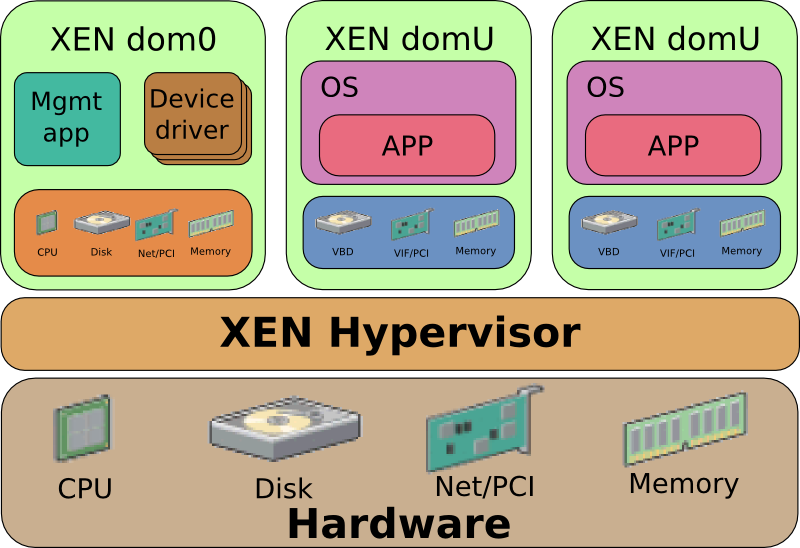
So far we've counted time. The other thing the list of exits decides is safety, because everything on that list is code the guest can reach.
08What the guest can reach
8.1Where the boundary sits, compared with a container
Containers and VMs both claim to isolate a workload, and they draw the line in very different places. Chapter 11 has the container side: a process with namespaces (which give it its own view of things like process IDs and network interfaces) and cgroups (which cap the CPU and memory it can use), talking to the same kernel as its neighbours. A VM's guest talks to virtual hardware instead.
| Container | Virtual machine | |
|---|---|---|
| What the workload talks to | The host kernel's full syscall interface | Virtual hardware: a vCPU, guest-physical memory, a few devices |
| Kernel | Shared with every other container | Its own, one per VM |
| A kernel bug in the syscall path | Reachable from every container on the host | Reachable only inside that guest |
| What the attacker must break to escape | One kernel | The hypervisor's exit handling or a device emulator |
The fourth row is the whole argument for VMs in multi-tenant systems. A container's attack surface, the code an attacker's program can reach and try to break, is the Linux syscall table plus everything behind it: filesystems, networking, the page cache. A VM's attack surface is the set of things that cause an exit and whatever code handles them. That's the table of section 3.2 again, and the device emulators behind the exits.
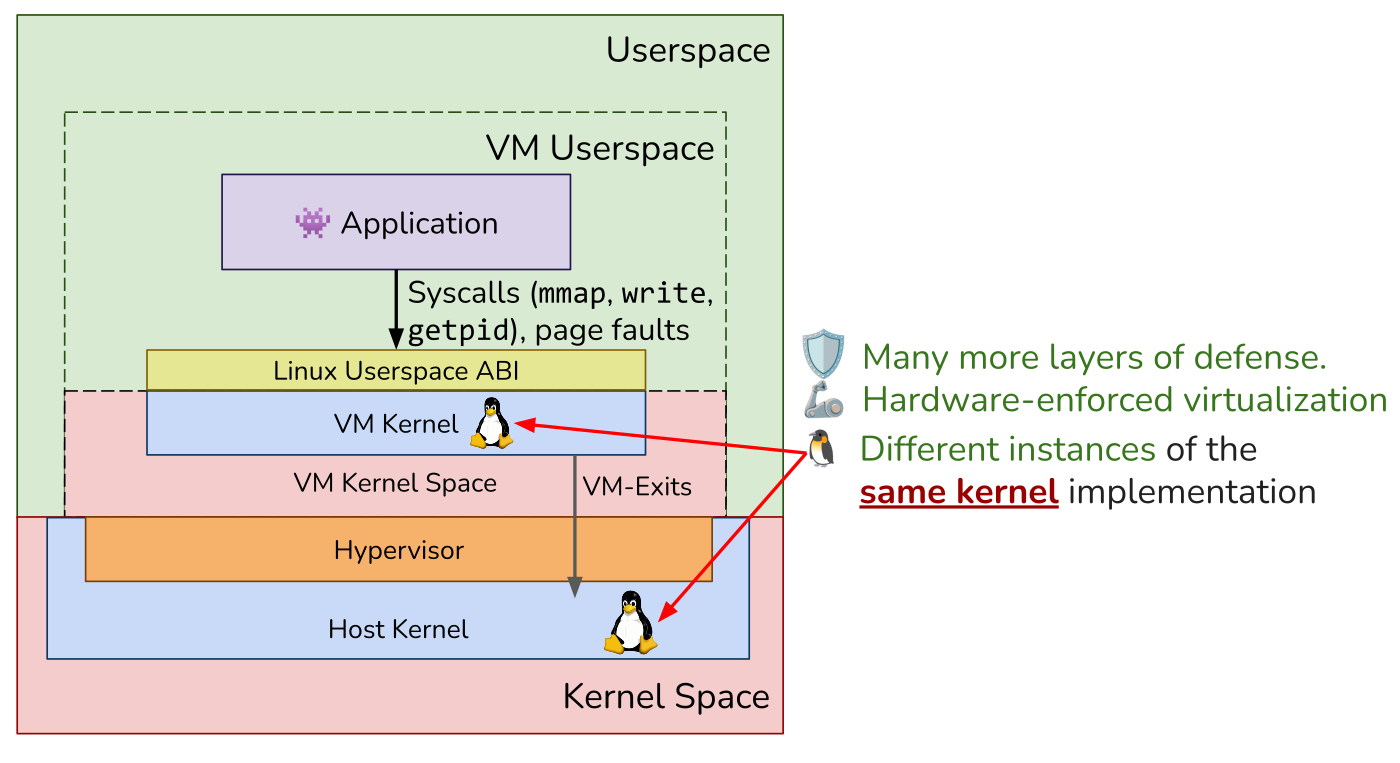
8.2VENOM: the floppy drive nobody had
On 13 May 2015 Jason Geffner at CrowdStrike disclosed VENOM, CVE-2015-3456, a buffer overflow in QEMU's emulated floppy disk controller. A guest with enough privilege to talk to the controller's I/O ports could overflow a buffer in the host's QEMU process and, per Red Hat's advisory, potentially run code there. That code had been in QEMU since 2004, and it was reachable on KVM and Xen setups using QEMU's device model.
?Why was a floppy controller reachable at all?
Nobody uses a floppy drive, and that's the point. It was reachable because it was emulated, and emulation is code that parses attacker-controlled input on every exit.
If the lesson is that every emulated device is attack surface, the fix is to emulate fewer of them.
8.3A smaller VMM
Firecracker is a VMM built on that idea, and its paper names the result. A microVM is a virtual machine stripped to the few devices a workload needs, so it boots fast and has little code to attack:
| VMM | Size | Devices |
|---|---|---|
| QEMU | Over 1.4 million lines; "can require up to 270 unique syscalls" | A large emulated machine |
| Firecracker | About 50,000 lines of Rust; its whole virtio block implementation is "around 1400 lines" | virtio-net, virtio-block, a serial port and a partial i8042 |
Fewer devices is fewer exits, and fewer exits is fewer places for the next VENOM. Firecracker also fences itself in: its jailer allows the VMM 24 syscalls and 30 ioctls.
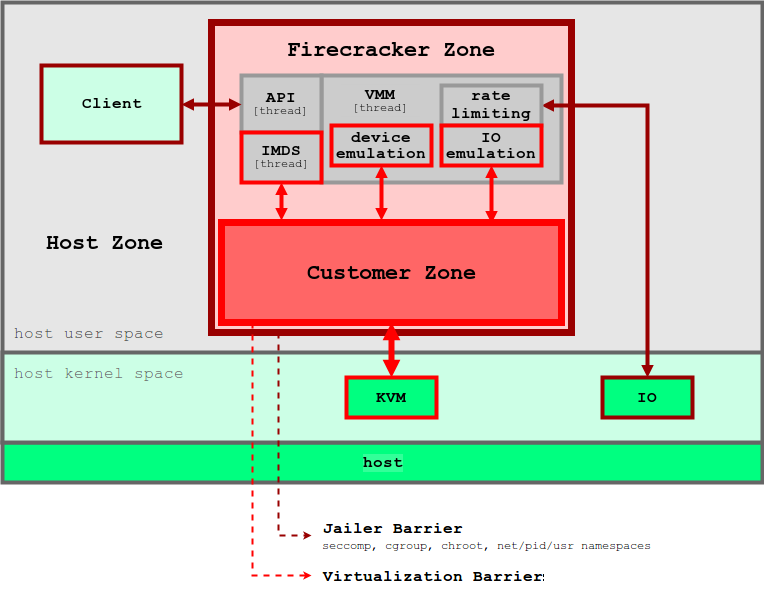
It's VM isolation at container density, and Amazon uses it that way. Lambda used to run each customer's functions in containers inside that customer's own VM. Firecracker replaced that, and per the NSDI paper it "powers millions of workloads and trillions of requests per month". When AWS released Firecracker in 2018, it described it as the technology under both Lambda and Fargate.
8.4Firecracker's numbers
A container starts in milliseconds, since it's a fork and some setup, and adds almost no memory. A microVM has to boot a kernel, so the interesting question is how close it gets. Here are the numbers from the NSDI 2020 paper (Agache et al.; the paper's tests ran on EC2 m5d.metal with a Linux 4.14 guest):
| What | Firecracker | For comparison |
|---|---|---|
| Boot to guest init | under 125 ms; p99 146 ms with 50 booting at once (pre-configured) | QEMU about twice as slow; stock Ubuntu 18.04 kernel adds ~900 ms |
| Memory overhead per VM | about 3 MB | Cloud Hypervisor ~13 MB, QEMU ~131 MB |
| Creation rate | up to 150 microVMs per second per host | density target: up to 8,000 128 MB functions per 1 TB host |
| iperf3, one TCP stream, RX | 15.6 Gb/s | host tap loopback 44.1 Gb/s |
| 4 KB read latency (p99, QD1) | 49 µs slower than native | large blocks more than double native latency |
Two terms in the table: iperf3 is a network throughput benchmark (RX is the receiving direction), and QD1 means one request outstanding at a time, so the figure is pure latency. The first three rows are what buy density. The last two are the honest part: the paper says outright that virtio "will not yield the near-bare-metal performance offered by PCI pass-through".
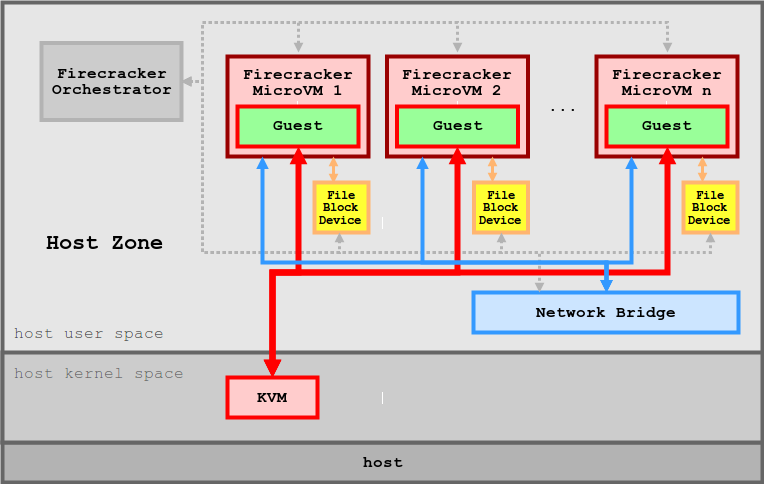
8.5Other ways to draw the line
Two more projects give a container a boundary that isn't the host kernel, in different ways.
| Project | How it isolates |
|---|---|
| gVisor | Its Sentry, a kernel written in Go that runs as an ordinary process, reimplements Linux syscalls, catching them with seccomp (a Linux feature that lets a process have its own syscalls intercepted) on its default systrap platform |
| Kata Containers | Runs each pod (a group of containers that Kubernetes schedules together) in a lightweight VM on one of five VMMs |
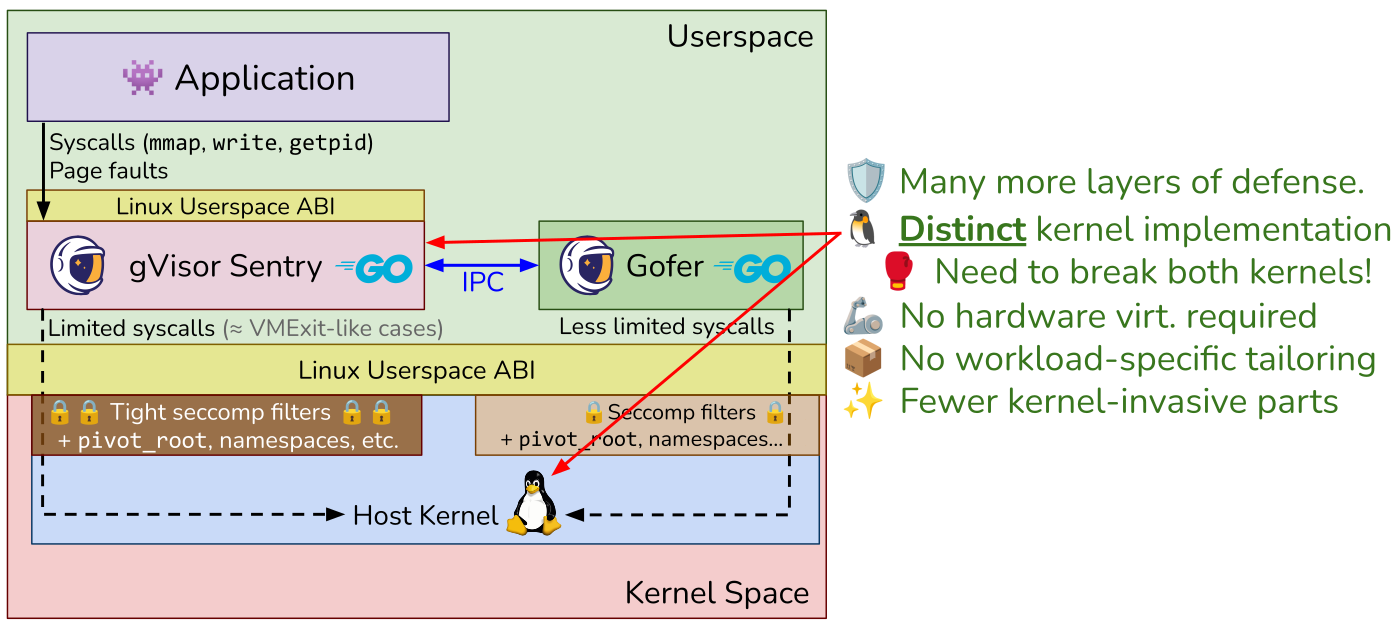
gVisor shrinks the attack surface by running a small kernel in userspace between the container and the host's, and Kata does it with a real VM. Either way many tenants now share one host, and that sharing brings its own problems.
09Sharing a host: CPU time and memory
9.1Steal time, and when %st lies
Density means many guests on one set of physical CPUs. When the host runs something else on the physical CPU your vCPU was using, your guest's clock keeps advancing and its work doesn't. The guest can't see this unless the hypervisor tells it. KVM tells a cooperating guest how long it was descheduled through a shared page (MSR_KVM_STEAL_TIME on x86, arm64's paravirtual-time interface, SMCCC PV time), and Linux reports it as steal: the st column in top, the eighth number on the cpu line of /proc/stat.
A rising %st is the one signal inside a guest that says "your neighbour is busy". Firecracker's rate limiters exist partly for "preventing a small number of busy MicroVMs on a server from affecting the performance of other MicroVMs", in the paper's words.
Here's the catch. In Docker Desktop's Linux guest, steal stayed at zero even after two days up:
$ grep '^cpu ' /proc/stat        # 8th number is steal
cpu  36035 0 20977 27010020 998 0 13880 0 0 0
$ dmesg | grep -c arm-pv
0
Linux prints arm-pv: using stolen time PV at boot (arch/arm64/kernel/paravirt.c) when the hypervisor offers stolen-time accounting. This guest never did.
9.2Two kernels managing the same memory
CPU time is shared by scheduling, and memory is shared by both sides making decisions about it at once. A guest kernel thinks its free memory is free. Meanwhile the host sees a process with gigabytes of anonymous memory (memory with no file behind it) that it can reclaim, compress or swap. Neither can see the other's decisions, and that produced the strangest numbers in this chapter.
Timing first-touch faults over 512 MB inside Docker's VM (the benchmark of section 7.2), the results depended on the VM's history:
| VM state | First pass, per 4 KB | Second pass, per 4 KB |
|---|---|---|
Up two days, Mac tight on memory (vm_stat: about 4,000 free 16 KB pages, over a million in the compressor) | 600 to 1,150 ns | 45 to 100 ns, over memory the guest had just freed and re-used |
| Freshly restarted Docker Desktop | 44 to 48 ns | 44 to 48 ns |
Ten to twenty times apart on the old VM, and no gap at all on the fresh one.
A likely explanation is host-side reclaim. The macOS compressor may have squeezed pages the guest considered free, so each "fresh" guest frame cost a host fault and a decompression. That isn't proven. Host faults on the VM process moved by roughly the right amount on some runs and not on others, and a dozen other containers were sharing that VM. Settling it needs one VM with nothing else in it, and the host's fault count on the VM process sampled before and after each pass.
Virtio has a device meant to close this gap. A balloon driver in the guest lets the host ask for memory back, and one of its optional features, free-page reporting, lets the guest tell the host which pages it isn't using so the host can drop them instead of compressing them. This guest's balloon doesn't negotiate that feature: bit 5 is clear in /sys/bus/virtio/devices/virtio11/features.
9.3Nested virtualization
Running a hypervisor inside a VM (CI runners, Kata on a cloud VM) multiplies every exit. A guest hypervisor's VMRESUME is itself a sensitive instruction that the real hypervisor must emulate, so one nested exit is several.
| Source | Nested overhead |
|---|---|
| IBM's Turtles project (OSDI 2010) | Nested KVM within 6 to 8% of single-level virtualization for common workloads |
| Google Cloud's documentation | Expect "a 10% or greater decrease" for CPU-bound workloads, and possibly more for I/O-bound ones |
We've now seen what a guest costs and what it can reach. What's left is how to find these things on a real host.
10Counting exits on a real host
10.1Where am I, and what can I see
Inside a guest, find out what you're running on before you trust any number:
# What am I running on? (section 1)
systemd-detect-virt                 # kvm, amazon, microsoft, none...
lscpu | grep -i hypervisor          # x86: "Hypervisor vendor: KVM"
ls -l /dev/kvm                      # can *this* machine run VMs? (section 6)

# Does my hypervisor report stolen time? (section 9.1)
grep -E '^cpu ' /proc/stat          # 8th field is steal, in USER_HZ ticks
dmesg | grep -i -E 'arm-pv|kvm-clock|steal'   # is steal even reported?

# Where do the device interrupts land? (section 5)
grep virtio /proc/interrupts        # which CPU takes the device interrupts
The last one turned up something in Docker's VM: all twelve virtio devices use level-triggered INTx, the original PCI interrupt lines, which can't be spread across CPUs the way the newer message-based interrupts (MSI-X) can, and every interrupt landed on CPU 0. On a busy network guest that's a hot CPU you'd want to find early.
On the host, the exit counters are the tool. These commands run on a Linux machine that is itself running KVM guests:
# Which exits dominate, and how long do they take? (sections 3 and 5)
perf kvm stat live                  # exits by reason, with time spent in each
perf kvm stat record -p $QEMU_PID   # then: perf kvm stat report
bpftrace -e 'tracepoint:kvm:kvm_exit { @[args->exit_reason] = count(); }'
cat /sys/kernel/debug/kvm/*/exits # per-VM exit counters (debugfs)10.2Rules that hold up
When a workload is slower in a VM than on metal, look at exits before you look at anything else.
- Count exits by reason first. The reason says which part of the chapter you're in: a device, memory, or a spinning guest.
- Put I/O on virtio, then vhost. An emulated copy of a real device, such as Intel's e1000 network card or an old IDE disk controller, exits per register, while virtio exits per batch and vhost keeps that exit in the kernel.
- Time something that exits when you want the hypervisor's cost. Syscalls and page faults in a guest don't exit.
- Check that steal exists before you trust
%st. A zero can mean nobody is counting. - Use huge pages on both sides for random access over large memory. They cut the nested walk from 24 references to 11.
- Reduce CPU overcommit when
PAUSE_INSTRUCTIONexits climb. A guest is spinning on a lock whose holder lost its CPU. - Give a guest the devices it needs and no others. Every device model is code reachable from the guest.
10.3What you give up
| You get | You pay | When the bill arrives |
|---|---|---|
| A separate kernel per tenant | A second kernel's memory and boot time | At density: QEMU's 131 MB overhead vs Firecracker's 3 MB |
| Guest code at native speed | ~0.7–1 µs every time the guest touches a device | In I/O-heavy guests with emulated devices |
| Hardware-walked nested page tables | Up to 24 memory references per TLB miss | Random access over large memory with 4 KB pages |
| virtio batching | A paravirtual driver in the guest | When the guest OS doesn't ship one |
| SR-IOV near-metal I/O | Live migration and overcommit get hard | The first host maintenance window |
| A small device model (Firecracker) | No BIOS, no USB, no GPU, no Windows | The day someone needs one |
10.4Symptom, cause, fix
| Symptom | Likely cause | Fix |
|---|---|---|
EPT_MISCONFIG or IO_INSTRUCTION dominates the exit counts | An emulated device is on the hot path; an emulated e1000 or IDE disk exits per register | Move I/O to virtio, which exits per batch, then to vhost, which keeps the exit in the kernel |
High PAUSE_INSTRUCTION counts | A guest spinning on a lock whose holder's vCPU was descheduled, burning its slice; usually overcommitted CPUs | Reduce CPU overcommit |
| Slow random access over large memory | Nested page walks: up to 24 references per TLB miss with 4 KB pages | Huge pages on both sides: 2 MB guest and 1 GB host pages bring it to 11 (section 4.3) |
| I/O still too slow after virtio and vhost | The exit budget is gone | Pass the device through with SR-IOV (section 7.5). You lose easy live migration. |
Latency suggests a noisy neighbour, but %st is 0 | The hypervisor doesn't publish steal time | Check dmesg for arm-pv or kvm-clock before trusting %st |
| Every virtio interrupt on CPU 0 | Level-triggered INTx, not spread across CPUs | Check /proc/interrupts early on busy network guests |
11Summary
- A VM only loses speed when it exits. A billion-iteration loop took 246 ms in a guest and 245 ms on the host; one exit round trip took about 670 ns.
- Trap-and-emulate needs every sensitive instruction to be privileged. x86 had seventeen that weren't, which is why VMware translated binaries and Xen modified guests.
- VT-x gives the CPU a second set of rings for guests. The VMCS decides what exits, and KVM dispatches each exit through a table indexed by reason.
- Nested paging costs up to 24 references per TLB miss. It's (n + 1)(m + 1) − 1; huge pages on both sides bring it to 11.
- virtio batches, and suppresses kicks when the device is busy. Under load a thousand packets can go out on one exit.
- vhost keeps the exit in the kernel. An ioeventfd and an irqfd let KVM hand the packet to a kernel thread without returning to the VMM.
- Syscalls and page faults inside a guest don't exit. A faster guest
write()is one kernel beating another. - A VM's attack surface is its list of exits. VENOM was an emulated floppy controller nobody used, reachable because it was emulated.
- microVMs trade I/O throughput for density. Firecracker boots in under 125 ms with about 3 MB of overhead, and is slower than PCI pass-through.
%st = 0can mean nobody's counting. Check that the hypervisor offers stolen-time accounting before you trust it.- Two kernels manage the same memory without seeing each other. On a host short of memory, first touches in a guest cost ten to twenty times more.
12Build this
Write a VM monitor with one device, and time its exits.
- On a Linux box with
/dev/kvm(a bare-metal cloud instance, or a VM with nested virtualization enabled), type in the program from LWN's Using the KVM API. Get it printing4. - Wrap
KVM_RUNinclock_gettimeand make the guest loop onoutto port0x3f8. That's your exit round-trip cost. Compare it with the ~670 ns on Apple silicon from section 6.2. - Add a fake MMIO device: pick an unmapped guest-physical address, handle
KVM_EXIT_MMIO, return a counter on reads. Now you've written thehandle_kvm_exitfrom section 5.3. - Then register that address with
KVM_IOEVENTFDand see how much faster a write gets when it never leaves the kernel.
On a Mac, Hypervisor.framework works too, and the code in section 6.2 is most of it. Sign it with the entitlement. Without it hv_vm_create returns 0xfae94007 (HV_DENIED), and since the code above doesn't check, the unsigned binary just segfaults.
13Interview questions
beginnerWhy does a guest run CPU-bound code at native speed?›
Because nothing in it exits. Arithmetic, branches and loads from mapped memory run directly on the CPU; the hypervisor only runs when the guest does something the VMCS or HCR_EL2 says to trap. A billion-iteration loop took 246 ms in a guest, 245 ms on the host.
beginnerWhat's the isolation difference between a container and a VM?›
A container shares the host kernel, so its boundary is the whole syscall interface. A VM has its own kernel, and its boundary is the set of exits plus the device emulation behind them: much smaller, though VENOM shows it isn't zero.
intermediateWhy was x86 not virtualizable before VT-x, in Popek and Goldberg's sense?›
Every sensitive instruction must be privileged, so it traps when run deprivileged. x86 had seventeen that didn't (Robin and Irvine, 2000). In ring 3 popf silently ignores changes to the interrupt flag, so a deprivileged guest kernel's attempt to disable interrupts was invisible. VMware answered with binary translation, Xen by modifying the guest.
intermediateDerive the worst-case memory references for a TLB miss with 4-level guest and 4-level EPT tables.›
Each of the four guest entries sits at a guest-physical address needing a 4-reference host walk, plus the entry read: 4 × 5 = 20. The data's final guest-physical address needs one more host walk: 24. In general (n+1)(m+1) − 1.
intermediateYour syscall benchmark is faster inside a VM than on the host. Did virtualization speed it up?›
No. A syscall in a guest goes from guest user mode to guest kernel mode without any exit, so you're comparing the guest kernel's syscall path with the host's. On an Apple-silicon Mac, Linux 6.10 in Docker's VM did write() in 108 ns and macOS did it in 351 ns. That's Linux against XNU, and the VM isn't in the picture.
deepWalk through what happens when a virtio-net guest transmits a packet on KVM with vhost-net.›
Descriptor into the available ring; check whether the device wants a kick; if so, a 16-bit MMIO store to the notify register. That exits (EPT_MISCONFIG), KVM matches an ioeventfd and resumes the guest without visiting userspace. A vhost thread reads the ring, sends to a tap, writes the used ring and raises an irqfd, which KVM injects as an interrupt.
deep%st is 0 on your VM but latency suggests a noisy neighbour. How can both be true?›
Steal only exists if the hypervisor publishes it (MSR_KVM_STEAL_TIME on x86 KVM, SMCCC PV time on arm64). Without that, the guest reports zero whatever happens. Docker Desktop's arm64 guest is like this: no arm-pv line in dmesg, steal zero after two days up.
deepWhy did AWS move I/O onto Nitro cards?›
Under Xen, device models ran in dom0 on the same CPUs customers paid for, and every I/O went through that software. Nitro put network and storage virtualization on dedicated cards and left a minimal KVM-based hypervisor with little to do: host CPU freed, dom0's attack surface gone, and overhead Brendan Gregg measured as often under 1%.
14Go deeper
Which of these exit on arm64: clock_gettime, write(), a load from a virtio register?›
Only the register load, about 1 µs in Docker's VM. The other two never leave the guest.
Guest uses 2 MB pages, host uses 4 KB pages, both otherwise 4-level. Worst-case references per TLB miss?›
(3 + 1)(4 + 1) − 1 = 19.
What stops a virtio guest from exiting once per packet?›
Notification suppression: a device that's already draining says so, and
virtqueue_kick_prepare returns false.
Why was first-generation VT-x often slower than VMware's binary translation?›
No hardware MMU help. Shadow paging still trapped guest page table writes, now with a costly exit each time.
The chapter: the same ideas in OSTEP's voice, how a VMM virtualizes the CPU, memory and I/O underneath an OS.
The paper. Section 2 for why Lambda rejected containers and QEMU; 5.3 for the I/O numbers.
PDF. Still the clearest account of binary translation, with early VT-x losing in measured numbers.
lwn.net/Articles/658511. A whole VM in one file. Do the build project from this.
The KVM API reference: ioeventfd, irqfd, every exit reason.
The standard. Section 2.7 is the split virtqueue; 2.8 the packed one.
Whitepaper. How dom0 was taken apart into cards.
15Related chapters
One page table, before this chapter doubled it.
The 348 ns crossing, half an exit.
Namespaces and cgroups: the other boundary.
The scheduler that decides when your vCPU thread runs.