A user logs in to your website. Your app server creates a session for them, a few bytes saying who they are and what they're allowed to do, and stores it in Redis under the name session:42. Redis answers OK. For the next half hour, any of your app servers might receive this user's next click, and each one asks Redis for session:42 and gets the same few bytes back, usually in well under a millisecond.
Three things about how Redis manages this tend to surprise people. It runs every command on a single thread, where most busy servers use many. It answers OK to a write before any second copy of the data exists anywhere. And because of the first fact, one client's slow request makes every other client wait.
What does the work is a small program, redis-server, that keeps every key and value in memory, in one big table indexed by name, and answers commands over the network. This chapter follows session:42 through it with one question in mind: where does the session live, how can that be so fast for so many clients, and is it still there if the server dies? We start with the design brief and a slow command that stalls a second client, then go down through the event loop, the layout in memory, what happens when memory fills or a key expires, and finally what happens when the process dies.
01Why one thread runs every command
1.1The brief
Your app servers need somewhere to keep small pieces of shared state: sessions, a counter per client, the result of an expensive query. A database can hold all of that, but a database query takes milliseconds, and this store has to answer in well under one. Speed rules out waiting for a disk on the normal path, so the data lives in RAM.
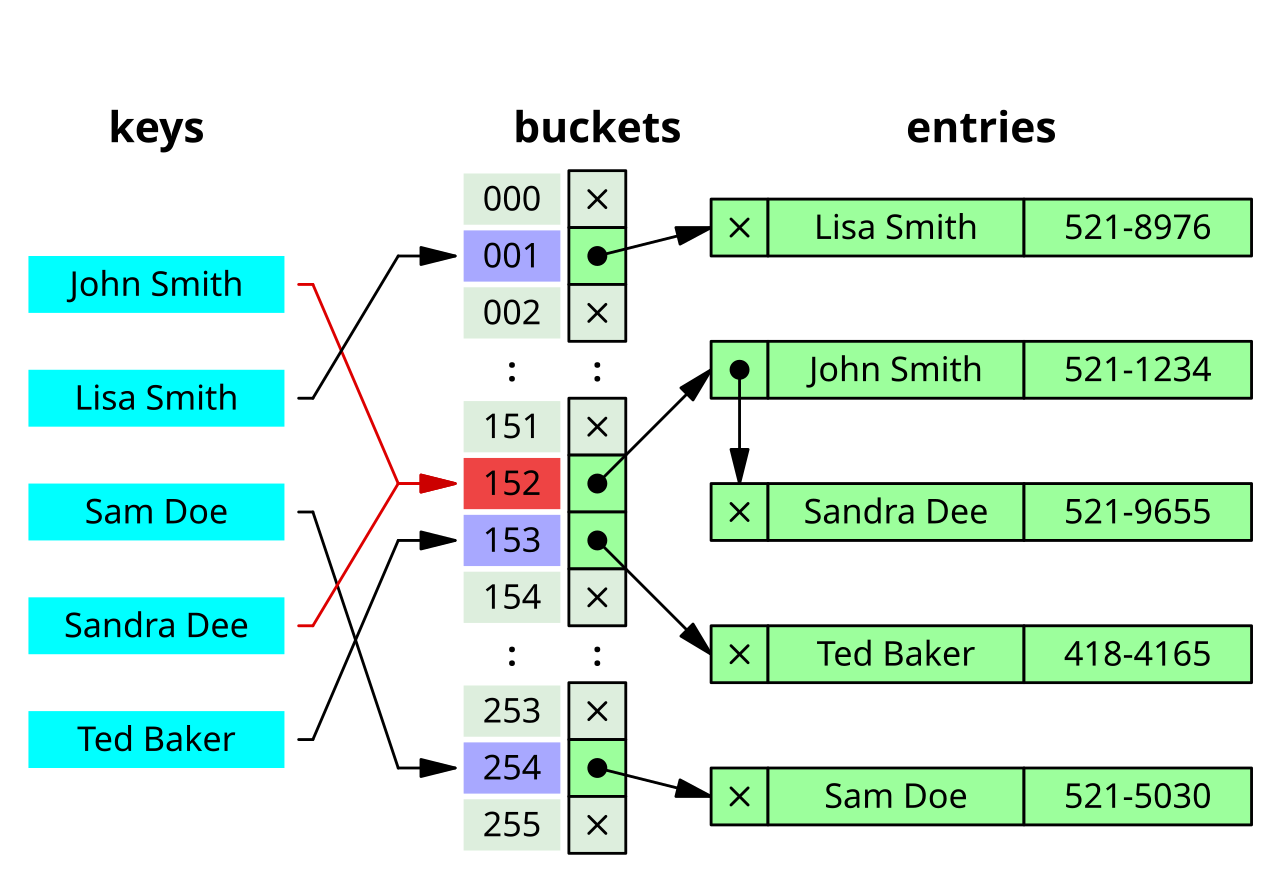
Finding a value by its name is what a hash table is for. It's an array of slots called buckets. A function of the key, the hash, turns a name like session:42 into a number that picks the bucket where its value is kept. Finding a key means computing one number and looking in one place, however many keys the table holds. Redis keeps all of its keys in one big hash table.
Storing and fetching one session is the easy part. The hard part is that dozens of app servers, with thousands of connections between them, are sending commands at the same moment.
1.2The textbook answer and what it costs
A textbook design gives every client connection its own thread and puts a lock around the table, so that two threads never change it at once. Chapter 13 showed why the lock is needed: two threads doing count++ at the same moment can both read the same old value and write back the same new one, so one increment is lost. Chapters 13 and 17 also showed what locks cost once many threads fight over them. In a store where each operation is a single lookup, every thread takes the same lock to do a fraction of a microsecond of work, so the threads spend more time queueing for the lock and handing it between CPU cores than doing lookups. The lock becomes the busiest thing in the program.
Redis takes the opposite route. One thread runs every command, one at a time, each to completion before the next one starts.
1.3One thread, one command at a time
Think about what that gives you. While a command runs, nothing else is running, so nothing else can see the table half-changed. A command like this is atomic: it happens all at once, with no state in the middle that another client could observe. The lost update from chapter 13 can't happen, because INCR, which adds one to a number stored under a key, is a single command. Nobody can slip in between its read and its write, and there isn't a lock anywhere to make that true.
That comes at a price, the other side of the same rule. If a command takes a long time, every command behind it waits. Here's session:42 being fetched, then a slow command arriving, then a PING (the simplest command there is, which just answers PONG) stuck in line behind it:
GET session:42. All of Redis's keys and values sit in one table in memory, which we'll call the keyspace. Nothing else is running, so the command goes straight to the one thread.1.4Trying it: one slow command, one stalled PING
Here's the same thing on a real server. redis-server --port 6399 starts a throwaway server on its own port, so it can't disturb a Redis you already run. --save "" turns off snapshots to disk (section 8 explains them), --enable-debug-command yes switches on the DEBUG commands, which are off by default, and --daemonize yes runs the server in the background. After that, redis-cli -p 6399 COMMAND sends one command and prints the reply.
First come ordinary commands. SET stores a value, GET reads it back, and INCR adds one to a number, creating it first if it isn't there. EXPIRE greeting 60 gives the key a TTL, a time to live: after 60 seconds Redis deletes it, and TTL asks how many seconds are left. Then DEBUG SLEEP 2 plays the slow command. The & at the end of its line runs it in the background so the shell can move on, sleep 0.3 waits a third of a second, and time reports how long the PING takes.
redis-server --port 6399 --save "" --enable-debug-command yes --daemonize yes
redis-cli -p 6399 SET greeting hello
redis-cli -p 6399 GET greeting
redis-cli -p 6399 INCR hits
redis-cli -p 6399 INCR hits
redis-cli -p 6399 EXPIRE greeting 60
redis-cli -p 6399 TTL greeting
redis-cli -p 6399 DEBUG SLEEP 2 &        # a command that takes two seconds
sleep 0.3
time redis-cli -p 6399 PING # a second client asks 0.3 s laterOK
hello
1
2
1
60
OK
PONG
real 0m1.695s
user 0m0.007s
sys 0m0.006sThose ordinary commands answer at once: the value is stored and read back, the counter goes to 1 and then 2, EXPIRE answers 1 to say it set a timeout, and TTL reports 60 seconds left. The second OK is DEBUG SLEEP finishing, two seconds after it started. PONG follows immediately, because that's the moment the thread is free to take the PING. Look at the real line. The PING was sent 0.3 seconds into a 2-second sleep, so it waited about 1.7 seconds for its turn, which matches the time reported.
Nothing was wrong with PING, and no lock was involved. That's the trade Redis makes: no locking, no coordination between threads, a very fast common case, and in exchange a stall whenever one command is expensive. It leaves a question open, though. The PING waited because the thread was busy running a command. It must never also wait on a client's network connection, or one client that goes quiet would freeze everyone just the same. How does one thread keep thousands of connections going without waiting on any of them?
02Following one GET through the event loop
2.1Never wait on one client
A naive server would loop over its connections: read from the first client, run the command, reply, read from the second. A read blocks until bytes arrive, though, so one client that connects and says nothing would hold up the whole loop.
Each client is connected through a socket, the kernel's endpoint for a network connection, and a socket is readable when bytes have arrived on it that nobody has read yet. Chapter 07 mentioned a system call built for exactly this problem, epoll on Linux (macOS has an equivalent called kqueue). You hand epoll all your sockets at once, and it returns only the ones that are ready, sleeping inside the kernel if none are. So the server can ask the kernel which sockets have a request waiting, handle exactly those, and ask again. This loop is the event loop. No thread ever waits on a slow client, because the loop only touches sockets that the kernel has already said are ready, and at any instant most of ten thousand connections are idle, waiting for their app server to send something.
2.2One GET, step by step
Now we can follow one command all the way through. First, some vocabulary. Redis clients speak a simple text protocol called RESP, in which a request is a few lines of text naming the command and its arguments. Redis keeps two chunks of memory for each client. The query buffer holds bytes read from the client's socket that haven't been parsed yet, and the output buffer holds replies waiting to be sent back. This is one trip around the loop for GET session:42, with the name of the function that does each step:
epoll_wait(), the epoll call that sleeps until some socket is ready. It's called from aeMain() in ae.c. Client A sends its request. The kernel sees bytes arrive on A's socket and wakes the loop, reporting that this socket is readable.Only the fourth step touches your data. Everything around it moves bytes between the socket and the two buffers.
2.3Why the reply waits
In the fifth step nothing is sent. Replies pile up in the client's output buffer and go out together in beforeSleep(), once per trip around the loop. That has a consequence for a client that sends many commands without waiting for each answer, which is called pipelining:
A client pipelines 100 GET commands in one packet. Roughly how many write() syscalls does Redis make to answer them?
?Why is a client that stops reading dangerous?
Because its output buffer keeps growing inside your Redis process. If a client sends requests but never reads the replies, the replies pile up in memory, and nothing else limits them. The setting client-output-buffer-limit decides whether Redis disconnects such a client or lets it eat your memory.
2.4Commands that block everything
Because commands run one at a time, any slow command is a stall for every other client, exactly as in section 1. The slow ones are the commands whose cost grows with the amount of data they touch, which programmers write as O(N), where N is the number of keys or members involved. A Lua script, in the last row, is a small program written in the Lua language that you send to Redis to run on the server as a single command. The usual suspects, and what to use instead:
| Command | Why it blocks | What to use |
|---|---|---|
KEYS pattern | Scans the entire keyspace | SCAN with a cursor: each call returns a small batch of keys plus a cursor to pass to the next call, so other clients get a turn in between |
SMEMBERS on a huge set | Builds one reply holding every member | SSCAN |
DEL on a 10M-element hash | Frees every entry inline | UNLINK (removes the key at once and frees the memory in a background thread) |
FLUSHALL (deletes every key) | Synchronous by default | FLUSHALL ASYNC |
| A long Lua script | Atomic by design, so nothing interrupts it | Split it into several short scripts, so other clients get a turn between them |
Since every command runs alone and to completion, we can say exactly what Redis promises, and just as important, what it leaves out.
03What one thread guarantees, and what it doesn't
Redis promises you one thing, and people coming from SQL databases often hear more than that: transactions that roll back, and writes that are safe once acknowledged. The actual promise is command atomicity: while a command runs, no other command runs. There's no partial state for another client to observe, no isolation setting to choose between, and no read that catches a value halfway through an update.
3.1The guarantees
| Guarantee | What it means in practice |
|---|---|
| Atomicity per command | Every command, including ones that touch several keys like MSET (set many keys at once) and scripts, runs to completion before the next one starts |
| Ordering per connection | Commands from one client execute in the order they were sent. Commands from different clients run in whatever order they reach the thread, with no promise about which goes first |
MULTI/EXEC without interleaving | MULTI starts queueing commands and EXEC runs the queue. Nothing else runs between the queued commands |
3.2What it explicitly does not promise
This is the half that causes incidents. One of the rows talks about copies of the data on other servers, so first the vocabulary. Redis can keep a second copy of your data on another machine. That machine is a replica, the original is the primary, and the primary sends each write to its replicas over the network. If the primary dies, one replica can be promoted to take its place, which is called a failover.
| Not promised | What happens |
|---|---|
| Rollback | If a command inside MULTI fails at runtime, the other commands still apply. Redis reports the error and moves on |
| Durability by default | Replication is asynchronous. WAIT numreplicas timeout blocks until replicas have acknowledged, which isn't the same as having fsynced (forced the data onto its disk, as in chapter 08) |
| Expired keys leaving memory promptly | An expired key is never returned to a client, but it can sit in the keyspace for a while (section 7.2) |
| Isolation between a script and the world | A Lua script blocks the server for its whole duration. That's atomicity working as designed, and it's also how people take an outage |
People who know transactions from SQL are surprised by the first row, so try to predict it before reading on.
Inside MULTI you queue SET a 1, then INCR on a key holding the string hello, then SET b 2. You call EXEC. What's in a and b afterwards?
The second row raises a question that matters for failover.
?Why is the acknowledgement allowed to come before replication?
Because that's what makes it fast. The primary replies as soon as the write is in its own memory, without waiting for a network round trip to another machine, which would add at least a fraction of a millisecond to every write. This is documented behaviour, chosen on purpose, and section 8.1 shows what it costs in a failover.
Two of these rows depend on memory and on what happens to it, and we haven't yet looked at how session:42 sits in memory at all. We'll do that now, because the layout decides what a key costs and what a TTL does.
04How session:42 is stored
4.1Two hash tables per database
A Redis server can hold several separate, numbered keyspaces, which it calls databases (16 by default, and nearly every application uses only number 0). Each one is a C structure holding two hash tables, and Redis's hash table type is called dict. This is the real definition from the source, trimmed to the part we need:
typedef struct redisDb {
    dict *dict;                 /* the keyspace: key -> robj */
    dict *expires;              /* key -> expiry ms, only for keys with a TTL */
    /* ... blocking_keys, watched_keys, id, avg_ttl ... */
} redisDb;
The first table, confusingly also named dict, is the keyspace from section 1: it maps each key name to a value object. The second, expires, maps a key to the moment it expires, and it holds only the keys that have a TTL. So session:42 has an entry in the keyspace, and once you give it a 30-minute TTL with EXPIRE session:42 1800 it gets a second entry in expires. That's why a TTL costs memory, and removing the TTL gives it back. The split matters again in section 7, because some of Redis's eviction policies only look at expires.
4.2The object header
Every value in the keyspace is wrapped in a small header called an robj, which says what kind of value it is and how it's currently laid out in memory.
typedef struct redisObject {
    unsigned type:4;        /* OBJ_STRING, OBJ_LIST, OBJ_HASH, OBJ_ZSET ... */
    unsigned encoding:4;    /* how it is laid out RIGHT NOW */
    unsigned lru:LRU_BITS;  /* clock for LRU, or frequency counter for LFU */
    int refcount;
    void *ptr;              /* the actual payload */
} robj;Two four-bit fields, a 24-bit clock, a refcount (how many places are using the object) and a pointer. On x86-64 that packs into 16 bytes, and you pay those 16 bytes for every value you store. The lru field records how recently or how often the value was used. Section 7 explains the two eviction rules, LRU and LFU, that read it when Redis has to throw keys out.
The type is what you asked for; the encoding is what Redis decided to give you. Your session might be stored as a string, whose type is "string" and whose encoding could be one of three. A string that is a whole number, like 12345, gets the int encoding. A short string gets embstr, where the header and the bytes sit together in one block of memory. A long string gets raw, where the header and the bytes are two separate blocks. The cutoff is 44 bytes, and section 6 shows where that number comes from.
4.3Small collections are flat arrays
Suppose you store the session as a hash instead, with one field per fact: HSET session:42 uid 42 role member. A general hash table has a lot of overhead for three small fields: an array of buckets, a node per entry, and pointers between them, which can easily outweigh the data. So Redis starts a small hash as a listpack, a single flat block of memory holding the entries one after another, each prefixed with its length. Looking up a field means scanning along the block. For three fields that scan is quick, and it saves the pointers.
Redis switches to a real hash table only when the collection outgrows a threshold. Hashes aren't the only type that does this. Besides strings and hashes, Redis has lists (ordered sequences), sets (unordered collections of distinct members) and sorted sets (members kept in order by a number called a score), and each type has its own compact form and its own threshold:
| Type | Compact form | Promotes to | Threshold on Redis 8.10 |
|---|---|---|---|
| String | int / embstr | raw | 45 bytes and up is raw |
| Hash | listpack | hashtable | 512 entries, or a 64-byte value |
| Sorted set | listpack | skiplist | 128 entries, or a 64-byte value |
| Set | intset / listpack | hashtable | 512 ints, or 128 non-ints |
| List | listpack | quicklist | 8 KB per node: a size, not a count |
Two names in the table are new. An intset is another compact form, a sorted array of integers, used for sets whose members are all whole numbers. A skiplist and a quicklist are the full-size structures that sorted sets and lists switch to. Lists also count differently from the rest. list-max-listpack-size defaults to -2, which isn't an entry count: negative values select a byte budget per node, and -2 means 8 KB. A thousand short strings in a list stay a listpack, and eighty hundred-byte strings don't.
A few notes keep you from quoting the wrong number. Blog posts often say 128 for hashes, and 128 is the sorted-set threshold, so check which type a post means. Listpack replaced the older ziplist in Redis 7.0, so a post that says ziplist predates that, and the config names it quotes no longer exist. And CONFIG GET reports your running value, which your distro may have overridden in redis.conf, so ask your own server.
This experiment builds a hash and watches its encoding as it grows. OBJECT ENCODING reports how a key is laid out right now, and HLEN counts a hash's fields. CONFIG GET prints the setting's name and then its value, so tail -1 keeps just the value. The loops add fields one command at a time, and the last step deletes 520 of them. It assumes the server from section 1 is still running on port 6399.
redis-cli -p 6399 CONFIG GET hash-max-listpack-entries | tail -1

redis-cli -p 6399 DEL h > /dev/null
redis-cli -p 6399 HSET h a 1 b 2 c 3 > /dev/null
redis-cli -p 6399 OBJECT ENCODING h

for i in $(seq 1 130); do redis-cli -p 6399 HSET h "f$i" "$i" > /dev/null; done
redis-cli -p 6399 HLEN h
redis-cli -p 6399 OBJECT ENCODING h

for i in $(seq 131 520); do redis-cli -p 6399 HSET h "f$i" "$i" > /dev/null; done
redis-cli -p 6399 HLEN h
redis-cli -p 6399 OBJECT ENCODING h

redis-cli -p 6399 HDEL h $(seq -f "f%g" 1 520 | tr '\n' ' ') > /dev/null
redis-cli -p 6399 HLEN h
redis-cli -p 6399 OBJECT ENCODING h512
listpack
133
listpack
523
hashtable
3
hashtableRead the output in pairs. This build's threshold is 512. A hash with three fields is a listpack, as we expected. After 130 more fields it holds 133, past the 128 that so many blog posts quote, and it's still a listpack. Redis's developers judged a linear scan over a flat block of a few hundred entries cheap enough to be worth the memory it saves. After 390 more it holds 523 fields and has become a hashtable. The last pair is the surprise: after 520 deletions the hash is back to three fields, and it's still a hashtable. The conversion only goes one way. Once a hash is promoted it stays promoted for the life of the key, however small it shrinks, so three fields now carry the full overhead of a hash table.
?Why doesn't a shrunk hash go back to a listpack?
Because the thresholds are checked on insert, never on delete. Build a hash by inserting 600 fields and deleting 597 and you keep paying. If that matters, rebuild the key: HGETALL into a new key and RENAME over the old one.
You might wonder why hashes get 512 while sorted sets and sets get 128, when the scan runs over the same listpack layout in each case. Nothing in the default config file says. A plausible reason is that hashes are the type people push hardest for object storage, so the memory saving was judged worth more scanning. That's a guess.
A hash table that holds every key has to grow as keys arrive. In a server with one thread, growing it is dangerous, and that's the next problem.
05Growing the table without stopping
5.1The obvious resize would freeze the server
When two keys hash to the same bucket, the bucket keeps them in a short chain, and a lookup walks the chain comparing names. With many more keys than buckets the chains get long and every lookup slows down, so the table has to grow. The normal way is to allocate a bigger array of buckets and move every entry into it. With one thread and fifty million keys, that move would freeze the server, and since command execution is serialised, blocking the loop is blocking the database. A stop-the-world rehash of a 50-million-key table would stall every client for seconds.
5.2Two tables and a cursor
So Redis moves the entries a little at a time. A dict holds two hash tables, the old one and the new one, plus one number saying how far the move has got. This is the definition, trimmed:
typedef struct dict {
    dictType *type;
    dictEntry **ht_table[2];      /* two tables: old and new */
    unsigned long ht_used[2];
    long rehashidx;               /* -1 when not rehashing, else the bucket index */
    /* ... */
} dict;
Here is a tiny table growing, with session:42 in one of the buckets. The move is called rehashing, and rehashidx is the number of the next bucket to move:
session:42, so some buckets hold more than one entry and the table is due to grow. The obvious way is to build a bigger table and move all five entries right now. With fifty million entries, that would freeze the only thread.Here is the same idea one size up, drawn bucket by bucket: an 8-bucket table growing to 16, frozen part-way with rehashidx at 3. The greyed buckets at the left of the old table have already been moved, and their keys now sit in the new table.
?Why not rehash everything at once?
Because the loop is the whole database. Spreading the work one bucket at a time keeps the worst case bounded: each command carries a tiny share of the move, and no client ever sees a multi-second stall.
You do pay for it on every read. While a resize is in flight, each lookup checks two tables. Redis trades a small continuous penalty for never having a long stall. For a system whose selling point is predictable latency, that's the right way round. Section 6.2 shows a resize caught in the middle, in a memory reading.
Growing tables are one reason a key's memory cost isn't a fixed number. The next question is how much memory one key takes.
06What one key costs
Memory is where Redis estimates go wrong most often. The fixed costs per key are small, but you pay them for every key, and the hash table adds a share that moves as it grows.
6.1The fixed costs
An amortised O(1) lookup means that the average cost doesn't grow with the number of keys, even though one particular resize costs more. "Hash slots in Cluster" refers to Redis Cluster, the mode where several servers split the keyspace between them: each key belongs to one of 16384 slots, and each server owns a share of the slots.
?Why 44 bytes, and not a round number?
An robj is 16 bytes, and the string's own header, called an sdshdr8 (SDS is Redis's string type, which stores its length in front of the bytes), is 3 bytes plus a null terminator at the end of the text. So 16 + 3 + 44 + 1 = 64. That is one cache line, the chunk of memory a CPU typically loads at a time, and exactly one of the standard block sizes the memory allocator rounds requests up to (its size classes). Cross it by a byte and the string no longer fits: Redis makes two allocations instead of one, every read follows one more pointer to a different place in memory, and the second block gets rounded up to its own size class with unused bytes at the end.
You can see the boundary on a running server. A 44-byte string reports embstr and a 45-byte string reports raw.
6.2Measuring your own per-key cost
Key length, value length, encoding and allocator all move the per-key overhead, so a number from a blog post won't fit your data, and that includes the number below. Measure your own shape. The experiment loads 100,000 sessions that look like ours and divides the growth in memory by 100,000.
A few of its pieces need explaining. redis-cli --pipe reads commands from standard input and sends them in bulk, much faster than one redis-cli call per key. INFO memory prints memory statistics, and used_memory is the number of bytes Redis has allocated, which awk pulls out before and after. The quotes matter. --pipe sends each line as a plain-text command, and in that format a " starts a quoted argument. So the JSON value goes inside single quotes; without them Redis reads the first " in the JSON as an opening quote and the whole pipe dies with "unbalanced quotes in request". FLUSHALL first empties the server, so the baseline is clean. MEMORY USAGE asks Redis what one key costs, and STRLEN gives the length of the value.
# Empty baseline
redis-cli -p 6399 FLUSHALL > /dev/null
BEFORE=$(redis-cli -p 6399 INFO memory | awk -F: '/^used_memory:/{print $2+0}')

# 100k keys in the shape you actually store. Note the single quotes around the
# JSON — without them the inline protocol reads the first " as an opening quote
# and the whole pipe dies with "unbalanced quotes in request".
for i in $(seq 1 100000); do
  printf "SET session:%s '{\"uid\":%s,\"role\":\"member\"}'\n" "$i" "$i"
done | redis-cli -p 6399 --pipe

AFTER=$(redis-cli -p 6399 INFO memory | awk -F: '/^used_memory:/{print $2+0}')
echo "bytes per key: $(( (AFTER - BEFORE) / 100000 ))"
redis-cli -p 6399 MEMORY USAGE session:1
redis-cli -p 6399 STRLEN session:1All data transferred. Waiting for the last reply...
Last reply received from server.
errors: 0, replies: 100000
bytes per key: 94
64
25Our key session:1 is 9 bytes and its value is 25, so each entry carries 34 bytes of data and takes about 94 bytes of RAM, a little under three times as much. The figure moves by a byte or two from run to run, depending on the state the table was left in. None of that is waste you can configure away. It's the robj header, the dictEntry that links the key into the table, the SDS length prefix, and the allocator rounding each of those up to a size class. The exact figure depends on the allocator your build uses.
?Why do MEMORY USAGE and the subtraction disagree?
MEMORY USAGE says 64: one key, its dictEntry and its allocator rounding. The subtraction says 94, because it also carries this key's share of the bucket array. Use the subtraction for sizing: the bucket array is memory you pay for too, and the single-key number leaves it out.
That share changes with how many keys you have, and not smoothly. The same measurement at three sizes:
| Keys | Bytes per key |
|---|---|
| 70,000 | 105 |
| 100,000 | 94 |
| 131,000 | 92 |
You might guess that 70,000 keys means a table that's oversized and half empty. That guess is wrong, and DEBUG HTSTATS shows why. It prints the state of the hash tables of one database, and it needs the server started with --enable-debug-command, because it has been off by default since Redis 7. Taken right after loading 70,000 keys, it looks like this. The [Expires HT] heading is the second hash table from section 4.1, and it's empty here because none of these keys has a TTL:
[Dictionary HT]
Hash table 0 stats (main hash table):
 table size: 65536
 number of elements: 58570
Hash table 1 stats (rehashing target):
 table size: 131072
 number of elements: 11430
[Expires HT]
Two tables exist, so the resize from section 5 is still in flight. There are 196,608 buckets for 70,000 keys (65,536 plus 131,072) until the incremental rehash drains table 0. At 100,000 keys it has finished: one table, 131,072 buckets, all 100,000 elements. That extra 11 bytes per key is a rehash caught in the middle. The exact split between the two tables varies from run to run, because it depends on how far the rehash has got.
So a memory reading taken on a keyspace that's still growing measures a transient, and it can be about 12% off while looking perfectly stable. Take your measurement when the table isn't resizing.
Now we know what a key costs. A server has only so much RAM, though, and sessions are meant to disappear, so Redis needs rules for what leaves.
07When memory fills and when keys expire
A cache has to get rid of data in two ways: when memory runs out, and when a key's TTL passes. Both rely on looking at small random samples of keys instead of keeping exact records, so neither is as precise or as prompt as most people assume.
7.1Choosing an eviction policy
maxmemory is a setting that puts a ceiling on how much memory Redis may use for data. When a write would take it past the ceiling, Redis has to decide what to do, and maxmemory-policy says which. It's the setting most often left at its default, and the default is noeviction, which means writes start failing when you hit the ceiling. For a cache that's almost never what you want. The alternative is eviction: Redis throws out existing keys to make room.
Which keys should go? There are two natural rules. LRU, least recently used, evicts the key that has gone longest without being touched. LFU, least frequently used, evicts the key that has been touched the fewest times. Think of sessions: the user who clicks every few seconds has a hot session under either rule. The trouble starts with a nightly job that reads every session exactly once.
Each rule can be applied to every key (the allkeys- policies) or only to keys that have a TTL, which Redis calls volatile keys (the volatile- policies). One more, volatile-ttl, ignores use altogether and goes by time left. These are the three you'll meet most often:
| Policy | How it picks a victim | Breaks when | Best for |
|---|---|---|---|
allkeys-lru | Samples maxmemory-samples keys (5 by default) and evicts the least recently used | A batch job touching every key evicts your hot set; recency is a weak signal under a scan | A pure cache with a stable working set and no periodic sweeps |
allkeys-lfu | Evicts by access frequency, from an 8-bit counter in the robj's lru field | A key that was hot last week resists eviction today; decay is set by lfu-decay-time, which people rarely tune | Caches with a long-lived hot set and periodic scans, the usual production shape |
volatile-ttl | Among keys with a TTL, evicts the one expiring soonest | Keys without a TTL are never candidates | A keyspace where every key has a deliberate TTL |
Under LRU, the nightly job makes every session it touches the most recently used key in the cache, and the hot set gets evicted to make room for keys nobody will read again. Under LFU, a key the job touched once has a counter near 1, while a key served a thousand times a minute sits far higher, so the scan evicts itself.
?Why sample instead of tracking exact LRU?
Real LRU would need a linked list threaded through every object, and every read would have to move its object to the front of the list. Sampling five keys gets close enough, most of the time, for a fraction of the memory.
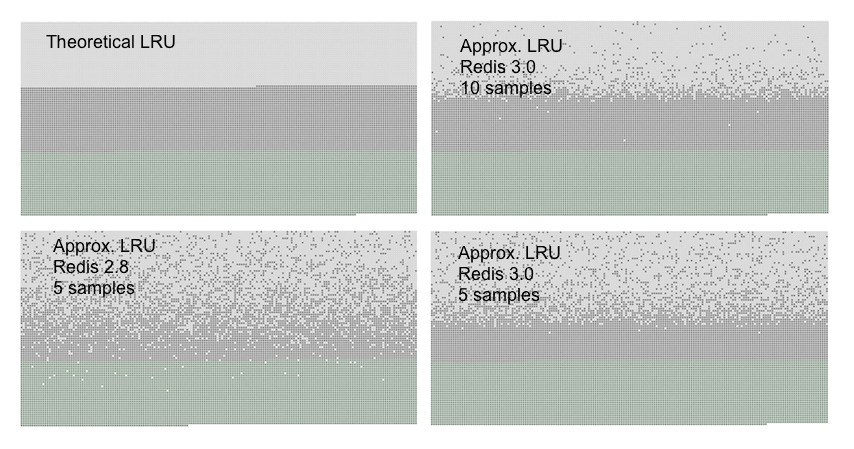
LFU's counter uses a similar trick to fit into eight bits. Increments get logarithmically less likely as the counter rises, so a counter of 255 represents roughly a million accesses. That frequency is what makes LFU scan-resistant.
7.2How expiry runs
Eviction frees memory when it's short. Expiry is the other path: a key reaches the end of its TTL, like session:42 after its 30 minutes, and must stop being served. Redis uses two mechanisms, and neither is a guarantee of prompt memory.
| Mechanism | When it runs | What it does |
|---|---|---|
| Lazy | On every lookup | Checks the expires dict first. An expired key is deleted and the lookup reports a miss, so a client never sees stale data |
| Active | On the server's timer, the cron from section 5.2, which runs hz times a second (10 by default) and calls activeExpireCycle() | Samples 20 keys from expires, deletes the expired ones, and repeats while more than 10% of the sample was expired |
Lazy expiry keeps the promise to clients: the moment the 30 minutes are up, a GET session:42 returns nothing. Active expiry gives the memory back for keys that nobody asks about. Its sampling stops as soon as at most one key in ten of the sample turns out to be expired, and each cycle is also capped to a share of the CPU time (in the 7.2.4 source, 25% of the time between two timer ticks), so the loop doesn't take over the server. Before Redis 6 the repeat rule was "more than 25% expired", and the official docs and many blog posts still give that figure. In the 7.2.4 source the 25 is the CPU cap, and the repeat threshold is 10%.
So memory for expired keys is reclaimed eventually. A key that nothing reads, in a database where few keys are expiring, can linger well past its TTL, because the sampling only digs deeper when it keeps finding expired keys. If you're sizing memory against a TTL, size against the lingering.
Eviction and expiry throw data away on purpose. Everything we've covered so far also lives in RAM, so the harder question remains: what happens to session:42 when the process itself dies?
08When the process dies
RAM is gone when the process dies. Redis has three answers: replicas that copy the primary's writes, RDB snapshots written by a forked child process, and an append-only file. Each has a gap you should know about, and the first one carries the biggest surprise.
8.1The acknowledged write that vanishes
Replication is asynchronous. The primary replies OK to your client and then streams the write to its replicas. Walk SET session:42 through a failure that lands between those two moments:
There is a mitigation, but it only goes part of the way:
min-replicas-to-write 1
min-replicas-max-lag 10
With these two lines the primary refuses writes unless at least one replica has reported in within the last ten seconds. That shrinks the window: a primary cut off from all its replicas stops accepting writes after ten seconds, instead of piling up writes that a failover would throw away.
The window stays open, though, because "a replica was alive recently" and "this specific write reached a replica" are different claims. A write acknowledged one second before the primary dies can still be lost. WAIT narrows it further: it blocks until a number of replicas have acknowledged a write. But it counts replicas that acknowledged receipt, not replicas that wrote the data to disk, so two replicas that both hold the write only in memory can lose it together in a correlated power failure.
Replicas protect against a dead machine. What about restarting the same machine? For that Redis can write the dataset to disk.
8.2Snapshots with fork()
An RDB snapshot is a copy of the whole dataset written to a file (by default dump.rdb). BGSAVE takes one without stopping the server, and the trick is fork(). The kernel creates a child process that starts out sharing all of the parent's memory, and as chapter 04 showed, the sharing is copy-on-write, or COW: a page is copied only when one of the two processes writes to it. The child writes its frozen view of memory to disk while the parent keeps serving clients. Rewriting the append-only file, which section 8.3 covers, forks in the same way. Here's a snapshot with session:42 in the middle of it:
session:42 is page 2. BGSAVE asks for a snapshot of everything while Redis keeps serving clients. It runs on the main thread, which calls fork().Two failure modes come out of this:
| Failure | Cause | What to do |
|---|---|---|
| Memory doubling under write load | COW copies every page the parent writes during the dump. Read-mostly instances probably never notice; one rewriting most of its keyspace can approach 2× | Budget COW headroom (section 9); set vm.overcommit_memory=1 so the kernel doesn't refuse a fork it would never need to back (see below) |
| The fork stalls the loop | Copying page tables for a large address space | Keep instances smaller, and schedule saves off-peak |
vm.overcommit_memory=1 is a Linux setting that stops the kernel from refusing the fork(). Left at its default, the kernel may add up the parent's and the child's memory as if both were private, find that it doesn't fit, and say no, although in practice the two share nearly all of it.
?Where did "disable transparent huge pages" come from?
Transparent huge pages are a Linux feature that lets the kernel use 2 MB pages instead of 4 KB ones. Before Linux 5.8, a COW fault on a huge page copied 2 MB instead of 4 KB, which made the aftermath of a fork far worse. Since commit 3917c80280c9, whose message names Redis, the kernel splits the page and copies 4 KB.
Huge pages still carry one risk. To assemble a 2 MB page the kernel sometimes has to move other pages out of the way, called compaction, and that can stall the process. So Redis still warns at startup when huge pages are enabled for everything, and it now recommends the setting madvise (huge pages only for programs that ask) rather than turning them off with never.
8.3The append-only file
A snapshot only holds the dataset as of the moment it was taken, so a crash loses everything written since. The append-only file, or AOF, closes most of that gap by recording every write command in a file that Redis replays on restart. Writing to a file is a write() call like any other, which brings back chapter 08: the bytes go into the page cache first and reach the disk only when fsync runs. How often Redis calls fsync on the AOF is a setting called appendfsync, and its default, everysec, flushes once a second, so a crash can lose up to about the last second of writes.
That's a much smaller window than a snapshot leaves, though not an empty one. All three answers leave some gap. A store that can lose its last acknowledged writes is a fine place for a copy of your data, like session:42, which a user can recreate by logging in again. The record you can't afford to lose belongs in a database that waits for the disk.
09Sizing an instance
9.1Adding it up
Now every cost has appeared, and the arithmetic is simple. Take your measured bytes per key, add margin for growth, and then add what the machine needs besides the data: the buffer the primary keeps for each replica, holding writes it hasn't sent yet (section 8.1), and headroom for copy-on-write during BGSAVE (section 8.2). For ten million sessions:
| Keys | peak sessions × 1.3 headroom | 10,000,000 |
| Bytes per key | measured in section 6.2 | 94 B |
| Dataset | 10M × 94 B | 0.94 GB |
| Replication buffer | client-output-buffer-limit slave | 0.26 GB |
| COW headroom for BGSAVE | write rate × dump duration | 0.40 GB |
| RAM the machine needs, before you round up to an instance size | ≈ 1.6 GB | |
The replication buffer row uses the default limit for replica connections, 256 MB. The copy-on-write row is the one you have to estimate from your own write rate during a dump. Together they show why a machine sized to the dataset runs out of memory: the dataset is only 0.94 GB of the 1.6. maxmemory itself caps the data, plus some margin for growth. Redis leaves the replica buffers out of the count it compares against maxmemory, and the pages copied during a snapshot are made by the kernel, outside Redis's own count, so both have to fit in the RAM left over.
10Running Redis in production
10.1What to look at when it's slow
Each question the chapter raised has a command that answers it on a live server.
# Is the whole server slow, or one client? (section 1)
redis-cli --latency-history          # round trip over time, cheap, run it first

# Which commands were slow? (sections 1 and 2.4)
redis-cli SLOWLOG GET 10             # commands over slowlog-log-slower-than

# Which command type uses the most time in total? (section 2.4)
redis-cli INFO commandstats          # calls, usec, usec_per_call, per command

# Which keys are huge? (sections 2.4 and 4)
redis-cli --bigkeys                  # SCAN-based, safe on production

# Do the keys have TTLs? (section 7.1)
redis-cli INFO keyspace              # keys vs expires
INFO commandstats is the one people skip, and it's usually the fastest route to an answer. It gives total microseconds per command type, so an HGETALL that's individually fast but called 400,000 times a second shows up as the largest number on the page.
10.2Rules that hold up
- Treat any O(N) command on a big key as a production change. Use
SCAN,SSCAN,UNLINKandFLUSHALL ASYNCby default (section 2.4). - Choose the eviction policy on purpose.
allkeys-lfuis the usual choice for a cache, and avolatile-*policy only works when almost every key has a TTL (section 7.1). - Measure the per-key cost by subtraction, on your own data shape, and not while the table is resizing (section 6.2).
- Treat an acknowledged write as probably durable. If losing it would be an incident, the source of truth belongs in a database (section 8.1).
- Budget copy-on-write headroom for
BGSAVE, setvm.overcommit_memory=1, and keep instances small enough thatfork()is quick (section 8.2). - Put a limit on client output buffers, so a client that stops reading can't eat your memory (section 2.3).
10.3What you give up
| You get | You pay | When the bill arrives |
|---|---|---|
| Atomicity with no locking | One slow command stalls every client | The first time someone runs KEYS in production |
| Fast acknowledged writes | An async replication loss window | During a failover, silently |
| Compact encodings | One-way promotion, unbounded by shrinkage | Gradually, as a memory leak that isn't one |
| Sampled LRU/LFU | Approximate eviction, tuned by maxmemory-samples | When the hit rate drops and nothing looks wrong |
| fork()-based persistence | COW memory proportional to write rate | At peak traffic, when BGSAVE is already slowest |
10.4Symptom, cause, fix
| Symptom | Likely cause | Fix |
|---|---|---|
| Every client stalls at once, briefly | One slow command: KEYS, a big DEL, a long script | SLOWLOG GET, then SCAN, UNLINK, FLUSHALL ASYNC |
| Memory far above the estimate | Per-key overhead, promoted encodings that never shrink, a resize in flight | Measure by subtraction; rebuild shrunk keys |
| OOM errors with plenty of data | volatile-* policy, few keys with TTLs | Compare keys and expires; use allkeys-lfu |
| Hit rate collapses after a nightly job | allkeys-lru evicting the hot set during a scan | Switch to allkeys-lfu |
| Memory spikes during saves | COW during BGSAVE under write load | Budget headroom; vm.overcommit_memory=1 |
| A write is missing after failover | Asynchronous replication | min-replicas-to-write, WAIT, or keep the source of truth elsewhere |
| Memory creeping on the server | A client not reading its replies | client-output-buffer-limit |
10.5Where you meet this in the wild
A 43-second network partition during maintenance cascaded into 24 hours of degraded service. The incident was not a Redis failure: it involved GitHub's MySQL clusters. The published analysis is the clearest public writing on how a replication topology with an asynchronous loss window behaves when the network, not the process, is what fails.
Before Redis Cluster, sharding lived in a proxy. Twitter's twemproxy sat in
front of the servers, hashed each key to pick one, and multiplexed
connections. It also couldn't do multi-key operations across shards, the
same constraint Cluster inherited and made explicit with CROSSSLOT errors.
11Summary
- One thread executes every command. That's where atomicity without locks comes from, and why one slow command stalls every client, the
PINGthat waited 1.7 seconds. - An event loop lets that one thread serve thousands of sockets. It only touches the sockets the kernel says are ready, so it never waits on a quiet client.
- "Single-threaded" is out of date. Since Redis 6, I/O threads parallelise socket reads and writes; execution stays serialised.
- Replies are buffered and flushed once per loop, so a hundred pipelined commands cost one
write. MULTI/EXECdoesn't roll back. A failing command reports an error and the rest still apply.- The type is what you asked for; the encoding is what you got. Small hashes are listpacks until 512 entries on Redis 8.10, and the 128 that blogs quote is the sorted-set number.
- Promotion is one-way. A hash that grew and shrank keeps hash-table overhead until you rebuild it.
- Resizing happens a bucket at a time. Lookups check two tables during a resize, and memory readings taken then are transient.
- Measure per-key cost by subtraction. 34 bytes of data cost about 94 bytes of RAM in the experiment above.
- Eviction and expiry both work by sampling.
volatile-*policies only see keys with a TTL, and expired keys can outlive their TTL in memory. - An acknowledged write can vanish in a failover. Replication is asynchronous,
min-replicas-to-writeonly narrows the window, andBGSAVEmemory grows with the write rate.
12Build this
Implement the listpack-to-hashtable promotion yourself. Not the whole of Redis: one type, one threshold, in about 200 lines of C++.
- A
Hashclass with two representations behind one interface: astd::vector<std::pair<std::string,std::string>>scanned linearly, and astd::unordered_map. - Promote when the entry count crosses 512 or any value exceeds 64 bytes, or whatever your own
CONFIG GET hash-max-listpack-entriessays, so the numbers are comparable to your build. - Benchmark
HGETat 4, 16, 64, 256, 511 and 513 entries. Plot it.
What you're looking for is the crossover: the point where a linear scan of a contiguous array stops beating a hash lookup with a pointer chase. Redis uses 512 for hashes and 128 for sorted sets over what looks like the same listpack layout, and its default config doesn't explain the difference. If your crossover lands nowhere near either number (and on a machine with a 128-byte cache line it might not), working out why will teach you more than this chapter did.
13Interview questions
beginnerIs Redis single-threaded?›
Command execution is, and always has been. Since Redis 6 there are also I/O
threads that read from and write to sockets in parallel, controlled by
io-threads. The accurate answer is that parsing and syscalls can parallelise
while command execution stays serialised on one thread, and it's the
serialised execution that gives you atomicity for free.
intermediateYou set a TTL on a key. When is the memory freed?›
On whichever comes first: the next access to that key, or the active expiry
cycle sampling it. Redis runs that cycle hz times a second (10 by default),
samples 20 keys from the expires table, deletes the expired ones, and repeats
while more than a tenth of the sample was expired. Neither path is a
guarantee, so a key past its TTL can hold memory for a while. It's never
returned to a client, though: the lazy check happens on every read.
intermediateWhy is pipelining faster than sending commands one at a time?›
Two separate savings, and candidates usually name only the first. You avoid the
network round trip per command. You also avoid a write syscall per reply,
because addReply only appends to a per-client buffer and beforeSleep
flushes the whole buffer once per event loop iteration. A hundred pipelined
commands cost one write, not a hundred.
deepWhy does BGSAVE sometimes double the memory footprint?›
BGSAVE forks. The child shares the parent's pages copy-on-write, so the
initial cost is near zero. Every page the parent then writes to has to be
copied, so the extra memory is proportional to the write rate during the dump,
not to the dataset size. A read-mostly instance will probably never notice; one
rewriting most of its keyspace during the dump can approach 2×. This is also
why vm.overcommit_memory=1 is in every production guide: with the default,
the kernel can refuse a fork it would in practice never need to back. It's also
where "turn THP off" came from: before Linux 5.8, a COW fault on a huge page
copied 2MB instead of 4KB. Newer kernels split the page and copy 4KB, so on a
modern box the remaining THP risk is compaction stalls, not COW.
deepYour instance is at maxmemory with allkeys-lru and the hit rate collapsed after a nightly batch job. What happened and what do you change?›
That batch job scanned keys nobody will ever read again. Under LRU every one of those became the most-recently-used thing in the cache, evicting the actual hot set. Recency is a weak signal when something sweeps the keyspace.
Switch to allkeys-lfu. Frequency survives a scan: a key touched once by the
batch job has a counter of roughly 1, while a key served a thousand times a
minute sits far higher, so the scan evicts itself. Check lfu-decay-time too:
one minute is probably right for your workload, and probably wrong if your hot
set shifts on a daily cycle.
deepExplain incremental rehashing and what it costs.›
A dict holds two hash tables. On growth, Redis allocates the second at the new
size and sets rehashidx to 0 without moving anything. Every subsequent lookup,
insert or delete migrates one bucket and advances rehashidx; a background cron
moves a few more. It exists because a stop-the-world rehash of a large table
would block the event loop for seconds, and since execution is serialised,
blocking the loop is blocking the database.
What it costs is that while rehashidx >= 0 every lookup checks both tables, so
reads are measurably slower for the duration. You're trading a small continuous
penalty for the elimination of a multi-second stall. For a system selling
predictable latency, that's the right way round.
14Go deeper
A hash grows to 200 fields; you delete 197. A second hash grows to 600 and you delete 597. Both have three fields. Same encoding?›
No. First one's listpack, second one's hashtable. 200 never crossed
hash-max-listpack-entries, which is 512 on Redis 8, so nothing was ever
promoted. 600 did, and promotion is one-way: the thresholds are checked on
insert, never on delete. Two keys, identical contents, and the second costs
you full hash table overhead for three fields until you rebuild it. If you
answered hashtable for both, you're carrying the 128 from an old blog post,
and that number belongs to sorted sets.
Why is the embstr threshold 44 bytes and not a round number?›
16 bytes of robj + 3 bytes of sdshdr8 header + 44 bytes of payload + 1
null terminator = 64 bytes. One cache line, one allocator size class.
You run `WAIT 2 1000` and it returns 2. Is your write durable?›
No. WAIT counts replicas that acknowledged receipt, not replicas that
fsynced to disk. Two replicas holding the write in memory can both lose it
in a correlated power failure.
INFO keyspace shows db0:keys=8000000,expires=1200. Your policy is volatile-lru. What breaks?›
Only 1,200 keys are eviction candidates. Once those are gone Redis hits
maxmemory with nothing eligible and starts refusing writes with an OOM
error, while appearing to hold 8M evictable keys.
The process API, which is where fork() is explained, and event-based
concurrency, the model Redis's event loop follows. Free online at ostep.org.
Incremental rehashing in about 200 readable lines. The clearest example in any production codebase of resizing a hash table without a pause.
The listpack-to-hashtable conversion, and every threshold check that
triggers it. Read hashTypeTryConversion first.
The official page on encodings and their config knobs. Thin on mechanism, accurate on defaults, and the defaults change between versions.
Written in 2012 and still the best explanation of the RDB/AOF trade. Some config names have moved; the reasoning hasn't.
15Related chapters
The lost update and lock costs that Redis's single thread avoids. Chapter 13.
epoll and the per-syscall cost that makes buffered replies and pipelining
pay. Chapter 07.
Copy-on-write, page tables and huge pages, the mechanics behind BGSAVE.
Chapter 04.
Why a written byte isn't on the disk until fsync, which is what limits the
append-only file. Chapter 08.
The locked and lock-free hash tables Redis chose not to build. Chapter 17.