You and a friend share a shopping cart. It holds a book. From your phone you tap "add pen", and a tenth of a second later your friend taps "add mug" on their laptop, before either of you has seen the other's change. To survive a machine failing, the cart is stored on two servers at once, each holding a full copy. We call those copies replicas. Your phone talks to replica A and your friend's laptop talks to replica B, so A hears about the pen, B hears about the mug, and later the two have to compare notes and agree on one cart.
The obvious way to settle it is to stamp each change with the time and keep the later one. Each server looks at its own clock when a change arrives, writes the time down next to the change, and when the replicas compare notes the higher time wins. That plan quietly assumes that the two clocks tell the same time. A clock is a physical thing, a quartz crystal ticking at a rate that depends on its temperature, and two of them set together in the morning will disagree by the evening, like two wristwatches. Worse, a clock can be set backwards, so even on one machine a timestamp doesn't always mean what you'd hope.
So the question for this chapter is: when two machines each stamp an event with their own clock, what does the stamp tell you about which event came first, and what can we use when it tells us too little? We'll follow the cart from the clocks on a single machine, to how machines set their clocks and where they still disagree, and then to the alternatives that don't rely on the wall clock.
01One server, two clocks
1.1A watch and a stopwatch
Before we compare two machines, let's look at what one machine offers. Every computer has two kinds of clock, and the easiest way to feel the difference is a wristwatch and a stopwatch. A watch knows the date and the time of day, and anyone with access can set it: you, a program, a time service. A stopwatch only counts up from the moment it started and nothing can set it, so it keeps running steadily whatever anyone does to the watch. In computing the watch is called the wall clock (the one hanging on the wall), and the stopwatch is the monotonic clock, a word that means it only ever moves forward.
The script below asks Python about three clocks it exposes: time.time, time.monotonic and time.perf_counter. The call time.get_clock_info(name) returns facts about a clock. adjustable says whether something can change it, monotonic says whether it's guaranteed never to go backwards, and resolution is the smallest tick it can show, in seconds. The last two lines print one reading from the wall clock and one from the monotonic clock. Save the script as clocks.py and run python3 clocks.py.
import datetime, time

for name in ("time", "monotonic", "perf_counter"):
    i = time.get_clock_info(name)
    print(f"{name:<13} adjustable={str(i.adjustable):<5} monotonic={str(i.monotonic):<5} resolution={i.resolution:.0e} s")

print()
print("time.time()      ->", time.time(), " =", datetime.datetime.fromtimestamp(time.time()).strftime("%Y-%m-%d %H:%M:%S"))
print("time.monotonic() ->", round(time.monotonic(), 3), " = seconds since some arbitrary starting point")time adjustable=True monotonic=False resolution=1e-06 s
monotonic adjustable=False monotonic=True resolution=4e-08 s
perf_counter adjustable=False monotonic=True resolution=4e-08 s
time.time() -> 1790737711.9712481 = 2026-09-30 08:38:31
time.monotonic() -> 1483730.375 = seconds since some arbitrary starting pointStart with time.time(), the wristwatch. It printed 1,790,737,711.97, which is a count of seconds since midnight UTC on 1 January 1970, a moment called the Unix epoch. (UTC is the world's reference time, the same as Greenwich time with no daylight-saving changes.) The script turned that count into a calendar date, 2026-09-30 08:38:31. The first row says this clock is adjustable=True and monotonic=False: something can change it, and it can go backwards. Its resolution is one microsecond, 1e-06 seconds.
time.monotonic() is the stopwatch. Its row says adjustable=False and monotonic=True, and its tick is finer, 40 nanoseconds. Its value means nothing on its own: 1,483,730 seconds since "some arbitrary starting point", which on Linux is in practice the last boot. It only becomes useful when you subtract two readings. perf_counter reports the same properties as monotonic here.
1.2Three questions
"Get the time" sounds like a single operation. Programs ask three different questions, and each needs a different tool:
| Question | Example | What you need | Wrong tool |
|---|---|---|---|
| What time is it? | A log timestamp, a certificate's expiry | A wall clock close to UTC | A counter since boot |
| How long did it take? | A request's latency, a timeout, a deadline | A clock that never jumps | The wall clock, which can jump |
| Which happened first? | Two writes to one key on two replicas | An order that follows cause and effect | Either clock alone |
For "what time is it" you need the watch. For "how long did that take", subtract two stopwatch readings, and never two watch readings, because someone may have set the watch in between. For "which of two events on different machines came first", neither will do, because each machine's clocks are its own and they disagree. That third question is the hard one, and the pen and the mug are an instance of it. Most time bugs come from answering one question with the tool for another.
Our cart server answers the second question constantly. Every request gets a log line saying how long it took, and the tempting way to produce that number is to read the watch before the request, read it again after, and subtract. Let's see what happens when that goes wrong.
02Timing with the wrong clock
2.1A negative duration
The cart server's timing code does start = time.time(), handles the request, then logs time.time() - start. This works every time, until the watch is set backwards between the two readings. Then the "duration" is negative, and whatever consumes it (a timeout, a random-number generator, a retry delay) receives a value it was never designed for.
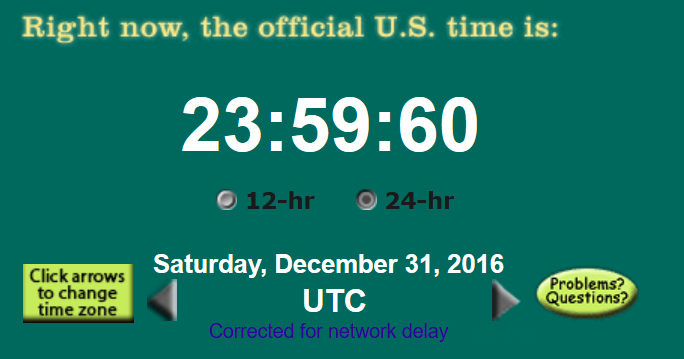
How can a watch go backwards? Three things set it: an operator by hand, a time service correcting an error (section 4), and a leap second. The Earth's rotation isn't perfectly regular, so every so often UTC adds one extra second to the end of a day, shown as 23:59:60, to keep civil time in step with the planet. Unix time has no way to write a 60th second, so the Linux kernel repeats a second instead: at midnight UTC, the wall clock goes back by one second.
That is what took down part of Cloudflare's DNS (the service that turns names into addresses) on 1 January 2017. The leap second made Go's time.Now() return an earlier value than a previous call. The negative duration reached rand.Int63n(), Go's random-number function, which panics (crashes the program) when given a number that isn't positive (Cloudflare's postmortem). At peak about 0.2% of DNS queries were affected, over 6 hours 45 minutes.
?Why did Go change, and not just Cloudflare?
Because every Go program measuring elapsed time had the same bug. The monotonic time proposal cites the outage. Since Go 1.9, time.Now() carries a wall reading and a monotonic one, and Sub, Since and Until use the monotonic one. No API changed. Other runtimes make you choose for yourself:
| Language | Wall clock | Monotonic clock |
|---|---|---|
| C / POSIX | clock_gettime(CLOCK_REALTIME) | clock_gettime(CLOCK_MONOTONIC) |
| Java | System.currentTimeMillis(), Instant.now() | System.nanoTime() |
| Python | time.time() | time.monotonic(), time.perf_counter() |
| Go 1.9+ | time.Now()'s wall reading | time.Now()'s monotonic reading, used by Sub |
| Rust | SystemTime | Instant |
So the wall clock is for display and the monotonic clock is for durations. Both come from the same machine, which raises the question of how a kernel can offer two clocks with such different rules. The answer is that it builds all of them from one counter, and Linux offers more than two.
03How Linux builds its clocks
On Linux, Python's time.time and time.monotonic call clock_gettime, a function that asks the kernel for the time on a named clock. The names are called clock IDs, and there are more than two.
3.1One counter, several bases
The machine has a single hardware counter, a register in the CPU that increases at a steady rate, driven by a quartz crystal called the oscillator. The kernel turns it into clocks by remembering a base for each one: "when the counter read X, this clock read Y". Each clock ID has its own base and its own rules about what may change it.
Two words describe the ways a wrong clock can be corrected. A step sets the clock to a new value in one go, and the new value can be earlier than the old one. A slew nudges the clock's rate, making it tick very slightly faster or slower until the error is gone, so it never goes backwards. Who does the correcting is the subject of section 4. For now only the difference matters. These are the clocks you'll choose between, as the clock_gettime(2) man page describes them (NTP is the protocol machines use to ask a time server for the right time, and "suspend" means the machine sleeping, as a closed laptop does):
| Clock | Counts from | Jumps when the time is set? | Slewed by NTP? | Counts suspend? | Use it for |
|---|---|---|---|---|---|
CLOCK_REALTIME | 1970-01-01 UTC, ignoring leap seconds | Yes | Yes | Yes | Timestamps humans read |
CLOCK_MONOTONIC | An unspecified point, in practice boot | No | Yes | No | Timeouts, latency, deadlines |
CLOCK_MONOTONIC_RAW | Same as MONOTONIC | No | No | No | Measuring the oscillator itself |
CLOCK_BOOTTIME | Same as MONOTONIC | No | Yes | Yes | Timers that must survive suspend |
CLOCK_TAI | Like REALTIME, but counts leap seconds | Along with REALTIME | Yes | Yes | Leap-second-free absolute time |
CLOCK_REALTIME_COARSE | Same as REALTIME | Yes | Yes | Yes | Cheap timestamps, a few ms of error |
?Why is MONOTONIC slewed but not stepped?
Because a slew only changes the rate, and a better rate helps everyone. If NTP decides the oscillator runs 20 ppm fast (20 parts per million, which is 20 microseconds of error every second), the kernel ticks a bit slower, and MONOTONIC gets that correction too, so your "one second" is closer to a real second. A step sets the time to a new value in one go, and only REALTIME takes it. MONOTONIC never goes backwards and never leaps.
3.2What a clock_gettime call costs
Our cart server asks for the time on every request, so the cost of the call matters. A syscall is a request from a program to the kernel, and each one pays a fixed toll to cross into it (chapter 07). clock_gettime() usually avoids even that. The kernel maps a page of timekeeping data into every process, and a small piece of kernel-supplied code called the vDSO reads the hardware counter and does the arithmetic inside your own process:
static __always_inline int do_hres(const struct vdso_data *vd, clockid_t clk,
				   struct __kernel_timespec *ts)
{
	const struct vdso_timestamp *vdso_ts = &vd->basetime[clk];
	u64 cycles, sec, ns;
	u32 seq;
	/* ... */
	do {
		while (unlikely((seq = READ_ONCE(vd->seq)) & 1)) {
			/* ... time namespace check ... */
			cpu_relax();
		}
		smp_rmb();
		/* ... */
		cycles = __arch_get_hw_counter(vd->clock_mode, vd);
		/* ... */
		ns = vdso_calc_ns(vd, cycles, vdso_ts->nsec);
		sec = vdso_ts->sec;
	} while (unlikely(vdso_read_retry(vd, seq)));
	/* ... normalise ns into ts ... */
}
The function loops until it gets a clean reading. It reads a sequence number, vd->seq, and if it's odd the kernel is in the middle of updating the page, so it waits. Then it reads the counter, scales it to nanoseconds, adds the clock's base, and checks that the sequence number hasn't changed. If it has, the kernel updated the page during the read and the loop runs again. Two details of this code explain the table above:
| Detail | What it means |
|---|---|
basetime[clk] | Every clock ID is the same hardware counter plus its own base. A step moves REALTIME's base and nothing else. |
vd->seq | A sequence count, odd while the kernel updates the page. Readers retry if it changed, so they never see half an update. |
vdso_calc_ns() scales the cycle count by a multiplier the kernel adjusts, and that's where NTP's slewing lands. The coarse clocks skip the counter and return the base itself. The kernel refreshes the base on every tick, a timer interrupt that arrives every few milliseconds, so a coarse clock only moves forward once per tick, and that's where the few milliseconds of error in the table come from.
The program below times five million calls to each clock, plus the same call forced through a real syscall with syscall(SYS_clock_gettime, …). It also calls adjtimex with modes = 0, which only reads and changes nothing. That call asks the kernel for its own opinion of how well its clock is being corrected. Many lines of the benchmark are elided here with a comment, but the shape is the same for every clock.
static void bench(const char *name, clockid_t id, int sys) {
    struct timespec t, a, b;
    clock_gettime(CLOCK_MONOTONIC, &a);
    for (int i = 0; i < 5000000; i++) {
        if (sys) syscall(SYS_clock_gettime, id, &t);  // force the trap
        else     clock_gettime(id, &t);               // vDSO
    }
    clock_gettime(CLOCK_MONOTONIC, &b);
    printf("%-24s %6.1f ns/call\n", name, ns(a, b) / 5000000);
}
/* ... REALTIME, MONOTONIC, MONOTONIC_RAW, BOOTTIME, TAI, REALTIME_COARSE ... */

struct timex tx = {0};               // modes = 0: read only, changes nothing
int state = adjtimex(&tx);REALTIME 18.3 ns/call
MONOTONIC 17.3 ns/call
MONOTONIC_RAW 18.2 ns/call
BOOTTIME 17.3 ns/call
TAI 18.8 ns/call
REALTIME_COARSE 3.8 ns/call
MONOTONIC via syscall() 133.6 ns/call
adjtimex state=5 offset=0 freq=0 maxerror=16000000 esterror=16000000 status=0x40The first seven lines show the cost of one call, in nanoseconds. The five fine-grained clocks cost about 17 to 19 ns each, which matches the code above: they are one counter read with different bases. The coarse clock costs about 4 ns because it skips the counter and returns the base. Forcing the real syscall costs about 134 ns, roughly 7 to 8 times more, which is the price of crossing into the kernel. The exact numbers vary with the CPU (on a recent Mac, REALTIME takes about 16.6 ns, MONOTONIC 23.4 ns and MONOTONIC_RAW 17.9 ns), but the shape holds: the vDSO makes every clock cheap, and a forced syscall costs several times more. The counter behind all of it is what the kernel calls its clocksource, arch_sys_counter on 64-bit ARM.
The last line is the more interesting one. State 5 is TIME_ERROR, and status 0x40 is STA_UNSYNC: nothing is correcting this kernel's clock, and the kernel reports a maximum error of 16,000,000 microseconds, 16 seconds. A kernel running as a guest on a cloud host (a virtual machine, which we'll meet next) often takes its time from the host and not from NTP, and here the kernel says honestly that it can't vouch for it.
3.3Clocks inside a VM
A virtual machine (VM) is a whole computer simulated by software on a host machine, and most cloud servers are VMs. They add their own error. A guest kernel without help from the host keeps time partly by counting timer interrupts, the regular signals a hardware timer sends the CPU, and the host has to simulate those. The kernel's KVM timekeeping notes warn that the host "may not be able to deliver the proper number of interrupts per second, and so guest time may fall behind", and that after a live migration, moving a running VM to another host, the counter may run at a different rate. Paravirtual clocks like kvm-clock, which let the guest read time from the host directly, fix most of the rate problem. A paused guest still resumes with its wall clock behind, and stays behind until its time service corrects it.
So a machine's wall clock is wrong by some amount, and something outside the machine has to set it right. That something is a time service, and it brings our two cart replicas back into the story, because each of them sets its watch this way.
04Setting the watch: NTP
4.1Why two watches disagree
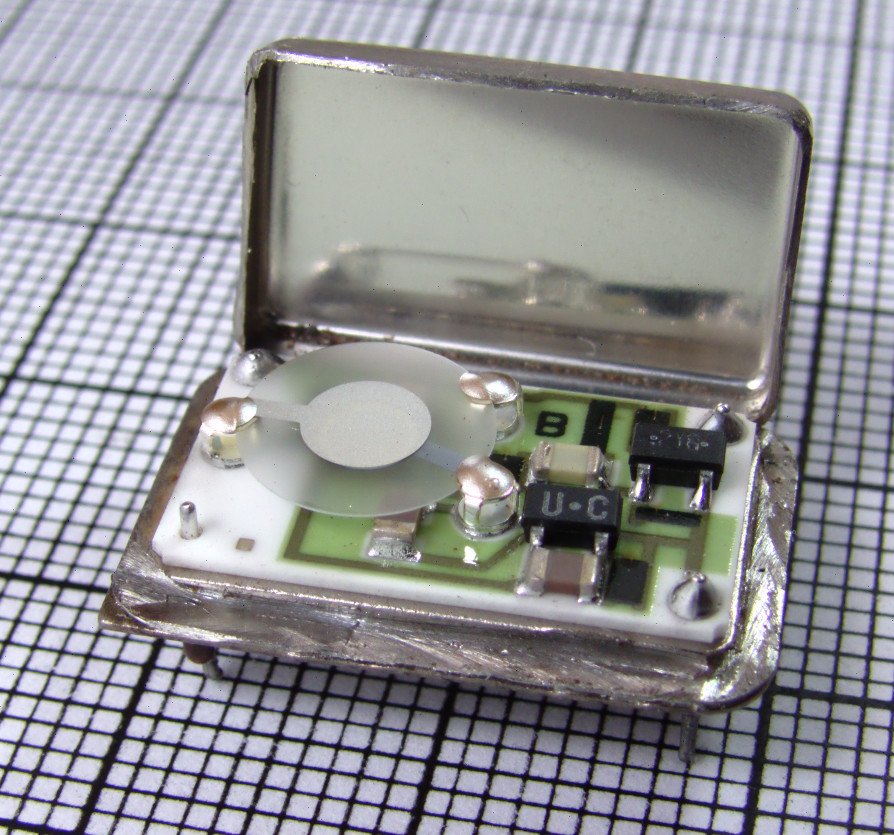
Replica A and replica B each have a clock built on a quartz crystal, and the crystal's frequency depends on temperature and on the individual crystal. Two machines set to the same time therefore drift apart. Spanner, Google's globally distributed database, assumes a worst-case drift of 200 microseconds per second for its clocks (Corbett et al.), which adds up to 0.72 seconds an hour if nothing corrected it.
Correcting means learning the right time from somewhere, and that's harder than it sounds.
?Why can't two machines just agree on the time?
Because the only way to learn another machine's clock is to send it a message and wait for the reply, and you can't tell how the round trip split between the two directions. Every comparison between machines comes with an error bar of roughly half the round trip.
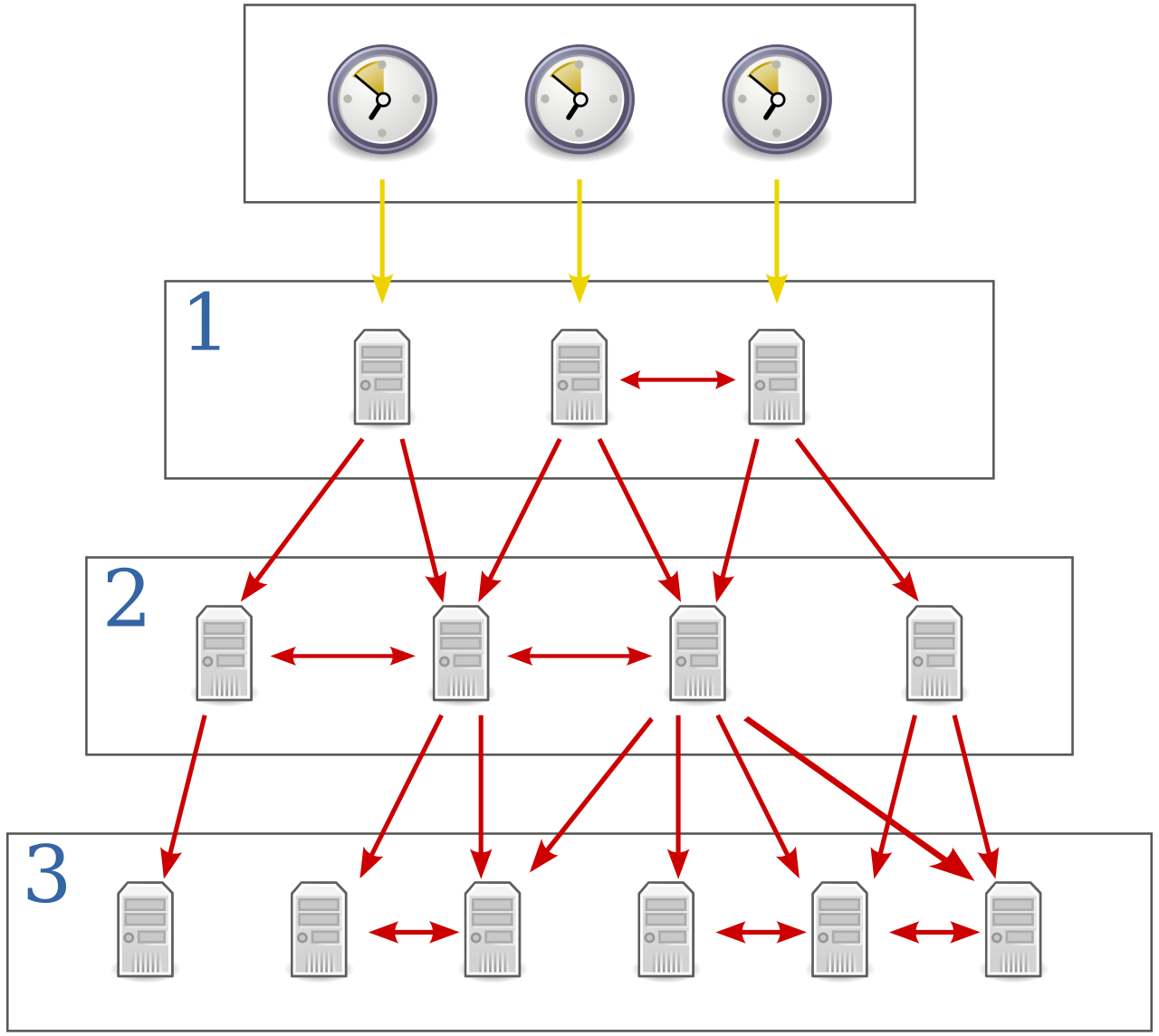
The Network Time Protocol (RFC 5905), NTP, is how nearly every server keeps its wall clock near UTC. It's spoken by ntpd, chronyd and systemd-timesyncd, three common time daemons, which are programs that run in the background for as long as the machine is up. Let's see how it copes with that error bar.
4.2Measuring an offset over a network
Say replica B wants to check its watch against a time server. It wants the offset, how far its clock is from the server's, and the round-trip delay. NTP collects four timestamps per exchange, two from each clock:
The formula for θ averages the two directions. That works if the request and the reply took the same time on the wire, and nothing guarantees it.
?Why does an asymmetric route ruin the estimate?
The offset formula assumes both legs took the same time. If the request takes 30 ms and the reply 10 ms, NTP reads the 10 ms difference as clock offset and sets your clock 10 ms wrong, and nothing in the four timestamps can reveal it.
What NTP can do is bound it: the true offset is within δ/2 of the estimate, whatever the asymmetry. So clients prefer samples with the smallest round trip, and a nearby server will probably beat a better one far away.
4.3Slew or step
Once B knows its offset, it can fix it the two ways from section 3.1:
| Slew | Step | |
|---|---|---|
| What happens | The clock runs slightly fast or slow until the offset is gone | The clock is set to the right value at once |
| Goes backwards? | Never | It can |
| Speed | ntpd: "each second of adjustment requires an amortization interval of 2000 s" (docs) | Instant |
| ntpd default | Offsets under the 128 ms step threshold | Offsets over it |
| chrony default | Everything, at up to 83,333 ppm (maxslewrate) | Only if configured, e.g. makestep 0.1 3: step if off by more than 0.1 s, in the first 3 updates |
chrony's makestep steps only during the first few updates after the daemon starts, when a fresh machine is most likely to be far off. After that it slews.
?Why not always slew?
Because slewing is slow on purpose. At ntpd's rate every second of error takes 2,000 seconds to remove, so a 600-second error takes 1.2 million seconds, which the docs put as "will take almost 14 days to complete",, and the machine timestamps everything wrong the whole time. Stepping at boot and slewing afterwards gives you a fast start and no backwards jumps once your services run.
4.4How close NTP gets you
It depends on the path to the time source:
| Setup | Typical error | Source |
|---|---|---|
| NTP over the public internet | Tens of ms; 100 ms or more with asymmetric routes | Wikipedia, NTP |
| NTP on a LAN, good conditions | Under 1 ms | same |
| Cloud VMs, as CockroachDB saw them | "On Azure, clock offsets between 250ms and 500ms are common. On AWS and GCE, clock offsets generally stay below 250ms." | pkg/base/constants.go |
| Amazon Time Sync over NTP | Error bound under 100 µs on supported instances | AWS, 2023 |
| Amazon Time Sync, PTP hardware clock | Under 40 µs | same |
| Spanner's TrueTime | 1 to 7 ms, 4 ms most of the time | Corbett et al. |
(LAN means a local network. PTP is the Precision Time Protocol, a cousin of NTP that relies on hardware support.) That CockroachDB comment sits right above the constant for its default maximum clock offset. It's what the authors saw on real cloud VMs, which probably makes it more useful than any spec sheet.
Now put our cart servers in this table. Even in the good rows, A and B differ by tens of microseconds, and on a cloud with the bad numbers they could differ by hundreds of milliseconds. The pen and the mug were a tenth of a second apart, which is inside that error. No amount of tuning makes the problem go away, because the error is never zero.
4.5Leap seconds and smearing
Section 2 met the leap second as a one-second backwards step of the wall clock. It has caused two well-documented failures, and Cloudflare's was the second:
- 30 June 2012. Linux applied the leap second without notifying the high-resolution timer subsystem, so futex timers (the kernel timers behind timeouts on thread waits) kept expiring and re-arming. Java virtual machines, MySQL and other programs with many threads sat at 100% CPU (Ubuntu bug 1020285, LWN).
- 31 December 2016. The Cloudflare outage from section 2.1.
?What does a leap smear do instead?
It spreads the extra second over many hours, so no clock ever repeats a second. Google's smear is linear over 24 hours, noon to noon UTC, slowing clocks by about 11.6 ppm. chrony can serve smeared time with smoothtime.
The cost is that a smeared clock and an unsmeared one disagree by up to half a second during the smear. AWS doesn't recommend "mixing smeared and non-smeared time sources", and its PTP hardware clock has no smeared option. A fleet that mixes a smearing cloud time service with public pool servers has a built-in half-second disagreement whenever a leap second happens, so every machine that compares timestamps should share one leap-second policy. The problem is also ending: in 2022 the General Conference on Weights and Measures resolved to let UT1 (time defined by the Earth's actual rotation) and UTC drift further apart by 2035, which probably ends leap seconds for good.
We now know the best the wall clock can do. It's good enough for log lines, and it leaves an error between machines that nothing removes. Let's see what that error does to the cart.
05Ordering the cart by timestamp
5.1Last-write-wins
Section 4 left us with two cart servers whose watches differ by an unknown amount. Let's see what that does to the simplest rule for settling the cart. Every tap reads the cart, adds an item and writes the whole cart back, which is called a read-modify-write. Each replica stamps its write with the time on its own watch. When the replicas compare notes and hold different versions, each keeps the version with the higher stamp and drops the other. This rule is last-write-wins, or LWW, and real databases use it. Cassandra, for one, resolves conflicting writes to a cell by timestamp, highest wins. By default "the coordinator will use the current time (in microseconds) at the start of statement execution", and clients can supply one with USING TIMESTAMP (Cassandra docs). The coordinator is the server that receives the client's request.
In the scene below, replica A's clock happens to run 200 ms fast, which is inside the cloud-VM errors from section 4.4, and nobody knows it. Watch the stamps, then watch which cart survives.
Now replay it with accurate clocks. The mug's stamp would be higher, the mug's cart would win, and the pen would vanish instead. Both writes replaced the whole cart and only one whole cart can win, so LWW throws one item away whatever the clocks say, and the skew only decides which one. Both clients were told their write succeeded, and nothing anywhere reports an error.
?What goes wrong when one coordinator's clock is fast?
Every write it coordinates is stamped in the future. With its clock 200 ms ahead:
- A write through it at 12:00:00.000 is stamped 12:00:00.200.
- A later write through an accurate node at 12:00:00.100 loses. Both clients were told success.
- A
DELETEin a store like this doesn't erase anything. It writes a timestamped marker saying "deleted at time T", called a tombstone, and the highest timestamp still wins. Delete a row through an accurate node within 200 ms of writing it through the fast node, and the tombstone is older than the data. The row stays.
Kyle Kingsbury's Jepsen analysis of Cassandra (Jepsen is a series of tests that probe databases for lost writes) showed acknowledged writes to one cell silently discarded under LWW, and makes the general point: an LWW register only guarantees your write survives when the value is immutable.
5.2Two ways out
Two timestamps from two machines only tell you which event came first if they're further apart than the clock error. If correctness depends on order, there are two honest options. The first is to learn how large the error is and design around that bound. That's the road Spanner and CockroachDB take, in sections 8 and 9. The second is to stop using physical time for ordering altogether and ask what order we need. The second is simpler, so we'll take it first.
06Happened-before and Lamport clocks
6.1What order do we need?
Look at the pen and the mug again. When replica A accepted the pen, it had never heard of the mug, and when B accepted the mug, it had never heard of the pen. Neither write could have influenced the other, so there's no real "first" between them. The only orders that mean anything are the ones where information could have flowed.
Leslie Lamport's 1978 paper Time, Clocks, and the Ordering of Events in a Distributed System made that precise. Event a happened before b (written a → b) if:
- a and b are on the same process, and a came first; or
- a sends a message and b receives that message; or
- there's some c with a → c and c → b.
If neither a → b nor b → a, the events are concurrent. That doesn't mean simultaneous. It means no information could have flowed from one to the other. The pen and the mug, accepted on two replicas that hadn't spoken, are concurrent.
?Why is that the right order to care about?
Because it's the order your program can observe. A handler can only depend on what reached it, and everything that reaches it travels along the message paths happened-before describes. Two events with no path between them can't depend on each other, so any order you pick for them is consistent with what every process saw.
6.2The Lamport clock
Lamport also gave a cheap way to compute an order that respects happened-before. A Lamport clock is one integer counter per process, with three rules:
- Before each local event, increment the counter.
- Attach the counter to every message you send.
- On receive, set the counter to
max(local, received) + 1.
Let's run the rules on the cart. Both counters start at 0. Replica A accepts the pen, replica B accepts the mug, and then the replicas exchange messages:
The guarantee runs one way: if a → b, then L(a) < L(b), because every step along a causal path increases the counter. Break ties by process ID, comparing (L, pid) pairs, and you get a total order that every process computes the same way. Lamport's paper builds a distributed mutual exclusion algorithm on exactly that.
6.3What a Lamport clock can't tell you
Look again at the first two events in the exchange. The pen and the mug both have L=1. With the tie-break by process ID, (1, A) sorts before (1, B), so a Lamport clock would say the pen came before the mug, though they were concurrent. Here is a similar question.
Event x on node A has Lamport timestamp 5. Event y on node B has timestamp 9. What can you conclude?
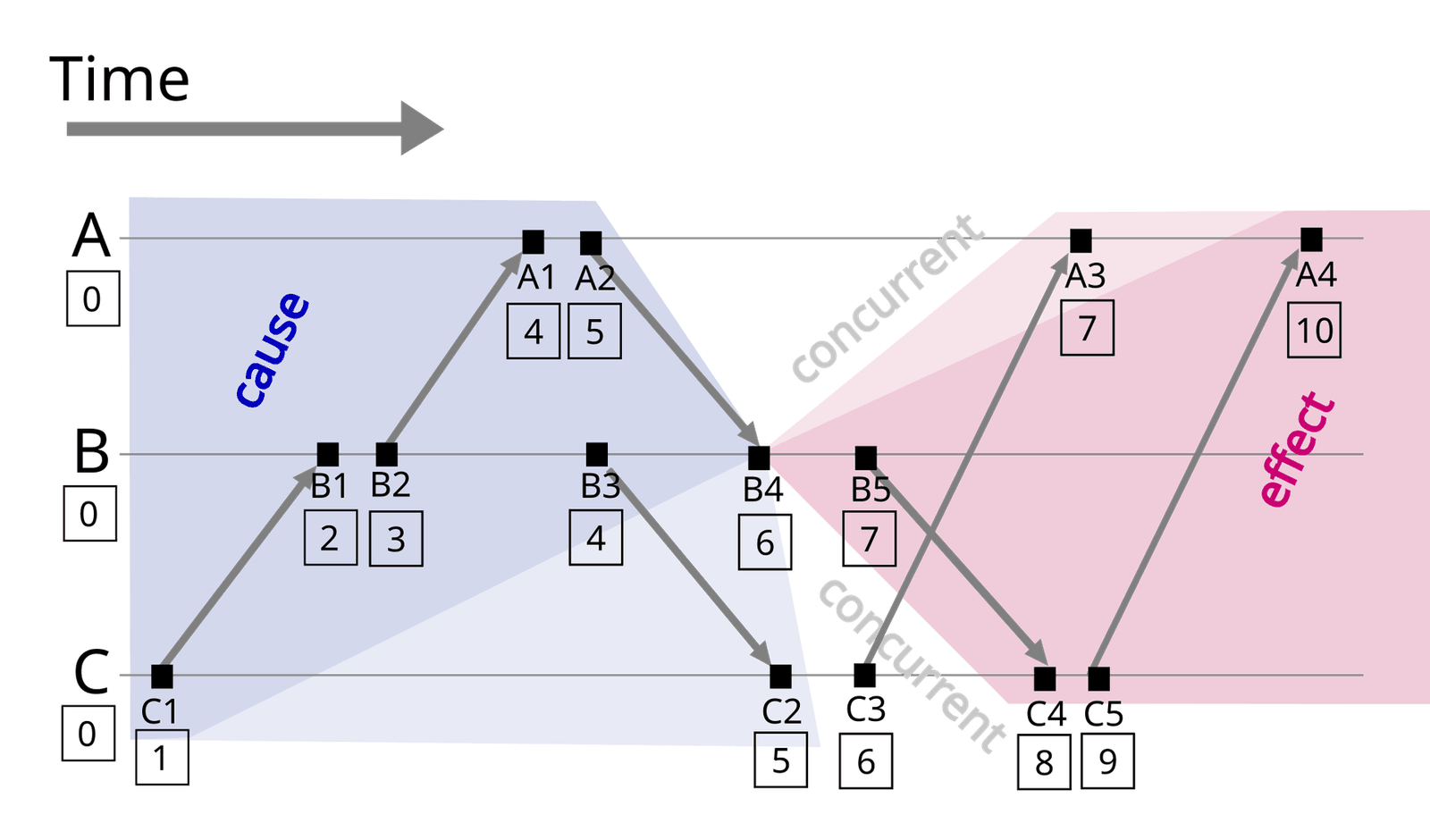
That gap matters when you need to detect concurrency. Suppose the network between A and B breaks for a while, a partition, so each replica carries on alone. Writes accepted on both sides during a partition should be recognised as concurrent, so the store can keep or merge both. A Lamport clock orders them anyway, and whichever sorts second silently wins, which is the lost mug again. To keep both items we need a clock that can say "these two are concurrent".
07Vector clocks and version vectors
A Lamport clock squeezes everything a process knows into one number, and that's why it can't tell concurrency from order. The fix is to stop squeezing: a vector clock keeps one counter per process. Colin Fidge and Friedemann Mattern described it independently in 1988.
7.1The rules, and the comparison
Process i keeps a vector V with one entry per process. Before a local event, it increments V[i]. It attaches the whole vector to every message. On receive, it takes the element-wise max with the received vector, then increments V[i]. Comparing two vectors gives three answers:
| Relation | Condition | Meaning |
|---|---|---|
| a → b | V(a) ≤ V(b) in every entry, and they differ | a happened before b |
| b → a | V(b) ≤ V(a) in every entry, and they differ | b happened before a |
| a ∥ b | Neither dominates | Concurrent, and you can tell |
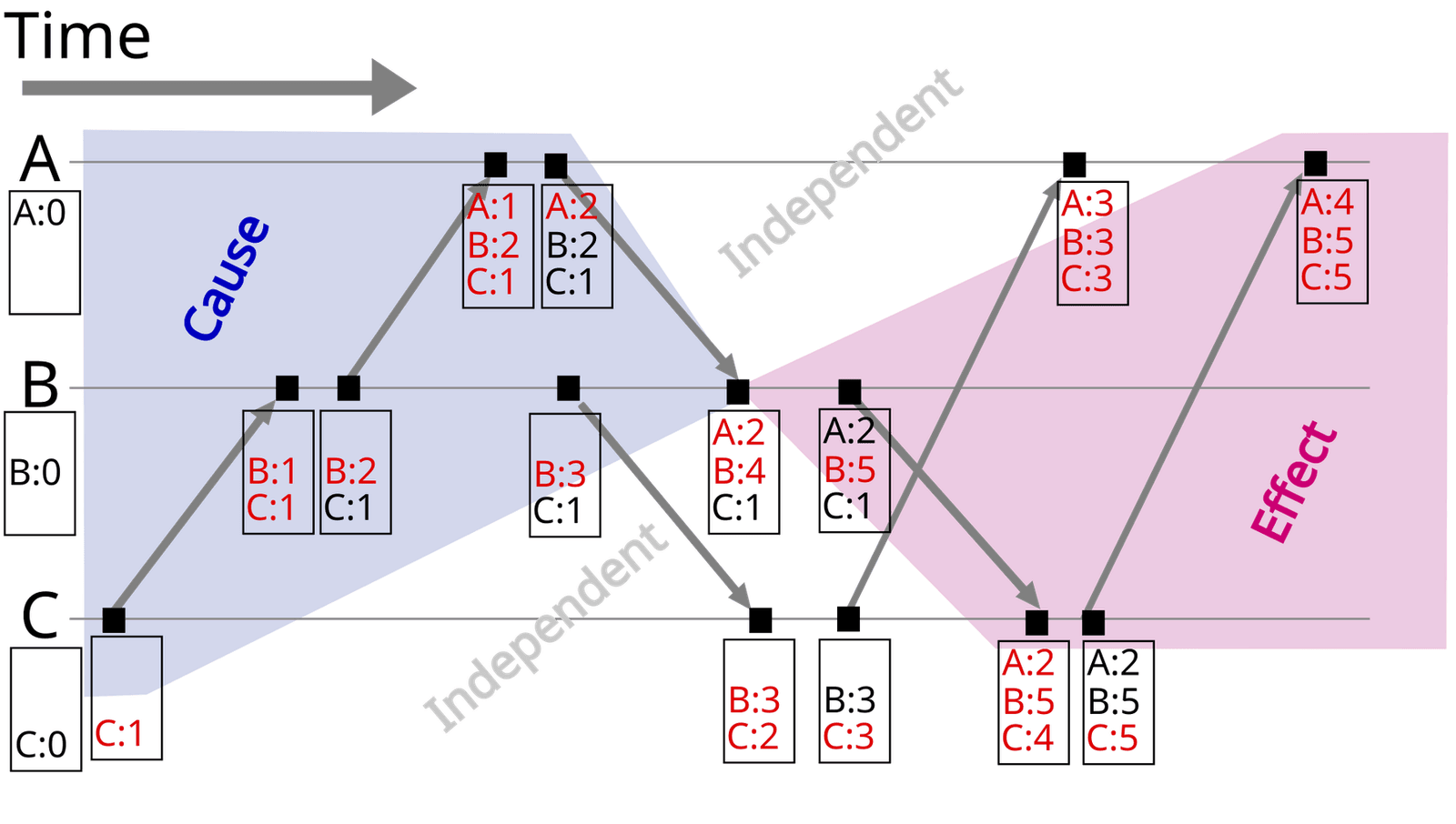
This works both ways: a → b exactly when V(a) < V(b). Let's replay the pen and the mug with vectors. A cart store doesn't need to count every event, only writes, so each version of the cart carries a vector with one entry per replica: how many writes that replica has coordinated. (Section 7.2 gives this slimmer variant its name.) This time the replicas are cut off from each other while the two taps happen:
The scene replays exactly the case Lamport clocks miss, and the vectors catch it.
7.2Version vectors, and Dynamo's shopping cart
Storage systems usually keep a version vector: one counter per replica, bumped only when that replica coordinates a write to the object. It tracks one piece of data's history, not every event, so it's much smaller. The scene above is a version vector.
Amazon's Dynamo paper (SOSP 2007) made this famous, with the shopping cart as its example. Concurrent versions go back to the application to reconcile. Over 24 hours of the cart service, 99.94% of requests saw exactly one version, and the paper blames the rest mostly on concurrent writers ("busy robots"), not failures.
?Why not just merge automatically?
Because the store doesn't know what the values mean. Union seems a reasonable merge for a cart, though a deleted item can reappear. For a bank balance, neither union nor either value is correct. Vectors tell you that you have a conflict; domain logic, or a CRDT, a data type whose merge rule is built in so that replicas always converge, has to resolve it.
7.3The size problem
A vector has one entry per writer, and entries never leave on their own. With clients as writers, or sloppy quorums (a Dynamo-style mode where any reachable nodes can accept a write when the usual ones are down) that let many nodes coordinate, it keeps growing. Dynamo truncates: "when the number of (node, counter) pairs in the vector clock reaches a threshold (say 10), the oldest pair is removed". The paper admits this weakens reconciliation, and says the problem "has not surfaced in production".
Riak hit a worse one, sibling explosion. Plain version vectors can say two updates are concurrent but not which value came from which, so retried writes could pile up duplicate siblings without bound (Riak docs). Riak 2.0 switched to dotted version vectors (Preguiça et al., 2010), which tag each value with the one event, the "dot", that created it. Siblings then stay "proportional to the number of concurrent updates".
Vectors answer "which came first, or were they concurrent", but they say nothing about when in the sense of a clock on the wall. A database asked to show the cart "as of 12:00" can't use them. The next idea keeps the counters and adds the wall clock back.
08Hybrid logical clocks
A hybrid logical clock (HLC) respects causality like a Lamport clock and stays close to wall time, so a database that serves "read as of 12:00" can use it.
8.1The algorithm
Kulkarni, Demirbas and colleagues described it in Logical Physical Clocks and Consistent Snapshots in Globally Distributed Databases (2014). A timestamp is a pair (l, c): l is the largest physical time the node has heard of, and c is a counter for when l hasn't moved.
- Local or send:
l = max(l, physical_now). Ifldidn't change, incrementc; otherwise reset it to 0. - Receive:
lis the max of locall, the message'sland physical now.ccomes from whichever contributed the winner, plus one, or 0 if physical time won outright.
Compare l first, then c. As with Lamport, a → b implies hlc(a) < hlc(b). Unlike Lamport, l never runs further ahead of a node's physical clock than ε, the maximum offset between any two clocks.
?Why doesn't the counter grow without bound?
Because c only climbs while l is stuck at a value from a node whose clock ran ahead. Once the local clock passes that value, l takes physical time and c resets. On four EC2 nodes (Amazon's cloud VMs) in the paper's experiments, c stayed below 4, so the authors pack it into 64 bits: 48 bits of NTP time for l, and 16 bits for c.
8.2CockroachDB's HLC, line by line
CockroachDB keeps an HLC per node and every key-value request carries its timestamp. Taking a new one is the paper's send rule:
func (c *Clock) NowAsClockTimestamp() ClockTimestamp {
	physicalClock := c.getPhysicalClockAndCheck(context.TODO())
	c.mu.Lock()
	defer c.mu.Unlock()
	if c.mu.timestamp.WallTime >= physicalClock {
		// The wall time is ahead, so the logical clock ticks.
		c.mu.timestamp.Logical++
	} else {
		// Use the physical clock, and reset the logical one.
		atomic.StoreInt64(&c.mu.timestamp.WallTime, physicalClock)
		c.mu.timestamp.Logical = 0
	}

	c.enforceWallTimeWithinBoundLocked()
	return c.mu.timestamp
}
The receive side is where it gets dangerous, since a remote node can push your clock forward:
func (c *Clock) UpdateAndCheckMaxOffset(ctx context.Context, rt ClockTimestamp) error {
	physicalClock := c.getPhysicalClockAndCheck(ctx)

	offset := time.Duration(rt.WallTime - physicalClock)
	if c.maxOffset > 0 && offset > c.maxOffset {
		return errors.Mark(
			errors.Errorf("remote wall time is too far ahead (%s) to be trustworthy", offset),
			errUntrustworthyRemoteWallTimeErr,
		)
	}

	if physicalClock > rt.WallTime {
		c.Update(ClockTimestamp{WallTime: physicalClock})
	} else {
		c.Update(rt)
	}

	return nil
}| Line | What it does |
|---|---|
offset > c.maxOffset | Refuses a remote timestamp more than the maximum offset ahead, so one node an hour fast can't drag the cluster an hour forward. |
c.Update(...) | Ratchets the local clock to the later of the two. Unlike the paper, receive doesn't bump the logical part; the next Now does. |
enforceWallTimeWithinBoundLocked() | Crashes the node on purpose (log.Fatalf) if the clock passes an upper bound persisted earlier, so a restarted node can't reissue timestamps it may already have used. |
8.3Max offset, uncertainty and self-termination
The maximum offset is the operator's promise that no two clocks differ by more than this. It defaults to 500 ms (CockroachDB FAQ).
?Why does a database built on HLCs need a clock bound at all?
Because an HLC only orders events linked by messages. A transaction is a group of reads and writes that take effect together, and each one gets a timestamp from the HLC of the node that runs it. Say transaction T1 commits on a node whose clock is 100 ms fast, so its commit is stamped 100 ms in the future. The user sees it finish and then starts T2 on an accurate node, with no message between the two nodes. T2's read timestamp is up to 100 ms earlier than T1's commit stamp, though T1 finished first in real time, so a plain read at T2's timestamp would skip T1's write.
So a read at t treats any value stamped in (t, t + max offset] as possibly in its past, and on finding one does an "uncertainty restart" just above it (Living Without Atomic Clocks). In the post's words, "While Spanner always waits after writes, CockroachDB sometimes retries reads."
That only works if the promise holds, so nodes check each other's clocks with the periodic check-in messages they already send each other (heartbeats). A node whose clock is off from at least half the others by 80% of the maximum offset "spontaneously shuts down". That is the lesser evil: a missing node is an outage the cluster can route around, while a node whose clock has broken the promise would serve wrong answers and nobody would notice.
8.4MongoDB's cluster time
MongoDB uses the same idea with a coarser physical part. Per Tyulenev et al.'s SIGMOD 2019 paper, cluster time pairs a 32-bit count of Unix seconds with a 32-bit increment for writes in the same second. It advances on writes to the oplog, the log of every change kept by the primary (the one node in a group of replicas that accepts writes), and every message carries the highest value the sender has seen.
?Why is MongoDB's cluster time signed?
Because clients pass it along too. A malicious client could send a cluster time near the maximum and push every node there, after which no write could get a larger timestamp. So servers sign it with an HMAC, a signature only holders of a secret key can produce: anyone can read it, only MongoDB processes can mint one. A session that asks for causal consistency (reads never go back in time relative to what it has already seen) then reads with afterClusterTime set to its last operationTime, and the serving node waits until its oplog catches up.
An HLC leans on a promised bound on clock error. Spanner asks what happens if we measure the bound for real and wait out the error instead of retrying.
09TrueTime and commit wait
Spanner takes the other road from section 5.2: measure how wrong the clocks are, and wait out the error.
9.1A clock that returns an interval
TT.now() returns [earliest, latest] and guarantees the true time is inside. TT.after(t) is true if t has definitely passed. ε is half the interval's width. From the Spanner paper (Corbett et al., OSDI 2012, quoted from the extended TOCS version):
| Piece | How it works |
|---|---|
| Time masters | A set per datacenter. Most have GPS receivers; the rest, "Armageddon masters", have atomic clocks, because the two fail in unrelated ways. |
| Timeslave daemon | One per machine. It polls several masters, rejects liars with a variant of Marzullo's algorithm, which finds the time range most sources agree on, and syncs to the rest. |
| Drift bound | Between polls, ε grows at an assumed worst case of 200 µs/s. Machines that drift faster are evicted. |
| Resulting ε | A sawtooth (growing between polls, dropping back at each one) "from about 1 to 7 ms over each poll interval", polling every 30 s: 0–6 ms of drift plus 1 ms of network delay. "ε is therefore 4 ms most of the time." |
?How much do you have to trust the bound?
Completely. If a clock drifts faster than 200 µs/s, TrueTime's guarantee is false and so is Spanner's consistency. The paper's argument is empirical: "bad CPUs are 6 times more likely than bad clocks". A clock you measure and evict is as trustworthy as the rest of the hardware.
9.2Commit wait, step by step
What does an interval clock buy? Spanner wants external consistency: if transaction T1 commits before transaction T2 starts, in real time, then T1's commit timestamp must be smaller than T2's. That's exactly the guarantee section 8.3's fast-clock example broke. Two ordinary clocks can't promise that, and an interval clock can, with two rules.
The leader of a commit, the server in charge of it, holds locks on the data being written so nobody else changes it meanwhile. The start rule says it picks a commit timestamp s no less than TT.now().latest, so s can't be earlier than the true time of the request. The commit-wait rule says nothing becomes visible until TT.after(s) is true, so s is guaranteed to be in the past when anyone sees the write.
The leader also has the write copied to several machines using Paxos, a protocol that makes machines agree on one log entry (chapter 27 covers it). Here is your friend's mug write going through all of this, with ε = 4 ms and a Paxos round that takes 10 ms for this example:
The paper's proof chains the rules: s1 is before T1's real commit time (commit wait), T1's commit is before T2 starts (assumption), T2 starts before it reaches its leader (causality), and that arrival is at or before s2 (start). So s1 < s2, with no message between the transactions.
ε is 4 ms and a Paxos round takes 10 ms. Roughly how much latency does commit wait add to a write?
9.3TrueTime outside Google
You can build the same interval on AWS. The ClockBound daemon reads chrony's state and publishes earliest, latest and a sync status, with the NTP error bound computed as |local offset| + root dispersion + root delay / 2. It grows between updates, like TrueTime's sawtooth. With bounds under 100 µs, a 2ε commit wait is roughly 0.2 ms at most.
| Approach | Clock requirement | What you pay | If the bound breaks |
|---|---|---|---|
| Spanner / TrueTime | A measured, enforced ε | Commit wait of about 2ε | Consistency violation, prevented by evicting bad clocks |
| CockroachDB / HLC | An operator-promised max offset, 500 ms default | Read restarts in the uncertainty window | Stale reads, prevented by self-termination |
| Pure logical clocks | None | No wall-time reads or real-time order | Nothing to break |
| Wall-clock LWW | Implicit, rarely stated | Nothing up front | Silently lost writes |
9.4The mechanisms side by side
Now that every mechanism has a name, here they are together, with what each one costs in size and what it can tell you:
| Mechanism | Size | Detects concurrency? | Near wall time? | Used in |
|---|---|---|---|---|
| Physical timestamp | 8 bytes | No, and misorders under skew | Yes | Cassandra cells |
| Lamport clock | 8 bytes | No | No | Lamport's mutual-exclusion algorithm; the logical half of every HLC |
| Version vector | One entry per writer | Yes | No | Dynamo, Riak before 2.0 |
| Dotted version vector | Per replica, plus a dot per value | Yes, without sibling explosion | No | Riak 2.0+ |
| Hybrid logical clock | 8 bytes | No | Yes, within the clock offset | CockroachDB, MongoDB |
| TrueTime interval | Two timestamps | Orders non-overlapping intervals | Yes, with a bound | Spanner |
Every mechanism so far replaced a clock's answer to "which came first" with something sturdier. There's one more place where a clock quietly decides who wins, and it has nothing to do with data versions.
10Leases and fencing tokens
10.1A lock with an expiry
Suppose a cleanup job on the cart replicas must run on only one worker at a time, so workers take a lock. A lock held by a worker that crashes would block everyone forever, so the lock is a lease from section 2.1: it expires after a set time. That solves the crash, and it assumes the holder notices when its time is up.
Martin Kleppmann's How to do distributed locking (2016) walks through the failure. Client 1 takes the lease and then pauses, in a long garbage collection (GC, when a runtime stops your program to free memory), say. The lease expires, client 2 takes it, and client 1 wakes still believing it holds the lock. Both write. No clock on client 1 could prevent this, because client 1 wasn't running to read one.
?What's a fencing token?
A number that goes up with every grant, checked by the resource and not by the client. Client 1 gets token 33 and pauses; client 2 gets 34 and writes. When client 1 writes with 33, the storage "remembers that it has already processed a write with a higher token number (34), and so it rejects the request".
That moves the ordering decision from a clock to a counter, the same move Lamport made in 1978. The lock service has to issue tokens in strict order, which in practice means a consensus store, a small cluster of machines that agree on every change. ZooKeeper and etcd are the common ones, and each keeps a counter that only goes up (ZooKeeper's zxid, etcd's revision), so the lock service can hand out that counter as the token. Chapter 27 covers how those stay safe, including the leases Raft leaders use for reads.
11What it all costs
11.1Reading a clock
Section 3.2's numbers, side by side. They vary with the CPU, but the shape holds everywhere the vDSO exists: reading a clock is cheap, and a forced syscall costs several times more.
So the cart server can stamp every request, even a million a second, without noticing: a million vDSO calls at about 18 ns spend 18 ms of each second.
11.2Waiting out the error
The cost of the better clocks is the error you have to wait out. The Spanner numbers from section 9 give a worked example:
| Drift between two polls | 30 s × 200 µs/s | 6 ms |
| Add network delay to a master | 6 ms + 1 ms | up to 7 ms |
| Typical ε in the paper | stated in the paper | 4 ms |
| Commit wait at that ε | 2 × 4 ms | 8 ms |
| A Paxos round in this example | assumed | 10 ms |
| Latency commit wait adds | 8 ms hides inside 10 ms | 0 ms |
| Commit wait with a 100 µs bound | 2 × 100 µs | 0.2 ms |
| why Google paid for GPS and atomic clocks | 8 ms → 0.2 ms | |
Commit wait costs nothing extra while 2ε stays below the replication time, and it adds latency once 2ε grows past it, which is why Google spends money on GPS receivers and atomic clocks to keep ε small.
12Watching clocks on a real system
12.1Seeing the clocks
Each question this chapter raised has a command that answers it.
# Is the host's clock being corrected, and how far off is it? (sections 3 and 4)
chronyc tracking          # offset from the time source, root delay, root dispersion
chronyc sources -v        # which servers it talks to and how each one looks
timedatectl status        # "System clock synchronized: yes" or "no"

# Which hardware counter sits behind the clocks? (section 3)
cat /sys/devices/system/clocksource/clocksource0/current_clocksource

# Are step and leap-second settings what you expect? (sections 4.3 and 4.5)
grep -E 'makestep|smoothtime|leapsecmode' /etc/chrony/chrony.conf    # path may be /etc/chrony.conf

# Does any code time a duration with the wall clock? (section 2)
grep -rnE 'currentTimeMillis|time\.time\(\)|Date\.now\(\)' src/
chronyc tracking is the most useful of these. It shows the daemon's own estimate of the offset, plus root delay and root dispersion, from which ClockBound (section 9.3) computes the worst-case error as |offset| + root dispersion + root delay / 2. That's the error bar from section 4.4, so graph it for every host. The C program from section 3.2 reads the kernel's own maxerror through adjtimex.
12.2Rules that hold up
- Use the monotonic clock for every duration, and the wall clock only to show a time to a human.
- Never let a timestamp from two machines decide who wins, unless a version vector, a transaction or a fencing token backs it up.
- Alert on the offset and the error bound, not on whether the time daemon is running.
- Share one leap-second policy fleet-wide. Mixing smeared and unsmeared sources builds in a half-second disagreement.
- Step the clock at boot and slew afterwards, so services never see time go backwards.
- Pair every lease with a fencing token checked by the resource.
- Don't raise CockroachDB's maximum offset to silence restarts, because it widens every read's uncertainty window.
12.3What you trade for what
| You get | You pay | When the bill arrives |
|---|---|---|
| A wall clock near UTC from NTP | An error of tens of µs to hundreds of ms that nothing removes | When two machines' timestamps are compared |
| Slewing: time never goes backwards | Slow correction, 14 days for 600 s at ntpd's rate | As timestamps that stay wrong for days |
| Leap smearing: no repeated second | Up to half a second of disagreement with unsmeared clocks | When a fleet mixes time sources |
| Lamport clocks: cause-respecting order in 8 bytes | No way to tell concurrent from ordered | As a silently lost write |
| Vector clocks: concurrency detected | One entry per writer, and the app must merge siblings | As metadata growth or a merge bug |
| HLC: near wall time with causality | A promised clock bound | As a node that shuts itself down |
| TrueTime: external consistency | A commit wait of about 2ε, and GPS and atomic clocks | As write latency when ε grows |
12.4Symptom, cause, fix
| Symptom | Likely cause | Fix |
|---|---|---|
| Negative durations, panics or huge timeouts after a clock change | Elapsed time taken from the wall clock | Monotonic clock for every duration |
| Every lease or session expires at once | Wall clock stepped forward; expiry in wall time | Monotonic deadlines; step only at boot |
| Cross-host logs show effects before causes | Normal clock skew | Propagate trace IDs or a logical clock; don't sort by host time |
| Cassandra deletes don't stick, recent writes vanish | A fast coordinator or client clock under LWW | Fix time sync, alert on offset, avoid client timestamps |
| CockroachDB nodes shut themselves down | Offset past 80% of the maximum | Fix chrony on that node; don't just raise the max |
| Half-second disagreements on a leap day | Mixed smeared and unsmeared sources | One leap policy fleet-wide |
| Two clients both "hold" the lock | A paused holder past its lease | Fencing tokens checked by the resource |
?What should you check on Monday?
First, grep for durations computed from wall-clock calls. Second, find every place a timestamp decides which write wins, and ask what happens if one machine is a second fast. Third, run chronyc tracking on a few hosts, check they share sources and a leap policy, and graph the offset.
13Summary
- "Time" is three questions. What time is it, how long did it take and which came first each need a different clock.
- The wall clock can go backwards. Steps and leap seconds move
CLOCK_REALTIME, which is how a negative duration took down part of Cloudflare's DNS.CLOCK_MONOTONICis only slewed. - Every Linux clock is one counter with a different base. Each costs about 18 ns through the vDSO, against about 134 ns when forced through a syscall.
- Clocks disagree by about half a round trip. You can't see how a delay splits between directions, so NTP's error is bounded by δ/2, and quartz drift adds more between corrections (Spanner assumes up to 200 µs a second).
- NTP accuracy depends on the path. Tens of milliseconds over the internet, under 100 µs with Amazon's local service, hundreds of milliseconds on some cloud VMs by CockroachDB's account.
- Leap seconds break code that assumes time only moves forward. Smear them, with one policy fleet-wide.
- Last-write-wins loses the pen or the mug. With skewed clocks one write is silently dropped, and with perfect clocks it still is for read-modify-write data.
- Lamport clocks give a causal total order, not concurrency. A smaller timestamp never proves happened-before.
- Vector clocks detect concurrency at a size cost. Dynamo truncated them; Riak moved to dotted version vectors.
- HLCs stay near wall time but still need a clock bound. CockroachDB enforces its 500 ms default with read restarts and self-termination, and Spanner measures ε and waits it out, about 2ε.
- A lease needs a fencing token, because a paused holder can't read any clock.
14Build this
A clock-skew test bench for a toy key-value store.
- Write a three-node store where each node's "wall clock" is a function you control, so you can add an offset or drift per node without touching the real clock.
- Implement three conflict rules: LWW on wall time, LWW on an HLC, and version vectors that keep siblings. Drive the same random mix of puts, deletes and read-modify-writes through each.
- Skew one node by 0, 10, 100 and 1,000 ms and count lost acknowledged writes and resurrected deletes. Then add CockroachDB's max-offset check and see which failures become errors.
You'll be able to watch the pen and the mug from this chapter lose and survive under each rule.
15Interview questions
beginnerWhy measure a request's latency with a monotonic clock instead of the wall clock?›
The wall clock can be stepped by NTP, an operator or a leap second, so the difference of two readings can be wrong or negative. CLOCK_MONOTONIC is only slewed, never set. Cloudflare's 2017 DNS outage came from a negative duration taken from the wall clock during a leap second.
beginnerWhat does it mean for two events to be concurrent in Lamport's sense?›
Neither happened before the other: no chain of local steps and messages links them. It says nothing about real time, only that no process could have known about one when it did the other.
intermediateWhat can a Lamport clock do that a vector clock can't, and the other way round?›
A Lamport clock gives each event one number and, with a node-ID tie-break, a total order consistent with causality, in 8 bytes. A vector clock can tell you two events were concurrent, which a Lamport clock can't, since L(a) < L(b) fits both a → b and concurrency. It costs one entry per writer.
intermediateHow does NTP estimate clock offset, and what's the error bound?›
From four timestamps T1 to T4. Delay is (T4 − T1) − (T3 − T2), offset is ((T2 − T1) + (T3 − T4)) / 2. That assumes symmetric paths; if they aren't, the error can be up to half the delay and NTP can't detect it, so clients prefer low-delay samples and nearby servers.
intermediateYour Cassandra cluster loses recent updates, and some deletes don't take effect. What do you suspect?›
Clock skew under last-write-wins. A fast node or client stamps writes in the future, so later writes lose, and a tombstone can be older than the data it targets. Check offsets on coordinators and on clients using USING TIMESTAMP; move read-modify-write data to lightweight transactions or a CRDT.
deepExplain Spanner's commit wait and why it gives external consistency.›
The coordinator picks s ≥ TT.now().latest, then hides the commit until TT.after(s), so s is definitely past when anyone sees it. A later transaction takes its timestamp from TT.now().latest after that, so it's larger. The wait is about 2ε, 8 ms at the paper's typical 4 ms, overlapped with Paxos.
deepCockroachDB uses HLCs. Why does it still need synchronized clocks, and what happens if they drift?›
Transactions with no message between them are ordered only by physical time, so a slow clock can give a later transaction an earlier timestamp. Reads treat values within the max offset (500 ms default) above their timestamp as uncertain and restart above them. A node off from half its peers by 80% of the max shuts down, and remote timestamps beyond the max are refused.
deepWhy isn't a lease with a TTL enough for mutual exclusion?›
The holder can pause past expiry while another client takes the lease, then resume and write. No client-side clock check helps, because it wasn't running. The fix is a fencing token that increases with each grant and is checked by the resource, which rejects anything lower than the highest it has seen.
16Go deeper
Happened-before, logical clocks and the mutex algorithm in eight pages. PDF.
TrueTime, commit wait and its proof, and ε measured across thousands of machines. PDF.
The HLC paper, including why the naive version is unbounded. PDF.
A production HLC with jump detection, the max-offset check and a persisted upper bound. Source.
Version vectors in production and the truncation trade-off. PDF.
Leases, GC pauses and fencing tokens. Post.
The protocol and its clock discipline, with the offset and delay maths. RFC.
A TrueTime-style interval clock on top of chrony. Repo.
17Related chapters
Ordered logs, fencing tokens, and the clock assumptions behind a leader's lease read. Chapter 27.
The vDSO that makes clock_gettime cost 17 ns instead of 130. Chapter 07.
Happens-before inside one machine, enforced by fences instead of messages. Chapter 03.
The acknowledged write that vanishes in a failover: silent loss like LWW's, from asynchronous replication. Chapter 22.