Ananya runs a small cooking channel from her kitchen in Bengaluru. One evening she films a twelve-minute video of how to make filter coffee, trims it on her phone, types a title and taps Upload. A progress bar creeps across the screen while she gets on with dinner. Twenty minutes later YouTube tells her the video is live.
An hour after that, Kwame, a student in Accra, taps the video in his feed while riding a crowded minibus. It starts in under a second, a little blurry, and within a few seconds the picture sharpens. As the bus passes between tall buildings the picture goes soft again for a while, but the video never stops to spin. He watches to the end, and the counter under the video ticks up by one.

Between those two moments a lot had to go right. Ananya's file came off her phone as one large blob of about 900 megabytes, recorded in whatever format her phone prefers, over a home connection that could have dropped at any point. Kwame's phone had perhaps a megabit or two per second to spare, a small screen, and a network that changed every few seconds. Sending him Ananya's original file would have meant waiting minutes before the first frame, then stalling every time the bus went round a corner. And Kwame is one viewer; YouTube serves billions of hours of video a day to people on every kind of screen and connection.
In this case study we'll design the system that sits between Ananya's phone and Kwame's, the way an engineer would: start with the most obvious design, find exactly where it breaks, and fix it. The question we'll keep returning to is this: how does a video uploaded once, from one phone, end up playing within a second and without stalling on any screen, over any connection, anywhere in the world? On the way we'll go from boxes on a diagram down to video frames, manifest files, byte layouts and the algorithm a player runs every four seconds to decide what to fetch next.
01What we're building, and how big
1.1What it has to do
The core of YouTube, leaving aside recommendations, comments and ads, comes down to a short list:
- Accept uploads of large video files from phones and computers, over unreliable connections.
- Process each video into versions that every kind of device and connection can play.
- Store every video, popular or not, for as long as it stays up.
- Deliver video to viewers anywhere, starting fast.
- Adapt playback to each viewer's connection as it changes, second by second.
- Count views and show the count, and feed the same numbers to creators' analytics.
And the qualities it needs while doing that:
- Fast start: the first frame should appear within about a second of pressing play.
- No stalls: once playing, the video should keep playing, even if the picture gets softer.
- Uploads that don't restart: a dropped connection at 90% mustn't mean starting from zero.
- Cheap enough to keep everything: most videos are watched rarely, and they still have to be there when someone asks.
Compared with the Uber case study, the shape of the problem is different. Uber's hard question was about space, finding the nearby car among millions. YouTube's is about bytes: an enormous volume of them, written once and read millions of times, by viewers whose connections are slow, far away and unpredictable.
1.2How big is it?
YouTube's own figures give the scale. In April 2021 a YouTube engineering post said that more than 500 hours of video, on average, are uploaded every minute. Its press page, citing January 2026 data, counts it differently: over 20 million videos uploaded a day. On the viewing side, YouTube said in February 2017 that people were watching a billion hours of video a day, and in February 2024 that viewers watch more than a billion hours a day on their TVs alone. Short vertical videos, Shorts, were averaging over 200 billion daily views by June 2025. In its results for the last quarter of 2025, Alphabet said YouTube's annual revenue across ads and subscriptions had passed $60 billion.
For contrast, when Google agreed to buy YouTube in October 2006 for $1.65 billion, the site had more than 100 million video views a day and 65,000 new videos uploaded daily.
Using 500 hours uploaded a minute and a billion hours watched a day, estimate how many bytes YouTube takes in each day and how many it sends out. Assume an uploaded hour of video is about 1 GB, and that an average viewer receives about 2 megabits per second.
02Version 1: upload a file, serve the file
2.1The obvious design
The most obvious design treats a video like any other file. Ananya's phone sends the file to a web server in one HTTP request. It saves the file to disk and writes a row in a database with the title and the file's location. When Kwame presses play, his phone asks the same server for the file and starts playing as soon as enough of it has arrived. This style of playback, a plain download that the player starts showing before it finishes, is called progressive download, and early web video worked exactly this way.
Let's walk through what goes wrong, using Ananya's video.
- The upload. Nine hundred megabytes over a home connection uploading at 5 megabits a second takes about 24 minutes. A single request that long will often be cut off by a dropped Wi-Fi signal or a phone that goes to sleep, and a failed request means sending all 900 MB again.
- The file. Phones record at a high bitrate in whatever format the phone's maker chose, sometimes rotated or with an odd frame rate. A smart TV, an old Android phone and a browser each support different formats, and almost none of them can afford 10 megabits a second on a bad day.
- The distance. One server in one place means every byte Kwame watches crosses oceans and continents, adding delay to every request and cost to every byte, and at 80 terabits a second no single place could send it anyway.
- The fixed quality. Even if Kwame's connection were fast on average, a minibus connection rises and falls. A single file at a single quality either is too big for the bad moments, and stalls, or too small for the good ones, and looks worse than it needs to.
Each of those is a section of this case study. We'll go in the order the bytes travel, starting with getting Ananya's file in.
03Getting the file in: resumable uploads
3.1Send it in pieces, and remember how far you got
The fix for a long upload that fails is to make it resumable: split the work into pieces, and have the server remember how many bytes it has safely received, so that after a failure the phone asks "how far did you get?" and continues from there.
YouTube's public upload API documents exactly such a protocol. First, the phone sends a small request describing the video, its title and size, without any video bytes. The server replies with a session URI, a unique address for this one upload, in the Location header of its response. Then it sends the bytes to that address in chunks, each labelled with which bytes of the file it carries in a Content-Range header, such as bytes 0-8388607/943718400. When the connection drops, the phone sends an empty request to the session URI asking for the status, and the server answers with HTTP status 308, which the protocol names "Resume Incomplete", and a Range header saying which bytes it already has. Ananya's phone carries on from the next byte.
Two details in the documentation show the design behind it. The chunk size must be a multiple of 256 KB, and every chunk except the last must be the same size, which lets the server store chunks in fixed-size blocks without reshuffling. And session URIs expire; Google Cloud Storage, which documents the same protocol, keeps a session for a week. After that the server can throw away the partial bytes of uploads that were abandoned. YouTube's limits on the file itself are 256 GB or 12 hours, whichever is less.
How should a large file be uploaded over an unreliable connection?
- Trivial to build
- Any failure restarts from zero
- Long requests are cut by proxies and sleeping phones
- A failure costs at most one chunk
- The server always knows exactly what it has
- The server must keep partial state until the session expires
- Faster on fast links with long delays
- More client logic
- No gain when one slow link is the limit
YouTube's Data API and Google Cloud Storage both document the resumable session. A phone's upload is usually limited by its one network link, so parallel parts finish no sooner there; they pay off on fast links with long delays, and Amazon S3 offers them as multipart upload for that case. Either way the server keeps the same thing: a record of which byte ranges have arrived.
3.2Say yes, then do the work later
The last chunk of Ananya's file arrives. It's tempting to process the video right there, while her phone waits, and report success when it's ready to play. But processing takes minutes, sometimes much longer, and the phone could go to sleep or lose its connection again in the meantime.
So the upload service does the minimum needed to make the upload safe: it confirms the bytes are durably stored, writes a row for the video with the status "processing", puts a job on a queue and tells Ananya's phone the upload succeeded. Everything else happens afterwards, driven by the queue. That gap is the "processing" status YouTube shows for a while after an upload completes.
What exactly does that processing have to do to Ananya's file? To answer that, we need to know a little about what's inside a video file.
04Turning one file into many
4.1What's inside a video file
A video is a sequence of still pictures, called frames, shown quickly enough, 24 to 60 a second, to look like motion. Stored raw, it would be enormous: a 1080p frame is 1920 × 1080 pixels, about two million, at three bytes each, so 6 MB a frame and 180 MB for every second at 30 frames a second. Ananya's twelve minutes would be roughly 130 GB. Her phone stored it in 900 MB, roughly 150 times smaller, by compressing it, and the program or chip that does the compressing is called an encoder. Rules for how the compressed bytes are laid out, so that any player can decode them, form a codec (for coder-decoder). H.264, VP9 and AV1 are the codecs that matter here.
Encoders get most of their savings from three ideas. The first is that the eye cares more about brightness than colour, so most video keeps colour at a quarter of the resolution, one colour sample for each 2 × 2 block of pixels, which alone halves the raw size. This is called 4:2:0 chroma subsampling.
Second, each frame is mostly the same as the one before it. In Ananya's video the kitchen counter doesn't move; only her hands and the coffee do. So most frames are stored as differences from a nearby frame: the encoder divides the picture into blocks and, for each block, records "take the block from over here in the previous frame, moved by this much", plus a small correction. The "moved by this much" is a motion vector.

Third, encoders choose which frames refer to which. Some frames, called I-frames (intra), are stored on their own, like a photo, so they can be decoded without any other frame. P-frames (predicted) are stored as differences from an earlier frame, and B-frames (bidirectional) from frames on both sides. I-frames are the big ones, often several times the size of the others, so an encoder uses as few as it can.
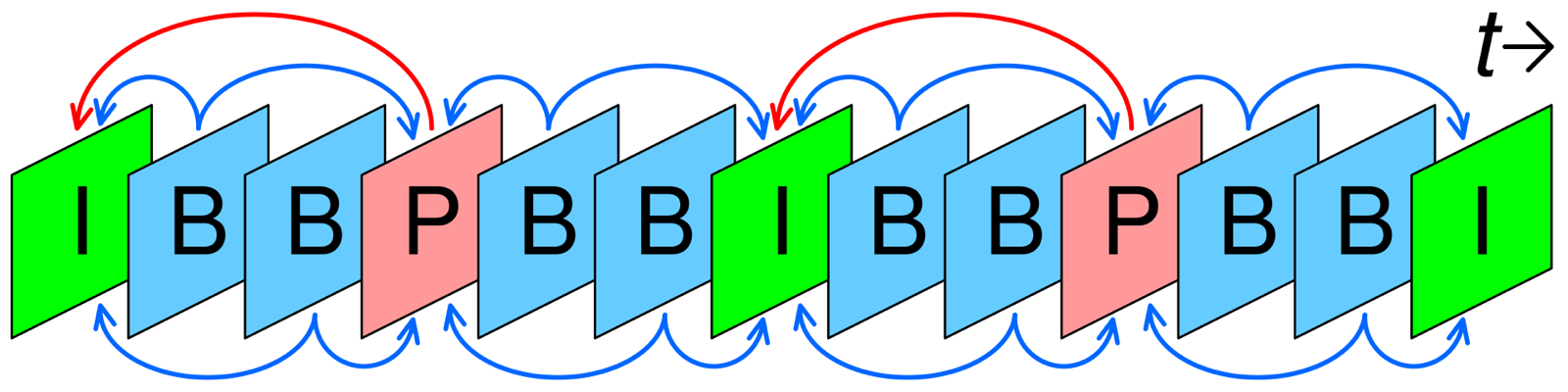
A run of frames from one I-frame up to the next is a group of pictures (GOP). When no frame in the group refers to a frame outside it, it's a closed GOP, and it can be decoded entirely on its own. Hold on to that idea: closed GOPs turn out to be what lets the processing pipeline run in parallel, and later what lets a player switch quality mid-video. YouTube's upload guidance asks for exactly this: H.264, closed GOPs, a GOP of half the frame rate (an I-frame every half second), and 4:2:0 colour.
4.2A ladder of renditions
Now we can say what processing has to produce. Kwame's phone on a bad connection needs a small, low-resolution version; a 4K TV on fibre wants a large one. So the pipeline encodes Ananya's video several times, each at a different resolution and bitrate. Each encoded version is called a rendition, and the set of them, from smallest to largest, is the bitrate ladder.
Google's 2021 paper on its video hardware gives YouTube's example: for a 1080p upload, it encodes 1080p, 720p, 480p, 360p, 240p and 144p. That's six rungs, and every one is also made in more than one codec, as we'll see. The exact number of renditions per video isn't published.
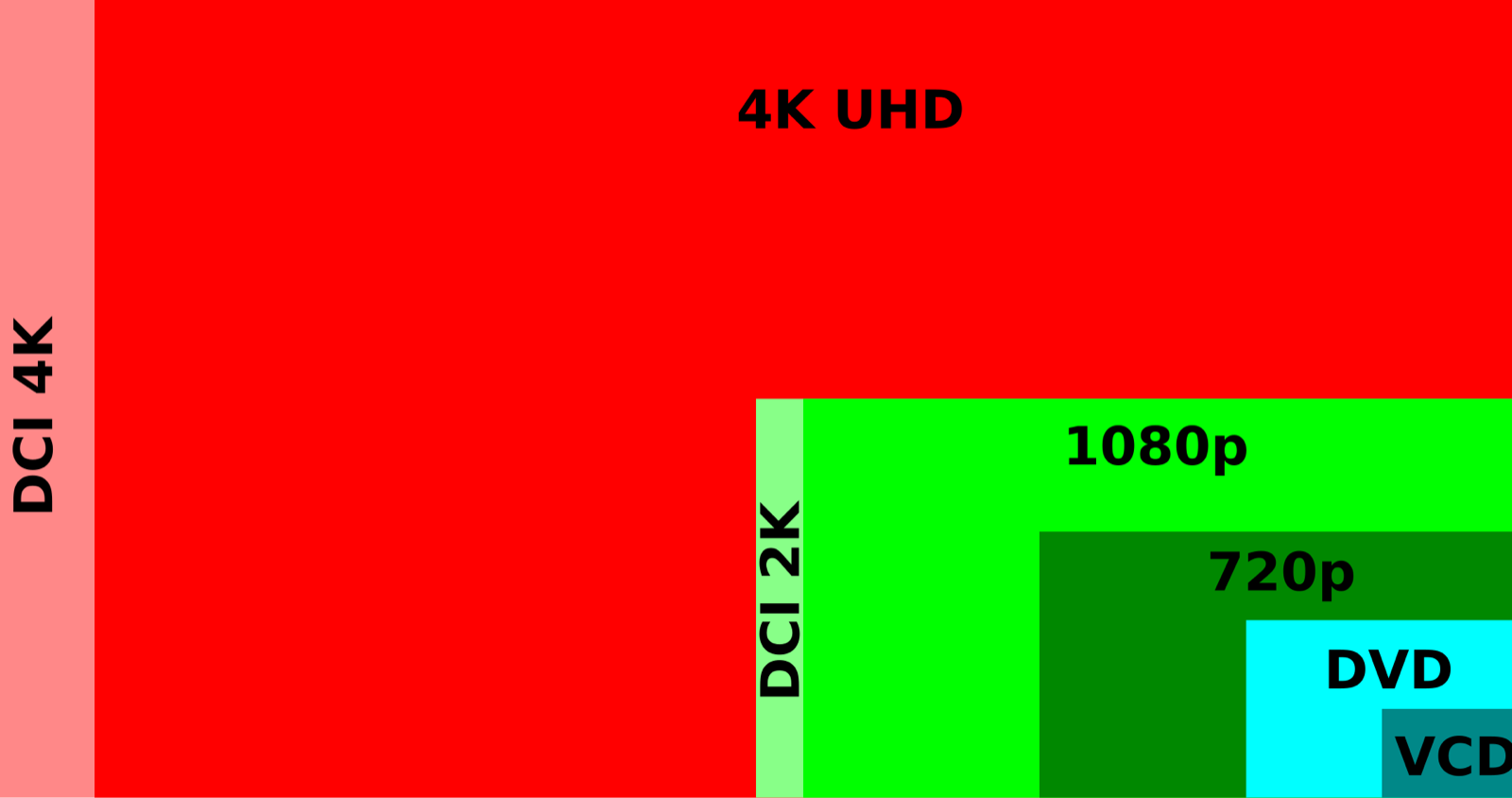
What bitrate does each rung get? YouTube doesn't publish its own ladder, but Apple publishes an example one in its HLS authoring specification, a document that tells video services how to prepare video for Apple devices. Its H.264 rows look like this:
| Resolution | Bitrate | Frame rate |
|---|---|---|
| 416 × 234 | 145 kb/s | up to 30 fps |
| 640 × 360 | 365 kb/s | up to 30 fps |
| 768 × 432 | 730 kb/s, 1,100 kb/s | up to 30 fps |
| 960 × 540 | 2,000 kb/s | same as source |
| 1280 × 720 | 3,000 kb/s, 4,500 kb/s | same as source |
| 1920 × 1080 | 6,000 kb/s, 7,800 kb/s | same as source |
Notice the spread: the top rung is more than fifty times the bottom one. That range is what lets the same video play on Kwame's minibus and on a television, and choosing between rungs, second by second, is the job of the player in section 8.
One bitrate ladder for every video, or one per video?
- Simple and predictable
- Easy to plan storage and delivery
- Wastes bits on simple videos
- Starves complex ones such as sport or confetti
- Same quality in fewer bits for easy content
- Many extra trial encodes per video
- The most bits saved
- Even more compute per video
Netflix moved away from its fixed ladder, 235 kb/s at 320 × 240 up to 5,800 kb/s at 1080p for every title, in December 2015; one example title reached its best 1080p quality at 4,640 kb/s, a 20% saving. Its 2018 Dynamic Optimizer, which encodes each shot separately, reported about 17% more. Netflix can afford the trial encodes because its catalogue is small and each title is watched millions of times. YouTube, with 20 million new videos a day, faces a different trade (section 4.5), and its ladder selection isn't published.
4.3Codecs: fewer bits, more work
Each rung could be encoded with any of several codecs, and newer codecs squeeze the same quality into fewer bits at the cost of far more computation. H.264 dates from 2003 and plays on almost every device ever made. VP9, Google's royalty-free codec, needs noticeably fewer bits: Google's case study on YouTube's VP9 rollout reported bitrates cut by as much as 50%, and over 25 billion hours of VP9 video delivered in its first year. AV1, from an industry alliance Google belongs to, compresses better still; YouTube began testing it in September 2018.
Encoding work is the catch. Google's 2021 paper says that encoding VP9 in software is typically six to eight times slower and more expensive than H.264, and gives a concrete example: one chunk of 150 frames at 2160p (4K) often takes 15 minutes and over an hour of CPU time to encode. So every upload faces a trade: spend more computing once, at upload, to save bandwidth on every later playback, and keep an H.264 rendition anyway for devices that can't decode the newer codecs.
Suppose Ananya had filmed in 4K. Her video is 12 minutes at 30 frames a second. Using the paper's figure of about 15 minutes per 150-frame 4K chunk, how long would one VP9 4K encode take on one machine, working through the video from start to finish? What would you do about it?
4.4The pipeline as a graph of tasks
The processing job for Ananya's video is a set of tasks with dependencies between them, and the dependencies form a directed acyclic graph (DAG): each task can start only when the tasks it depends on have finished, and nothing depends on itself. Drawn out, the graph for one upload looks roughly like this:
- Inspect the original: its codec, resolution, frame rate, rotation, audio tracks.
- Split it into chunks at closed-GOP boundaries.
- Transcode every chunk to every rendition, in parallel.
- Join each rendition's chunks back into one continuous stream, and encode the audio separately.
- Package each rendition into small segments a player can fetch, and write a manifest, a file listing them (section 7 is about both).
- Alongside the video work, generate thumbnails and run the automated checks a platform needs before publishing, such as copyright matching and policy checks.
- Publish: mark the video ready and tell Ananya.
Step 3 is where the fan-out happens: roughly a hundred chunks, each encoded to six resolutions in two or three codecs, is well over a thousand encoding tasks for one upload. A scheduler hands them to free workers and starts the join when a rendition's last chunk is done. Because every task reads and writes files in storage, a failed task is run again.
Google's paper adds one refinement that matters a lot at this scale. Decoding the original is itself expensive, so instead of one task per chunk per rendition, which would decode the same chunk six times, YouTube mostly uses multiple-output transcoding (MOT): one task reads and decodes a chunk once, then scales and encodes it to every output resolution in parallel. According to the paper, its production workload is largely MOT.
4.5Hardware built for the job
Even in chunks, the total is staggering: hundreds of hours a minute, each encoded to a dozen or more outputs. For years the cost forced a compromise: the paper says VP9 was produced only for the most popular videos, using cheap spare CPU time after upload.
In April 2021 YouTube described its answer: a chip of its own, the Video Coding Unit (VCU), a hardware encoder designed for warehouse-scale transcoding, with the work spread across hundreds of these chips for a single video. Google's paper on it, presented at ASPLOS 2021, reports 20 to 33 times better efficiency than its previous well-tuned CPU-only setup, measured across tens of thousands of servers. With the VCUs, YouTube could produce both VP9 and H.264 at upload time, for every video.
That paper also describes the other half of the trade: how much effort a video deserves depends on how popular it is. Video popularity, it says, follows a stretched power law with three broad buckets. A small number of very popular videos make up the majority of watch time, so extra encoding effort on them, a newer codec or a slower, better encode, pays back on every playback. The long tail, the majority of videos, gets the treatment that minimises storage and transcoding cost. And since an old video can suddenly become popular, the system has to be able to go back and reprocess it.
How much encoding work does each video get, and when?
- Every viewer gets the best format from the first play
- Most of the work is spent on videos that are barely watched
- Compute goes where the views are
- Early viewers of a future hit get a worse format
- Needs a reprocessing path
- No work for videos nobody watches
- The first viewer waits
- Spikes of work when a video goes viral
YouTube's published choice shifted with its hardware: VP9 for popular videos only before VCUs, H.264 and VP9 for everything at upload after, with extra effort still going to the most popular. An encode is paid for once and its benefit is multiplied by the views, so the right amount of work grows with expected popularity.
The renditions are done. Now they have to live somewhere, and there are a lot of them.
05Where the bytes live
5.1Most bytes are cold
Ananya's video now exists as the original plus a dozen or more renditions, together maybe a couple of gigabytes. Multiply by 20 million uploads a day and storage grows by petabytes daily, and a video stays up until its owner removes it.
What saves us is the shape of the reads. Google's paper says a small number of popular videos account for most watch time, and Facebook's 2014 paper on its photo storage found the same pattern in its own data: requests for week-old content were an order of magnitude lower than for content less than a day old. Most stored bytes are cold: they're read rarely, but when someone does ask for one, it must still be there within a second or two. A few are hot, read constantly, and storing both kinds the same way wastes money.
Google stores YouTube's video in Colossus, its cluster file system, which it described in 2021 as scaling to exabytes per cluster and serving YouTube, Drive and Gmail. Colossus puts the hottest data on flash. Newly written data, which tends to be hot, is spread evenly across all the drives, and then moved to larger-capacity drives as it ages and cools. A 2025 Google post lists YouTube video storage as a workload whose reads are megabytes in size and whose expected latency is seconds, which is the profile of large sequential reads where cheap capacity matters more than speed. YouTube's own tiering policy beyond that isn't published.
5.2Copies or codes
Every stored byte has to survive disk failures, which happen every day in a fleet this size. Simplest is to keep three copies of everything on three different machines, which triples the storage bill, which for exabytes of mostly cold video is a lot of money.
Or we can use an erasure code. Split a block of data into, say, 10 pieces and compute 4 extra parity pieces from them, using a scheme called Reed–Solomon coding, such that any 10 of the 14 pieces are enough to rebuild the original. Store the 14 pieces on 14 different machines. Now any four can fail without losing data, and the storage cost is 14/10 = 1.4 times the data, against 3 times for three copies. In exchange, reads and repairs do more work: rebuilding a lost piece means reading ten others.
Facebook's f4 paper from 2014 put numbers on exactly this choice for warm photos and videos. Its hot storage system, Haystack, kept data at an effective replication factor of 3.6. Moving warm data to f4, which uses Reed–Solomon (10,4) within a data centre plus an XOR code across data centres, brought that down to 2.8 or 2.1 and, at the time, saved over 53 petabytes.
How should cold video be made durable?
- Fast reads from any copy
- Cheap repair: copy from a survivor
- 3× the storage
- Survives m failures at (k+m)/k cost, e.g. 1.4×
- Repairs read k pieces
- Reads of a damaged block are slower
The usual answer, and the one f4 documents, is both: keep new, hot data replicated for fast reads, and move it to erasure-coded storage as it cools. For a service where most bytes are read rarely, the cold tier is where most of the money is, so it's where the cheaper durability pays off most.
Storage solves keeping the bytes. It does nothing for Kwame, whose phone is in Accra while the data centres holding Ananya's renditions are thousands of kilometres away.
06Getting close to the viewer
6.1Popularity is skewed, so caches work
Every request from Kwame's phone travels to wherever the bytes are. From Accra to a data centre in Europe or North America, the round trip is a hundred milliseconds or more, and every byte crosses expensive long-distance links; at the scale from section 1, that's tens of terabits a second across oceans.
So we keep copies of video close to viewers, in many small sites spread around the world, a content delivery network (CDN). Each site is a cache: when someone asks for a piece of video it has, it serves it; when it doesn't, it fetches it from further up and keeps a copy. That only pays off if a small cache can answer a large share of requests, which depends on how skewed popularity is.
It's very skewed. A 2007 study of YouTube by Cha and colleagues, using a crawl of 1.69 million videos, found that the top 10% of videos accounted for nearly 80% of views, and concluded that a cache holding just the long-term popular 10% could serve 80% of requests. The popularity curve has a tall head of a few videos everyone watches and a very long tail of videos each watched a little.
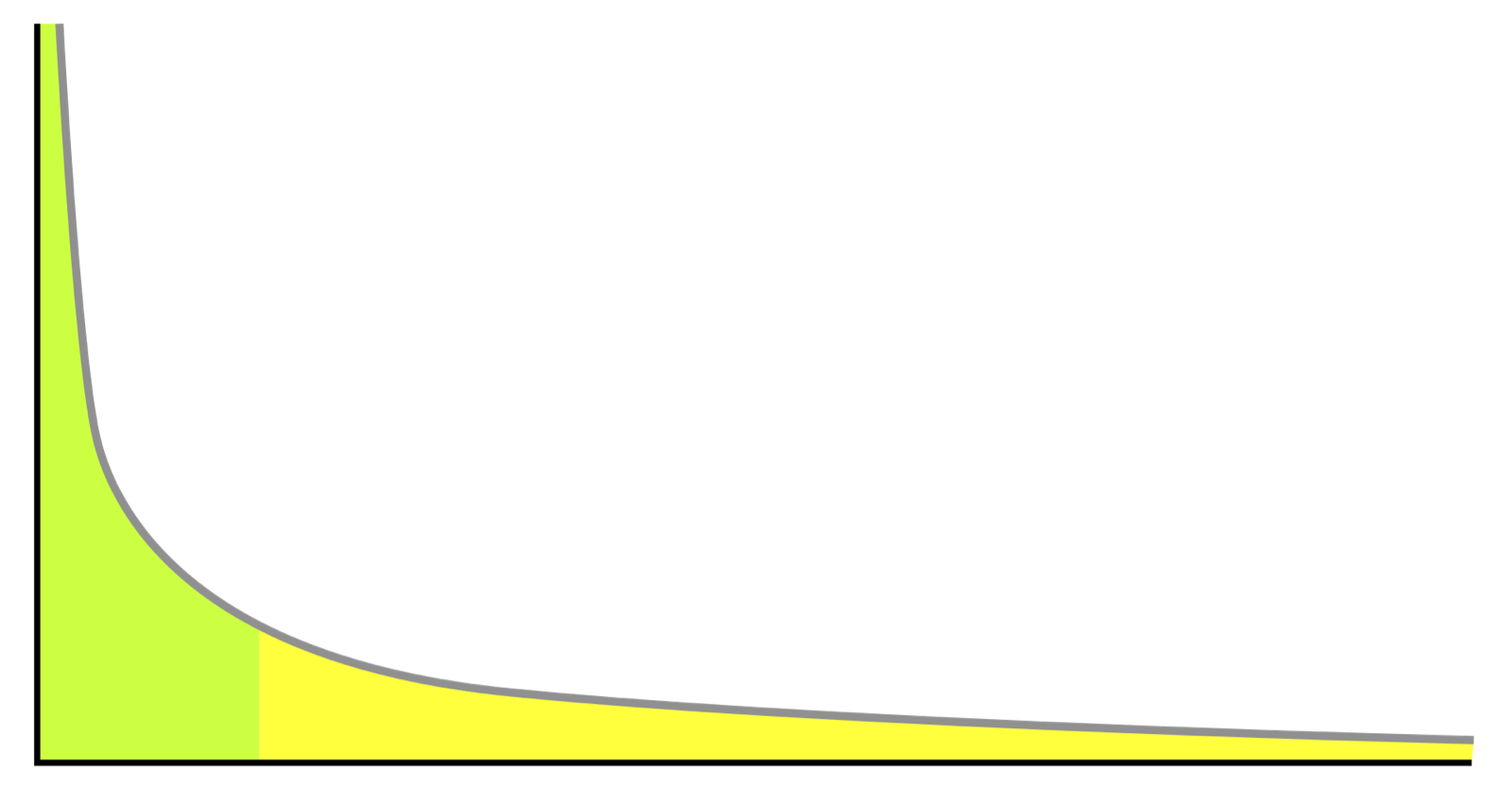
A common model for curves like this is the Zipf distribution: the video ranked i gets views in proportion to 1/i^a, where the exponent a sets how steep the head is. This program computes, for ten million videos and three values of a, what share of all views go to the top 0.01%, 0.1%, 1% and 10% of videos. That share is exactly the hit rate of a cache that holds those videos.
# 10 million videos. The i-th most popular gets views in proportion to 1/i**a,
# a "Zipf-like" curve; a sets how steep the head is.
N = 10_000_000

for a in (0.6, 0.8, 1.0):
    weights = [1 / i**a for i in range(1, N + 1)]
    total = sum(weights)
    share, running, marks = {}, 0.0, {N // 10_000, N // 1_000, N // 100, N // 10}
    for i, w in enumerate(weights, start=1):
        running += w
        if i in marks:
            share[i] = running / total
    cells = "   ".join(f"top {k / N:.2%}: {share[k]:5.1%}" for k in sorted(share))
print(f"a={a} {cells}")a=0.6 top 0.01%: 2.4% top 0.10%: 6.2% top 1.00%: 15.7% top 10.00%: 39.7%
a=0.8 top 0.01%: 12.8% top 0.10%: 22.4% top 1.00%: 37.6% top 10.00%: 61.7%
a=1.0 top 0.01%: 44.8% top 0.10%: 58.6% top 1.00%: 72.4% top 10.00%: 86.2%Read the bottom row first. With a = 1, the top thousand videos, 0.01% of the catalogue, carry 45% of all views, and the top 1% carry 72%, so a cache near Kwame holding the right hundred thousand videos would probably answer most requests in his city. Reading up the table, a flatter curve makes the same cache catch much less. Cha's measured 10%-gets-80% sits between the bottom two rows. And whatever the exponent, the tail never goes away: a real fraction of requests is for videos no nearby cache has.
A cache in Accra holds the 1% most popular videos worldwide. Ananya's coffee video, new and niche, isn't among them. Kwame presses play. What happens?
6.2A hierarchy of caches, ending inside the ISP
For the tail, add layers. A small cache near the viewer holds the very popular videos, a larger regional cache behind it holds more, and the origin storage behind that holds everything. Each tier's misses go to the next. A 2011 measurement study of YouTube's delivery network, "Vivisecting YouTube", mapped exactly this: a three-tier physical cache hierarchy with 38 primary cache locations, some inside the networks of internet service providers (ISPs), the companies that connect homes and phones to the internet, behind them 8 secondary and 5 tertiary locations in the US and Europe. Popularity showed in the routing: about 5% of requests for popular videos were redirected to another cache, against more than 24% for unpopular ones.
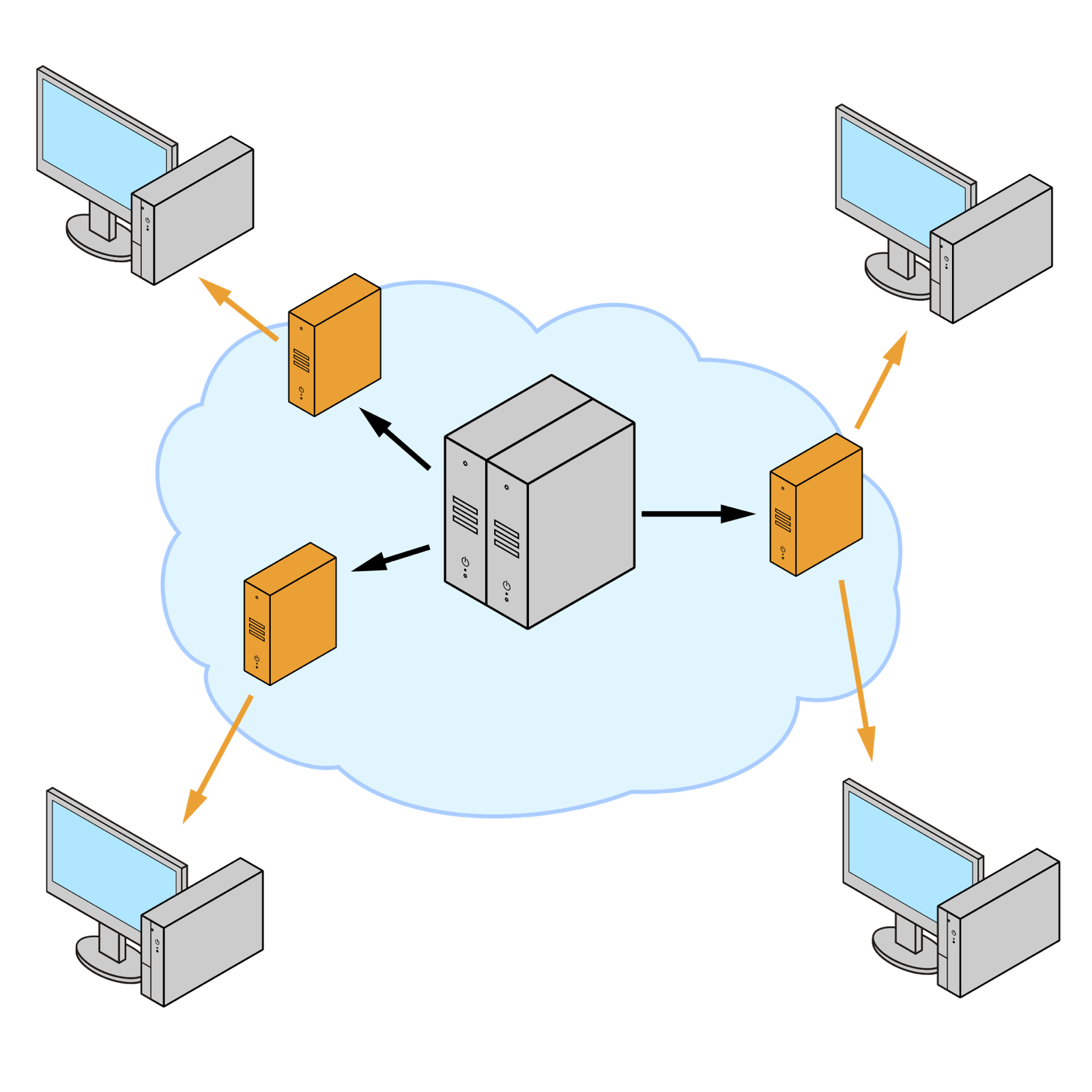
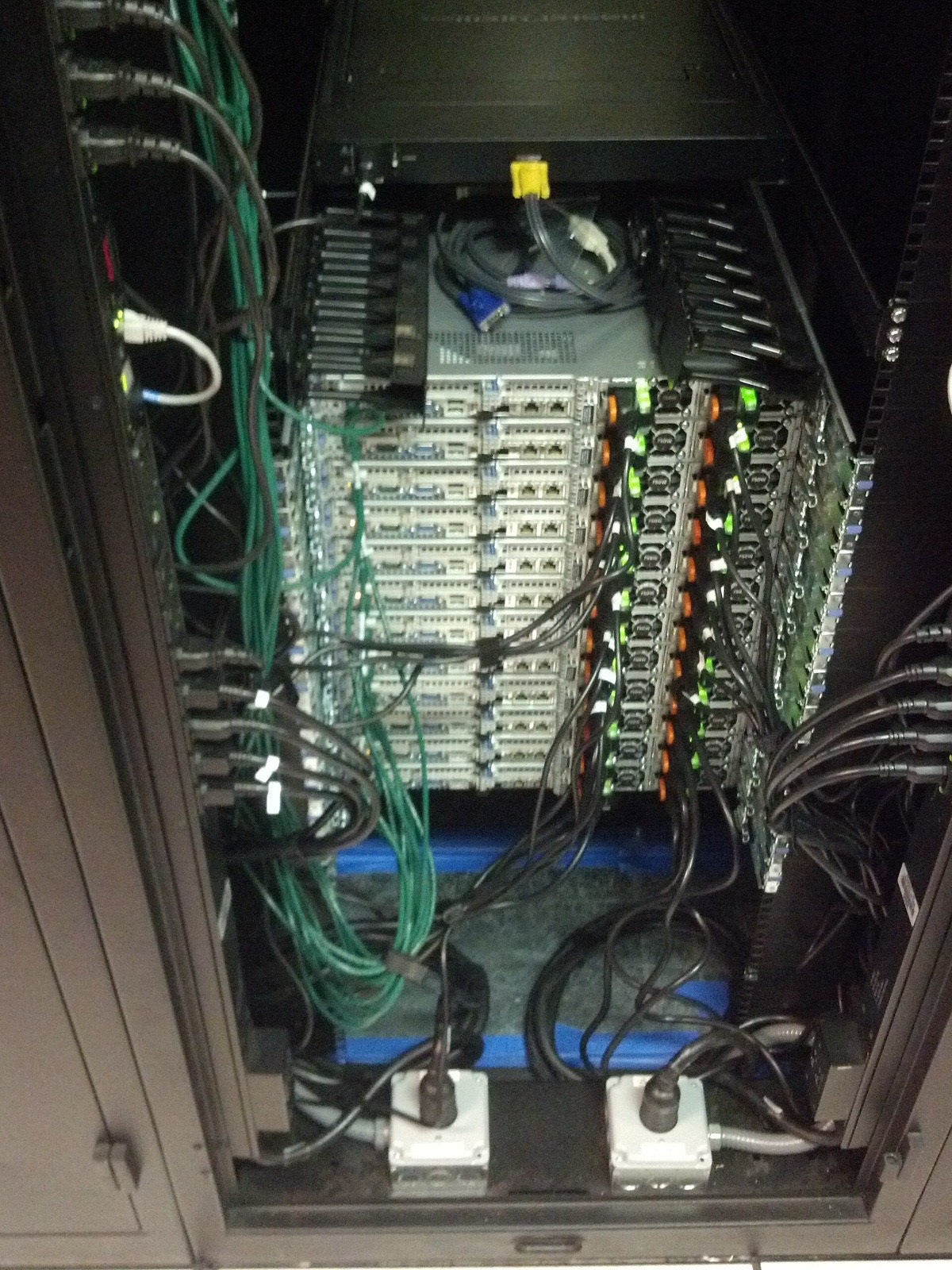
Google takes the bottom tier one step further, into the networks of the ISPs themselves. Under a programme called Google Global Cache (GGC), Google supplies cache servers and an ISP gives them space, power and a connection inside its own network. Google's documentation says that typically 70–90% of cacheable traffic can be served from these caches, and that most of what they serve is YouTube. For Kwame's ISP in Accra, that means popular YouTube video never crosses its expensive international links at all; it comes from a rack in the ISP's own building.
Should caches be filled in advance, or on demand?
- No first-viewer misses
- Fill traffic moves to off-peak hours
- Needs good predictions
- Useless for content that didn't exist last night
- Works for anything, including videos uploaded a minute ago
- The cache naturally follows what people watch
- The first viewer in each place gets a slower start
Netflix's Open Connect appliances, which sit inside ISPs much like Google Global Cache, are filled mostly in advance: Netflix says it deploys the majority of its content proactively during off-peak fill windows, adding new files nightly. That works because Netflix's catalogue is fixed and its popularity predictable. YouTube's isn't: with 20 million uploads a day, many of tomorrow's most-watched videos don't exist yet. Pull-through caching, with the hierarchy absorbing misses, fits a catalogue that changes every second. Whether YouTube also pre-positions predicted hits isn't published.
A cache can only cache what it can name. That brings us to what, exactly, Kwame's phone asks the cache for.
07Segments and manifests
7.1Cut every rendition into the same pieces
We still have the fourth problem from version 1: Kwame's connection rises and falls, and one quality can't suit all of it. With a ladder of renditions, the player could switch between them, but only at certain places. A P-frame from the 720p rendition can't be decoded using an I-frame from the 360p one, because the frames it refers to aren't there. Switching is only safe at the start of a closed GOP, where the new rendition begins with an I-frame of its own.
So the packager in the pipeline cuts every rendition into short segments, each a few seconds of video starting with an I-frame, and it cuts all the renditions at exactly the same moments. Segment 31 of the 360p rendition and segment 31 of the 720p rendition cover the same four seconds of Ananya pouring coffee. The player can now fetch segment 31 at 720p, then segment 32 at 360p, and play them back to back without a glitch.
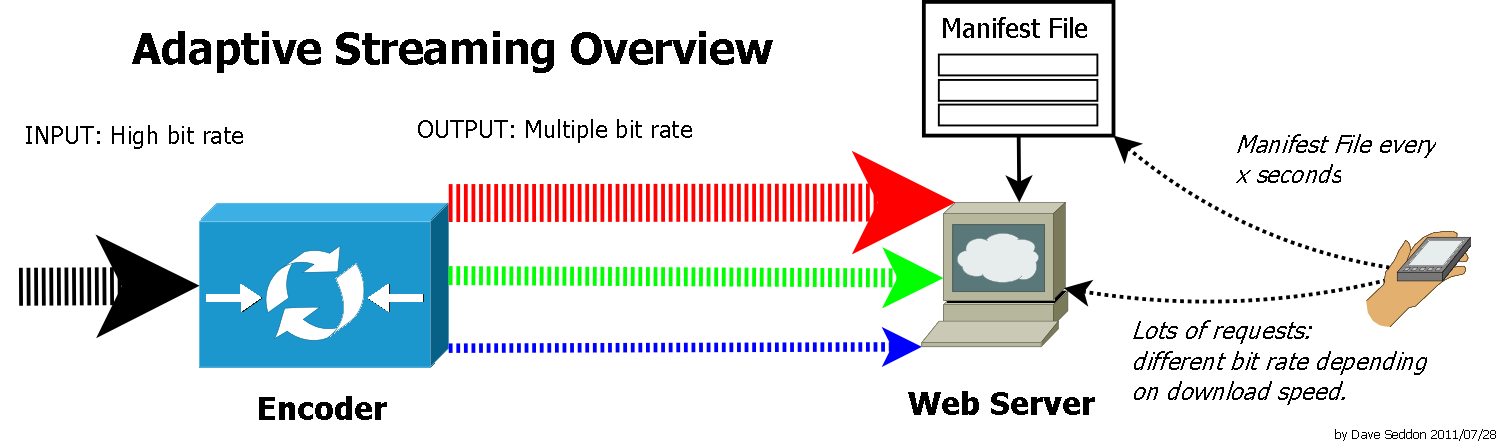
This also solves the CDN's naming problem. Each segment is an ordinary file, fetched with an ordinary HTTP GET, with its own URL that never changes. Any cache that can store web objects can store video segments, and the popular segments of a popular video end up on every cache that serves it. This approach, video delivered as many small HTTP files with the player choosing among renditions, is called HTTP adaptive streaming, and the two standard formats for it are DASH and HLS.
7.2The manifest: a map of every segment
Before fetching any segment, the player needs to know what renditions exist, what codec and bitrate each one has, how long the segments are and where to find them. That's the job of the manifest, a small file fetched first.
In DASH (Dynamic Adaptive Streaming over HTTP), an international standard, ISO/IEC 23009-1, first published in 2012, the manifest is an XML file called the Media Presentation Description (MPD). Its structure is a tree:
- The MPD at the root says whether the video is finished (
type="static") or live ("dynamic"), and its total duration. - A Period is a stretch of time with one set of content. A plain video has one; an ad inserted in the middle would be its own Period.
- An AdaptationSet groups interchangeable versions of one thing: all the video renditions, or all the audio ones.
- A Representation is one rendition, with its
bandwidthin bits per second,codecs,widthandheight. - Segment information says where the segments are. The most compact form is a SegmentTemplate, a URL pattern with placeholders such as
$RepresentationID$and$Number$that the player fills in, so a two-hour film doesn't need a list of thousands of URLs.
Here is a small MPD for Ananya's video, written the way the standard's own examples are, and a program that reads it the way a player does: work out how many segments there are, pick a representation for a given bandwidth estimate, and build the URLs to fetch.
import math, re
import xml.etree.ElementTree as ET

MPD = """<?xml version="1.0"?>
<MPD xmlns="urn:mpeg:dash:schema:mpd:2011" type="static"
     mediaPresentationDuration="PT12M0S" minBufferTime="PT4S"
     profiles="urn:mpeg:dash:profile:isoff-live:2011">
  <Period>
    <AdaptationSet mimeType="video/mp4" segmentAlignment="true" startWithSAP="1">
      <SegmentTemplate timescale="1000" duration="4000" startNumber="1"
          initialization="$RepresentationID$/init.mp4"
          media="$RepresentationID$/$Number%05d$.m4s"/>
      <Representation id="144p"  codecs="avc1.4d400c" width="256"  height="144"  bandwidth="110000"/>
      <Representation id="360p"  codecs="avc1.4d401e" width="640"  height="360"  bandwidth="640000"/>
      <Representation id="720p"  codecs="avc1.4d401f" width="1280" height="720"  bandwidth="2300000"/>
      <Representation id="1080p" codecs="avc1.640028" width="1920" height="1080" bandwidth="4300000"/>
    </AdaptationSet>
  </Period>
</MPD>"""

NS = {"d": "urn:mpeg:dash:schema:mpd:2011"}
root = ET.fromstring(MPD)

def seconds(iso):                       # "PT12M0S" -> 720.0
    h, m, s = re.fullmatch(r"PT(?:(\d+)H)?(?:(\d+)M)?(?:([\d.]+)S)?", iso).groups()
    return int(h or 0) * 3600 + int(m or 0) * 60 + float(s or 0)

def fill(template, rep_id, number=None):
    out = template.replace("$RepresentationID$", rep_id)
    m = re.search(r"\$Number(%0(\d+)d)?\$", out)
    if m and number is not None:
        out = out.replace(m.group(0), str(number).zfill(int(m.group(2) or 0)))
    return out

aset = root.find("d:Period/d:AdaptationSet", NS)
tpl = aset.find("d:SegmentTemplate", NS)
seg_len = int(tpl.get("duration")) / int(tpl.get("timescale"))
count = math.ceil(seconds(root.get("mediaPresentationDuration")) / seg_len)
reps = sorted(aset.findall("d:Representation", NS), key=lambda r: int(r.get("bandwidth")))

print(f"{count} segments of {seg_len:.0f} s in each of {len(reps)} representations")
for estimate in (1_000_000, 3_000_000):
    pick = [r for r in reps if int(r.get("bandwidth")) <= 0.8 * estimate] or reps[:1]
    rep = pick[-1]
    first = int(tpl.get("startNumber"))
    print(f"\nestimate {estimate / 1e6:.1f} Mb/s -> {rep.get('id')} ({rep.get('codecs')})")
    print("  GET", fill(tpl.get("initialization"), rep.get("id")))
    for n in (first, first + 1, count):
print(" GET", fill(tpl.get("media"), rep.get("id"), n))180 segments of 4 s in each of 4 representations
estimate 1.0 Mb/s -> 360p (avc1.4d401e)
GET 360p/init.mp4
GET 360p/00001.m4s
GET 360p/00002.m4s
GET 360p/00180.m4s
estimate 3.0 Mb/s -> 720p (avc1.4d401f)
GET 720p/init.mp4
GET 720p/00001.m4s
GET 720p/00002.m4s
GET 720p/00180.m4sLet's read the manifest closely. timescale="1000" with duration="4000" means segments are 4,000 thousandths of a second, so twelve minutes is 180 segments. startWithSAP="1" promises that every segment starts at a stream access point, the standard's name for a place where decoding can begin, which in practice means an I-frame of a closed GOP. segmentAlignment="true" promises that segments line up across representations, the contract from 7.1. And $Number%05d$ means "the segment number, padded to five digits", which is how 00001.m4s appears in the output.
In the program, notice that choosing a representation is a single line: the highest bandwidth that fits under 80% of the estimate. That line is the entire adaptation logic of the simplest possible player, and section 8 is about why it isn't good enough. Notice also that the program fetches an init.mp4 before any numbered segment, which takes us one level further down, into the bytes of the files themselves.
7.3Inside a segment: boxes
Segments are almost always fragmented MP4 files, a form of the ISO base media file format in which a file is a sequence of boxes. Every box starts with its size in bytes and a four-letter type, then its contents, which can include more boxes. A player can walk through a file box by box, skipping any it doesn't understand, because it always knows how big each one is.
A rendition in fragmented MP4 comes in two kinds of piece:
- An initialization segment, fetched once per rendition: an
ftypbox naming the file's brand, then amoovbox holding everything the decoder must know before any frame, such as the codec's settings, resolution and timescale. This is theinit.mp4in the program above. - Media segments, one per few seconds: a
moofbox (movie fragment) that lists the frames in this fragment, their sizes, timings and which ones are I-frames, followed by anmdatbox (media data) holding the compressed frames themselves.
There's a second way to address segments, used when a whole rendition is stored as one long file instead of hundreds of small ones. The file then carries a segment index, a sidx box, near its start, and the player fetches individual segments with HTTP range requests ("bytes 932 to 62,370 of this file"). The sidx box is a compact table, one entry per segment:
| Field | Bits | What it holds |
|---|---|---|
| reference_type | 1 | 0 means the entry points at a movie fragment (moof) |
| referenced_size | 31 | bytes from this segment's first byte to the next one's |
| subsegment_duration | 32 | how long the segment plays, in the file's timescale |
| starts_with_SAP | 1 | whether the segment begins with a stream access point |
| SAP_type | 3 | which kind of access point (1 or 2 for a clean I-frame start) |
| SAP_delta_time | 28 | how far into the segment the access point is |
That's 12 bytes per segment. For Ananya's 180 segments the whole index is about 2 KB, and from it the player can compute the byte range and start time of any segment by adding up sizes and durations, the same way a filesystem turns a list of extents into offsets. Seeking to minute seven is one addition loop and one range request.
YouTube appears to use this single-file style. A YouTube DASH manifest that is still served from a URL in an early version of Google's open-source ExoPlayer demo app identifies each Representation by a YouTube format number, the itag, stores each rendition as one MP4 file, and lists its segments as byte ranges of that file, about 10 seconds each. The itags appear there, and in open-source download tools, with consistent meanings:
| itag | What it is |
|---|---|
| 160 | 144p H.264 video |
| 134 | 360p H.264 video |
| 136 | 720p H.264 video |
| 137 | 1080p H.264 video |
| 248 | 1080p VP9 video |
| 399 | 1080p AV1 video |
| 140 | AAC audio, about 128 kb/s |
Notice that video and audio are separate renditions, fetched separately and combined in the player, which lets a player change video quality without touching the audio. In 2025, open-source tools reported that YouTube's web player had moved to a custom streaming protocol of its own; its internals aren't publicly documented.
7.4HLS, and how long a segment should be
Apple's format, HTTP Live Streaming (HLS), published as RFC 8216 in August 2017, does the same job with plain-text playlists instead of XML. A top-level playlist lists the renditions, each with its peak bandwidth:
#EXTM3U
#EXT-X-STREAM-INF:BANDWIDTH=1280000,AVERAGE-BANDWIDTH=1000000
http://example.com/low.m3u8
#EXT-X-STREAM-INF:BANDWIDTH=2560000,AVERAGE-BANDWIDTH=2000000
http://example.com/mid.m3u8
#EXT-X-STREAM-INF:BANDWIDTH=7680000,AVERAGE-BANDWIDTH=6000000
http://example.com/hi.m3u8
and each rendition's own playlist lists its segments, each with its duration:
#EXTM3U
#EXT-X-TARGETDURATION:10
#EXT-X-VERSION:3
#EXTINF:9.009,
http://media.example.com/first.ts
#EXTINF:9.009,
http://media.example.com/second.ts
#EXTINF:3.003,
http://media.example.com/third.ts
#EXT-X-ENDLIST
Both examples are from the RFC. EXT-X-TARGETDURATION is the longest segment, rounded, EXTINF gives each segment's length, and EXT-X-ENDLIST says no more segments will be added: the video is finished, and a player needn't check the playlist again for new segments. Since 2018, a common packaging format called CMAF lets one set of fragmented MP4 segments serve both DASH and HLS players, so a service doesn't have to store everything twice.
How long should a segment be? DASH's industry guidelines call anything from 1 to 10 seconds reasonable, and Apple's authoring specification recommends 6 seconds, with an I-frame every 2.
How long should each segment be?
- Fast start and fast reaction to bandwidth changes
- Low delay for live video
- More I-frames, so more bits for the same quality
- Many more requests and cache objects
- A balance of compression, request count and agility
- Reacts to a bandwidth drop only at the next boundary
- Fewest requests
- Best compression
- Slow to start and slow to switch
Every segment must begin with an I-frame, and I-frames are expensive, so shorter segments cost compression; Netflix's per-shot encoding post makes the same point, that frames after an I-frame can't refer back to anything before it. Live video pays that cost willingly for lower delay. On-demand video can afford longer segments, especially when it uses byte ranges into one file, where a longer segment also means fewer requests.
So now Kwame's phone has a manifest listing six renditions and 180 segments for each. Every four seconds it has to pick one rendition for the next segment. How should it choose?
08Choosing the next segment: adaptive bitrate
8.1The buffer, and why it matters
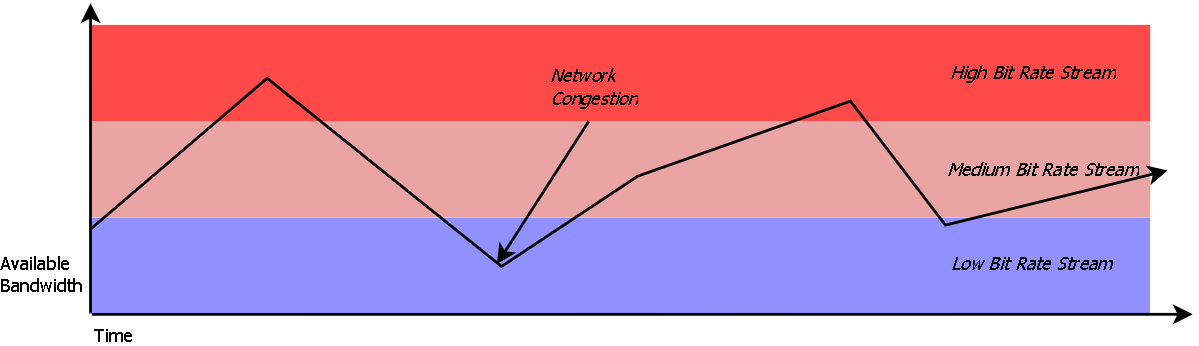
A player doesn't fetch each segment just as it's needed. It downloads ahead, keeping a buffer of video that has arrived but hasn't been shown yet, measured in seconds of playback. Every second of real time, one second of video leaves the buffer to be shown. Every time a segment arrives, its four seconds are added. If the buffer ever empties, the picture freezes and the spinner appears; that's a stall, or rebuffer, and it's the thing viewers hate most.
Whether the buffer grows or shrinks depends on one comparison. If Kwame's connection can deliver data faster than the rendition he's fetching plays it, each four-second segment takes less than four seconds to download and the buffer grows. If the rendition's bitrate is higher than what the connection delivers, each segment takes longer than it lasts, and the buffer drains.
The program which picks the rendition for each segment is the player's adaptive bitrate (ABR) algorithm, and its two goals pull against each other: pick high rungs for a sharp picture, and never let the buffer run dry.
8.2Rule one: estimate the bandwidth
An obvious algorithm is the one-liner from our manifest program. Measure how fast the last segment downloaded, its throughput, multiply that by a safety margin, and pick the highest rung under that. Most players start here. Media3, the player library Android apps use, by default counts a rendition as affordable if its bitrate is under 70% of the estimated bandwidth, and the dash.js reference player uses a margin of 90% in its throughput rule.
But the estimate is a guess about the future made from the past, and on a real network the past is a poor guide. The best evidence comes from a 2014 paper by Te-Yuan Huang and colleagues at Stanford and Netflix, who studied this in Netflix's own service. One real session in the paper saw its measured throughput swing from 17 megabits a second down to 500 kilobits. About 10% of sessions they looked at had swings that large, and in a sample of 300,000 sessions, roughly 10% had a median throughput less than half of their 95th-percentile throughput.
Huang's team walks through what that does to a throughput-based player. A video is playing at 3 Mb/s over a 5 Mb/s connection. After 25 seconds, the capacity drops to 350 kb/s. The player's estimate still says the connection is fast, so it keeps requesting 3 Mb/s segments, each of which now takes about 35 seconds to download, and the buffer drains. In the paper's trace the video stalled and didn't resume for 200 seconds, though a 235 kb/s rendition would have played smoothly the whole time over 350 kb/s.
?Why is the bandwidth so hard to estimate?
A segment's download time measures what the connection delivered over those particular seconds. Kwame's phone shares a cell with everyone else on the bus, other apps on his phone start and stop downloads, TCP itself speeds up and backs off, and the signal changes as the bus moves. Any estimate is for a moment that has passed, and the cost of being wrong in the optimistic direction is a stall. The paper reaches a hard conclusion: to protect against estimates as wrong as the ones they saw, a throughput-based player would have to be so cautious that it picked rates at a few percent of what the connection could carry.
8.3Rule two: let the buffer decide
Huang and colleagues proposed turning the problem around. The buffer level is something the player knows exactly, and it already summarises how the network has been doing: if the connection has been delivering faster than the video plays, the buffer has grown; if slower, it has shrunk. So pick the next rendition from the buffer level alone, with no bandwidth estimate. This is a buffer-based approach (BBA).
The key observation is a guarantee. Suppose the lowest rung's bitrate, R_min, is below the connection's capacity, whatever happens. Then if the player always fetches R_min when the buffer is nearly empty, each segment arrives faster than it plays, the buffer grows, and it never runs dry. So the algorithm only has to make sure it reaches R_min before the buffer reaches zero, and climb towards the top rung, R_max, as the buffer fills.
The paper's simplest version, BBA-0, does this with a rate map, a function from buffer level to bitrate, divided into three zones:
- The reservoir, from empty up to r seconds: always fetch R_min. This is the safety margin that absorbs a sudden drop while the algorithm reacts.
- The cushion, from r to r + cu seconds: the target bitrate rises in a straight line from R_min to R_max.
- The upper reservoir, above that: always fetch R_max.
In Netflix's browser player, which had a 240-second buffer and 4-second segments, the paper set the reservoir to 90 seconds and the cushion to 126 seconds, so the map reaches R_max at 216 seconds, 90% full.
The map gives a target, but the ladder only has a few rungs, so the paper adds one more rule to stop the player flapping between two rungs whenever the target sits between them. Call the current rung R_prev, the rung above it Rate+ and the one below Rate−. For each segment:
- If the buffer is in the reservoir, pick R_min. If it's in the upper reservoir, pick R_max.
- Otherwise compute the target f(B) from the map.
- If f(B) has risen to Rate+ or above, step up to the highest rung below f(B).
- If f(B) has fallen to Rate− or below, step down to the lowest rung above f(B).
- Otherwise, stay on R_prev.
The paper calls the result "sticky": the rung changes only when the target crosses a neighbouring rung, not every time it moves.
Let's put the two rules side by side on bumpy connections. This program simulates 500 viewing sessions, each on a connection that jumps to a new speed every 5 to 30 seconds, between about 300 kb/s and 5 Mb/s, with noise on every second. It plays each session with three players over the same Netflix 2013 ladder: the throughput rule with an 80% margin, BBA-0 with the paper's 90-second reservoir and 126-second cushion, and BBA-0 squeezed into a much smaller 8-second reservoir and 24-second cushion. All of them may buffer up to 240 seconds.
import random

LADDER = [235, 375, 560, 750, 1050, 1750, 2350, 3000]   # kbps, lowest to highest
SEG, MAX_BUF = 4.0, 240.0          # 4-second segments, a 240-second buffer

def make_trace(rng, seconds=1200):
    """A bumpy connection: a new speed every 5-30 s, each second a bit noisy."""
    trace = []
    while len(trace) < seconds:
        kbps = rng.choice([300, 800, 1500, 3000, 5000])
        trace += [kbps * rng.uniform(0.6, 1.4) for _ in range(rng.randint(5, 30))]
    return trace

def download(trace, t, kbits):
    """Start fetching kbits at time t; return how many seconds it takes."""
    sec, left, took = int(t), 1 - (t - int(t)), 0.0
    while True:
        bw = trace[min(sec, len(trace) - 1)]
        if kbits <= bw * left:
            return took + kbits / bw
        kbits -= bw * left
        took += left
        sec, left = sec + 1, 1.0

def by_throughput(prev, tput, buf):
    """Highest rate under 80% of the last segment's measured throughput."""
    fits = [r for r in LADDER if r <= 0.8 * tput]
    return fits[-1] if fits else LADDER[0]

def bba0(prev, tput, buf, reservoir=90.0, cushion=126.0):
    """BBA-0: the buffer level alone picks the rate (Huang et al., 2014)."""
    lo, hi = LADDER[0], LADDER[-1]
    if buf <= reservoir: return lo
    if buf >= reservoir + cushion: return hi
    f = lo + (hi - lo) * (buf - reservoir) / cushion
    up = min([r for r in LADDER if r > prev], default=hi)
    down = max([r for r in LADDER if r < prev], default=lo)
    if f >= up:   return max(r for r in LADDER if r < f)
    if f <= down: return min(r for r in LADDER if r > f)
    return prev                                  # stay put: "sticky"

def small_reservoir(prev, tput, buf):
    return bba0(prev, tput, buf, reservoir=8.0, cushion=24.0)

def play(trace, choose, segments=200):
    t = buf = stalled = 0.0
    rate, tput, rates = LADDER[0], LADDER[0], []
    for n in range(segments):
        if buf > MAX_BUF - SEG:                  # buffer full: wait for room
            t += buf - (MAX_BUF - SEG); buf = MAX_BUF - SEG
        rate = choose(rate, tput, buf) if n else LADDER[0]
        dt = download(trace, t, rate * SEG)
        t += dt
        if n:                                    # playing since segment 0 arrived
            stalled += max(0.0, dt - buf)
            buf = max(0.0, buf - dt)
        buf += SEG
        tput = rate * SEG / dt
        rates.append(rate)
    switches = sum(a != b for a, b in zip(rates, rates[1:]))
    return sum(rates) / len(rates), stalled, switches

rng = random.Random(7)
traces = [make_trace(rng) for _ in range(500)]
print("rule              avg rate   sessions that stalled   total stall   switches/session")
for name, rule in [("throughput", by_throughput), ("BBA-0", bba0),
                   ("BBA-0, tiny buffer", small_reservoir)]:
    runs = [play(tr, rule) for tr in traces]
    print(f"{name:18} {sum(r[0] for r in runs) / len(runs):5.0f} kbps"
          f"   {sum(r[1] > 0 for r in runs):10}/500"
          f"   {sum(r[1] for r in runs):10.0f} s"
f" {sum(r[2] for r in runs) / len(runs):12.1f}")rule avg rate sessions that stalled total stall switches/session
throughput 1574 kbps 78/500 358 s 77.4
BBA-0 1617 kbps 0/500 0 s 11.2
BBA-0, tiny buffer 2029 kbps 292/500 1452 s 46.5Look at the first two rows. The throughput rule and BBA-0 deliver nearly the same average bitrate, about 1.6 Mb/s, but the throughput rule stalled in 78 of the 500 sessions and BBA-0 in none. Its stalls come where the throughput rule is most exposed: early in a session, before the buffer has built up, when one fast segment makes it pick a high rung just before the speed collapses. The throughput rule also switched rungs 77 times a session, against 11 for BBA-0, because every noisy measurement moves its choice while BBA-0's sticky rule ignores small changes.
Row three is the warning. The same algorithm with a reservoir of 8 seconds gets a higher average bitrate, because it climbs the ladder sooner, and stalls in more than half the sessions, because a top-rung segment that's caught by a slowdown can take longer to arrive than the whole buffer lasts. The buffer-based guarantee only holds if the reservoir is big enough to cover the worst slow segment, and the paper chose 90 seconds for that reason.
Kwame has just pressed play, so his buffer is empty. What does BBA-0 fetch for the first minute and a half, and what's the cost?
8.4What the experiment found, and where players are today
Huang and colleagues ran these algorithms on Netflix's real service in 2013, in A/B tests with over half a million users each, on three continents. Compared with Netflix's then-default algorithm, which was based on capacity estimation, the buffer-based approach reduced the rebuffer rate by 10–20% while delivering a similar average video rate and a higher rate in steady state. BBA-0 alone cut switching by roughly half. Its weakness was the start-up, which BBA-1 and BBA-2 refined with a reservoir that adapts to the size of upcoming segments and a fast start-up phase.
Later work kept testing the idea. In 2020, Stanford's Puffer project, which streamed live TV to over 63,000 real users and randomly assigned them to different ABR algorithms, reported that it was difficult for sophisticated or machine-learned schemes to outperform a simple buffer-based one; its own learned algorithm, Fugu, beat BBA on stalls and quality only by a modest margin. And widely used open-source players combine both signals. dash.js runs its throughput rule while the buffer is under 12 seconds and switches to BOLA, a buffer-based algorithm with a mathematical guarantee, once the buffer passes that, switching back below 6 seconds. Media3 uses a bandwidth estimate but won't switch up while the buffer is under 10 seconds, and won't switch down while it's over 25.
What should the player base its choice on?
- Fast start
- Reacts immediately to a faster connection
- Estimates are noisy and lag reality
- Optimistic errors cause stalls
- Provably avoids stalls if the lowest rung fits
- Few switches
- Slow, blurry start without a start-up phase
- Needs a large buffer
- Fast start and stable steady state
- More parameters to tune
Production players have converged on hybrids: the bandwidth estimate drives start-up, when there's no buffer to read, and the buffer level drives steady state, when the estimate is least trustworthy. YouTube's own player algorithm isn't published. What YouTube did publish is the effect of moving to adaptive streaming: when it made the HTML5 player the default in January 2015, Google said adaptive bitrate streaming, together with VP9, had cut buffering by more than 50% globally and by as much as 80% on heavily congested networks.
Kwame's video has played to the end. One more thing happens: the count under the video goes up.
09Counting views
9.1One row, one counter, one problem
An obvious way to count views is a column in the videos table. When Kwame's playback starts, the server runs something like UPDATE videos SET views = views + 1 WHERE id = 'coffee'. For Ananya's video, getting a few views an hour, that's fine.
A music video goes viral and is played 50,000 times a second worldwide. Every play runs that UPDATE on the same row. What goes wrong?
There's a second problem: not every play is a person. Bots and scripts replay videos to inflate counts, so a view has to be checked before it's counted. YouTube's help page says it may temporarily slow down or freeze a video's count while it checks views, and discard low-quality playbacks, and that new counts may take a few hours to settle. For years this was visible: a new video's count would stick at "301+" while views were reviewed. In August 2015 YouTube ended that, saying it now counts views it's confident come from real people as they're recorded, and keeps reviewing the rest.
And there's a third, made famous by one video. In December 2014 PSY's "Gangnam Style" approached 2,147,483,647 views, the largest number a signed 32-bit integer can hold. Google said it had never expected a video to be watched more times than that, and had upgraded the counter to a 64-bit integer, which won't overflow until about 9.2 quintillion.
9.2Views as a stream of events
All three problems go away if we separate recording a view from counting it. When Kwame's playback starts, the player sends a small event, "video coffee, started, at this time, from this session", to a logging service, which appends it to a durable log. Downstream, a stream-processing job reads the events, filters out the ones that look automated, and adds them up per video in short time windows, spread over many workers so that no single worker handles every event for a hot video. Every few seconds it adds each window's totals to a store of counts that the watch page reads.
YouTube's own published piece of this picture is the database that serves the numbers. Google's 2019 paper on Procella, YouTube's in-house SQL query engine, says YouTube generates trillions of new data items a day, and that Procella serves both creators' analytics and the statistics embedded in YouTube pages, such as view counts. For those embedded statistics, the paper reports millions of queries a second from more than ten data centres, with a median latency of 1.6 milliseconds. The analytics instance behind YouTube Analytics handled over 1.5 billion queries a day, scanning more than 80 quadrillion rows, with new data visible in under a minute. The pipeline that checks views before they reach Procella isn't published.
The video's other metadata, its title, owner and status, is ordinary relational data, and for that YouTube built Vitess, a system for splitting MySQL databases into many shards behind one interface. YouTube created it in 2010, open-sourced it in 2012, and it became a graduated Cloud Native Computing Foundation project in November 2019.
How exact and how fresh must a view count be?
- The number is always current
- One hot row caps a viral video's throughput
- No time to filter fake views
- Scales with the number of aggregators
- Room to drop fake views before they count
- The count lags reality
- Counts can be revised downwards
YouTube's public behaviour shows this choice: counts may lag, freeze or be adjusted while views are reviewed, and creators are told their numbers can take hours to settle. The same reasoning as Uber's surge counts applies: a count that's a few seconds old and slightly provisional costs nobody anything, while a fake count costs advertisers and creators real money. The definition of a view has also shifted: since August 2026, YouTube's help page says views are counted the moment a video starts to play, in every format.
That's every piece between Ananya's phone and Kwame's. Let's put them together.
10The whole system
10.1Every box, and why it's there
| Component | What it does | Added because |
|---|---|---|
| Resumable upload | Chunks plus a server-side session that knows which bytes arrived | A dropped connection mustn't restart a 900 MB upload (§3) |
| Job queue | Decouples the upload from processing | Processing takes minutes; the user shouldn't wait on it (§3.2) |
| Transcoding DAG | Splits at closed GOPs, encodes all rungs and codecs in parallel | One original file plays on almost nothing, and serial encoding takes hours (§4) |
| Video hardware (VCU) | Encodes 20–33× more efficiently than CPUs | Newer codecs cost 5–8× more to encode (§4.5) |
| Tiered storage | Hot data on flash and replicas, cold on dense disks with erasure codes | Most bytes are rarely read but must stay available (§5) |
| CDN and ISP caches | Pull-through caches in a hierarchy, the lowest inside ISPs | Popularity is skewed, and distance costs time and money (§6) |
| Segments and manifest | Aligned, I-frame-led pieces plus a map of them | Players must switch quality mid-video, and caches need named objects (§7) |
| ABR in the player | Picks a rung per segment from buffer and bandwidth | Connections change every few seconds (§8) |
| View pipeline | Log, check, aggregate, add in batches | A single counter row can't take a viral video, and fake views must be filtered (§9) |
10.2From top to bottom
| Level | The choice | Data structure or algorithm |
|---|---|---|
| System | Spend work once at upload to save on every playback | Asynchronous jobs from a queue |
| Upload | Resume from the last byte stored | Per-session record of received byte ranges, 256 KB-multiple chunks |
| Processing | Parallel by chunk | DAG of tasks over closed GOPs; decode once, encode to many outputs |
| Video | Compress by predicting from other frames | I, P and B frames; motion vectors; 4:2:0 colour |
| Storage | Cheap durability for cold bytes | Reed–Solomon erasure codes, e.g. 10 data + 4 parity pieces |
| Delivery | Keep the head of the curve close to viewers | Pull-through cache hierarchy; Zipf-like popularity |
| Manifest | One map of all renditions and segments | MPD tree: Period → AdaptationSet → Representation → SegmentTemplate |
| Segment | Self-describing, seekable pieces | MP4 boxes: ftyp + moov to initialise, moof + mdat per fragment, sidx index |
| Player | Never run dry, then look good | BBA rate map: reservoir, cushion, sticky switching; hybrids with throughput |
| Views | Count in parallel, a little late | Event log, windowed aggregation, 64-bit counters |
11What goes wrong, and what it costs
11.1Failures this design has to survive
| What happens | What the user sees | What the design does |
|---|---|---|
| Wi-Fi drops mid-upload | The progress bar pauses | The phone asks the session how far it got and resumes from that byte |
| A transcoding worker dies | Nothing, or a slightly longer "processing" | The scheduler reruns that chunk's task from its stored input |
| An old video suddenly goes viral | The first viewers get a basic format | Popular videos are reprocessed with better codecs; caches fill as views arrive |
| A disk or server holding cold video fails | Nothing | Erasure-coded pieces elsewhere rebuild the lost data |
| An ISP cache misses | A slightly slower start | The request falls through to the regional edge and then storage |
| Bandwidth collapses mid-video | The picture softens | The buffer absorbs the slowdown while ABR steps down to lower rungs |
| A bot farm replays a video | The count freezes or is revised | Views are checked before they're counted |
| A count passes 2³¹ − 1 | Nothing, since 2014 | Counters are 64-bit |
11.2The tradeoffs, in one table
| Decision | Chosen | Given up | Why it was worth it |
|---|---|---|---|
| Upload | Resumable chunks | A little server-side state per session | A failure costs one chunk, not the file |
| When to process | Asynchronously, after the upload is durable | An instantly playable video | The uploader never waits on encoding |
| Encoding effort | More for popular videos, newer codecs via custom hardware | Uniform treatment; general-purpose servers | Encoding is paid once, savings on every view |
| Cold storage | Erasure codes | Fast, cheap repairs | Most bytes are cold, so cost per byte dominates |
| Cache fill | Pull-through on demand | A fast first view everywhere | The catalogue changes every second |
| Segment length | A few seconds, aligned across rungs | Some compression to extra I-frames | Switching quality and caching by URL |
| ABR | Buffer-aware, with throughput for start-up | Some sharpness early in a session | Far fewer stalls and switches |
| View counts | Checked and a little late | An instant, exact number | Scales to viral videos, keeps fake views out |
12Summary
- Video is read about a thousand times more than it's written, so it pays to spend heavily on each upload to make every playback cheaper and smoother.
- Resumable uploads keep a session on the server that records which bytes arrived, so a dropped connection costs one chunk, and the user is told "done" once the original is durable.
- Compression predicts frames from other frames: I-frames stand alone, P and B frames store differences with motion vectors, and a closed GOP can be decoded on its own.
- Processing makes a ladder of renditions at different resolutions, bitrates and codecs, as a DAG of tasks over closed-GOP chunks that run in parallel, decoding each chunk once.
- Newer codecs trade compute for bandwidth: VP9 needs far fewer bits than H.264 but five to eight times the encoding work, so YouTube built its own video hardware and spends extra effort on popular videos.
- Most stored bytes are cold, so they go to dense disks with erasure codes, which survive several failures at about 1.4 times the data instead of 3.
- Popularity is heavily skewed, so caches near viewers, down to Google Global Cache servers inside ISPs, serve most traffic, with a hierarchy behind them for the long tail.
- Every rendition is cut into aligned segments that start with an I-frame, so a player can switch quality at any boundary and any web cache can store the pieces.
- A manifest maps every segment: in DASH, an MPD tree of Periods, AdaptationSets and Representations with URL templates; in fragmented MP4, boxes and a sidx index locate each segment.
- The player picks a rung for every segment; bandwidth estimates are noisy, and a buffer-based rate map, with a large reservoir and sticky switching, avoids stalls with similar average quality.
- View counts are events, checked and aggregated in parallel, so counts can lag, freeze or be revised; and they're 64-bit, since Gangnam Style.
13Build this
A tiny YouTube on your laptop.
- Take any short video and use FFmpeg to encode a three-rung ladder (say 360p, 720p and 1080p) with a fixed keyframe every 2 seconds, and package it as DASH with 4-second segments (
ffmpeg -f dashdoes both). Open the.mpdand find the Period, AdaptationSet, Representations and SegmentTemplate from section 7. - Serve the folder with
python3 -m http.serverand play it with the dash.js reference player in a browser. Use the browser's network throttling to drop the connection to 1 Mb/s mid-video, and watch which segment URLs it fetches. - Split the same video into closed-GOP chunks, encode them in parallel with one process per core, join them, and compare the wall-clock time with a single encode.
- Extend the ABR program from section 8.3 with a start-up phase like BBA-2's (step up while segments arrive much faster than they play) and see how much of BBA-0's blurry start you recover without adding stalls.
- Write a view counter that takes events from many threads into per-thread counts, merged every second, and compare its throughput with one shared counter behind a lock.
14Interview questions
beginnerWhy does a video site store many versions of every video?›
Viewers have very different screens and connections, and their connections change while they watch. A ladder of renditions, from 144p at a hundred-odd kilobits a second up to 1080p or 4K at several megabits, lets each player pick the version that fits right now. Each rung is also made in more than one codec, because newer codecs like VP9 and AV1 save bandwidth but not every device can decode them, so H.264 stays as a fallback.
beginnerHow do you upload a 1 GB file over a flaky mobile connection?›
Use a resumable upload. The client first creates an upload session and gets back a session URI, then sends the file in fixed-size chunks, each labelled with its byte range. The server records which bytes it has stored. After a failure, the client asks the session for its status, gets back the range already received, and continues from the next byte, so a dropped connection costs at most one chunk. YouTube's API and Google Cloud Storage both work this way, with chunks a multiple of 256 KB.
intermediateHow would you make transcoding fast enough when one 4K encode can take hours?›
Split the video into chunks at closed-GOP boundaries, so each chunk can be decoded and encoded without any other, and encode the chunks in parallel on many machines; the wall time drops from the length of the whole job to roughly the length of one chunk. Model the work as a DAG (split, encode, join, package, publish) with stored intermediate outputs so failed tasks rerun alone. Decode each chunk once and encode it to all rungs in the same task, and, at YouTube's scale, consider specialised hardware: Google's VCUs gave 20–33 times better efficiency than CPUs.
intermediateWhy are video segments a few seconds long, and why must they line up across renditions?›
A player can only switch to a different rendition at a point where the new one can be decoded from scratch, which means at an I-frame that starts a closed GOP. So every segment starts with an I-frame, and all renditions are cut at the same times, so segment 31 at 360p and segment 31 at 720p cover the same seconds and can be swapped. Shorter segments let the player react faster and start sooner but cost compression, because I-frames are large, and add requests; a few seconds is the usual balance, such as Apple's recommended 6.
deepDesign the bitrate selection algorithm for a video player.›
The goals are to avoid stalls first and to maximise quality second. A throughput rule picks the highest rendition under a fraction of measured bandwidth, but estimates are noisy and lag reality, and an optimistic estimate when the buffer is small causes stalls. A buffer-based rule picks the rendition from the buffer level: the lowest rung in a reservoir zone, rising linearly through a cushion to the top rung, with sticky switching so it changes rung only when the target crosses a neighbouring one. If the lowest rung fits under the capacity, it never stalls. Netflix's 2013 experiments with this approach cut rebuffers by 10–20% at similar average quality. Because the buffer says nothing at start-up, practical players are hybrids: throughput-based while the buffer is small, buffer-based once it's built.
deepA video goes viral at 50,000 views a second. How do you count views?›
Not with one counter row, because every increment would queue on that row's lock. Have players send view events to an append-only log, check them to drop automated traffic, aggregate them per video in short windows across many workers, and add each window's totals to the stored count in one write. The count is then a few seconds behind and may be revised as checking continues; YouTube's help pages describe exactly this. Use a 64-bit counter: a 32-bit one overflows at 2,147,483,647, which Gangnam Style approached in 2014.
15Go deeper
Why can a player switch from 360p to 720p at the start of segment 31 but not halfway through it?›
Halfway through, the next 720p frame is a P or B frame that refers to earlier 720p frames the player never downloaded. Segment 31 starts with an I-frame that decodes on its own, and all renditions are cut at the same moments, so the switch is clean only at the boundary.
With a 90-second reservoir and a 126-second cushion over a ladder from 235 to 3,000 kb/s, what target does BBA-0's rate map give at 153 seconds of buffer?›
153 is 63 seconds into the cushion, halfway. The target is halfway between 235 and 3,000: 235 + 0.5 × 2,765 ≈ 1,618 kb/s. Whether the player changes rung depends on the sticky rule and the rung it's on now.
Erasure code with 10 data pieces and 4 parity pieces: how many failures can it survive, and what does it cost in storage?›
Any 4 of the 14 pieces can be lost, since any 10 rebuild the data. It stores 14/10 = 1.4 times the data, against 3 times for three full copies.
The BBA paper: why capacity estimation fails, the rate map with reservoir and cushion, and A/B tests on Netflix's service in 2013.
Google's paper on YouTube's video coding units: the transcoding workload, chunked multiple-output transcoding, popularity buckets and the 20–33× result.
The two manifest formats. The DASH standard's example MPDs are in the MPEG DASHSchema repository; the RFC's examples are short enough to read whole.
Concrete rules for real services: segment lengths, keyframe intervals and a sample bitrate ladder.
YouTube's SQL engine for analytics and the statistics on its pages, including view counts, with latency figures.
An early measurement of YouTube popularity: the skew that makes caching work.
Why one fixed ladder wastes bits, and how to pick a ladder per title.
A randomised trial of ABR algorithms on real users, and why simple buffer-based control is hard to beat.
16Related chapters
The template for these case studies, and a contrasting system built around space and matching. Chapter 50.
Hit rates, eviction and the hierarchy of caches that a CDN extends across the world. Chapter 25.
Durable blob storage, erasure coding and multipart uploads. Chapter 32.
How a request finds a nearby server before any video moves. Chapter 35.
The append-only event log under the view pipeline. Chapter 23.
The kind of engine Procella is, built for scanning huge tables quickly. Chapter 24.