You run docker run -d --name demo alpine sleep 300, and a moment later a container called demo is sitting there doing nothing but sleeping. Ask it what's running inside and you get a short answer: one process, sleep, with the number 1. (The kernel gives every running process a number, its PID.) It looks like a tiny computer that has just been switched on, with sleep as its first and only program.
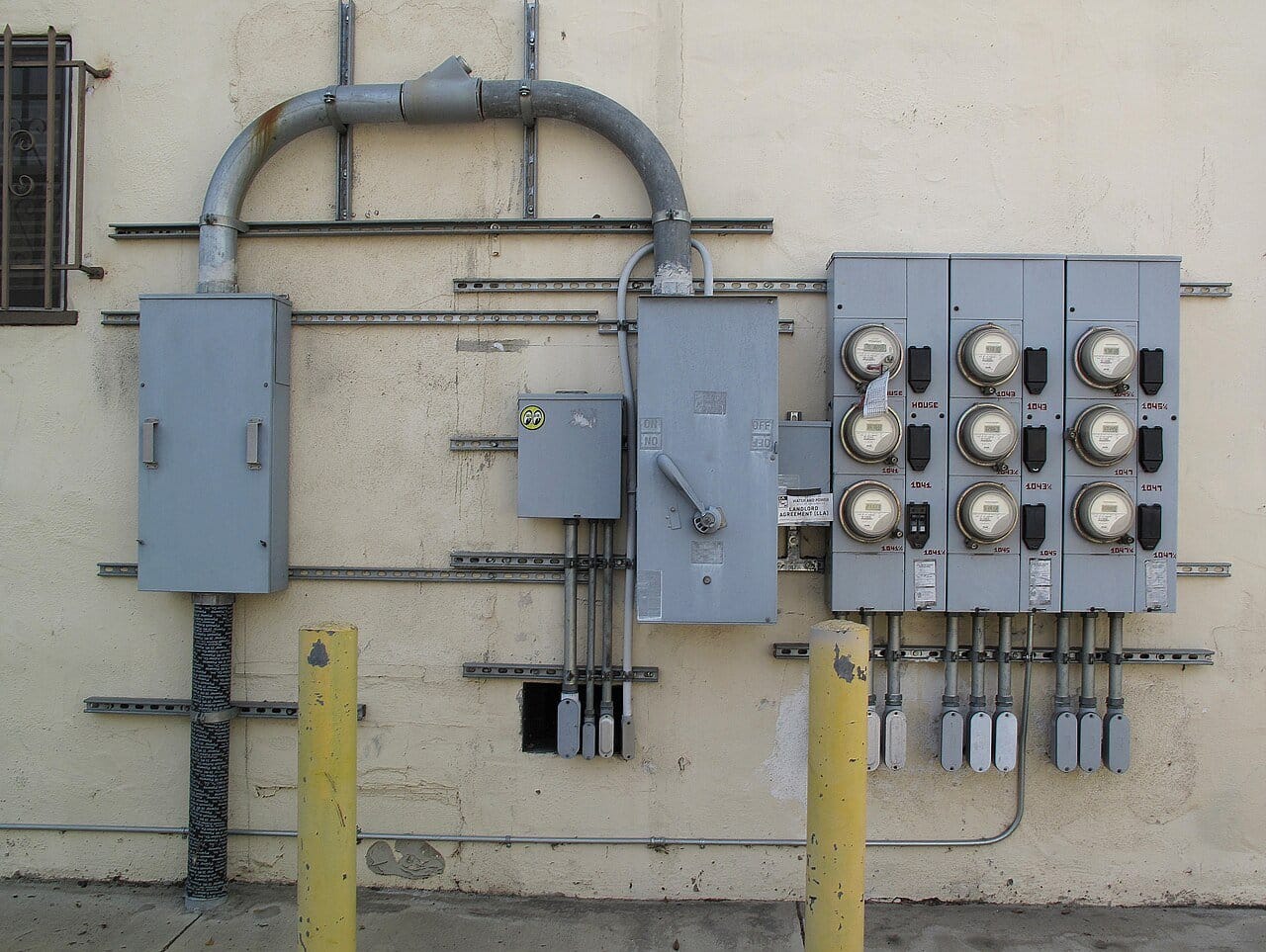
Now ask the machine Docker runs on about the same process and you get a different answer. It knows sleep under another number, in a list of every process on the machine, and nothing was booted to start it. There's no second computer and no second operating system. The "tiny computer" is an ordinary process that the kernel has dressed up so that it sees a short list of processes, a set of files and a network of its own, and can't use more memory than it was given. Think of a flat in an apartment building. The tenant has a door, a number and private rooms, and believes the flat is theirs, while behind the walls there is one set of pipes, one electrical supply and one landlord, who fits every flat with its own meter.
Three features of the Linux kernel do the dressing up. One gives a process its own copy of things like the process list, so it sees only part of the machine. One puts a ceiling on how much memory and CPU it may use. One builds its files out of stacked layers, so a hundred containers can share one copy of the same system files. This chapter follows that sleeping process through all three, builds the same container by hand with shell commands and then in about a hundred lines of C, and keeps asking one question: when there's no machine inside, what exactly is a container, and where does the illusion crack? It cracks in places that explain real incidents, such as containers that die with exit code 137, a docker stop that always takes ten seconds, and processes that escape onto the host.
01One process, two views
1.1Starting a container and looking at it twice
You need Docker installed and running, and nothing else. On Linux, containers run straight on your machine's kernel. On macOS and Windows, Docker quietly starts one small Linux virtual machine and runs the containers inside that. We'll call the machine whose kernel runs the containers the host, which on a Mac is that small virtual machine.
The block below does four things. docker run -d --name demo alpine sleep 300 starts a container in the background (-d), names it demo and runs sleep 300 inside it. alpine is the image, a ready-made bundle of files holding a very small Linux system, and it becomes the container's files. docker exec demo ps runs the ps command, which lists processes, inside the running container, and docker top demo -o pid,comm asks Docker to list the container's processes as the host sees them. The last two lines start throw-away containers (--rm deletes each one when it exits) and print a file called memory.max, once with a memory limit (--memory 64m) and once without. The kernel shows each container's limits as files under /sys/fs/cgroup, and memory.max holds the memory ceiling in bytes.
docker run -d --name demo alpine sleep 300
docker exec demo ps                    # the view from inside
docker top demo -o pid,comm            # the same process, seen from the host side
docker run --rm --memory 64m alpine cat /sys/fs/cgroup/memory.max
docker run --rm alpine cat /sys/fs/cgroup/memory.maxPID USER TIME COMMAND
1 root 0:00 sleep 300
7 root 0:00 ps
PID COMMAND
691 sleep
67108864
maxRead the two process lists first. From inside, sleep 300 is PID 1, and the only other process is the ps you just ran. From the host, the very same process is PID 691 (yours will differ), one entry among everything else on the machine. Nothing was copied or emulated. The kernel keeps one process table, and it can show a single process under two different numbers depending on who is asking.
The last two lines show the budget. With --memory 64m the file holds 67,108,864 bytes, which is exactly 64 MiB (64 × 1024 × 1024). Without the flag it says max, meaning no limit.
1.2Why not give each app its own machine?
Why would anyone want this? Suppose you have one Linux machine and two applications to run on it. One needs Python 3.8 and an old OpenSSL, the other needs Python 3.12. Both want to listen on port 8080. One leaks memory, and you'd rather it didn't take the other down. And neither should be able to see, or kill, the other's processes.
The heavyweight answer is a virtual machine for each, with its own kernel and its own slice of RAM. That works, and chapter 47 covers it, but it's a lot of machinery for a problem that is mostly about what each program is allowed to perceive.
?What would you change about one process so it believes it's alone?
Go through what a process can look at, one thing at a time. It sees files, so give it a different root directory, with its own /usr and its own Python. It sees other processes, so give it a process list in which it's PID 1 and nothing else exists. It sees network interfaces and ports, so give it a set of its own, with its own port 8080. It sees a hostname, so give it its own. Linux has one mechanism for all of these, the namespace, which is a private copy of one of the kernel's lists (processes, mounted filesystems, network interfaces) for the processes inside it.
Seeing is only half of it. The leaky application also needs a ceiling on what it can use, and that is a cgroup (control group): a group of processes whose memory and CPU use the kernel adds up, with limits you can set. Finally, the process needs files of its own without a full copy of Linux for every app, and that is overlayfs, which stacks directories into one merged view. Each of the three answers one of the questions from the experiment you just ran:
| Piece | The question it answers | Where you just saw it | Kernel feature |
|---|---|---|---|
| Namespaces | What can the process see? | PID 1 inside, PID 691 outside | Requests to the kernel named clone and unshare, with CLONE_NEW... flags |
| A cgroup | What can it use? | memory.max reading 67,108,864 | Files under /sys/fs/cgroup |
| A layered root filesystem | Which files does it have? | An Alpine system, not the host's files | overlayfs, plus pivot_root (section 3) |
1.3What isn't in the table: a second kernel
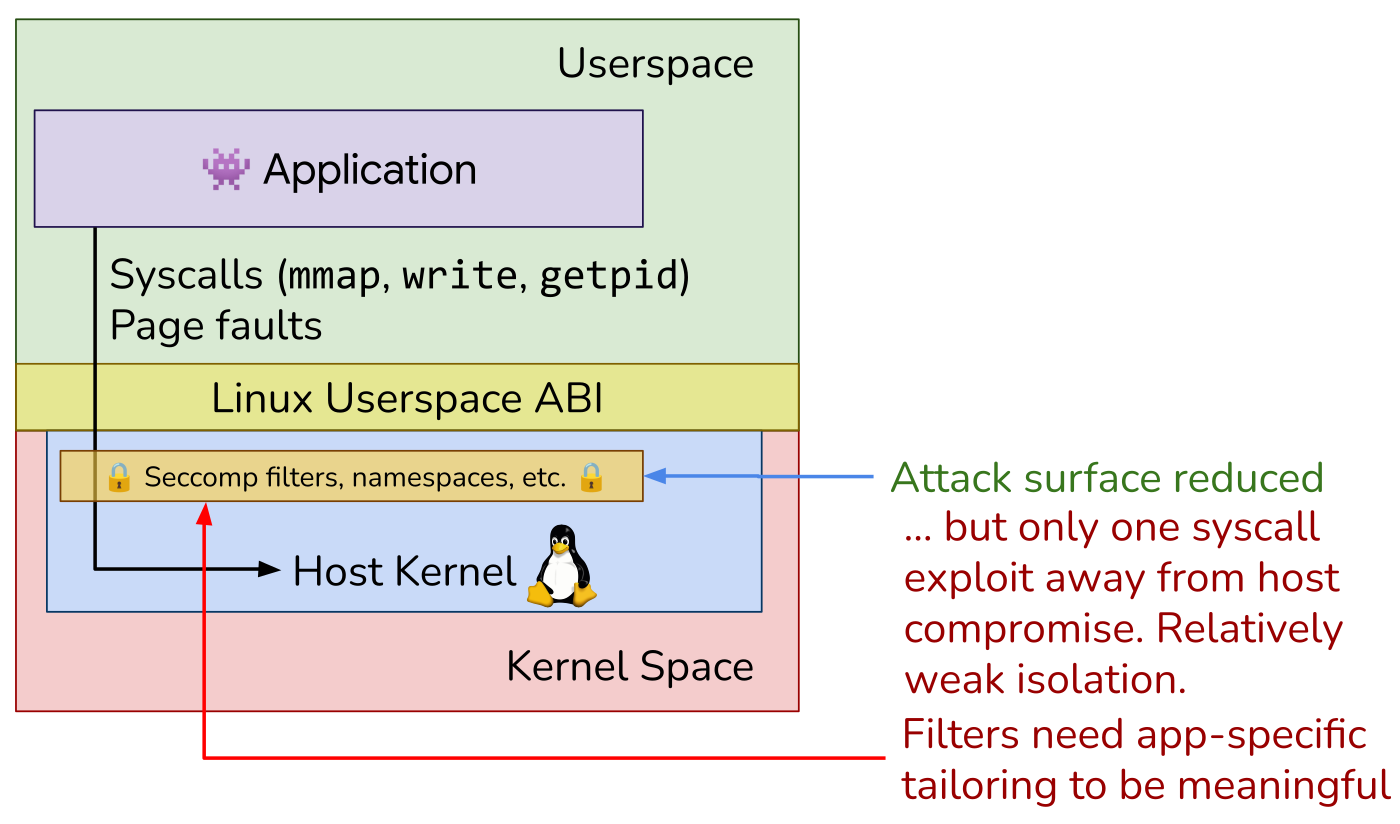
Look at what the table leaves out. Nothing in it starts a second kernel. A program gets anything done (opening a file, sending a packet, starting a process) by making a system call, a request to the kernel, and every container on a host makes its system calls into the same kernel, with the same scheduler, the same page cache and the same bugs.
That sharing is why containers are cheap: starting a process inside six new namespaces takes under a millisecond (section 8 has the numbers), because the kernel only has to allocate a few records. It is also why they're weaker than a virtual machine. A kernel bug that one container can reach is a bug every container on the host can reach, and section 6.3 shows what that looks like.
We'll build the pieces in the order of the table, starting with what the process sees, because that's what the first experiment showed us.
02What a process sees: namespaces
2.1Two tables for one process
Go back to the two numbers, 1 and 691. The kernel keeps a table of every process, with the number it handed out to each. A PID namespace is a second table for a group of processes. It holds only them and their descendants, and its numbering starts again from 1. A process inside one has a number in its own table and another in the table of the namespace above it, so the host's table and the container's table both contain sleep. Here are demo's sleep and the ps we ran:
dockerd is the program that starts containers.Every kind of namespace works the same way. The kernel keeps a list of something (process numbers, mounted filesystems, network interfaces), a namespace is a private copy of that list for the processes inside it, and each process belongs to exactly one namespace of each kind.
2.2The kinds of namespace
PIDs are only one list. The kernel has several, and each has its own kind of namespace:
| Namespace | What it hides |
|---|---|
| pid | Process numbers. Its first process becomes PID 1 and can't see its parent. |
| mnt | The list of mounted filesystems (a mount attaches a filesystem at a directory). This is what makes a different / possible. |
| uts | The hostname and domain name. Tiny, and roughly the one every tutorial starts with. |
| ipc | System V semaphores, message queues and shared memory, the old ways for processes to talk to each other. |
| net | Network interfaces, routes, firewall rules, sockets and the port numbers. |
| user | User and group numbers, so that "root" inside can be an ordinary user outside. |
| cgroup | Where the process sits among the resource groups of section 4: its own group looks like the top. |
There's an eighth, the time namespace (Linux 5.6), which almost nobody uses, so there are seven or eight kinds depending on how you count.
Docker doesn't create user or time namespaces by default. User namespace remapping is opt-in, and section 7 explains why it matters.
2.3Making a PID namespace by hand
Docker built demo's namespaces for us. To see what one does, we'll make one ourselves with unshare, a command that starts a program inside new namespaces. You need a Linux machine and root, and a privileged container is the easiest one: docker run --rm -it --privileged -v "$PWD":/w ubuntu:24.04 bash. (--privileged lifts the restrictions Docker normally puts on a container, so the programs inside can create namespaces of their own, and -v "$PWD":/w shares your current directory as /w, which section 3 uses. The base image is bare, so apt install procps iproute2 supplies ps and ip if they're missing.) The shell transcripts from here through section 6 run in a privileged container like that.
Start with the smallest experiment. --pid asks for a PID namespace, --fork makes unshare run the command as a child (section 2.4 explains why that's needed), and $$ is the shell's own PID. We ask for the PID and then list processes:
$ unshare --pid --fork bash -c 'echo $$; ps -o pid,comm | head -5'
1
fatal library error, lookup self
The shell is PID 1, as promised, but ps fails with a strange error instead of listing anything.
?Why can't ps find itself?
ps doesn't ask the kernel for the process list directly. It reads /proc, a directory the kernel fills with one folder per process. /proc is a mount: a filesystem attached to a directory, in this case a special one that shows the kernel's data instead of disk blocks. The list of everything mounted, and where, is the mount table. Our new PID namespace has its own numbers, but the /proc mounted in this shell still shows the parent's process table, where our shell has a different number. So ps looks for process 1 in a table where process 1 is somebody else, and can't find itself.
A PID namespace without a new /proc is only half a PID namespace. To give it one we need to change what's mounted for this process alone, which is a job for another namespace, the mount namespace. --mount-proc creates one and mounts a fresh /proc in it:
$ unshare --pid --fork --mount-proc bash -c 'echo $$; ps -o pid,comm'
1
  PID COMMAND
    1 ps
PID 1 is ps, not bash. Bash replaces itself with the last command of a -c string (it execs it), so ps inherited the PID. Keep that in mind for section 6.2, where PID 1 turns out to be special in ways that bite.
2.4Where the kernel keeps it
We used --fork without explaining it. The answer is in how the kernel records a process's namespaces. It keeps one record, a C struct named nsproxy, with a pointer to each namespace the process belongs to, and unshare or clone with CLONE_NEW... flags builds a new one. Here is the function that does it, at the kernel version used throughout (the // comments are added):
static struct nsproxy *create_new_namespaces(unsigned long flags,
	struct task_struct *tsk, struct user_namespace *user_ns,
	struct fs_struct *new_fs)
{
	new_nsp = create_nsproxy();
	// each copy_*() takes a reference on the old namespace, or allocates
	// a new one if its CLONE_NEW* bit is set in flags
	new_nsp->mnt_ns = copy_mnt_ns(flags, tsk->nsproxy->mnt_ns, user_ns, new_fs);
	new_nsp->uts_ns = copy_utsname(flags, user_ns, tsk->nsproxy->uts_ns);
	new_nsp->ipc_ns = copy_ipcs(flags, user_ns, tsk->nsproxy->ipc_ns);
	new_nsp->pid_ns_for_children =
		copy_pid_ns(flags, user_ns, tsk->nsproxy->pid_ns_for_children);
	new_nsp->cgroup_ns = copy_cgroup_ns(flags, user_ns,
					    tsk->nsproxy->cgroup_ns);
	new_nsp->net_ns = copy_net_ns(flags, user_ns, tsk->nsproxy->net_ns);
	new_nsp->time_ns_for_children = copy_time_ns(flags, user_ns,
					tsk->nsproxy->time_ns_for_children);
	// error unwinding elided
	return new_nsp;
}
Each line either takes another reference to the namespace the process already had, or allocates a fresh one if the matching flag was set. Two details in there are easy to miss.
There's no user_ns field in the record. The user namespace hangs off the task's credentials (the identity the kernel checks permissions against) and is passed in as the owner of every namespace created here.
And the PID field is called pid_ns_for_children. Unsharing a PID namespace can't change the number of a process that is already running, so it doesn't move the caller. It changes where the caller's next child lands, and that child becomes PID 1. That's why unshare --pid needs --fork: without it, the command keeps its old number and only its children would land in the new namespace.
A process now has a view of its own, with its own process list and a /proc that matches. It still sees every file on the host, though, including the host's /etc and the Docker data directory. The files come next.
03What a process has: overlayfs and pivot_root
3.1One root filesystem per app, or layers
A process's root filesystem is the tree of directories that begins at /, the starting point of every absolute path it uses. The Python 3.8 app wants its own tree, with its own /usr, and the Python 3.12 app wants another. The obvious way is to unpack a complete copy of a Linux system for each container. That wastes space, because nearly all the files in a copy are the same as in every other container built on the same base, and the apps differ by a few directories.
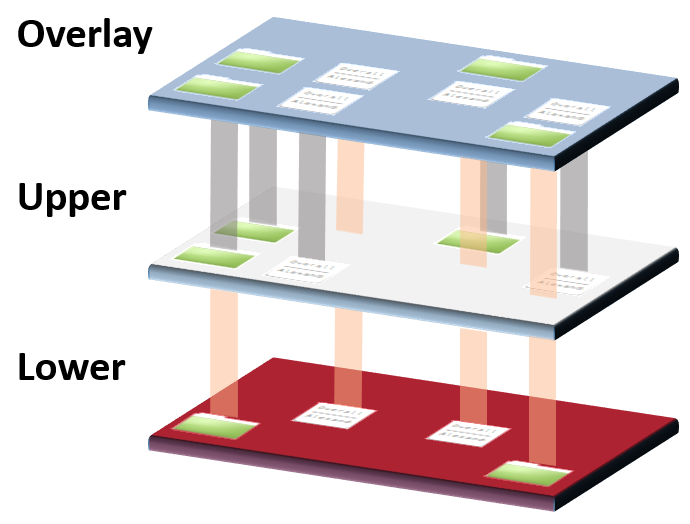
So images are stacked in layers. The shared base is kept once, read-only, and each container adds a thin writable layer on top that holds only what it changed. Overlayfs, from section 1.2, is the kernel feature that merges the stack into a single directory tree that looks like one ordinary filesystem.
3.2On disk: lower, upper, work
An overlayfs mount takes three directories:
| Directory | Role |
|---|---|
lowerdir | The image, read-only |
upperdir | Where every write goes |
workdir | Scratch space the kernel needs for atomic renames |
To try it we need an image's files. docker export writes a container's whole filesystem out as a tar archive (one file that bundles a directory tree), and for Alpine that archive is 8.9 MB. The commands below put a tmpfs (a filesystem kept entirely in memory, so nothing we do touches a real disk) at /ks, unpack the archive as the lower layer, and mount the overlay on /ks/merged. Create /ks first with mkdir /ks. The archive is /w/alpine.tar, which you can make on your own machine, in the directory you shared as /w, with docker export $(docker create alpine) > alpine.tar.
mount -t tmpfs tmpfs /ks
mkdir -p /ks/lower /ks/upper /ks/work /ks/merged
tar -xf /w/alpine.tar -C /ks/lower
mount -t overlay overlay \
  -o lowerdir=/ks/lower,upperdir=/ks/upper,workdir=/ks/work /ks/merged
/ks/merged now shows Alpine's files, and everything we write there lands in /ks/upper. That raises a question: what does it mean to delete a file that exists only in the read-only lower layer? The lower layer can't be changed, so overlayfs writes a whiteout instead, a character device (a special file that stands for a device instead of holding data) with device number 0,0 in the upper layer that hides the lower file:
$ rm /ks/merged/etc/motd
$ stat -c "%n %F %t,%T" /ks/upper/etc/motd
/ks/upper/etc/motd character special file 0,0
$ ls /ks/lower/etc/motd
/ks/lower/etc/motd           # still there, just hidden
That's what a Docker image layer is on disk: a directory of files plus whiteouts, and an image is a stack of them. The layering has a price when you write to a file that lives only in a lower layer, and section 8.3 measures it.
3.3Making the merged directory the process's root
/ks/merged is only a directory so far. The container's process has to be made to treat it as /. The older tool for that is chroot, which changes one process's idea of where / is. The one containers use is pivot_root, and the difference between them is the difference between hiding the host's files and removing them.
/ is the host's root, so host files are all within reach.?Why pivot_root and not chroot?
A chroot changes one process's root directory and leaves the old root mounted in its namespace. A root process can walk back out with the well-known double-chroot trick: it calls chroot again on a subdirectory without moving into it, which leaves its current directory outside its new root. From there, cd .. is never stopped by a root, so it climbs all the way to the host's real /, which was never taken away. After pivot_root and a lazy unmount of /.old, the host tree isn't in the mount namespace at all, so there's nothing to walk back to.
chroot | pivot_root + umount -l | |
|---|---|---|
| What changes | One process's root directory | The root mount of the whole mount namespace |
| Old root | Still mounted | Detached |
| Escape by root | Double-chroot trick | No path back |
Now the process sees its own processes and its own files. Nothing yet stops it from using all of the host's memory, which was the leaky application's problem in the first place.
04What a process may use: cgroups
4.1A budget kept as files
Namespaces and overlayfs control what a process sees and which files it has. They say nothing about how much it may use, and that's the cgroup's job from section 1.2.
cgroups version 2 is a tree of directories under /sys/fs/cgroup. Each directory is a cgroup, the processes listed in it belong to it, and the files in it hold its limits. Each kind of resource is managed by a controller (memory, cpu and pids are the three we'll use), and a cgroup's files for that resource only appear once the controller is switched on for it. Write 64M into memory.max and, as the group's usage nears that figure, the kernel will first reclaim memory from it, meaning it takes back pages it can safely drop, such as cached copies of files that are still on disk. Then, if that isn't enough, end a process with its OOM killer (out-of-memory killer) before that cgroup's usage passes 64 MiB. The leaky application can now only hurt itself.
We'll make a cgroup called box for our hand-built container. In order, the commands below move every running process into a cgroup called init, switch on the three controllers for the children of the top cgroup, make box, and write its limits. memory.swap.max set to 0 forbids swap (disk space used as overflow for memory), so the 64 MiB is a hard wall. cpu.max takes a quota and a period in microseconds, so 50000 100000 means 50 ms of CPU in every 100 ms. pids.max caps how many processes the group may contain.
cd /sys/fs/cgroup
mkdir init && for p in $(cat cgroup.procs); do echo $p > init/cgroup.procs; done
echo "+memory +cpu +pids" > cgroup.subtree_control
mkdir box
echo 64M            > box/memory.max
echo 0              > box/memory.swap.max
echo "50000 100000" > box/cpu.max      # 50 ms of CPU per 100 ms period
echo 64             > box/pids.max
The loop that moves every process into init has a reason. cgroup v2 refuses to enable controllers for the children of a cgroup that still holds processes of its own, which the kernel docs call the no-internal-process constraint. A real root cgroup is exempt, but the "root" inside a Docker container is Docker's /docker/<id> cgroup seen through a cgroup namespace, so the rule applies there. On an ordinary Linux server you rarely meet it, because systemd, the program that starts and supervises services on most distributions, already keeps every process in a leaf, a cgroup with no children of its own.
4.2What a CPU limit feels like
The memory limit has an obvious failure, which section 6.1 will show. The CPU limit fails in a quieter way. The line cpu.max = 50000 100000 reads like "half a core", but the kernel enforces it as a quota per period: 50 ms of CPU to spend in each 100 ms window. A loop that wants all the CPU it can get, run for 3 seconds in such a cgroup, reports:
real 0m 3.00s   user 0m 1.51s
cpu.stat delta: nr_periods 30   nr_throttled 30   throttled_usec 1,488,738
real is the wall-clock time and user is the CPU time the loop received: about half. The cpu.stat counters say why. There were 30 periods in 3 seconds, and all 30 were throttled: the loop used up its 50 ms early in the period and was frozen until the next one began. The frozen stretches add up to about 1.5 seconds:
| Quota in each period | cpu.max = 50000 100000 | 50 ms of 100 ms |
| Periods in a 3 s busy loop | 3,000 ms ÷ 100 ms | 30 |
| Time frozen if every period is throttled | 30 × ~50 ms | ~1.5 s |
| throttled_usec reported by cpu.stat | 1,488,738 µs | |
On average that's half a core. In practice it's 50 ms of running followed by 50 ms of being frozen, and for a request handler that means a 50 ms stall shows up in your tail latency (the latency of the slowest few percent of requests) whenever a request straddles the boundary. Chapter 16 explains why averages hide this, and the field note You paid for four CPUs and got throttled at 40% reproduces it on a real service.
We now have all three pieces, made separately. Next we combine them in one process.
05Putting the pieces together
5.1By hand, with shell commands
We have a PID namespace, an overlay and a cgroup. A container needs one process that has them all, plus a network connection, and the order in which they're set up matters. The setup is split across two scripts. The inner script runs as PID 1 inside the new namespaces and builds the container's world. The outer script runs on the host, puts the container into its cgroup, starts the inner script and connects the network.
Here is the inner script, lightly trimmed. It starts as PID 1 in fresh mount, UTS, IPC, net and cgroup namespaces, but it can still see every host file.
#!/bin/bash
set -e
hostname box
mount --make-rprivate /            # stop our mounts leaking back to the host
cd /ks/merged
mkdir -p .old
pivot_root . .old                  # the overlay becomes /, the host moves to /.old
cd /; hash -r                      # bash cached /usr/bin/mount from the host
mount -t proc proc /proc
mount -t sysfs sysfs /sys
mount -t cgroup2 cgroup2 /sys/fs/cgroup
mount -t tmpfs -o size=1m,mode=755 tmpfs /dev
mknod -m 666 /dev/null c 1 3
umount -l /.old && rmdir /.old     # and now the host is gone
until ip link show c0 >/dev/null 2>&1; do sleep 0.05; done
ip link set c0 name eth0
ip addr add 10.99.0.2/24 dev eth0 && ip link set eth0 up && ip link set lo up
exec "$@"
Read it top to bottom. hostname box only changes the name in the new UTS namespace. mount --make-rprivate / stops mounts made in the new mount namespace from propagating back to the host's. Then comes the pivot_root from section 3.3, and fresh mounts of /proc (section 2.3), /sys and the cgroup files, plus a tiny /dev that holds one device file, null. (mknod makes a device file: c means a character device, and 1 and 3 are the kernel's numbers for null.) The /sys/fs/cgroup mounted here is the box's own cgroup, because the container is in a cgroup namespace. The until loop waits for the host to create the network interface c0, and the last line replaces the script with your command, which becomes PID 1.
The hash -r line is there for a subtle reason. Bash looks up a command's path once and remembers it, so mount was remembered as the host's /usr/bin/mount. After the pivot, that path doesn't exist, and without hash -r the script dies with /usr/bin/mount: No such file or directory. (Alpine keeps mount in /bin.) It's a good demonstration that pivot_root swaps the world out from under a running process.
A new network namespace starts with no connection to anything: just a loopback interface. To give it one we create a veth pair, two virtual network interfaces joined like the two ends of a cable, so that whatever goes in one comes out of the other. One end stays on the host and the other goes into the container's namespace. The outer script does that. It joins the cgroup first, so the child and its cgroup namespace are rooted there, then unshares, then plugs in the veth pair. The peer is named c0 and created directly in the child's namespace, so there's nothing for it to collide with:
echo $$ > /sys/fs/cgroup/box/cgroup.procs
unshare --pid --fork --mount --uts --ipc --net --cgroup /w/inner.sh "$@" &
sleep 0.2
CPID=$(pgrep -P $!)                     # the container's PID 1, as the host sees it
ip link add veth-host type veth peer name c0 netns $CPID
ip addr add 10.99.0.1/24 dev veth-host && ip link set veth-host up
wait
Two shell details make the middle lines work. $! is the PID of the command just started in the background, here unshare, and pgrep -P lists that process's children, so CPID ends up holding the host's number for the inner script, the container's PID 1. netns $CPID then tells ip to create the c0 end inside that process's network namespace.
Save the inner script as /w/inner.sh, the path the outer script uses, and run the outer script with the command you want as PID 1, such as /bin/sleep 1000, which is what the transcript below shows.
Now we can look inside. ping checks that the host can reach the container's end of the veth pair, and nsenter -t PID -a starts a command inside every namespace of the process with that PID. We use it here to run a handful of commands in the box:
$ ping -c2 -W1 10.99.0.2 | tail -1
rtt min/avg/max/mdev = 0.013/0.020/0.028/0.007 ms
$ nsenter -t $CPID -a sh -c 'hostname; cat /etc/alpine-release; ps;
cat /sys/fs/cgroup/memory.max /sys/fs/cgroup/cpu.max; mount'box
3.24.2
PID USER TIME COMMAND
1 root 0:00 /bin/sleep 1000
29 root 0:00 sh -c hostname; cat /etc/alpine-release; ps; [...]
31 root 0:00 ps
67108864
50000 100000
overlay on / type overlay (rw,relatime,lowerdir=/ks/lower,upperdir=/ks/upper,workdir=/ks/work,uuid=on)
proc on /proc type proc (rw,relatime)
sysfs on /sys type sysfs (rw,relatime)
cgroup2 on /sys/fs/cgroup type cgroup2 (rw,relatime)
tmpfs on /dev type tmpfs (rw,relatime,size=1024k,mode=755)Go down the output and match each line to a piece. The hostname box and the 3.24.2 Alpine release come from the UTS namespace and the overlay. ps shows sleep as PID 1, the PID namespace at work. memory.max and cpu.max show the limits we wrote into the box cgroup, and because of the cgroup namespace, /sys/fs/cgroup inside is box outside. Look at the first line of mount too: the host paths of the layers leak into the container. Docker containers do the same thing with /var/lib/docker/overlay2/....
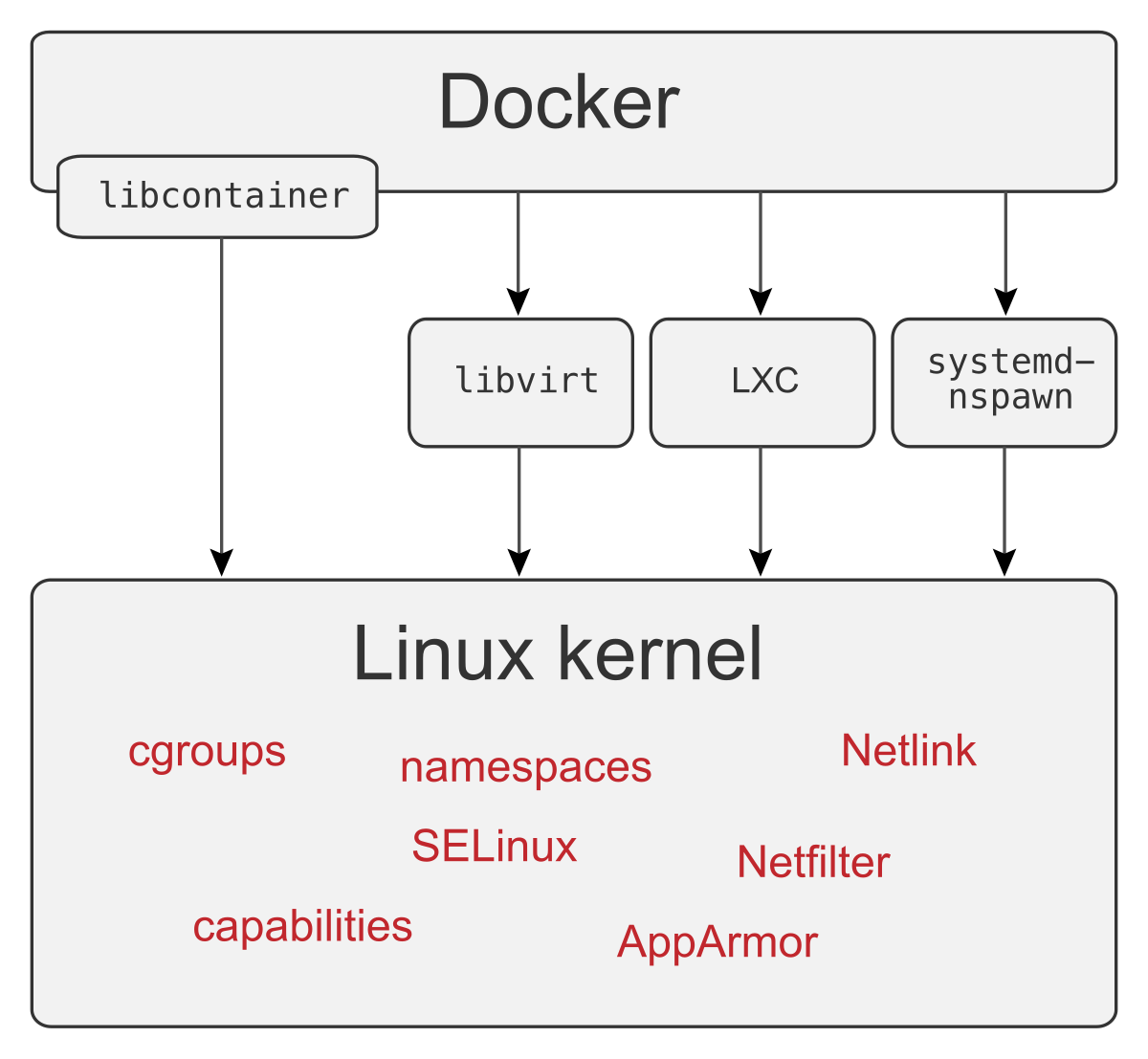
That is a container. Everything Docker adds (a registry to fetch images from, a virtual network switch called a bridge plus address translation so containers can reach the outside world, and log collection) sits around this, not inside it. Doing it with scripts hides the order of the system calls, though, and the order turns out to be where the difficulty is. The same thing in C makes it visible.
5.2The same thing in about a hundred lines of C
Here's the version without unshare, pivot_root and the other command-line tools, which come from a package called util-linux. It does everything above in one program, plus a seccomp filter, which is a small program the kernel runs on every system call a process makes and which can allow the call, make it fail or kill the process. It keeps system("ip ...") for the veth setup, because the netlink code (netlink is the socket interface the kernel offers for network configuration) to create a veth pair would double the length and teach nothing about containers.
clone is the system call that creates a new process, like fork, and takes flags that choose which namespaces the child gets. Most flag names match the table in section 2.2, except one: CLONE_NEWNS is the mount namespace, named back when it was the only kind. Compile the program with gcc -O2 mini.c -o mini. Step through what it does before reading the code:
/sys/fs/cgroup/mini and writes the limits: memory.max 64M, no swap, cpu.max 50000 100000, pids.max 64.The program takes a lower directory (the unpacked image) and a command, and the filter inside it checks for the ARM64 architecture. On an x86-64 machine, change AUDIT_ARCH_AARCH64 to AUDIT_ARCH_X86_64.
// mini.c: a container in about a hundred lines. Linux 5.x+, run as root.
// usage: ./mini <lowerdir> <cmd> [args...]
#define _GNU_SOURCE
#include <fcntl.h>
#include <linux/audit.h>
#include <linux/filter.h>
#include <linux/seccomp.h>
#include <sched.h>
#include <signal.h>
#include <stddef.h>
#include <stdio.h>
#include <stdlib.h>
#include <string.h>
#include <sys/mount.h>
#include <sys/prctl.h>
#include <sys/stat.h>
#include <sys/syscall.h>
#include <sys/sysmacros.h>
#include <sys/wait.h>
#include <unistd.h>

#define CG "/sys/fs/cgroup/mini"
#define DIE(what) do { perror(what); exit(1); } while (0)
static char **argv_; static int sync_pipe[2];

static void put(const char *path, const char *val) {        // echo val > path
  int fd = open(path, O_WRONLY);
  if (fd < 0 || write(fd, val, strlen(val)) < 0) DIE(path);
  close(fd);
}

static void deny_mount(void) {       // seccomp: mount(2) returns EPERM, even for root
  struct sock_filter f[] = {
    BPF_STMT(BPF_LD | BPF_W | BPF_ABS, offsetof(struct seccomp_data, arch)),
    BPF_JUMP(BPF_JMP | BPF_JEQ | BPF_K, AUDIT_ARCH_AARCH64, 1, 0),
    BPF_STMT(BPF_RET | BPF_K, SECCOMP_RET_KILL_PROCESS),
    BPF_STMT(BPF_LD | BPF_W | BPF_ABS, offsetof(struct seccomp_data, nr)),
    BPF_JUMP(BPF_JMP | BPF_JEQ | BPF_K, __NR_mount, 0, 1),
    BPF_STMT(BPF_RET | BPF_K, SECCOMP_RET_ERRNO | 1 /* EPERM */),
    BPF_STMT(BPF_RET | BPF_K, SECCOMP_RET_ALLOW),
  };
  struct sock_fprog prog = { sizeof f / sizeof f[0], f };
  if (prctl(PR_SET_NO_NEW_PRIVS, 1, 0, 0, 0) ||
      prctl(PR_SET_SECCOMP, SECCOMP_MODE_FILTER, &prog)) DIE("seccomp");
}

static int child(void *arg) {
  char c;                                     // wait until the parent has put us
  close(sync_pipe[1]);                        // in the cgroup and made our veth
  if (read(sync_pipe[0], &c, 1) != 1) DIE("sync");
  if (unshare(CLONE_NEWCGROUP)) DIE("cgroupns");   // root it at /mini, not /
  if (sethostname("mini", 4)) DIE("uts");
  if (mount(NULL, "/", NULL, MS_REC | MS_PRIVATE, NULL)) DIE("private");
  mkdir("/tmp/mini", 0755);                   // overlay: image read-only, writes to tmpfs
  if (mount("tmpfs", "/tmp/mini", "tmpfs", 0, NULL)) DIE("tmpfs");
  mkdir("/tmp/mini/up", 0755); mkdir("/tmp/mini/work", 0755); mkdir("/tmp/mini/root", 0755);
  char opts[512];
  snprintf(opts, sizeof opts, "lowerdir=%s,upperdir=/tmp/mini/up,workdir=/tmp/mini/work", (char *)arg);
  if (mount("overlay", "/tmp/mini/root", "overlay", 0, opts)) DIE("overlay");
  if (system("ip link set c0 name eth0 && ip addr add 10.99.1.2/24 dev eth0 &&"
             "ip link set eth0 up && ip link set lo up")) DIE("net");
  if (chdir("/tmp/mini/root") || mkdir(".old", 0700) < 0) DIE("chdir");
  if (syscall(SYS_pivot_root, ".", ".old")) DIE("pivot_root");
  if (chdir("/") || umount2("/.old", MNT_DETACH) || rmdir("/.old")) DIE("old root");
  if (mount("proc", "/proc", "proc", 0, NULL)) DIE("proc");
  mount("sysfs", "/sys", "sysfs", MS_RDONLY, NULL);
  mount("cgroup2", "/sys/fs/cgroup", "cgroup2", 0, NULL);
  mount("tmpfs", "/dev", "tmpfs", 0, "size=1m,mode=755");
  mknod("/dev/null", S_IFCHR | 0666, makedev(1, 3));
  mknod("/dev/zero", S_IFCHR | 0666, makedev(1, 5));
  deny_mount();
  execvp(argv_[0], argv_);
  DIE("exec");
}

int main(int argc, char **argv) {
  if (argc < 3) { fprintf(stderr, "usage: %s lowerdir cmd...\n", argv[0]); return 2; }
  argv_ = argv + 2;
  mkdir(CG, 0755);                                        // cgroup v2 limits
  put(CG "/memory.max", "64M"); put(CG "/memory.swap.max", "0");
  put(CG "/cpu.max", "50000 100000"); put(CG "/pids.max", "64");
  if (pipe(sync_pipe)) DIE("pipe");
  static char stack[1 << 20];
  int flags = CLONE_NEWPID | CLONE_NEWNS | CLONE_NEWUTS | CLONE_NEWIPC | CLONE_NEWNET | SIGCHLD;
  pid_t pid = clone(child, stack + sizeof stack, flags, argv[1]);
  if (pid < 0) DIE("clone");
  char buf[256];
  snprintf(buf, sizeof buf, "%d", pid); put(CG "/cgroup.procs", buf);
  snprintf(buf, sizeof buf, "ip link add vm%1$d type veth peer name c0 netns %1$d && "
           "ip addr add 10.99.1.1/24 dev vm%1$d && ip link set vm%1$d up", pid);
  if (system(buf)) DIE("veth");
  close(sync_pipe[0]);
  if (write(sync_pipe[1], "g", 1) != 1) DIE("release");
  int status; waitpid(pid, &status, 0);
  if (rmdir(CG)) perror("rmdir " CG);          // the veth dies with the netns
  if (WIFSIGNALED(status)) fprintf(stderr, "mini: killed by signal %d\n", WTERMSIG(status));
  return WIFEXITED(status) ? WEXITSTATUS(status) : 128 + WTERMSIG(status);
}$ ./mini /ks/lower /bin/sh -c 'echo pid=$$ host=$(hostname); cat /etc/alpine-release;
cat /proc/self/cgroup; cat /sys/fs/cgroup/memory.max; ip addr show eth0 | grep inet;
ps; mount -t tmpfs x /mnt; echo hello > /hi; cat /hi'
$ ./mini /ks/lower /bin/grep -E "Seccomp:|CapEff" /proc/self/statuspid=1 host=mini
3.24.2
0::/
67108864
inet 10.99.1.2/24 scope global eth0
inet6 fe80::dcfc:cbff:fe45:1800/64 scope link tentative
PID USER TIME COMMAND
1 root 0:00 /bin/sh -c echo pid=$$ host=$(hostname); [...]
13 root 0:00 ps
hello
mount: permission denied (are you root?)
CapEff: 000001ffffffffff
Seccomp: 2The output matches the hand-built box: PID 1, hostname mini, Alpine 3.24.2, a 64 MiB limit, and an eth0 with an address. Two lines are new. The permission denied line is the seccomp filter at work: the shell ran mount -t tmpfs x /mnt, and the filter made the mount system call fail with EPERM, the error code for "operation not permitted", before the kernel looked at who was asking. Alpine's mount comes from busybox, the one small program that supplies all of Alpine's basic commands, and busybox guesses at the cause and asks "are you root?". The process is root, UID 0, so the guess is wrong; the filter refused the call regardless. The error appears after hello only because error messages and normal output travel on separate streams (stderr and stdout) and reach the screen in their own time.
The last two lines, CapEff and Seccomp, are about what root can do. Linux splits root's powers into separate switches called capabilities, such as the power to mount filesystems or to load kernel modules. CapEff is a bitmask of the capabilities this process currently has, one bit per capability, and 000001ffffffffff has every bit set. That's the biggest gap in mini: it never drops any. A plain docker run alpine on the same VM shows CapEff: 00000000a80425fb, which is 14 capabilities. Seccomp: 2 means a filter is installed.
?Why does the child wait on a pipe?
Of all the steps in mini, this is the one whose order you can't change. child() blocks until the parent has written its PID into cgroup.procs and created the veth end in its network namespace, because the child's cgroup namespace and its network setup both depend on those two things already being in place. Here's the exchange:
A cgroup namespace's root is fixed at the moment it's created: it's whichever cgroup the process is in at that instant. Put CLONE_NEWCGROUP in the clone flags instead, and the root becomes the cgroup the parent was sitting in when it called clone, before the child was moved into mini. Then /proc/self/cgroup shows a path starting with /.., climbing out of its own root, instead of the tidy 0::/.
5.3From mini to runc
mini is a toy. The program that Docker and Kubernetes use underneath is runc, which does the same steps from a JSON file (the OCI spec) that lists the command, the mounts, the namespaces and the limits. It does much more than mini does: it drops capabilities to the spec's list, masks and mounts parts of /proc read-only, sets up /dev properly, supports user namespaces, and uses three processes where mini uses two. That last difference has a cause, and section 7.2 explains it once we've met user namespaces. First, though, we should see what happens when the pieces we've assembled are put under pressure.
06What goes wrong
A container built the way we've built one runs correctly until something pushes on its limits. Three kinds of failure show up again and again: a memory limit that kills, a PID 1 that won't die, and escapes through /proc.
6.1A memory limit that kills
The memory limit is the first thing to test. The obvious way is to get a shell inside the box with nsenter -a, as in section 5.1, and run something that needs far more than 64 MB, such as piping 200 MB into tail. Before reading on, decide what you expect.
You nsenter -a into a container whose memory.max is 64M and run a command that needs 200 MB. What happens?
docker exec doesn't have this problem, because runc writes the exec'd process into the container's cgroup. Bare nsenter doesn't. So to test properly, join the cgroup first. Use dd (it copies data in blocks of a size you choose, and with bs=100M it allocates a 100 MB buffer first) so the allocation is certain, and read memory.events, a file of counters the kernel keeps for the cgroup:
$ echo $$ > /sys/fs/cgroup/box/cgroup.procs
$ nsenter -t $CPID -a sh -c 'dd if=/dev/zero of=/dev/null bs=100M count=1; echo exit=$?;
    cat /sys/fs/cgroup/memory.events'
Killed
exit=137
low 0
high 0
max 37
oom 1
oom_kill 1
oom_group_kill 0

$ dmesg | tail -1          # wrapped here for width
Memory cgroup out of memory: Killed process 91997 (dd) total-vm:104076kB,
anon-rss:63664kB, file-rss:0kB, shmem-rss:844kB, UID:0 pgtables:164kB oom_score_adj:0Here is what happened inside the kernel, step by step. Notice the max 37 counter: it counts the times the cgroup's usage was about to cross memory.max, and each one is a moment where the kernel tried to take memory back.
box, dd starts and asks for a 100 MB buffer. The kernel hands out memory a page at a time as dd touches it, and charges every page to box.The PID in dmesg, 91997, isn't the number dd had inside the box, which was two digits long. dd sat in three nested PID namespaces, the VM's, the privileged container's and the box's, and had a different number in each. The kernel log always uses the number from the outermost one, the VM's.
?Which process gets killed?
That's a policy question, and Kubernetes changed its answer. Kubernetes runs containers across many machines, and its agent on each machine is the kubelet. On cgroup v2, since Kubernetes 1.28, the kubelet sets memory.oom.group=1 on every container, so an out-of-memory event kills every process in the container, not just the one the kernel picked.
For a web server that's what you want. For a Jupyter kernel running under a notebook server it isn't. 2i2c hit this when their clusters moved to Amazon Linux 2023 (AL2023) node images, which use cgroup v2: a user who blew through their memory used to lose one kernel and now lost the whole pod (the group of containers Kubernetes runs together). They fixed it with the kubelet's singleProcessOOMKill option, added in 1.32. The field note The dashboard said 60% goes through how the numbers behind these kills disagree.
A memory limit ends in a kill. A different failure comes from the process we've been calling PID 1.
6.2PID 1 ignores you
In section 2.3 we saw PID 1 appear in a new namespace, and the kernel gives that process special treatment. To see it, we run mini with a PID 1 that never calls wait() (the call a parent makes to collect a child's exit status), plus two short-lived children. In the transcript, the first line starts mini in the background, running a shell that starts two short sleeps and then replaces itself with a long sleep. The next lines find that long sleep from the host, list the container's processes, send it SIGTERM (the polite "please stop" signal, which a program can catch and use to clean up), and then SIGKILL.
$ ./mini /ks/lower /bin/sh -c '(sleep 0.2 &) ; sleep 0.1 & exec sleep 1000' &
$ sleep 1; P=$(pgrep -f '^sleep 1000')
$ nsenter -t $P -a ps -o pid,ppid,stat,comm
$ kill -TERM $P; sleep 1; ps -o pid,stat,comm -p $P
$ kill -KILL $P; sleep 0.3; ps -o pid,stat,comm -p $P || echo gonePID PPID STAT COMMAND
1 0 S sleep
8 1 Z sleep
9 1 Z sleep
10 0 R ps
PID STAT COMMAND
32352 S sleep
mini: killed by signal 9
PID STAT COMMAND
goneLook at the STAT column first. Two processes show Z: zombies. A process that has exited stays in the process table until its parent collects its exit status, and collecting it is called reaping. A process whose parent has died is handed to PID 1, which is expected to reap it. Here, one zombie was orphaned into PID 1 and the other is its direct child, and neither is ever reaped because the sleep running as PID 1 never calls wait().
The second thing is the SIGTERM. That ps runs on the host, so it shows the host's number for the long sleep, 32352, and after kill -TERM the process is still there in state S (sleeping), untouched. Only the SIGKILL ended it, which mini reports as killed by signal 9, and the last ps finds nothing. The SIGTERM never arrived because the kernel dropped it:
static bool sig_task_ignored(struct task_struct *t, int sig, bool force)
{
	void __user *handler;

	handler = sig_handler(t, sig);

	/* SIGKILL and SIGSTOP may not be sent to the global init */
	if (unlikely(is_global_init(t) && sig_kernel_only(sig)))
		return true;

	if (unlikely(t->signal->flags & SIGNAL_UNKILLABLE) &&
	    handler == SIG_DFL && !(force && sig_kernel_only(sig)))
		return true;
The function answers one question: should this signal be thrown away? The first test makes sure nobody can kill or stop the machine's own PID 1. The second is the one that bit us. A normal process with no SIGTERM handler dies when it gets one, because dying is the default action, written SIG_DFL in the code. The kernel marks every namespace's PID 1 SIGNAL_UNKILLABLE, and for such a process with no handler installed, the function returns true: the signal is dropped instead of being given its default action. The only exception is in the last clause. force is set when the signal comes from a namespace above, and sig_kernel_only is true only for SIGKILL and SIGSTOP, the two signals no process can catch, so only those two, sent from outside, get through.
Your app is PID 1 in its container and installs no SIGTERM handler. You run docker stop, which sends SIGTERM. How long does docker stop take?
That's what a docker stop that hits its 10-second timeout usually is: your app didn't install a handler, so SIGTERM vanished, and Docker waited and then sent SIGKILL.
tini exists for exactly these two jobs: forward signals to the real process and reap zombies. It has shipped inside Docker since 1.13 as docker run --init. Without it, the zombie half of the problem builds up slowly. In a long-lived container whose PID 1 is sleep infinity, every script you run with docker exec that dies leaving children behind hands them to sleep, and ps ends up showing a small graveyard of <defunct> entries, such as pkill and run.sh, that nothing will ever reap.
Both failures so far hurt the container itself. The third kind lets a process reach the host.
6.3Breakouts through /proc
Namespaces hide things, but they don't build a wall, because every container still calls the same kernel. A VM gives the guest its own kernel and exposes a small emulated device interface to the host. A container exposes the host kernel's entire system-call surface, narrowed by filters such as the seccomp filter and the capabilities we met in section 5.2, and by LSMs (Linux security modules, the AppArmor and SELinux policy systems). That's why Firecracker, gVisor and Kata (sandboxes that put a small VM, or a kernel written in user space, between the workload and the host kernel) exist, why AWS runs Lambda functions in Firecracker microVMs instead of plain containers, and why chapter 47 is a chapter of its own.
When a container does escape, it's usually through a path that lets a process reach an object a normal path lookup would never find. Both famous runc escapes go through the same door, the links under /proc/self: /proc/self/exe points at the running program's own binary, and /proc/self/fd/N at its open file number N. They're called magic links because the kernel doesn't resolve them by following a path name. It hands you the file the process already holds, even if that file lives in a part of the filesystem the process could never name from inside its root. A CVE is a numbered public record of a security bug, and these are two of them:
| CVE | What leaked | Affected | Fixed or disclosed |
|---|---|---|---|
| CVE-2019-5736 (disclosure) | The host's runc binary, through /proc/self/exe | — | Disclosed 11 February 2019 |
| CVE-2024-21626, "Leaky Vessels" (advisory) | An open file descriptor for the host's /sys/fs/cgroup | 1.0.0-rc93 to 1.1.11 | 1.1.12, 31 January 2024 |
?How did a container overwrite runc?
When runc execs into a container, for a moment the process in the container is the host's runc binary. A malicious container could open /proc/self/exe, wait for the binary to stop being busy (Linux won't let anyone write to a program file while it's running), and overwrite runc on the host. At the next docker exec, that's code running as root on the host. It was found by Adam Iwaniuk and Borys Popławski.
Leaky Vessels was simpler. runc does its setup inside the container through a process called runc init, which ends by execing your command. runc left a file descriptor for the host's cgroup directory open in that process, so an image with WORKDIR /proc/self/fd/7 (the Dockerfile line that sets a container's starting directory) started life with its working directory on the host filesystem. Rory McNamara at Snyk found it, and the advisory credits two other people as well.
The 2019 fix is still in runc, and the current version comments on its own cost:
// CloneSelfExe makes a clone of the current process's binary (through
// /proc/self/exe). This binary can then be used for "runc init" in order to
// make sure the container process can never resolve the original runc binary.
// For more details on why this is necessary, see CVE-2019-5736.
func CloneSelfExe(tmpDir string) (*os.File, error) {
	// Try to create a temporary overlayfs to produce a readonly version of
	// /proc/self/exe that cannot be "unwrapped" by the container. [...]
	//
	// Based on some basic performance testing, the overlayfs approach has
	// effectively no performance overhead (it is on par with both
	// MS_BIND+MS_RDONLY and no binary cloning at all) while memfd copying adds
	// around ~60% overhead during container startup.
	overlayFile, err := sealedOverlayfs("/proc/self/exe", tmpDir)
The original fix copied the whole runc binary into a sealed memfd (an anonymous in-memory file) on every start. Today's version mounts a throwaway read-only overlay over it and falls back to the copy.
The disclosure of CVE-2019-5736 also says which defences stopped it, and that points to the next idea. Neither the default AppArmor policy nor the default SELinux policy on Fedora blocked the attack. What did block it was correct use of user namespaces, where the host's root isn't mapped into the container.
07Who is root inside?
7.1Root inside, nobody outside
So far, root inside the container has been root outside it too: the same user number, 0, with the same standing in the eyes of the kernel. The one namespace we haven't used changes that. A user namespace gives a process its own table of user and group numbers, mapped onto different numbers outside. As an unprivileged user u1, in the same Ubuntu container, unshare --user --map-root-user makes you root inside a namespace that maps back to u1:
$ id
uid=1001(u1) gid=1001(u1) groups=1001(u1)
$ unshare --user --map-root-user --mount --pid --fork --mount-proc sh
# id; cat /proc/self/uid_map
uid=0(root) gid=0(root) groups=0(root)
         0       1001          1
# touch /etc/owned-by-host-root
touch: cannot touch '/etc/owned-by-host-root': Permission denied
# mount -t tmpfs x /mnt && echo mounted a tmpfs
mounted a tmpfs
# ls -ln /etc/shadow
-rw-r----- 1 65534 65534 526 Sep 25 13:13 /etc/shadow
The uid_map line 0 1001 1 reads: inside number 0 is outside number 1001, for a range of 1 number. So this is root inside and UID 1001 outside. It can mount a tmpfs, because inside the new namespace it holds the capability to do so (CAP_SYS_ADMIN, the broad "administer the system" capability, scoped to the namespaces it owns). It can't touch host-root files, which show up as 65534, the overflow ID for anything unmapped.
?What do user namespaces fix, and what don't they?
They fix the "root in the container is root on the host" class of bug. CVE-2019-5736's own disclosure says the attack fails when host root isn't mapped into the container, since overwriting runc needs host root. Kubernetes turned user namespaces for pods on by default in 1.33. A pod still opts in by setting hostUsers: false, and the feature needs Linux 6.3+ and runc 1.2+.
They don't fix the shared kernel, and they make its reachable surface bigger. An unprivileged user can now reach code paths that used to require real root. CVE-2022-0185, a heap overflow in filesystem-context parsing, was exploitable by an unprivileged user precisely because user namespaces handed them a namespaced CAP_SYS_ADMIN (Ubuntu's notice). That's why Ubuntu added an AppArmor restriction on unprivileged user namespaces (opt-in in 23.10, on by default from 24.04).
7.2Why a real runtime needs three stages
User namespaces are also the reason runc is so much longer than mini. They have to be created in a particular order relative to everything else, and the order is awkward enough that runc's authors left a candid comment about it:
	/*
	 * Okay, so this is quite annoying.
	 *
	 * [...] if we unshare(2) the user namespace *before* we clone(2), then
	 * all hell breaks loose.
	 *
	 * The parent no longer has permissions to do many things (unshare(2) drops
	 * all capabilities in your old namespace), and the container cannot be set
	 * up to have more than one {uid,gid} mapping. This is obviously less than
	 * ideal. In order to fix this, we have to first clone(2) and then unshare.
	 *
	 * Unfortunately, it's not as simple as that. We have to fork to enter the
	 * PID namespace (the PID namespace only applies to children). Since we'll
	 * have to double-fork, this clone_parent() call won't be able to get the
	 * PID of the _actual_ init process [...]
	 *
	 * -- Aleksa "what has my life come to?" Sarai
	 */
The comment lines up with two things we saw earlier. "The PID namespace only applies to children" is the pid_ns_for_children field from section 2.4. And the child can't write the uid_map a real container needs. It may map its own single user number, which is all unshare --map-root-user did in section 7.1, but mapping more than one number, or numbers other than its own, needs privileges in the namespace outside, and as the comment says, a process that has just unshared a user namespace has dropped all its capabilities there. So a process that stayed outside has to write the map for it. That gives runc three stages:
| Stage | What it does |
|---|---|
STAGE_PARENT | Writes the child's uid_map, because the child can't |
STAGE_CHILD | Unshares the user namespace, asks the parent for a mapping over a socket, then unshares everything else |
STAGE_INIT | The grandchild, and the only one inside the new PID namespace |
mini skips all of it by leaving user namespaces out. A real runtime can't.
Everything so far has described what these features do and how they fail. The next question is what they cost.
08What each layer costs
Isolation features take time to set up, and the time varies a lot between them. The numbers below are typical of a Linux VM on a laptop, and they shift with the machine and between runs. Medians are steady; the slowest runs (the max columns) are noisy, because anything else running on the VM shows up there first. The network namespace row, for example, landed anywhere from 240 to 363 µs across four runs, while the cheap rows moved by under a microsecond.
8.1Creating each namespace
The benchmark forked a fresh child per trial and had it time one unshare() call, 400 trials per kind, compiled with g++ -std=c++20 -O2. In the table, p50 is the median trial, p90 is the time that nine trials in ten beat, and max is the slowest one. One run is shown:
| Namespace | p50 | p90 | max |
|---|---|---|---|
| uts | 1.1 µs | 1.4 µs | 10 µs |
| pid | 1.2 µs | 2.5 µs | 46 µs |
| cgroup | 1.1 µs | 1.5 µs | 12 µs |
| user | 2.5 µs | 3.8 µs | 19 µs |
| ipc | 6.2 µs | 9.1 µs | 67 µs |
| mnt | 6.6 µs | 11.2 µs | 48 µs |
| net | 266 µs | 311 µs | 40.2 ms |
| all seven at once | 254 µs | 369 µs | 953 µs |
Six of the seven are a few microseconds: allocate a struct, copy some state.
?Why is a network namespace roughly a hundred times slower?
A new network namespace runs every registered per-namespace initialisation hook: loopback, the IPv4 and IPv6 tables, netfilter (the kernel's firewall machinery), and the fallback tunnel devices you can see in ip link inside the box (tunl0, gre0, sit0, ip6tnl0...), created because those modules were loaded. Kubernetes pods share one network namespace across their containers for many reasons, and this cost is probably a small one.
Teardown is asynchronous: the kernel cleans up in the background after the last process leaves. After mini exits, its host-side veth lingers for about 75 ms while that cleanup runs. That has a practical consequence for anything that starts containers in a loop. If the veth has a fixed name, such as veth-mini, the next run's ip link add fails because the previous run's interface still exists. mini avoids the collision by naming the veth after the PID.
8.2Starting a whole container
Creating the namespaces is only part of starting a container. Here is the whole path, from a bare fork and exec up to docker run:
| Command, median of 200 runs | Median | Min | Max |
|---|---|---|---|
| /bin/true (fork + exec baseline) | 0.15 ms | 0.13 ms | 0.32 ms |
| unshare, six namespaces, /bin/true | 0.76 ms | 0.60 ms | 16.1 ms |
| mini (veth, overlay, cgroup, seccomp) | 6.66 ms | 4.35 ms | 64.7 ms |
| runc 1.3.1 run, default spec | 47.8 ms | 20.1 ms | 190 ms |
| docker run --rm alpine true, from macOS (n=20) | 440 ms | 264 ms | 544 ms |
strace -f -r, which lists every system call a program and its children make with the time between them, shows where mini's 6.7 ms goes: seven fork-and-exec rounds of /usr/sbin/ip, each 2–7 ms under strace. Mounts and pivot_root cost a few hundred microseconds each. A runtime that spoke netlink directly should land much closer to the unshare row.
runc is roughly seven times slower than mini and does much more. It parses the OCI spec, drops to the spec's capability set, masks and read-only-mounts parts of /proc, sets up /dev properly, seals its own binary (section 6.3), and runs the three-stage dance from section 7.2.
docker run from the Mac adds the API round trip, containerd (the service that manages containers on Docker's behalf), a shim (a small process that stays with each container as its parent), image resolution and the VM boundary, and lands at roughly half a second.
8.3Copy-up: the first write to a big file
Section 3.2 left a question open: what does it cost to write to a file that exists only in the read-only lower layer? Suppose a 1 GiB SQLite database app.db ships inside the image. The first time the container opens it for writing, overlayfs copies the whole file into the upper layer, inside the open() call, a step called copy-up:
app.db, 1 GiB, in the lower layer. The upper layer starts empty. Your app opens the file for writing.Timing a single open(path, O_WRONLY) on a fresh overlay, with caches dropped, gives:
| File in lower layer | tmpfs upper | ext4 upper (loop file) | Second open |
|---|---|---|---|
| 1 MiB | 0.2–0.4 ms | 8.5–10.9 ms | — |
| 64 MiB | 13–37 ms | 141–167 ms | — |
| 256 MiB | 59–85 ms | 477–937 ms | — |
| 1 GiB | 166–392 ms | 3.93–4.15 s | 0.002–0.023 ms |
So getting write access to a 1 GiB file costs about four seconds, all of it spent inside one open(), and every later open costs a few microseconds. Each range covers three fresh overlays. The ext4 upper layer was a loop-mounted file (a file used as if it were a disk) on a virtual disk, so a real NVMe drive will probably do better, though copying a whole gigabyte is never free.
Even chmod triggers a copy-up, unless you mount with metacopy=on, which copies only the file's metadata (its owner, permissions and times) and leaves the contents in the lower layer until they're written:
metacopy=off  chmod 1 GiB file: 1.55 s     upper layer afterwards: 1.1G
metacopy=on chmod 1 GiB file: 0.00 s upper layer afterwards: 8.0K8.4An unexplained tail
The network namespace row has an ugly max of 17 to 40 ms in every run, against a 266 µs median. The first batch of network namespace creations in each run was also consistently slower (319–363 µs) than a second identical batch later in the same process (244–261 µs). The "all seven" trials ran in that later, faster stretch, which is why that row beats net alone in the table.
The best guess is contention with the asynchronous cleanup of namespaces that were just destroyed. cleanup_net runs from a kernel work queue and takes rtnl_lock, a global lock for network configuration, and so does registering the new namespace's devices. That would explain both the tail and the warm-up effect if the backlog drains. It isn't proven. What would settle it is an off-CPU profile of copy_net_ns with bpftrace (a tool for tracing kernel functions), run once with a 20 ms gap between creations and once without.
09Operating containers
9.1Seeing inside a running container
Each question the chapter raised has a command that answers it on a running container.
# Which namespaces is it in? (section 2)
lsns -p $PID                          # which namespaces, by inode
readlink /proc/$PID/ns/*              # same, raw; equal inodes = shared namespace
nsenter -t $PID -a sh                 # enter all of them (but NOT its cgroup, section 6.1)

# What can root do inside it? (sections 5.2 and 7)
grep -E 'Seccomp|CapEff|NoNewPrivs' /proc/$PID/status
cat /proc/$PID/cgroup                 # 0::/kubepods.slice/...

# What is its budget, and is it being hit? (sections 4 and 6.1)
cd /sys/fs/cgroup/<container>
cat memory.events                     # max, oom, oom_kill counters
cat memory.pressure cpu.pressure      # PSI: time stalled waiting for the resource
grep throttled cpu.stat               # nr_throttled, throttled_usec (section 4.2)
cat memory.stat | grep -E '^(anon|file) '   # is it heap or page cache?
When a container is slow, look at three things first. cpu.stat shows throttling. memory.pressure shows reclaim stalls, because a container near memory.max spends its time evicting its own page cache long before any OOM kill. And the Seccomp field in /proc/PID/status shows whether the filter is on at all. On a privileged container that field is 0: --privileged switches off seccomp, keeps every capability and exposes host devices. It's the right tool for experimenting with the pieces of a container and the wrong one for anything else.
9.2cgroup v1 to v2
Everything in this chapter used cgroup v2. Its predecessor, v1, gave every controller its own hierarchy. A process could be in /a for memory and /b for CPU, and nobody could reason about the result. v2 has one tree, the no-internal-process rule from section 4.1, pressure stall information (the *.pressure files above), and memory.high as a soft limit that throttles before it kills. The migration took years, and it's now pretty much over:
| Milestone | What changed |
|---|---|
| Kubernetes 1.25 (August 2022) | cgroup v2 support GA (generally available, meaning stable) |
| systemd 258 | Removed v1 support entirely (NEWS) |
| Kubernetes 1.35 | kubelets refuse to start on a v1 host unless you set failCgroupV1: false (KEP-5573) |
Where it bites is usually the JVM. OpenJDK before 11.0.16 and 8u372 can't read v2 limits, so on a v2 node it sizes its heap from the host's memory and can get OOM-killed (JDK-8230305). Kubernetes' cgroup v2 page lists the minimum versions for Java, Node and other runtimes. Check before the node image changes under you, not after.
9.3Rules that hold up
- Give PID 1 a job. Install a SIGTERM handler and reap children, or put tini in front of your app (section 6.2).
- Test limits from inside the cgroup. Join the container's
cgroup.procsfirst, or usedocker exec, becausensenterdoesn't (section 6.1). - Read exit 137 as an OOM kill until proven otherwise. Check
oom_killinmemory.eventsanddmesg(section 6.1). - Watch
nr_throttled, not average CPU. A quota stalls requests in 50 ms blocks that averages hide (section 4.2). - Keep mutable data out of the image. Put it on a volume to avoid copy-up (section 8.3).
- Don't treat a container as a VM boundary for code you don't trust. Add user namespaces, or use a microVM (sections 6.3 and 7).
- Check your runtime reads cgroup v2 limits before the node image changes (section 9.2).
9.4What you trade for what
| You get | You pay | When the bill arrives |
|---|---|---|
| Millisecond startup, no guest kernel | Every container shares one kernel | At the next kernel CVE reachable through the syscall surface |
| Cheap image layers via overlayfs | Whole-file copy-up on first write | As a multi-second first request on a big image file |
| A hard memory limit | SIGKILL, not an error, when it's hit | As exit 137 and a lost in-flight request |
| A CPU quota | Throttling in 100 ms periods | In p99, invisible in averages |
| Your app as PID 1 | Signals dropped without a handler, zombies unreaped | On every docker stop that takes 10 seconds |
| Rootless via user namespaces | More kernel code reachable by unprivileged users | When the next CVE-2022-0185 lands |
9.5Symptom, cause, fix
| Symptom | Likely cause | Fix |
|---|---|---|
| Exit code 137, nothing in the app's logs | memory.max hit, OOM kill | Check oom_kill in memory.events and dmesg; raise the limit or fix the leak |
docker stop always takes 10 seconds | PID 1 has no SIGTERM handler | Install a handler, or run with --init / tini |
<defunct> processes pile up | PID 1 doesn't reap | tini, dumb-init, or waitpid in your init |
| First request after deploy takes seconds | overlayfs copy-up of a big image file | Put mutable data on a volume |
| p99 has 50 ms stalls, average CPU looks fine | CPU quota throttling (cpu.max) | Check nr_throttled in cpu.stat; raise the quota |
| Memory limit test doesn't trigger OOM | Test shell entered with nsenter, outside the cgroup | Write your PID to cgroup.procs first |
| JVM OOM-killed after a node image change | Old JDK can't read cgroup v2 limits | JDK 11.0.16+ or 8u372+ (section 9.2) |
9.6Where you meet this in the wild
A container overwrote the host's runc through /proc/self/exe and got
root on the next exec. Neither the default AppArmor policy nor the
default SELinux policy on Fedora stopped it; correct use of user
namespaces did.
oss-security disclosure.
A leaked fd to the host's /sys/fs/cgroup, reachable as /proc/self/fd/7.
CVSS 8.6, runc 1.0.0-rc93 through 1.1.11.
GitHub advisory.
Moving to cgroup v2 nodes turned "the notebook kernel died" into "the
whole pod died", because Kubernetes 1.28+ kills the entire container
cgroup. Fixed with singleProcessOOMKill.
2i2c's write-up.
A container init that reaps zombies and forwards signals, built into Docker
since 1.13. Kubernetes has no --init flag, so images bake in tini or
dumb-init, or rely on the pause container when the pod shares a PID namespace.
krallin/tini.
10Summary
- A container is an ordinary process that the kernel dresses up. Namespaces set what it sees, a cgroup sets what it can use, and overlayfs gives it a root filesystem, so the same
sleepis PID 1 inside and PID 691 outside. Every container shares the host kernel, which makes startup cost milliseconds and makes a reachable kernel bug everyone's problem. - A namespace is a private copy of one kernel list. Unsharing a PID namespace moves your children, not you, so the next child becomes PID 1 and needs its own
/proc. - Overlayfs stacks read-only layers under one writable layer. Deleting a lower file writes a whiteout, and an image layer is just a directory of files plus whiteouts.
pivot_rootremoves the host tree;chrootonly hides it. After a lazy unmount of the old root there's no path back.- A cgroup is a directory of limit files. A 50 ms quota per 100 ms period is half a core as 50 ms running and 50 ms frozen, which shows up in tail latency.
- Order matters when you build one. Join the cgroup and wire the network before creating the cgroup namespace, or the paths come out wrong.
nsenterdoesn't join the cgroup. Tests run from it escape the limits.- Exit 137 means SIGKILL, almost always an OOM kill at
memory.max, and Kubernetes 1.28+ kills the whole container cgroup. - PID 1 drops signals it has no handler for. That's the 10-second
docker stop; tini or a handler fixes it. - User namespaces stop root inside being root outside, but they widen the kernel code unprivileged users can reach, and they are why runc needs three stages.
- The network namespace is the expensive one, and the first write to a big image file copies all of it. About 266 µs against a few microseconds for the other namespaces, and seconds for a 1 GiB copy-up. Put mutable data on a volume.
11Build this
Make mini into something you'd let a stranger run code in, then attack it.
- Add user namespace support: clone with
CLONE_NEWUSER, have the parent writeuid_mapandgid_map, and discover for yourself why runc has three stages. - Drop capabilities to Docker's default 14 with
capset, and replace the one-rule seccomp filter with a real allowlist. - Make PID 1 a 20-line init that reaps with
waitpid(-1, ..., WNOHANG)and forwards SIGTERM. Rerun the zombie transcript from section 6.2. - Then try to escape: write the Leaky Vessels bug on purpose by leaking a host directory fd without
O_CLOEXEC, andchdir("/proc/self/fd/N")from inside. It's a short program, and it's alarming how well it works.
12Interview questions
beginnerWhat's the difference between a container and a VM?›
A VM runs its own kernel on virtual hardware; a container is a set of host processes in namespaces and a cgroup, making syscalls to the host kernel. So a container starts in milliseconds (about 6.7 ms for a hand-built one) and a kernel bug is shared by every container on the host. See chapter 47 for the other side.
beginnerYour container exits with code 137. What happened?›
It got SIGKILL: 128 + 9. Almost always the cgroup's memory.max was hit and the kernel OOM-killed it. Confirm with oom_kill in memory.events or dmesg, which shows CONSTRAINT_MEMCG and the cgroup path. The other common source is docker stop escalating after its timeout.
intermediateWhy does docker stop sometimes take exactly ten seconds?›
It sends SIGTERM to the container's PID 1, waits 10 seconds, then sends SIGKILL. A PID namespace's init is SIGNAL_UNKILLABLE: with no handler installed, the kernel drops SIGTERM without applying the default action. So an app that never installs a handler ignores it. Fix it with a handler, or --init/tini.
intermediateWhy pivot_root and not chroot?›
chroot changes one process's root directory but leaves the old root mounted in its namespace, and a root process can escape with the double-chroot trick. pivot_root swaps the root mount of the whole mount namespace; after a lazy unmount of the old root, the host tree isn't reachable by any path.
intermediateA container's first request after deploy takes four seconds, later ones take milliseconds. Where do you look?›
Overlayfs copy-up. The first open-for-write of a lower-layer file copies the whole file into the upper layer inside open(). For a 1 GiB file on an ext4 upper layer that takes about 4 seconds. Put mutable data on a volume, not in the image.
deepWhy does creating a network namespace cost 100× more than a UTS namespace?›
A UTS namespace is a struct copy, about a microsecond. A network namespace runs every registered per-namespace init: loopback, IPv4/IPv6 state, netfilter, and fallback tunnel devices for loaded modules. It takes about 266 µs at the median, with a multi-millisecond tail, and teardown is asynchronous, so the veth lingers for about 75 ms.
deepWhat do rootless containers protect against, and what don't they?›
With a user namespace, container root maps to an unprivileged host UID, so bugs that give "root in container" (CVE-2019-5736 overwriting runc) don't give host root. They don't shrink the shared kernel; they widen it, since unprivileged users gain namespaced capabilities that reach code like the CVE-2022-0185 overflow.
deepHow did CVE-2024-21626 let a container reach the host filesystem?›
runc leaked a file descriptor for the host's /sys/fs/cgroup into runc init, without close-on-exec. An image with WORKDIR /proc/self/fd/7 started with its cwd on the host mount, outside the pivot_root. Fixed in runc 1.1.12 by making sure the fd is closed before the container process runs, plus checks on the working directory.
13Go deeper
You enter a container with nsenter -a and run a memory hog. It exceeds the limit and isn't killed. Why?›
nsenter joins namespaces, not cgroups. Your process is still in the cgroup you started in. Write your PID to the container's cgroup.procs first.
Why does ps fail after unshare --pid --fork without --mount-proc?›
/proc is still the parent's procfs, so ps can't find itself by PID. A PID namespace needs its own /proc mount.
Why can't you enable controllers in cgroup.subtree_control on a cgroup with processes in it?›
cgroup v2's no-internal-processes rule: controllers apply to leaves, so move the processes into a child cgroup first.
What is a whiteout?›
A 0,0 character device in the upper layer that hides a lower-layer file, because overlayfs can't delete from the read-only lower.
Kerrisk's LWN series from 2013, still the clearest walk through each namespace with runnable code. lwn.net/Articles/531114.
The cgroup v2 spec, including memory.oom.group, PSI and the
no-internal-processes rule. v6.10.
Copy-up, whiteouts, metacopy and what changing the lower layer under a
mounted overlay does (don't). v6.10.
runc's three-stage clone, in C, with comments that explain every dead end. v1.3.1.
14Related chapters
What a VM isolates that a container can't, and what Firecracker and gVisor put between a guest and the host kernel. Read it.
What seccomp filters, and what each crossing costs. Read it.
Page cache, dentries and inodes, the layer overlayfs is built on. Read it.
cgroup delegation and why systemd keeps every process in a leaf. Read it.