Your database has a table of bank accounts, and one row says that account 1 holds a balance of 100. A purchase takes 10, so you run UPDATE acct SET balance = 90 WHERE id = 1. It's natural to picture Postgres finding the row in its file on disk and changing the 100 to a 90, the way you'd rub out a pencilled number and write the new one in its place.
Postgres never does that. It leaves the 100 where it is, marks it as replaced, and writes a brand-new row that says 90 somewhere else. Update the balance once more and the file holds three rows for the one account, although a query only ever shows you one of them. An accountant keeps a ledger in ink the same way: a changed figure gets a line through it and a new line below, and every so often a clerk cuts out the lines nobody can still need.
That one habit explains most of what's odd about Postgres: why tables grow when you update them, why a background job called VACUUM has to exist, why a counter can stop your whole database, and why a replica is made by copying a log. This chapter follows account 1 through all of it, asking one question: when I update a row, what does Postgres do with it on disk, and what does that cost me? We'll start with the page the row lives on, watch three versions of it appear, and then follow the consequences one at a time.
01Where a row lives
1.1A table is a file of pages
Before we can watch account 1 change, we need to know where it sits. Postgres keeps a table in a file and cuts the file into fixed-size chunks of 8 KB. Each chunk is a page, and Postgres reads and writes the file one page at a time. (These are Postgres's own pages. They aren't the 4 KB or 16 KB memory pages of chapters 04 and 08, and the 8 KB size is fixed when Postgres is compiled, in a setting called BLCKSZ.) New rows go on whichever page has room, in no particular order, so a table laid out like this is called a heap: an unordered pile of rows. Anything that needs sorted order, such as finding account 1 quickly by its id, uses a separate structure that points into the heap, and section 4 comes to it.
Inside a page, a row needs somewhere to go and a way to be found again. Every page has the same layout. At the front is a small page header of bookkeeping, then an array of line pointers, then free space, and then the rows themselves, which fill the page from the back. Postgres calls the stored bytes of one row a tuple. This chapter also says row version for the same thing, for a reason the next section makes obvious. A line pointer is a 4-byte entry that records where one tuple starts, how long it is, and what state it's in.
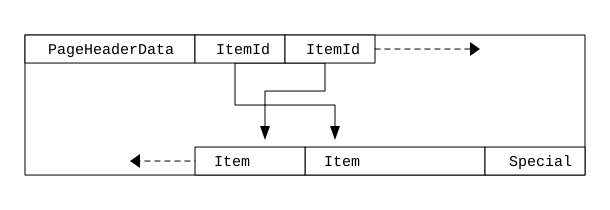
| Part | Where it sits | What it holds |
|---|---|---|
| Page header | First 24 bytes | Bookkeeping: where the free space starts and ends, some flags, and the position in the write-ahead log (section 8) of the last change to the page |
| Line pointers | Growing forward from the header | 4 bytes each: offset, length and a 2-bit state for one tuple |
| Free space | The gap in the middle | Room for more line pointers and tuples |
| Tuples | Growing backward from the end | The row versions themselves |
Two numbers in the page header, lower and upper, mark the two ends of the free space. lower is where the line pointers stop and upper is where the tuples start, and they move toward each other as the page fills. Every line pointer adds 4 to lower, so a page holding two tuples has lower = 32: 24 bytes of header plus two 4-byte pointers.
Here is the line pointer in Postgres's source. Its three fields add up to 32 bits, which is the 4 bytes, and the two bits of lp_flags hold one of four states. LP_NORMAL means the pointer leads to a tuple and LP_UNUSED means the slot is free. LP_DEAD and LP_REDIRECT will matter in sections 4 and 5.
typedef struct ItemIdData
{
	unsigned	lp_off:15,		/* offset to tuple (from start of page) */
				lp_flags:2,		/* state of line pointer, see below */
				lp_len:15;		/* byte length of tuple */
} ItemIdData;

#define LP_UNUSED		0		/* unused (should always have lp_len=0) */
#define LP_NORMAL		1		/* used (should always have lp_len>0) */
#define LP_REDIRECT		2		/* HOT redirect (should have lp_len=0) */
#define LP_DEAD 3 /* dead, may or may not have storage */1.2A row's address
A row's address is the pair (page number, line pointer number), called its ctid. Account 1 is the first row in page 0, so its ctid is (0,1).
?Why the extra step through a line pointer?
Because the address has to stay valid when the tuple moves. The lookup structures we'll meet in section 4, called indexes, store ctids. If the address were the tuple's byte offset, moving a tuple inside its page, to close a gap, would mean finding and fixing every index entry that points at it. With a line pointer in between, Postgres compacts the tuple to a new offset inside the page, changes the one offset in the line pointer, and (0,1) still leads to the same row.
So account 1 sits at (0,1) with a balance of 100. Next we change the balance and watch what happens to that address.
02Updating one row three times
2.1Three updates, three addresses
You need Docker for this one. docker run starts a throwaway Postgres 16 in a container called pgdemo: -d runs it in the background and -e POSTGRES_PASSWORD=x sets the password the image insists on. docker exec then opens psql, Postgres's command-line client, inside that container as the user postgres, and -it connects it to your terminal.
Postgres lets any query ask for a few hidden columns. We'll use three. ctid is the address we just met. xmin and xmax need one new idea: a transaction is a group of statements that take effect together or not at all. It ends with a commit, which makes its changes permanent, or an abort, which undoes them, and every statement outside an explicit BEGIN is a transaction of its own. Postgres numbers each transaction that changes data, counting upward. xmin is the number of the transaction that created this version of the row, and xmax is the number of the transaction that replaced or deleted it, with 0 meaning nobody has.
We create the table, insert account 1 with a balance of 100, and update the balance to 90 and then to 80, printing the row each time. Last, we use pageinspect, an extension that shows the raw contents of a page. get_raw_page('acct', 0) fetches page 0 of the table's file, and heap_page_items lists every slot on it, with lp as the slot number and t_xmin, t_xmax and t_ctid as the same bookkeeping fields stored in each tuple. t_ctid is the tuple's own record of its address, or of the newer version that replaced it.
docker run -d --name pgdemo -e POSTGRES_PASSWORD=x postgres:16-alpine
docker exec -it pgdemo psql -U postgres # then paste the SQL belowCREATE TABLE acct (id int PRIMARY KEY, balance int);
INSERT INTO acct VALUES (1, 100);
SELECT ctid, xmin, xmax, * FROM acct;
UPDATE acct SET balance = 90 WHERE id = 1;
SELECT ctid, xmin, xmax, * FROM acct;
UPDATE acct SET balance = 80 WHERE id = 1;
SELECT ctid, xmin, xmax, * FROM acct;
CREATE EXTENSION pageinspect;
SELECT lp, t_xmin, t_xmax, t_ctid FROM heap_page_items(get_raw_page('acct', 0)); ctid | xmin | xmax | id | balance
-------+------+------+----+---------
(0,1) | 732 | 0 | 1 | 100
ctid | xmin | xmax | id | balance
-------+------+------+----+---------
(0,2) | 733 | 0 | 1 | 90
ctid | xmin | xmax | id | balance
-------+------+------+----+---------
(0,3) | 734 | 0 | 1 | 80
lp | t_xmin | t_xmax | t_ctid
----+--------+--------+--------
1 | 732 | 733 | (0,2)
2 | 733 | 734 | (0,3)
3 | 734 | 0 | (0,3)Read the first three tables top to bottom. The table holds one row, and every UPDATE gave it a new address: (0,1), then (0,2), then (0,3). Its xmin went 732, 733, 734, so three different transactions wrote the three versions: the INSERT and the two UPDATEs.
The last table shows why the address moved. All three versions are still on page 0, in slots 1, 2 and 3. Slots 1 and 2 have a non-zero t_xmax, 733 and 734, which are the transactions that replaced them, and each t_ctid points at its successor: slot 1 at (0,2) and slot 2 at (0,3). Only slot 3, whose t_xmax is 0, is the live row. So an UPDATE is an insert of a new version plus a stamp on the old one, and a DELETE is just the stamp. Nothing is overwritten.
2.2The header in front of every version
The fields that just did the work sit in a header at the front of every tuple. Postgres's source defines it like this, with /* ... */ standing in for the parts left out:
typedef struct HeapTupleFields
{
	TransactionId t_xmin;		/* inserting xact ID */
	TransactionId t_xmax;		/* deleting or locking xact ID */

	union
	{
		CommandId	t_cid;		/* inserting or deleting command ID, or both */
		TransactionId t_xvac;	/* old-style VACUUM FULL xact ID */
	}			t_field3;
} HeapTupleFields;

struct HeapTupleHeaderData
{
	union
	{
		HeapTupleFields t_heap;
		DatumTupleFields t_datum;
	}			t_choice;

	ItemPointerData t_ctid;		/* current TID of this or newer tuple (or a
								 * speculative insertion token) */
	/* ... */
	uint16		t_infomask2;	/* number of attributes + various flags */
	uint16		t_infomask;		/* various flag bits, see below */
	uint8		t_hoff;			/* sizeof header incl. bitmap, padding */

	/* ^ - 23 bytes - ^ */
	/* ... null bitmap, then the column data ... */
};| Field | What it's for |
|---|---|
t_xmin | The transaction that created this version |
t_xmax | The transaction that deleted or replaced it; 0 while it's current |
t_ctid | Points at itself, or at the newer version that replaced it |
t_infomask | Flag bits, among them the hint bits of section 3.2 and the frozen flag of section 6 |
t_hoff | Where the data starts, after the header, null bitmap and alignment padding |
Every version of every row pays for this header. After alignment the 23 bytes become 24 (t_hoff = 24 in the page we read). A row of two integers and the word hello took 38 bytes in the heap: 24 of header and 14 of data. Add the 4-byte line pointer and it's 42 bytes of page for 14 bytes of payload, so for narrow tables the header is most of the table.
Keeping old versions costs a header and a slot each, and a pile of dead rows to clean up later. Postgres could have overwritten the balance and saved all of that, so why doesn't it? The answer appears the moment a second person looks at account 1 while we're changing it.
03Who sees which version
3.1A reader and a writer at the same time
Suppose a report starts reading all the accounts right after the INSERT, when account 1 holds 100, and takes a while to finish. While it runs, your two updates set the balance to 90 and then 80, and each commits. What should the report see for account 1?
If Postgres overwrote the row, every answer would be bad. A report could read 100 for some accounts and 90 for others, a total that never existed at any single moment. Or one side would have to wait with a lock until the other finished. Keeping the old versions gives a third answer: the report keeps reading the version that was current when it began, a new query reads the newest one, and nobody waits. Postgres calls this multi-version concurrency control, or MVCC. Readers never block writers and writers never block readers, because each query is shown the database as of a single moment.
Watch the page, and what each of the two readers gets from it.
3.2How a query picks a version
A snapshot is a small record taken when a statement starts: the next transaction number to be handed out, and the list of transactions still in progress. (In the REPEATABLE READ isolation level, which chapter 19 covers, one snapshot lasts for the whole transaction.) A version is visible to you if the transaction that created it had committed before your snapshot and the transaction that replaced it hadn't. Four cases cover it:
xmin is… | xmax is… | Visible to your snapshot? |
|---|---|---|
| Committed before your snapshot | 0, or aborted | Yes |
| Committed before your snapshot | Committed before your snapshot | No: it was deleted or replaced |
| Committed before your snapshot | In progress, or committed after | Yes: the delete hasn't happened for you |
| In progress, aborted, or after your snapshot | Anything | No |
Apply it to the report in the diagram. Slot 1 has an xmin of 732, committed before the report's snapshot, and an xmax of 733, which hadn't committed when the snapshot was taken, so it falls in the third row and the report sees it. Slot 2 has an xmin of 733, which hadn't committed yet, so it falls in the fourth row and the report can't see it.
Deciding whether 733 committed means looking it up in the commit log, pg_xact, a compact record of how every transaction ended. Doing that for every tuple of every query would be slow, so whichever reader finds out first writes the answer into the tuple's header as a hint bit (a flag in t_infomask), and later readers skip the lookup.
?Why does a SELECT sometimes write to disk?
Because setting a hint bit changes the page in memory, which makes it dirty, the word chapter 08 used for a page that has changed in memory and must be written back to disk later. So the first read of freshly loaded data writes more than you'd expect, and with page checksums or wal_log_hints turned on it also adds records to the write-ahead log of section 8. It happens once per tuple, and it surprises people who run benchmarks right after a bulk load.
3.3Why not overwrite, like MySQL?
MySQL's InnoDB engine does overwrite the row in place. It keeps the old version in a separate undo log, which readers rebuild old values from. Postgres keeps the old versions in the table itself. That makes rollback free: the versions an aborted transaction wrote are never visible to anyone, so nothing has to be copied back. It also means crash recovery never has to undo anything, for the same reason. The price is cleanup, because the dead versions sit in the table until something removes them, and that something is vacuum (section 5).
This idea is older than Postgres's SQL. Michael Stonebraker's The Design of the POSTGRES Storage System (VLDB 1987) described a "no-overwrite" store that kept every version and needed no write-ahead log. Postgres kept the no-overwrite heap and added the log in 7.1, in 2001.
There's a catch we skipped over. Each new version has a new ctid, and the structures that find rows by address still hold the old one.
04Indexes, and why HOT updates exist
4.1Every version has a new address
Finding account 1 by its id without reading the whole heap is the job of an index: a separate sorted structure (usually a B-tree, which chapter 18 covers) whose entries pair a column value with a ctid. Our index on id holds an entry that says "id 1 is at (0,1)". After our first UPDATE the live version is at (0,2), and the index still says (0,1).
The most direct fix would be to add a new entry, "id 1 is at (0,2)", to every index on the table, on every update, even when no indexed column changed. A table with five indexes would then do six writes to change one balance. One small change turning into many physical writes is called write amplification, and it's what Uber described in 2016 when it moved from Postgres to MySQL: "a small logical update (say, writing a few bytes) becomes a much larger, costly update when translated to the physical layer."
4.2Heap-only tuples
HOT (heap-only tuples, added in 8.3) removes that cost in a common case. If no indexed column changed and the new version fits on the same page, Postgres writes the new version without touching any index. Postgres flags the new version heap-only, because no index points at it, and the old version HOT-updated. An index scan still arrives at the old slot through the stale ctid, and from there it follows the t_ctid pointers to the live version.
This run shows those flags on a page. It uses a table with a third column, note, so run it in a fresh database (CREATE DATABASE hot; and then \c hot), because it creates its own acct. Its two & expressions test bits of t_infomask2: 16384 (0x4000) is the HOT-updated flag and 32768 (0x8000) is the heap-only flag.
create extension pageinspect;
create table acct (id int primary key, balance int, note text);
insert into acct values (1, 100, 'hello');
update acct set balance = 90 where id = 1;

select lp, lp_flags, lp_len, t_xmin, t_xmax, t_ctid,
       (t_infomask2 & 16384) > 0 as hot_updated,
       (t_infomask2 & 32768) > 0 as heap_only
from heap_page_items(get_raw_page('acct', 0)); lp | lp_flags | lp_len | t_xmin | t_xmax | t_ctid | hot_updated | heap_only
----+----------+--------+--------+--------+--------+-------------+-----------
1 | 1 | 38 | 732 | 734 | (0,2) | t | f
2 | 1 | 38 | 734 | 0 | (0,2) | f | tPostgres didn't touch the original bytes except to stamp them. Line pointer 1
still holds balance 100, with xmax = 734 and a t_ctid pointing forward to
(0,2). Line pointer 2 is the new version, created by transaction 734.
Slot 1 is HOT-updated and slot 2 is heap-only, exactly the pair described above. Both tuples are 38 bytes (lp_len), the size we worked out in section 2.2. Because balance has no index, no index had to learn about slot 2.
Here is the same idea on account 1 with two indexes, one on id and one on balance, and a note column. We'll change an unindexed column first and then an indexed one.
hello. Both indexes point at (0,1).The condition "fits on the same page" is why the setting fillfactor exists. A table with fillfactor = 90 leaves 10% of every page empty when rows are first inserted, as landing space for new versions.
A 100,000-row table has fillfactor 90 and no autovacuum. You run one UPDATE that changes a non-indexed column on every row. Roughly what fraction of those updates are HOT?
Here is that run, and the same tables under random single-row updates, which is the pattern of a busy application where each transaction touches one row. pgbench is Postgres's own benchmarking tool. Its -n option skips the vacuum it would otherwise run first, -f names a file of SQL to repeat, and -t 200000 makes the run 200,000 transactions.
# 100,000 rows of (int, int, 80-byte text), autovacuum off, primary key on id.
# Bulk: one statement updates every row.
update ff100 set n = n + 1;       update ff90 set n = n + 1;

# Random: 200,000 single-row updates, each on a random id.
# \set id random(1,100000)
# update ff100 set n = n + 1 where id = :id;
pgbench -n -f upd100.sql -t 200000 fillfactor 100 fillfactor 90
bulk UPDATE 0 of 100,000 HOT 10,170 of 100,000 HOT
heap 12.6 MB -> 25.2 MB heap 13.9 MB -> 26.4 MB
random updates 196,370 of 200,000 (98.2%) 200,000 of 200,000 (100%)
heap 12.6 MB -> 13.1 MB heap 13.9 MB -> 13.9 MBA bulk UPDATE doubled the table either way. Random updates barely grew it, even
at fillfactor 100.
Bulk updates behave as the prediction says: with fillfactor 100 none of the new versions fit on their page, with fillfactor 90 about a tenth did, and either way the table's file roughly doubled, because the old versions are still sitting in it. Random updates tell a different story. They barely grew the table and almost all were HOT, even on pages with no spare room at the start.
?How can random updates be 98% HOT on a full page?
Because of page pruning. When a query visits a page that's short on space, Postgres frees the bytes of any dead versions on it that no snapshot can see any more, right then, without waiting for vacuum. The first update on a full page has to put its new version on another page, and it leaves the old version behind, dead. The next time a query visits that page, pruning reclaims those bytes, and the following update on the page fits there and is HOT. With updates spread at random over the table, most pages settle into that cycle.
Changing an indexed column is the case that hurts, and it's the case the Uber post is about. Take a table with three indexes, one of them on an email column, and fillfactor 90. Fifty thousand random updates to a column with no index were all HOT. The same number of updates to email gave zero HOT updates, and section 8 shows how much extra work that is.
Pruning cleans up inside one page when a query happens to visit it. Dead versions it doesn't reach, like the ones the bulk update left behind, stay in the file, and something has to go through the table and remove them.
05Vacuum: removing old versions
5.1What one vacuum pass does
A version is dead when no snapshot, now or later, can see it, like slots 1 and 2 at the end of the first diagram. Dead versions can go, and the job that removes them is vacuum. To know which versions are dead, vacuum first works out the horizon: the number of the oldest transaction that any snapshot still open in the database may need. Vacuum's own output calls it the removable cutoff. A version whose replacement committed before the horizon can't be seen by anyone, so it can be removed.
Vacuum then walks the table's pages. It skips any page that the visibility map marks as all-visible, a bitmap with one bit per page saying that every version on the page is visible to everyone, so there is nothing to clean. On every other page it removes dead versions. Once a page has room again, vacuum notes it in the free space map, a small side file that records roughly how much room each page has, so that later inserts and updates can find a page with space without searching the table. Here is the page from the last section, after the report is long gone and the horizon has moved past slots 1 and 2.
In words, one pass has five parts. Vacuum computes the horizon. It scans the heap, skipping all-visible pages, and prunes dead versions older than the horizon, collecting the addresses of the stubs in memory. It scans every index and removes the entries that point at those addresses. It goes back to the heap and frees the stubs. And it updates the free space map and the visibility map, and freezes old tuples, a second job that section 6 explains. maintenance_work_mem limits the memory for the list of dead addresses; when the list fills, vacuum has to stop and do an index pass early, so a small budget means more index passes.
?Why doesn't VACUUM give the disk space back?
Because it frees space inside pages, for future rows of the same table. It only shortens the file if the pages at the very end are empty. In section 4, a bulk update doubled a table to 25.2 MB, and it stayed at 25.2 MB after VACUUM removed all 100,000 dead versions. VACUUM FULL rewrote it to 12.6 MB, and took an ACCESS EXCLUSIVE lock to do it, which means no reads or writes on the table for the duration.
| Tool | Returns disk to the OS | Lock | Use when |
|---|---|---|---|
VACUUM | Only empty pages at the end | Allows reads and writes | Always; autovacuum runs it for you |
VACUUM FULL | Yes, rewrites the table | Blocks everything | A maintenance window, a small table |
pg_repack (extension) | Yes, rebuilds online | Brief locks at start and end | A big bloated table you can't take offline |
5.2When autovacuum decides to run
Nobody runs VACUUM by hand on every table. A background process called autovacuum does it. Its launcher wakes every autovacuum_naptime (60 s) and checks each table against a threshold. In the code, reltuples is the estimated number of rows in the table, and vactuples is the number of dead tuples counted so far.
		vacthresh = (float4) vac_base_thresh + vac_scale_factor * reltuples;
		vacinsthresh = (float4) vac_ins_base_thresh + vac_ins_scale_factor * reltuples;
		anlthresh = (float4) anl_base_thresh + anl_scale_factor * reltuples;
		/* ... */
		/* Determine if this table needs vacuum or analyze. */
		*dovacuum = force_vacuum || (vactuples > vacthresh) ||
			(vac_ins_base_thresh >= 0 && instuples > vacinsthresh);
		*doanalyze = (anltuples > anlthresh);
With the defaults (a base threshold of 50 and a scale factor of 0.2), a table is vacuumed once its dead tuples exceed 50 plus 20% of its rows. A second threshold, based on inserts and added in Postgres 13, exists so that append-only tables get vacuumed (and frozen, which section 6 explains) too.
?Why does autovacuum fall behind on big tables?
There are two reasons. With the default scale factor, a billion-row table waits for 200 million dead tuples before anything happens. And autovacuum is throttled on purpose: with vacuum_cost_limit = 200 and autovacuum_vacuum_cost_delay = 2 ms, it sleeps every time it has done a small budget of page work, so that it doesn't swamp your disks.
| Setting | Default on 16 | What to change for a large, busy table |
|---|---|---|
autovacuum_vacuum_scale_factor | 0.2 | Per table, 0.01 or lower |
autovacuum_vacuum_cost_limit | -1 (uses vacuum_cost_limit = 200) | Raise it, often by 5–10×, if your disks have headroom |
autovacuum_max_workers | 3 | More only helps if many tables need work at once |
maintenance_work_mem | 64 MB | More means fewer index passes per vacuum |
Per-table settings go in ALTER TABLE … SET (autovacuum_vacuum_scale_factor = 0.01).
Tuned or not, vacuum can only remove what the horizon allows, and the horizon is set by the oldest snapshot anyone is still holding.
5.3The transaction that holds everything back
One old snapshot holds back cleanup in every table of its database. (A replication slot or a standby's feedback, listed below, holds back every database.) We can make one on purpose. The commands below run in a shell inside the container from section 2 (docker exec -it pgdemo sh), and export PGUSER=postgres makes every psql connect as the postgres user. We create a table v of 100,000 rows with autovacuum switched off, so that only our own vacuum runs. In session 1, begin isolation level repeatable read followed by a query takes a snapshot, and pg_sleep(15) keeps it open for 15 seconds while the trailing & runs it in the background. Session 2 then updates every row, looks at the open transactions in pg_stat_activity, and runs vacuum (verbose), which prints a report. A sleep 1 gives session 1 a moment to take its snapshot first.
export PGUSER=postgres
psql -c "create table v as select g as id, 0 as n from generate_series(1,100000) g" -c "alter table v set (autovacuum_enabled = off)"

# session 1: a transaction that takes a snapshot and holds it for 15 seconds
psql -c "begin isolation level repeatable read" -c "select count(*) from pg_class" -c "select pg_sleep(15)" &
sleep 1

# session 2, while session 1 is still sleeping
psql -c "update v set n = n + 1"
psql -c "select backend_xmin, state, left(query, 40) as query from pg_stat_activity where backend_xmin is not null and pid <> pg_backend_pid()"
psql -c "vacuum (verbose) v" backend_xmin | state | query
--------------+--------+---------------------
775 | active | select pg_sleep(15)
tuples: 0 removed, 200000 remain, 100000 are dead but not yet removable
removable cutoff: 775, which was 1 XIDs old when operation endedAfter session 1 ended, the same VACUUM reported 100000 removed. The phrase
to search your logs for is "dead but not yet removable".
The activity table names the culprit: session 1 holds a snapshot with backend_xmin 775, and that number is the horizon. Vacuum's report agrees, with a removable cutoff of 775. Vacuum counts the 100,000 versions replaced by the UPDATE as dead, because the transaction that replaced them committed. But session 1's snapshot was taken before that commit, so session 1 can still see the old versions and may read them, and vacuum leaves all 100,000 in place. Once session 1 finishes, the horizon moves forward and the same vacuum removes them.
Anything that pins an old transaction number does the same:
| What holds the horizon | Where to see it | Fix |
|---|---|---|
A long transaction, or one left idle in transaction (open but doing nothing) | pg_stat_activity.backend_xmin, state | End it; set idle_in_transaction_session_timeout |
A replica with hot_standby_feedback = on running a long query | pg_stat_replication.backend_xmin | Shorter replica queries, or accept cancellations (section 9.4) |
| A replication slot nobody consumes | pg_replication_slots.xmin, catalog_xmin | Drop the slot |
| A forgotten prepared transaction (one parked by two-phase commit) | pg_prepared_xacts | COMMIT PREPARED or ROLLBACK PREPARED |
Vacuum has one more duty, and it's the reason you can't switch it off even on a table that never needs cleaning.
06Transaction id wraparound
6.1A 32-bit counter on a circle
Transaction numbers in section 2 were 732, 733 and 734, which looks like a generous supply. But xmin and xmax in every tuple header are 32-bit numbers, and Postgres hands out the next number to every transaction that writes. At a few thousand write transactions a second, the counter gets halfway through its range in about five days, and what Postgres does about that is the reason vacuum can't be optional.
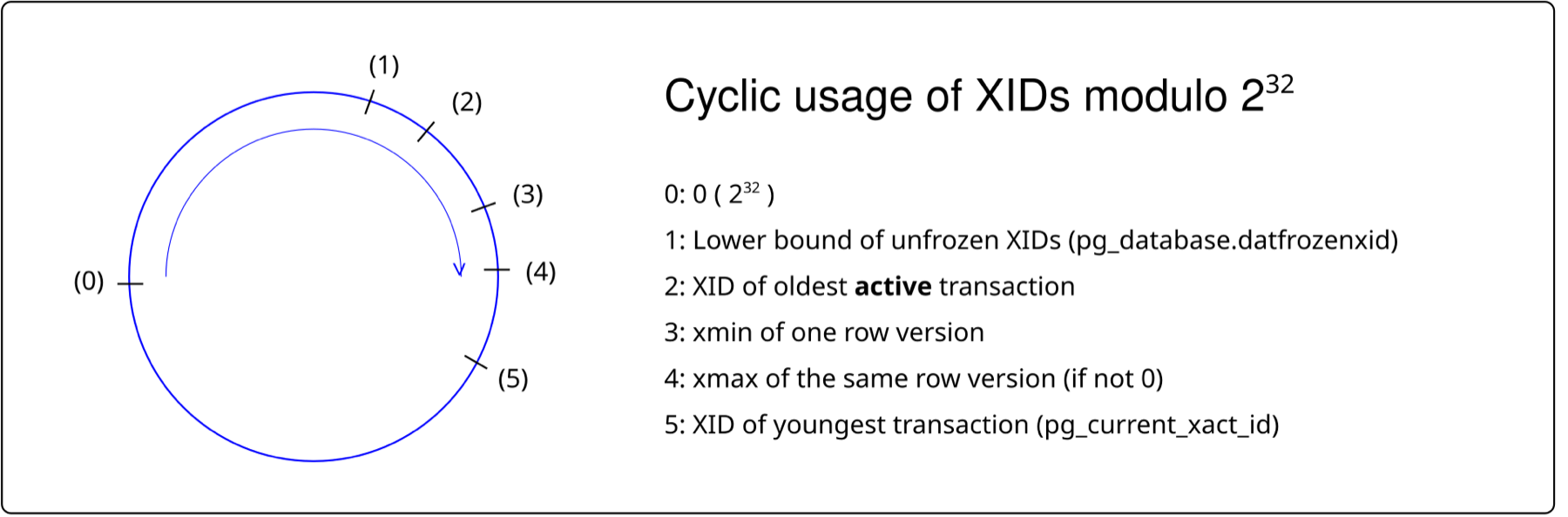
Postgres compares transaction ids modulo 2³². For any transaction, the 2³¹ ids behind it count as the past and the 2³¹ ahead of it count as the future, so there's no largest id, only a circle.
?What goes wrong when the counter laps?
Account 1's first version has an xmin of 732, which is visible because 732 is in the past. Roughly 2.1 billion transactions later, 732 would suddenly be in the future, and that committed row would vanish from every query. Postgres stops accepting writes instead of letting that happen.
The fix is freezing. Vacuum marks old tuples as frozen, meaning "committed, and older than everyone", and a frozen tuple is visible whatever the current transaction number is. Each table records relfrozenxid, the oldest unfrozen transaction number it could still contain, and each database records the minimum of those as datfrozenxid.
This experiment makes one table with one row and reads the tuple's flags before and after vacuum (freeze), a vacuum that freezes every tuple it can. age(relfrozenxid) counts how many transactions old that number is, and the expression (t_infomask & 768) = 768 tests the two hint bits that together mean "frozen".
create table fz (id int); insert into fz values (1);
select t_xmin, (t_infomask & 768) = 768 as frozen, relfrozenxid, age(relfrozenxid)
from heap_page_items(get_raw_page('fz',0)), pg_class where relname = 'fz';
vacuum (freeze) fz;
-- same query again t_xmin | frozen | relfrozenxid | age
--------+--------+--------------+-----
454807 | f | 454806 | 2
454807 | t | 454808 | 00x300 in t_infomask is HEAP_XMIN_COMMITTED | HEAP_XMIN_INVALID, the
combination that means frozen. t_xmin is kept for debugging; it's no longer
compared with anything.
In both rows t_xmin stays the same, but frozen flips from false to true, and relfrozenxid moves forward from 454806 to 454808, so the table's oldest possible unfrozen id is now two transactions younger and its age drops to 0.
6.2The limits, from the source
Postgres doesn't wait until the last id before it acts. It computes a set of limits from the oldest datfrozenxid:
	xidWrapLimit = oldest_datfrozenxid + (MaxTransactionId >> 1);
	/* ... */
	/*
	 * We'll refuse to continue assigning XIDs in interactive mode once we get
	 * within 3M transactions of data loss.  ...
	 */
	xidStopLimit = xidWrapLimit - 3000000;
	/* ... */
	/*
	 * We'll start complaining loudly when we get within 40M transactions of
	 * data loss.  This is kind of arbitrary, but if you let your gas gauge
	 * get down to 2% of full, would you be looking for the next gas station?
	 * ...
	 */
	xidWarnLimit = xidWrapLimit - 40000000;
Put in order of the age of the oldest unfrozen id, the thresholds are:
| Age of the oldest unfrozen id | What happens | Setting |
|---|---|---|
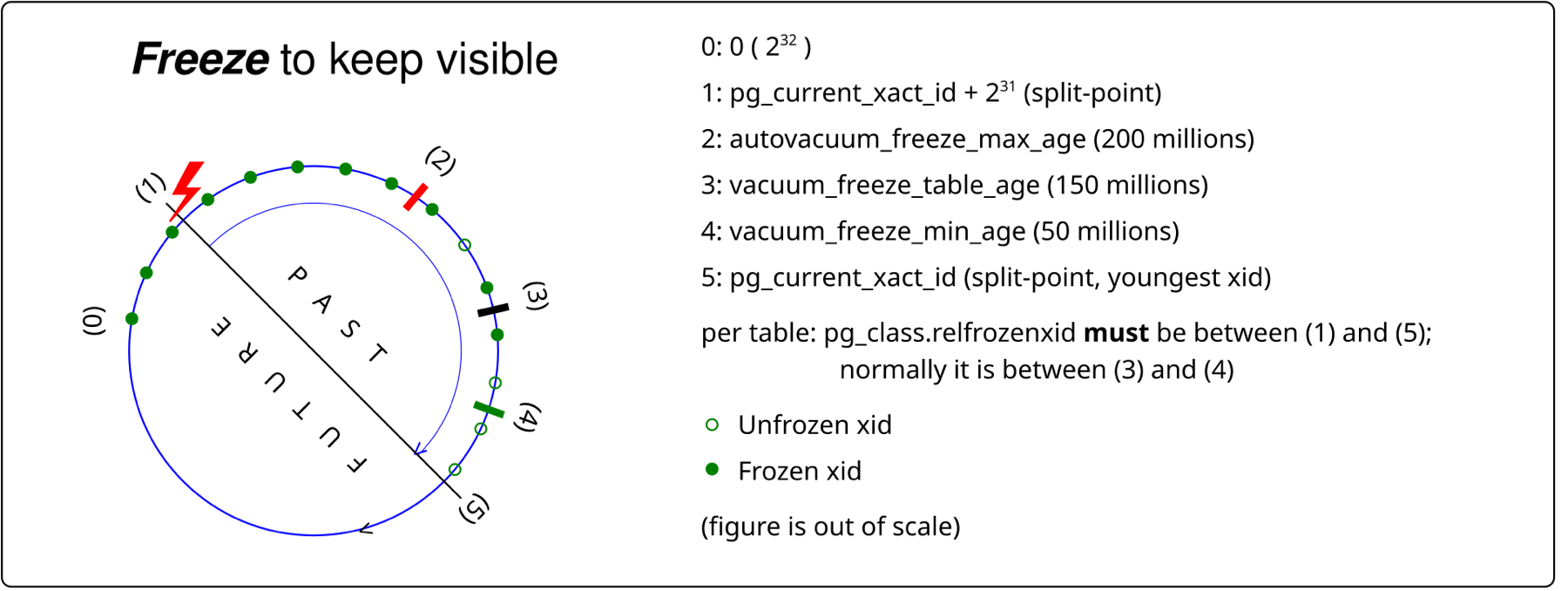
| 150 million | Vacuums of that table turn aggressive: they visit every page except those the visibility map marks all-frozen (a second bit per page, set when every tuple on it is frozen) | vacuum_freeze_table_age |
| 200 million | Autovacuum forces an anti-wraparound vacuum of the table, even if autovacuum is switched off | autovacuum_freeze_max_age |
| 1.6 billion | Vacuum's failsafe: cost delays and index cleanup are skipped to finish fast (added in 14) | vacuum_failsafe_age |
| About 2.1 billion − 40 million | WARNING: database "x" must be vacuumed within N transactions | Hard-coded |
| About 2.1 billion − 3 million | ERROR: database is not accepting commands to avoid wraparound data loss | Hard-coded |
How much time that leaves depends on the write rate, which varies a lot with hardware and workload, so treat this as one data point. A single pgbench client running single-row UPDATEs reaches about 4,700 write transactions a second:
| Write transactions a second | one pgbench client, single-row UPDATEs | ≈ 4,700 |
| Until the forced anti-wraparound vacuum | 200M / 4,700 per s | ≈ 11.8 hours |
| Until writes stop, if nothing ever freezes | (2³¹ − 3M) / 4,700 per s | ≈ 5.3 days |
| Freezing runs well inside a week, or the database stops | days, not years | |
That forced vacuum can cause an outage of its own. It's the vacuum you can't skip, on a table that's been ignored for 200 million transactions, so it scans every unfrozen page, and the lock conflicts that normally make autovacuum back off don't cancel it. A migration that needs an ACCESS EXCLUSIVE lock on that table will queue behind it, and every query on the table queues behind the migration.
6.3Two outages
Both of these companies published what happened:
- Sentry, July 2015. Write load outran autovacuum, and the database stopped accepting writes for most of a US working day. Their writeup, Transaction ID Wraparound in Postgres, describes restarting in single-user mode and truncating a large, non-critical table to recover.
- Mailchimp's Mandrill, February 2019. One shard hit wraparound protection and the outage lasted about 41 hours. The postmortem explains that XIDs "are stored with 32 bits, and compared using modulo 2^32 arithmetic", and recovery again involved truncating tables so that vacuum could finish.
The wraparound limit comes from a fixed-size field in the tuple header. The data after the header has a fixed limit too, the 8 KB page, which raises the next question: what happens to a value bigger than a page?
07Big values: TOAST
7.1The 2 KB rule
Every UPDATE writes a whole new version, and a version has to fit on one 8 KB page. So what happens to account 1 if we attach a 100,000-byte statement to it, and then update the balance? A text column, or a jsonb column (Postgres's binary JSON type), can hold up to a gigabyte, and copying 100,000 bytes for every balance change would be wasteful even if it fit. TOAST (The Oversized-Attribute Storage Technique, added alongside the log in 7.1) is how Postgres handles it.
When a tuple is larger than a threshold of about 2 KB, called TOAST_TUPLE_THRESHOLD, Postgres first compresses its largest variable-length values. If that isn't enough, it moves them out of line into a separate TOAST table, in chunks, and leaves an 18-byte pointer behind in the tuple.
#define MaximumBytesPerTuple(tuplesPerPage) \
	MAXALIGN_DOWN((BLCKSZ - \
				   MAXALIGN(SizeOfPageHeaderData + (tuplesPerPage) * sizeof(ItemIdData))) \
				  / (tuplesPerPage))
/* ... */
#define TOAST_TUPLES_PER_PAGE	4

#define TOAST_TUPLE_THRESHOLD	MaximumBytesPerTuple(TOAST_TUPLES_PER_PAGE)
TOAST aims to fit four tuples on a page, so for an 8 KB page the threshold is (8192 − 40) / 4 = 2,038, aligned down to 2,032 bytes. We can find the byte where a value leaves the heap. We set the column's storage to external, which means "move out of line if needed, but don't compress", so only the size rule is at work. It inserts values of six lengths, then joins each row to its tuple on the page through ctid to read the tuple's size, lp_len.
create table t (id int, body text);
alter table t alter column body set storage external;   -- no compression, just the size rule
insert into t select n, repeat('a', n)
from unnest(array[1000,1999,2000,2001,4000,100000]) n;

select t.id as body_len, h.lp_len as heap_tuple_bytes
from t join heap_page_items(get_raw_page('t',0)) h on h.t_ctid = t.ctid; body_len | heap_tuple_bytes
----------+------------------
1000 | 1032
1999 | 2031
2000 | 2032
2001 | 46
4000 | 46
100000 | 46At 2,032 bytes the tuple stays inline. One byte more and the value moves out,
leaving a 46-byte tuple: 24 bytes of header, 4 of id, and the 18-byte TOAST
pointer. Postgres stored the values in chunks of at most 1,996 bytes; the
100,000-byte value took 51 of them.
The calculation holds to the byte. A 2,000-byte body gives a 2,032-byte tuple, exactly the threshold, and the rule is "larger than", so it stays. A 2,001-byte body moves out, and from then on the tuple is 46 bytes however big the value is.
7.2Compression, and what TOAST saves you
text and jsonb columns default to extended storage: compress first, and move out of line only if the value is still too big. pglz is the default compressor, and lz4 is available per column or through default_toast_compression.
| Value (100,000 bytes) | pglz | lz4 |
|---|---|---|
repeat('a', 100000) | 1,156 bytes | 411 bytes |
| 3,125 concatenated MD5 hex strings | not compressed | not compressed |
Neither compressor shrinks the hex text, because both are pure LZ compressors: they replace repeated byte sequences with back-references, and they have no entropy coding that could exploit a 16-letter alphabet. Random hex has few repeats, so pglz gives up and stores the value as it is.
TOAST has a pleasant side effect for our update. Changing a row without changing its toasted column copies the 18-byte pointer, not the value. With a 100,000-byte body, updating id left the TOAST table at 122,880 bytes, and appending one character to the body grew it to 221,184, because the changed value was stored again in full.
The reverse is the usual way TOAST hurts. A large jsonb document that is rewritten often, kept in one column, writes the whole compressed document again on every change to any key, both to the TOAST table and to the log (section 8). If one field changes often, give it its own column.
Everything we've followed so far, the new versions, the stamps, the vacuum clean-up and the TOAST chunks, happens to pages in memory. The next question is what happens when the power goes out.
08The write-ahead log
8.1Changes happen in memory
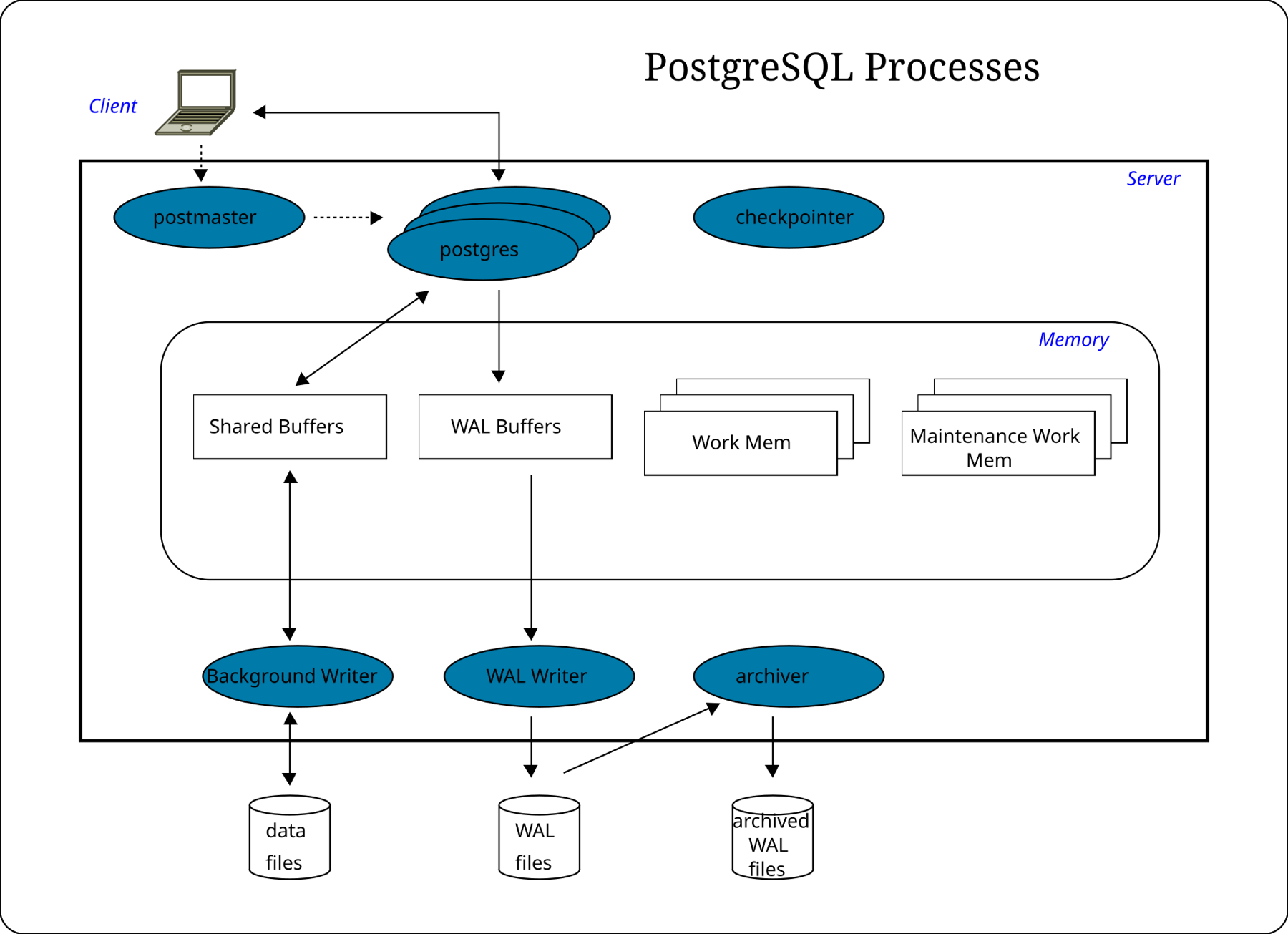
When Postgres changes a page, it changes a copy held in memory, in a region called shared buffers. That's Postgres's own cache of pages, much like the OS page cache of chapter 08, and it behaves the same way: the page becomes dirty and is written to the table's file later. So when your COMMIT returns, account 1's new balance may exist only in memory while the file still says 100. A power cut at that moment would lose a commit that Postgres had already reported as done.
Chapter 08's answer was fsync, and we could use it here by writing and flushing every changed page at commit. But one commit might touch five pages scattered across three tables and two indexes, and that's five random 8 KB writes and flushes before the client hears anything.
The fix is to write down what's about to change, in one place, before changing anything else. Postgres appends a short description of every change to a single file, the write-ahead log, or WAL. Each record has a position in the log, its log sequence number or LSN, which only ever goes up, and when a record changes a page, Postgres stamps the page's header with that record's LSN. The rule is that a change's log record must be on disk before the data page it describes. The stamp is how it's enforced: before writing a page to the table's file, Postgres checks that the log has been flushed at least up to the page's LSN. With that rule, a commit only has to flush the log, and any crash can be repaired by replaying the log.
8.2One commit, then a crash
Here is the update of account 1 from 100 to 90, committing, followed by a power cut. Two more pieces appear in it. Each client connection is served by its own Postgres server process, called a backend, and the backend is what changes pages and writes log records for that client. Log records aren't written to the file one at a time; the backend first appends them to the WAL buffers, a small area of shared memory, and they go to the WAL file in batches. Real LSNs are byte offsets, so the picture numbers them 1 and 2 to keep it small. A checkpoint, which turns up in the last frame, is a periodic moment when Postgres writes every dirty page to its file and notes the log position, so that recovery only has to replay the log from there.
UPDATE … SET balance = 90 and then COMMIT.It sounds as if writing everything twice must be slower than writing it once, so why is it faster? Because the log is sequential and compact, and the data pages are neither. A commit that touched five scattered pages flushes a few hundred bytes of log, appended at the end of one file, instead of five random 8 KB writes. That's the performance argument the 7.1 release notes made when the log was added.
One thing the picture leaves out is that a dirty page nobody writes back would stay in memory forever. The checkpoint in the last frame, or the background writer (a process that trickles dirty pages out between checkpoints), writes pages back, and neither ever writes a page whose LSN is ahead of the flushed log, which is the rule from 8.1.
8.3Torn pages and full-page writes
There's a hole in the recovery story. A crash in the middle of an 8 KB page write can leave a page that's half old and half new, because the OS and the disk usually write in 4 KB units. This is a torn page, and replaying a small log record onto it doesn't repair it.
So the first time a page changes after each checkpoint, Postgres writes the whole page into the log, and replay starts from that full image. You can see it in the log volume. The run forces a checkpoint with checkpoint;, makes single-row updates on one page, and reads the log with pg_waldump, a tool that prints log records between two LSNs.
checkpoint;  update ... id = 1;     # 17,920 bytes of WAL
             update ... id = 2;     #    176 bytes, same page
             update ... id = 3;     #    176 bytes
checkpoint;  update ... id = 4;     #  8,336 bytes
pg_waldump -s <start> -e <end>rmgr: Heap2 len (rec/tot): 60/8196, desc: PRUNE ... blkref #0: rel 1663/5/16531 blk 0 FPW
rmgr: Heap len (rec/tot): 71/ 71, desc: HOT_UPDATE old_xmax: 400786, old_off: 4 ... blk 0
rmgr: Transaction len (rec/tot): 34/34, desc: COMMIT 2026-09-27 04:07:37.945741 UTCFPW marks a full-page write: a 60-byte record carrying an 8,196-byte page
image. With full_page_writes = off, the post-checkpoint update wrote 176 bytes.
The very first update was a non-HOT one that dirtied a new heap page and an index
page, so it carried two images.
That kind of update costs 176 bytes of log when the page has already been imaged since the last checkpoint and 8,336 bytes when it's the first touch. In the records above, the HOT_UPDATE itself is 71 bytes and the commit record is 34. The big record is the PRUNE one, carrying an 8,196-byte page image.
Log volume also shows what an extra index costs. On the three-index table from section 4, a HOT update of a non-indexed column wrote 425 bytes of log per update, and changing the indexed email column wrote 784 bytes, since the new index entries have to be logged as well.
So more frequent checkpoints mean more log, because every checkpoint restarts the "first touch" clock for every page. With checkpoints every 30 seconds, a busy page gets a full image roughly twice a minute, and with checkpoints every 15 minutes, once. checkpoint_timeout (default 5 minutes) and max_wal_size (default 1 GB) trade log volume and I/O smoothness against recovery time after a crash.
The log describes every change to every page, completely. That makes it more than a recovery tool, because anything that can replay it can reproduce the database.
09Replication: shipping the log
9.1Streaming replication
If replaying the log after a crash rebuilds the database, replaying it on another machine builds a second copy. That's all Postgres's built-in replication is, and because it copies changes to pages, it's called physical replication. The server taking writes is the primary. A standby starts from a copy of the primary's files made with pg_basebackup, then connects to the primary and streams the log as it's written. On the primary a process called the walsender reads new log and sends it. On the standby the walreceiver writes what arrives, and the startup process, the same process that replays the log after a crash, applies it to the standby's pages.
By default the primary tells the client a commit succeeded as soon as its own log is flushed, without waiting for any standby. You can name a standby as synchronous, and then the primary holds each commit until that standby confirms it has the log. The diagram shows that case.
?Why can't a physical standby replicate one table, or run a newer major version?
Because log records say things like "put these bytes at offset 4 of block 0 of relation 16531". They describe pages, not rows, so the standby has to be a byte-for-byte copy of the whole cluster, meaning every database one server holds, on the same major version. Logical replication (CREATE PUBLICATION and CREATE SUBSCRIPTION) decodes the log into row changes instead. That's how you replicate a subset of tables or cross versions for an upgrade.
9.2What synchronous_commit buys
In that sequence the primary held the client's COMMIT until the standby answered. What exactly it waits for is the synchronous_commit setting. With a synchronous standby named in synchronous_standby_names, the setting decides which point the commit waits for:
synchronous_commit | The commit waits until… | Survives |
|---|---|---|
off | Nothing: WAL is flushed shortly after | A crash can lose the last few hundred milliseconds of commits (up to 3 × wal_writer_delay, 200 ms by default), without corrupting anything |
local | Local WAL is fsynced | A primary crash, not the loss of the primary's disk |
remote_write | The standby has written the WAL to its OS | A primary loss, unless the standby's OS also crashes |
on | The standby has fsynced it | Loss of either machine |
remote_apply | The standby has replayed it | Loss of either machine, and reads on the standby see the write |
Each step down the table waits for one more thing, and the latency shows it. These runs used pgbench with one client doing single-row inserts, and the primary and standby on the same host, so there is no network delay in them:
| Configuration | Mean commit latency | vs async on |
|---|---|---|
| No sync standby, synchronous_commit = off | 0.18 ms | 0.24× |
| No sync standby, synchronous_commit = on | 0.75 ms | 1× |
| Sync standby, local | 0.69 ms | 0.9× |
| Sync standby, remote_write | 1.37 ms | 1.8× |
| Sync standby, on | 2.53 ms | 3.4× |
| Sync standby, remote_apply | 3.49 ms | 4.6× |
Each figure is pgbench's mean latency, taking the median of three runs of 3,000 transactions, and the exact values depend on the disks. Across a real network, add roughly one round trip to every row from remote_write down.
9.3Replication slots, and the disk that fills
A standby can fall behind: its network drops or it restarts. A primary normally recycles its log segments, which are 16 MB files, after a checkpoint, so a standby that was away too long can find the log it needs already gone. That's what happened at GitLab in January 2017: "the replication failed as WAL segments needed by the secondary were already removed from the primary" (postmortem).
A replication slot fixes that by making the primary keep every segment the consumer hasn't confirmed. It also means a consumer that disappears makes the primary keep log forever. This run loads a million rows twice into a primary with max_wal_size = 64MB, once with no slot and once with an unused slot, and measures the pg_wal directory each time.
# create table big as select g, repeat('x',200) from generate_series(1,1000000) g; checkpoint
du -sm pg_wal       # no slot
select pg_create_physical_replication_slot('forgotten', true);
# same load again
du -sm pg_wal       # unused slot
select slot_name, active, wal_status,
       pg_size_pretty(pg_wal_lsn_diff(pg_current_wal_lsn(), restart_lsn)) retained
from pg_replication_slots;pg_wal after a 1M-row load, no slot: 64 MB
pg_wal after the same load, with an unused slot: 272 MB
slot_name | active | wal_status | retained
-----------+--------+------------+----------
forgotten | f | extended | 253 MBAfter the slot was dropped, the next load left pg_wal at 64 MB again. The
wal_status of extended means the slot is holding WAL beyond max_wal_size.
With no slot, the log directory stayed at its 64 MB limit. With a slot that nobody reads, it grew to 272 MB and the slot reports 253 MB retained, and it would keep growing with every write until the disk filled.
max_slot_wal_keep_size (Postgres 13, default -1, unlimited) puts a cap on it: past the cap, Postgres gives up on the slot instead of letting the disk fill. Slots also hold the horizon from section 5.3 if they carry xmin or catalog_xmin, so a dead logical slot blocks vacuum as well.
9.4Queries on a standby
A standby that answers read queries while it replays the log is called a hot standby, and those reads can conflict with what replay has to do.
?Why does the primary's vacuum cancel a query on the replica?
Because the standby's pages are copies of the primary's. When vacuum on the primary removes dead versions, the log tells the standby to remove them too, even if a long query on the standby still needs them. The standby waits up to max_standby_streaming_delay (30 s by default) and then cancels the query.
# standby: begin isolation level repeatable read; select count(*) from hs; select pg_sleep(60); ...
# primary: delete from hs where id <= 5000; vacuum hs;standby: ERROR: canceling statement due to conflict with recovery
standby: DETAIL: User query might have needed to see row versions that must be removed.
standby query ended after 30 spg_stat_database_conflicts.confl_snapshot on the standby went to 1.
The standby query held a snapshot, the primary removed versions that snapshot needed, and after 30 seconds of conflict the standby gave up on the query. You can pick where the pain goes, but not remove it:
| Choice | Effect on standby queries | Effect on the primary |
|---|---|---|
max_standby_streaming_delay = 30s (default) | Cancelled after 30 s of conflict | None; the standby's replay lags by up to 30 s |
A larger delay, or -1 | Rarely cancelled | Replica lag grows, so failover loses more and reads are staler |
hot_standby_feedback = on | Not cancelled for this reason | Standby's oldest snapshot holds back vacuum on the primary (section 5.3) |
9.5Archiving and point-in-time recovery
Streaming gives you a live copy, and it can't give you yesterday. A replica faithfully replays a DROP TABLE within milliseconds. For going back, archive_command (or an archive library) copies each finished 16 MB segment to durable storage, and a base backup plus the archived log lets you replay to any moment and then stop, using recovery_target_time. Only the archive can take you back to one second before the mistake.
10Operating Postgres
10.1The queries to keep handy
Each question this chapter raised has a query that answers it on a running server.
-- How many dead versions, and how often is HOT working? (sections 4 and 5)
select relname, n_live_tup, n_dead_tup, n_tup_upd, n_tup_hot_upd, last_autovacuum
from pg_stat_user_tables order by n_dead_tup desc limit 20;

-- What's holding the horizon? (section 5.3)
select pid, state, backend_xmin, age(backend_xmin), xact_start, left(query, 60)
from pg_stat_activity where backend_xmin is not null order by age(backend_xmin) desc;
select slot_name, active, xmin, catalog_xmin, wal_status from pg_replication_slots;
select * from pg_prepared_xacts;

-- How close is wraparound? (section 6)
select datname, age(datfrozenxid) from pg_database order by 2 desc;
select relname, age(relfrozenxid) from pg_class where relkind in ('r','t','m')
order by 2 desc limit 20;

-- Vacuums running right now, and how far along (section 5)
select * from pg_stat_progress_vacuum;

-- Replication positions and lag (section 9)
select application_name, state, sync_state, sent_lsn, write_lsn, flush_lsn,
       replay_lsn, write_lag, flush_lag, replay_lag
from pg_stat_replication;10.2Rules that hold up
- Find the horizon before you tune vacuum. If vacuum reports rows as "dead but not yet removable", look for the oldest
backend_xmin, anidle in transactionsession, an unused slot or a prepared transaction. Setidle_in_transaction_session_timeout. - Alert on
age(datfrozenxid)long before 200 million. The forced vacuum and the stop at 3 million before the limit are days away at most. - Tune autovacuum per table for the big, busy ones. Lower
autovacuum_vacuum_scale_factorto 0.01 or less, and raise the cost limit if the disks have headroom. - Index only what you query by. Every index can switch HOT off, and costs an entry on every non-HOT update. Check
n_tup_hot_upd. - Don't keep a large, frequently rewritten document in one column. Give the field that changes its own column.
- Leave
full_page_writeson unless your storage guarantees atomic 8 KB writes. - Drop replication slots nobody reads, and set
max_slot_wal_keep_size.
10.3What you trade for what
| You get | You pay | When the bill arrives |
|---|---|---|
| Readers and writers that never block each other (MVCC) | Dead versions stay in the table until vacuum removes them | As bloat, and as a table that won't shrink |
UPDATE without touching indexes (HOT) | Spare room on each page, and no index on a column that changes | As a low n_tup_hot_upd ratio |
| 32-bit transaction ids in every header | Freezing, so vacuum can never be optional | As a database that refuses writes |
| Big values out of the page (TOAST) | A separate table, and a rewrite of the whole value when it changes | As log volume and TOAST growth on a changing jsonb |
| A commit that survives a crash (WAL) | One log flush per commit, and full-page images after each checkpoint | As commit latency and log volume spikes |
| A copy that can take over (replication) | Latency for every synchronous step, and log kept for slots | As slower commits, or a full disk |
10.4Symptom, cause, fix
| Symptom | Likely cause | Fix |
|---|---|---|
| Table far bigger than its rows | Bloat from updates vacuum couldn't keep up with, or a bulk UPDATE | Fix the cause first, then pg_repack or VACUUM FULL |
VACUUM VERBOSE: "dead but not yet removable" | Old snapshot, idle in transaction, slot or prepared xact | Find the oldest backend_xmin and end it |
Low n_tup_hot_upd ratio on a hot table | An index on a frequently changed column, or full pages | Drop or narrow the index; lower fillfactor |
WARNING: must be vacuumed within N transactions | Freezing fell behind, often behind a stuck horizon | Clear the horizon, then VACUUM (FREEZE, VERBOSE) the oldest tables |
| Writes rejected: "not accepting commands to avoid wraparound" | The same, 37 million transactions later | Follow the error's hint; this is the Sentry and Mandrill outage |
pg_wal filling the disk | Inactive replication slot, or failing archive_command | Drop the slot or fix archiving; set max_slot_wal_keep_size |
| WAL volume spikes after each checkpoint | Full-page writes | Longer checkpoint_timeout, larger max_wal_size |
| "canceling statement due to conflict with recovery" | Replay removed versions a standby query needed | Raise max_standby_streaming_delay, or hot_standby_feedback with care |
| Commits slow after adding a replica | Synchronous replication waiting on the network | remote_write, or async with accepted loss |
11Summary
- A table is a heap of 8 KB pages. Each page holds a header, line pointers and tuples, and a row's address, its ctid, is a page number and a slot number.
- Postgres never updates in place. An
UPDATEwrites a new version and stamps the old one'sxmax, which is why account 1 left three versions on page 0 after two updates. - Every tuple carries a 24-byte header. For narrow rows it's most of the storage.
- MVCC lets each query read the versions its snapshot allows. Readers and writers never block each other, and the price is the old versions.
- HOT avoids index writes when no indexed column changes and the page has room. An index on a busy column switches it off.
- Vacuum removes versions no snapshot can see, and one old snapshot stops it in every table of its database. A bulk
UPDATEdoubles a table, while random single-row updates barely grow it, thanks to page pruning. VACUUMfrees space for reuse, not for the OS. Only a rewrite shrinks the file.- Transaction ids are 32 bits on a circle. Freezing is mandatory, and the database stops writes about 3 million ids before data would be lost.
- Values move to TOAST above 2,032 bytes a tuple, in chunks of at most 1,996 bytes, compressed first.
- WAL is what makes a commit durable. The log record reaches disk before the page, and full-page writes after each checkpoint are much of its volume.
- Replication is shipping the WAL.
synchronous_commitpicks how much latency you trade for how much loss, and an unused slot can fill your disk.
12Build this
A bloat and wraparound monitor for one cluster.
- Write a script that, every minute, records per-table
n_dead_tup, HOT ratio,age(relfrozenxid)and size, plus the oldestbackend_xminfrompg_stat_activity, slots and prepared transactions. - Make it alert on three things: a horizon older than ten minutes, any table whose
age(relfrozenxid)passes 150 million, and slot-retained log over a fixed size. - Test it against the experiments in this chapter: the open
REPEATABLE READsession from section 5.3, the forgotten slot from section 9.3, and a bulkUPDATEon a table with autovacuum off. Then usepg_resetwal's-xoption on a throwaway cluster to start near a wraparound limit, and watch the warning appear.
13Interview questions
beginnerWhat happens on disk when you UPDATE a row in Postgres?›
A new row version is written, usually on the same page if there's room, and the old version's xmax is set to the updating transaction's id with its t_ctid pointing at the new one. Nothing is overwritten. The old version stays until vacuum removes it, once no snapshot can see it.
beginnerWhy does Postgres need VACUUM at all?›
Because MVCC leaves dead row versions behind after every update and delete, and something has to reclaim their space. Vacuum also freezes old tuples so the 32-bit transaction id counter can wrap safely, and maintains the visibility map, which lets some queries be answered from an index alone.
intermediateWhat's a HOT update, and when can't you get one?›
A heap-only tuple update puts the new version on the same page and writes no index entries; index scans arrive at the old line pointer and follow the chain to the new version. You don't get one if any indexed column changed or if the page has no room. Lower fillfactor, avoid indexing columns that change often, and check n_tup_hot_upd.
intermediateAutovacuum is running but the table keeps growing. What do you check?›
First VACUUM VERBOSE on the table: if it reports rows "dead but not yet removable", something holds the horizon. Check backend_xmin in pg_stat_activity for long or idle in transaction sessions, replication slots, hot_standby_feedback on replicas, and prepared transactions. If rows are removable, autovacuum is too slow: lower the table's scale factor and raise the cost limit.
intermediateWhat's the trade-off in synchronous_commit?›
Durability against latency. off returns before the local log flush and can lose recent commits in a crash without corruption. on with no synchronous standby waits for the local fsync. With a synchronous standby, remote_write, on and remote_apply wait for the standby to write, fsync or replay, which adds at least a network round trip. With one client on a single host, the mean commit latencies were about 0.18, 0.75, 1.37, 2.53 and 3.49 ms for off, on without a standby, and the three standby levels.
deepExplain transaction ID wraparound and how Postgres prevents it.›
Transaction ids are 32 bits and compared modulo 2³², so any id sees 2³¹ as past and 2³¹ as future. An unfrozen tuple older than that would flip to "future" and disappear. Vacuum freezes tuples, and relfrozenxid and datfrozenxid track the oldest unfrozen id. At 200 million autovacuum forces a freeze, at 1.6 billion the failsafe drops throttling, 40 million from the limit Postgres warns, and 3 million from it, it refuses new ids. A stuck horizon is the usual root cause, because it stops freezing too.
deepWhy does WAL volume jump right after a checkpoint?›
Full-page writes. The first modification of each page after a checkpoint logs the entire 8 KB page, so replay can recover from a torn write. A single-row HOT update writes about 176 bytes normally and about 8,336 bytes when it's the first touch after a checkpoint. More frequent checkpoints mean more first touches and more log.
deepA query on a hot standby is cancelled with 'conflict with recovery'. What are your options?›
Replay needs to remove row versions (or take a lock) that the standby query depends on, usually because vacuum ran on the primary. The standby waits max_standby_streaming_delay and then cancels. You can raise the delay (replay lags, failover loses more), turn on hot_standby_feedback (the primary keeps those versions, so bloat moves there), or run such queries on a separate replica tuned for them, or on a logical copy.
14Go deeper
A value is 2,000 bytes in a table of (int, text). Is it TOASTed?›
No. The tuple is 24 + 4 + 4 + 2,000 = 2,032 bytes, exactly
TOAST_TUPLE_THRESHOLD, and the rule is "larger than". At 2,001 bytes it
moves out, leaving a 46-byte tuple.
VACUUM removed 100,000 dead rows. Why didn't the table file shrink?›
Vacuum frees space inside pages for reuse by the same table. It only
truncates empty pages at the very end. Shrinking needs a rewrite:
VACUUM FULL or pg_repack.
Your replica is fine, but pg_wal on the primary keeps growing. First query?›
select slot_name, active, wal_status from pg_replication_slots. An
inactive slot keeps every segment its consumer hasn't confirmed.
Why can't a synchronous standby prevent all data loss with synchronous_commit = remote_write?›
remote_write only waits until the standby has handed the WAL to its OS. If
the primary dies and the standby's OS crashes before flushing, that commit is
gone from both.
Crash consistency with fsck and journalling: the same write-the-plan-first idea the WAL uses, built up one step at a time. Free online at ostep.org.
The official account of vacuum, freezing and wraparound, with every setting in this chapter. docs/16/routine-vacuuming.
The design note for heap-only tuples, pruning and redirect line pointers, from the people who built it. REL_16_15.
Where the no-overwrite heap comes from, written before Postgres had SQL or a WAL. PDF.
Streaming, slots, synchronous commit and hot standby conflicts. docs/16/high-availability.
Two public accounts of the database stopping writes, and how each got it back. Sentry, 2015 · Mandrill, 2019.
The case against the no-overwrite heap, from write amplification to replication volume. Read it next to section 4.1. uber.com/blog.
15Related chapters
What fsync guarantees: the promise a WAL flush and a commit rest on.
Chapter 08.
Why random 8 KB page writes cost more than sequential log appends, and what a torn write is at the device. Chapter 09.
Another system that acknowledges before it replicates, and loses the same writes in a failover. Chapter 22.
The log as the whole database instead of a recovery mechanism, and logical replication's cousin: change data capture. Chapter 23.