Meera looks after billing at a company that sells software by subscription. Every night at midnight UTC, a job called invoice-nightly wakes up, works out what each of about forty thousand customers owes, charges their cards and emails the invoices. Beside it on the same server, a job called fx-rates fetches currency exchange rates every minute. And whenever a card is declined, the billing code asks for a one-off job: "send this customer a reminder in three days." All three were set up with a few lines in a file on one machine, and for two years nobody thought about them.
Then, one Tuesday, the finance team notices that no invoices went out overnight. Someone had rebooted the server for a kernel update at 23:58 and came back at 00:03, and the scheduler on it never saw midnight. The engineers add a second server running the same schedule, so that one can cover for the other. On the following night both servers are healthy, both see midnight, and forty thousand customers are charged twice.
Those two nights hold most of what makes scheduling hard. One machine is a single point of failure, so a job can be missed. Two machines that don't coordinate will both act, so a job can run twice. And there's no third option where you add machines and the problem goes away: the machines have to agree on who fires each job, and the jobs themselves have to cope when that agreement fails, as it sometimes will.
In this case study we'll design a scheduler for Meera's company, and then grow it into one that could serve a large company's thousands of teams. Here's the question we'll keep returning to is this: how do you make a job run when it's supposed to, once, when any machine can fail at any moment? We'll start from a single line of cron, find exactly where it breaks, and fix it step by step, going down to heaps, timing wheels, leases, retries with backoff and dependency graphs, and looking at what Google, Apache Airflow, Temporal, Netflix and Dropbox built.
01What we're building, and how big
1.1What it has to do
A job scheduler, in the sense of this chapter, starts work at a time given in advance. That's different from a job queue, which runs work as soon as possible after someone asks; a scheduler holds work back until its moment and then usually hands it to something like a queue. Meera's three jobs show the three kinds of schedule it has to accept:
- Recurring jobs, given as a schedule:
fx-ratesevery minute,invoice-nightlyevery day at midnight. - One-off delayed jobs: "send the reminder to customer 8812 at 14:05 on Friday."
- Jobs that depend on other jobs: invoices should only be computed after the day's usage has been totalled, and emailed only after the charges are done.
Around those, it has to:
- Run the work somewhere, on machines other than the scheduler itself, and know whether it succeeded.
- Retry failures sensibly, and park jobs that keep failing where a person will see them.
- Show history: when did this job last run, how long did it take, did it work?
And the qualities that matter, in order of how much pain their absence causes:
- Don't run a job twice when that does harm. Charging cards twice is the worst outcome in Meera's story.
- Don't miss runs. A missed invoice run means missing revenue and confused customers.
- On time, within reason. A few seconds of lateness is fine for almost every job, and probably nobody notices; minutes usually are for nightly ones.
- Survive machine failures without anyone being paged at midnight.
Notice the tension between the first two. A scheduler that's never sure whether a job ran has to choose between running it again (risking a double run) and not running it (risking a missed one). Much of this chapter is about shrinking the cases where it isn't sure, and making the remaining ones harmless.
1.2How big is it?
At Meera's company, the numbers are small: a few dozen recurring jobs and a few thousand reminder emails a day. Things get interesting when one scheduler serves a whole company, and the companies that have published figures give a sense of the range.
Dropbox described its Async Task Framework (ATF) in November 2020. It was built for 10,000 tasks a second from the start and was then serving about 9,000 tasks a second, with the promise that 95% of tasks begin within five seconds of their scheduled time. Slack's job queue, a close cousin that runs work as soon as possible, was processing over 1.4 billion jobs on its busiest days, at a peak of 33,000 a second, when Slack wrote about it in 2017. Amazon's EventBridge Scheduler, a managed scheduler launched in November 2022, today allows 10 million schedules per AWS region by default.
At the other end are workflow schedulers for data pipelines, where each job may run for hours. Netflix's Maestro, open-sourced in 2024, "schedules hundreds of thousands of workflows, millions of jobs every day," according to its repository. Here the number of jobs is smaller, but each one is bigger, and many depend on others.
Suppose your scheduler holds 50 million pending one-off jobs (reminders, trial expiries, retries) spread evenly over the next 30 days, plus 20,000 recurring jobs that their owners all set to run at midnight. How many jobs become due per second on an ordinary second, and in the first second after midnight?
02Version 1: cron on one machine
2.1How cron works
The tool Meera's company started with, cron, has been part of Unix since the 1970s. Each user has a crontab, a text file with one line per job: five fields saying when, then the command to run. In order, the fields are minute, hour, day of month, month and day of week, and * means "any".
# min hour dom mon dow  command
  *   *    *   *   *    /opt/billing/fx-rates
  0   0    *   *   *    /opt/billing/invoice-nightly
The first line matches every minute; the second matches when the minute is 0 and the hour is 0, so once a day at midnight. The cron daemon, a background process, wakes once a minute, reads the current time from the machine's clock, checks every line against it, and starts a process for each line that matches. That's the whole design, and for a single machine it's a good one: it's simple, it's been debugged for decades, and it has no dependencies beyond the machine itself.
The one-off reminder doesn't fit cron at all, since cron only knows repeating patterns. People usually work around it with a database table of reminders with a send_at column, and a cron job that runs every minute to send whatever is due. We'll come back to that table; it turns out to be the seed of the real design.
2.2Where it breaks
0 0 * * * matches and starts invoice-nightly as a local process.Google's SRE book, in its 2016 chapter on distributed cron, puts the first problem in one sentence: "Cron's failure domain is essentially just one machine. If the machine is not running, neither the cron scheduler nor the jobs it launches can run." A failure domain is the set of things that fail together, and here it's the scheduler, the jobs and the record of what ran, all on one box. Walk through what Meera would see in each case:
- The machine is down at midnight. The daemon isn't running, so nobody sees the time match. When the machine comes back at 00:03, cron looks at the current minute, which doesn't match, and does nothing. So the run is silently missed.
- The machine dies at 00:20, halfway through. Half the customers have been charged. Nothing records which half. When the machine comes back, cron won't rerun the job, and if someone reruns it by hand, the first half is charged again.
- The job takes longer than its interval. If
fx-ratessometimes takes 90 seconds, cron happily starts a second copy at the next minute while the first is still running. - The machine fills up. Every job shares one CPU, one disk and one memory. A heavy nightly report can starve
invoice-nightly, and it probably will on the busiest night. - Nobody knows. Cron's output goes to a local mail spool that nobody reads. There's no history, no alerting and no retry.
The SRE book's example makes the reliability point in numbers: if the cron machine is one of 1,000 in a data centre, "a failure of just 1/1000th of your available machines could knock out the entire cron service."
2.3Two machines, twice the charges
The fix Meera's team tried, two servers with the same crontab, turns the missed run into a double run. Neither server knows the other exists, so both fire at midnight. Every later section depends on the general lesson here: more copies of the scheduler make it more available, but only if they agree on which copy acts. Agreement between machines is the problem chapter 27 spent its whole length on, and we'll borrow its answer in section 4.
The SRE book also makes the second lesson explicit: not every job is equally dangerous to repeat. Some jobs are idempotent, meaning that running them twice has the same effect as running them once. fx-rates fetches the current rates and overwrites a table; a second run writes the same rows. Others are not: "a process that sends out an email newsletter to a wide distribution, should not be launched more than once." invoice-nightly, as written, is the newsletter kind. Google's stated preference, when its cron can't tell whether a launch happened, is to skip it, because "recovering from a skipped launch is more tenable than recovering from a double launch." Hold on to that; section 5 turns it around by making the jobs themselves safe to repeat.
So we need three things that cron doesn't give us: somewhere to keep the jobs that isn't one machine's disk, a way for several scheduler machines to agree who fires each job, and a record of what has run. The first of these, storing jobs and finding the due ones quickly, is where we start.
03Storing jobs and finding the due ones
3.1A table of jobs with a time-ordered index
The reminders table from section 2.1 generalises. Put every job, recurring or one-off, in a database table, with a column for the next time it should fire:
| job_id | schedule | next_run_at | payload |
|---|---|---|---|
| invoice-nightly | 0 0 * * * | 2026-10-10 00:00:00 | {} |
| fx-rates | * * * * * | 2026-10-09 14:03:00 | {} |
| remind-8812 | once | 2026-10-12 14:05:00 | {"customer": 8812} |
A scheduler process then wakes every second or so and asks the database for everything due: SELECT ... WHERE next_run_at <= now() ORDER BY next_run_at. For a recurring job, after firing it computes the next matching time from the schedule and writes it back to next_run_at; for a one-off job, it marks the row done.
Without help, that query reads the whole table every second. With an index on next_run_at, a B-tree kept in time order (chapter 18 covers how a B-tree works), the database walks straight to the start of the tree and reads rows until it reaches one in the future. Its cost becomes proportional to the number of due jobs, not the number of stored ones. A time-ordered index is the single most important data structure in a scheduler, and everything in this section is a different way of building one.
This design survives a scheduler crash, because the jobs live in the database, and it's what many real schedulers do. Dropbox's task framework and Quartz's database-backed store (section 4.3) both keep jobs in a table and query by time. Its cost is that the database is asked the same question every second, even when nothing is due, and a precise schedule means asking often. When the jobs due in the next few minutes number in the thousands, it's worth also keeping them in memory, in a structure that can answer "what's next?" without any I/O.
3.2In memory: a min-heap
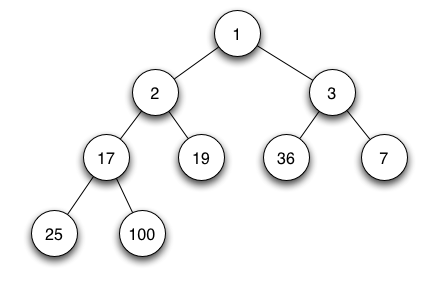
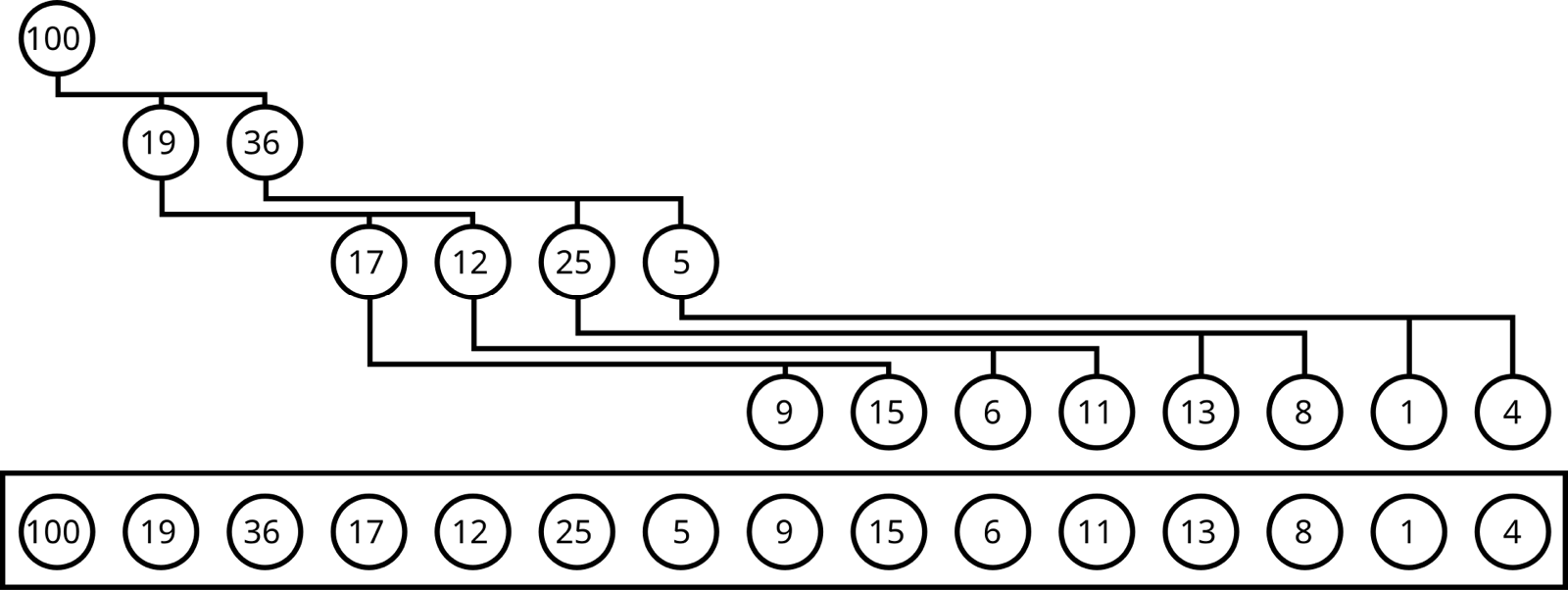
The classic structure for "always give me the smallest" is a min-heap: a binary tree in which every node's value is no larger than its children's. The smallest value is therefore always at the root. Adding a job puts it at the bottom and swaps it upward while it's smaller than its parent; removing the root moves the last element to the top and swaps it downward. Both take a number of steps equal to the tree's height, which for n items is about log₂ n, so twenty steps for a million jobs.
This program puts a million jobs, due at random seconds over the next 30 days, into a heap, then plays the scheduler's loop for four seconds, comparing it with scanning the whole list every second:
import heapq, random, time
random.seed(7)

# 1,000,000 scheduled jobs, each due at some second in the next 30 days
N, MONTH = 1_000_000, 30 * 24 * 3600
jobs = [(random.randrange(MONTH), f"job-{i}") for i in range(N)]

# The scheduler wakes once a second and asks: what became due this second?
def due_by_scan(now):
    return sorted(j for j in jobs if now - 1 < j[0] <= now)

heap = list(jobs)
heapq.heapify(heap)            # the soonest job is always at heap[0]
def due_by_heap(now):
    out = []
    while heap and heap[0][0] <= now:
        out.append(heapq.heappop(heap))
    return out

for now in range(0, 4):
    t = time.perf_counter(); a = due_by_scan(now); scan = time.perf_counter() - t
    t = time.perf_counter(); b = due_by_heap(now); hp = time.perf_counter() - t
print(f"t={now}s due={len(a)} scan {scan*1e3:5.1f} ms heap {hp*1e6:4.1f} µs same={a == b}")t=0s due=1 scan 13.6 ms heap 18.7 µs same=True
t=1s due=0 scan 13.4 ms heap 1.1 µs same=True
t=2s due=0 scan 13.1 ms heap 0.8 µs same=True
t=3s due=0 scan 14.1 ms heap 1.7 µs same=TrueBoth find the same jobs. Scanning pays about 13 milliseconds every second whether anything is due or not, because it looks at all million jobs. The heap answers an empty second in about a microsecond, since it only has to glance at the root and see that it's in the future; that's roughly ten thousand times less work (exact times vary by machine). Its first call is slower because it pops a job and reorganises the tree.
Heaps are what most language runtimes use for timers. Java's ScheduledThreadPoolExecutor keeps its tasks in a heap-based queue, and Go's runtime keeps a heap of timers for each processor it schedules goroutines on, a 4-ary heap (each node has four children) to make the tree shallower.
The heap has one weak spot for a scheduler: cancelling. Reminders get cancelled all the time, because the customer pays before the three days are up. Finding an arbitrary job inside a heap means searching it, unless every job remembers its position, which Java's executor does to bring removal down from O(n) to O(log n). And every insert and every removal still costs log n steps. When the number of timers is huge and most are cancelled before they fire, there's a structure that does both in constant time.
3.3Timing wheels
In 1987, George Varghese and Tony Lauck at Digital Equipment Corporation published a paper on exactly this problem, for the timers inside an operating system's network code, where almost every timer is a timeout that gets cancelled. Their abstract states the result: "By using a circular buffer or timing wheel, it takes O(1) time to start, stop, and maintain timers within the range of the wheel."
The idea is the one on a clock face. Make an array of slots, one per second, say 60 of them, arranged in a ring, and a pointer to the current slot. To schedule a job 42 seconds from now, put it in the list at slot (now + 42) mod 60. That's one array index and one list append, whatever the number of timers. Every second, the pointer moves one slot and everything in that slot's list fires. Cancelling a job removes it from its slot's list, which is constant time if the list is doubly linked and the job keeps a pointer to its entry.

?What about a reminder three days away?
A single wheel only reaches as far as it has slots. Three days at one-second resolution is 259,200 slots, most of them empty, and the paper's own example is a timer facility for up to 100 days, which would take 8.64 million. Varghese and Lauck's answer is the one a clock already uses: separate hands. Keep a wheel of 60 seconds, a wheel of 60 minutes, a wheel of 24 hours and a wheel of 100 days, "Thus instead of 100 * 24 * 60 * 60 = 8.64 million locations to store timers up to 100 days, we need only 100 + 24 + 60 + 60 = 244 locations."
A timer goes into the coarsest wheel that it needs. When that wheel's slot comes round, its timers are moved down into the next finer wheel, at the right position within that hour or minute. This move is called a cascade. Varghese and Lauck point out that this is a radix sort done lazily: each timer is sorted by days, then by hours, then by minutes, but only when it gets close enough for the finer order to matter.
This program builds a three-level wheel (seconds, minutes, hours) and runs Meera's three jobs through a day, printing every time a job is placed or moved:
# A three-level hierarchical timing wheel, ticking once a second:
#   seconds wheel: 60 slots of 1 s    (covers the next minute)
#   minutes wheel: 60 slots of 60 s   (covers the next hour)
#   hours wheel:   24 slots of 3600 s (covers the next day)
LEVELS = [("seconds", 1, 60), ("minutes", 60, 60), ("hours", 3600, 24)]
wheels = [[[] for _ in range(size)] for _, _, size in LEVELS]
now = 0

def add(name, due):
    """Put a timer in the finest wheel whose span still reaches it: O(1)."""
    for level, (label, tick, size) in enumerate(LEVELS):
        if due - now < tick * size:
            slot = (due // tick) % size
            wheels[level][slot].append((name, due))
            print(f"  t={now:>5}  {name} -> {label} wheel, slot {slot}")
            return
    raise ValueError("too far ahead for this wheel")

add("rates-sync", 42)            # in 42 s
add("reminder-email", 3725)      # in 1 h 2 min 5 s
add("invoice-nightly", 86_399)   # in 23 h 59 min 59 s

while now < 86_400:
    now += 1
    # When a coarser wheel's slot comes due, empty it into finer wheels
    # (this is the "cascade"). Coarse slots first, so timers trickle down.
    for level in (2, 1):
        label, tick, size = LEVELS[level]
        if now % tick == 0:
            bucket, wheels[level][(now // tick) % size] = wheels[level][(now // tick) % size], []
            for name, due in bucket:
                if due == now:
                    print(f"  t={now:>5}  FIRE {name}")
                else:
                    add(name, due)
    for name, due in wheels[0][now % 60]:
        print(f"  t={now:>5}  FIRE {name}")
wheels[0][now % 60] = [] t= 0 rates-sync -> seconds wheel, slot 42
t= 0 reminder-email -> hours wheel, slot 1
t= 0 invoice-nightly -> hours wheel, slot 23
t= 42 FIRE rates-sync
t= 3600 reminder-email -> minutes wheel, slot 2
t= 3720 reminder-email -> seconds wheel, slot 5
t= 3725 FIRE reminder-email
t=82800 invoice-nightly -> minutes wheel, slot 59
t=86340 invoice-nightly -> seconds wheel, slot 59
t=86399 FIRE invoice-nightlyFollow the reminder, due 1 hour, 2 minutes and 5 seconds from now. At time 0 it's too far away for the seconds or minutes wheel, so it goes into hour slot 1. Nothing touches it for an hour. At t = 3600 its hour slot comes round and it cascades into minute slot 2; at t = 3720 that slot comes round and it cascades into second slot 5; five seconds later it fires. Each move is one append, so a timer is handled at most once per level, three times here, however many millions of other timers exist. And for the whole day, the scheduler's per-second work was looking at one slot of the seconds wheel and, once a minute or once an hour, one slot of a coarser wheel.
fx-rates, due in 42 s, goes straight into the seconds wheel.How should the scheduler keep its pending timers in memory?
- Next timer is always first
- Trivial to write
- O(n) per insert
- Painful with millions of timers
- O(log n) insert and pop
- Exact ordering at any resolution
- In every standard library
- Cancellation needs extra bookkeeping
- log n work per timer adds up at high rates
- O(1) insert and cancel
- Per-tick work independent of the number of timers
- Resolution fixed by the tick
- Needs a tick even when nothing is due
- Cascading costs work for timers that would be cancelled anyway
For an operating system or a broker with millions of short timeouts, most of them cancelled, the wheel wins clearly; Varghese and Lauck recommended their hashed or hierarchical schemes for "a general timer module". For a job scheduler with a modest number of jobs due soon, a heap is simpler and plenty fast, and many schedulers use one. A common combination in large schedulers is a durable time-ordered table for the far future, and an in-memory heap or wheel loaded with only the next few minutes.
3.4Where timing wheels run today
The best-documented production timing wheel is in Apache Kafka. A Kafka broker holds many requests that are waiting for something, a produce request waiting for replicas to confirm a write, a fetch waiting for enough data to arrive, each with a timeout. Kafka calls the holding area the purgatory. Until 2015, those timeouts sat in Java's DelayQueue, a heap. Yasuhiro Matsuda's October 2015 post explains why that hurt: heap timers "have O(log n) insert/delete cost", and the queue didn't support removing an arbitrary entry, so completed requests stayed in it until a separate thread scanned them out. When that thread fell behind, the broker could run out of memory.
The replacement, shipped in Kafka 0.9, is a hierarchical timing wheel with a tick of 1 ms and 20 slots per wheel. A timer beyond the first wheel's 20 ms goes to an overflow wheel with 20 ms slots, then one with 400 ms slots, and so on, each "created on-demand." One detail solves the "tick even when nothing is due" problem: instead of waking every millisecond, the broker puts each non-empty slot into a DelayQueue, and sleeps until the earliest slot is due. The heap now holds at most a few dozen slots instead of every request. In the post's benchmark, with long timeouts, the old purgatory saturated at around 25,000 requests a second and the new one at 105,000.
Linux has run a timer wheel for decades, and in 2016 it removed the very thing our program just showed. Thomas Gleixner's rework, released in Linux 4.8 in October 2016, observed that "the vast majority of the timer wheel timers are canceled or rearmed before expiration," so cascading them down the levels was "completely pointless in most cases." The new wheel has 64 slots per level, each level eight times coarser than the one below, and timers never move: a timeout set for an hour from now just fires within the precision of its level, up to about 12.5% late. For network timeouts that's fine. For Meera's invoice run it probably wouldn't be: the right timer structure depends on whether timers are mostly cancelled or mostly fired.
We now have a way to find due jobs in a durable table and in memory. But Meera's real problem was never speed; it was that two machines both fired the same job. If two scheduler processes read the same table and both see invoice-nightly due at midnight, they'll both fire it. Next we need them to agree.
04Firing each job once
4.1One leader, chosen by a lease
Run three scheduler processes on three machines, reading the same jobs table. Probably the simplest way to stop them all firing invoice-nightly is to let only one of them fire anything. Its peers stand by, ready to take over. The one that acts is the leader, and choosing it is leader election.
The obvious way to elect a leader, "whoever holds the lock", runs into the problem chapter 26 dwelt on: a lock held by a machine that has crashed is never released, so it has to expire. A lock that expires after a set time unless renewed is a lease. A leader renews its lease every few seconds, say every 3 seconds for a 10-second lease; if it dies, the lease runs out and a standby takes it. Leases are kept in a small replicated store that uses consensus, such as etcd or ZooKeeper (chapter 27), precisely so that the store can't itself be a single machine that fails or disagrees with itself.
?What if the old leader isn't dead, just slow?
That's the case that makes leases tricky. Suppose scheduler-a pauses for 15 seconds, for a long garbage-collection pause or because its virtual machine was frozen. Its lease expires and b becomes leader. Then a wakes up, still believing it's leader for the moment it takes to notice, and launches the job it was about to launch. Now two leaders have acted. Chapter 26 walks through this exact failure and its fix, the fencing token: every lease grant comes with a number that only goes up, the leader attaches it to everything it does, and whatever receives the action rejects numbers lower than the highest it has seen. Our jobs table can do this with a check on write: the leader only marks a job as launched if its token is still the current one.
Google's distributed cron, described in its SRE book, takes the same line in its own words. Only the leader may launch jobs, and "as soon as it loses its leadership for any reason, it must immediately stop interacting with the datacenter scheduler." Its replicas found a dead leader "quickly (within seconds)", well within the one-minute failover the cron service could tolerate.
4.2The leader that dies halfway through a launch
A lease decides who fires. It doesn't tell the new leader what the old one had already done. Suppose scheduler-a decided to launch invoice-nightly, started it, and died before writing "launched" in the jobs table. scheduler-b takes over, sees the job still due, and launches it again.
Google's cron solves this with two records per launch. Its state lives in a log replicated with Paxos (the consensus protocol chapter 27 compares with Raft), and before every launch the leader writes "about to launch" and waits until a majority of replicas have it; after the launch, it writes "finished". In the book's words: "We synchronously inform a quorum of replicas of the beginning and end of each scheduled launch for each cron job." A new leader that finds a launch with a start record and no finish record knows exactly which launch is in doubt.
What it does next depends on being able to ask the cluster "did this launch happen?" Google's answer is to name every launch before it happens. The job's name in the data-centre scheduler, Borg, is computed from the cron job's name and its scheduled time, so invoice-nightly for 10 October always has the same name. The book: "If the cron service leader dies during launch, the new leader simply looks up the state of all the precomputed names and launches the missing names." The scheduled time has to be part of the name, especially for jobs that run every minute; otherwise the new leader can't tell this minute's launch from the last one's.
That's the general shape of the fix, and it's worth naming: when you can't make an action and its record happen atomically, give the action a deterministic identity that the next actor can check. We'll meet it twice more, in idempotency keys for the jobs themselves and in the payment provider's API.
Google also explains where it keeps this state. The Paxos logs and snapshots live on the local disks of the three cron replicas, and only snapshots are backed up to the distributed filesystem, because "Small writes on a distributed filesystem are very expensive and come with high latency," and because "Base services for which outages have wide impact (such as cron) should have very few dependencies."
4.3Or no leader at all: claiming rows
A single leader is simple, but it means one process does all the scheduling. There's a second common design that lets every scheduler work at once and still fire each job once: let the database decide, row by row.
The trick is a pair of SQL clauses. SELECT ... FOR UPDATE locks the rows it returns, so no other transaction can claim them until this one commits. Adding SKIP LOCKED makes other schedulers step over locked rows instead of waiting for them. Each scheduler runs:
BEGIN;
SELECT job_id FROM jobs
 WHERE next_run_at <= now()
 ORDER BY next_run_at
 LIMIT 100
 FOR UPDATE SKIP LOCKED;
-- launch each job, then move next_run_at forward or mark it done
COMMIT;
Two schedulers that run this at the same instant get disjoint sets of rows: whichever locks invoice-nightly first gets it, and the other one skips it. The database's own locking, which already has to be correct for everything else it does, provides the mutual exclusion.
Apache Airflow, the most widely used open-source workflow scheduler, adopted exactly this when it added support for running several schedulers in version 2.0, released in December 2020. Its documentation says the schedulers don't talk to each other or run any consensus algorithm, a design that "kept the 'operational surface area' to a minimum"; they coordinate only through row locks with SKIP LOCKED or NOWAIT in the metadata database, so it requires PostgreSQL 12+ or MySQL 8.0+, whose locking supports them. The Quartz scheduler for Java, much older, clusters the same way: every node shares one database, takes a row lock in a QRTZ_LOCKS table, and "the first node to acquire it (by placing a lock on it) is the node that will fire it."
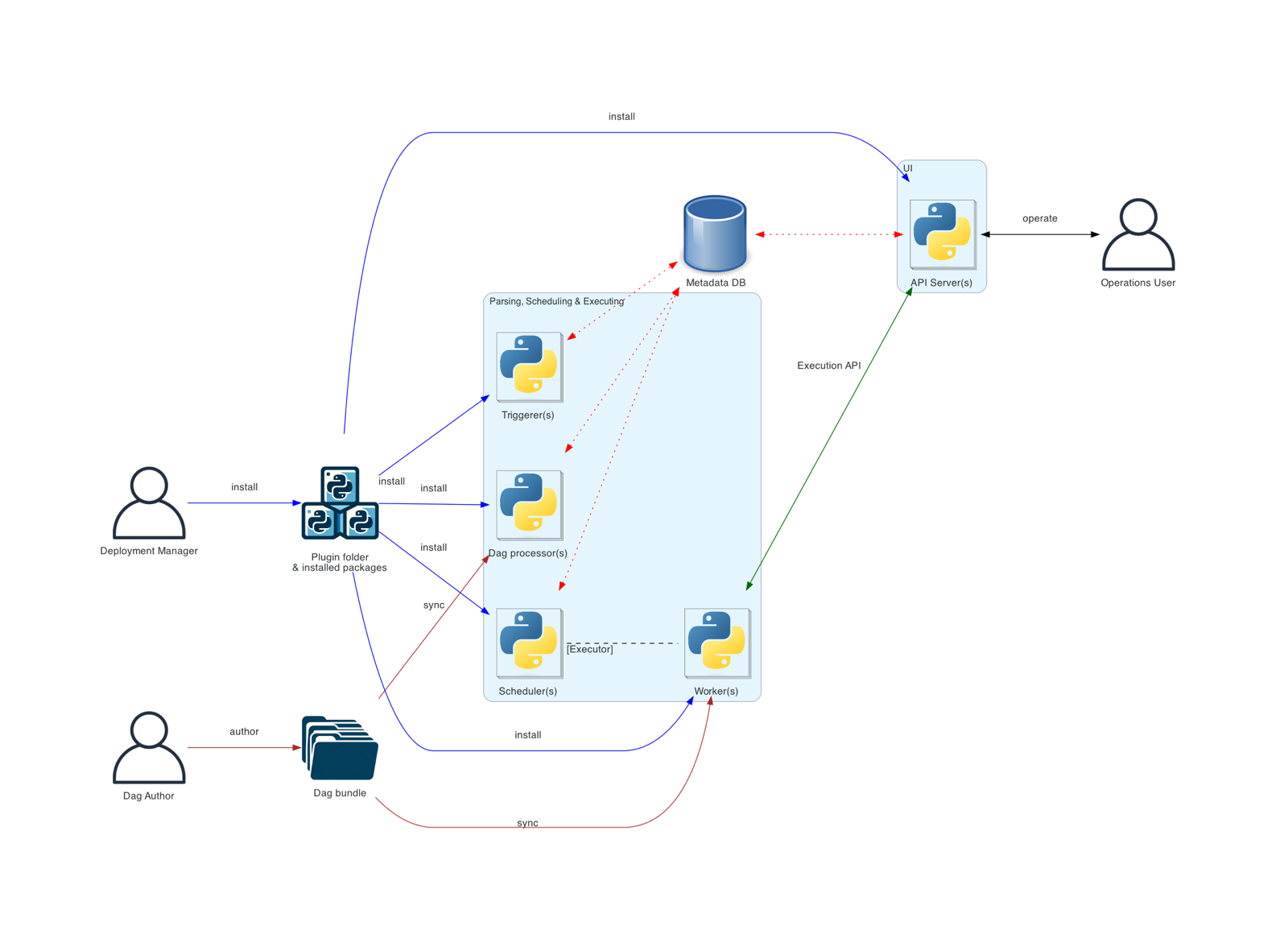
The cost is that the database becomes the one thing everything depends on, and every scheduler polls it. Quartz's clustering documentation adds a warning that matters for the rest of this chapter: "Never run clustering on separate machines, unless their clocks are synchronized." Each node decides what is due by its own clock.
How do several scheduler processes avoid firing the same job?
- Simple to reason about: one actor
- Leader can keep all due jobs in memory
- One process's capacity
- Failover gap of a lease timeout
- Needs fencing against a paused ex-leader
- All schedulers work at once
- No separate coordination service
- The database is now the bottleneck and the single point of failure
- Polling load grows with the number of schedulers
- Scales out with the number of shards
- A failure affects one shard
- More moving parts
- Rebalancing shards when machines change
For Meera's company, either of the first two is plenty, and the second is attractive because the jobs table already exists. Section 10 explains why the very large schedulers end up with the third, which is the first one repeated per shard.
So now exactly one scheduler fires invoice-nightly at midnight. But firing isn't running. It runs for forty minutes on some machine, and that machine can fail too.
05Running the work: leases, heartbeats and idempotent jobs
5.1Separate the scheduler from the workers
In cron, the scheduler and the work share a machine, so one reboot lost both. So we split them. The scheduler only decides when; at that moment it puts a small message, "run invoice-nightly for 2026-10-10", onto a queue. A pool of workers, processes on other machines, take messages from the queue and do the work. Now a heavy job can't starve the scheduler, workers can be added when the queue grows, and the scheduler stays small enough to fail over in seconds.
This is how most production designs look. Dropbox's ATF has a store consumer that polls the task store every two seconds for tasks whose trigger time has passed and pushes them onto Amazon SQS queues, from which controllers on the worker hosts pull them. Airflow's scheduler hands tasks to an executor, which sends them to Celery or Kubernetes workers.
But the split creates a new question. A worker takes invoice-nightly off the queue and, twenty minutes in, its machine loses power. Who notices, and who finishes the job?
5.2Leasing a job, and heartbeats
If a queue deleted a message the moment a worker took it, a crashing worker would lose the job. Instead the worker leases it, the same idea as the scheduler's lease in section 4.1, applied to one job: the message stays in the queue but becomes invisible to other workers for a fixed time. If the worker finishes and acknowledges it, the message is deleted. If the lease runs out first, the message reappears and another worker picks it up.
Amazon SQS calls this the visibility timeout: 30 seconds by default, extendable up to 12 hours from when the message was first received. A forty-minute job can't just pick a forty-minute timeout, though, because then a crash at minute one wastes thirty-nine minutes before anyone retries. So long jobs keep the lease short and renew it while they're alive, by sending a heartbeat, a periodic "I'm still working on this", every few seconds. AWS's own advice is to "implement a heartbeat mechanism to periodically extend the visibility timeout." Temporal's activities do the same with a heartbeat timeout: if a running activity stops heartbeating for longer than that, it's treated as failed and retried.
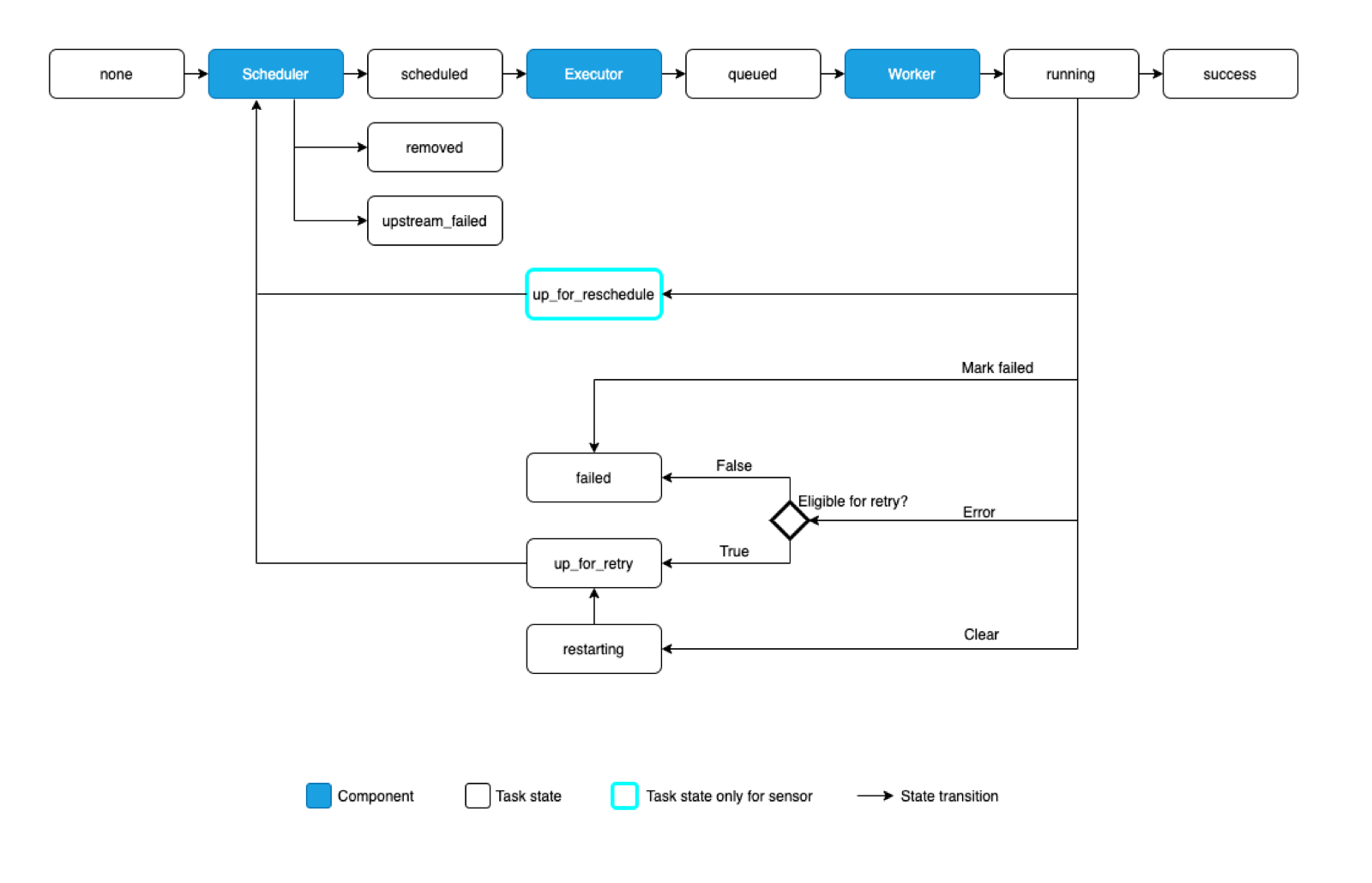
invoice-nightly for 10 October.Leases have the same weakness here as in section 4. A worker that pauses for longer than its lease, then wakes up and carries on, now runs alongside the worker that took over. Dropbox's ATF guards against the common case from the worker's side: an executor "terminates itself as soon as three consecutive heartbeat calls fail," because if it can't renew its lease it must assume someone else is about to take the job. That narrows the window; it doesn't close it.
5.3At-least-once, so make the job idempotent
Look at what the lease guarantees. A job whose worker crashes will run again, so it's never lost. But a job can run twice: once partly, on the dead worker, and again in full; or twice concurrently, if the first worker was paused instead of dead. This guarantee, "every job runs one or more times", is called at-least-once execution, and it's what every scheduler in this chapter offers. Dropbox's ATF "guarantees that a task is executed at least once after being scheduled"; EventBridge Scheduler "provides at-least-once event delivery to targets"; and Kubernetes' CronJob documentation says outright that "there are certain circumstances where two Jobs might be created, or no Job might be created ... the Jobs that you define should be idempotent."
Could a cleverer scheduler guarantee that invoice-nightly runs exactly once, if machines can crash and messages can be lost?
So the work moves from the scheduler to the job. A job is safe under at-least-once if every action it takes is idempotent, and chapter 31 covers the standard tool, the idempotency key: a unique value for each logical operation, sent with every attempt, so the receiver can recognise a repeat. Here's how invoice-nightly becomes safe:
- Name the run. The run is identified by the job and its scheduled time,
invoice-nightly/2026-10-10, the same deterministic identity Google's cron used for launches in section 4.2. Every attempt of this run uses the same identity. - Record each customer's invoice with a unique constraint on (customer, billing period). Before charging customer 8812 for 10 October, the job inserts that row; if it already exists from an earlier attempt, the customer is skipped or the earlier result is reused.
- Charge with an idempotency key built from the same pieces, such as
charge-8812-2026-10-10. Payment providers such as Stripe remember the result of the first request with a given key and return it again for repeats, so even a crash between charging and recording can't produce a second charge.
With those three changes, worker-2 in the diagram above walks through the first 12,000 customers finding each one already done, and charges only the rest. The job has become, in Google's terms, the garbage-collection kind instead of the newsletter kind.
06When a job fails: retries, backoff and dead letters
6.1Retry, but not immediately
Workers dying is one kind of failure. A commoner kind is the job itself failing: the payment provider times out, the database is overloaded, a bug throws an exception. Many of these failures are probably temporary, so the scheduler should try again. When should it try?
Retrying at once is usually wrong. If the payment provider is overloaded, every failed job retrying immediately adds load to the thing that's already struggling. The standard answer is exponential backoff: wait a little after the first failure, twice as long after the second, and so on, up to a cap. Temporal's default retry policy is a typical example: the first retry after 1 second, a backoff coefficient of 2.0, so 2, 4, 8 seconds, capped at 100 times the initial interval (100 seconds), with unlimited attempts by default.
Backoff alone still has a flaw. If a thousand reminder jobs fail together at 14:05:00 because the email service blipped, they all retry together at 14:05:01, then together at 14:05:03, a synchronised wave each time. Marc Brooker's 2015 AWS post on the subject compared ways of adding randomness, called jitter. The simplest, "full jitter", waits a random time between zero and the exponential delay; Brooker found that backing off without jitter was the "clear loser", and that jittered schemes gave "a substantial decrease in client work and server load." Chapter 40 covers retries, backoff and jitter for requests in general; jobs are the same story with longer delays.
6.2When to give up: the dead-letter queue
Some failures aren't temporary. A reminder for a customer whose account has been deleted will fail forever, and retrying it forever wastes workers and hides the problem. So retries need a limit, a number of attempts or a total time, and some errors should never be retried at all: Temporal lets a retry policy list error types that are non-retryable.
A job that exhausts its retries shouldn't vanish. It goes to a dead-letter queue, a separate place where failed jobs are kept with their last error, for a person to inspect, fix and replay. EventBridge Scheduler, by default, retries a failed delivery for up to 24 hours and 185 attempts; if you haven't configured a dead-letter queue, the event is then dropped. Airflow's equivalent is the failed state in the diagram above, and an alert.
07Jobs that depend on jobs
7.1From a schedule to a graph
Meera's nightly run is made of four jobs. usage-rollup totals each customer's usage for the day. invoice-nightly needs those totals and today's exchange rates from fx-rates. send-invoices emails the results, and needs the charges done. With cron, people handle this with gaps: rollup at 00:00, invoices at 00:30, emails at 01:30, and a hope that each finishes in time. On the night the rollup takes 45 minutes, invoices are computed from half the data.
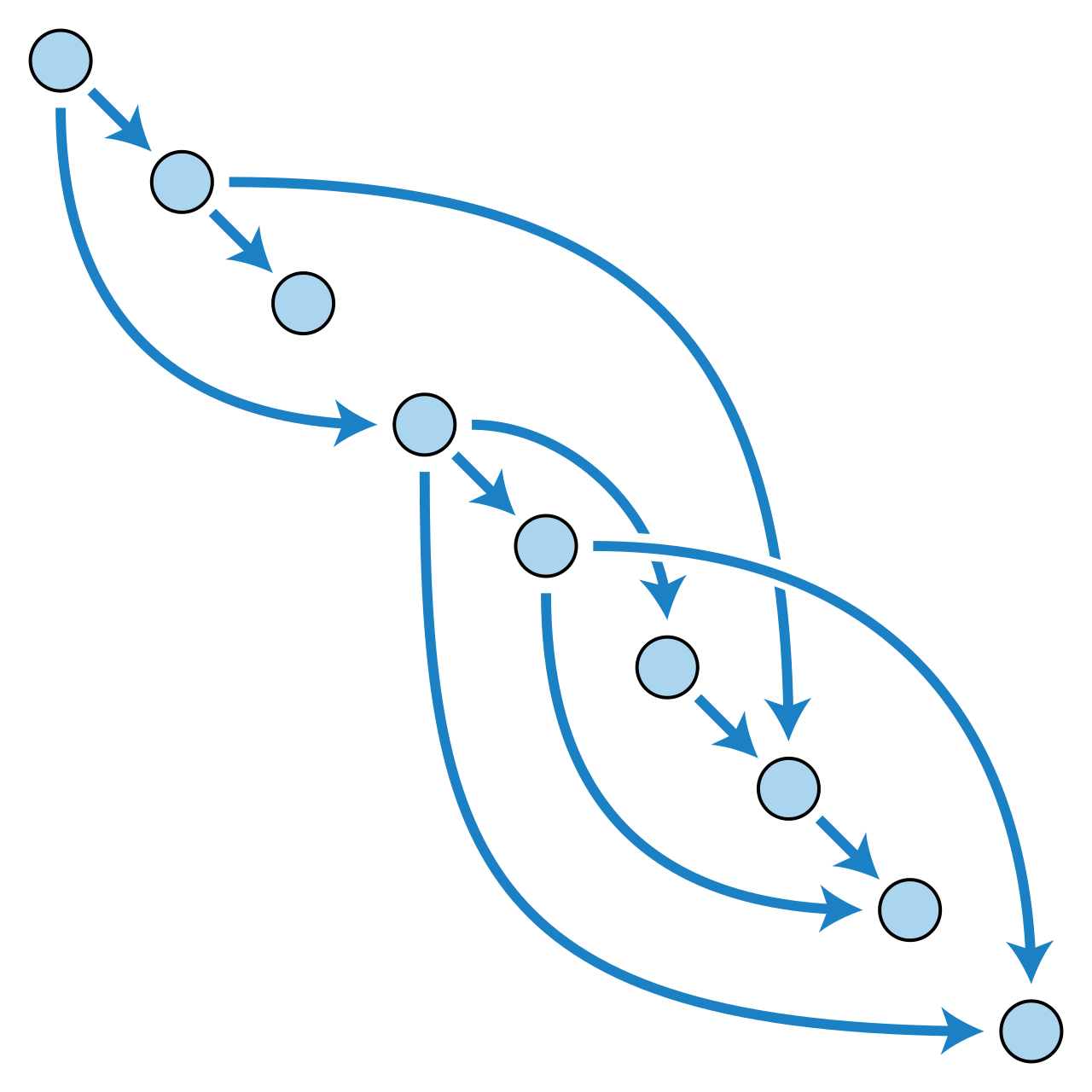
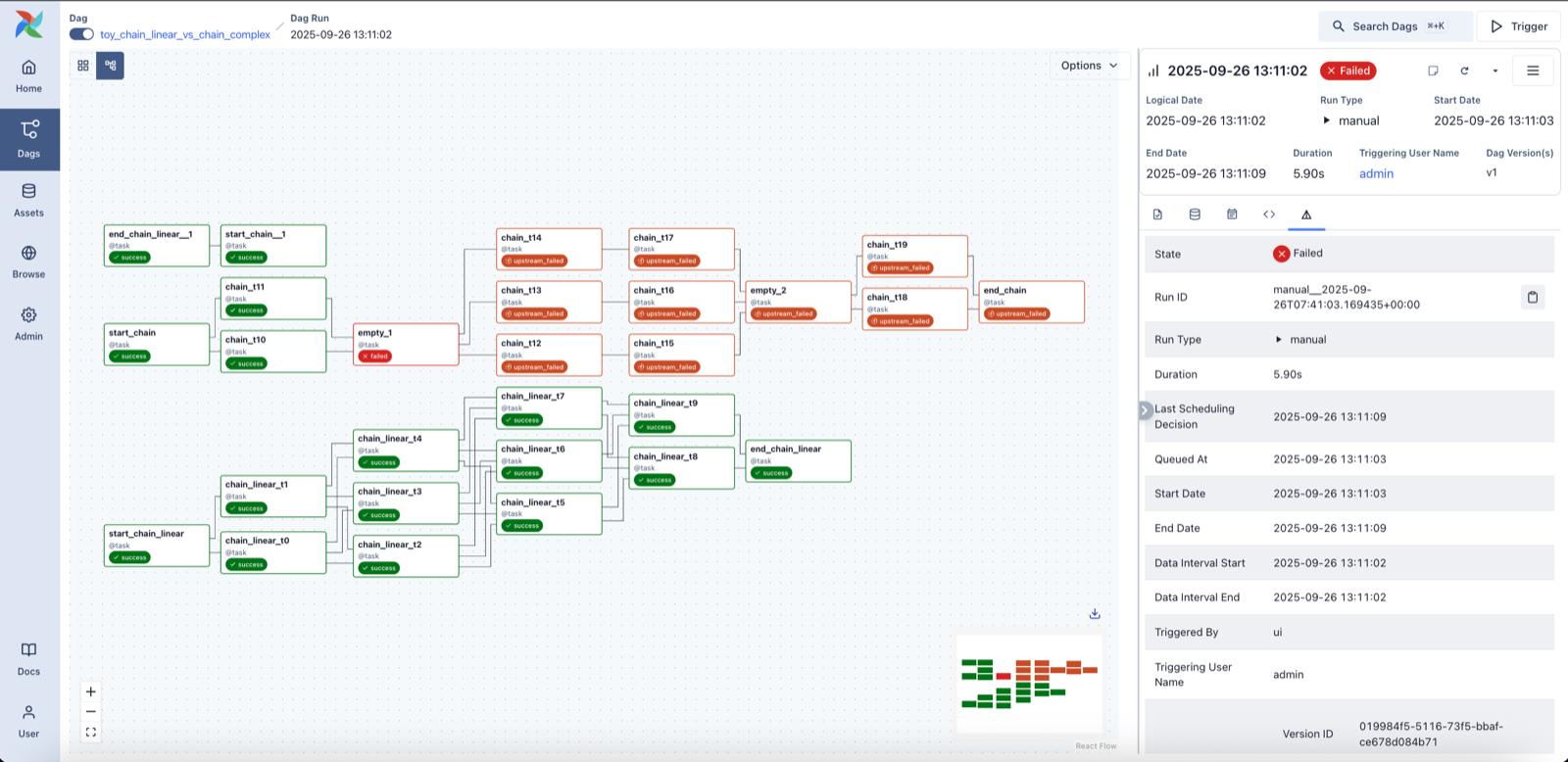
The fix is to say what each job depends on, not when it runs, and let the scheduler start each job when its inputs are ready. Together, the dependencies form a directed graph, jobs as nodes and "must finish before" as arrows. It has to be a directed acyclic graph, a DAG: if A waits for B and B waits for A, neither can ever start. Airflow uses the word for its whole unit of work: a "DAG" is a set of tasks and their dependencies, with a schedule for the whole graph.
7.2Running a DAG
The algorithm that runs a DAG is the one for topological sorting, usually Kahn's algorithm. For each job, count its unfinished dependencies, its in-degree. Every job with a count of zero is ready; send them all to workers. Each time a job succeeds, subtract one from the count of each job that depends on it, and any that reach zero become ready. For Meera's graph: usage-rollup and fx-rates start at once, in parallel; when both are done, invoice-nightly's count reaches zero; when it's done, send-invoices runs.
The same counts show what happens on failure. If invoice-nightly fails after its retries, send-invoices's count never reaches zero, so it's never started, and the scheduler marks it upstream_failed, exactly what the orange tasks in the Airflow screenshot show. Now the run is stuck until someone fixes the failure and clears the task, at which point it reruns and the counts continue. If cycles slip in, Kahn's algorithm finds them too: jobs whose count never reaches zero even though nothing has failed.
A DAG run needs a scheduler to remember state per run, not per job: which tasks of nightly-billing/2026-10-10 have succeeded. That state lives in the same database as the schedule, and that's one reason workflow schedulers like Airflow are built around a metadata database.
?Which day's data does the 10 October run process?
Airflow's answer catches out almost every newcomer. A daily DAG run covers a data interval, a span of time, and is started after that interval ends: "A Dag run is usually scheduled after its associated data interval has ended." So the run that starts just after midnight on 10 October processes 9 October, and its logical date, the label it's known by, is the start of the interval, 9 October. That's right for billing, which should charge for a day once the day is over, and it gives every run a deterministic identity, the logical date, for idempotent tasks to key on.
08Time itself: clocks, time zones and missed runs
8.1Whose midnight?
Every scheduler decision so far started from "is it time yet?", which assumes the machine knows what time it is. It only roughly does. Each machine's clock drifts, and is corrected by NTP, the Network Time Protocol, which sets it from servers that are themselves set from more accurate ones (chapter 26 covers how). On a well-run fleet clocks probably agree to within a few milliseconds; on a misconfigured machine they can be minutes apart.
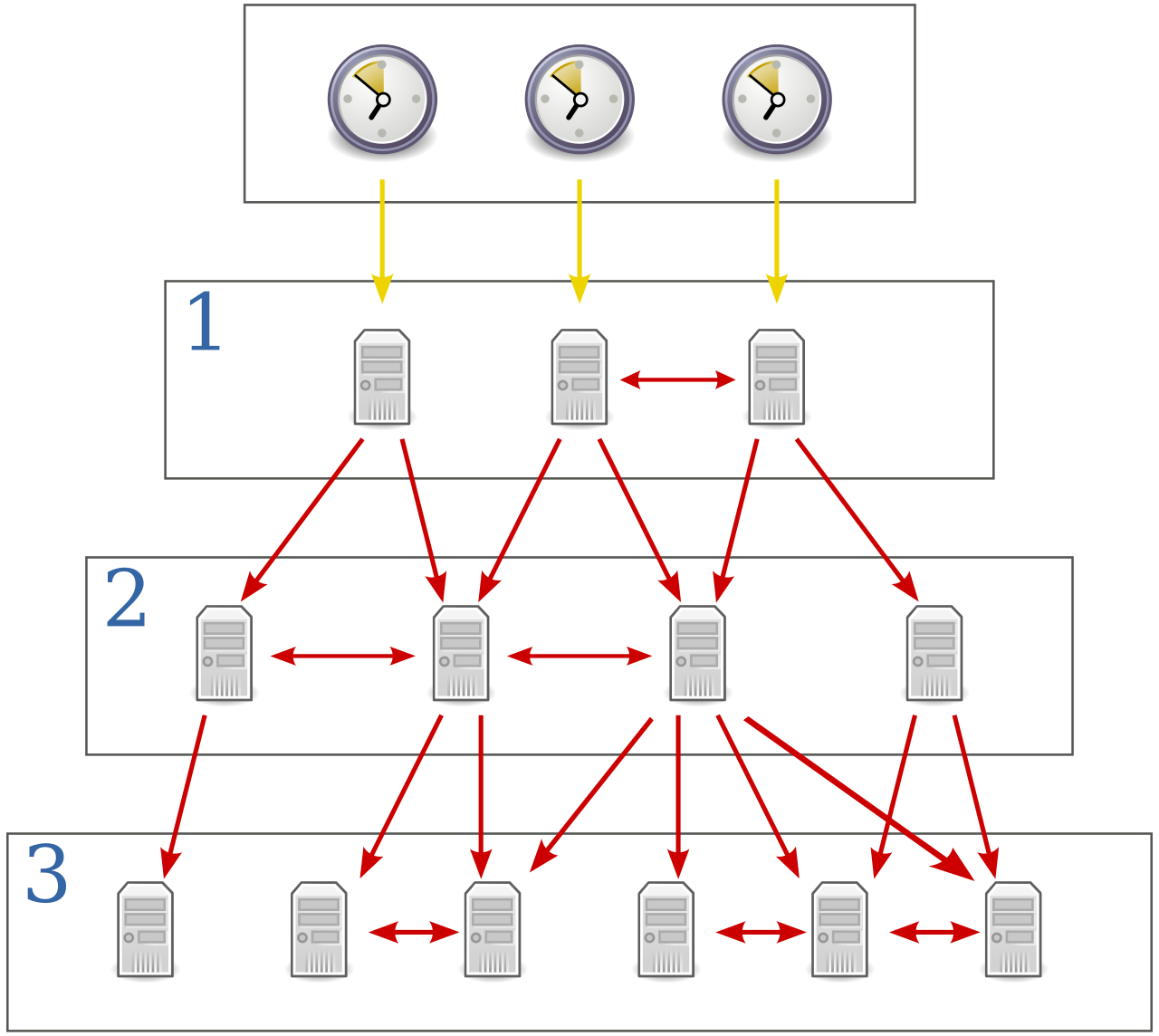
For a single leader, a skewed clock means jobs fire a bit early or late, and that's usually harmless. For designs where several machines each decide what's due, it's worse: a scheduler whose clock runs a minute fast can fire tomorrow's run early, or claim a row that another scheduler considers not yet due. That's why Quartz requires clustered nodes' clocks to be synchronised, and why Kubernetes' error for an unexpectedly large number of missed runs ends "or check clock skew". Three defences help: keep NTP healthy and monitored, to read "now" from one place where possible (the leader, or the database's now()), and to identify runs by their scheduled time, never by the wall-clock time at which they happened to start.
Then there's the time zone. "Midnight" in a crontab means midnight in whatever zone the scheduling machine is set to, and that's how jobs move by an hour when a server is rebuilt with a different setting. Worse, in zones with daylight saving time, 02:30 doesn't exist on the night the clocks go forward and happens twice on the night they go back. Cron implementations each have their own rules for this. Modern schedulers make the zone explicit: Kubernetes added a timeZone field to CronJob, stable since version 1.27; Temporal schedules are in UTC unless told otherwise; EventBridge Scheduler takes a time zone per schedule. Billing that has to match a customer's calendar should name the zone; everything else is simpler in UTC.
8.2Missed runs: catch up, skip, or run once
Now go back to Meera's first night, the reboot from 23:58 to 00:03. With the jobs in a database, the scheduler can see what it missed when it comes back: invoice-nightly has a next_run_at of 00:00 that has passed. Cron would have done nothing. What should we do instead?
The scheduler was down from 23:58 to 00:03 on one night, and on another night from 21:00 to 03:00. For each of invoice-nightly, fx-rates (every minute) and an hourly report, what should happen when it comes back?
This choice is called a misfire policy or catch-up policy, and every serious scheduler has one:
| Scheduler | Setting | Options and defaults |
|---|---|---|
| Kubernetes CronJob | startingDeadlineSeconds | Skip a run if it can't start within this many seconds of its time; unset means no deadline. More than 100 missed schedules logs a "too many missed start times" error. |
| Quartz | misfire instruction | FIRE_ONCE_NOW (the default for cron triggers) or DO_NOTHING; a trigger counts as misfired after 60 seconds by default. |
| Airflow | catchup | Run every missed interval in order (a backfill), or only the latest; Airflow 3.0 (April 2025) changed the default to not catching up. |
| Temporal Schedules | catch-up window | Missed actions within the window run when the scheduler recovers; the default window is one year. |
What should a scheduler do with runs it missed while it was down?
- Nothing is lost
- Right for jobs that process one interval each
- A long outage releases a flood of runs
- Useless for 'latest state' jobs
- Catches up the state without a flood
- Right for most daily jobs
- Per-interval work is skipped
- No surprise load after an outage
- Right for frequent, stateless jobs
- Silently loses runs; needs an alert
"Run once, now" is the most common default, Quartz's for cron triggers, and the right one for invoice-nightly. But the policy belongs to the job, not the scheduler: fx-rates should skip, and a per-hour report should backfill. Whatever the policy, a missed run should raise an alert, because a scheduler that quietly skipped the payroll run is worse than one that complains.
A related setting covers the case where the previous run hasn't finished when the next is due, the fx-rates problem from section 2.2. Kubernetes calls it concurrencyPolicy with Allow (the default), Forbid (skip the new run) and Replace (stop the old one). Temporal calls it an overlap policy, with Skip as the default and options to buffer one run, buffer all, cancel or terminate the old run, or allow both.
09Midnight: the thundering herd
9.1Everyone picks 0 0 * * *
Meera's company grows, and other teams start using the scheduler. Each writes 0 0 * * * for its nightly job, because midnight is the obvious time for "once a day". The Think in section 1.2 already counted what this means at a large company: thousands of jobs, all due in the same second, every night, when the average is a handful a second. When many waiting things are released at the same instant and all rush at the same resource, it's called a thundering herd.
Google's SRE book describes the same thing: "When people think of a 'daily cron job,' they commonly configure this job to run at midnight... what if your cron job can spawn a MapReduce with thousands of workers? And what if 30 different teams decide to run a daily cron job like this, in the same datacenter?" Its fix was an extension to the crontab format, a question mark meaning "any value is acceptable", with the value chosen by "hashing the cron job configuration over the given time range (e.g., 0..23 for hour), therefore distributing those launches more evenly." Jenkins has the same idea as H, for "hash": its documentation warns that 0 0 * * * "for a dozen daily jobs will cause a large spike at midnight," while H H * * * runs each job once a day "but not all at the same time."
Why hash, and not pick a random time? Because a hash of the job's name gives the same answer every night. Each job keeps a stable time that its owners and its downstream jobs can rely on, while different jobs land on different times. This program spreads 20,000 midnight jobs over windows of different sizes:
import hashlib
from collections import Counter

# 20,000 teams each wrote "0 0 * * *": run my job at midnight
jobs = [f"team-{i}/nightly-report" for i in range(20_000)]

def spread(name, window_s):
    """A stable offset in [0, window): the same job lands on the same second every night."""
    h = int.from_bytes(hashlib.sha256(name.encode()).digest()[:8], "big")
    return h % window_s

for label, window in [("all at 00:00:00", 1), ("spread over 10 min", 600), ("spread over 1 hour", 3600)]:
    starts = Counter(spread(j, window) for j in jobs)
    peak_s = max(starts.values())
    print(f"{label:20}  peak {peak_s:>6,} job starts in one second   average {len(jobs)/window:>8,.1f}")

print("team-7/nightly-report starts", spread("team-7/nightly-report", 3600), "s after midnight, every night")all at 00:00:00 peak 20,000 job starts in one second average 20,000.0
spread over 10 min peak 51 job starts in one second average 33.3
spread over 1 hour peak 16 job starts in one second average 5.6
team-7/nightly-report starts 1344 s after midnight, every nightSpreading over an hour cuts the peak from 20,000 starts in one second to 16, more than a thousand times lower. Notice that the peak is a few times the average, not equal to it: hashing spreads jobs randomly, so some seconds get more than their share. And team-7's report starts at the same second, 22 minutes and 24 seconds past midnight, every night.
The last line also shows what this costs. A hashed time is fine for a report; it's wrong for invoice-nightly, whose owners care when it runs. So spreading is opt-in per job: Google's ?, Jenkins' H, and EventBridge Scheduler's flexible time window, which lets a schedule say "anywhere in the 15 minutes after the hour", "dispersing your target invocations". Temporal schedules take a jitter setting, a random delay up to a maximum. And even with spreading, the SRE book admits the load "is still very spiky": the scheduler and the workers still need capacity for the peak, or a queue in front of the workers that lets a burst wait its turn.
10One scheduler is not enough: sharding
10.1Splitting the timers
A single leader with an in-memory heap can fire a lot of jobs, but the company keeps growing, and someone wants to schedule a reminder for every one of fifty million users. Now the leader has too many timers to load, too many launches a second, and a failover that has to reload all of them. A database behind the row-claim design has the same problem: every scheduler polls one table.
The fix is the one chapter 29 develops: partition the jobs. Hash each job's ID into one of a fixed number of shards, say 512. Each shard has its own slice of the jobs table, its own timer structure, and its own lease, so it's owned by exactly one scheduler process at a time. A machine might own a hundred shards, maybe more; when it dies, its shards' leases expire and other machines pick them up, each reloading only that shard's timers. Each shard is section 4.1's leader design in miniature.
?Why a fixed number of shards?
Because a job's shard has to stay put. If the shard were hash(job) mod number-of-machines, adding a machine would move almost every job, the problem chapter 29 opened with. With a fixed, generous shard count, machines come and go by taking over whole shards, and jobs never move between shards. Temporal, the open-source workflow engine that began in 2019 as a fork of Uber's Cadence, does exactly this. Its history service, which among other things durably stores every workflow's timers, is split into a number of history shards set when the cluster is created; the documentation is blunt that the count "cannot be changed" afterwards. Clusters have run with anywhere from 1 to 128K shards, and its Helm chart defaults to 512. Each shard maps to one partition of the database and has an internal timer task queue that durably persists timers, and a Temporal timer can be anything from one second to several years.
11The whole system
11.1Every box, and why it's there
| Component | What it does | Added because |
|---|---|---|
| Job store | Jobs, schedules, next_run_at index, run history | Cron's state lived on one disk (§2) |
| Timer structure | Heap or timing wheel of soon-due jobs | Polling the table every second is wasteful at scale (§3) |
| Leases + fencing | One owner per scheduler shard | Two schedulers fired the same job (§2.3, §4) |
| Deterministic run IDs | job/scheduled-time | A new leader must know what the old one launched (§4.2) |
| Task queue with leases | Hands work to workers; reappears on crash | Workers die mid-job (§5) |
| Idempotency keys in jobs | Make a second run harmless | Execution is at-least-once (§5.3) |
| Retry policy + dead letters | Backoff with jitter; park hopeless jobs | Failures are mostly temporary, sometimes not (§6) |
| DAG engine | Runs jobs when their inputs are ready | Fixed gaps between jobs broke on slow nights (§7) |
| Misfire and overlap policies | Decide what to do with missed or overlapping runs | Schedulers go down; jobs overrun (§8) |
| Spreading and jitter | Hash start times within a window | Everyone picks midnight (§9) |
| Shards | Split jobs and timers across machines | One leader has a ceiling (§10) |
11.2From top to bottom
| Level | The choice | Data structure or algorithm |
|---|---|---|
| System | Separate deciding when from doing the work | Scheduler → queue → workers |
| Job store | Find due jobs without scanning | B-tree index on next_run_at |
| In memory | Constant-time timers | Min-heap (O(log n)) or hierarchical timing wheel (O(1) insert and cancel) |
| Coordination | One actor per job | Leases in a consensus store; fencing tokens; or SELECT … FOR UPDATE SKIP LOCKED |
| Launch safety | Recover a half-done launch | Start/finish records; names derived from job and scheduled time |
| Execution | At-least-once | Visibility timeouts, heartbeats, idempotency keys |
| Retries | Back off without herding | min(cap, base × 2ⁿ) with full jitter |
| Dependencies | Run when inputs are ready | Kahn's topological sort with in-degree counts |
| Spreading | Stable, even start times | hash(job name) mod window |
| Scale | Split by job | Fixed shard count; a lease per shard |
12What goes wrong, and what it cost
12.1Failures this design has to survive
| What happens | What Meera sees | What the design does |
|---|---|---|
| The scheduler leader dies | Runs a few seconds late | The lease expires; a standby takes over and reads open launches |
| The old leader was only paused | Nothing, if fencing works | Its stale token is rejected by the job store |
| A worker dies mid-job | The run takes longer | The lease expires; another worker reruns it; idempotency keys skip finished work |
| The payment provider is down | Retries in the logs | Backoff with jitter; after the limit, dead letter and an alert |
| The scheduler was down over midnight | Invoices a little late | Misfire policy: run once, now |
| Usage rollup is slow | Invoices wait for it | The DAG holds invoice-nightly until its inputs are done |
| Everyone schedules at midnight | Nothing, if spread | Hashed start times within a window |
| A machine's clock is wrong | Early or late runs | NTP monitoring; one source of "now"; runs named by scheduled time |
12.2The tradeoffs, in one table
| Decision | Chosen | Given up | Why it was worth it |
|---|---|---|---|
| Who fires jobs | One lease holder per shard | Instant failover | Two schedulers acting is worse than a few seconds' delay |
| Execution guarantee | At-least-once, idempotent jobs | Exactly-once execution | Exactly-once isn't possible across crashes; exactly-once effect is |
| In doubt about a launch | Check the deterministic run ID | Simplicity | Neither a blind rerun nor a blind skip is safe for billing |
| Timer structure | Durable index + in-memory heap or wheel | Pure database polling | Microseconds per tick, and the store still survives crashes |
| Missed runs | Per job: run once, backfill or skip | One simple rule | Jobs differ in whether a late run is useful |
| Start times | Hashed within a window by default | Exact times for most jobs | Midnight spikes disappear |
| Scale | Fixed shard count | Changing the count later | Jobs never move between shards |
13Summary
- Cron's failure domain is one machine: if it's down at midnight the run is silently missed, and two uncoordinated copies run every job twice.
- Jobs belong in a durable store with a time-ordered index, so finding due jobs costs the number of due jobs, not the number stored.
- In memory, a min-heap gives the next job in O(log n), and a hierarchical timing wheel inserts and cancels in O(1), by cascading timers from coarse slots to fine ones as their time approaches.
- One process fires each job: a lease elects the leader (or one per shard), fencing tokens stop a paused ex-leader, or
SKIP LOCKEDrow claims let the database arbitrate. - Name each run by job and scheduled time, so a new leader can tell which launches the old one completed.
- Workers lease jobs and heartbeat, so a crashed worker's job reappears; this makes execution at-least-once.
- Exactly-once execution is impossible across crashes, so make jobs idempotent, with unique constraints and idempotency keys built from the run's identity.
- Retry with exponential backoff and jitter, then dead-letter: temporary failures heal, permanent ones are parked where people look.
- Dependencies form a DAG, run by counting each job's unfinished inputs; a failure marks everything downstream as upstream_failed.
- Clocks, time zones and missed runs need explicit policy: UTC or named zones, runs identified by scheduled time, and a per-job choice of run once, backfill or skip.
- Hash start times within a window to dissolve the midnight thundering herd, and shard by job with a fixed shard count when one scheduler isn't enough.
14Build this
A small scheduler with failover.
- Create a Postgres table
jobs(job_id, schedule, next_run_at, payload)with an index onnext_run_at. Write a scheduler loop in Python that claims due rows withFOR UPDATE SKIP LOCKED, enqueues them into ataskstable, and computes the next run from a cron expression (thecroniterpackage parses them). - Run three copies of the scheduler. Add 10,000 jobs due in the same minute and check that each was enqueued exactly once. Then remove
SKIP LOCKEDand watch the copies queue up behind each other's locks. - Write workers that lease tasks by setting
leased_until = now() + 30 s, heartbeat every 10 seconds, and occasionallykill -9themselves mid-task. Count how many tasks ran twice. - Make the task a fake "charge" that inserts into
charges(customer, period)with a unique constraint, and confirm the duplicates disappear. - Add a nightly job set to
0 0 * * *for 5,000 fake teams, measure the peak tasks per second, then spread them by hashing their names over an hour and measure again.
15Interview questions
beginnerWhy not just run cron on two machines for redundancy?›
Neither machine knows about the other, so both fire every job, and any job that isn't idempotent, like charging customers or sending emails, does its work twice. Redundancy only helps if the copies agree which one acts: a leader chosen by a lease in a consensus store, or a database row lock that only one scheduler can take per job.
beginnerHow does a scheduler find the jobs that are due without scanning every job?›
It keeps them ordered by due time. In a database that's an index on the next-run timestamp, so the query reads from the start of the index until it reaches a future time. In memory it's a min-heap, where the soonest job is always at the root, or a timing wheel, where jobs sit in slots by due time and the scheduler only looks at the current slot each tick.
intermediateExplain a hierarchical timing wheel. Why would Kafka use one instead of a priority queue?›
A timing wheel is a ring of slots, one per tick; a timer goes in slot (now + delay) mod size, and each tick fires the current slot, so insert and cancel are O(1). To reach far into the future without millions of slots, wheels are stacked at coarser granularities, like seconds, minutes and hours, and timers cascade down to finer wheels as their time nears. Kafka holds a timeout for most requests and cancels nearly all of them when the request completes. Its old heap-based DelayQueue cost O(log n) per operation and couldn't remove arbitrary entries, so completed requests piled up; the wheel, introduced in Kafka 0.9 in 2015, made both cheap.
intermediateA worker crashes halfway through a job that charges customers. What happens, and how do you make it safe?›
The worker held a lease on the task and was renewing it with heartbeats. When the heartbeats stop, the lease expires, the task becomes visible again, and another worker runs it, so the job runs at least once but possibly twice. To make the second run harmless, the job uses an identity derived from the job name and scheduled time, records each customer's charge under a unique constraint, and sends an idempotency key with each charge, so customers already charged are skipped and the payment provider rejects repeats.
deepGoogle's cron prefers skipping a launch to risking a double launch. When would you choose otherwise?›
Skipping is safer when a double run is hard to undo, like sending a newsletter, and a missed run can be noticed and rerun by hand. It's the wrong choice when missing a run is the expensive failure, like payroll or billing, and the job can be made idempotent; then you prefer at-least-once execution and let idempotency absorb the duplicates. Google's own design narrows the dilemma by recording the start and end of each launch in Paxos and deriving job names from the scheduled time, so a new leader can check whether a launch it's unsure about happened.
deepDesign a scheduler for 100 million one-off timers, most of them cancelled before they fire.›
Partition timers by a hash of their ID into a fixed number of shards, each owned by one scheduler process through a lease. Each shard keeps its timers in a durable store indexed by due time, and loads only the next few minutes into an in-memory timing wheel, which makes insert and cancel O(1); far-future timers stay in the store until they come within range. Cancelling deletes the row and, if loaded, the wheel entry. Firing enqueues a task for workers with leases and heartbeats, and jobs are idempotent because delivery is at-least-once. Spread start times with jitter where exact time doesn't matter, and keep the shard count fixed so timers never move when machines change.
16Go deeper
A hierarchical wheel has 60 one-second slots, 60 one-minute slots and 24 one-hour slots. How many times is a timer due in 2 hours 30 minutes 10 seconds moved before it fires?›
Twice. It starts in the hours wheel, cascades into the minutes wheel when its hour slot comes round, and into the seconds wheel when its minute slot comes round; then it fires from there.
Why does Google's cron put the scheduled time into each launched job's name?›
So that a new leader that takes over mid-launch can look the name up and see whether that particular launch happened. Without the time, it couldn't tell this run of an every-minute job from the previous one.
20,000 jobs are spread over a one-hour window by hashing their names. Why is the busiest second about three times the average rather than equal to it?›
The hash places jobs effectively at random, and random placement puts more than the average into some seconds. Spreading removes the giant spike, but you still size for a peak somewhat above the mean.
Štěpán Davidovič on Google's Paxos-backed cron: skipping versus double launches, precomputed job names, local logs and the "?" syntax for spreading midnight jobs.
The seven timer schemes, from a decrement-everything loop to hierarchical wheels, with their costs; the source of every timing wheel since.
Why Kafka replaced DelayQueue, how its overflow wheels and bucket-level DelayQueue work, and the benchmark.
A production task scheduler: Edgestore as the task store, SQS queues, heartbeats, at-least-once execution and idempotent task handlers.
Overlap and catch-up policies, retry defaults, heartbeat timeouts and the history shards that store durable timers.
Running several schedulers with SKIP LOCKED, data intervals and logical dates, catch-up and task states.
Full, equal and decorrelated jitter compared by simulation.
17Related chapters
Clocks, NTP, and the leases and fencing tokens the scheduler's leader election relies on. Chapter 26.
How a lease store like etcd stays correct, and how Raft and Paxos elect a leader. Chapter 27.
Hashing jobs into a fixed number of shards and moving shards between machines. Chapter 29.
Why a quiet worker can't be told from a dead one, and how heartbeats and timeouts are chosen. Chapter 30.
Idempotency keys and what "exactly-once" can honestly mean. Chapter 31.
Retries, backoff and jitter for requests, the same tools at shorter time scales. Chapter 40.