Maya edits wedding films. At eleven at night, in a café with patchy wifi, she finishes the first cut of a project, a folder of about 2 GB holding footage, a music track and the editing software's project file, and presses Save. The Dropbox icon in her menu bar spins for a while and turns into a green tick. On the bus home she opens the Dropbox app on her phone and the project is there. The next morning Tom, who does colour grading for her from another city, finds the same folder on his machine, already downloaded, and starts work.
It looks like copying a folder to a server and back, but the copy hides most of the problem. Maya's café uplink can probably move 2 GB in a quarter of an hour, and she'll press Save again in five minutes after changing a few seconds of the timeline. Her laptop has to notice which files changed without being told. Tom edits the same project file while Maya edits it on a train with no signal, and when both of them reconnect, somebody's work must not silently vanish. And Dropbox has to do this for hundreds of millions of people, keeping every byte safe on its own disks, more than an exabyte of it.
In this case study we'll design that system the way an engineer would: start with the most obvious design, find exactly where it breaks, and fix it. The question we'll keep coming back to is this: when Maya presses Save, how does Dropbox move only what changed, get it onto every other device, and never lose anybody's edit? Along the way we'll go from boxes on a diagram down to SHA-256 block lists, rolling hashes, a journal read with cursors, three trees and a merge base, erasure codes and the tracks on a shingled hard drive.
01What we're building, and how big
1.1What it has to do
The core of Dropbox, the part that keeps files in step, comes down to a short list:
- Notice changes to files in the Dropbox folder on any device, without the user doing anything.
- Upload what changed, even over a slow or flaky connection.
- Tell every other device that shares the folder, and have them download the change.
- Work offline, and when devices reconnect, combine everyone's changes without losing any of them.
- Share folders between people, each with their own view of which files they can reach.
- Keep every file safe, along with its earlier versions, for years.
And the qualities it needs while doing that:
- Efficient: send as few bytes as possible, because uplinks are slow and people's data plans cost money.
- Correct: a file must never vanish, be duplicated by accident, or end up half one version and half another.
- Durable: once Dropbox says a file is saved, losing it is not an option.
- Fast enough: a change on one device should show up on the others within seconds to a minute.
This list differs from the earlier case studies in one important way. Uber's hard problem was a question about space, and WhatsApp's was delivering small messages. Dropbox moves large amounts of data that change a little at a time, between devices that are often disconnected, and the hard part is agreeing on what the folder should look like when they meet again.
1.2How big is it?
Dropbox's 2018 S-1 filing, the document a company publishes before going public, gives the scale at that point: more than 500 million registered users in 180 countries, over 11 million of them paying, and more than 400 billion pieces of content added to Dropbox, "totaling over an exabyte (more than 1,000,000,000 gigabytes) of data". When Dropbox's engineers described their sync rewrite in 2020, they wrote of hundreds of millions of users and devices, hundreds of billions of files, trillions of file revisions and exabytes of customer data.
An exabyte is a million terabytes. If a laptop drive holds one terabyte, an exabyte is a million laptops' worth of storage, and it all has to be stored somewhere that never loses it.
Maya's café connection uploads at about 20 megabits a second. How long does her 2 GB project take to upload? And if she saves the project file every five minutes during a ten-hour day and the whole folder were re-uploaded each time, how much would she send?
That estimate is the whole shape of the problem. Storage is large but cheap per byte; the network between a person and Dropbox is narrow and expensive in time. Most of the design is about not using it.
02Version 1: upload the whole file
2.1The obvious design
The most obvious design copies files whole. A program on Maya's laptop, the client, checks the Dropbox folder every minute. When a file's modification time has changed, it uploads the entire file to a server, which writes it to disk and records the new version in a database. Other devices ask the server every minute whether anything changed, and download whole files when it has.
2.2Where it breaks
Walk Maya's evening through this design and it fails in a different way at each step.
- Every save re-sends everything. Maya changes a few kilobytes of a large file, and the client uploads all of it, thirteen minutes for the whole project, as the estimate showed.
- A dropped connection starts over. The café wifi drops at 90%, and the upload begins again from zero, because the server has nothing it can recognise as "the first 90%".
- The same bytes are stored again and again. Maya's footage folder holds a copy of a clip she also keeps in another folder; Tom drags the whole project into a second folder of his. Each copy is uploaded and stored in full.
- Polling wastes everyone's time. Most "anything new?" questions get the answer "no", and when there is something new, Tom waits up to a minute to find out.
- Two edits, one survivor. Tom and Maya both edit the project file. Whoever uploads last overwrites the other, and nobody is told.
The first three failures are about bytes: we're sending and storing data the server already has. One idea fixes all three, and it's where we start. Failures four and five are about coordination, and they take the rest of the chapter.
03Blocks and hashes
3.1Cut files into blocks
Here's the first idea, and you'd probably come up with it yourself. Instead of treating a file as one indivisible thing, cut it into fixed-size pieces and treat each piece separately. If Maya changes a few seconds in the middle of a large file, only the piece containing those bytes is different, and only that piece needs uploading. If the connection drops halfway through, the pieces already sent stay sent.
Dropbox does exactly this. Its 2014 engineering post on sync says: "Every file in Dropbox is partitioned into 4MB blocks, with the final block potentially being smaller." The API documentation makes "4 MB" precise: 4,194,304 bytes, 4 × 1024 × 1024. A 2 GB project is about 500 of these blocks.
That leaves a question: how does the client know which blocks the server already has, without sending them to find out? It needs a short name for each block that depends only on the block's contents.
3.2Name each block by its hash
A hash function takes any amount of data and produces a short, fixed-size value from it, called a digest. A cryptographic hash function adds two promises: change even one bit of the input and the digest changes completely, and nobody knows how to find two different inputs with the same digest. SHA-256 is one, with a 256-bit (32-byte) digest. Dropbox names every block by the SHA-256 hash of its contents.
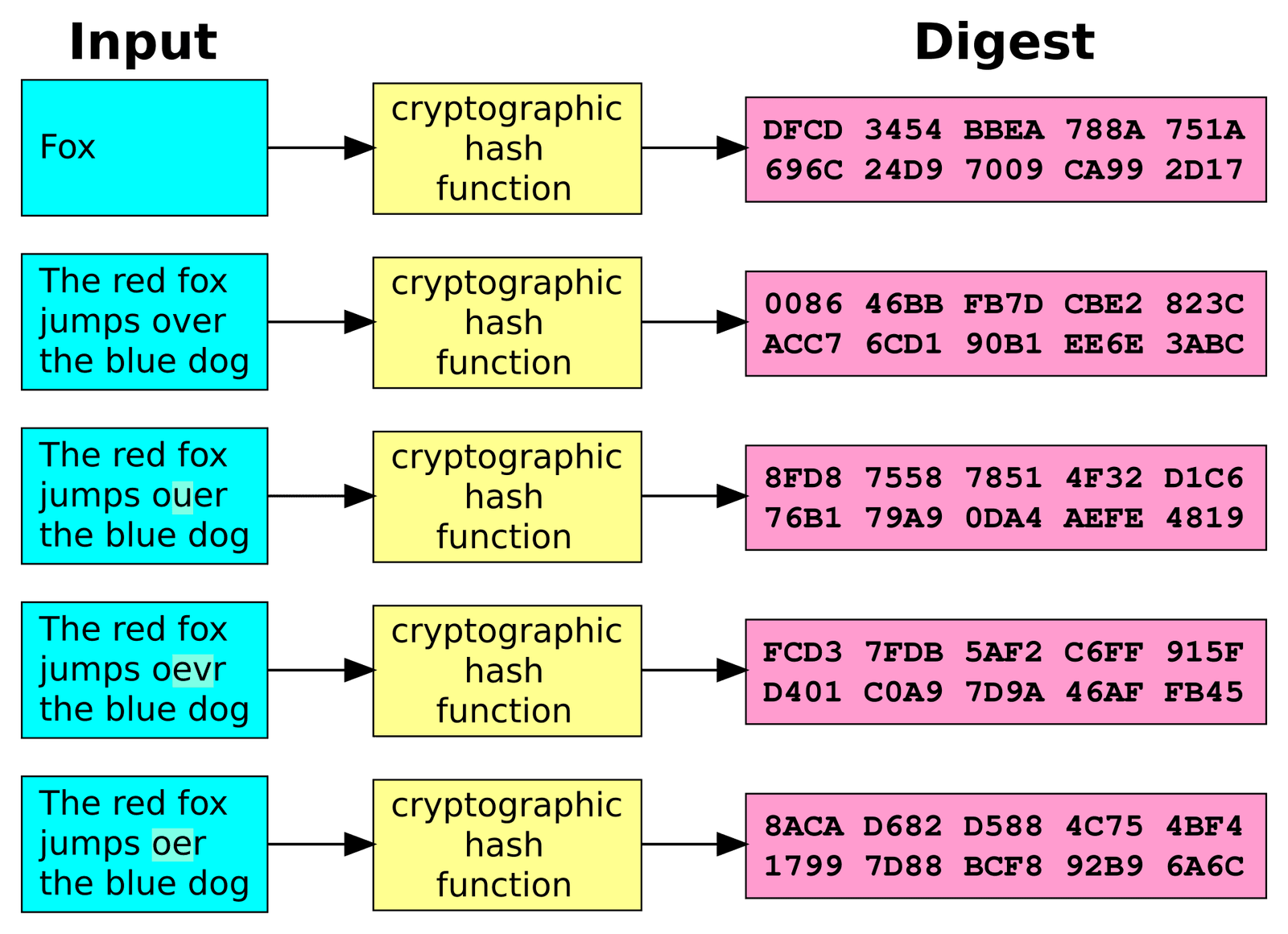
Now a file can be described by the ordered list of its blocks' hashes, which Dropbox calls a blocklist. Maya's 2 GB project is about 500 hashes of 32 bytes each, 16 KB in all. The client sends the blocklist first, the server answers with the hashes it doesn't recognise, and the client sends only those blocks. Storing data under a name derived from its own contents like this is called content addressing, and it gives us three things at once:
- Small uploads after an edit. Only blocks whose hashes changed are sent.
- Resumable uploads. After a dropped connection, the blocks that arrived are already known to the server by hash.
- Deduplication. A block that already exists anywhere in the store, from another folder or another copy, is stored once and referenced again.
The Dropbox API publishes a related value for every file, the content_hash: hash each 4 MB block with SHA-256, join the binary hashes together, and hash that string with SHA-256 again. It's a two-level hash tree, and a hash tree of any depth is the same trick applied repeatedly:
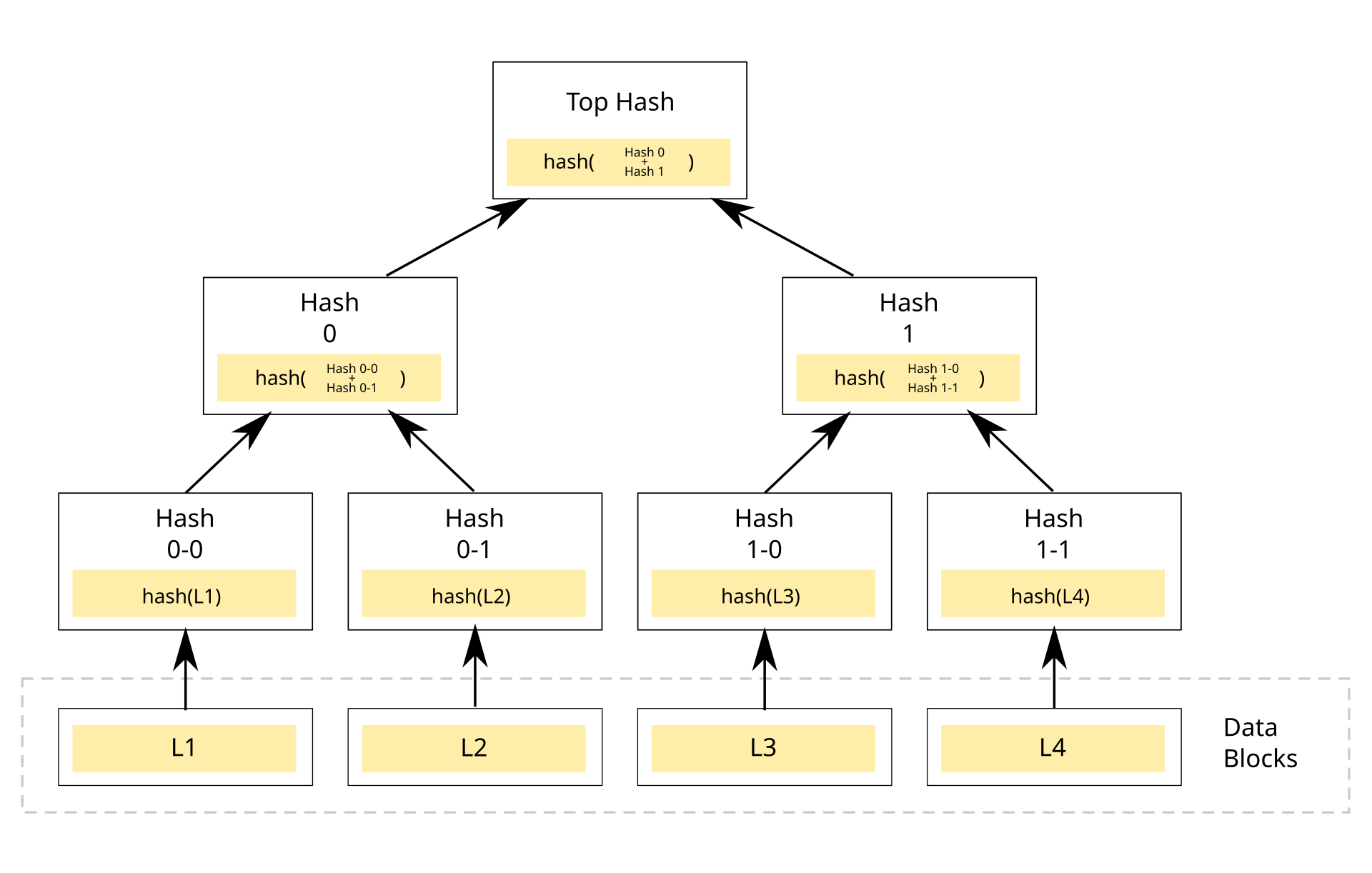
This program cuts a 40 MB stand-in for Maya's file into 4 MB blocks, changes 100 KB in the middle, and counts which blocks changed. It also computes the content_hash exactly as the API docs describe, and checks how much of a second copy of the file the server would already have:
import hashlib, random

BLOCK = 4 * 1024 * 1024                  # Dropbox's "4 MB" block: 4 x 1024 x 1024 bytes

def block_hashes(data):
    return [hashlib.sha256(data[i:i + BLOCK]).hexdigest()
            for i in range(0, len(data), BLOCK)]

def content_hash(data):
    # the Dropbox API's documented content_hash:
    # SHA-256 of the concatenated SHA-256 hashes of the 4 MB blocks
    joined = b"".join(bytes.fromhex(h) for h in block_hashes(data))
    return hashlib.sha256(joined).hexdigest()

random.seed(7)
project = random.randbytes(40 * 1024 * 1024)   # a 40 MB stand-in for Maya's file

# Maya re-renders a short clip: 100 KB in the middle of the file change in place
edited = bytearray(project)
start = 22 * 1024 * 1024
edited[start:start + 100_000] = random.randbytes(100_000)
edited = bytes(edited)

old, new = block_hashes(project), block_hashes(edited)
changed = [i for i in range(len(old)) if old[i] != new[i]]
print(f"blocks in the file:  {len(old)}")
print(f"blocks that changed: {changed}")
print(f"to upload: {len(changed) * 4} MB instead of {len(old) * 4} MB")
print(f"content hash before: {content_hash(project)[:16]}...")
print(f"content hash after:  {content_hash(edited)[:16]}...")
stored = set(old) | set(new)                   # what the server already holds
copy = block_hashes(project)                   # the same footage saved in a second folder
print(f"second copy: {sum(h in stored for h in copy)} of {len(copy)} blocks already on the server")blocks in the file: 10
blocks that changed: [5]
to upload: 4 MB instead of 40 MB
content hash before: c1dd25750fe76234...
content hash after: 8db36e113d554e3d...
second copy: 10 of 10 blocks already on the serverThe edit starts 22 MB into the file, inside block 5 (which covers 20 to 24 MB), so that's the only block whose hash changed, and the upload drops from 40 MB to 4 MB. The file's content_hash changed completely, as it should: it identifies the whole file. And the second copy costs nothing to store, because all ten of its block hashes are already known. Scale that up to Maya's 2 GB and a small edit costs one or two blocks, a few seconds of upload instead of thirteen minutes.
3.3Why 4 MB?
?Why not much smaller blocks, which would make an edit cost even less?
Because every block has a fixed cost no matter how small it is: a 32-byte hash in the blocklist, a row in the server's index of blocks, a lookup on every upload, and a separate object to store, replicate and check. Halve the block size and you double all of those for every file in the system. With 4 MB blocks, the index entry is about a hundred-thousandth of the data it describes; with 4 KB blocks it would be about a hundredth. At exabyte scale, that difference is a whole fleet of database machines.
How big should a block be?
- An edit re-sends very little
- More duplicate blocks found between files
- Huge block index
- Per-block overheads dominate: more requests, more lookups
- Smallest index
- Simplest protocol
- Any edit re-sends everything
- Nothing to resume after a dropped connection
- Index is tiny next to the data
- Edits to large files stay cheap
- Big enough for efficient disk and network transfers
- A one-byte edit still costs a 4 MB upload, unless a delta is sent inside the block
Dropbox chose 4 MB, and the number runs all the way down the stack: the sync protocol, the API's content_hash, LAN sync, and the storage system, Magic Pocket, which stores "encrypted chunks of files up to 4 megabytes in size". The remaining cost, a whole block for a tiny edit, is softened in transfer: Dropbox's 2014 post notes that block uploads and downloads use compression and rsync, the delta technique section 4 explains.
3.4Deduplication and who may use a hash
Deduplication has a sharp edge. If the server says "I already have that block" to anyone who sends its hash, then a hash works like a key to the block's contents. In April 2011 a developer published Dropship, a tool that did exactly that: it saved the block hashes of a file as a small JSON file, and anyone holding that file could "teleport" the contents into their own Dropbox account without uploading anything. Dropbox asked for the project to be taken down and changed its servers, and the tool stopped working.
The 2014 sync post shows the shape of the fix: when a client commits a file, the server answers "need blocks" if it doesn't know a hash or if the user can't prove access to it. Knowing a block's hash is no longer enough; the account has to be one that's allowed to see that block, and otherwise it uploads the bytes like anyone else.
So far, an edit costs one block. But that only holds when the edit replaces bytes in place. Insert bytes instead, and something much worse happens.
04When bytes shift: rolling hashes
4.1One inserted byte changes every block
Suppose Maya's editing software, instead of overwriting bytes in place, inserts a short title card near the start of a large file, pushing everything after it along by a few bytes. The blocks are cut at fixed offsets: 0 to 4 MB, 4 to 8 MB, and so on. After the insert, every one of those windows holds slightly different bytes, shifted by a few positions, so every block hash after the insertion changes. A ten-byte edit near the start of a 2 GB file costs a 2 GB upload, which is where we started.
This is called the boundary-shift problem, and it's the reason fixed blocks are not the end of the story. There are two well-known ways around it, from two famous pieces of research, and both rest on the same trick.
4.2rsync: find a block at any offset
In June 1996 Andrew Tridgell and Paul Mackerras described rsync, an algorithm for updating a file on one machine to match a similar file on another over a slow link. The receiver, which has the old version, cuts it into fixed-size blocks and sends the sender two checksums per block: a cheap 32-bit one and a strong 128-bit MD4 hash. The sender then slides a window of one block's length over the new file, one byte at a time, at every possible offset, and asks whether the bytes under the window match any of the receiver's blocks. Where they match, it sends "use your block 17"; where they don't, it sends the literal bytes.
Checking every offset of a 2 GB file sounds hopeless, since recomputing a checksum over a whole block at each of two billion positions would take forever. The trick is a checksum that can be updated when the window slides by one byte, from the old value, the byte that leaves and the byte that enters, without looking at the rest of the window. This is called a rolling hash. rsync's, inspired by Adler-32, is two running sums over the window from byte k to byte l:
| Sum | Definition | When the window slides one byte |
|---|---|---|
| a | sum of the bytes, mod 2¹⁶ | subtract the byte leaving, add the byte entering |
| b | sum of each byte times its distance from the window's end, mod 2¹⁶ | subtract (window length × byte leaving), add the new a |
| checksum | a + 2¹⁶ × b | two additions and a multiplication per byte |
Only when the cheap checksum matches does the sender compute the expensive MD4 to confirm. The paper suggested blocks of 500 to 1,000 bytes as good for most purposes. Inserted bytes no longer matter: after the insertion point, the sliding window finds the old blocks again at their new offsets.
rsync suits a delta between two specific versions, and that's where Dropbox uses it, inside a block transfer. But it needs the receiver's checksums for the old version every time, so it can't tell you whether a chunk exists anywhere in a store of trillions of blocks. For that, we need the chunk boundaries themselves to survive an insertion.
4.3Content-defined chunking: let the data choose the cuts
In 2001, Athicha Muthitacharoen, Benjie Chen and David Mazières described LBFS, a network file system for slow links, and its idea is the one to remember. Instead of cutting at fixed offsets, cut where the contents say to cut. Slide a 48-byte window over the file, computing a rolling hash of the window at every byte (LBFS used a Rabin fingerprint, a polynomial rolling hash). Whenever the low 13 bits of the hash happen to equal a chosen value, declare a chunk boundary right there. On random data that happens about once every 2¹³ = 8,192 bytes, so chunks average about 8 KB.
This is called content-defined chunking, and look at what it does to Maya's insert. A boundary depends only on the 48 bytes just before it. Insert a title card, and the boundaries before it are untouched, the boundaries after it are the same bytes at shifted positions, so they're found again, and only the chunk where the insert landed changes. The LBFS paper puts it directly: insertions and deletions "only affect the surrounding chunks".
There are two pathological cases. If the data happened to produce a boundary every 48 bytes, the index would be as large as the file; and the Rabin fingerprint never produces a boundary inside a long run of zeros, so a chunk could grow without limit. LBFS bounds both: a minimum chunk of 2 KB, ignoring any boundary closer than that, and a maximum of 64 KB, cutting artificially if no boundary has appeared. It named chunks by SHA-1, and on its workloads it used over an order of magnitude less bandwidth than traditional network file systems.
A 2 MB file is chunked two ways: fixed 8 KB blocks, and content-defined chunks averaging about 8 KB. Then 10 bytes are inserted 300 KB from the start. Roughly what fraction of the new file's chunks will be missing from the old version under each scheme?
This program builds both chunkers. The content-defined one slides a 48-byte window using a polynomial rolling hash (multiply by a base and add the new byte, subtract the departing byte's contribution), and cuts where the low 13 bits are all ones, with LBFS's 2 KB minimum and 64 KB maximum. Then it inserts ten bytes into a 2 MB file and counts how many chunks of the new version the old version didn't have:
import hashlib, random

WINDOW = 48                      # bytes in the sliding window (LBFS used 48)
MASK = (1 << 13) - 1             # boundary when the low 13 bits are all ones: ~8 KiB chunks
MIN, MAX = 2 * 1024, 64 * 1024   # LBFS's minimum and maximum chunk sizes
B, M = 257, (1 << 61) - 1        # base and modulus of the rolling hash
B_OUT = pow(B, WINDOW, M)        # weight of the byte leaving the window

def fixed_chunks(data, size=8 * 1024):
    return [data[i:i + size] for i in range(0, len(data), size)]

def cdc_chunks(data):
    chunks, start, h = [], 0, 0
    for i, byte in enumerate(data):
        h = (h * B + byte) % M                         # slide the new byte in
        if i >= WINDOW:
            h = (h - data[i - WINDOW] * B_OUT) % M     # and the old one out
        size = i - start + 1
        if (size >= MIN and h & MASK == MASK) or size >= MAX:
            chunks.append(data[start:i + 1])
            start = i + 1
    if start < len(data):
        chunks.append(data[start:])
    return chunks

def compare(name, chunker, old, new):
    have = {hashlib.sha256(c).digest() for c in chunker(old)}
    new_chunks = chunker(new)
    missing = [c for c in new_chunks if hashlib.sha256(c).digest() not in have]
    print(f"{name:15} {len(new_chunks):4} chunks, {len(missing):3} new, "
          f"{sum(map(len, missing)):>9,} bytes to send")

random.seed(3)
old = random.randbytes(2 * 1024 * 1024)            # a 2 MiB file
new = old[:300_000] + b"TITLE CARD" + old[300_000:]  # 10 bytes inserted near the start

compare("fixed 8 KiB", fixed_chunks, old, new)
compare("content-defined", cdc_chunks, old, new)fixed 8 KiB 257 chunks, 221 new, 1,802,250 bytes to send
content-defined 234 chunks, 1 new, 34,812 bytes to sendWith fixed blocks, 221 of 257 chunks are new: every block from the insertion point to the end, about 1.8 MB to send for a ten-byte change. With content-defined chunks, exactly one chunk is new, and 35 KB goes over the wire. (That one chunk is larger than 8 KB because the minimum size and the random data put a long gap between boundaries there; on average the 234 chunks are about 9 KB, the 8 KB expected plus the effect of the 2 KB minimum.)
Fixed-size blocks or content-defined chunks?
- Trivial to compute and to seek: block n starts at n × 4 MB
- Block boundaries are the same on every device and every version of the client
- Pairs naturally with rsync deltas inside a block
- An insert shifts every later block
- Fewer duplicates found across similar files
- Inserts and deletes only touch nearby chunks
- Finds duplicates across files that share runs of bytes
- A rolling hash over every byte costs CPU
- Variable sizes complicate storage and seeking
- Parameters can never change without re-chunking everything
Dropbox's published design uses fixed 4 MB blocks: the sync protocol, the API's content_hash, LAN sync and Magic Pocket all describe them, and the 2014 post adds rsync for transfers. Dropbox hasn't published using content-defined chunking. Fixed blocks probably fit its workload well: many files are photos, videos and documents that are replaced or appended to, not edited in the middle, and a fixed layout lets every client and server agree on block boundaries forever. Backup systems, which see the same large files day after day with small edits anywhere, are where content-defined chunking usually wins.
We now know how a file becomes a list of hashes and a handful of new blocks. Next: where those two kinds of thing go on the server side, and in what order.
05Two kinds of server
5.1Separate what a file is from what it contains
A file in Dropbox is now two different kinds of data. There's the metadata: the name, the folder it's in, who can see it, which version is current, and its blocklist. And there are the blocks themselves, the actual bytes. They behave in opposite ways. Metadata is tiny, changes constantly, must be consistent (two devices must agree which version is current), and is read on every sync. Blocks are large and never change once written, since a new version of a file has new blocks with new hashes, and they only need to be stored and fetched by hash.
So Dropbox splits the server side in two. In the words of the 2014 post, the block server stores a mapping from hash to encrypted contents and has "no knowledge of users/files/how those blocks fit together". The metadata server keeps the database of users, folders and files. Each can then be built for its own workload: the block side as a huge, dumb, immutable store, the metadata side as a carefully sharded, strongly consistent database.
5.2Namespaces and the journal
Before we follow an upload, we need two terms from the metadata side.
Shared folders make a single tree per user awkward: Tom's shared "Wedding Films" folder appears inside Maya's Dropbox and inside Tom's, at different paths. So Dropbox gives each user a root namespace, a self-contained directory tree, and makes every shared folder a namespace of its own that can be mounted inside many users' roots. A file is identified by its namespace and its path within that namespace.
The metadata for a namespace lives in an append-only log that Dropbox called the Server File Journal (SFJ). Each row is one version of one file: the namespace ID, the path within the namespace, the blocklist, and a journal ID that increases by one with each change in that namespace. Nothing is overwritten. A new version of cut.prproj is a new row with a higher journal ID, and a delete is a row too. That's the property section 6 relies on.
5.3Following an upload
Here is how Maya's save reaches the server, step by step, using the calls named in Dropbox's 2014 post:
?Why must the blocks arrive before the journal row?
Because the journal row is a promise that the file can be downloaded. If the row were written first and Maya's laptop then lost its connection, every other device would see a new version whose blocks nobody can fetch. Writing the immutable blocks first and the metadata last means a failure at any point leaves either the old version, or the old version plus some unreferenced blocks that a garbage collector can clean up later. It's the same rule a filesystem follows when it writes data blocks before the inode that points at them (chapter 08): make the thing exist before you publish a pointer to it.
So the file now exists on the server. Next: how does Tom's laptop, and Maya's phone, find out?
06Telling the other devices
6.1Cursors into the journal
Because the journal is append-only and its IDs increase, a device doesn't need to ask "what does the folder look like now?" and compare it with what it has. It only needs to remember the last journal ID it has seen in each namespace and ask for everything after it. That remembered position is called a cursor. Tom's laptop holds a cursor for his root namespace and one for the shared "Wedding Films" namespace; it calls list with its cursors, and in the post's words, "only new entries are returned". Then it moves its cursors forward.
This is cheap in both directions. A device that has been off for a week gets a week of changes in order, however many there were, and a device that's up to date gets an empty answer. And because each change is a row in order, a device that crashes halfway through applying a batch can resume from its saved cursor.
?How does Tom's laptop know when to call list, without polling?
An idle client keeps a connection open to a notification server, sending a request that the server deliberately doesn't answer until there's something to say, or until a timeout, after which the client sends another. This is called a long poll. When Maya's commit lands, the notification server answers Tom's waiting request, and Tom's client calls list. Tom's client learns about the change within moments, and a quiet folder costs almost nothing.
6.2Streaming sync: don't wait for the commit
As described, the protocol has one wasteful wait. For a large new file, Tom's laptop can't start downloading until Maya's laptop has uploaded every block and committed, so the two transfers happen one after the other. In 2014 Dropbox described streaming sync: when Maya's first commit comes back "need blocks", the metadata server remembers the pending blocklist, and Tom's list call returns it as a prefetchable blocklist, so his client starts fetching blocks while Maya is still uploading the rest. The post claims up to a 2× improvement in multi-client sync time and gives these measurements from two machines on a slow test connection:
| File size | With streaming sync | Without |
|---|---|---|
| 20 MB | 21 s | 25 s |
| 100 MB | 64 s | 89 s |
| 500 MB | 293 s | 383 s |
Notice that the gain grows with file size, because only large files need many store and retrieve requests to overlap.
6.3LAN sync: fetch from the laptop next door
One more trick for downloads. When Maya and Tom work in the same studio, the blocks Tom needs are already on Maya's laptop, a few metres away on a fast local network. Dropbox's LAN sync, described in 2015, lets a client fetch blocks from peers on the same network first. Each client broadcasts small UDP packets on port 17500 announcing which namespaces it has and which port its sync server listens on. A client that needs a block sends HEAD requests for /blocks/[namespace]/[hash] to a few peers, and downloads it with GET from the first that has it, falling back to the block server if none do.
Two details keep it safe. Only blocks travel over the LAN; the metadata, which file has which blocks, still comes from Dropbox's servers, so every device agrees on what the folder looks like. And each namespace gets its own TLS certificate, handed only to computers allowed to see that namespace, so a laptop on the same café network can't ask Maya's machine for her blocks.
Uploads and downloads now move only what's needed. But we've been assuming that Maya's client knows which files changed. How does it find out?
07Noticing changes on the laptop
7.1Scanning is too slow; ask the operating system
Version 1 checked every file's modification time once a minute. For a Dropbox folder with a few hundred thousand files, walking the whole tree every minute keeps the disk busy, maybe for several seconds each time, and the change still waits up to a minute to be noticed. A better way is to have the operating system say when something changes.
Every desktop operating system offers this, each differently. On Linux, inotify lets a program place a watch on a directory and receive an event whenever a file in it is created, modified, moved or deleted. Watches aren't recursive, so a client needs one per directory, and the kernel limits how many a user can hold with the setting fs.inotify.max_user_watches. That limit is the source of a familiar Dropbox error on Linux, "Unable to monitor filesystem", whose fix is to raise the setting. On macOS, FSEvents reports changes for a whole directory tree, at the level of "something changed in this directory", and can replay events since a stored event ID, which helps a client that was not running. Windows has ReadDirectoryChangesW, which watches a directory tree and reports file names.
?If the operating system reports every change, why does the client still need to hash files?
Because events are only hints. They can be coalesced, dropped when a queue overflows, or describe a directory without saying which file. Or the file may still be half-written when the event arrives, in which case uploading it now would send half a video. So a client treats an event as "look here soon": it waits until the file has stopped changing, reads it, hashes it into blocks, and compares with what it last knew. If the event queue overflows, the only safe recovery is a full rescan. The OS tells the client where to look; the hashes tell it what changed.
08Offline edits and conflicts
8.1Two edits to the same file
Here's the case version 1 got wrong. On Saturday, Maya edits cut.prproj on a train with no signal, trimming the ceremony. Meanwhile Tom, online, edits the same file to adjust the colour settings, and his version reaches the server first. When Maya's laptop reconnects, it has a new version of a file whose server copy has also moved on since she last synced.
There are three options. Last-writer-wins would let Maya's upload replace Tom's, and Tom's afternoon of work disappears without a message. Merging would combine the two edits, but a project file is an opaque binary format that Dropbox can't understand, and a merge that guesses wrong corrupts the file. The third option keeps both: Dropbox's help centre describes a conflicted copy, a second file created when "multiple people edit the same file at the same time", or when "someone edits a file offline while someone else edits the same file", with the editor's name, the words "conflicted copy" and the date added to its name.
When two devices change the same file independently, what should happen?
- Simple; no extra files
- Silently destroys one person's work
- No duplicate files
- Impossible for opaque binary formats
- A wrong merge corrupts the file
- Nobody's work is ever lost
- Works for any file type
- A person has to look at both and reconcile them
A file-sync service can't know what's inside most files, so the only safe automatic action is to keep both and tell the user. Products that do understand their documents can merge: Figma (chapter 64) and Google Docs merge edits property by property or character by character. For bytes in a folder, a conflicted copy is the honest answer.
8.2Who changed what? The missing third view
Deciding that this is a conflict is harder than it sounds. When Maya's laptop reconnects, it can compare its local cut.prproj with the server's, and they differ. But which side changed? Maybe Maya edited it and the server's is the old one: upload. Maybe Tom edited it and Maya's is old: download. Maybe both: conflict. Two copies alone can't tell these apart.
Maya's laptop reconnects. `old-take.mov` is on the server but not on her laptop. With only those two views, local and server, what should the client do?
That third view, what the folder looked like the last time this device and the server were in agreement, is what a version-control system calls a merge base. With it, every case becomes mechanical: if only the local copy differs from the merge base, Maya changed it; if only the server's differs, someone else did; if both differ in different ways, it's a genuine conflict. Dropbox's 2020 sync engine is built on this idea, and getting there took a rewrite.
09Nucleus: rewriting the sync engine
9.1Why rewrite something that works
Dropbox's original desktop sync engine, later called Sync Engine Classic, was written in Python and had been patched through more than a decade of bug fixes. In March 2020 Dropbox announced it had spent four years rebuilding it, as a new engine codenamed Nucleus, and had shipped it to all users. The announcement lists what had gone wrong with the old one:
- The data model was built for a world without sharing. Files had no stable identity across moves.
- A move was a delete plus an add. If the delete reached the server and the add didn't, the file vanished from the server and every other device.
- Few guarantees. The protocol allowed rare but possible bad states, such as a file arriving before its parent folder, and many bad outcomes were technically legal, which made tests weak: a test can't fail on a state the model allows.
- Threads everywhere. Work ran on many threads scheduled by the operating system, with coarse locks held for long stretches, so a failing integration test couldn't be replayed the same way twice.
- Slow ramp-up. New engineers took years to learn the code well enough to change it safely.
Rewriting the program that touches every file of hundreds of millions of people is about as risky as software work gets, and Dropbox's engineers say so. Dropbox did it anyway because the problems were in the foundations: no amount of patching gives files a stable identity or makes a threaded program deterministic.
Patch the old sync engine, or rewrite it?
- No big-bang risk
- Keeps a decade of bug fixes
- Can't fix the data model or threading underneath
- Tests stay weak because bad states are legal
- Strong guarantees designed in
- Deterministic, so randomized tests can be replayed
- Four years of work
- Must match ten-plus years of edge-case fixes
Dropbox did both for a while: it added MyPy type annotations to Classic incrementally, and built Nucleus alongside. It probably paid off only because it came with a testing strategy strong enough to replace a decade of production experience, which is section 10.
9.2Rust and one control thread
Nucleus is written in Rust, a systems language whose compiler checks memory safety and rules about which data may be shared between threads, and lets types express invariants such as "this ID is a namespace ID, not a file ID". Dropbox called Rust "a force multiplier" for the project.
The bigger choice was the concurrency model. Almost all of Nucleus's logic runs on a single control thread, written with Rust's futures (pieces of work that pause while waiting and are resumed later, all on one thread). Slow work is handed out: network calls go to an event loop, hashing to a pool of threads, and filesystem access to a dedicated thread, and their results come back to the control thread as events. Because the control thread does everything in one order, given the same inputs in the same order it makes the same decisions every time. That determinism is what makes the testing in section 10 possible.
9.3Three trees
At the heart of Nucleus are three trees, each a full picture of the Dropbox folder:
- The Remote tree is the latest state of the folder on the server, as learned from the journal.
- The Local tree is the last state of the folder observed on this device's disk.
- The Synced tree is the last state at which Remote and Local were known to agree: the merge base from section 8.2.
When the three trees are equal, the device is in sync. When they differ, comparing each of Remote and Local against Synced says which way each change has to flow, and a component called the planner turns the differences into batches of operations (upload this, download that, delete here, move there) that are safe to run at the same time. As each operation completes, the trees are updated, until all three agree again.
notes.txt at version c1 everywhere.This program applies the three-tree rule to Maya's weekend. Each tree maps a path to a content hash, and a path missing from a tree means the file isn't there. Tom changed cut.prproj and music.wav, deleted old-take.mov and added titles.psd; Maya, offline, changed cut.prproj and notes.txt:
# Each tree maps a path to a content hash; a missing path means "not there".
synced = {"cut.prproj": "a1", "music.wav": "b1", "notes.txt": "c1", "old-take.mov": "d1"}
remote = {"cut.prproj": "a3", "music.wav": "b2", "notes.txt": "c1",
          "titles.psd": "e1"}                       # Tom's changes, already on the server
local  = {"cut.prproj": "a2", "music.wav": "b1", "notes.txt": "c2",
          "old-take.mov": "d1"}                     # Maya's changes, made offline

def decide(path):
    r, l, s = remote.get(path), local.get(path), synced.get(path)
    if r == l:
        return "nothing to do"
    if l == s:                                      # only the server side moved
        return "delete locally" if r is None else "download"
    if r == s:                                      # only Maya's side moved
        return "delete on server" if l is None else "upload"
    return "CONFLICT: keep both, save a conflicted copy"

for path in sorted(set(synced) | set(remote) | set(local)):
print(f"{path:13} {decide(path)}")cut.prproj CONFLICT: keep both, save a conflicted copy
music.wav download
notes.txt upload
old-take.mov delete locally
titles.psd downloadLook at old-take.mov, the file from the Predict question. It's on Maya's disk and in Synced, but not on the server, so the Synced tree proves Maya didn't add it; Tom deleted it, and the right action is to delete it locally. titles.psd is the opposite: absent from Synced, so it's new on the server, and Maya downloads it. Only cut.prproj, changed on both sides into different versions, is a real conflict. Nucleus's real planner works on whole trees with folders, moves and permissions, but the decision for each node starts from this comparison.
9.4Moves and stable identities
Those trees are keyed by path, which is how Classic thought of files, and it's why Classic represented a move as a delete plus an add. Nucleus gives every file and folder a unique ID that survives moves and renames, so a move is a single change to one node's parent and name, applied atomically however large the folder being moved. A folder of 10,000 clips moved into "Archive" is one operation, not 10,000 deletes and 10,000 adds, and there is no moment when the clips exist in neither place.
Stable IDs also expose cases that paths hide. Dropbox's testing post describes a bug its randomized tests found: a local move and a remote move that, applied together, would have put a folder inside its own descendant, a cycle among folders called Archives, Drafts and January. Classic, in the announcement's example, handled such move cycles by duplicating directories. Nucleus keeps the originals and resolves the cycle by the order in which the moves reach the server.
10Testing sync: randomness you can replay
10.1Seeds and determinism
A rewrite like Nucleus has to reproduce more than ten years of edge cases learned the hard way, across hundreds of millions of machines with every possible filesystem, network and timing. Hand-written tests can't enumerate those. So Dropbox leaned on randomized testing: generate random folders, random edits on both sides, random failures and random orderings, run the engine, and check that the result is correct.
Randomized tests are only useful if a failure can be reproduced, and Dropbox's 2020 post "Testing sync at Dropbox" states the rule: every framework must be "fully deterministic and easily reproducible". Each run starts by picking a random seed, a number from which a pseudorandom generator produces every random decision in the run. If the run fails, the test prints the seed, and running again with that seed replays exactly the same scenario. This is where the single control thread pays off: with no operating-system thread scheduling in the way, the same seed gives the same execution. Dropbox even replaced Rust's default hash-map hashing, which is randomized per process, with a deterministic one, so iteration order couldn't differ between runs.
Dropbox runs tens of millions of these randomized runs every night, and says its main branch is generally 100% green. When a seed fails, the build system files a task with the seed and the commit, and the failure is guaranteed to reproduce on an engineer's laptop.
10.2CanopyCheck: testing the planner
CanopyCheck tests the planner alone. It generates one random tree, randomly perturbs it into two more, and hands the three to the planner as Remote, Local and Synced, so they overlap enough to be interesting. Then it loops: ask the planner for a batch of operations, shuffle the batch (they're supposed to be safe in any order), pretend each succeeded by updating the trees, and repeat until there's nothing left to do. No real disk or network is involved, so it runs very fast. At the end it checks invariants:
- Termination: the planner finishes within 200 rounds, a heuristic cut-off for "stuck in a loop".
- No panics: none of the planner's internal assertions fired.
- Sync correctness: all three trees are equal.
- Nothing lost: a file that existed only on the server ends up in all three trees, and so does a file that existed only locally.
When a test fails, CanopyCheck shrinks the input, in the style of QuickCheck: it repeatedly removes nodes from the failing trees while the failure persists, ending with a tiny example an engineer can reason about. That's how the Archives/Drafts move cycle from section 9.4 was found.
10.3Trinity: testing the whole engine under chaos
Trinity tests the entire engine against everything that can go wrong around it. It runs Nucleus against an in-memory filesystem and a mock of Dropbox's servers written in Rust, with a timer it can fast-forward. Nucleus is a Rust future, so Trinity acts as the executor that decides when each piece of Nucleus and each intercepted request gets to run, which lets it choose the interleaving. In between, it modifies the local filesystem and the server, reorders network responses, injects filesystem errors and network failures, and simulates crashes. When Nucleus reports that it's in sync, Trinity checks that everything is consistent, then runs the same seed again and checks it reaches the same final state.
Dropbox's post is candid about the limits. Running against the real filesystem instead of the in-memory one is about 10 times slower, so far fewer seeds get that treatment. Trinity can't reboot the machine, so it doesn't prove that writes survive power loss. And a mocked server can hide protocol bugs, so another suite, Heirloom, runs against a real server, about 100 times slower than Trinity.
The client side is now solid. All those blocks, though, have to live somewhere, and for its first eight years that somewhere was Amazon.
11Where the blocks live: Magic Pocket
11.1Leaving S3
From early on, Dropbox ran a hybrid: its metadata and web servers in its own data centres, and file contents in Amazon S3, the object store chapter 32 describes. S3 suited a young company perfectly, since it stored blocks by key, scaled without effort and was very durable. But storage was most of Dropbox's cost, and paying a cloud provider's margin on every byte of an exabyte-scale business is expensive.
So in 2013 Dropbox began building its own block store, Magic Pocket. Its 2016 announcement gives the timeline. From August 2014 it ran a "dark launch", mirroring data between two of its own regional locations while keeping extra backups. On February 27, 2015 it began storing and serving user files exclusively in-house for the first time. From April 2015 it moved data at a peak of over half a terabit a second, and on October 7, 2015 it hit 90% of data served in-house. By March 2016 it held over 500 petabytes of user data, up from about 40 PB in 2012.
The S-1 shows what it did to the business. Dropbox completed the migration in the fourth quarter of 2016. In 2016 its payments to its "third-party datacenter service provider" fell by $92.5 million, offset by $53.0 million more in depreciation and facilities for its own hardware, and gross margin, the share of revenue left after the cost of serving it, went from 33% in 2015 to 54% in 2016 and 67% in 2017, which the filing attributes in large part to what it calls its Infrastructure Optimization.
Store blocks in a public cloud's object store, or build your own?
- No hardware or storage team
- Elastic: grow without planning
- A provider's margin on every byte
- No control over hardware, layout or cost curve
- Much lower cost per byte at scale
- Hardware and software designed for one workload (immutable 4 MB blocks)
- Years of engineering and a big capital bill
- Durability is now your problem
Building your own only makes sense when storage is the business and the workload is simple and huge. Dropbox's workload is both: immutable blocks keyed by hash, petabytes added every month. It still uses AWS where that fits; its 2016 announcement mentions expanding with AWS to store data in Germany for European customers, and the S-1 lists both its own co-location facilities and third-party providers such as AWS.
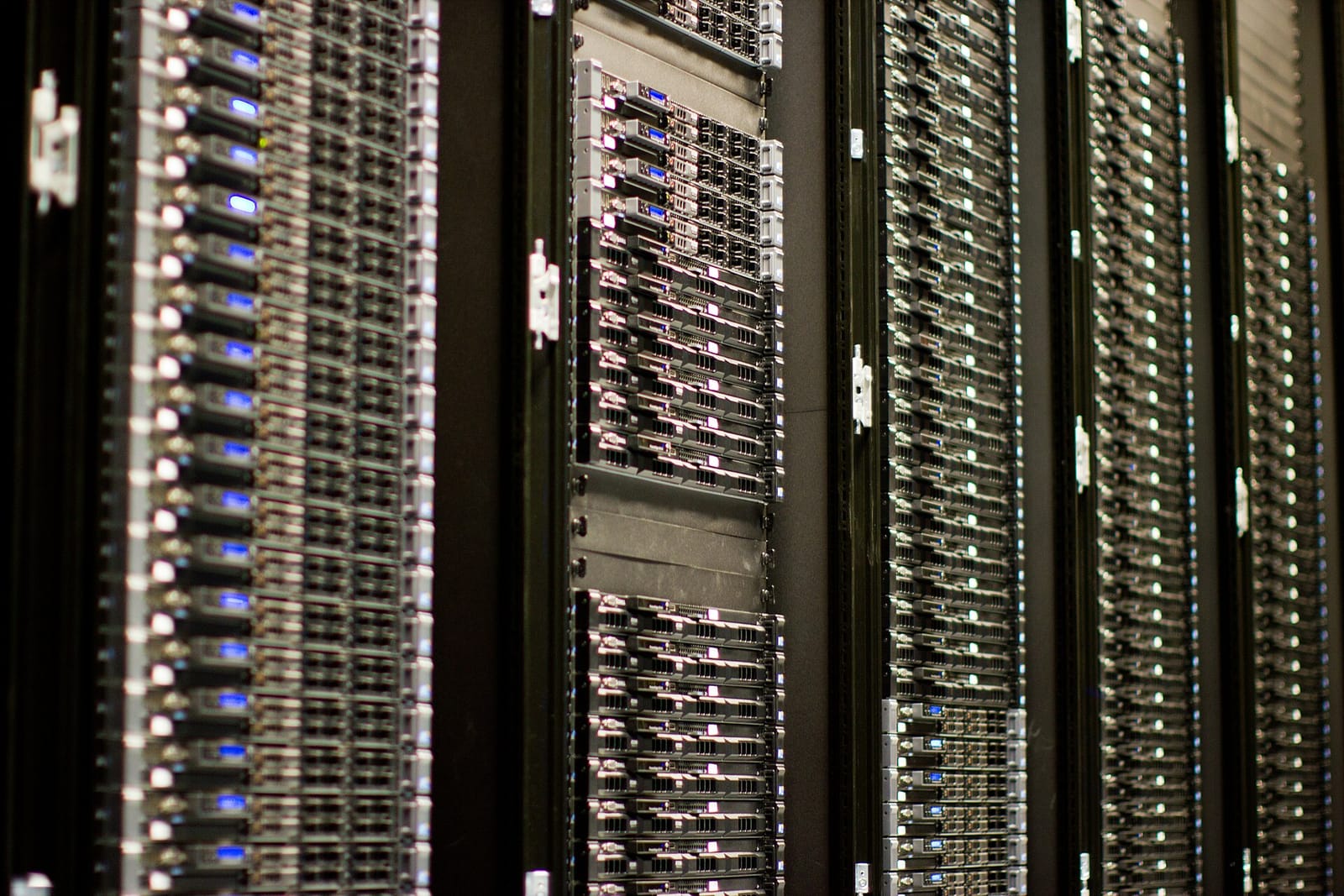
11.2How Magic Pocket is organised
Magic Pocket's job is narrow: store immutable blocks of up to 4 MB, keyed by their SHA-256 hash, and never lose one. James Cowling's 2016 post "Inside the Magic Pocket" describes the structure.
- Zones. Storage clusters sit in three regions of the US, west, central and east. Every block is stored in at least two zones, and is written to a remote zone within a second of being uploaded locally.
- The Block Index. A giant sharded MySQL cluster maps each block hash to the cell and bucket that hold it, plus a checksum.
- Cells. Each zone is divided into cells, independent units of storage of around 50 PB of raw data each in 2016 (over 100 PB by 2023), so a problem in one cell is contained there.
- Buckets and volumes. Blocks are packed into 1 GB containers called buckets. A bucket is placed on a volume, a set of storage machines that hold it, and each cell has a master that tracks volumes and repairs them.
- Storage machines. The machines that hold data are called OSDs (object storage devices). In 2016 a single one held over a petabyte, over 8 PB per rack. If an OSD has been offline for 15 minutes, the cell starts rebuilding its data elsewhere.
Dropbox states durability of over 99.9999999999% a year, twelve nines, in both 2016 and a 2023 write-up of a QCon talk, which also gave the size of the fleet: more than 600,000 drives. At that size, drives fail every day as a matter of routine. What matters is how to survive them without storing everything many times over.
11.3Erasure coding: surviving failures without full copies
The simplest protection is replication: keep several full copies on different machines. Magic Pocket does that for new data; the 2023 talk write-up describes freshly written volumes as replicated four times. But four copies of an exabyte is four exabytes of disk.
Erasure coding gets the same protection for far less space. Split a piece of data into k fragments, compute m extra parity fragments from them, and store all k + m on different machines; any k of them are enough to rebuild the original. It's easiest to see with one parity fragment: store A, B and A XOR B, and if any one is lost, XOR-ing the other two gives it back. Reed–Solomon codes generalise this to any number of parity fragments. RAID 6, in a single server, is the same idea with two parity blocks per stripe:
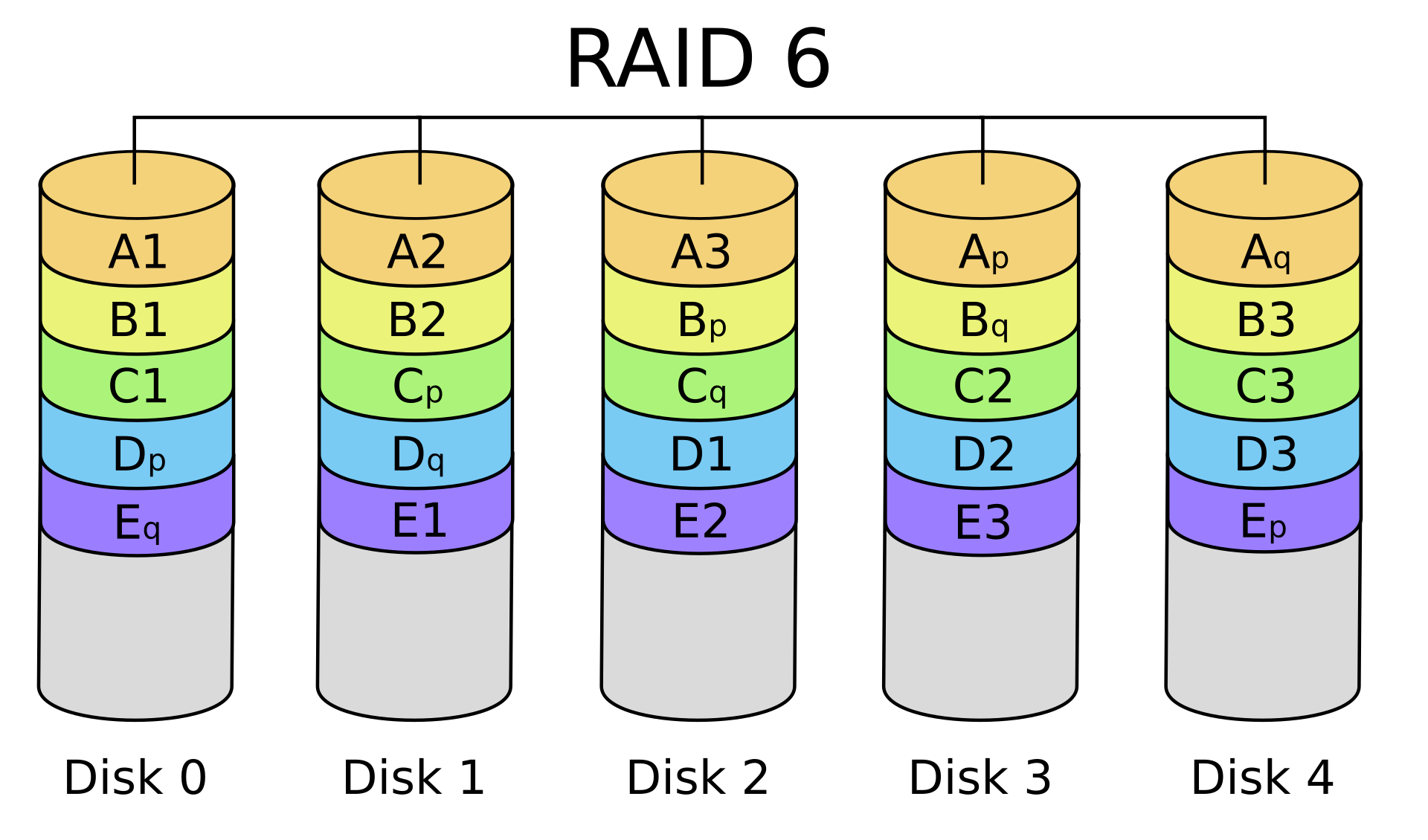
Once a volume is full and closed, Magic Pocket erasure-codes it in the background. The 2023 talk write-up gives Reed–Solomon 6 + 3 as the example (six data fragments, three parity fragments, survives any three losses) and also describes local reconstruction codes (LRC), a variant that adds small "local" parities so that the common case, a single lost fragment, can be rebuilt by reading a few fragments instead of all of them.
Compare the raw disk needed to store 1 EB of user data with four-way replication, Reed–Solomon 6 + 3, and an LRC with 12 data fragments, 2 local parities and 2 global parities. Then: Dropbox keeps a copy in a second region on top of that. What does that double?
That second region is the expensive part, and in 2019 Dropbox described a cold tier for data that's rarely read. Its argument came from access patterns: over 40% of file retrievals are for data uploaded in the last day, over 70% for the last month and over 90% for the last year. Older blocks hardly get read, so they can be stored more cheaply even if reading them is slower. Instead of a full copy in each of two regions, the cold tier splits a block into two halves in two regions and puts their XOR in a third. Any two regions can rebuild the block, and the cross-region factor falls from 2× to 1.5×, a 25% saving of disk.
11.4Shingled drives
Under all of this are hard drives, spinning magnetic platters read and written by a head on a moving arm. Data sits in concentric rings called tracks:
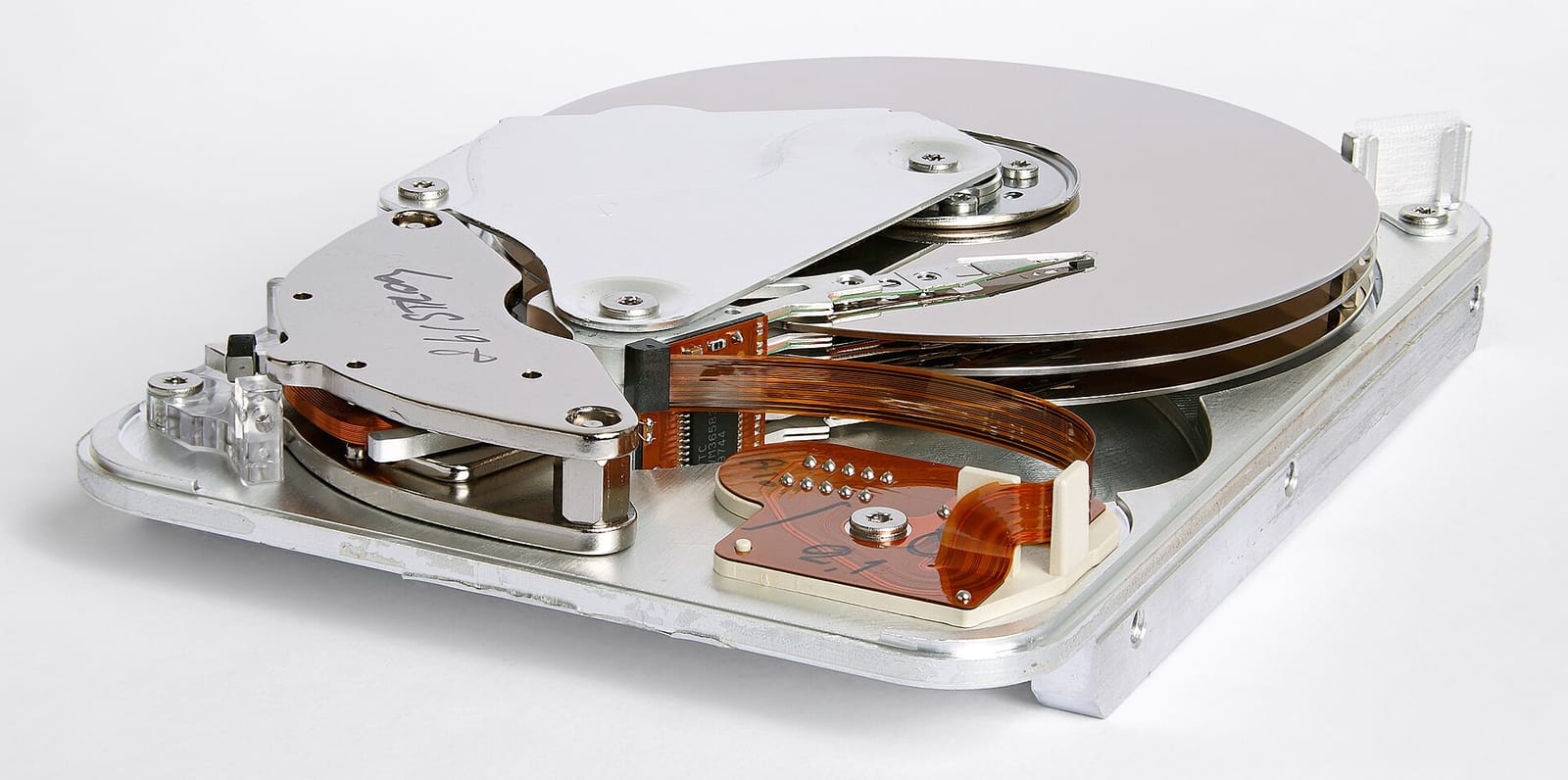
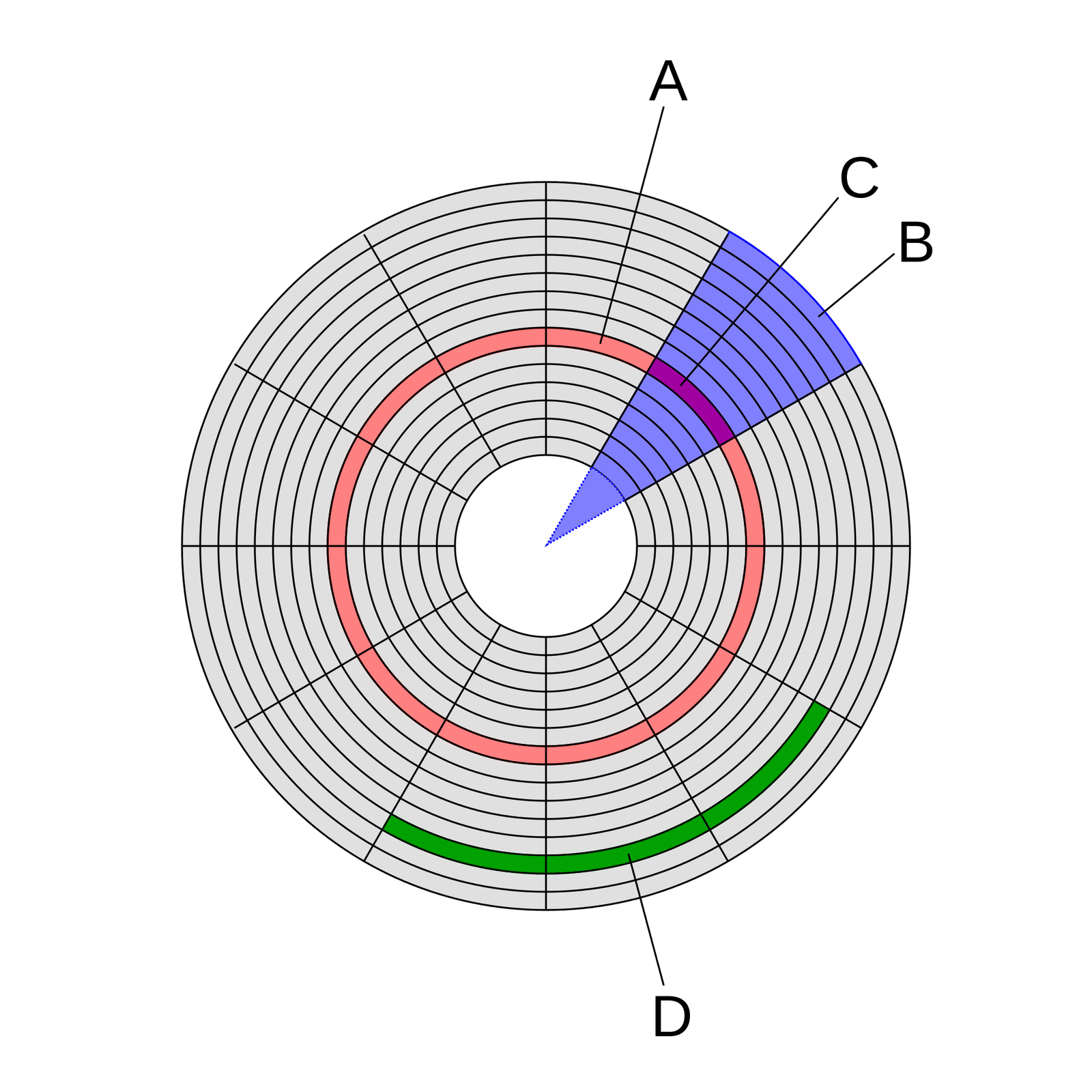
A drive's write head is wider than its read head needs to be. Shingled magnetic recording (SMR) uses that: each new track is written partly over the previous one, like the shingles on a roof, leaving the old track narrower but still readable. Squeezing tracks together this way stores more on the same platters; Dropbox's 2023 retrospective puts the gain at roughly 10 to 20% more data per drive than conventional drives at little or no extra cost.
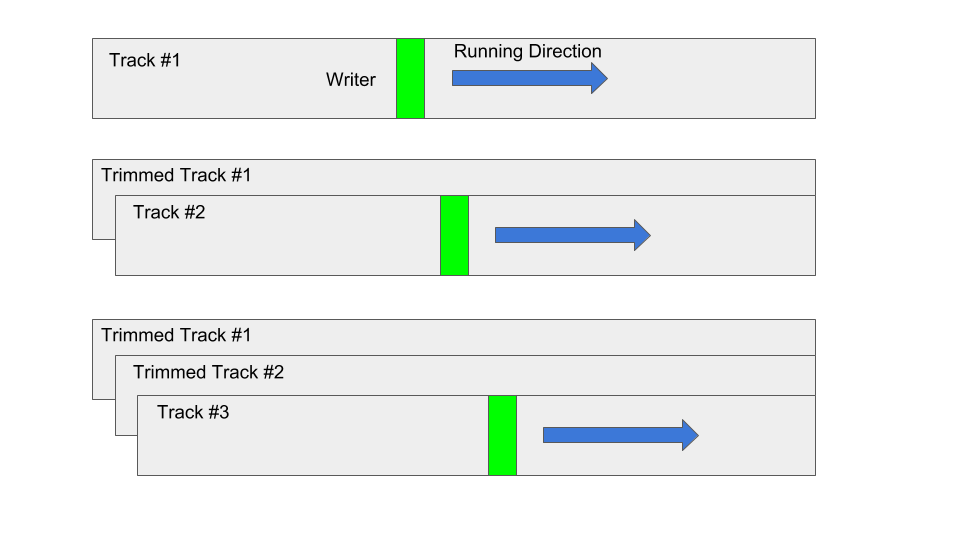
The catch is in the next picture. Because each track overlaps its neighbour, rewriting a track in the middle would clobber the track written over it. So an SMR drive is divided into zones that must be written sequentially, start to end, like appending to a log; to change something in the middle of a zone you must rewrite the zone from that point.
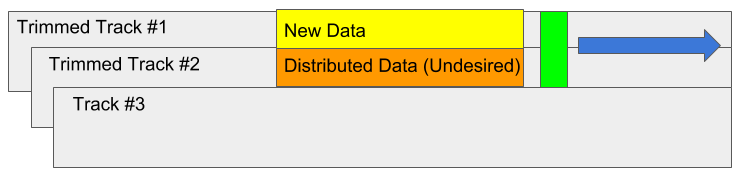
Most software would probably find that restriction painful. For Magic Pocket it costs almost nothing, because blocks are immutable and buckets are filled once, in order, then closed. Dropbox's June 2018 post describes how it fitted the two together: it chose host-managed SMR, where the software itself opens, fills and closes zones; each 1 GB extent maps onto four 256 MB zones; frequently updated metadata goes in a small conventional area of each disk; and an SSD stages incoming writes so they reach the disk in large, aligned batches. Its storage machine then held about 100 drives of 14 TB in a 4U chassis, 1.4 PB per host, about 2.3 times as many blocks per machine as before.
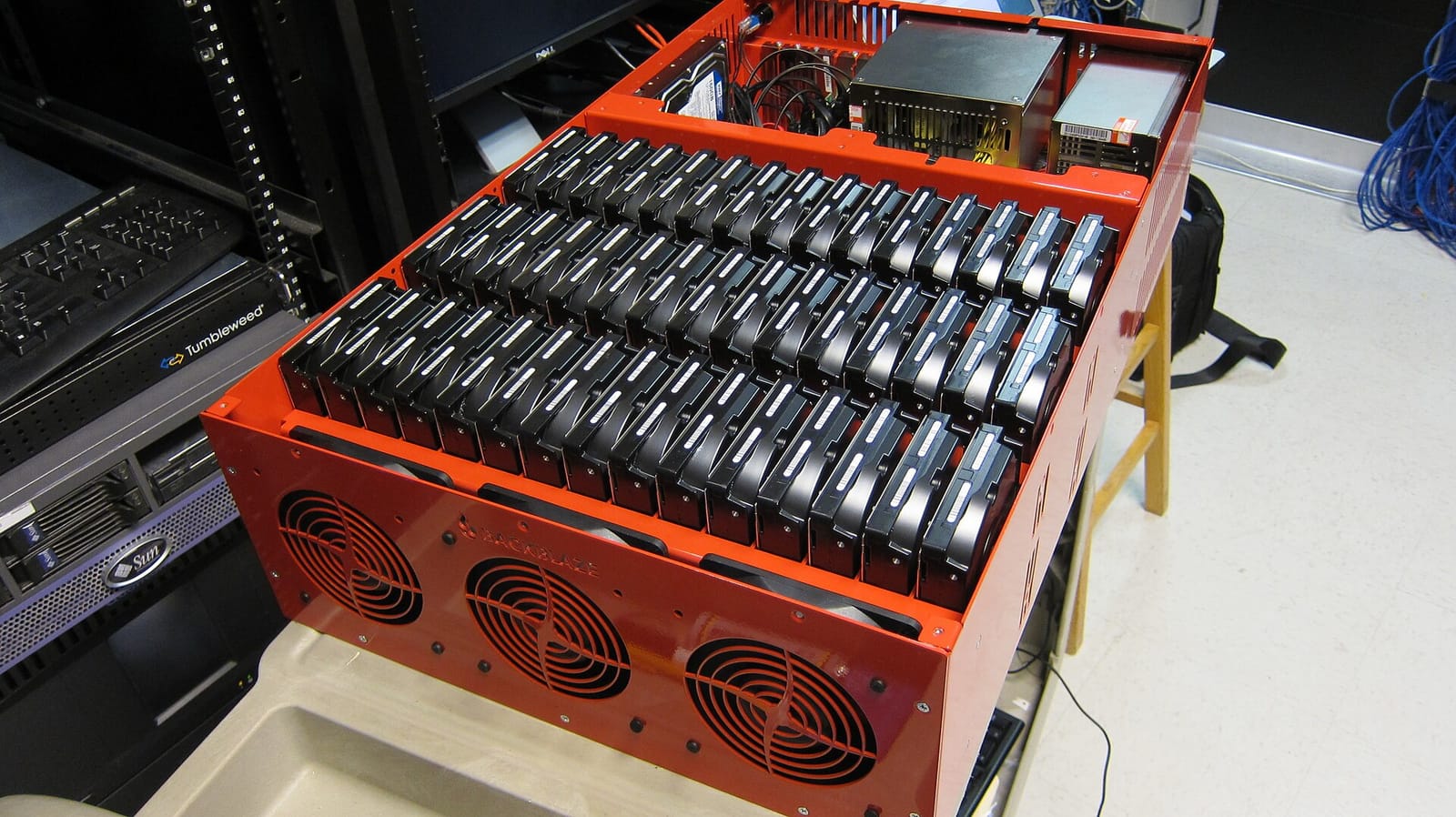
Dropbox was the first major tech company to adopt high-density SMR, in 2018. About a quarter of its fleet was SMR in 2019 and about 90% by 2023, with 18 and 20 TB drives using around 0.3 watts per terabyte when idle. One high-density SMR drive replaced four or five of the 4 TB drives it started with.
11.5The cost of immutability: deletes and compaction
Immutability has a bill too. When Maya deletes an old take, its blocks become garbage, but they sit inside closed, erasure-coded volumes that are never reopened. The space only comes back when a compaction process copies the live blocks out of mostly-dead volumes into new ones and retires the old volumes. Dropbox's April 2026 post describes this going wrong: deletes outpaced compaction until the worst volumes held less than 5% live data, and a volume that's 10% live uses about ten times the disk its data needs. Dropbox's fix was new compaction strategies, including one that packs several under-filled volumes into near-full ones, which cut compaction overhead by 30 to 50% in the cells that used it. It's the same trade every log-structured system makes (chapter 18): appends are cheap, and you pay for them later in garbage collection.
That covers the blocks. Their metadata, the journal and every namespace, has its own scale problem.
12Metadata at scale
12.1Sharded MySQL, Edgestore and Panda
Blocks scale by adding cells. Metadata is harder, because it must stay consistent: two devices listing the same namespace must see the same journal. Dropbox keeps its metadata in two large systems built on sharded MySQL. One is the Filesystem, the metadata for files and folders that the journal and namespaces describe. The other is Edgestore, a store of entities and the associations between them (a user, a shared folder, the link that says the user can see the folder) that serves most of Dropbox's other products. In 2016 Edgestore held several trillion entries and served millions of queries a second; by 2022 the two systems together ran on thousands of servers, held petabytes on SSDs, and served tens of millions of queries a second at single-digit-millisecond latency.
For the journal, splitting by namespace is the natural choice, since a namespace's rows are read and written together; Dropbox hasn't published the Filesystem's exact sharding scheme. Edgestore spread its data evenly over a fixed set of MySQL shards, several per server, and when the disks filled up, each server was split in two, each half keeping half the shards. By 2019 another doubling was coming, and Dropbox judged it too costly; worse, a single shard that grew faster than the rest could outgrow its machine, with no way to split it.
Dropbox's answer, described in 2022, was Panda, a layer between the metadata systems and MySQL that splits the key space into ranges of about 100 GB and moves ranges between machines as they grow, with transactions across ranges using two-phase commit and hybrid logical clocks (chapters 31 and 26). Moving a range of hundreds of gigabytes costs only seconds of unavailability, and capacity can grow a little at a time instead of by doubling the fleet.
How should metadata be partitioned as it grows?
- Simple routing: shard number never changes
- Each shard is an ordinary MySQL database
- Growth comes in doublings
- A hot or huge shard can't be split
- Grow a few machines at a time
- Rebalance hot spots
- A routing layer and range registry to build
- Cross-range transactions need two-phase commit
This is the classic choice from chapter 29 between hash-style fixed partitions and range partitioning with splits. Fixed shards were probably the right start; Panda became worth building once the cost of doubling, and the risk of one unsplittable shard, outweighed the complexity of moving ranges.
13The whole system
13.1Every box, and why it's there
| Component | What it does | Added because |
|---|---|---|
| 4 MB blocks + SHA-256 | Files become blocklists; blocks named by content | Whole-file uploads re-sent everything (§2, §3) |
| Rolling hashes (rsync) | Deltas that survive shifted bytes | Inserts shift fixed blocks (§4) |
| Metadata / block split | Small consistent state apart from big immutable bytes | The two behave in opposite ways (§5) |
| Journal + cursors | Each device reads only what's new | Comparing whole folders is slow (§6) |
| Notification server | Long polls tell idle clients to list | Polling wastes requests and adds delay (§6) |
| File-system watcher | inotify, FSEvents, ReadDirectoryChangesW as hints | Rescanning every minute is slow (§7) |
| Conflicted copies | Keep both versions of an opaque file | Last-writer-wins loses work (§8) |
| Nucleus, three trees | Remote, Local, Synced; planner decides direction | Two views can't tell add from delete (§8, §9) |
| Deterministic random testing | CanopyCheck, Trinity, replayable seeds | A rewrite must match a decade of edge cases (§10) |
| Magic Pocket | Own block store; zones, cells, erasure coding, SMR | S3's margin on an exabyte (§11) |
| Sharded metadata (Panda) | Ranges that split and move | Fixed shards grew only by doubling (§12) |
13.2From top to bottom
| Level | The choice | Data structure or algorithm |
|---|---|---|
| System | Split metadata from content | Consistent sharded database; immutable content-addressed store |
| File | Describe contents by hashes | Blocklist of SHA-256 digests; content_hash as a two-level hash tree |
| Transfer | Send only differences | rsync's rolling checksum (a, b sums mod 2¹⁶) plus a strong hash |
| Chunking (alternative) | Let content choose boundaries | Rabin fingerprint over 48 bytes; cut on 13 bits; 2 KB min, 64 KB max |
| Change feed | Read forward from a position | Append-only journal; per-namespace cursor (journal ID); long poll |
| Client | Decide each change's direction | Three trees with a merge base; planner emitting concurrent batches |
| Identity | Survive moves | Unique node IDs; a move is one atomic parent change |
| Testing | Reproduce any failure | Seeded PRNG, single-threaded executor, shrinking |
| Storage | Durable and cheap | Reed–Solomon / LRC erasure codes; XOR across regions for cold data |
| Disk | Dense drives | SMR zones written sequentially; append-only extents |
14What goes wrong, and what it costs
14.1Failures this design has to survive
| What happens | What the user sees | What the design does |
|---|---|---|
| Connection drops mid-upload | Sync pauses, then resumes | Blocks already stored are known by hash; only the rest are sent |
| Laptop crashes while applying changes | Nothing lost | The cursor and Synced tree only move after changes land, so it resumes from them |
| Two people edit one file offline | A "conflicted copy" appears | The merge base shows both sides changed; both versions are kept |
| A folder is moved while someone edits inside it | The edit lands in the moved folder | Stable IDs: the edit follows the file, not the path |
| The OS drops change events | A short delay | The client rescans and hashes to find what changed |
| A hard drive dies | Nothing | Erasure-coded fragments elsewhere rebuild its data |
| A whole region goes dark | Nothing, perhaps slower reads | Every block is in at least two zones |
| A file is deleted | Space isn't freed at once | Compaction later copies live blocks out of old volumes |
14.2The tradeoffs, in one table
| Decision | Chosen | Given up | Why it was worth it |
|---|---|---|---|
| Unit of transfer | Fixed 4 MB blocks | Insert-proof boundaries | Simple, universal block IDs; rsync softens the rest |
| Server split | Metadata vs blocks | One simple server | Each scales and fails in its own way |
| Change feed | Journal with cursors | Simple "give me everything" | Devices read only what's new, resume after a crash |
| Concurrent edits | Conflicted copies | Automatic merging | Never loses work, works for every file type |
| Sync engine | Rewrite in Rust (2016–2020) | Four years and a big risk | Strong guarantees and replayable tests |
| Storage | Own hardware (2015–2016) | S3's simplicity | Gross margin from 33% to 67% in two years |
| Redundancy | Erasure coding; XOR across regions for cold data | Fast single-copy reads | Far less disk per exabyte |
| Drives | SMR, append-only | Random writes | Denser, cheaper, lower-power storage |
15Summary
- The network is the scarce resource: re-sending Maya's 2 GB project on every save would mean hundreds of gigabytes a day, so the design avoids sending what the other side has.
- Files become blocklists: 4 MB blocks named by SHA-256, so an edit uploads only changed blocks, uploads resume, and identical blocks are stored once.
- Deduplication needs access control: knowing a hash mustn't grant the block, as Dropship showed in 2011.
- Inserts shift fixed blocks: rsync's rolling checksum finds blocks at any offset, and content-defined chunking lets the data choose boundaries so an insert only touches nearby chunks.
- Metadata and blocks live apart: a consistent metadata server with a journal, a dumb immutable block store, and a commit that stores blocks first and publishes the pointer last.
- Devices read the journal from a cursor: a long poll says something changed, list returns only new rows, and the device fetches only blocks it lacks, from a LAN peer if possible.
- OS change events are hints: inotify, FSEvents and ReadDirectoryChangesW say where to look; hashing says what changed.
- Concurrent edits to opaque files become conflicted copies, because last-writer-wins loses work and binary files can't be merged.
- Nucleus decides direction with three trees: Remote, Local and Synced, the merge base that tells an add from a delete, with stable IDs making moves atomic.
- Deterministic randomized tests made the rewrite safe: one control thread, seeded randomness, CanopyCheck and Trinity, tens of millions of runs a night.
- Magic Pocket replaced S3: immutable blocks in three zones, erasure-coded, on append-only SMR drives that only an immutable design could use.
16Build this
A tiny sync engine.
- Write a "server" as two Python dictionaries: blocks (hash → bytes) and a journal (a list of rows: path, blocklist, journal ID). Give it
commit(path, blocklist)that returns missing hashes,store(blocks), andlist(cursor). - Write a "client" that keeps a folder, a cursor, and Remote, Local and Synced trees. On each tick, scan the folder, hash files into blocks, plan with the three-tree rule from the TryIt, and execute: commit and store for uploads, list and fetch for downloads.
- Run two clients against one server. Edit different files on each, then the same file on both while one is "offline" (skip its ticks), and check you get a conflicted copy and no lost edits.
- Replace fixed blocks with content-defined chunks from the second TryIt, insert bytes into a large file, and measure how many bytes each scheme sends.
- Make every random choice come from one seeded generator, run a thousand random scenarios, and print the seed of any run whose final trees differ. Then replay it.
17Interview questions
beginnerWhy does Dropbox split files into blocks instead of uploading whole files?›
So that an edit costs only the blocks it touched. Each 4 MB block is named by its SHA-256 hash, and a file is described by its list of block hashes. The client sends the list first, the server replies with the hashes it doesn't have, and only those blocks are uploaded. The same naming makes interrupted uploads resumable and stores identical blocks once.
beginnerWhat's a conflicted copy, and why doesn't Dropbox just keep the latest version?›
When two devices change the same file independently, for example one offline, Dropbox keeps one version under the original name and saves the other as a separate file marked "conflicted copy" with the editor's name and date. Keeping only the latest would silently destroy the other person's work, and Dropbox can't merge most files because it doesn't understand their formats.
intermediateHow does a device find out what changed on the server without downloading the whole folder listing?›
Each namespace's metadata is an append-only journal with increasing journal IDs. A device keeps a cursor, the last journal ID it applied, and asks for everything after it, so it gets only new rows. An idle device holds a long poll open to a notification server, which answers when something changes, prompting the device to list from its cursor and fetch only the blocks it lacks.
intermediateFixed-size blocks break when bytes are inserted. How do you fix that?›
Either find old blocks at any offset, as rsync does by sliding a cheap rolling checksum one byte at a time over the new file and confirming matches with a strong hash, or let the content choose the chunk boundaries, as LBFS does: compute a rolling Rabin fingerprint over a 48-byte window and cut wherever its low 13 bits match a fixed value, with a minimum and maximum size. Boundaries then move with the data, so an insert changes only the chunk it lands in.
deepWhy does a sync engine need a third tree, and what does Nucleus do with it?›
Comparing only local and remote state can't tell who changed what: a file present on the server and missing locally could be a local delete or a remote add. Nucleus keeps a Synced tree, the last state both sides agreed on, as a merge base. If only Local differs from Synced, upload; if only Remote does, download; if both changed differently, it's a conflict. A planner turns the differences into batches of safe concurrent operations, and stable node IDs make moves single atomic changes.
deepHow would you store an exabyte of immutable blocks durably and cheaply?›
Key blocks by their hash, pack them into large containers, and index hash to location in a sharded database. Replicate new data for speed, then erasure-code closed containers, for example Reed–Solomon 6 + 3 at 1.5× or an LRC at about 1.33×, spread across machines and racks, with a copy in a second region, or an XOR across three regions for cold data. Because nothing is modified in place, you can use append-only shingled drives, and you reclaim deleted space with background compaction.
18Go deeper
A 2 GB file has 10 bytes inserted at the start. With fixed 4 MB blocks, how many blocks change?›
All of them, about 500. Every block after the insert holds shifted bytes and gets a new hash. That's the boundary-shift problem that rsync's rolling checksum and content-defined chunking solve.
Why must blocks be stored before the journal row is written?›
The journal row tells every other device that the new version exists. If it were written first and the upload then failed, devices would see a version whose blocks nobody can fetch. Blocks first, pointer last.
Remote and Synced both say a file is at version 5; Local says version 6. What does Nucleus do?›
Upload. Only the local side moved away from the merge base, so the change came from this device.
Why could Magic Pocket adopt shingled drives when many systems can't?›
SMR zones must be written sequentially, and Magic Pocket never modifies a block: buckets are filled once, in order, and closed. Its write pattern is already append-only.
The sync protocol in Dropbox's own words: 4 MB blocks, blocklists, namespaces, the Server File Journal, cursors, commit and need blocks, and how streaming sync overlaps uploads and downloads.
Why Sync Engine Classic was replaced, why Rust, and how Nucleus's single control thread and data model work.
The three trees, CanopyCheck, Trinity, deterministic seeds and the honest list of what they don't catch.
"Scaling to exabytes and beyond" and "Inside the Magic Pocket" (2016), the cold tier (2019), SMR (2018 and 2023) and compaction (2026).
Eight pages: the rolling checksum, the three-level search and why one round trip is enough.
Content-defined chunking with Rabin fingerprints, and the pathological cases that minimum and maximum chunk sizes fix.
Peer-to-peer block fetches, Dropbox's entity store, and the range-based layer that let its metadata grow without doubling the fleet.
The scale in 2018 and the financial effect of leaving S3, under "Infrastructure Optimization".
19Related chapters
The service Dropbox left, and the erasure coding and keymap ideas Magic Pocket shares with it. Chapter 32.
Data before metadata, rename tricks, and why a half-written file is a real risk. Chapter 08.
The other answer to concurrent edits: understand the document and merge it, instead of keeping both copies. Chapter 64.
Fixed shards versus ranges that split, the choice behind Panda. Chapter 29.
Append-only logs and compaction, the same trade Magic Pocket makes with deletes. Chapter 18.
Offsets into an append-only log, the cursor idea at streaming scale. Chapter 23.