Asha works at a payments company in Bengaluru with roughly 2,000 people, and on Monday morning she opens the Engineering wiki in Notion. It's a long page: to-dos for the week, links to a sub-page for every team, an embedded table of incidents. She clicks at the end of "Ship search", presses Enter and types a new to-do, "Review shard runbook". Then she grabs the six-dot handle beside it and drags it into the On-call notes sub-page, which only the SRE team can open. Across the office, Rohan has the wiki open too. On his screen the to-do appears and then vanishes again, without him reloading anything.

It looks like editing a document, and a document is the obvious way to store it. But a Notion page is an odd kind of document. Any line can be dragged anywhere, turned from a to-do into a heading, or indented under another line. A line can be a whole page, and a page can be a row in a table. A sub-page can be private while the page around it is open to everyone. And the wiki is one of hundreds of billions of such pieces, kept in a relational database that had to be split across dozens of machines while people kept typing.
In this case study we'll design the system behind Asha's to-do, starting from the simplest design and fixing it each time it breaks. We'll keep returning to one question: how do you store a page made of thousands of small, movable pieces so that every edit saves at once, shows up for everyone else, and keeps working as the pieces grow into the hundreds of billions? Our answer runs from a tree of blocks and a walk up parent pointers, through two rounds of sharding Postgres, to a data lake and a database inside the browser.
01What we're building, and how big
1.1What it has to do
Leaving aside sign-in and billing, the core of Notion is short:
- Show a page fast, including nested lists, tables and links to sub-pages.
- Edit anything: type, drag, indent, change a line's type, with no Save button.
- Live updates: when Asha changes the page, Rohan sees it within roughly a second.
- Permissions: a page can be shared with the company, a team or one guest, and everything inside it follows.
- Databases: tables and boards whose rows are themselves pages.
- Search and AI over everything a person may see.
And the qualities it needs: an edit that appeared on screen must never be lost; a page you've seen before should open instantly; the SRE team's notes must never leak to anyone else, in a page, a search result or an AI answer; and the storage underneath must be able to grow while the product stays up.
1.2How big is it?
Notion said in September 2024 that it had passed 100 million users the month before, up from 1 million in 2020. Its 2024 post on its data lake gives the figure that matters more for storage: the table of blocks, the small pieces every page is made of, held more than 20 billion rows at the start of 2021 and more than 200 billion by 2024. According to the same post, Notion's data was doubling every six to twelve months and had reached hundreds of terabytes, even compressed.
Suppose a block row (one line of text with its ids, type, timestamps and list of children) takes roughly 1 KB in the database, indexes included. What do 200 billion of them weigh? If one database server should hold at most 10 TB, how many servers is that?
02Version 1: a page is a document
2.1The obvious design
Most of us would first sketch a design that stores each page as one document. A pages table has a row per page with an id, a title, an owner, and a body column holding the whole page as HTML or JSON. Opening the wiki reads one row; saving writes it back.
2.2Where it breaks
Monday morning breaks this design in four places.
- Every edit rewrites the page. Asha changed one line, but hundreds of kilobytes cross the network and get written to disk, all day.
- Two editors overwrite each other. Whoever saves last replaces the whole page, and the other person's work is gone.
- Permissions have nowhere to live. If the On-call notes sub-page is inside the wiki's body, there's no way to hide just that part from people outside the SRE team.
- Pages can't nest inside other things. Rows of the incident table open as full pages. Here a row isn't a page, so tables need a second storage system, and comments a third.
Those first two are one problem: the unit of storage is much bigger than the unit of change. Points three and four say that a page is a tree of things, some of them pages, and storage should be that tree. Both point to the same fix: stop storing pages and store the pieces.
03Everything is a block
3.1A block and its five fields
Notion's answer, described by engineer Jake Teton-Landis in May 2021 in "The data model behind Notion's flexibility", is that every piece of content is a block: each paragraph, heading, to-do, image, page and table row. A block is one row in a database table, with five fields that matter:
| Field | What it holds | Asha's new to-do |
|---|---|---|
id | A random UUID, a 128-bit identifier the client can make up on the spot without clashing with anyone | 9f3c… |
type | How to draw it: text, header, to_do, page, … | to_do |
properties | A small map of attributes, most often title, the text itself | title: "Review shard runbook" |
content | The ids of its child blocks, in order | empty |
parent | The id of the block it sits in | the wiki's id |
content points down the tree and parent points up. A page's content lists everything on the page in order, so a line's position on the page is its position in its parent's list, and the page is just the block at the top. That's the picture at the start of this chapter: Asha sees outline (b), and Notion stores tree (a).
Two things follow straight away. First, the type is only a label. Turning a to-do into a heading changes the type field and nothing else; the text and the children stay put, so Notion can switch a line between a bullet, a to-do and a toggle without losing anything. Second, indentation is structure. Pressing Tab moves a block into the content list of the block above it, and the parent's type decides how children are drawn: a bulleted list indents them, a toggle hides them until clicked, and a page shows them on a page of their own.
3.2Pages, databases and rows are blocks too
That last rule is what lets everything nest. A page is a block of type page. On its parent it appears as one line, a link, and its children are drawn when you open it. On-call notes, the sub-page, is an entry in the wiki's content list, exactly like a to-do.
A Notion database, a table or board, is a block too, and each of its rows is a page block whose properties are the table's columns: an incident's severity, date and owner, beside its title. Open the row and it's a full page with blocks inside. So the incident table, a row in it and a paragraph in that row are the same kind of record, linked by content and parent. (Something must also hold a table's column definitions. Notion's 2021 sharding post lists a collection table next to block; it probably holds those definitions, but its contents are unpublished.)
What is the unit of storage?
- One read opens a page
- Easy to export
- Every edit rewrites the page
- Concurrent saves overwrite each other
- Can't share or nest part of a page
- An edit touches a few small rows
- Anything can nest inside anything
- Changing type keeps the content
- Opening a page reads many rows
- Hundreds of billions of rows to store
Notion chose blocks, and much of this chapter is the bill: a table so large it had to be split across machines, and page loads that need many rows. In return, the product's flexibility comes from five fields, and a new kind of content is a new type, not a new storage system.
3.3Who can see a block? Walk up the tree
Now the permissions problem. Everyone at Acme can open the wiki, but only the SRE team can open On-call notes. When Rohan's browser asks for the line "Pager rota", the server must decide whether he may read it.
Storing permissions on every block would mean copying them onto millions of rows and rewriting all of those whenever someone changes a page's sharing. So blocks inherit permissions instead: a block is visible to whoever may see the nearest block above it that sets permissions explicitly, with the workspace at the top as the default. So the question becomes "what is above this block?"
?Why not find the ancestors through the content lists?
Those content lists already describe the tree, but Notion's post gives two reasons not to use them for this. A block can be referenced from more than one content list, so "the block above" would be ambiguous. And finding which lists mention an id means searching, which is slow. So each block also keeps one upward pointer, and the post says plainly that parent exists only for permissions. Checking access is a loop: if this block doesn't set permissions, move to its parent, and repeat.
This program builds a slice of the wiki, draws pages by following content lists down, and answers "who can read this?" by following parent pointers up. Each edit is applied as a list of small operations, which section 4 explains. Watch the last line of each half.
# id: (type, title, content = child ids in order, parent, permissions if set here)
blocks = {
    "ws":     dict(type="workspace", title="Acme", content=["eng"], parent=None,
                   perms="everyone at Acme"),
    "eng":    dict(type="page", title="Engineering wiki",
                   content=["todo1", "oncall"], parent="ws"),
    "todo1":  dict(type="to_do", title="Ship search", content=[], parent="eng"),
    "oncall": dict(type="page", title="On-call notes", content=["p1"],
                   parent="eng", perms="SRE team"),     # a restricted sub-page
    "p1":     dict(type="text", title="Pager rota", content=[], parent="oncall"),
}

def render(page):
    # follow content lists down; a sub-page shows as a link, not inline
    print(f"== {blocks[page]['title']}: " + ", ".join(
        ("-> " if blocks[c]["type"] == "page" else "") + blocks[c]["title"]
        for c in blocks[page]["content"]))

def who_can_read(bid):
    # follow parent pointers up to the nearest block that sets permissions
    path = [bid]
    while "perms" not in blocks[path[-1]]:
        path.append(blocks[path[-1]]["parent"])
    return blocks[path[-1]]["perms"], " -> ".join(path)

def apply(transaction):
    for op, bid, arg in transaction:
        if op == "create":  blocks[bid] = arg
        if op == "set":     blocks[bid].update(arg)
        if op == "insert":  blocks[bid]["content"].insert(arg[1], arg[0])
        if op == "remove":  blocks[bid]["content"].remove(arg)

# Asha adds a to-do after "Ship search": one transaction, two operations
apply([("create", "todo2", dict(type="to_do", title="Review shard runbook",
                                content=[], parent="eng")),
       ("insert", "eng", ("todo2", 1))])
render("eng")
print("todo2 readable by:", *who_can_read("todo2"))

# Then she drags it into the on-call page: three operations
apply([("remove", "eng", "todo2"),
       ("insert", "oncall", ("todo2", 1)),
       ("set", "todo2", {"parent": "oncall"})])
render("eng")
render("oncall")
print("todo2 readable by:", *who_can_read("todo2"))== Engineering wiki: Ship search, Review shard runbook, -> On-call notes
todo2 readable by: everyone at Acme todo2 -> eng -> ws
== Engineering wiki: Ship search, -> On-call notes
== On-call notes: Pager rota, Review shard runbook
todo2 readable by: SRE team todo2 -> oncallAfter the first edit, the new to-do sits right after "Ship search", because its id was inserted at position 1 of the wiki's content list. Its permission walk goes todo2 -> eng -> ws before reaching a block that sets permissions, so everyone at Acme can read it. On the wiki, the sub-page shows as one line with an arrow, since a page's children belong on its own page.
After the drag, the to-do has left the wiki's list, joined the on-call page's list, and its parent points at oncall. Now the walk stops one step up, and only the SRE team can read it. Nobody touched a permission; moving the block changed who can see it. That's why the to-do vanished from Rohan's screen in the opening, and it's the behaviour you want: a line dragged into a private page becomes private.
3.4The cost: a page is many rows
You pay for blocks when you open a page. Version 1 read one row. Now the wiki is a block whose content lists dozens of ids, some with children of their own, plus records they depend on, like the users named in "assigned to". Notion's post describes the endpoint that fetches them, loadPageChunk: it starts at a block, walks down the content tree, and returns the blocks with their dependent records. In the worst case that takes many trips to the database, and the post says several layers of caching make up for it. Before asking the server at all, the client tries to draw the page from data it already holds, which will matter in section 10.
Blocks fix the size and structure problems of Version 1. It hasn't yet said how Asha's edit reaches the server without clobbering Rohan's, or how Rohan's screen hears about it.
04Saving an edit and telling everyone
4.1Operations and transactions
When Asha presses Enter, two things must change: a new block must exist, and the wiki's content list must include its id. If only the first were saved, the to-do would exist but appear nowhere; if only the second, the page would point at nothing. They must succeed or fail together.
So Notion's client turns every action into operations, each creating or updating one record, and groups an action's operations into a transaction that the server commits or rejects as a whole. Adding the to-do is two operations; the drag is three (remove from one list, insert into another, change parent). That's what apply did in the TryIt.
Notion's client doesn't wait for the server. It applies the transaction to its own copy at once, so the to-do appears as Asha types, and stores it in a queue Notion calls the TransactionQueue, kept in IndexedDB in the browser or SQLite in the apps, so it survives a closed tab. Then it sends it to the server's /saveTransactions endpoint. On arrival, the server loads the records involved, applies the operations, checks that Asha may edit those blocks (the walk up the tree again) and that the result is coherent, and commits. Only then does the client drop the transaction from its queue.
4.2How Rohan finds out
Rohan's browser could ask every few seconds whether the wiki changed, but that multiplies load by every open tab in the company. Instead, every Notion client keeps one long-lived WebSocket, a two-way connection the server can push messages down at any time, to a service called MessageStore, and subscribes to the records it's showing. After committing Asha's transaction, the server notifies MessageStore, which pushes a short note to each subscriber: this record is now at a new version. Rohan's client compares that with the version it holds, fetches the changed records with a call named syncRecordValues, and redraws.
?Why push a version number instead of the new data?
A note like this is tiny and identical for every subscriber, so MessageStore needn't know who may see what. Rohan's fetch that follows goes through the API, which checks permissions for Rohan. After Asha's drag, his fetch comes back without the to-do, because it now lives under a page he can't read.
4.3Two people in the same line
Asha's to-do and Rohan's tick on another line touch different records, so both transactions commit. Two people typing in the same paragraph is harder, and it's the subject of most of chapter 64: operational transformation, CRDTs, and Figma's per-property last-writer-wins. Notion's 2021 post doesn't say how it merged concurrent edits to the same text. Its December 2025 post on offline mode says offline pages are migrated to a new CRDT-based data model for conflict resolution, so for text edited while disconnected, at least, Notion seems to use the CRDT family. How it orders siblings when two people insert into the same content list at once is unpublished.
All of this has assumed a single database holding every block. In 2020 that stopped being possible.
05One Postgres, until 2020
5.1When VACUUM stalls
Every block, workspace and comment lived in one Postgres database. In October 2021 Notion's infrastructure lead, Garrett Fidalgo, wrote in "Herding elephants: lessons learned from sharding Postgres at Notion" that this monolith had served for five years and grown by four orders of magnitude, and that by mid-2020 the team expected usage to outgrow it. On-call engineers were being woken by CPU spikes, and schema changes that should have been routine had become risky.
What finally broke was VACUUM. Postgres never overwrites a row in place (chapter 21 has the detail): an update writes a new version of the row and marks the old one dead, so transactions still reading it can finish. A background process, VACUUM, later sweeps each table to reclaim the dead versions. A block table edited all day by millions of people makes dead versions constantly, and Notion's post says VACUUM began to stall consistently, so tables bloated and queries slowed.
5.2Transaction ID wraparound
VACUUM has a second job, and that's the one that scared the team. Postgres stamps every writing transaction with a 32-bit transaction ID, a counter that goes up by one each time, and compares these IDs to decide which row versions a query may see. A 32-bit counter wraps around after roughly four billion, like an odometer.
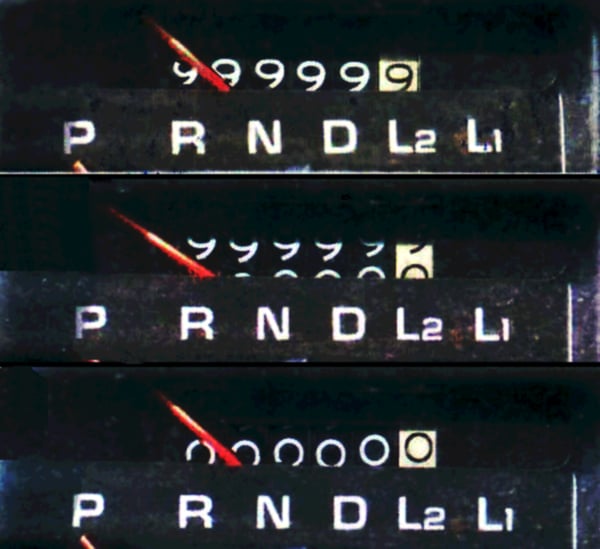
After a wrap, an old row's ID would seem to come from the future, and the row would vanish from view. VACUUM prevents this by freezing old rows, marking them visible to everyone so their IDs stop mattering. If VACUUM can't keep up, Postgres eventually refuses all writes, to avoid losing data. Notion's post calls wraparound an existential threat to the product. A stalled VACUUM on the block table was a countdown to Notion being unable to save anything.
One database is running out of room. What next?
- No application changes
- A hard ceiling, with data doubling yearly
- VACUUM and schema changes get worse long before the hardware runs out
- Someone else's sharding code
- Less to build
- Data placement hidden inside the system
- A new system to learn under pressure
- Full control over where data lives
- Stays on Postgres the team knows
- Every query must carry its shard key
- Moving data later is the team's own job
According to the post, vertical scaling wasn't a long-term option, because performance and upkeep degrade well before the hardware limit. Notion's team turned down Citus and Vitess because their clustering logic was opaque and it wanted control over how data was distributed. So Notion sharded in the application.
That leaves three questions: what to split, how, and how to move a live database into the new layout without losing an edit.
06Splitting the block table
6.1Choosing the partition key
To shard a table is to split its rows across several databases, so each machine's share of rows, queries and VACUUM work stays manageable (chapter 29). What matters most is the partition key, the value in each row that decides its shard. A good key keeps rows used together on the same shard, because a query or transaction that spans shards is slow and hard to make atomic.
Asha's transaction touches the new to-do and the wiki page. Rohan's permission check walks from a block up to the workspace. Which key keeps all of that on one shard: the block id, the user id, or something else?
That's Notion's choice. Every workspace gets a UUID when it's created, and every block records its workspace (Notion's internal word for a workspace is "space", so the column is space_id). Notion sharded every table reachable from block through a foreign key, such as space, discussion and comment, so a workspace's blocks and comments always live together. In exchange, a workspace is the smallest unit that can be placed: the largest enterprise workspace must fit on one shard.
6.2Logical shards and physical databases
Next, how many shards? If you pick one per machine, say 32, and route by hash(workspace) mod 32, the first time you add a 33rd machine almost every workspace's result changes and almost every row must move. Notion avoided this with two levels.
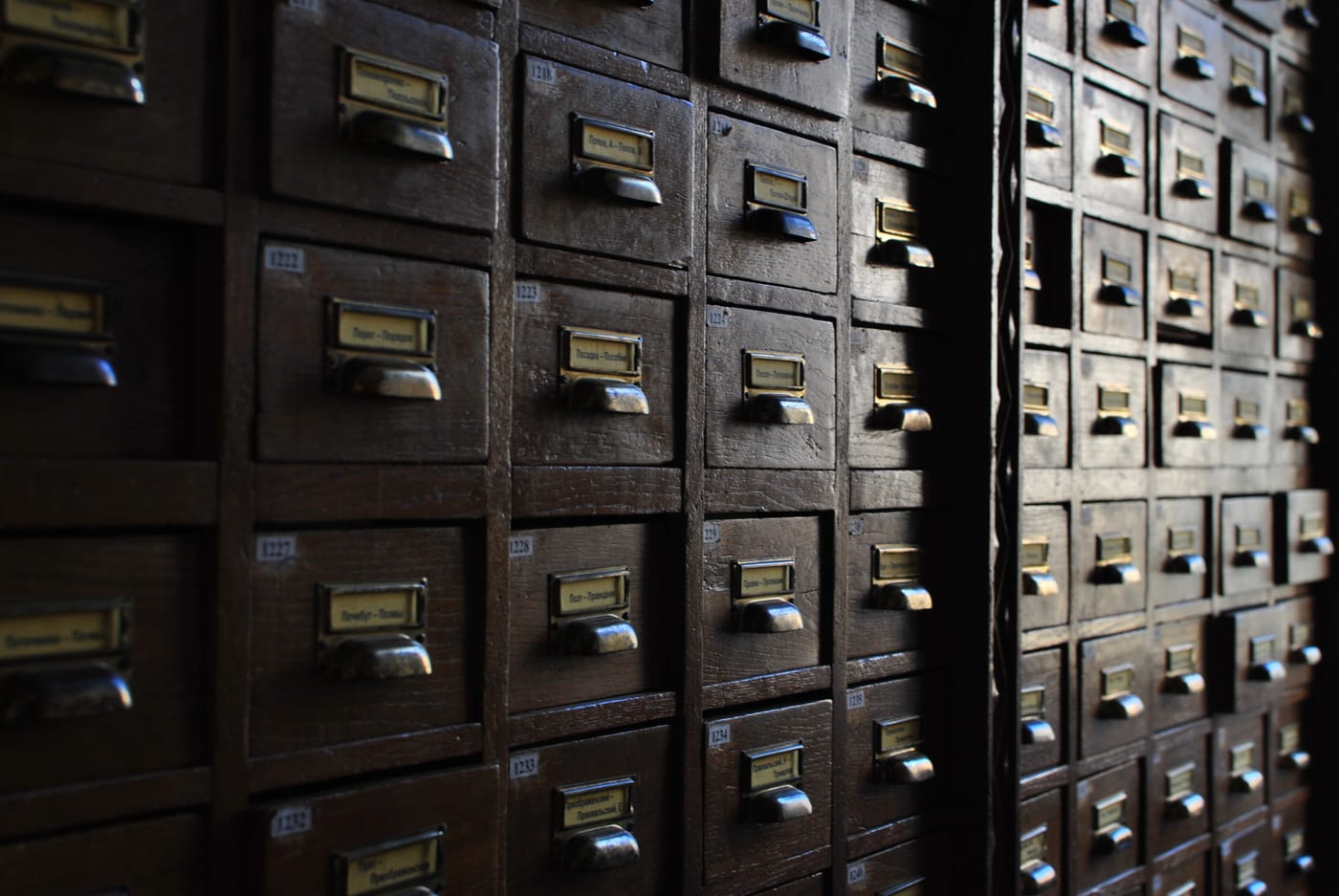
Notion splits the data into many small logical shards, packed onto fewer physical databases, the actual Postgres servers. In 2021 Notion made 480 logical shards on 32 physical databases, 15 per database. Each logical shard is a Postgres schema, a namespace inside a database with its own set of tables, so one server holds schema001.block, schema002.block and so on, each beside its own space, comment and other sharded tables. Notion chose separate tables over Postgres's built-in partitioning so that all routing would happen in one place, the application.
Routing takes two steps. First, the workspace UUID picks the logical shard, because, as the post puts it, the UUID space can be partitioned into uniform buckets: 480 equal ranges of a 128-bit number. Second, a fixed map says which server holds that shard. When hardware changes, only the map changes. A workspace never changes logical shard, so its rows are never re-sorted, only moved as a whole schema.
?Why 480 and not a round 512?
Because 480 is divisible by a lot of numbers, the post says. To spread shards evenly, the number of machines must divide the number of shards. With 480, the fleet can go from 32 to 40 to 48 machines, with 15, 12 and 10 shards on each. With 512, a power of two, the next even step after 32 is 64; the post notes that 512 would force doubling every time.
This program routes a random workspace, checks how evenly 100,000 workspaces spread, and compares what moves when machines are added.
import uuid, random
random.seed(7)
LOGICAL = 480

def logical_shard(workspace_id):
    # split the 128-bit UUID space into 480 equal ranges
    return workspace_id.int * LOGICAL >> 128

def host(shard, hosts):
    return shard // (LOGICAL // hosts)     # consecutive schemas share a host

def schemas_on(h, hosts):
    return [x for x in range(LOGICAL) if host(x, hosts) == h]

acme = uuid.UUID(int=random.getrandbits(128))
s = logical_shard(acme)
on12 = schemas_on(host(s, 32), 32)
print(f"Acme {str(acme)[:8]}... -> logical shard {s}")
print(f"  32 hosts: host {host(s, 32)}, which holds shards {on12[0]}-{on12[-1]}")
print(f"  96 hosts: host {host(s, 96)}")

ws = [uuid.UUID(int=random.getrandbits(128)) for _ in range(100_000)]
count = [0] * 32
for w in ws:
    count[host(logical_shard(w), 32)] += 1
print(f"\n100,000 workspaces on 32 hosts: {min(count):,} to {max(count):,} each")

new = sorted({host(x, 96) for x in on12})
print(f"32 -> 96: host 12's 15 shards go to new hosts {new}, 5 each")

# a smaller step: 32 -> 40 hosts. Each old host keeps 12 shards, hands on 3.
print(f"32 -> 40 with logical shards: {32 * 3} of 480 shards move "
      f"({32 * 3 / LOGICAL:.0%}), as whole schemas")
moved = sum(1 for w in ws if w.int % 32 != w.int % 40)
print(f"32 -> 40 with hash mod N:     {moved / len(ws):.0%} of workspaces move, row by row")

for n in (480, 512):
print(f"{n} shards divide evenly over {[h for h in range(16, 200) if n % h == 0]} hosts")Acme 6513270e... -> logical shard 189
32 hosts: host 12, which holds shards 180-194
96 hosts: host 37
100,000 workspaces on 32 hosts: 3,028 to 3,222 each
32 -> 96: host 12's 15 shards go to new hosts [36, 37, 38], 5 each
32 -> 40 with logical shards: 96 of 480 shards move (20%), as whole schemas
32 -> 40 with hash mod N: 80% of workspaces move, row by row
480 shards divide evenly over [16, 20, 24, 30, 32, 40, 48, 60, 80, 96, 120, 160] hosts
512 shards divide evenly over [16, 32, 64, 128] hostsOur program counts shards from 0, where Notion names its schemas from schema001, so Acme's shard 189 is schema190. Random UUIDs fill the 32 hosts evenly, within roughly 3% (real load also depends on workspace sizes, which this ignores). Look hardest at the middle lines: moving from 32 to 40 machines, each old machine keeps 12 of its 15 schemas and hands 3 on, so a fifth of the data moves, as whole tables. With mod N, four-fifths of the workspaces would move, picked out of every table row by row. And the 32-to-96 line previews section 8, where each old host's 15 schemas split cleanly into three groups of 5.
A connection pooler like PgBouncer sits in that path because Postgres runs a separate process for every connection, so thousands of direct connections from API servers would exhaust a database's memory. A pooler holds a modest number of real connections and lends them out per query. It returns in section 8.
07Moving a live database
7.1Copy, catch up, check, switch
Now the hard part. Billions of blocks sit in the monolith, people are editing them every second, and every row must end up in the right schema on the right new host, including edits made while the copy runs, with proof that the copy is right before anyone reads from it. Notion's 2021 migration had four steps.
- Double-write. From a fixed moment, every write had to reach both old and new databases. Writing both from the application was judged too flaky, since one write can succeed while the other fails. Postgres's logical replication, which streams row changes from one database to another, couldn't keep up with the block table's write volume. So the team wrote every change to an audit log table, and a catch-up process replayed the log onto the new databases.
- Backfill. Copy all existing rows. This ran on one AWS m5.24xlarge machine with 96 CPUs and took roughly three days. Since catch-up was writing newer versions at the same time, the backfill compared versions and never overwrote a newer row.
- Verify. A script sampled random UUIDs and compared the rows around them in both databases. Then dark reads: the application read from both, served the old answer, and logged any difference. Migration and verification were written by different people, so one mistake couldn't hide in both.
- Switch. Notion took the product down for roughly five minutes of scheduled maintenance, let catch-up drain, and pointed the application at the new shards. A reverse audit log was ready to replay changes back to the monolith. It wasn't needed.
That version check in the fourth frame lets the backfill and the catch-up run at the same time. Without it, a slow backfill could overwrite a fresh edit with a stale copy.
7.2What Notion would do differently
Notion's post ends with frank lessons:
- Shard earlier. By the time work began, the monolith was too loaded for heavy operations, which ruled out logical replication and forced the custom audit log.
- Aim for zero downtime. A five-minute window was needed for the final catch-up; if catch-up could finish in under 30 seconds, the switch could have happened at the load balancer with no window at all.
- Put the partition key in the primary key. With a separate
space_idcolumn, any code that looked up a block by id also had to carry the workspace id to find the shard. A combined primary key would have made the shard part of each block's identity.
Thirty-two databases gave Notion room until late 2022.
08The Great Re-shard, 2023
8.1Thirty-two hosts fill up
In July 2023 four Notion engineers wrote "The Great Re-shard: adding Postgres capacity (again) with zero downtime". Toward the end of 2022 some of the 32 databases ran above 90% CPU at peak, many were close to the disk operations per second they'd been provisioned for (their IOPS), and the PgBouncer layer was hitting connection limits, with a new-year traffic spike coming. So the plan was to triple the fleet from 32 machines to 96, with 5 logical shards on each instead of 15. New machines were smaller, with smaller disks, because disk space wasn't the bottleneck.
This is the move logical shards were built for. No workspace changes logical shard, and each old host's 15 schemas go, five at a time, to three new hosts, as the TryIt showed.
8.2Copying with logical replication
This time the databases had enough headroom for Postgres's own logical replication. On the source you define a publication, a named set of tables whose changes should be streamed out; on the target you create a subscription to it. A subscriber copies the existing rows, then applies every later insert, update and delete, decoded from the source's write-ahead log, Postgres's record of every change (chapter 18).
Each old database got three publications of 5 schemas each, and each new database subscribed to exactly one. One trick made a big difference: the new tables were created without indexes. Copying into an indexed table updates every index for every row, while building indexes once at the end is far cheaper. Notion reported that this cut synchronisation from three days to twelve hours.
8.3Connections, checks and the switch
Tripling the databases nearly broke the pooler. Notion ran roughly 100 PgBouncer instances, each allowed up to 6 connections to each shard, so 600 per database. By Notion's account, naively tripling the databases behind every instance would have meant up to 18 connections from each instance to each old shard during the move, three times what the old databases were sized for. So Notion split PgBouncer into 4 groups, each serving 24 of the new databases, which kept every database's connection count in bounds. It's sharding again, one layer up.
?Why compare only small queries in the dark reads?
A dark read doubles the work of every query it checks, on a fleet already near its CPU limit. So Notion only compared queries returning up to 5 rows, for a small sample of requests, and waited a second before reading the new database so replication could deliver the latest changes. Results agreed roughly 100% of the time.
Then came the switch, run 96 times, one shard at a time, as a four-step script of PgBouncer commands with a rollback point at each step, and with replication set up in reverse, new to old, so the old database kept every change. At worst, a user saw about a second of the "saving" spinner, and Notion reported no downtime users noticed. Afterwards, peak CPU and IOPS use fell to roughly 20%.
The 2023 re-shard tripled the machines. Why not also go from 480 to 1,440 logical shards at the same time?
How do you move live shards to new machines?
- Works when the source is too loaded for replication
- Full control over versions
- Custom code to write and trust
- Needed a short maintenance window
- Built into Postgres
- Seconds per shard to switch
- Runs in reverse as a rollback
- Needs a source with spare capacity
- Connections and verification still need care
It was the 2021 lesson, "shard earlier", that made the 2023 choice possible: moving while the databases still had headroom let Notion use Postgres's own replication, and the 480-shard layout meant whole schemas could move without re-sorting a row.
Sharding solved serving blocks one workspace at a time. Meanwhile analytics, search and AI needed all of them at once.
09Every edit, for analytics and AI
9.1Why a warehouse wasn't enough
Notion's product reads a page at a time. An analyst asking how many workspaces use databases, or a job building the search and AI indexes, needs every block, joined to its workspace and its permissions. You don't run that against the production shards; you copy the data somewhere else.
Notion's July 2024 post, "Building and scaling Notion's data lake", describes the 2021 setup: a vendor tool, Fivetran, read each shard's write-ahead log and loaded the changes into Snowflake, a cloud data warehouse, through 480 connectors, one per logical shard, running hourly. Three things went wrong.
- 480 connectors were a burden to run, and every re-shard or maintenance meant re-syncing them.
- The workload was mostly updates. About 90% of Notion's upserts (writes that insert a row or update it if it exists) updated existing blocks, and Snowflake is built for appending, so ingesting was slow and expensive.
- The permission walk didn't fit SQL. Computing who can see each block means walking up its parents to the workspace, as in section 3, and as repeated self-joins over billions of rows it timed out.
9.2Change data capture into Kafka
Its replacement, built between spring and autumn 2022, starts with change data capture (CDC): reading a database's own log of committed changes and turning each into a message, so the application doesn't have to send events. Notion runs one Debezium connector per Postgres host. Debezium is an open-source CDC tool whose Postgres connector reads changes through logical decoding, the same machinery as logical replication.
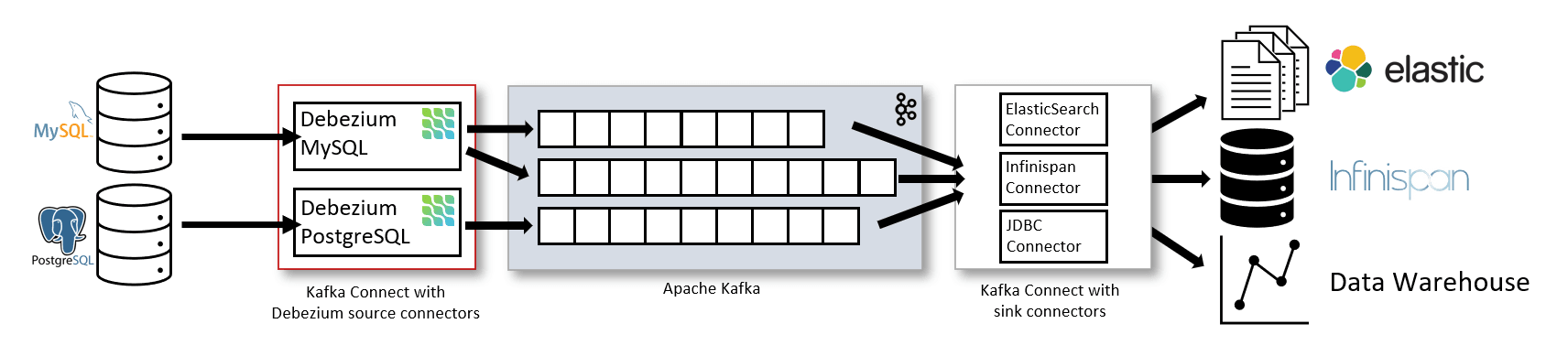
Debezium writes to Kafka, a durable, ordered log of messages (chapter 23), with one topic per table, so all 480 shards' block changes flow into one block topic at tens of megabytes a second. Asha's to-do becomes a message holding the block's new values and its log sequence number (LSN), the position in the source's write-ahead log where the change happened.
9.3Hudi on S3, sorted by recency
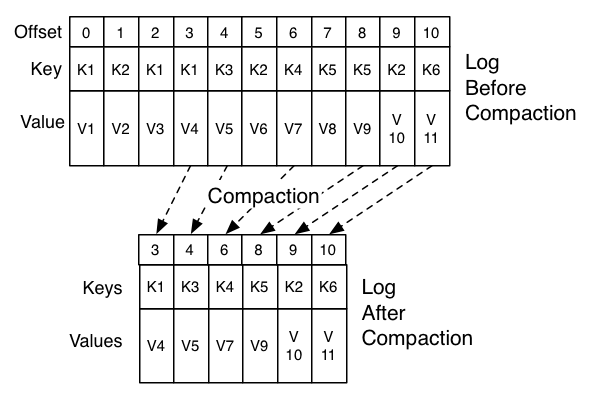
From Kafka the changes land in Amazon S3, object storage (chapter 32), as tables managed by Apache Hudi, an open table format that keeps a table as many data files plus a timeline of commits and lets you apply upserts to them. Notion compared it with Apache Iceberg and Delta Lake and chose Hudi for its performance on update-heavy work and its built-in support for Debezium's messages. Hudi applies updates in one of two ways:
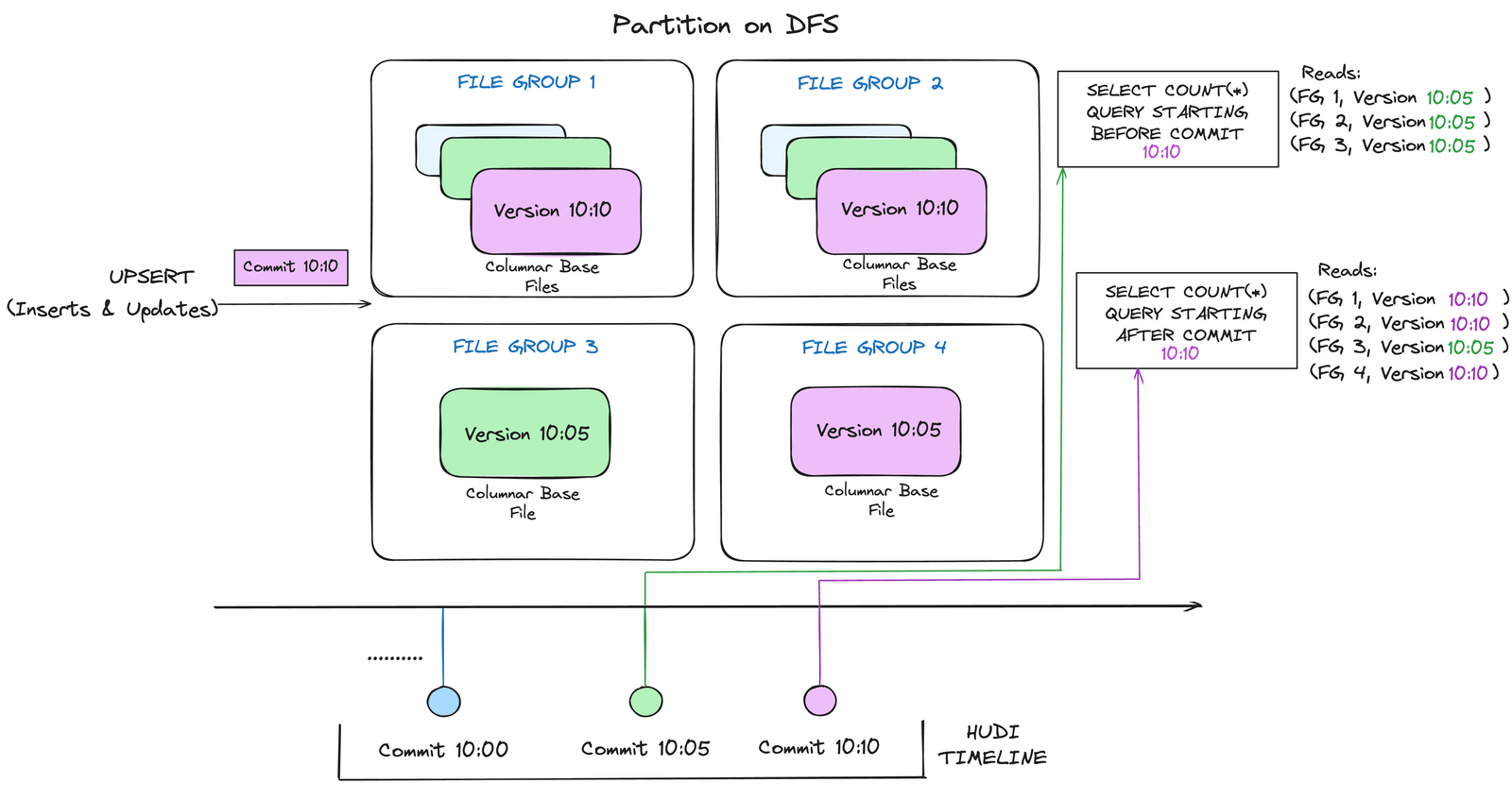
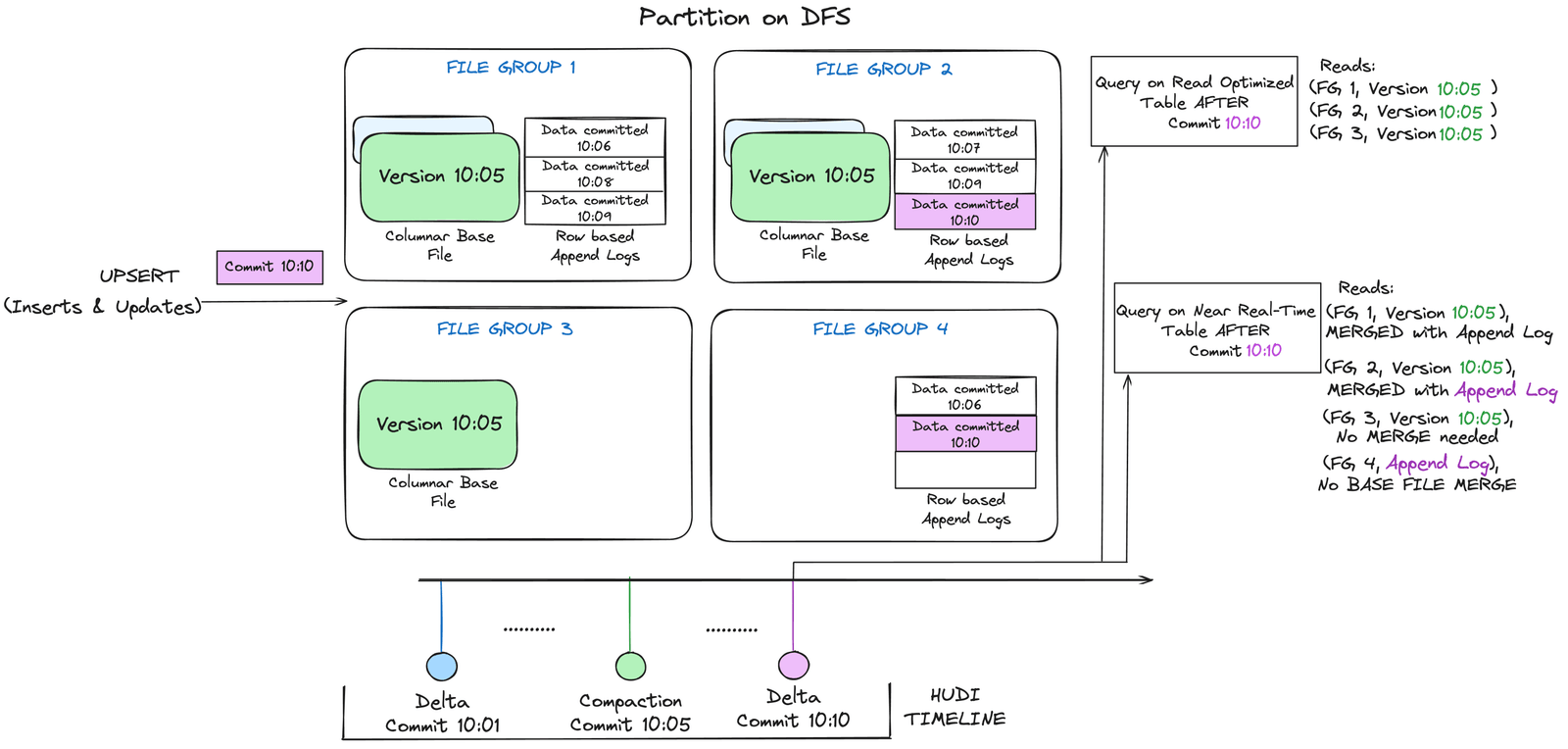
Notion uses copy-on-write, which seems the costlier choice for updates at first sight. Its post doesn't spell out why it picked that over merge-on-read, but it describes what makes copy-on-write affordable. Its data is partitioned into the same 480 shards as Postgres, and within each, rows are sorted by the LSN of their last change, because recently changed blocks are the most likely to change again. Hudi also keeps a Bloom filter per file, a compact structure that can say "this key is definitely not here", so an upsert opens only files that might hold the block.
Sort order is where a 90%-updates workload is won or lost. Copy-on-write rewrites every file that holds a changed row. If rows are spread across files at random, as ordering by UUID would do, one batch of edits touches nearly every file. Ordered by recency, with edits clustered on recent blocks, the same batch touches a few.
import random
random.seed(3)
BLOCKS, PER_FILE, CHANGES = 1_000_000, 10_000, 20_000

# block i was created i-th; edits go mostly to recently created blocks
def pick_block():
    age = int(random.expovariate(1 / 20_000))   # most edits within ~20k newest
    return max(0, BLOCKS - 1 - age)

batch = []
for _ in range(CHANGES):
    if random.random() < 0.9:
        batch.append(("update", pick_block()))
    else:
        batch.append(("insert", None))           # inserts go to a new file

# Layout 1: files filled in UUID order, which is random with respect to age
uuid_order = list(range(BLOCKS))
random.shuffle(uuid_order)
file_by_uuid = {b: pos // PER_FILE for pos, b in enumerate(uuid_order)}

# Layout 2: files filled in order of age (Notion sorts by last-change LSN)
file_by_time = {b: b // PER_FILE for b in range(BLOCKS)}

for name, layout in [("by UUID", file_by_uuid), ("by recency", file_by_time)]:
    touched = {layout[b] for op, b in batch if op == "update"}
    rewritten = len(touched) * PER_FILE        # copy-on-write: whole files
    print(f"{name:10}: {len(touched):3} of {BLOCKS // PER_FILE} files rewritten, "
          f"{rewritten:,} rows copied for {CHANGES:,} changes "
f"({rewritten / CHANGES:.0f}x)")by UUID : 100 of 100 files rewritten, 1,000,000 rows copied for 20,000 changes (50x)
by recency: 19 of 100 files rewritten, 190,000 rows copied for 20,000 changes (10x)Our model is one shard of a million blocks in 100 files, and a batch of 20,000 changes, 90% of them updates aimed mostly at recent blocks. (The skew is a guess standing in for Notion's observation that recent blocks change more; the real distribution is unpublished.) By UUID, the batch touches every file and copy-on-write rewrites all million rows, fifty rows written per row changed. By recency it touches 19 files, a fifth of the work. Merge-on-read would skip the rewrite entirely and pay at read time instead.
9.4Walking the tree in Spark
With raw blocks in S3, the transformations that timed out in the warehouse run in Apache Spark, which spreads a computation across a cluster. Heaviest of all is the walk from section 3, run for every block to compute its effective permissions. Notion's post describes processing shards in parallel, small ones in memory and large ones by shuffling through disk. Here the workspace key pays off again: every parent chain stays inside one shard.
New tables start from a snapshot: start the connector, export the Postgres tables to S3 as of time t, load them into Hudi, then replay Kafka from t, usually within 24 hours. Moving several large datasets into the lake saved over a million dollars in 2022, with more in 2023 and 2024. Data that took over a day to arrive now took minutes for small tables and up to a couple of hours for large ones, the block table included. Notion adds that the lake underpinned Notion AI's rollout in 2023 and 2024.
Where should a copy of every block live for analytics and AI?
- Managed; SQL for everyone
- Slow and costly for 90% updates
- Tree walks time out
- 480 connectors to look after
- Cheap storage, update-friendly format
- Real code for tree walks
- Minutes to hours fresh
- Kafka, Debezium, Hudi and Spark to run
- Not for real-time product reads
Notion kept Snowflake for what it does well and put the lake in front of it, for offline work where minutes to hours of delay are fine. Chapter 61 covers the stream-processing ideas underneath, and chapter 24 the columnar files Hudi writes.
10A database in the browser
10.1Caching blocks on the device
Back to Asha's Monday. Loading the wiki from the server means walking the tree with several round trips, as section 3.4 showed. But if she opened it an hour ago, her device already has most of those blocks, and the fastest load reads them locally and asks the server only for what changed.
Notion's desktop and mobile apps have done this for years with RecordCache, a local SQLite database of every record the app has seen, with the least recently used evicted. Carlo Francisco's July 2024 post "How we sped up Notion in the browser with WASM SQLite" says the Mac and Windows apps had got faster this way about three years before, and the browser hadn't, for lack of a fast, durable database in the browser.
By 2024 one existed. SQLite can be compiled to WebAssembly (WASM), a compact instruction format browsers run at close to native speed, and browsers had added the Origin Private File System (OPFS), a private area of disk per website with fast file access. Together they let a web page run real SQLite on a real file. One catch: fast OPFS access only works inside a Web Worker, a background thread separate from the page.
10.2Many tabs, one database file
Notion's first version gave every tab its own worker writing to SQLite. People keep Notion open in several tabs, and with several writers on one file, some users' databases were corrupted, showing wrong data such as two rows with the same id and different contents. Taking turns with the browser's Web Locks API, and letting only the focused tab write, made this rarer but didn't stop it. Notion's conclusion was that OPFS doesn't handle concurrency gracefully. Desktop and mobile apps never had the problem, because one process owns their database.
So exactly one tab now owns the database. Notion used SQLite's "OPFS SyncAccessHandle Pool" storage variant, which works in every major browser without the cross-origin isolation headers that Notion's third-party scripts made impractical, but which allows only one tab at a time. A SharedWorker, a single worker shared by all of a site's tabs, chooses one tab as the active tab; that tab runs the SQLite worker, and other tabs send their queries to it through the SharedWorker. Each tab holds a Web Lock for its lifetime, so when a tab closes its lock is released, and the SharedWorker picks a new active tab. Notion credits the pattern to Roy Hashimoto, author of the wa-sqlite library, and reports no corruption since.
Page navigation got roughly 20% faster in all modern browsers, and more where Notion's servers are far away: 28% in Australia, 31% in China and 33% in India, where Asha is. Two things got worse first. Downloading the SQLite library, a few hundred kilobytes, delayed the first page load until Notion loaded it in the background. And on slow devices such as older Android phones, reading the disk could lose to the network, making the slowest navigations worse; the fix was to reuse logic page loads already had, querying SQLite and the API at once and using whichever answers first: the race in the diagram.
10.3Offline: from best effort to a promise
A cache that usually has your page isn't the same as working offline. Raymond Xu's December 2025 post, "How we made Notion available offline", explains the gap: the SQLite cache was best-effort, with no promise about which records stay, which is fine online because anything missing can be fetched. Offline Mode, announced in August 2025 after years as a top request, needed a guarantee that every block of a chosen page is on the device.
A page can be offline for several reasons at once: Asha switched it on, it's a favourite, she visited it recently, or it's inside a page that's offline. Notion's first design kept one set of offline pages and removed a page when its toggle went off, which wrongly removed pages that were also offline for another reason. So the client now records each reason separately, in an offline_action table, alongside an offline_page table with one row per page available offline, and a page leaves the device only when its last reason goes. That's reference counting, the same rule as a file being deleted only when its last link is removed. On reconnecting, the client compares when it last downloaded each page with when the server last changed it and fetches only newer pages, and edits made offline merge through the CRDT model from section 4.3.
11Search and AI, briefly
11.1Finding blocks by meaning
Search and AI are the last readers of blocks. Notion's April 2026 post on multi-region data mentions a dedicated Elasticsearch cluster for EU workspaces, so keyword search runs on an inverted index (chapter 62); how the main index is kept fresh is otherwise unpublished.
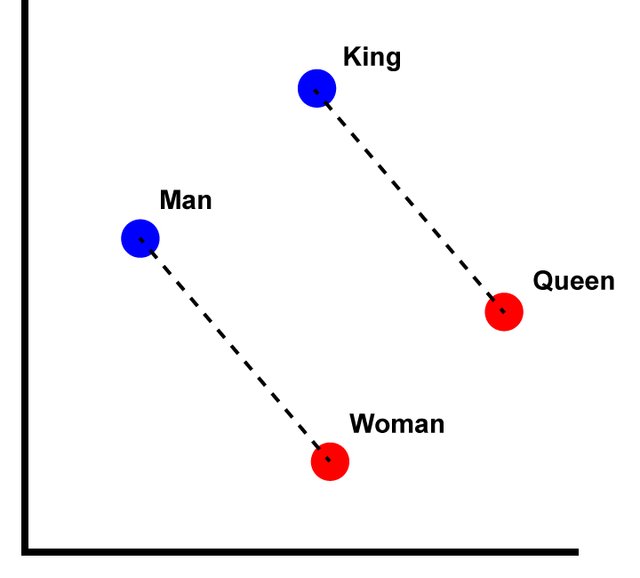
Notion AI's question answering, launched in November 2023, searches by meaning. Notion's February 2026 post "Two years of vector search at Notion" describes it: long pages are split into spans, a model turns each span into an embedding, a list of numbers placing it in a space where similar meanings land close together, and each vector is stored with metadata including permissions, so a question only searches what the asker may see. Bulk indexing runs in Spark and page edits flow through Kafka consumers, with sub-minute delay.
Asha's drag is a good test of this pipeline. Her to-do's text didn't change, but its permissions did. Since July 2025, Notion keeps two 64-bit xxHash hashes per span, one of the text and one of the metadata. Changed text is re-embedded; changed metadata only, like a new parent's permissions, is patched onto the stored vector without re-embedding. Notion says this cut data volume by 70%. Notion committed in late 2024 to moving its vectors to turbopuffer, which cut search spend by 60% and median query latency from 70–100 ms to 50–70 ms.
12The whole system
12.1Every box, and why it's there
| Component | What it does | Added because |
|---|---|---|
| Blocks | Every piece of content is a row with type, properties, children and parent | A page as one document can't be edited, shared or nested in parts (§2, §3) |
| Parent pointers | Permission checks walk up to the nearest block that sets access | Per-block permissions are unmanageable (§3.3) |
| Transactions + durable queue | Small atomic edits, shown locally first | Edits must feel instant and never be half-applied (§4) |
| MessageStore | Pushes "this changed" over WebSockets | Polling from every tab would swamp the servers (§4.2) |
| 480 logical shards by workspace | Routing in the application | One Postgres hit VACUUM stalls and wraparound risk (§5, §6) |
| Audit log, then logical replication | Moving live data between hosts | Shards had to be created, then tripled, without losing edits (§7, §8) |
| Debezium, Kafka, Hudi, Spark | A full copy of every block | The warehouse couldn't absorb 90% updates or walk the tree (§9) |
| WASM SQLite + SharedWorker | Pages from a local database in the browser | Fetching blocks over the network was slow, most of all far away (§10) |
12.2From top to bottom
| Level | The choice | Data structure or algorithm |
|---|---|---|
| Page | A tree of blocks | Records with an ordered child list and a parent pointer |
| Permissions | Inherit from the nearest ancestor | Walk up parent pointers; in bulk, a tree traversal per shard |
| Edits | Small, atomic, optimistic | Operations in transactions; durable client queue; per-record versions |
| Storage | Shard by workspace | UUID range → one of 480 Postgres schemas → host by a fixed map |
| Growth | Move schemas, never re-sort rows | 480 for its divisors; one publication per 5 schemas |
| Analytics | Upserts to object storage | Hudi copy-on-write files sorted by last-change LSN, Bloom filters |
| Client | One SQLite writer per browser | WASM SQLite in OPFS; a SharedWorker elects the active tab |
| Offline | Keep a page while any reason remains | Reference counts in offline_page and offline_action |
| AI search | Re-embed only what changed | Per-span xxHash of text and of metadata |
13What goes wrong, and what it cost
13.1Failures and tradeoffs
| What happens | What the user sees | What the design does |
|---|---|---|
| Asha's laptop sleeps mid-edit | The to-do is on screen | The transaction waits in the durable queue and is sent later |
| A block is dragged into a private page | It disappears for others | Permissions come from the new parent; derived indexes are patched |
| A shard host runs hot | Slow saves for its workspaces | Move whole logical shards to more hosts (2023: 32 → 96) |
| VACUUM can't keep up | Bloat, then refused writes | Smaller shards, so each table and each VACUUM is smaller |
| Two tabs write the cache | Wrong data on a page | One active tab owns SQLite; others go through a SharedWorker |
| The local disk is slow | Navigation slower than the network | Race SQLite against the API |
| Decision | Chosen | Given up | Why it was worth it |
|---|---|---|---|
| Unit of storage | Blocks | One-read page loads | Small edits; anything nests; types change freely |
| Permissions | Inherited via parents | Cheap bulk evaluation | Sharing changes touch one row; moves behave as people expect |
| Sharding | In the application, by workspace (2021) | An off-the-shelf distributed database | Control over placement; every transaction on one shard |
| Shard count | 480 logical on 32, then 96 hosts | A simple mod N | Add hosts without re-sorting rows |
| Re-shard | Logical replication (2023) | The 2021 custom tooling | No noticeable downtime, rollback per shard |
| Analytics | Hudi lake before the warehouse (2022) | One managed system | Cheap upserts, tree walks in Spark, over $1M saved in 2022 |
| Browser cache | WASM SQLite, one writer (2024) | Simplicity | About 20% faster navigation, more far from servers |
14Summary
- A page as one document breaks as soon as two people edit it, part of it is private, or it contains other pages.
- Everything is a block: an id, a type, properties, an ordered list of child ids and a parent pointer, for paragraphs, pages, databases and rows alike.
- Permissions are inherited by walking parent pointers to the nearest block that sets them, so moving a block can change who sees it.
- Edits are transactions of small operations, shown on the device first, queued durably, and committed atomically after a permission check.
- Other viewers hear by push and fetch by pull: MessageStore says "this changed", and each client fetches what it may see.
- One Postgres hit VACUUM stalls and wraparound risk in 2020, after five years and four orders of magnitude of growth.
- Notion sharded in the application by workspace in 2021, into 480 logical shards (Postgres schemas) on 32 hosts, so a transaction or permission walk needs one shard.
- 480 was chosen for its divisors, and in 2023 Notion tripled to 96 hosts with logical replication and per-shard switches, with no downtime users noticed.
- Every change also flows out by CDC, through Debezium and Kafka into Hudi tables on S3 sorted by recency, where Spark walks the tree for analytics, search and AI.
- The browser keeps its own SQLite database with one writer per browser, raced against the network, and offline mode turns that cache into a reference-counted promise.
15Build this
A tiny sharded block store.
- Grow the first TryIt into a small server with
loadPage(id), which walkscontentlists and drops blocks the caller can't read, andsaveTransaction(ops), which rejects the whole transaction if any operation fails a permission check. - Add a version to each block and a WebSocket that pushes "block X is at version N". Open two tabs and watch one update when the other edits.
- Store blocks in SQLite files, one per logical shard: 12 shards on 2 "hosts" (directories), routed by workspace id.
- Move to 3 hosts while a script keeps writing: copy whole shard files, log writes made during the copy, replay them, compare checksums, then switch. Repeat with 16 shards and count what has to move.
- Bonus: compute every block's effective permissions in one pass by walking down from the workspace, instead of up from every block.
16Interview questions
beginnerWhy does Notion store blocks instead of whole pages?›
Because the unit of change is a line, not a page. As one document, every edit rewrites the page, two people saving at once overwrite each other, and there's nowhere to put permissions for part of a page or a table row that is itself a page. With blocks, an edit touches a few small rows, anything can nest in anything, and changing a line's type changes one field. In exchange, opening a page reads many rows, which caching on the server and the device makes up for.
beginnerHow does Notion decide whether you can see a block?›
Blocks inherit permissions. Each block stores a parent pointer, and the check walks up to the first ancestor that sets permissions, ending at the workspace. Downward content lists aren't used, because a block can appear in more than one and searching them is slow. So dragging a block into a private page makes it private without any permission being edited.
intermediateWhy shard by workspace id, and why 480 logical shards on 32 machines?›
Everything one action touches, the blocks in a transaction, a page's blocks, and every ancestor in a permission walk, belongs to one workspace, so keying on it keeps each of those on one shard with no cross-shard joins. Logical shards separate where a workspace belongs from which machine holds it: a workspace's logical shard never changes, so adding machines moves whole schemas instead of re-sorting rows. 480 has many divisors, so the fleet can grow to 40, 48 or 96 hosts evenly; 512 would only allow doubling.
deepHow would you move a live, heavily written Postgres table to new shards without losing writes?›
Capture every change from a fixed moment: Notion used an audit-log table in 2021, because the overloaded monolith couldn't sustain logical replication, and logical replication in 2023. Copy existing rows, comparing versions so the copy never overwrites a newer change. Verify with sampled comparisons and dark reads, ideally written by someone other than the migration's author. Then switch, with a rollback path: in 2021 a five-minute window, in 2023 a per-shard PgBouncer switch with about a second of paused saves and reverse replication ready. And start while the database still has headroom.
deepWhy didn't a data warehouse work for Notion's block data, and what replaced it?›
About 90% of block changes update existing rows, and the warehouse was built for appends, so ingesting the stream from 480 shards was slow and costly; and computing permissions needs a walk up each block's ancestors, which timed out as SQL. Notion put a lake in front: Debezium reads each host's changes into Kafka, Hudi upserts them into copy-on-write tables on S3, partitioned like the shards and sorted by recency so updates rewrite few files, and Spark runs the tree walks. Cleaned results go on to the warehouse, search and AI.
17Go deeper
Asha changes a to-do into a heading. Which fields of the block change?›
Only type. The text stays in properties, the children in content,
and the parent is unchanged; switching back loses nothing.
Notion grows from 96 hosts to 120. How many logical shards per host, and does any workspace change logical shard?›
480 ÷ 120 = 4 per host. No workspace changes logical shard, because the UUID-to-shard mapping depends only on the 480; whole schemas move between hosts.
Why does sorting Hudi files by last-change LSN help a copy-on-write table?›
Copy-on-write rewrites every file containing an updated row. Recently changed blocks are the most likely to change again, so sorting by recency concentrates each batch's updates in a few files.
Blocks, the render tree, parent pointers, transactions, RecordCache and MessageStore.
The stalled monolith, the 480-on-32 layout, the audit-log migration and its lessons.
32 to 96 hosts with logical replication, PgBouncer groups, dark reads and per-shard failover.
Why the warehouse alone didn't fit, and the Debezium, Kafka, Hudi and Spark design.
OPFS, multi-tab corruption, the SharedWorker fix and the regressions.
Reference-counted offline pages; spans, embeddings and hash-based re-indexing for Notion AI.
Copy-on-write versus merge-on-read; wraparound and freezing; publications and subscriptions.
18Related chapters
Concurrent editing of a tree, OT versus CRDTs, fractional indexing, and another in-house Postgres sharding. Chapter 64.
MVCC, VACUUM, freezing and the write-ahead log behind logical replication. Chapter 21.
Partition keys, and moving data when nodes change. Chapter 29.
The ideas under CDC pipelines into a lake. Chapter 61.
The ordered log every block change passes through. Chapter 23.
Inverted indexes and vector search. Chapter 62.