You type https://www.wikipedia.org into a browser and press Enter. A moment later the page is there. You never typed a number, you never chose which computer to talk to, and nobody asked you whether to trust it. Yet the page came from a machine you couldn't have named, over a connection that nobody in between could read.
The network knows nothing about any of that. It moves packets, small chunks of data, between machines identified by IP addresses, which are numbers like 104.16.124.96. A name like www.wikipedia.org is only text, and nothing on the wire understands it. An address doesn't always mean a single machine either: a busy site's address can lead to any of hundreds of computers around the world. And every packet crosses routers owned by other people, any of which could read it or change it on the way.
So before the first byte of the page arrives, four jobs have to be done. Something has to find the address that belongs to the name. The packets have to reach a machine that can answer. That machine and your browser have to agree on a secret and prove who they are to each other. And if a copy of the page is sitting in a cache nearby, the cache can answer so that Wikipedia's own servers never see the request. The question for this chapter is what happens between pressing Enter and the first byte of the page, and why each step is there. We'll follow one visit in the order the browser takes it, and run the pieces ourselves along the way.
01From a name to an address
1.1Why a name needs a lookup
The browser has the text www.wikipedia.org and needs an IP address to send packets to. The simplest design is one big table, names on the left and addresses on the right, that every machine can ask. That table would have to hold every name in the world, accept changes from millions of owners, and answer every lookup from every browser. It would be huge, and everything would depend on the one place that holds it.
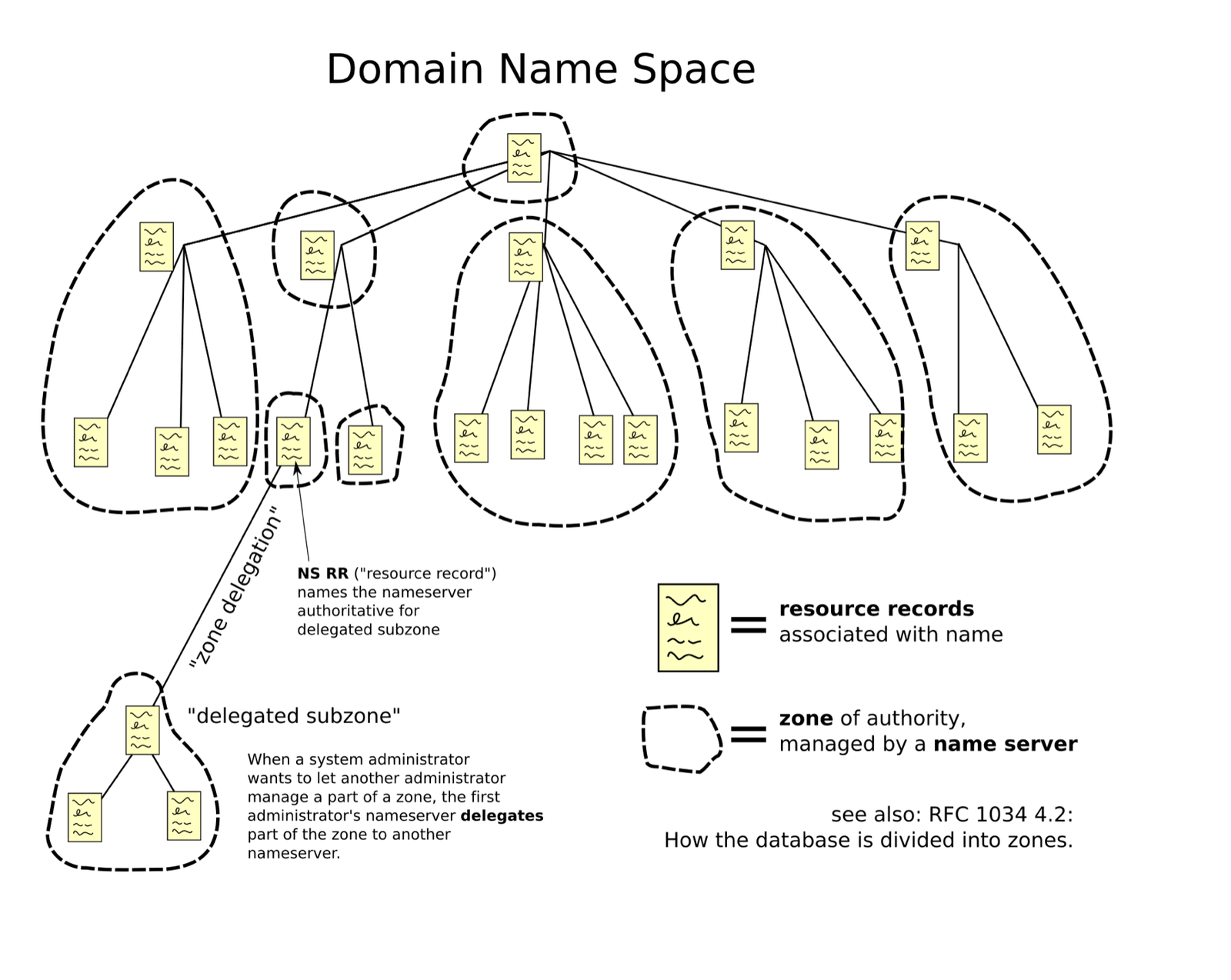
The design the internet uses splits the table along the dots in the name. Read www.wikipedia.org from the right. org is a top-level domain, one of the endings such as com, org or uk. wikipedia is a name registered inside it, and www is a machine name chosen by whoever owns wikipedia.org. So the names form a tree: an unnamed root at the top, the endings below it, registered names below those. Each level is run by different people on their own servers, and each server knows only its own slice. One group of servers, at the root, knows which servers handle .org. The .org servers know which servers handle wikipedia.org. And Wikipedia's servers know the actual addresses of the machines inside it.
A server that doesn't know the answer says who to ask next. That reply, "I don't know, ask these servers", is called a referral, and the whole arrangement is DNS, the Domain Name System. Its design is in RFC 1034 and hasn't changed shape since 1987.
Each fact a DNS server holds is a record: a name, a type, a value, and a lifetime. The lifetime is called a TTL (time to live), the number of seconds anyone may remember the record before asking again, and section 2 is about why it matters. The types we'll meet are these:
| Record type | What it says |
|---|---|
A | "This name has this IPv4 address." (AAAA is the same for the longer IPv6 addresses.) |
NS | "These servers are responsible for this part of the tree." |
CNAME | "This name is an alias for another name; look that one up instead." |
The slice of names that one group of servers is responsible for is called a zone: .org is a zone, and so is wikipedia.org.
1.2Four roles in a lookup
Someone has to do the walking, asking one server, following its referral to the next, and so on until a server holds the answer. Your browser doesn't do it. Your program contains only a small piece of code called the stub resolver, which sends one question to a server it's been told about and waits for the answer. That server is a recursive resolver, run by your network, your company or a public service such as 1.1.1.1 or 8.8.8.8, and it does the walking on behalf of every client that asks it.
The servers it walks through come in two kinds. The root servers and the top-level-domain servers, or TLD servers (the .org ones), hold only referrals. The authoritative server for a zone holds the real records and answers with them. A lookup can involve all four roles, and it helps to keep them apart because each one caches differently and fails differently.
| Role | Examples | What it does |
|---|---|---|
| Stub resolver | the lookup code in the C library your program links against, or a local helper such as systemd-resolved on Linux | Sends one question and waits. May rewrite the name before asking (section 3). |
| Recursive resolver | 1.1.1.1, 8.8.8.8, your cloud network's built-in resolver (on AWS, the VPC resolver), open-source servers such as Unbound | Does the walking: asks root, then TLD, then authoritative. Remembers everything it learns. |
| Root and TLD servers | a.root-servers.net to m, the .com and .org servers | Answer only with referrals: "I don't know, ask these servers." |
| Authoritative server | Route 53 (AWS's DNS service), Cloudflare DNS, a server you run yourself with software such as BIND | Holds the actual records for a zone and answers with them. |
?Why does your app never talk to the root servers?
Because the stub resolver in your process is deliberately dumb. It sends one question, with a flag saying "recursion desired" (please do the walking for me), to whatever server the file /etc/resolv.conf names. That puts the memory of past answers in one shared place, where every client of that resolver benefits from every lookup any of them has made.
1.3One cold lookup, step by step
Let's follow the lookup of www.wikipedia.org when nothing is remembered anywhere, which is called a cold lookup. The scene below shows your app, the recursive resolver with its cache of remembered records, and the three servers it will visit. Watch the cache fill up as the resolver gets referrals.
www.wikipedia.org. The stub resolver sends one question, with recursion desired set, to the recursive resolver and waits. Everything after this is the resolver's job. Its cache is empty.QNAME minimisation, from the fourth frame, is described in RFC 9156. You can watch the same walk happen on your own machine. dig is a command-line tool that sends DNS questions, and its +trace option makes it do the walking itself, starting from the root, instead of asking a resolver to do it. +nodnssec hides some extra signature records that section 4 will explain. The ... lines in the output stand for further servers in each list.
dig +trace +nodnssec www.wikipedia.org. 4502 IN NS a.root-servers.net.
...
org. 172800 IN NS c0.org.afilias-nst.info.
...
wikipedia.org. 3600 IN NS ns0.wikimedia.org.
...
www.wikipedia.org. 86400 IN CNAME dyna.wikimedia.org.
;; Received 420 bytes from 192.168.65.7#53(192.168.65.7) in 3 ms
;; Received 783 bytes from 199.7.91.13#53(d.root-servers.net) in 193 ms
;; Received 743 bytes from 199.19.53.1#53(c0.org.afilias-nst.info) in 70 ms
;; Received 95 bytes from 208.80.153.231#53(ns1.wikimedia.org) in 312 msLook at the Received lines first. The first is the local resolver handing back the list of root servers from its own memory, in 3 ms. The next three are real round trips to three different organisations, 193 ms, 70 ms and 312 ms, and together they come to more than half a second. The numbers vary from run to run and from place to place.
Now look at the second column, the TTLs: two days for the .org delegation, an hour for the Wikimedia name servers, a day for the CNAME. The lines at the top of the tree are the ones that almost never need asking again. The walk ends on a CNAME, so the resolver still has to look up dyna.wikimedia.org to get an actual address.
Half a second to learn one address is far too long to pay for every page view, and nobody does. The reason is in the last two frames of the scene.
02Caching: why the walk isn't repeated
2.1What a warm lookup costs
Every record the resolver learns goes into its cache with the TTL it arrived with, and stays there until that many seconds have passed. Until then the resolver answers from memory. A lookup that finds what it needs in the cache is called warm. Because the cache belongs to the resolver and not to your app, one person's lookup warms it for everyone who uses that resolver.
How much is the cache worth? Start a private Unbound resolver (a widely used open-source recursive resolver) with an empty cache, and ask it for eight names, each one twice. The first answer for each name is cold and the second is warm. Over three rounds, each starting from an empty cache, the medians come out like this:
| Name | Cold (median of 3) | Warm | Why the cold one is slow |
|---|---|---|---|
| news.ycombinator.com | 247 ms | 1–2 ms | `.com` already cached from an earlier name |
| www.cloudflare.com | 280 ms | 0–2 ms | short chain |
| github.com | 289 ms | 1 ms | short chain |
| www.rust-lang.org | 626 ms | 0–6 ms | CNAME into a CDN's zone |
| www.netflix.com | 804 ms | 0–1 ms | CNAME into a second zone |
| www.kernel.org | 812 ms | 0–1 ms | CNAME into a second zone |
| www.wikipedia.org | 1,207 ms | 0–1 ms | first query of each round: primes root and `.org` too |
| www.apple.com | 1,790 ms | 1–5 ms | three CNAMEs across three zones |
The absolute numbers depend on how far your resolver is from each server it asks, so yours will differ. What carries over is the shape. Cold lookups cost hundreds of milliseconds, up to nearly two seconds, and warm ones cost about a millisecond, because a warm answer is one packet to a nearby server that answers from memory.
?Why was www.apple.com about six times slower than github.com?
Because of its CNAME chain. The answer came back as www.apple.com → www-apple-com.v.aaplimg.com → www.apple.com.edgekey.net → e6858.dsce9.akamaiedge.net → an A record. Each hop lands in a different zone, and each zone the resolver hasn't seen yet costs its own walk from the top-level domain down. CDNs (content delivery networks, which we'll meet in section 8) lean on CNAMEs like this to steer clients, and the price is paid on every cold cache.
The TTL on the last record in that chain was 11 seconds. CDNs keep their final A records this short so they can move traffic between their servers quickly, and the consequence is that the tail of the chain expires almost as soon as it's cached, so it's nearly always cold.
2.2Remembering can also be wrong
A cache that remembers answers for a TTL will, by design, sometimes hand out an answer that has since changed. That cuts two ways, and both have bitten people.
?How long is "not found" cached?
Negative answers are cached too. When a name doesn't exist, the reply is NXDOMAIN ("no such domain"), and RFC 2308 says a resolver keeps it for "the minimum of the MINIMUM field of the SOA record and the TTL of the SOA itself". The SOA record is a zone's administrative record, and it carries those two numbers. So if you ask for a name before you create it, every resolver that saw the miss remembers that it doesn't exist, for up to that long.
Positive answers cause the mirror-image problem during a migration. If an A record has a one-day TTL, then changing it takes up to a day to reach every client, because resolvers keep handing out the old address until their copy expires. The usual move is to lower the TTL to a minute or so one full old-TTL before the change, make the change, and raise the TTL again afterwards. Lowering it a full old-TTL ahead is what guarantees that every cached copy of the long version has expired by the time you switch.
So far the lookups have used the name exactly as you typed it. Your process doesn't always send it that way.
03What your process asks
3.1The search list and ndots
Before a question leaves your process, the stub resolver may rewrite the name. On a company network, people type short names like payments and expect them to work. To allow that, /etc/resolv.conf (the file that tells the stub which resolver to ask) can also hold a search list, a list of suffixes the stub may add to a name. An option called ndots decides when: if the name has fewer dots than ndots, the stub tries the name with each suffix added first, and only then as written.
That surprises nearly everyone who runs Kubernetes. A pod is Kubernetes's name for a group of containers that run together and share network settings, including their own /etc/resolv.conf. Every pod gets a file like this one, written by the kubelet (the agent that runs on each machine in the cluster and starts the pods):
nameserver 10.32.0.10
search <namespace>.svc.cluster.local svc.cluster.local cluster.local
options ndots:5
The nameserver line is the address of the cluster's own DNS server, which plays the recursive resolver for the pod. The search line lists three suffixes, starting with the pod's namespace (Kubernetes's word for a group of services, such as default or billing). And ndots:5 means: if the name has fewer than five dots, try it with each search suffix appended first. Here's the logic in glibc, the C library that most Linux programs use, which contains the stub resolver:
	dots = 0;
	for (cp = name; *cp != '\0'; cp++)
		dots += (*cp == '.');
	trailing_dot = 0;
	if (cp > name && *--cp == '.')
		trailing_dot++;
	/* ... */
	/*
	 * If there are enough dots in the name, let's just give it a
	 * try 'as is'. The threshold can be set with the "ndots" option.
	 * Also, query 'as is', if there is a trailing dot in the name.
	 */
	saved_herrno = -1;
	if (dots >= statp->ndots || trailing_dot) {
		ret = __res_context_querydomain (ctx, name, NULL, class, type, /* ... */);
		/* ... */
	}
	/* ... otherwise, or if that failed: */
		for (size_t domain_index = 0; !done; ++domain_index) {
			const char *dname = __resolv_context_search_list
			  (ctx, domain_index);
			/* ... query name + "." + dname ... */
			switch (statp->res_h_errno) {
			case NO_DATA:
				got_nodata++;
				/* FALLTHROUGH */
			case HOST_NOT_FOUND:
				/* keep trying */
				break;
			/* ... SERVFAIL also moves on; anything else stops ... */
The first loop counts the dots, and notes whether the name ends in a dot (a trailing dot marks a name as complete, with nothing to add). If there are at least ndots dots, or there's a trailing dot, the name goes out as written. Otherwise the second loop adds each search domain in turn, and every "no such name" answer just moves on to the next suffix. The name as written gets tried only after the suffixes fail.
A pod with the default Kubernetes resolv.conf looks up api.github.com (two dots). How many DNS queries does glibc send for the A record?
3.2Counting the queries
You can check this without a cluster. The experiment below uses unshare -m to start a command in a private mount namespace, a view of the filesystem that only that command sees. Inside it, mount --bind lays a kubelet-style file over /etc/resolv.conf, and getent ahosts looks a name up through glibc exactly as any program would. The file points at a local Unbound that answers cluster.local names itself, as CoreDNS (the DNS server inside a Kubernetes cluster) would, and that logs every question it receives. The final grep pulls the A-record questions out of the log. The output below collects three runs: one with the kubelet-style file, one with a copy of it that says ndots:1, and one with the kubelet-style file again but the name written with a trailing dot, api.github.com..
unshare -m bash -c '
  mount --bind resolv.k8s /etc/resolv.conf     # the kubelet-style file above
  getent ahosts api.github.com > /dev/null'
grep -oE 'info: [^ ]+ [^ ]+ A' logs/unbound.log# ndots:5
A api.github.com.default.svc.cluster.local.
A api.github.com.svc.cluster.local.
A api.github.com.cluster.local.
A api.github.com.
# ndots:1
A api.github.com.
# ndots:5, but the app asked for "api.github.com." with a trailing dot
A api.github.com.Take the three runs in turn. Under ndots:5, three search-domain names are asked and answered with NXDOMAIN before the real name goes out. Under ndots:1, api.github.com has two dots, which is at least one, so it goes out as written. With a trailing dot, it goes out as written whatever ndots says. Only A queries appear because the container the test ran in has no IPv6 address; on a dual-stack pod each line would have an AAAA twin.
The extra queries cost time. With every answer already cached in the resolver, the median getaddrinfo() call took 6.8 ms under ndots:5 against 1.5 ms under ndots:1 (median of five runs of fifty calls each). Absolute times vary by machine, but the ratio comes from the extra round trips to the resolver: four questions instead of one.
?Why does Kubernetes default to something so expensive?
So that short names work. With ndots:5, a pod can call http://payments or payments.billing and the search list turns it into the right service name. The cost lands on every external name, and on the cluster's DNS servers, which now answer three NXDOMAINs for every real lookup.
Each of these queries is a small packet sent without any connection setup. That choice is what makes warm lookups so cheap, and it brings problems of its own.
04DNS on the wire
4.1UDP and the size limit
Most DNS runs over UDP, a way to send a single packet with no connection set up and no promise of delivery. A lookup is one packet out and one back, with no handshake, which is why a warm lookup costs about a millisecond. The price is that the answer has to fit in one packet.
A UDP answer bigger than the path can carry gets split into fragments, and firewalls tend to drop fragments. DNS Flag Day 2020 settled on a default size for UDP replies, announced through a DNS extension called EDNS, of 1,232 bytes, which "will avoid fragmentation on nearly all current networks". That figure is the minimum packet size IPv6 guarantees, 1,280 bytes, minus 48 bytes of headers. A bigger answer is sent back with a flag, TC (truncated), set, and the resolver "MUST" retry the question over TCP.
4.2Spoofing and DNSSEC
A UDP answer has no connection to tie it to the question, so how does a resolver know the reply came from the server it asked? It accepts any packet that matches the question and carries the same 16-bit query ID. RFC 5452, written after Dan Kaminsky's 2008 cache-poisoning attack (an attacker floods a resolver with forged answers to get a false address cached), points out that 16 bits "will require on average 32768 attempts to guess". Its fix is to randomise the source port of the question too, which multiplies the number of guesses an attacker needs. Every modern resolver does this.
DNSSEC goes further and has zone owners sign their records, so a resolver can check the signature instead of trusting the packet. It also adds new ways to fail. Slack's 2021 DNSSEC rollout broke resolution for some users for about a day. A DS record (the record that links a zone's signing key to its parent) had been cached by resolvers "for 24h by default", so it outlived the rollback. And a Route 53 bug in NSEC answers for wildcard records (NSEC is how a signed zone proves that a name doesn't exist) made validating resolvers conclude that A records didn't exist.
At the end of all this, the browser has an address. It sends its first packet there, and the next question is which machine receives it.
05One address, many places
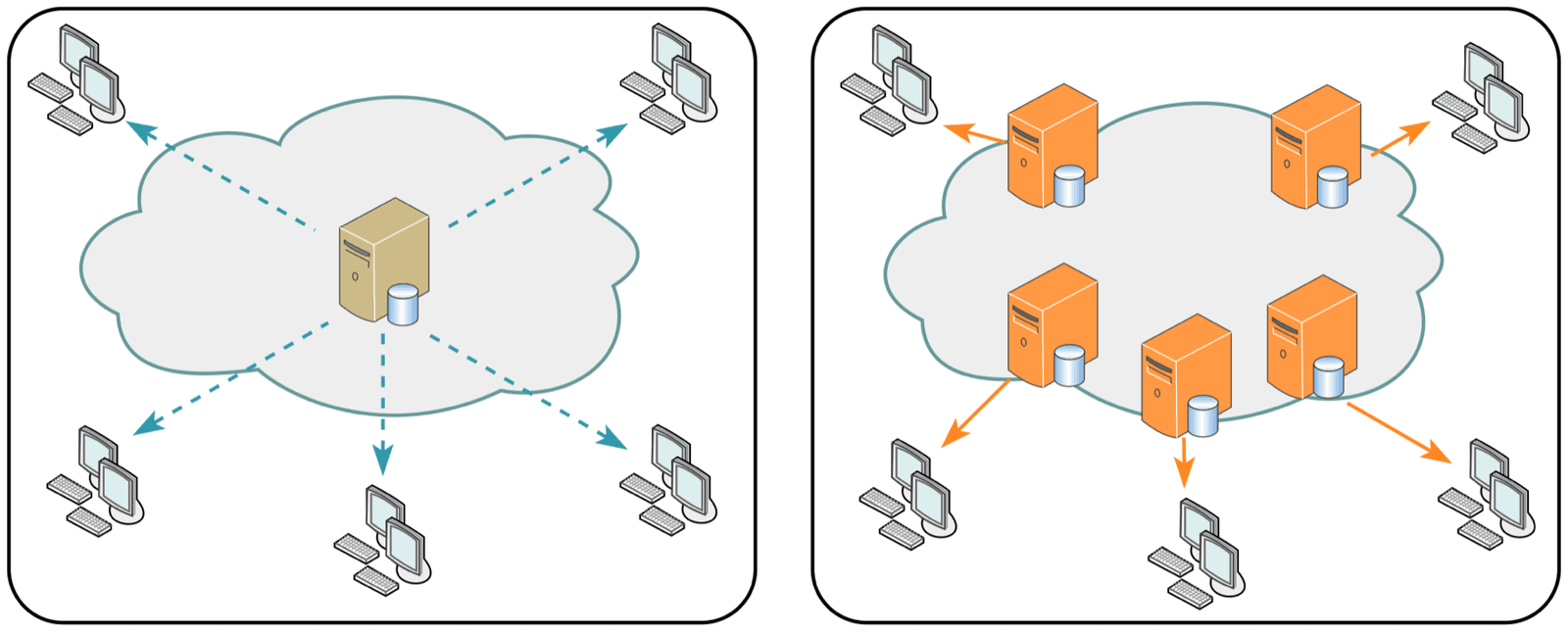
5.1How one address reaches many machines
Take the address www.cloudflare.com resolves to, 104.16.124.96. There isn't one machine with that address. There are hundreds of data centres, all claiming it.
The trick uses how the internet finds its way. The internet is thousands of independent networks, and they tell each other which blocks of addresses they can reach, using a protocol called BGP (Border Gateway Protocol). Each announcement says "I can reach this block of addresses", and a block of addresses is called a prefix. Your ISP, the company that connects you to the internet, is one of those networks, and its routers hear the announcements from many neighbours. Normally one network announces a prefix. With anycast, many sites announce the same prefix, and each router that hears them picks whichever announcement looks best by its own policy, usually the shortest path.
So each client's packets flow to a nearby site, with no lookup, no redirect and no logic on the client. The DNS root servers are the biggest example: 13 names, a to m, served by 12 organisations, and at the time of writing root-servers.org counts 2,045 instances behind them.
?How can you tell which instance answered?
Many anycast DNS services answer a special query, in the CHAOS class, that returns an identifier for the instance:
dig +short CH TXT id.server @1.1.1.1      # Cloudflare returns a site code
dig +short CH TXT id.server @k.root-servers.net  # e.g. "ns1.in-maa.k.ripe.net"
1.1.1.1 answers with an airport code for a nearby city plus an instance number, and K-root names a RIPE instance by its city code too. The same query from another country gets a different answer from the same IP address, which is anycast made visible.
5.2A site fails, and traffic moves
Anycast has another benefit: failover without anyone deciding anything. Each site runs health checks, automatic tests of whether its own servers and network are working. A site that fails them can stop announcing the prefix, which is called withdrawing its route, and routers then send packets to the next-best site. Here is what happens to one TCP connection when the site serving it withdraws.
104.16.124.96. The client's ISP has both routes and prefers Site A, the shorter path.?Why doesn't anycast break every TCP connection?
Because routes are stable most of the time. RFC 4786, the operational guide to anycast, discusses exactly the case in the scene: a route change in the middle of a connection sends packets to a node with no state for them. In practice, paths change rarely enough that short HTTP connections probably finish where they started. The long-lived connections are the ones that notice.
5.3When the automatic withdrawal is the outage
The same self-withdrawal that makes anycast resilient took Facebook off the internet on October 4, 2021. Meta's postmortem describes a maintenance command that "unintentionally took down all the connections in our backbone network". Then came this:
"our DNS servers disable those BGP advertisements if they themselves can not speak to our data centers, since this is an indication of an unhealthy network connection"
Every DNS site saw the backbone disappear, decided that it was the unhealthy one, and withdrew, all at the same moment, so no site was left announcing Facebook's DNS addresses. With no DNS, nobody could resolve any Facebook name, including the tools engineers needed to fix it.
Our packets now reach a machine at a nearby site, and the connection to it is plain TCP. Anything we send goes through other people's routers in the clear, and nothing so far tells the browser who is at the other end.
06Setting up a secret: the TLS handshake
6.1A plain pipe, and what protecting it costs
A TCP connection is a plain pipe. Every router on the path can read the bytes going through, any of them could change the bytes, and nothing in TCP lets the browser check who is on the other end. Before sending anything private, the browser needs to set up protection. The protocol that does that is TLS (Transport Layer Security), a short conversation that takes place on top of the TCP connection before any HTTP request is sent. TLS 1.3 is the current version, and TLS 1.2 is its widely used predecessor.
Protection is not free, because each message in the conversation has to wait for a reply. We measure that wait in round trips: one message out and its answer back, which takes as long as the time a packet needs to travel to the server and return. Opening the TCP connection already costs one, since the client's first packet (SYN) gets an answer. How many more does TLS add? Here are the medians for a laptop on a home connection opening eleven connections to www.cloudflare.com with each protocol version, repeated twice (hence the ranges):
| Handshake | TCP connect (median) | TLS handshake (median) | TLS ÷ TCP |
|---|---|---|---|
| TLS 1.2 | 60.5–67.9 ms | 139.1–141.3 ms | 2.05–2.34 |
| TLS 1.3 | 64.3–105.2 ms | 74.3–78.8 ms | 0.71–1.22 |
The TCP connect time is one round trip, so it's a decent estimate of the round-trip time. Compared with that, TLS 1.2 took roughly two round trips, and TLS 1.3 took roughly one, as the protocols promise. Section 6.3 shows why.
?Why count round trips instead of milliseconds?
Because round trips are the part you can't buy your way out of. Faster servers shorten the work in between, but the waiting for the network stays. If a packet needs 10 ms for the round trip, a handshake of two round trips costs 20 ms. To a client on a bad mobile link where the round trip is 150 ms, the same handshake costs 300 ms.
6.2What the handshake has to establish
The handshake has four jobs, and each one is a problem the plain pipe leaves open.
First, the two sides have to agree on which algorithms to use, since neither knows what the other supports. A cipher suite is a named bundle of algorithms for encrypting and checking the data, so the client offers a list of cipher suites and the server picks one it also supports. The same offer-and-pick happens for the other choices below.
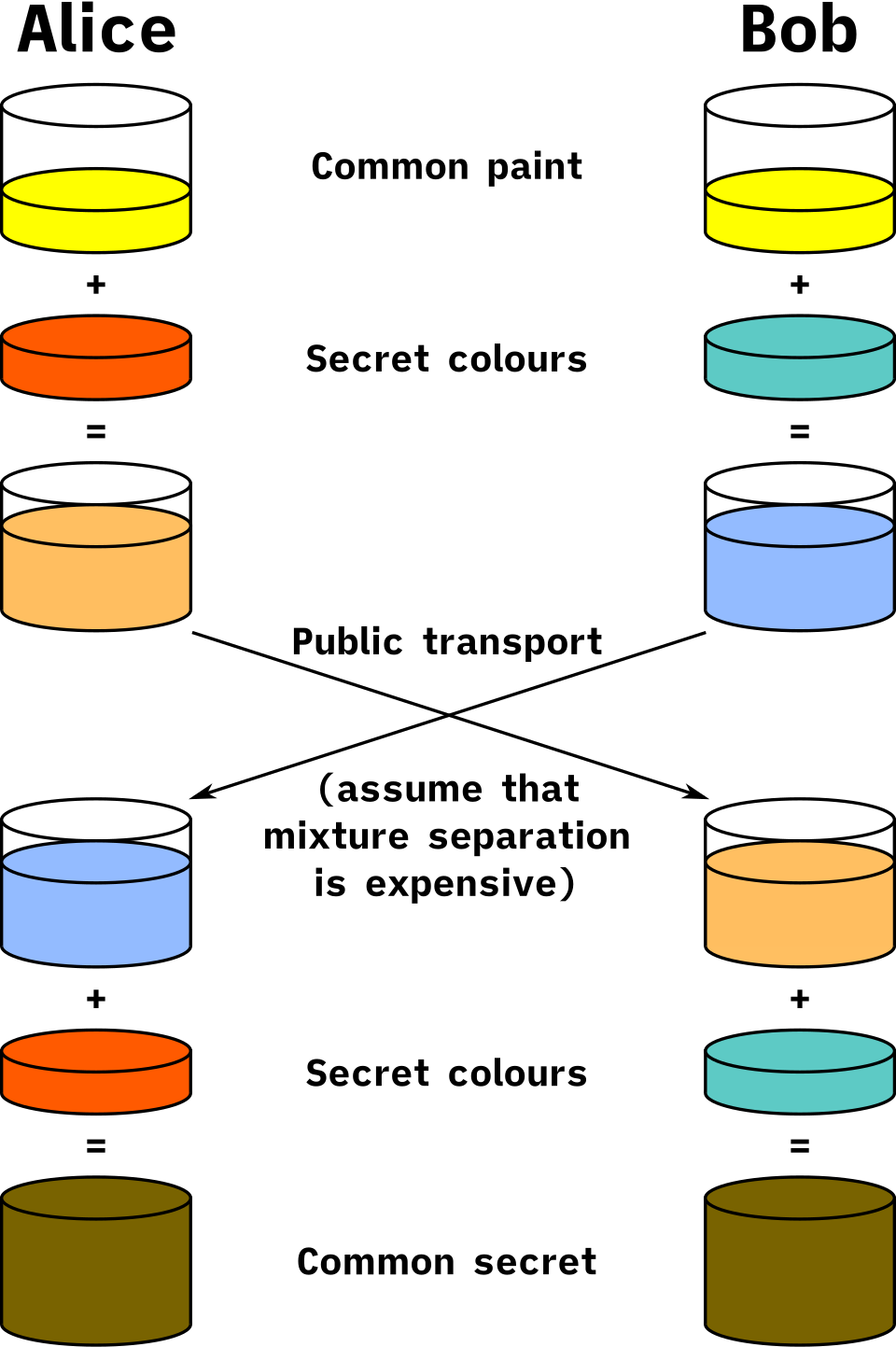
Second, they need a secret key that only the two of them know, even though every message between them can be read on the way. The trick that makes this possible is Diffie-Hellman. Each side picks a secret number and sends the other a public value computed from it. Each side then combines its own secret with the other's public value, and both arrive at the same key, while someone who saw only the two public values can't compute it. The public value is called a key share. It's ephemeral when the secret number is made fresh for every connection and thrown away afterwards. The mathematical setting the numbers live in is called the group, and X25519 and P-256 are the two common groups.
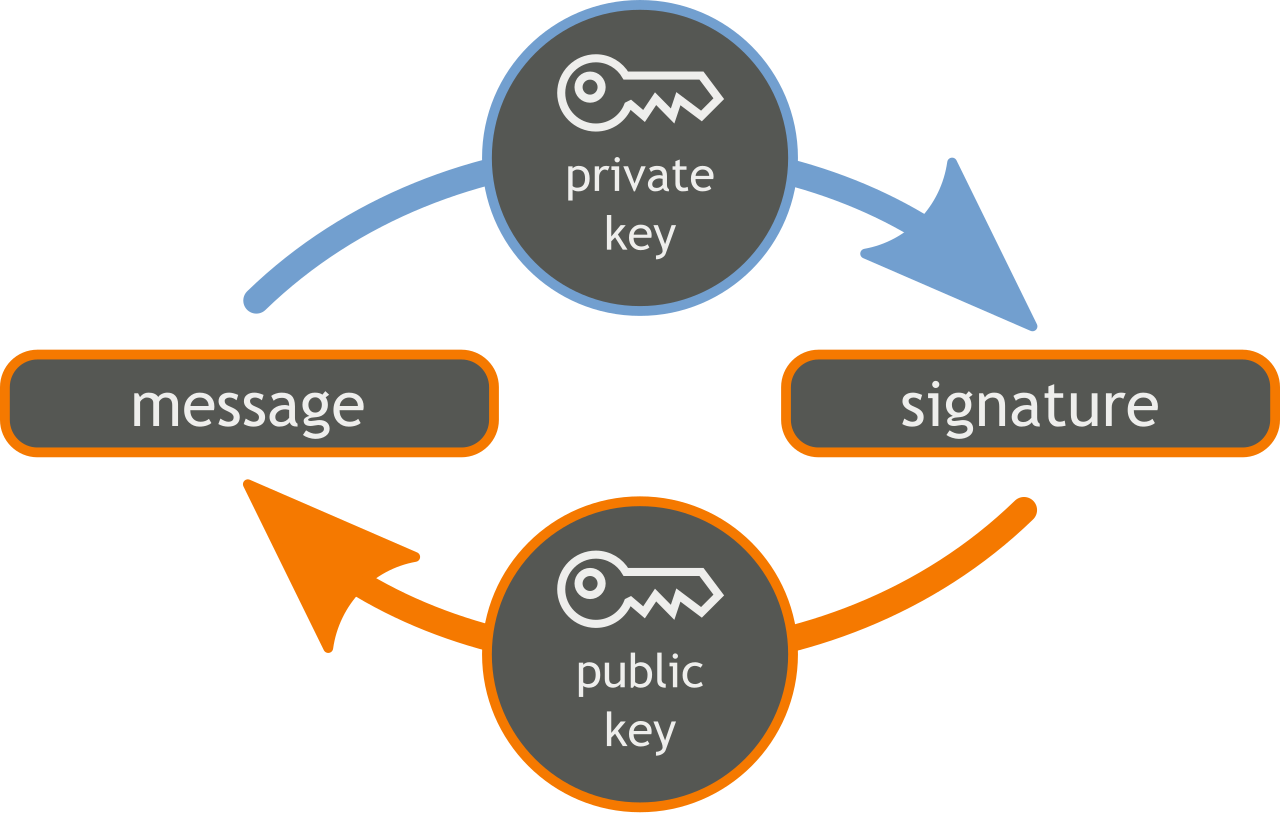
Third, the client has to learn who it's talking to, because an attacker in the middle could run Diffie-Hellman just as well as the real server. The server sends a certificate, a signed document that says "this public key belongs to this name" (section 7 shows how the client checks it). Then it proves it holds the matching private key by signing the transcript, every handshake message sent so far.
Fourth, both sides have to be sure nobody changed the handshake messages on the way, for example to remove the strongest algorithms from the client's offer. A MAC (message authentication code) is a short tag computed with the shared key that proves the bytes it covers weren't changed. Each side sends one over the whole transcript in a message called Finished.
| Goal | How TLS 1.3 gets it |
|---|---|
| Agree on algorithms | Client offers cipher suites, groups and signature schemes; server picks |
| Shared secret keys | Ephemeral Diffie-Hellman (X25519 or P-256): each side sends a key share |
| Server identity | Server sends its certificate chain and signs the handshake transcript with the certificate's private key |
| Tamper detection | Both sides send a Finished MAC over everything so far |
?Why sign the transcript instead of encrypting with the certificate's key?
TLS 1.2 allowed that simpler design, called RSA key exchange: the client picked the session secret itself and encrypted it with the public key in the server's certificate, which stays the same for months. Anyone who recorded the traffic and later stole the server's private key could decrypt the secret, and with it every recorded session. TLS 1.3 (RFC 8446) removed that option. With ephemeral Diffie-Hellman, the certificate's key only signs, and the secret numbers that made each session key are gone once the connection ends, so stealing the certificate's key later leaves past traffic sealed. That property is called forward secrecy, and in TLS 1.3 you get it by default.
6.3One handshake, step by step
Two more names appear in the first message. SNI (server name indication) is the hostname the client wants, sent in plaintext, so that a server hosting many sites knows which certificate to show. ALPN (application-layer protocol negotiation) is the client's list of protocols it can speak once the connection is secure, such as h2 (HTTP/2) or http/1.1. Here's the whole exchange:
h2, http/1.1), and a Diffie-Hellman key share, guessing the group the server will pick.?Why is this one round trip when TLS 1.2 took two?
Because the client guesses. In TLS 1.2 the client first learned which key exchange the server picked, and only then sent its share, so a whole round trip went on negotiation. TLS 1.3 has the client send a key share in its very first message. If the guess is wrong, the server asks again (HelloRetryRequest) and you're back to two round trips, but clients guess X25519, which nearly every server supports, so the guess almost always lands. The certificate experiment in section 7.3 shows an X25519 handshake.
That explains the ratio in section 6.1: about 2.1 times the TCP round trip for TLS 1.2, and about one time for TLS 1.3.
6.4Resumption and 0-RTT
A full handshake costs a round trip and a signature, and a client that visits often does it over and over. So the server gives the client a session ticket at the end of a handshake, a small token carrying a secret that both sides remember. Next time, the client presents the ticket, which lets the server skip the certificate and the signature. Both sides derive keys from the stored secret (plus, normally, a fresh Diffie-Hellman exchange for forward secrecy). This is resumption.
TLS 1.3 goes one step further. A client that holds a ticket can send its request in its very first flight, before the server has answered at all. It is called 0-RTT or "early data", and it saves even that one round trip. It's tempting, and RFC 8446 is blunt about what it costs:
- "This data is not forward secret, as it is encrypted solely under keys derived using the offered PSK."
- "There are no guarantees of non-replay between connections."
(PSK stands for pre-shared key, the secret both sides remember from the ticket.)
An attacker records a 0-RTT request of yours and sends the same bytes to the server again, from their own machine. What does the server do?
?What does replay mean for your API?
It depends on what the request does. For a GET of a public page, a replay is harmless. For POST /transfer it's a second transfer.
RFC 8470 gives you the tools. A CDN or proxy that accepted a request in early data forwards it with Early-Data: 1, and your origin can answer 425 (Too Early), which tells the client to retry after the handshake completes.
6.5A resumed handshake that took 43 ms on loopback
Resumption should be the fastest handshake there is. Yet a client making resumed TLS 1.2 connections to a local nginx server, each followed by one tiny request, took a median of about 43 ms per connection, far more than the same exchange with a full handshake. The client and server were on one machine, talking over loopback, the network interface a machine uses to talk to itself, where a round trip takes microseconds. So the network can't be the explanation.
The snippet below is the timed loop. It leaves out the setup: ctx holds the client's TLS settings, limited to TLS 1.2; sess is the session saved from the previous connection, which is what makes the next one a resumption; and ts collects the timings. The loop runs twice, and the only difference between the passes is one socket option, TCP_NODELAY, which we'll explain after the output.
for nodelay in (0, 1):
    for i in range(60):
        s = socket.create_connection(("127.0.0.1", 58443))
        s.setsockopt(socket.IPPROTO_TCP, socket.TCP_NODELAY, nodelay)
        t = time.perf_counter()
        ss = ctx.wrap_socket(s, server_hostname="lab.test", session=sess)
        ss.sendall(b"GET / HTTP/1.0\r\n\r\n"); ss.recv(100)
ts.append(time.perf_counter() - t); sess = ss.session; ss.close()TCP_NODELAY=0 resumed TLS1.2 + one request: median 43.0 ms
TCP_NODELAY=1 resumed TLS1.2 + one request: median 1.6 ms
TCP_NODELAY=0 resumed TLS1.2 + one request: median 43.7 ms
TCP_NODELAY=1 resumed TLS1.2 + one request: median 1.2 ms
TCP_NODELAY=0 resumed TLS1.2 + one request: median 43.2 ms
TCP_NODELAY=1 resumed TLS1.2 + one request: median 1.3 msEach pair of lines is one repeat of the test. Setting TCP_NODELAY takes the time from about 43 ms to about 1.5 ms every time. The same test with a full TLS 1.2 handshake, or with TLS 1.3, full or resumed, shows no stall at all. So something in TCP is waiting for about 40 ms, and only in one shape of conversation.
A wait of 40-odd milliseconds points at a particular timer. Linux's minimum delayed-ACK timer, TCP_DELACK_MIN, is HZ/25 (include/net/tcp.h), which is 40 ms. Two TCP behaviours are involved. A receiver that gets data doesn't acknowledge it (send an ACK) at once, but waits a little in case it has data of its own to carry the ACK along with. That is delayed ACK. And a sender using Nagle's algorithm holds back a small write for as long as earlier data is still unacknowledged, to avoid flooding the network with tiny packets. Nagle's algorithm is on by default, and TCP_NODELAY is the option that turns it off. Here's the sequence that fits every row:
- In a resumed TLS 1.2 handshake, the client speaks last: its final handshake messages (
ChangeCipherSpec, which switches on encryption, andFinished) go out, and the server has nothing to say back. - The server's operating system delays its ACK, hoping to piggyback it on data.
- The client immediately writes a small request. Nagle's algorithm holds it, because the client's previous data is still unacknowledged.
- Both sides wait until the server's delayed-ACK timer fires, 40 ms later.
In a full TLS 1.2 handshake the server speaks last, so its Finished acknowledges the client and nothing is outstanding. In TLS 1.3 the server sends session tickets right after the client's Finished, which carries the ACK immediately. That is the likely reason TLS 1.3 doesn't stall, and a packet capture of both versions would show it directly.
6.6What a handshake costs the CPU
Round trips dominate over a real network. On the server, though, handshakes are the expensive part of TLS. Once the handshake is done, the data is encrypted with the shared key using a fast cipher such as AES-GCM, which modern CPUs have special instructions for. The public-key operations inside the handshake, signing and Diffie-Hellman, are far slower. There are two common ways for a server to sign: RSA, the older, and ECDSA, which is based on elliptic curves. Here's what OpenSSL measures for each, plus the key exchange from section 6.2:
| Operation (OpenSSL 3.0.13) | Per second, one core | Per operation | Who pays in a handshake |
|---|---|---|---|
| RSA-2048 sign | 1,892 | 529 µs | Server, once per full handshake |
| RSA-2048 verify | 79,206 | 12.6 µs | Client, per RSA signature in the chain |
| ECDSA P-256 sign | 60,532 | 16.5 µs | Server, once per full handshake |
| ECDSA P-256 verify | 19,561 | 51 µs | Client, per ECDSA signature in the chain |
| X25519 key exchange | 34,653 | 28.9 µs | Both sides, every handshake |
These come from openssl speed -seconds 2, the median of three runs on one core of an aarch64 CPU. Absolute numbers vary by CPU, and the ratios are what carry over.
?Why do almost all big sites use ECDSA certificates now?
Because the server signs, and an RSA-2048 signature costs about 32 times what an ECDSA P-256 signature does in these numbers. A server doing nothing but full RSA handshakes could manage under 2,000 per core per second. With ECDSA the signature stops being the bottleneck. All three public sites in section 7.4 served ECDSA P-256 leaf certificates. RSA's cheap verify is why some sites also keep an RSA certificate for old clients that can't verify ECDSA.
Resumption skips the signature altogether. There's a catch when you run several servers behind one name: a server encrypts the session tickets it hands out with a key of its own, the ticket key, so a ticket only works on a server that has that key. Unless the servers share ticket keys, a client resuming against a different server falls back to a full handshake.
The server has signed the transcript with the private key of its certificate. But the signature only proves the server holds that key. Nothing yet says the key belongs to www.wikipedia.org.
07Who vouches for the server
7.1Encryption without identity
Think of a club with a doorman who checks IDs. The doorman doesn't know you, but trusts government-issued IDs, so a government ID gets you in. A card you printed at home saying you're allowed gets refused, even if every detail on it is true, because the doorman has no reason to trust whoever made it. Your browser is that doorman. A server's certificate is its ID, and it has to be issued by someone the browser already trusts.
You can play both sides on your own machine. The script below makes a self-signed certificate, the home-printed card, runs a small TLS server with it, and connects twice. openssl req -x509 creates a certificate directly, -newkey ec with a P-256 curve makes a fresh key for it, -nodes skips the passphrase, and -addext "subjectAltName=…" records the hostname the certificate is for. openssl s_server runs the TLS server, and openssl s_client connects to it. The client sends the name through -servername (the SNI from section 6.3), and the second run adds -CAfile cert.pem, which tells it to trust that one certificate.
openssl req -x509 -newkey ec -pkeyopt ec_paramgen_curve:prime256v1 -nodes \
  -keyout key.pem -out cert.pem -days 30 -subj "/CN=localhost" -addext "subjectAltName=DNS:localhost"
openssl s_server -accept 4433 -cert cert.pem -key key.pem -www &      # a TLS server on localhost
sleep 1
echo "--- default trust:"
echo | openssl s_client -connect localhost:4433 -servername localhost 2>&1 \
  | grep -E "Protocol|Cipher is|subject=|issuer=|Verify return"
echo "--- after telling openssl to trust that certificate:"
echo | openssl s_client -connect localhost:4433 -servername localhost -CAfile cert.pem 2>&1 \
  | grep -E "Verify return"
kill %1Using default temp DH parameters
ACCEPT
--- default trust:
subject=CN=localhost
issuer=CN=localhost
New, TLSv1.3, Cipher is TLS_AES_256_GCM_SHA384
Protocol: TLSv1.3
Verify return code: 18 (self-signed certificate)
--- after telling openssl to trust that certificate:
Verify return code: 0 (ok)The first two lines are the server announcing itself. Then the connection negotiated TLS 1.3 with the cipher TLS_AES_256_GCM_SHA384 both times. The first time, verification failed with code 18, self-signed certificate: the subject and the issuer are both CN=localhost, so the certificate vouches for itself and no trusted authority does. After adding the certificate to the trusted set, the same connection passed with code 0.
The traffic was encrypted with modern TLS in both runs, and only the second run trusted who was on the other end. So encryption and identity are two separate things. A browser gets identity by checking that a certificate was signed by a certificate authority (CA), an organisation whose certificate is already built into the browser, which is why real sites get certificates from authorities and not from themselves.
7.2What a certificate says
An X.509 certificate (X.509 is the standard format) is a signed statement: "this public key belongs to these names, from this date to that date, and may be used for these purposes". The server's own certificate, the one that names it, is called the leaf. The fields that matter in practice are these, and each is something the client checks:
| Field | What the client checks |
|---|---|
| Subject Alternative Name (SAN) | The hostname you connected to must match one entry. The old Common Name field is ignored for this by modern browsers. |
Validity (notBefore, notAfter) | The current time must be inside it. A skewed client clock breaks this. |
| Basic Constraints | Only certificates marked CA:TRUE may sign other certificates. |
| Key Usage / Extended Key Usage | A leaf must be allowed for serverAuth. |
| Issuer and signature | Must be signed by the next certificate up the chain. |
A wildcard SAN like *.wikipedia.org matches exactly one label, so it covers en.wikipedia.org but not wikipedia.org or a.b.wikipedia.org. That's why Wikipedia's certificate lists both *.wikipedia.org and wikipedia.org, among 41 names.
The table mentions "the next certificate up the chain". Why does a chain exist at all, when the browser could trust one authority that signs every server's certificate directly?
7.3Building and checking a chain
Because the key that signs certificates is too valuable to use every day. Browsers and operating systems ship a trust store, a few hundred root certificates that they trust because they're built in. Roots almost never sign server certificates directly. A root's key is kept offline, and it signs a few intermediate certificates, whose keys are kept online and do the daily signing of leaf certificates, the ones servers present. The server sends its leaf and its intermediates, and the client supplies the root from its own store.
The scene below follows the chain for a test server called lab.test, the same one the experiment after it uses. Watch which certificates the server sends and which one the client already has.
lab.test and the intermediate that signed it, Lab Intermediate. The client's trust store contains Lab Root (we told the client to trust it) and hundreds of other roots.In production, that last frame is the failure that happens most often: the server sends the leaf but forgets the intermediate. The experiment below serves a three-level chain, root, intermediate and leaf, from nginx twice. Port 58443 sends the leaf together with the intermediate (chain-ec.pem), and port 58445 sends the leaf alone (leaf-ec.pem). s_client -CAfile root.pem plays the client whose trust store holds only the lab root.
# ssl_certificate chain-ec.pem  (leaf + intermediate)  on :58443
# ssl_certificate leaf-ec.pem   (leaf only)            on :58445
openssl s_client -connect 127.0.0.1:58443 -servername lab.test -CAfile root.pem
openssl s_client -connect 127.0.0.1:58445 -servername lab.test -CAfile root.pem# :58443, full chain
depth=2 CN = Lab Root
depth=1 CN = Lab Intermediate
depth=0 CN = lab.test
Server Temp Key: X25519, 253 bits
New, TLSv1.3, Cipher is TLS_AES_256_GCM_SHA384
Verify return code: 0 (ok)
# :58445, leaf only
depth=0 CN = lab.test
verify error:num=20:unable to get local issuer certificate
verify error:num=21:unable to verify the first certificate
Verify return code: 21 (unable to verify the first certificate)Read the depth lines: depth 0 is the leaf, 1 the intermediate, 2 the root. The first server gives the client a path to the root it trusts, so verification returns 0. The second gives the client only the leaf, and the client stops at depth 0 with errors 20 and 21, which are the scene's last frame in OpenSSL's words. The Server Temp Key: X25519 line is the ephemeral key share from section 6.2.
?Why does a missing intermediate work in one browser and fail in curl?
Because some clients paper over it. A browser may already have the intermediate cached from another site, ship a preloaded list of intermediates, or fetch the missing one from the URL in the certificate's Authority Information Access field. curl, OpenSSL, Go, Java and most server-side clients don't, so they fail with exactly the error above. That's why "works in my browser" is no test of a certificate deploy.
7.4Real chains, and why they're longer than they need to be
Here's what three public sites sent in September 2026:
| Site | Chain as served (leaf first) | DER sizes | Leaf lifetime |
|---|---|---|---|
| www.cloudflare.com | leaf → WE1 → GTS Root R4 (cross-signed by GlobalSign Root CA) | 923, 675, 894 B | 90 days |
| www.wikipedia.org | leaf → YE2 → ISRG Root YE (cross-signed by X2) → ISRG Root X2 (cross-signed by X1) | 1,636, 656, 682, 1,140 B | 90 days |
| github.com | leaf → Sectigo DV E36 → Sectigo Root E46 (cross-signed by USERTrust ECC) | 1,009, 867, 842 B | 90 days |
DER is the binary encoding certificates travel in. Every leaf was ECDSA P-256, and every chain includes a certificate for a root that is itself signed by an older root. That is a cross-sign.
?Why send a root the client might already have?
Because not every client has it. A new root takes years to reach every trust store, especially on devices that never update. Wikipedia's chain uses Let's Encrypt's Generation Y hierarchy, whose new roots are cross-signed so that clients trusting only ISRG Root X1 or X2 can still build a path. A modern client stops at whichever root it trusts, and an old one follows the cross-signs up to a root it knows.
Cross-signs expire, and that has caused real outages. When DST Root CA X3 expired on September 30, 2021, devices that didn't trust ISRG Root X1 started failing. Worse, "in OpenSSL 1.0.x, a quirk in certificate verification means that even clients that trust ISRG Root X1 will fail" when handed the longer chain: the old verifier followed the path to the expired root and gave up instead of trying the shorter one.
Chain length also has a cost you can count. Wikipedia's four certificates add up to about 4.1 KB, sent on every full handshake to every new client. Resumed handshakes skip the certificates entirely, which is one more reason to make resumption work.
7.5Revocation, transparency, and short lifetimes
If a private key leaks, the certificate should stop working before it expires. Ending a certificate early is called revocation, and there were two classic ways to do it: lists of revoked certificates published by the authority (CRLs), and asking the authority live whether a certificate is still good (OCSP). Both had the same flaw: when the check failed or timed out, most clients carried on anyway, so an attacker who could block the check could keep using a revoked certificate. The industry's answer has been to make certificates expire sooner, so a leaked key is only useful for a short time.
A second change makes bad certificates easier to spot. Certificate Transparency means every publicly trusted certificate is logged in public, append-only logs, and the certificate carries signed timestamps proving it was logged. You can watch the logs for certificates issued for your domains that you didn't ask for. These are the dates that matter:
| Change | Date | Source |
|---|---|---|
| Chrome requires Certificate Transparency for certificates issued after April 30, 2018 | July 2018 (Chrome 68) | Chrome CT policy |
| Let's Encrypt turns off its OCSP responders | August 6, 2025 | Let's Encrypt |
| Maximum public certificate lifetime drops to 200 days | March 15, 2026 | CA/B Forum SC-081v3 |
| ...to 100 days | March 15, 2027 | same |
| ...to 47 days | March 15, 2029 | same |
The certificate checked out and the handshake is finished, so the browser's GET request is on its way, over a connection that only the two ends can read. It lands on a server at the nearby site we reached with anycast, and that server may not need to bother Wikipedia's own machines at all.
08The edge cache
8.1A request at the edge
The sites that anycast spreads around the world are often run by a CDN, a content delivery network: a company with servers in many places that keep copies of responses close to users. Such a server is an edge server, and the site's own machines behind it are the origin. The edge is the machine that ends the TLS connection, so it reads the request, and then it can do one of two things. If it already holds a stored response that fits the request, it answers at once, and the origin never hears about it. That's a hit. If not, it's a miss, and the edge forwards the request to the origin, often through a regional shield cache (a second cache layer shared by many edges, so that they don't each miss separately), and stores the response if the rules allow.
"Fits the request" needs a precise meaning, and the edge's answer is the cache key: a string built from parts of the request, and the stored response is filed under it. Say the browser asks for GET /img/logo.png?v=3, with its usual headers such as Accept-Encoding, User-Agent and cookies. The edge builds the key from some of them. By default, that means the scheme (https), the host, the path, and the query string. A hit also needs the stored response to be fresh, meaning younger than its max-age (the lifetime the origin set with Cache-Control). A stale one goes back to the origin. Most edges tell you what they did in a response header, such as X-Cache or CF-Cache-Status.
Defaults differ, so check yours. nginx's default is proxy_cache_key $scheme$proxy_host$request_uri (docs). Cloudflare's default key is scheme, host and "URI with query string", plus a few headers such as Origin (used in the browser's cross-site request rules, CORS).
A cache key is just a string. That has a consequence we can see by sending requests that mean the same thing but spell it differently.
8.2Same content, different keys
Two requests that mean the same thing but are spelled differently have different keys, and so they're two different objects, each of which has to come from the origin. The scene sends five requests for what the origin treats as one page, through an edge cache with the default key.
GET /p?a=1&b=2. The edge builds the key from scheme, host, path and query string, and looks for a stored response under it. The cache is empty.This is easy to reproduce with an nginx cache. The for loop below requests the five URLs from the scene in order, and curl -s -D- -o /dev/null prints only the response headers, where grep picks out the cache status. The nginx server is set up to add an X-Cache header saying whether it found the response in its cache, and in the output each status is shown next to the URL that produced it.
for u in "/p?a=1&b=2" "/p?a=1&b=2" "/p?b=2&a=1" "/P?a=1&b=2" "/p?a=1&b=2&utm_source=x"; do
  curl -s -D- -o /dev/null "http://127.0.0.1:58080$u" | grep -i x-cache
done/p?a=1&b=2 X-Cache: MISS
/p?a=1&b=2 X-Cache: HIT
/p?b=2&a=1 X-Cache: MISS
/P?a=1&b=2 X-Cache: MISS
/p?a=1&b=2&utm_source=x X-Cache: MISSThe output matches the scene. The repeat is a HIT, and each of the three variants is a MISS. That leaves four objects on disk for what the origin treats as one response: reordered parameters, a different case in the path, and a marketing tag each made a new key.
The fix is to normalise the key at the edge: sort query parameters, drop the ones the origin ignores (utm_*, fbclid, gclid), and lowercase the path if your origin is case-insensitive. Every CDN has a setting or a rule language for this, and nginx lets you build proxy_cache_key from whatever variables you like.
?Why not just drop the whole query string from the key?
Because some parameters change the response: ?v=3 for cache-busting, ?page=2, ?w=400 for image resizing. Drop those from the key and every user gets whichever variant was cached first. Choose an allow-list of parameters that matter, not a deny-list of ones that don't.
8.3Vary: the second half of the key
The origin can widen the key itself with the Vary response header. Vary: Accept-Encoding tells caches "store a separate copy per value of the request's Accept-Encoding" (for example, one compressed and one not). RFC 9111 defines the match: the headers must be equal after only whitespace and known-equivalent normalisation. And "a stored response with a Vary header field value containing a member '*' always fails to match."
That works well for a header with two or three values. Here's what happens with a header that has thousands of values. The experiment makes four requests through an nginx cache whose origin sends Vary: User-Agent, and curl -A sets the User-Agent header, with the first two identical, the third differing by one digit in the version, and the fourth from another operating system:
curl -A "Mozilla/5.0 (Macintosh) Chrome/140.0.0.0" .../v/logo.png   # first
curl -A "Mozilla/5.0 (Macintosh) Chrome/140.0.0.0" .../v/logo.png   # same UA
curl -A "Mozilla/5.0 (Macintosh) Chrome/140.0.0.1" .../v/logo.png   # patch version
curl -A "Mozilla/5.0 (Windows) Chrome/140.0.0.0" .../v/logo.png # another OSX-Cache: MISS
X-Cache: HIT
X-Cache: MISS
X-Cache: MISSThe second request is byte-for-byte the same as the first, so it hits. The third differs by one digit in the version number and misses, and so does the fourth. Every distinct User-Agent string gets its own stored copy of the same logo, so each browser patch release starts a new set of misses.
A Set-Cookie header also makes nginx skip caching ("such a response will not be cached"), so a framework that sets a session cookie on every response quietly turns off your cache.
All of this was about keys that are too wide, so the cache misses. The opposite mistake is worse.
8.4Unkeyed inputs and cache poisoning
If a request header changes the response but isn't in the key, then whatever response the first requester triggered is stored and served to everyone.
James Kettle's Practical Web Cache Poisoning (2018) calls these unkeyed inputs: "Any difference in the response triggered by an unkeyed input may be stored and served to other users." His example was a site that built an absolute URL from X-Forwarded-Host, which the cache didn't key on. Send one request with a malicious host, and the cached page pointed every later visitor at the attacker's script. Planting a response like that is cache poisoning.
So a key can go wrong in both directions, and each has its own price:
| Mistake | What goes wrong | Fix |
|---|---|---|
| Key too wide (UA, cookies, tracking params) | Hit rate collapses; origin takes the load | Normalise the key; vary on a small derived header |
| Key too narrow (response depends on an unkeyed header) | One user's variant served to everyone, or poisoning | Key on every input that changes output, or stop reading the header |
| Personal data in a cacheable response | One user's page served to another | Cache-Control: private or no-store on anything personal |
That covers the whole path of one visit. The next question is what it all adds up to.
09What the front half costs
9.1Where the first 400 milliseconds go
Everything so far, from the name to the edge, is the front half of a request: the part that happens before any server of yours does real work. Along the way, three questions had to be answered before the first byte of HTTP, and each has a price when nothing is warm:
| Question | Answered by | Typical cost, cold |
|---|---|---|
| Which IP address serves this name? | DNS | 0 to several hundred ms, depending on caches |
| Is the machine at that address the name I asked for, and what keys do we share? | TLS handshake and certificate verification | 1 round trip (TLS 1.3) or 2 (TLS 1.2), plus CPU |
| Which of the many machines behind that address gets my packets? | Anycast routing and the CDN edge | Decided by BGP, invisible to the client |
Those costs stack. A client that has never talked to you before pays for DNS, then the TCP handshake, then TLS, and only then sends its request. Here are the numbers from this chapter side by side:
Now put them together for one realistic visit. We'll use a cold lookup for github.com (289 ms), and the TCP and TLS 1.3 times from the first run in the table in section 6.1 (64.3 ms and 74.3 ms). The numbers come from different tests, so treat the total as a sense of scale and not an exact figure:
| DNS, cold resolver | github.com, cold median | 289 ms |
| TCP connect | one round trip | 64.3 ms |
| TLS 1.3 handshake | one more round trip | 74.3 ms |
| First visit, before the request is even sent | 289 + 64.3 + 74.3 | 428 ms |
| Repeat visit, resolver already has the answer | 1 + 64.3 + 74.3 | 140 ms |
| what a warm DNS cache saves on one page view | 428 ms → 140 ms | |
With TLS 1.2 instead of 1.3, the handshake line grows by about 65 ms (139.1 against 74.3). Nearly all of what's left after the DNS cache is round trips to the nearby edge, which is why the techniques that matter are the ones that avoid starting over: DNS caching, TLS 1.3, resumption, and reusing connections (keep-alive).
10Operating the front half
10.1Tools
Each tool answers a question the chapter raised.
# DNS: what does the resolver say, and what does the authority say? (sections 1 and 2)
dig www.example.com                        # via /etc/resolv.conf
dig @1.1.1.1 www.example.com +noall +answer +ttlid
dig +trace www.example.com                 # walk it yourself
dig SOA example.com                        # negative-cache TTL is in here
getent ahosts payments                     # what glibc does, search list included (section 3)

# TLS: what chain does the server send, and does it verify? (sections 6 and 7)
openssl s_client -connect host:443 -servername host -showcerts </dev/null
echo | openssl s_client -connect host:443 -servername host 2>/dev/null \
  | openssl x509 -noout -dates -ext subjectAltName

# Where does the time go? (section 9)
curl -so /dev/null -w 'dns %{time_namelookup} tcp %{time_connect} tls %{time_appconnect} ttfb %{time_starttransfer}\n' https://host/

# Edge: hit or miss, and why? (section 8)
curl -sI https://host/path | grep -iE 'cache|age|vary|cache-control'
curl -w's timers are cumulative from the start, so subtract to get each phase. ttfb means time to first byte, the moment the first byte of the response arrives.
10.2Rules that hold up
- Lower a record's TTL one old-TTL before you change it, and don't query a name before you create it (section 2).
- Give pods that call outside the cluster a lower
ndots, or write names with a trailing dot (section 3). - Allow DNS over TCP as well as UDP, and keep answers under 1,232 bytes (section 4).
- Guard automatic route withdrawal with a floor, and keep a way into your DNS and routers that doesn't depend on them (section 5).
- Serve ECDSA certificates, share session-ticket keys across edge servers, and set
TCP_NODELAYon clients you write (section 6). - Send the leaf and its intermediates, and automate renewal with ACME, alerting on every
notAfter(section 7). - Allow 0-RTT only for idempotent requests, and answer 425 for the rest (section 6.4).
- Normalise the cache key, keep
Varysmall, and mark anything personalprivate(section 8).
10.3What you trade for what
| You get | You pay | When the bill arrives |
|---|---|---|
| Resolver caches that make lookups ~1 ms | Answers can be stale for a TTL, and misses are remembered too | A migration that takes a day to reach everyone, or an NXDOMAIN that sticks |
Short names that work in a cluster (ndots:5) | Three extra NXDOMAINs for each external name | As slow lookups and a busy cluster DNS |
| TLS 1.3 0-RTT saves the last round trip | Early data can be replayed | A request that runs twice |
| Anycast spreads load and fails over by itself | Automatic withdrawal can happen everywhere at once | A global outage, like Facebook's in 2021 |
| Cross-signed chains keep old clients working | About 4.1 KB of certificates per full handshake, and expiry risk | A CA change that breaks old devices |
| Short certificate lifetimes limit the damage of a leaked key | Renewal has to be automatic | A certificate that expires because someone forgot |
| A CDN that answers without the origin | A shared failure, and a cache key to get right | A CDN-wide outage like Fastly's in 2021 (section 10.5), or a page served to the wrong user |
10.4Symptom, cause, fix
| Symptom | Likely cause | Fix |
|---|---|---|
| Pods spend milliseconds on every external lookup; CoreDNS load is high | ndots:5 search-list expansion, 3 NXDOMAINs per name | dnsConfig with a lower ndots, or trailing-dot FQDNs |
| New record exists, some clients still get NXDOMAIN | Negative answer cached from before the record existed | Wait out the SOA minimum; don't query names before creating them |
| DNS migration still sending traffic to the old IP after hours | Old TTL was long, and clients cached it | Lower the TTL one old-TTL ahead of the change |
| Large DNS answers fail, small ones work | UDP only allowed on port 53, or fragments dropped | Allow TCP 53; keep answers under 1,232 bytes |
curl or Java says "unable to get local issuer certificate", browsers are fine | Server sends leaf without intermediate | Put the full chain in the certificate file |
| Old devices fail after a CA change | Chain relies on a cross-sign or root they don't have, or that expired | Check the served chain against the oldest clients you support |
| About 40 ms added to some TLS requests from one client | Nagle plus delayed ACK after the client speaks last | Set TCP_NODELAY on the client socket |
| TLS terminators pegged on CPU at modest request rates | Full handshakes with RSA keys; no resumption | ECDSA certificates, session tickets shared across servers, keep-alive |
| Static files have a low hit rate | Tracking params, unsorted queries or Vary: User-Agent in the key | Normalise the key; vary on a derived header |
| One user saw another user's page | Personal response cached under a shared key | Cache-Control: private; key on the session if you must cache |
10.5When the edge itself fails
An edge network is shared infrastructure, so its failures are everyone's. On June 8, 2021, a bug deployed on May 12 was triggered by what Fastly called a valid customer configuration change, and 85% of its network returned errors. It was detected within a minute and 95% of the network was back within 49 minutes. Sites that depended on one CDN, with no way to route around it, were down for all of that.
Keep DNS TTLs on CDN-facing records short enough that switching providers is possible mid-outage, and keep the origin able to serve something directly, even if it's only a status page.
11Summary
- The network moves packets between numbers. A name, a trusted identity and a machine each need their own step before the first byte: DNS, TLS, and anycast routing.
- DNS splits the table along the dots. A recursive resolver walks root, TLD and authoritative servers by following referrals, and the first walk of
www.wikipedia.orgtook more than half a second. - DNS is fast because it caches at every level. A cold walk took 250 ms to 1.8 s in the tests; a warm answer took about 1 ms.
- CNAME chains multiply cold-lookup cost. Each new zone in the chain is another walk, and CDNs keep the last TTL short.
- TTLs cut both ways. Misses are cached too, and a long TTL delays a migration, so lower it one old-TTL ahead.
ndots:5turns one external lookup into four. Lower it or use trailing dots for pods that call outside the cluster.- Anycast gives locality and failover for free, and can fail everywhere at once. Guard automatic route withdrawal with a floor.
- TLS 1.3 needs one round trip; TLS 1.2 needs two. The client sends its key share first and nearly always guesses the group right.
- 0-RTT data can be replayed. Allow it only for idempotent requests and answer 425 to the rest.
- The server signs, so the leaf's key type sets handshake CPU. RSA-2048 signing cost about 32 times ECDSA P-256 in the measurements.
- Identity comes from a chain to a root the client already trusts, and the server must send its intermediates. Browsers hide the mistake;
curl, Java and Go don't. - Your cache key decides your hit rate. Normalise it, keep
Varysmall, and key on every input that changes the response.
12Build this
A front-half latency and correctness probe.
- Write a script that, for a list of URLs, reports DNS time (cold, against a freshly started local Unbound, and warm), TCP connect, TLS handshake, TLS version, key-exchange group, leaf key type, chain length in certificates and bytes, days until
notAfter, and whether the chain verifies with only the certificates the server sent. - Add a Kubernetes mode: run it in a pod with the default
resolv.conf, then withndots:1, and print the query counts and lookup times side by side. - Point it at an nginx cache you control and have it report hit ratios for the same object requested with shuffled query parameters, tracking tags, and a handful of user agents. Then fix the cache key and run it again.
13Interview questions
beginnerWalk me through what happens when you type a URL and press Enter, up to the first HTTP byte.›
The stub resolver asks a recursive resolver for the name. If nothing is cached, the resolver walks root, TLD and authoritative servers, following referrals, and caches each answer for its TTL. The client opens TCP to the address, which anycast routing may deliver to the nearest of many sites. Then comes the TLS handshake: ClientHello with SNI and a key share, ServerHello, the certificate chain and a signature over the transcript, Finished. The client verifies the chain and hostname, then sends its own Finished and the HTTP request in the same flight.
beginnerWhat's the difference between a recursive and an authoritative DNS server?›
An authoritative server holds the records for a zone and answers only for that zone. A recursive resolver holds nothing of its own: it walks the hierarchy on a client's behalf and caches what it learns. Your application only ever talks to a recursive resolver, through the stub resolver in its own process.
intermediateWhy is TLS 1.3 one round trip faster than TLS 1.2?›
In TLS 1.2 the client learned the server's chosen key exchange before sending its own share, which cost a round trip. In 1.3 the client sends a Diffie-Hellman share in the ClientHello, guessing the group. If the guess is right, which it almost always is with X25519, both sides have keys after one exchange. A wrong guess triggers HelloRetryRequest and costs the round trip back.
intermediateA service in Kubernetes is slow to call an external API, and CoreDNS is busy. What do you check?›
The pod's resolv.conf. With the default ndots:5, a name like api.vendor.com is first tried with each of three search domains, so every lookup costs three NXDOMAINs before the real query, doubled with AAAA on dual-stack. The fixes are dnsConfig.options with an ndots of 1 or 2, a trailing dot on the FQDN, or connection reuse so lookups happen less often.
intermediateYour new certificate works in Chrome but curl fails with 'unable to get local issuer certificate'. Why?›
The server is sending only the leaf, not the intermediate. Browsers often have the intermediate cached or fetch it through the AIA extension, while curl and most server-side TLS stacks don't. Put the leaf followed by the intermediates in the file the server loads, and test with openssl s_client -showcerts.
deepWhen is TLS 0-RTT safe to enable?›
When every request that can arrive in early data is safe to replay. 0-RTT data is encrypted under the resumption PSK only, so it isn't forward secret, and the server can't distinguish a replay from the original. Enable it at the edge, have the edge forward Early-Data: 1, and have the origin return 425 Too Early for anything non-idempotent, so the client retries after the full handshake.
deepHow can anycast take down a whole service when it's supposed to add redundancy?›
Each site withdraws its route when its health check fails. If a shared dependency fails (in Facebook's 2021 outage, the backbone to the data centres), every site fails the same check and withdraws together, and the prefix vanishes from the internet. Protect against correlated withdrawal with a minimum number of announcing sites, and keep out-of-band access that doesn't depend on the service's own DNS.
deepWhat's web cache poisoning, and how do you prevent it?›
A response is influenced by a request input that isn't part of the cache key, such as X-Forwarded-Host. The first request's variant is stored and served to everyone who shares the key. Prevent it by keying on every input that changes the response, or by not letting unkeyed headers affect output at all, and by marking personal responses private.
14Go deeper
A resolver got NXDOMAIN for a name whose SOA has TTL 3600 and MINIMUM 900. How long can it cache the miss?›
900 seconds. RFC 2308 uses the minimum of the SOA's MINIMUM field and the SOA record's own TTL.
What is the maximum lifetime of a new public TLS certificate after March 15, 2027?›
100 days, under CA/B Forum ballot SC-081v3, falling to 47 days in March 2029.
Why does DNS need TCP at all?›
Answers larger than the EDNS buffer (1,232 bytes by the 2020 flag-day default) are truncated with TC=1, and the resolver must retry over TCP.
What does a trailing dot on a hostname do in glibc?›
It marks the name fully qualified: glibc queries it as-is and skips the search list, whatever ndots says.
The handshake, key schedule and 0-RTT caveats from the source. Section 2 is a readable overview; section 8 is the replay discussion.
DNS concepts and negative caching. Short, old, and still how every resolver behaves.
The search-list and ndots logic every Linux process uses, in about 150 lines.
Anycast DNS withdrawing itself everywhere at once, and why recovery needed people on site.
Unkeyed inputs, how to find them, and real cases against large sites.
DS-record caching and a wildcard NSEC bug, in a detailed public postmortem.
15Related chapters
What happens to the SYN and the handshake packets once they reach your machine, and the delayed-ACK timer behind section 6.5. Chapter 10.
The network your origin sits in, including the VPC resolver that answers your instances' DNS. Chapter 33.
What sits behind the edge: L4 and L7 balancers, health checks and connection draining. Chapter 34.
The other half of "who is allowed to talk to this": identity for services instead of hostnames. Chapter 37.