You type a short note, "buy milk", and press Save. The app writes it to a file called notes.txt. You can quit the app, restart the computer, and the note is still there tomorrow. It's natural to imagine the file as a little object sitting on the disk with its name written on the front.
The disk knows nothing of the sort. Whether it's a spinning hard drive or the SSD in your laptop, a disk stores a long row of numbered blocks, each a few kilobytes in size, and it understands only two requests: "give me the contents of block number n" and "store these bytes in block number n". It has no idea that anything called notes.txt exists, or which blocks hold your note.
Something has to turn the name you chose into block numbers, and keep track of it all. That something is the filesystem, a part of the operating system's kernel. This chapter follows your note through it, asking one question the whole way: when Save finishes, where is the note, and is it safe? The answer turns out to be "in memory, and not yet", and the rest of the chapter explains why it's built that way and what it takes to make the note safe.
01From a name to blocks
1.1What the disk holds
Let's start with a tiny disk, small enough to draw. It has twelve blocks, numbered 0 to 11. Real disks have hundreds of millions, but nothing about the ideas changes.
Suppose the filesystem has put the text of your note in block 7. Later, when you open the note again, it has to know to read block 7, so it must have written that down somewhere. While it's at it, it needs to remember a few other facts about the file: how many bytes long it is, who owns it, who is allowed to read and change it, and when it was last modified.
The filesystem keeps all of this in a small fixed-size record called an inode (short for "index node"). Every file has exactly one inode, and every inode has a number, so the inode is how the filesystem identifies a file internally. On our tiny disk, block 1 is set aside for inodes, and the inode for your note might say: 9 bytes long, owned by jai, readable by everyone, data in block 7.
Block 0 holds the free map, a record of which blocks are in use and which are free. When the filesystem needs space for a new file, it looks here to find an unused block and marks it as taken. We'll need the free map again in section 5.
1.2Names live in directories
Notice what the inode doesn't contain: the name. Names are kept somewhere else, in directories.
A directory is itself a file, with an inode of its own. Its contents are a simple table, and each row of the table pairs a name with an inode number. The folder you see in Finder or Explorer is a picture of one of these tables. On our disk, block 5 holds the table for the directory jai, and one of its rows says "notes.txt → inode 12".
So when your app asks to open /home/jai/notes.txt, the kernel works down the path one name at a time:
- It reads the root directory
/(block 2 on our disk) and finds the row forhome, which gives the inode number of thehomedirectory. - It reads that inode to learn where
home's table is (block 3), reads the table, and finds the row forjai. - It does the same again to reach the
jaitable in block 5, where it finds the row fornotes.txt: inode 12. - It reads inode 12, which says the data is in block 7.
Only after the fourth step does the kernel know which block to ask the disk for. Opening a file takes several reads before a single byte of your note is touched, which will matter in section 2, when we look at how long each read takes.
1.3Trying it: one file, two names
If names live in directory tables and the file itself lives in an inode, two things should follow. One file should be able to have two names, just by having two rows point at the same inode. And removing one of those names shouldn't touch the file at all. Both are easy to try.
Two commands do the work. ln old new adds a second directory row, new, pointing at the same inode as old. The -i option makes ls print each file's inode number in the first column.
echo "buy milk" > notes.txt
ln notes.txt saved.txt                # a second name for the same file
ls -li notes.txt saved.txt            # -i shows the inode number
rm notes.txt
cat saved.txt
ls -li saved.txt43728939 -rw-r--r--@ 2 jai wheel 9 2 Oct 16:40 notes.txt
43728939 -rw-r--r--@ 2 jai wheel 9 2 Oct 16:40 saved.txt
buy milk
43728939 -rw-r--r--@ 1 jai wheel 9 2 Oct 16:40 saved.txtBoth names show the same inode number, 43728939, so they are two rows pointing at one file. (The @ is macOS noting that the file carries some extra attributes; you can ignore it.) The 2 just after the permissions is the inode's link count, the number of directory rows that point at it.
Now look at what rm did. It didn't delete the file. It removed one row from the directory, the link count dropped to 1, and the note is still there under its other name. A file's blocks are only freed when nothing points at its inode any more.
Directory rows aren't the only thing that can point at an inode. When a program opens a file, the kernel hands it a file descriptor, a small number the program uses in later reads and writes, and every open descriptor also keeps the inode alive. This short Python script opens a file, removes its only name, and then reads from it anyway:
import os
f = open("draft.txt", "w+"); f.write("still here\n"); f.flush()
print("before unlink:", os.path.exists("draft.txt"))
os.unlink("draft.txt")
print("after  unlink:", os.path.exists("draft.txt"))
f.seek(0); print("read via open handle:", f.read().strip())before unlink: True
after unlink: False
read via open handle: still hereunlink is the system call that rm uses to remove a name. After it, the name is gone and os.path.exists says so, but the open descriptor still reads the data. The kernel frees a file only when two counts are both zero: its directory rows and its open descriptors.
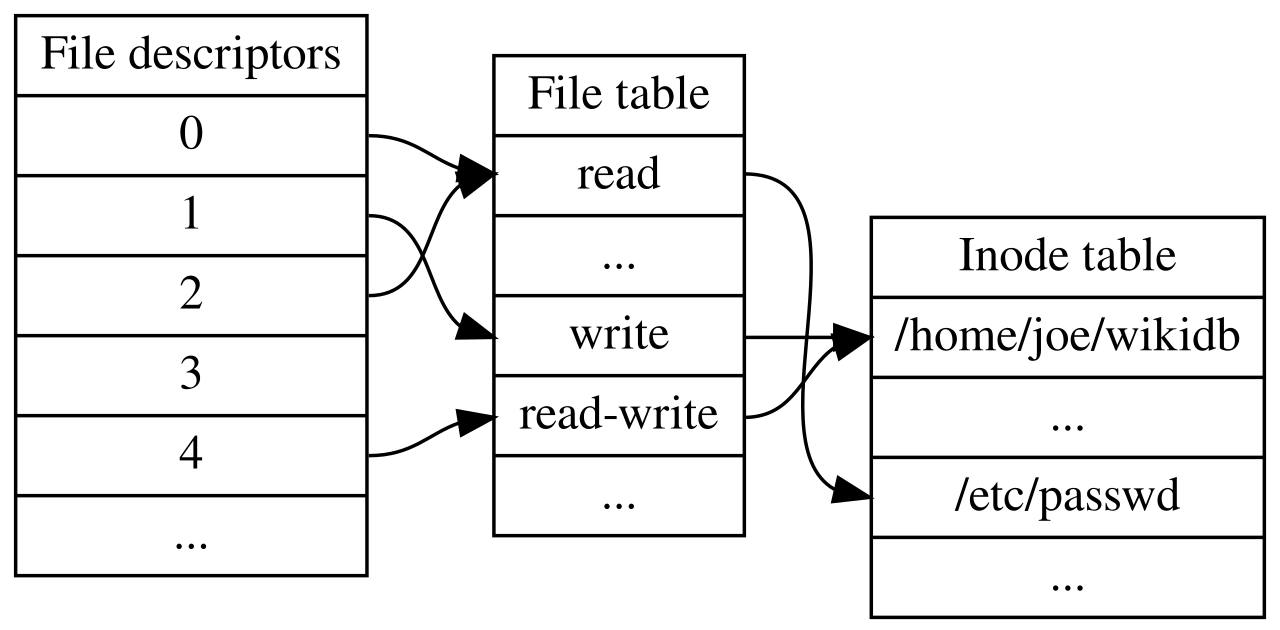
This explains a puzzle you're likely to meet on a server one day. A disk fills up, so you delete a 50 GB log file, and the free space doesn't change. Some program, usually the one writing the log, still has it open, so the blocks stay in use until that program closes the file or exits.
?Why is renaming a huge file instant?
Because renaming only edits a directory row. The inode and the data blocks don't move, so renaming a 50 GB file costs the same as renaming an empty one. (Moving a file to a different disk is another matter: there the data has to be copied, because inode numbers only mean something within one filesystem.)
1.4Big files: extents
Your note fits in one block, so its inode only needs to record one block number. Think about a 1 GB video instead. In 4 KB blocks it occupies about 260,000 of them, and writing all 260,000 numbers into the inode would be a lot of bookkeeping for a file that is probably stored in one unbroken run of blocks anyway.
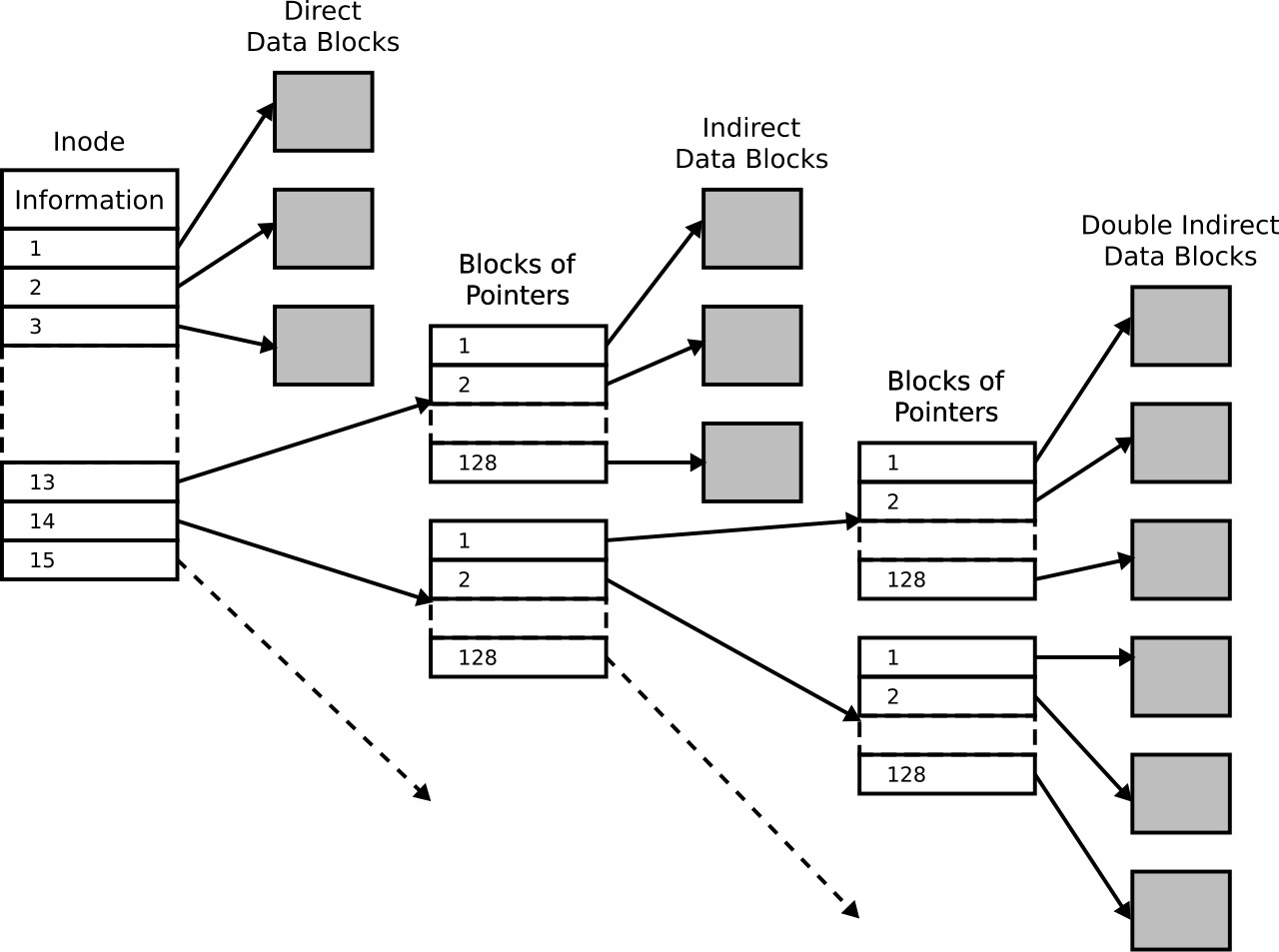
So modern filesystems describe where a file lives as extents. An extent is a starting block and a length, such as "blocks 900 to 1400". If the video was written into one stretch of free space, its inode needs a single extent, however large the file is.
That only works while there are long stretches of free space to write into. On a disk that's been in use for years, free space gets broken up into small gaps between other files, and a file written then has to be split across many of them. It ends up described by hundreds or thousands of short extents. This is fragmentation, and it's why a file that has been rewritten and extended for months can become slower to read: each extent can mean a separate request to the disk.
At this point we know how the kernel gets from a name to block numbers. The next question is how long it takes to fetch those blocks, and the answer explains most of the rest of the chapter.
02Reading through memory
2.1How slow is the disk?
Reading a small 4 KB piece from a random place in a file on a fast laptop SSD takes about 45 microseconds. On its own that sounds like nothing. But it adds up fast: a program that reads a thousand small pieces of a file, one after another, spends 45 milliseconds just waiting, and every file it opens costs a few of those reads already, one for each directory and inode on the path.
Reading the same 4 KB from main memory takes about half a microsecond, close to a hundred times faster. Most of that half microsecond isn't even the copy. It's the fixed cost of asking the kernel for anything at all, which chapter 07 measured at about 350 nanoseconds.
With a gap that large, an obvious idea suggests itself. The first time a piece of a file is read, keep a copy of it in memory. If anyone asks for it again, hand over the copy and skip the disk.
2.2The page cache
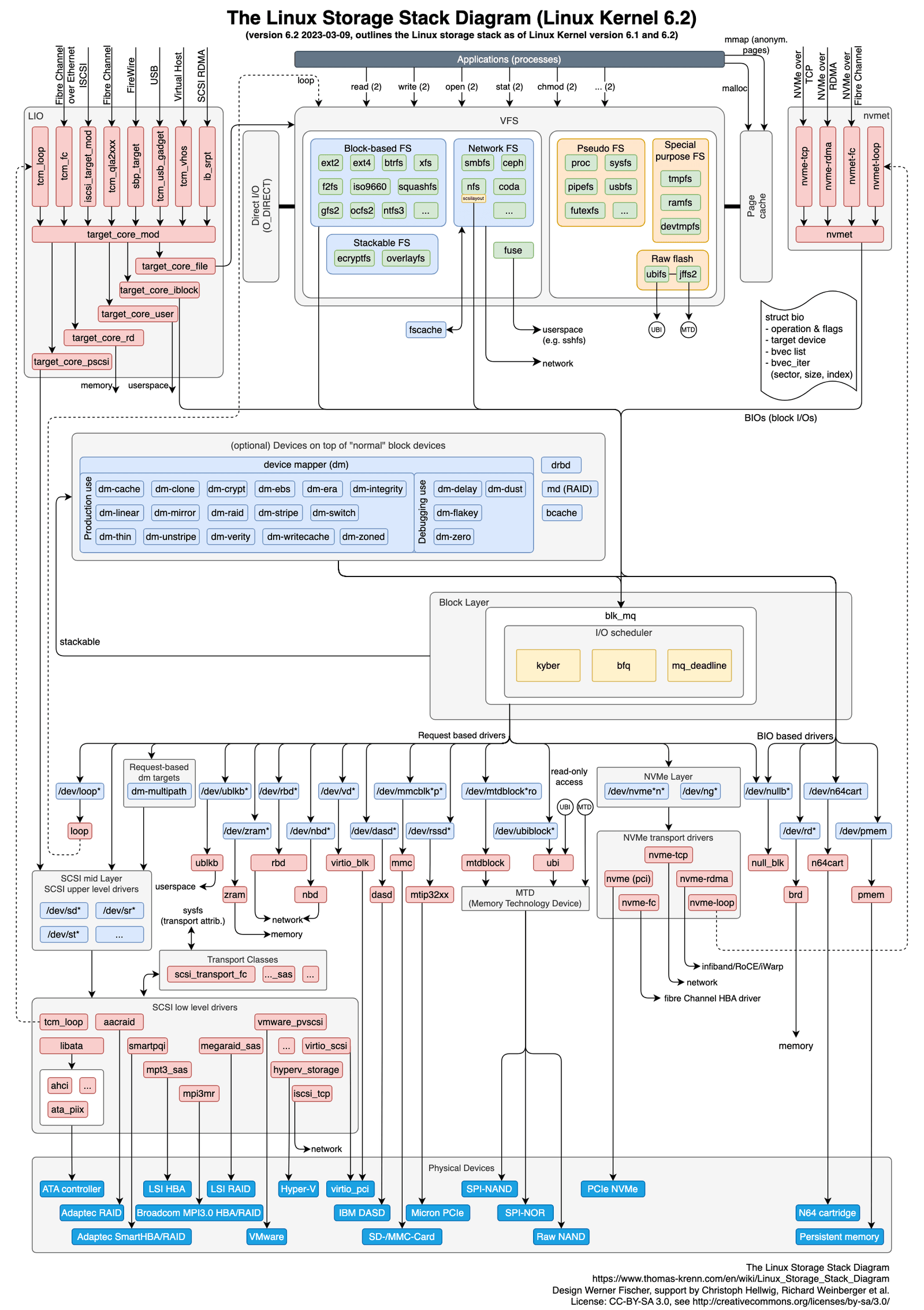
That's what the kernel does. Memory is managed in pages, fixed chunks of 4 KB or 16 KB depending on the machine (chapter 04 explains why). The kernel's collection of pages holding copies of file data is called the page cache.
Each cached page is labelled with where it came from: which file, by inode number, and how far into the file, as an offset in bytes. So when a program calls read() asking for bytes 8,192 to 12,287 of inode 12, the kernel can look up "inode 12, offset 8,192" and see whether that page is already in memory. If it is, that's a hit. If not, it's a miss, and the data has to come from the disk.
On a miss, the request goes through one more part of the kernel on its way down. The block layer collects requests for a storage device into a queue, and when two requests are for neighbouring blocks it merges them, so the device sees fewer and larger requests. Here is one read of your note, followed from start to finish, and then read a second time:
read() for the first 4 KB of notes.txt. The kernel looks in the page cache for inode 12, offset 0. Other files' pages are already there, but not this one.After a miss, the page stays in the cache. The next read of the same data is a hit, so a file you use often is served from memory nearly all the time, and the disk is only touched the first time.
A program reads the same 4 KB of a file twice in a row, and the first read had to go to the SSD. Roughly how long does the second read take?
2.3What the cache does to a real machine
The page cache uses whatever memory programs aren't using, and gives it back the moment a program needs more. Two everyday observations follow directly from that.
?Why is a database slow for a while after a restart?
Because a reboot empties the page cache. Until the data the database uses most, its working set, has been read from the disk once, nearly every read is a miss and pays the 45 µs. A database whose working set is many gigabytes can take tens of minutes to warm up, and then gets fast again without anything having changed.
?Why does a busy server show almost no free memory?
Because the kernel would be wasting memory if it left any of it empty. Unused memory gets filled with cached file pages, and those pages are handed back as soon as a program asks for memory. So on a healthy server the "free" figure is close to zero by design. The number that tells you how much memory programs could still get is "available" (shown by free on Linux), which counts the cache that can be given back.
Reading through memory is a straightforward win. Writes go through the same cache, and that's where the trouble starts.
03Writing through memory
3.1Dirty pages and writeback
When your notes app saves, it calls write(). If the kernel sent the bytes to the disk then and there and waited for it to finish, every save would take tens of microseconds at best, and a program writing a thousand small pieces would sit waiting for every one.
So the kernel does for writes what it does for reads. It copies your bytes into a page in the page cache and marks that page dirty, meaning it has changed in memory and the copy on the disk is now out of date. Then write() returns at once. Your app never waits for the device, which is why saving feels instant.
The dirty page still has to reach the disk eventually. The kernel does that in the background, a little later, and marks the page clean again; this is called writeback. It happens on a timer, or sooner if the kernel needs the memory for something else. On Linux, a dirty page can wait for up to about 30 seconds before it's written back. Waiting has a second benefit too: if your app changes the same page several times in those seconds, only the final version has to be written.
3.2The power cut
That waiting is fast and efficient, as long as the machine stays on.
Your app saves a note and write() returns success. Five seconds later the power fails. Is the note on the disk?
So a successful write can mean two different things, and it's worth having a word for each. After write() returns, your data is visible: any program that reads the file now, including a completely different one, sees the new bytes, because all reads go through the same page cache. Your data is durable only once it has reached the disk and would survive a crash or a power cut. Between the two sits a window of up to about 30 seconds, and write() returning tells you nothing about which side of it you're on.
3.3fsync: waiting for the disk on purpose
For most files the window doesn't matter much. If a browser's cache of a web page is lost in a power cut, the browser downloads it again. But some writes must not be lost: a payment, a database transaction, the new version of a config file. For those, a program needs a way to say "don't come back until this is on the disk".
That's the fsync system call. You pass it a file descriptor, and the kernel starts writeback of that file's dirty pages straight away, then waits until the device reports that it has stored them. When fsync returns, the data is durable. Here's what happens to your note when you add eggs and save it safely:
write() with the new text. The page cache and the disk both still hold the old version.Waiting for the disk costs time, which is why the page cache delays writes in the first place. On a fast laptop SSD, a small write that only goes to the cache takes about 1 microsecond, and the same write followed by fsync takes about 19. Section 7 comes back to what that factor of nineteen means for a busy database.
Not every system pays for fsync on each write. Kafka, which stores streams of messages, leaves its messages in the page cache and lets the kernel's writeback flush them. It gets its safety a different way, by copying each message to several machines, so a power cut on one machine doesn't lose anything.
3.4What the rules promise
Since so much is left to the kernel's timing, it helps to know exactly what a program can rely on. The rules come from POSIX, the standard that Unix-like systems, including Linux and macOS, follow so that programs behave the same on all of them. Here's what it says about files:
| Situation | Promised? | What it means for you |
|---|---|---|
| A read after a write, in the same or another program, sees the new data | Yes | Other programs see your write straight away |
rename() within one filesystem happens all at once | Yes | No reader ever sees a half-finished rename. Section 4 builds on this. |
Data survives a crash without fsync | No | Up to about 30 s of writes can vanish |
| Writes to different files reach the disk in the order you made them | No | After a crash, file B can be newer than file A |
Notice that only one thing on this list is both safe and all-at-once, and that's rename. That turns out to be enough to solve the next problem.
04Replacing a file without losing it
4.1What goes wrong when you overwrite
So far your note has been short and new. Now suppose it's a long, important file, the settings for your app, and you want to save a new version of it. The simplest way is to open the file, which empties it, and write the new contents in.
Even with fsync, there's a moment in the middle where things go badly. Once the file has been emptied and only half the new contents written, the old version is gone and the new one isn't complete. A crash at that moment leaves an empty or half-written settings file, and the old version is gone too. fsync can't help: it makes data durable, and here the data you'd want to keep is the old version you just threw away.
What we need is a way to switch from the old version to the new one in a single step, so that a crash leaves either one or the other. The table above has exactly one operation that works like that.
4.2The rename procedure
rename() is atomic: other programs see it either not done at all or completely done, and never anything in between. So the trick is to write the new version under a different name first, make sure it's safe, and only then rename it over the old one. Spelled out in full, it takes four steps, and each one is there to handle a particular crash:
# 1. write the new contents to a temporary file in the SAME directory
# 2. fsync the temporary file      (its data is now on the disk)
# 3. rename it over the target     (the switch, all at once)
# 4. fsync the directory           (the rename itself is now on the disk)
The temporary file has to be in the same directory, because rename is only atomic within one filesystem, and the same directory is certain to be on the same filesystem as the target. Step 2 is needed so that by the time the new version takes the old name, its contents are on the disk. Without it, a crash just after the rename could leave the name pointing at a file whose data never made it there.
config.tmp in the same directory as config. Anyone reading config still sees the old version.?Why fsync the directory too?
Remember from section 1 that a name is a row in a directory's table, and the directory is itself a file. The rename edited that table, and the edit went into the page cache as a dirty page, exactly like any other write. Until it reaches the disk, a crash can undo the rename. So the last step calls fsync on the directory, to make the switch itself durable.
If you want to see how far this kind of care can go, SQLite's document "Atomic Commit In SQLite" is the best free explanation. It lists which guarantees SQLite relies on and which it assumes it can't have, written by people who had to make one database behave correctly on every operating system and on disks that don't always do what they report.
Your file's contents are now safe. But the filesystem has records of its own, the inodes, directory tables and free map from section 1, and they face the same danger.
05Keeping the filesystem's own records consistent
5.1Three writes for one new file
Go back to the moment your note was first created. The filesystem had three separate things to change on the disk:
- Find a free block and mark it as taken in the free map (block 0 on our tiny disk).
- Fill in a new inode saying the file is 9 bytes long and lives in block 7 (block 1).
- Add a row to the directory table linking
notes.txtto the new inode (block 5).
These are writes to three different blocks, and the disk carries them out one at a time. A power cut can land between any two of them. Let's walk through what each case leaves behind:
- Only the free map was updated. Block 7 is marked as taken, but no inode points at it. Nothing will ever use that block again, and nothing knows it's wasted.
- Only the inode was written. The inode says block 7 belongs to it, but the free map still says block 7 is free. The next new file may be given block 7 too, and then two files share one block and overwrite each other.
- The free map and the inode, but not the directory. The file exists and its block is properly accounted for, but no name leads to it. Your note is lost and its space wasted.
- The directory row, but not the inode. The name
notes.txtpoints at an inode that was never filled in, so opening it reads whatever leftover junk was in that slot.
All four leave the filesystem's records contradicting each other. A filesystem in this state is called inconsistent, and if nobody repairs it, the damage spreads quietly as new files are written over the confusion.
5.2The old fix: check everything
The first solution was simple. After a crash, before letting anyone use the disk again, run a program called fsck ("file system check"). It reads every inode and every directory on the disk, works out which blocks are in use, compares that with the free map, and fixes whatever disagrees. Files that exist but have no name are moved into a directory called lost+found so their owner can rescue them.
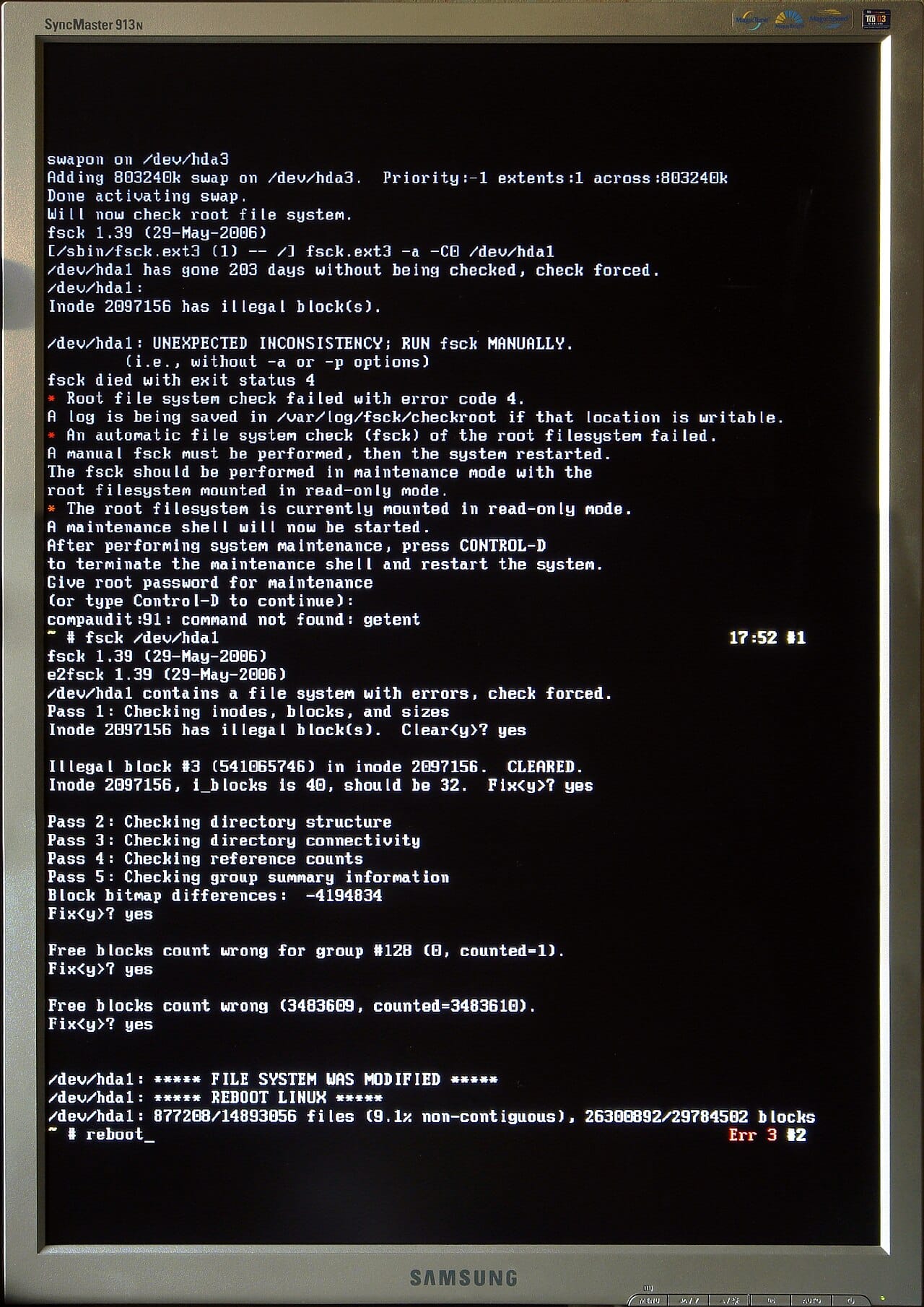
It works, but think about the cost. A crash interrupted a change that touched three blocks, and the repair reads the entire disk. On a large disk that took many minutes, often hours, and the machine was unusable the whole time. As disks grew, this became intolerable, and a better idea was needed.
5.3Writing the plan first
The better idea is one a careful person uses for any job they might be interrupted in the middle of: write down what you're about to do before you start.
The filesystem sets aside an area of the disk called the journal. Before touching the free map, the inode or the directory, it writes a description of all three changes into the journal: here are the new contents of block 0, block 1 and block 5. Then it writes one more small record after them, a marker that says "this plan is complete". It waits for all of that to reach the disk. Only then does it go and make the real changes in blocks 0, 1 and 5. Once those are done, the plan in the journal is no longer needed and its space gets reused.
Here is that whole sequence for your note:
jai directory has no row for notes.txt.Now look at what a crash can leave behind, because there are only two cases:
- The crash happened while the plan was being written. The "plan is complete" marker never reached the disk. On restart the kernel sees an unfinished plan, throws it away, and carries on. None of the real changes had started, so the free map, inode and directory still agree with each other: as far as the disk is concerned, the file was never created.
- The crash happened after the plan was complete. On restart the kernel reads the plan and makes all three changes again, from the start. Some of them may already have been done before the crash, but doing them twice is harmless, because the journal holds the full new contents of each block. Writing the same contents into a block a second time leaves it exactly as it was.
Either way, the filesystem comes back consistent, and the kernel only had to read the end of the journal, which takes seconds. This idea is called journalling, and the same idea, under the name "write-ahead log", is how databases survive crashes too.
5.4What the journal covers, and what it doesn't
The inodes, directory tables and free map have a collective name: metadata, meaning data about your files, as opposed to the bytes inside them. Most filesystems put only metadata through the journal, because writing every byte of every file twice, once into the journal and once into its real place, would halve the speed of every large write.
On ext4, the filesystem most Linux machines use, the default setting is called data=ordered. Metadata goes through the journal, and your file's contents don't. ext4 does make sure a file's contents are written to their blocks before the journal entry that points at them is completed, so after a crash an inode never points at a block full of some other file's old data.
That arrangement protects the filesystem, and it leaves a gap that surprises a lot of people. Suppose you save a new version of your note and the power fails ten seconds later. The new text was still a dirty page in memory waiting for writeback, as in section 3, so it never reached the disk. When the machine restarts, the journal does its job perfectly: every record agrees with every other. Your note, though, has its old contents, or is empty if it was brand new. No error is reported anywhere, because as far as the filesystem is concerned nothing went wrong.
?Why can a file come back empty when the filesystem reports no errors?
Because the journal and fsync protect different things. The journal keeps the filesystem's own records consistent. Your file's contents are only protected by fsync, and by the rename procedure from section 4 when you replace a file. A journalled filesystem does nothing for a program that never calls fsync.
Everything so far has quietly assumed two things: that when the kernel writes a page back, the write succeeds, and that once a page is in the cache, it stays there until it's written. Neither is always true.
06When the layers fail quietly
6.1A write that fails after write() succeeded
Writeback happens in the background, long after write() has returned. So what happens if the disk reports an error during writeback? Your program isn't in the middle of any call. The only chance the kernel gets to tell it is the next time it calls fsync.
In 2018 the Postgres developers found out what Linux did at that point, and it shocked them. The story is now known as fsyncgate:
write() has returned success.?Why can't you just retry a failed fsync?
Because by the time fsync reports the error, the data it was about isn't anywhere any more. The kernel had already dropped the dirty pages, so a retry has nothing left to write, and it reports success because there's nothing pending. Retrying turns a failure you were told about into one you weren't. Later Linux versions report these errors more reliably to every program that has the file open, but the lost pages still can't be recovered, so the conclusion is the same.
Postgres now treats a failed fsync as fatal: it stops immediately, and on restart rebuilds its state from its own log, which it had already made durable. Other databases made the same change.
6.2When other programs push your file out of memory
The page cache lives in memory that programs aren't using, which means it shrinks when they need more. Memory that a program allocates for itself, for its variables and data structures, is called anonymous memory, because unlike a cached page it has no file behind it. When some program starts allocating a lot of anonymous memory, the kernel makes room by dropping cached file pages, starting with the ones used least recently.
That program doesn't have to be yours. Another service on the same machine can grow, push your files out of the cache, and suddenly your reads are misses again. The symptom is reads that took half a microsecond now taking around 45, with nothing in your own code having changed. On Linux, a setting called vm.swappiness controls how readily the kernel drops file pages compared with moving anonymous memory out to swap, an area of the disk used as overflow for memory, and per-container memory limits decide whose pages go first.
?Why does file I/O push a container towards its memory limit?
Containers are limited using a kernel feature called cgroups, which caps how much memory a group of processes can use. The page cache that a container's file reads and writes create is counted against that cap, which surprises many people.
Clean cached pages are mostly harmless, because the kernel can drop them instantly when the container needs memory. Two kinds can't be dropped so easily. Dirty pages have to be written back before they can be dropped, which takes time. Files in tmpfs, a filesystem that keeps its files only in memory and is often used for /tmp in containers, have no disk copy at all, so they can't be dropped. If either fills the container's allowance, the kernel's out-of-memory killer ends the container's processes. The dashboard said 60% reproduces both cases.
6.3Directories with a million names
The last problem comes back to the path walk from section 1. Every time a program opens a file, the kernel searches a directory's table for one name. If the table is a plain list and the directory holds a million files, every open turns into a long search.
ext4 avoids this with an option called dir_index, on by default, which stores big directories as a hashed tree so a name can be found in a few steps. Older filesystems and some network filesystems don't have anything like it. The usual fix is to never let one directory get that big: split files across subdirectories named after the first characters of a hash of their name, like ab/cd/abcdef…. Git stores its objects this way, and so do many caches and object stores.
07What it all costs
7.1What the page cache is worth
Here are the two numbers from section 2, side by side. They were taken on a fast laptop SSD, and the exact values vary between machines, but the shape is the same everywhere: memory is about two orders of magnitude faster than even a fast SSD.
That factor of about 87 is why the kernel fills every bit of otherwise idle memory with file pages. Using that memory for anything else would make every program slower.
7.2What durability costs
The same comparison for writes:
Nineteen times is what a fast laptop SSD gives. On a disk that takes longer to flush, or a filesystem that does more work per flush, the gap is larger.
Now think about a database that has to be durable. Say it handles 10,000 transactions a second and calls fsync once per transaction, as section 3 said it must. Each fsync waits about 18.5 µs, so 10,000 of them add up to 185 ms of every second spent waiting for the disk.
The way out is to notice that one fsync makes everything written so far durable, not just the last write. So the database can collect the transactions that arrive over a short moment, write them all, and call fsync once for the whole group. This is called group commit:
| Transactions per second | target | 10,000 |
| One fsync per transaction | 10,000 × 18,541 ns | 185 ms/s |
| Share of each second spent waiting | 185 ms of every 1,000 | 18.5% |
| Group commit, 50 transactions per fsync | 200 × 18,541 ns | 3.7 ms/s |
| why every database batches its fsyncs | 18.5% → 0.4% | |
08Watching it on a real machine
8.1Seeing the cache
Each question this chapter raised has a tool that answers it on a running machine.
# How much memory is page cache, and how much of it is dirty? (sections 2 and 3)
free -h
grep -E 'Dirty|Writeback|^Cached' /proc/meminfo

# Which pages of this file are in the cache right now? (section 2)
vmtouch -v /path/to/file

# Is this process hitting the cache or going to the disk? (section 6.2)
pidstat -d 1                   # bytes read from and written to the device itself
cat /proc/$PID/io              # rchar: bytes asked for; read_bytes: bytes from the device

# macOS
fs_usage -w -f filesys $PID    # every filesystem call a process makes
sudo purge                     # empty the page cache, then measure again
/proc/$PID/io is the most useful of these. rchar counts the bytes the process asked to read, and read_bytes counts the bytes that had to come from the device. The difference between them is what the page cache saved, so when read_bytes starts climbing towards rchar, your working set is falling out of memory.
8.2Rules that hold up
- Use the rename procedure for any file that matters. Write a temporary file,
fsyncit, rename it over the original,fsyncthe directory. All four steps. - Treat a failed
fsyncas fatal. The data it was about is already gone, so retrying can't help. - Batch your
fsynccalls when you control the write pattern. Paying nineteen times the cost of a write for every write adds up quickly. - Let the page cache do its job. The
O_DIRECTflag makes reads and writes skip the page cache. It's meant for databases that keep their own cache in memory, and anywhere else it throws away the factor of 87. - Count the page cache in container memory limits, especially dirty pages and tmpfs.
8.3What you trade for what
| You get | You pay | When the bill arrives |
|---|---|---|
| Reads about 87× faster from the page cache | The cache shares memory with your programs and counts in container limits | As an out-of-memory kill you didn't expect |
write() returns immediately | Up to 30 s of data held only in memory | On a power cut |
Real durability from fsync | About 19× the cost of each write | As commit latency that can't go below the disk's flush time |
| A journal for the filesystem's records | Your file contents aren't covered | After a crash, as files that are empty or old |
Atomic rename | Only if you also fsync the directory | As a crash that undoes the rename |
8.4Symptom, cause, fix
| Symptom | Likely cause | Fix |
|---|---|---|
| Slow for minutes after a restart, then fine | The page cache started empty | Expected. Warm it up, or wait; compare read_bytes with rchar |
| Reads suddenly ~100× slower, nothing deployed | Your working set was pushed out of the page cache | Find what started using memory; check /proc/$PID/io |
| Deleted a large file, no space freed | A process still has it open | Restart or close that process |
| A file is empty or old after a power cut | No fsync, or no directory fsync after the rename | The four-step rename procedure |
| Files empty after a crash on a "journalled" filesystem | The default journal covers metadata only | fsync your data; don't rely on the journal |
| Container killed for memory while doing file I/O | Dirty pages or tmpfs counted against its limit | Flush sooner, move tmpfs data to disk, or raise the limit |
open is slow in a huge directory | A long search through the directory's table | Split files into subdirectories by hash prefix |
09Summary
- A disk only stores numbered blocks. The filesystem is the part of the kernel that turns names into block numbers.
- A file is its inode, and a name is a row in a directory. That's why one file can have two names, why
rmonly removes a name, and why renaming is instant. - A file's blocks are freed only when no name and no open descriptor points at it, which is why deleting an open log file frees nothing.
- Extents describe big files cheaply. Fragmentation breaks one extent into thousands and makes reads slower.
- The page cache keeps file data in memory, making a repeated read about 87 times faster than going to the SSD.
write()returning means visible, not durable. Dirty pages can wait in memory for up to about 30 seconds.fsyncwaits for the disk, and costs about 19 times as much as the write alone.- Replacing a file safely takes four steps: write a temporary file,
fsyncit, rename it over the original,fsyncthe directory. - The journal protects the filesystem's own records, not your file's contents. A file can come back empty after a crash with no error reported.
- A failed
fsynccan't be retried, because the data it was about has already been dropped. - Group commit makes durability affordable: one
fsyncfor 50 transactions cut the time spent waiting from 18.5% of each second to 0.4%.
10Build this
Find the cache's edge yourself, then fall off it.
- Write a file bigger than your machine's memory. Read 4 KB at random offsets and time each read: most will be misses.
- Now read a small 64 MB part of it over and over until it's all in the cache, and time that.
- The ratio between the two should be around two orders of magnitude.
- Empty the cache between runs (
echo 3 > /proc/sys/vm/drop_cacheson Linux,sudo purgeon macOS) and watch the fast number turn back into the slow one.
Then do the durability half: time 1,000 small writes without fsync, then with an fsync after each, then with one fsync after every 50 writes. The third run is group commit, and you'll have worked out for yourself why databases do it.
11Interview questions
beginnerwrite() returned success. Is your data safe?›
Not necessarily. Success means the kernel has copied your data into the page cache and marked the page dirty, so any later read will see it. It says nothing about the disk. Dirty pages are written back on a timer or when memory is needed, typically within tens of seconds, and a power cut before that loses them.
To make the data durable you call fsync(), which waits until the device reports it stored. That wait costs roughly twenty times the write itself on a fast SSD, which is why programs only do it when they must.
intermediateDescribe the safe way to replace a file's contents.›
Four steps. Write the new contents to a temporary file in the same directory. fsync that file so its data is on the disk. rename it over the target, which POSIX guarantees happens all at once, so no reader ever sees a partial file. Then fsync the directory.
The last step is the one people skip. The rename is a change to the directory's table, and that change sits in the page cache like any other write. Without the final fsync, a crash can undo the rename.
intermediateYour reads suddenly got 100x slower and nothing was deployed. What happened?›
Most likely your working set fell out of the page cache. Something else on the machine started using memory and the kernel dropped your file pages to make room, or your files grew past what the cache can hold.
A read served from the cache takes about half a microsecond, and one that has to go to an SSD takes about 45, so losing the cache looks exactly like this. To confirm it, compare read_bytes with rchar in /proc/$PID/io: if the bytes coming from the device are climbing towards the bytes requested, the cache is no longer doing its job.
deepWhat is fsyncgate and why can't you retry a failed fsync?›
In 2018 the Postgres developers found that when background writeback failed on Linux, the kernel reported the error once, to the next fsync call, and marked the failed pages clean. The data was no longer in memory and had never reached the disk. A second fsync returned success, because nothing was left pending.
So retrying turns a failure you were told about into one you weren't. Later kernels report the error more reliably, but the pages are still gone. Postgres now stops on a failed fsync and recovers from its own durable log, which is the only safe response.
deepYour database does 10,000 commits per second and fsync costs about 18.5 µs. Do the arithmetic.›
Ten thousand fsync calls at 18.5 µs each is 185 ms of every second spent waiting for the disk, about 18.5% of the time, before any real work.
Group commit fixes it. Collect the transactions that arrive within a millisecond or so, write them all, and fsync once for the group, since one fsync makes everything written so far durable. At 50 transactions per flush that's 200 calls a second instead of 10,000, and the waiting drops to about 0.4%. The price is a little extra latency per commit, and commit latency can never drop below the disk's flush time.
12Go deeper
You deleted a large file and no space was freed. Why?›
A process still has it open. The name is gone, but an open file descriptor still points at the inode, so its blocks stay in use until that process closes the file or exits.
ext4 with its default data=ordered setting came back cleanly after a crash. Are your file contents intact?›
Not necessarily. The default journal covers metadata only, so the filesystem's own records are consistent, but contents that were still dirty pages in memory never reached the disk. A file can come back empty or with its old contents.
Roughly how much faster is a read from the page cache than one from an SSD?›
Around 87 times: about half a microsecond from memory against about 45 microseconds from a fast SSD, for a 4 KB random read.
Should application code use O_DIRECT to avoid keeping data in memory twice?›
Almost never. O_DIRECT skips the page cache, which only makes sense for software that keeps its own cache, like a database. Anywhere else you lose the page cache's speed and gain nothing.
Files and directories, how a simple filesystem is laid out, and crash consistency with fsck and journalling, built up one step at a time. Free online at ostep.org.
The clearest write-up of fsyncgate, including why the kernel behaves that way and why it was hard to change.
Which filesystem guarantees are real, which are assumed, and how to build durability without most of them.
Wisconsin's study finding crash-consistency bugs in almost every application they tested, including several databases.
Shows and controls which pages of a file are in the page cache, so you can watch the cache instead of guessing about it.
13Related chapters
The ~350 ns every read() and write() pays before the page cache is even
consulted. Chapter 07.
What happens below the block layer, and why fsync costs what it does.
Chapter 09.
Pages, reclaiming memory, and mmap: the machinery the page cache is built
from. Chapter 04.
cgroup memory limits, and why the page cache counts against them. Chapter 11.