Meera is at her desk in Bengaluru with a design file open, the checkout screen for a shopping app. About a thousand kilometres away, Arjun has the same file open on his laptop on the Deccan Queen, the morning train from Pune to Mumbai. Meera clicks the grey Pay button and makes it green. A moment later, on Arjun's screen, the button turns green, and a small labelled arrow with Meera's name on it hovers next to it. Arjun double-clicks the button and changes its label to "Pay ₹499". On Meera's screen, the label changes while she watches.
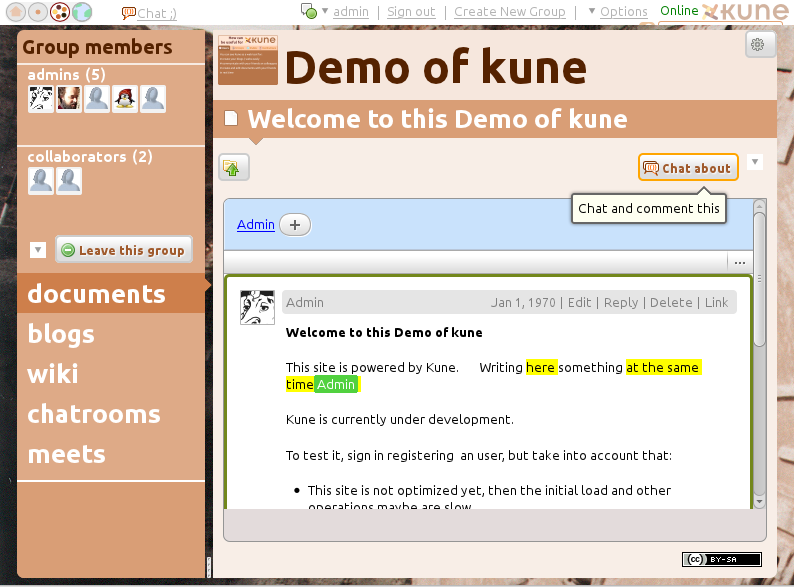
Then the train enters the tunnels of the Bhor Ghat and Arjun's connection drops. He doesn't notice, because nothing on his screen stops working. He moves the Pay button into a different frame, recolours it blue, and adds a new layer. Meera, still online, changes the same button's corner radius and deletes a layer Arjun had been editing. Ten minutes later the train comes out of the hills, Arjun's laptop reconnects, and both screens have to end up showing the same design. Two copies of one file have been edited separately, in conflicting ways, and nobody pressed Save.
In this case study we'll design the system that makes this work, the way an engineer would: start with the most obvious design, find exactly where it breaks, and fix it, one step at a time. The question we'll keep coming back to is this: when two people edit the same file at the same moment, one of them offline, how do both screens end up with the same design, without either person's work silently disappearing? On the way we'll go from boxes on a diagram down to the data structures underneath: a tree of objects with properties, numbers that always have room between them, cycle checks on a tree, and a log of changes that survives a crashed server.
01What we're building, and how big
1.1What it has to do
Figma is a design tool that runs in a web browser. Its core, the part this case study is about, comes down to a short list:
- Open a design file quickly, including very large ones with thousands of layers on dozens of pages.
- Edit it with other people at the same time, each person seeing the others' changes within a fraction of a second.
- Keep working offline, and merge those edits in when the connection comes back.
- Show who else is here: each person's cursor and selection, live.
- Undo and redo your own changes, even while others are editing.
- Never lose work, even when a server crashes.
And the qualities it needs while doing that:
- Instant locally: when Meera drags something, it moves under her mouse at once. Waiting for a server round trip on every drag would make the tool unusable.
- Convergent: once everyone's changes have arrived everywhere, every screen shows the same document. Two people looking at "the same file" and seeing different designs is probably the worst failure here.
- Unsurprising: when two edits do conflict, the result should be something a designer can understand and fix, not a merged mess.
Figma calls simultaneous editing "multiplayer", and we'll use the word too. Notice that this list is almost the opposite of WhatsApp's. WhatsApp moves many small messages between many people, and each message, once sent, never changes. Figma has comparatively few people looking at one shared thing that everyone keeps changing. What's hard is agreeing on what that thing looks like.
1.2How big is it?
Figma's IPO prospectus, filed in July 2025, reported more than 13 million monthly active users in the first quarter of 2025, about two-thirds of them not designers: developers, product managers, writers and others who open design files to look, comment and make small edits.
The number that matters more for this design is how much editing goes on. In October 2022, Figma's engineers wrote that the system logging every change to every file was receiving more than 2.2 billion changes a day. Each open editor sends its changes in small batches about every 33 milliseconds, roughly 30 times a second, so a drag of the Pay button turns into a stream of small updates while it's moving.
2.2 billion changes a day, across all files. What's the average rate per second? And is that the number that makes this system hard?
02Version 1: save the whole file
2.1The obvious design
The most obvious design copies how documents worked for decades. A server holds the file, and opening it downloads a copy. Editing changes your copy. Saving uploads your whole copy, which replaces what's on the server. To see other people's work, you reload.
This is last-write-wins on the whole document: when two versions compete, the one that arrives last replaces the other completely. It fails in the worst way, silently. Meera made a change, saw it saved, and later finds it gone with no warning. And the two edits weren't even in conflict: one touched the colour and the other touched the label. They collided only because the unit of saving was the whole file.
2.2Take turns: locking
The classic fix is a lock. Before editing, you check the file out, and nobody else can edit until you check it back in. Many document systems and code repositories have worked this way, and you've probably met one.
Locking stops the lost update, but think about it on the train. Arjun checks the file out, enters a tunnel, and his laptop goes quiet. Does he still hold the lock? If yes, Meera can't change a pixel until he resurfaces, perhaps hours later. If the lock expires after a minute, Arjun keeps editing a file he no longer owns, and his work has nowhere to go when he reconnects. And even with everyone online, taking turns means only one person can work at a time, which defeats the point of a shared file.
Figma considered a version of this. In its 2016 announcement of multiplayer, the team described rejecting a "baton-passing" model, where one person edits while the others watch, in favour of everyone editing at once.
So whole-file saving loses work, and locking makes people wait. Both go wrong for the same reason: they treat the file as one indivisible thing. To do better, we have to look inside the file and make edits smaller than "the file".
03What a design file is made of
3.1A tree of objects with properties
Look at the checkout screen the way Figma stores it. A file contains pages. A page contains frames, which are rectangles that hold other things (a frame is roughly what a designer would call a screen or an artboard). Inside the Checkout frame are a header, a list of items and the Pay button, and the button is itself a small group: a rectangle and a text layer. Everything is nested inside exactly one parent, all the way up to the document itself. That shape is a tree: every object has one parent, except the root, and any number of children.
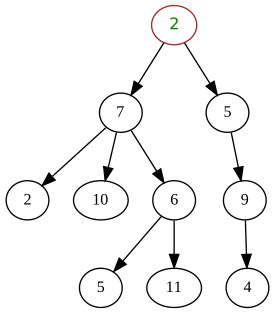
Each object in the tree has an ID and a set of named properties: its fill colour, its x and y position, its width, its corner radius, its text, and so on. Figma's 2019 description of its multiplayer system says you can think of the whole document as a map from object ID to a map from property name to value:
Map<ObjectID, Map<Property, Value>>

"pay-btn" → { fill: "grey", text: "Pay", x: 40, y: 600, radius: 8, ... }
"cart"    → { fill: "white", width: 375, ... }
Even the tree's shape is stored this way. Each object has a property saying who its parent is, and the parent doesn't keep a list of its children. We'll see in section 7 why that choice matters.
3.2Send changes, not files
With the file seen as objects and properties, an edit stops being "here is my whole file" and becomes "set fill of pay-btn to green". Meera's browser sends that one small change to the server, and the server sends it on to everyone else who has the file open. Arjun's edit becomes "set text of pay-btn to Pay ₹499".
This little program puts the two designs side by side. First it saves whole files, as version 1 did. Then it sends only the changed properties, and tries both possible orders of arrival:
# The "Pay" button, as both designers loaded it
start = {"fill": "grey", "text": "Pay", "x": 40}

# Meera recolours it; Arjun, at the same moment, edits its label
meera = {**start, "fill": "green"}
arjun = {**start, "text": "Pay ₹499"}

# 1. Whole-file saves: whichever copy reaches the server last replaces the file
whole_file = arjun                       # Arjun's save happened to land second
print("whole file: ", whole_file)

# 2. Per-property changes: each client sends only what it changed
changes = [("meera", "fill", "green"), ("arjun", "text", "Pay ₹499")]
for order in (changes, changes[::-1]):   # try both arrival orders
    doc = dict(start)
    for who, prop, value in order:
        doc[prop] = value
print("properties: ", doc, "(", " then ".join(w for w, _, _ in order), ")")whole file: {'fill': 'grey', 'text': 'Pay ₹499', 'x': 40}
properties: {'fill': 'green', 'text': 'Pay ₹499', 'x': 40} ( meera then arjun )
properties: {'fill': 'green', 'text': 'Pay ₹499', 'x': 40} ( arjun then meera )The first line is version 1's bug: the button's fill is back to grey, because Arjun's copy never had Meera's green in it. The next two lines keep both edits, and they agree with each other: it didn't matter which change reached the server first. Edits to different properties don't interfere, so their order doesn't matter.
That's most of the battle, because most edits in a shared design file touch different things. But not all of them. What if Meera and Arjun both change the button's fill at the same moment, one to green and one to blue? Now the order of arrival decides the answer, and the two screens could disagree about it.
3.3When are two edits in conflict?
Before choosing how to resolve conflicts, we need to say precisely when two edits conflict. "At the same moment" sounds like a question about clocks, but clocks on two laptops never agree exactly, and Arjun's laptop in a tunnel might be minutes out. A more useful question is this one: when Arjun made his change, had he already seen Meera's?
If he had, his edit came after hers in a meaningful sense, and it should win: he looked at green and chose blue. If he hadn't, neither edit knew about the other. Two edits where neither person had seen the other's are called concurrent. Concurrent edits to the same property are the real conflicts, and no amount of clock precision makes one of them "right"; the system has to pick a rule.
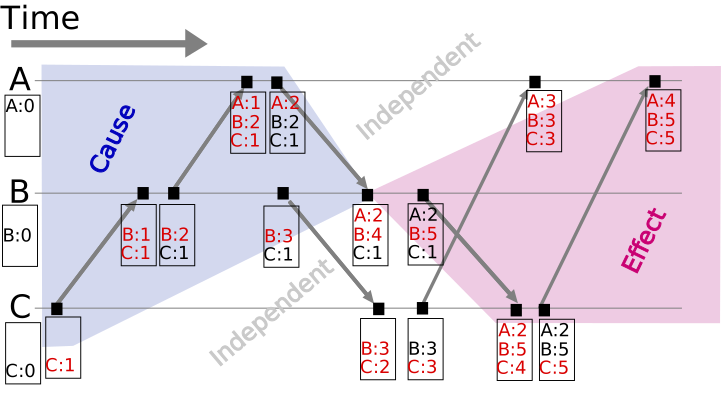
Chapter 26 covers how distributed systems track "who had seen what" with logical clocks like these. For the train, the picture is simple. Everything Arjun does in the tunnel is concurrent with everything Meera does in the same ten minutes, because neither can hear from the other. When he reconnects, some of those edits will collide.
So we need a rule for concurrent edits that every screen applies the same way, so they all end up identical. There are two well-known families of such rules, and Figma took ideas from one while rejecting the other.
04Two families of answers
4.1Operational transformation
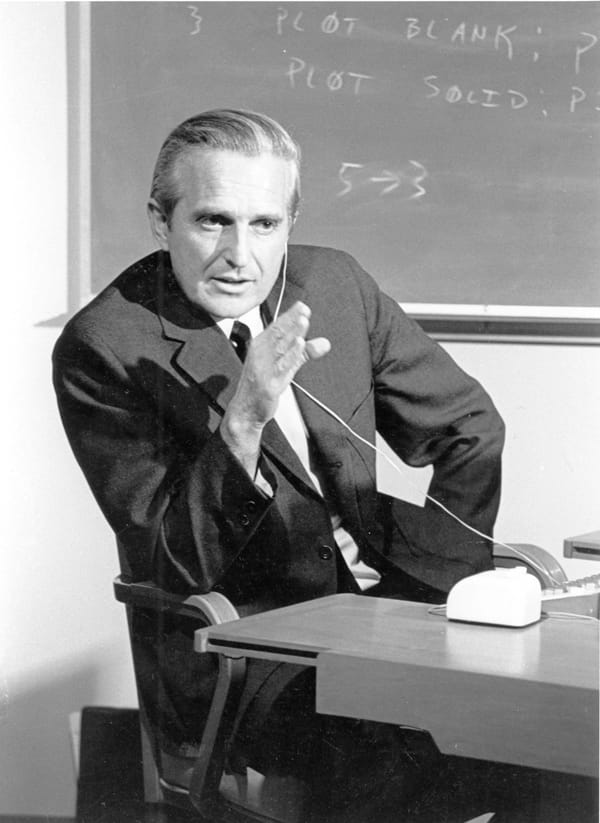
People have wanted to edit together for a long time. In December 1968, Douglas Engelbart's team at the Stanford Research Institute gave a demonstration, later nicknamed "the mother of all demos", in which two people in different cities worked in the same document on screen, each with a cursor and a video link. Figma's 2019 write-up opens with this demo.
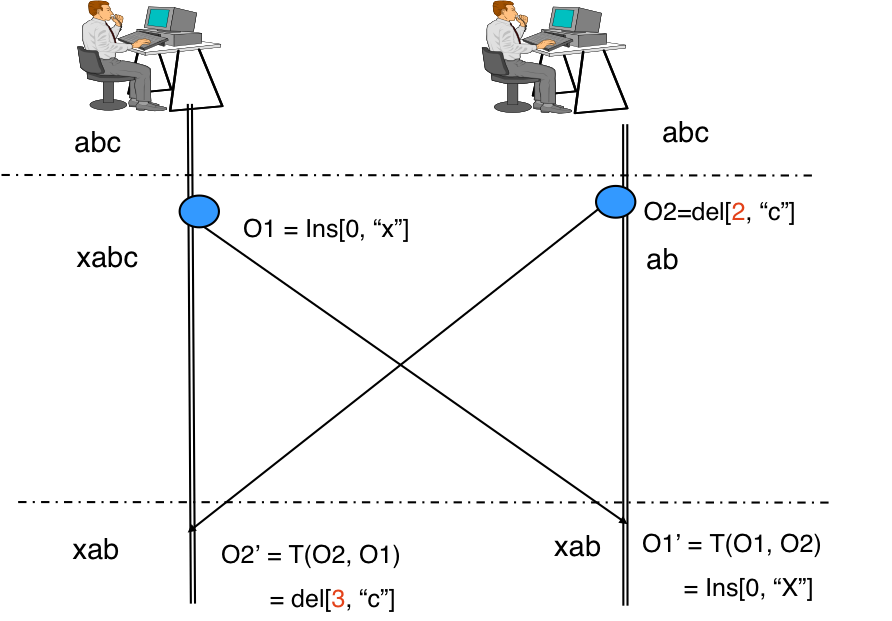
The first family of rules came out of text editing. Imagine a shared document containing abc. One user inserts x at the start, position 0. At the same moment, another deletes the c at position 2. Each applies their own edit at once and sends it to the other. The first user now has xabc and receives "delete position 2", which would delete the b. Applying the other person's edit as written gives the wrong answer, because the first user's own insert has shifted everything after it by one.
One fix is to adjust each incoming edit for the concurrent edits that have already been applied locally. Here, "delete position 2" arrives after a local insert at position 0, so it becomes "delete position 3". That adjustment is called operational transformation, or OT. A transformation function takes two concurrent operations and rewrites one of them so that it still means what its author intended after the other has been applied.
OT's practical form came from the Jupiter system, built at Xerox PARC and published by Nichols, Curtis, Dixon and Lamping in 1995. Earlier algorithms had let every user exchange edits with every other user directly, and getting the transformations right in every possible interleaving turned out to be very hard. Jupiter put a central server in the middle: each client talks only to the server, so any transformation only has to reconcile two parties, one client and the server, never a whole crowd. According to the paper, this let them substantially simplify the algorithm. In September 2010, Google described the new Google Docs as working this way: each editor sends its changes to a server, which passes them on, and each editor transforms incoming changes against its own so they make sense in its copy. That's what made character-by-character co-editing in Docs possible.
OT's cost lies in the transformation functions themselves. You need one for every pair of operation types: insert against insert, insert against delete, delete against delete, and so on. Text has only a few operation types. A design tool has dozens: set a property, create an object, delete one, move it to a new parent, reorder its children, resize a frame whose children resize with it. The number of pairs grows with the square of the number of types, and each pair has to be correct in every interleaving. Researchers found counterexamples in several published transformation functions in the early 2000s, years after they'd been proposed, which tells you how subtle they are.
4.2CRDTs
The second family attacks the problem from the other end. Instead of fixing up operations after the fact, design the data so that concurrent changes can be applied in any order and still give the same result. Then there's nothing to transform.
Take the simplest example, a counter of likes. If each replica keeps its own count and "merging" means adding them, then it doesn't matter in what order the merges happen, or whether one happens twice. A harder example is a single value, like a fill colour, where concurrent writes must be settled by a fixed rule: attach to each write a timestamp and the writer's ID, and on merge keep the write with the larger pair. Every replica that has seen the same writes picks the same winner, whatever order they arrived in. That data type is a last-writer-wins register.
Data types built so that any two replicas that have received the same set of updates are guaranteed to be identical are called conflict-free replicated data types, or CRDTs. The term was formalised by Shapiro, Preguiça, Baquero and Zawirski in 2011, who called the guarantee strong eventual consistency: no coordination needed while editing, and no conflicts left over to resolve afterwards.
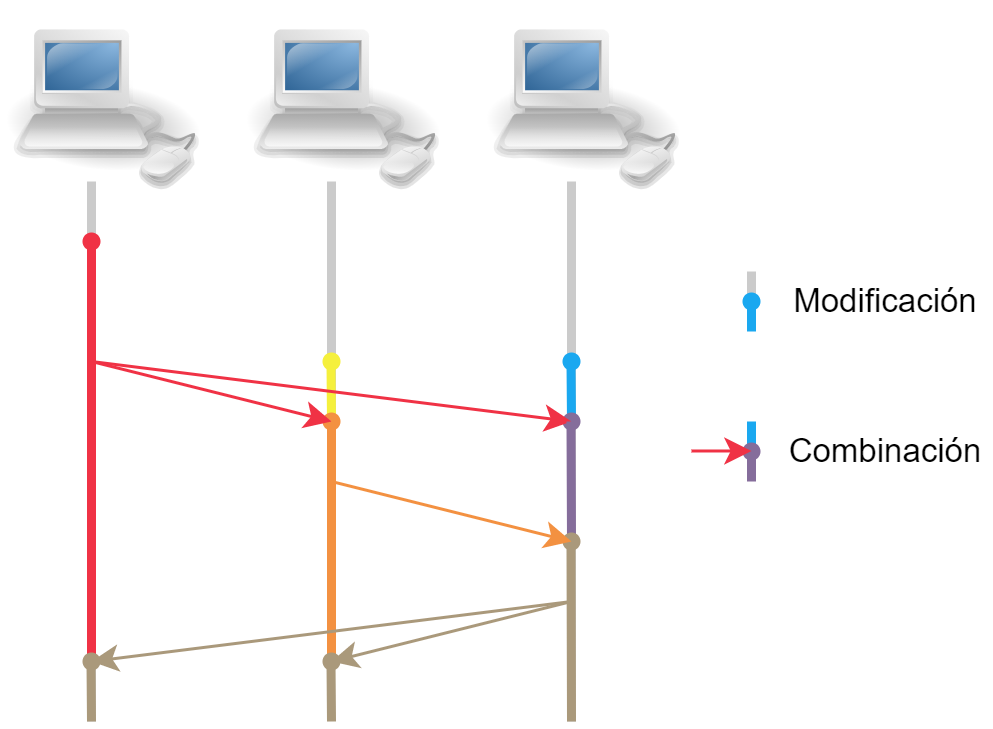
CRDTs shine when there is no central server at all: phones syncing directly over Bluetooth, or apps where each device is the master copy of the user's data. Libraries such as Automerge and Yjs provide CRDTs for whole JSON-like documents and for text, and they don't care how changes travel: a server, a peer-to-peer link, or a USB stick all work.
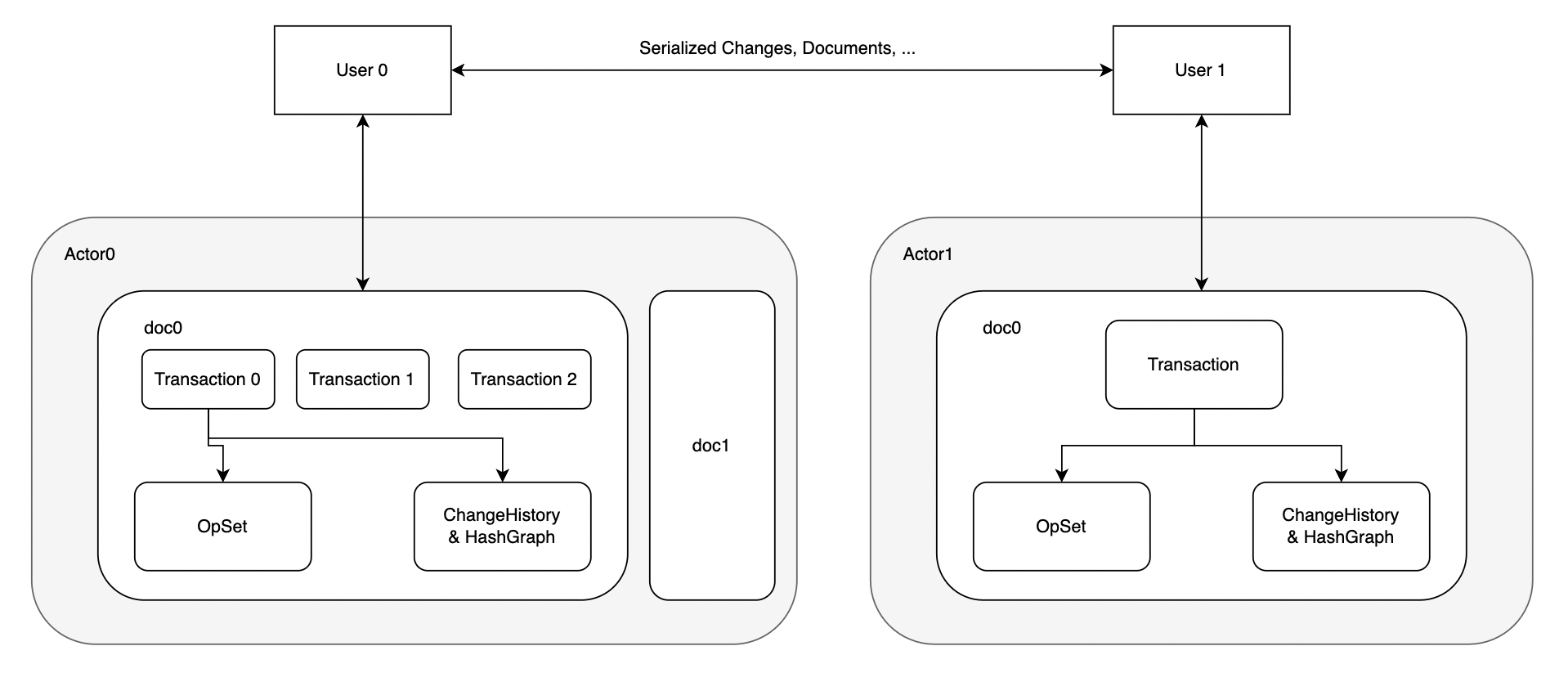
That generality has a price. Since there's no authority to say "this object is gone for good", a CRDT usually keeps a marker for every deleted item, called a tombstone, so that late-arriving edits to it can be recognised. It keeps metadata on every item about who wrote it and what they had seen. And for some operations, moving a layer to a new parent being the important one for us, a correct CRDT turned out to be a research problem of its own, as section 7 shows.
4.3Figma's choice
Figma had something the CRDT papers don't assume: a server that every client talks to anyway, for loading files, for permissions and for storage. If one server already sees every change to a file, it can decide the order of those changes itself, and much of the machinery that CRDTs carry around to work without a central authority becomes unnecessary.
How should concurrent edits to the same file be merged?
- Proven at scale for text (Google Docs)
- Preserves the intent of positional edits like inserts in text
- A transformation for every pair of operation types
- Easy to get subtly wrong as the operation set grows
- Works peer-to-peer and offline by design
- No server needed to resolve conflicts
- Tombstones and per-item metadata
- Some operations, like tree moves, are hard to make correct
- Simple rules a designer can predict
- The server can reject invalid changes and forget deleted data
- Needs the server to resolve conflicts
- Concurrent edits to one property: one simply wins
Figma's 2019 post says the team decided against OT because it was unnecessarily complex for their problem, and built a system inspired by CRDTs. It also says plainly that Figma isn't using true CRDTs: those are designed for decentralised systems, and since Figma's server is the central authority, it can drop the overhead that decentralisation requires. A design file also suits the simpler model better than text does. Text is one long sequence where every insert shifts everything after it; a design is a set of separate objects, and two people rarely edit the same property of the same object at the same moment.
05How Figma's multiplayer works
5.1One server per file decides the order
Here's the shape of the design, from Figma's 2019 description. When Meera opens the checkout file, her browser downloads a copy of it and opens a WebSocket to a multiplayer server, a connection that stays open so that either side can send messages at any moment (chapter 49 explains why long-lived connections beat polling). Arjun's laptop does the same. Each file that's being edited has its own process on the multiplayer servers, and everyone editing that file connects to that one process.
Only the contents of design files go through this system. Comments, users, teams and projects live in an ordinary database and sync another way, which section 13 covers.
5.2Last writer wins, per property
The rule for conflicts is the last-writer-wins register from section 4.2, applied to every property of every object separately. The server keeps the latest value any client has sent for each property of each object. Two changes to different properties never conflict, as the TryIt showed. Two changes to the same property of the same object do, and the document ends up with whichever value reached the server last.
Notice what's missing: timestamps. A CRDT register needs one so that replicas with no shared authority all pick the same winner. Figma doesn't, because, as its post puts it, the server can define the order of events. The "last" in last-writer-wins means last to arrive at the server, which every client then hears about in the same order.
Meera changes the Pay button's text to "Pay now". At the same moment, Arjun changes it to "Pay ₹499". Meera's change reaches the server first. When everything settles, what do the two screens show?
Here's the whole exchange, including what each screen shows at every moment:
5.3Showing your own edit instantly
Frame 4 of that scene hides an important detail. Each client applies its own changes the moment they're made, without waiting for the server, so the tool feels as fast as a desktop application. This is called optimistic local editing: the client assumes its change will be accepted and corrects itself if not.
Trouble lives in the gap between sending a change and hearing back. During that gap, older changes from other people can still arrive. If Arjun's screen applied Meera's green while his blue was still on its way, his button would flicker blue, green, blue as the messages came in. So Figma's clients follow one rule: while a client has a change to some property that the server hasn't acknowledged yet, it ignores incoming changes to that same property. The server will eventually send everyone the final value anyway, and the client's own pending change is always newer from its point of view.
?Why doesn't Meera's screen flicker too?
Meera's change was acknowledged before Arjun's arrived, so when fill=blue comes in, she has nothing pending on that property and applies it. She does see her green replaced by blue, and that's correct: someone else changed the colour after she did. What the rule prevents is the meaningless flicker of seeing your own change briefly undone by an older one.
5.4Creating and deleting objects
Properties are replaced whole, but objects have to come into existence and leave it. Figma makes both explicit actions. Writing a property to an object ID that doesn't exist does nothing; the object has to be created first. Deleting an object removes all of its data from the server.
New objects need IDs, and the obvious place to hand out IDs would be the server. But Arjun can create layers in a tunnel, with no server to ask. So each client gets a unique client ID, and the IDs of the objects it creates include it, like a prefix. Two clients can then never invent the same ID, even when they're both offline. (Figma's post states the requirement, that creation has to work offline; the exact ID format isn't published.)
Deletion has a neat consequence. A CRDT would normally keep a tombstone for every deleted object forever. Figma's server, being the authority, can forget a deleted object completely. If Meera deletes a layer and then presses undo, where does the layer come back from? From Meera's own browser: the deleted object's data is kept in the undo history of the client that deleted it, not on the server. Files that have been edited for years don't fill up with the ghosts of everything ever deleted.
That settles properties and objects. The next question is about the tree's structure, and it starts with something as ordinary as the order of the layers in a frame.
06Keeping layers in order
6.1Why array positions break
The order of children inside a frame matters in a design tool: it decides what's drawn on top of what. An obvious way to store it is an array in the parent, children: [header, items, pay-btn], where position 0 is drawn first.
Now Meera inserts a promo banner at position 1, between the header and the items, while Arjun, concurrently, moves the Pay button from position 2 to position 0. Both edits are written in terms of positions in the array as each of them saw it. Once Meera's insert has been applied, every position after 1 has shifted, so "the thing at position 2" means something different on the server than it did on Arjun's screen. This is exactly the problem that OT's transformation functions solve for text, and we decided not to go down that path.
6.2A number between any two numbers
Figma's answer, described in a 2017 post by co-founder Evan Wallace, removes positions altogether. Each child gets a number, its own position, and the children are drawn in order of those numbers. To put something between two layers, give it a number between theirs; the simplest choice is the average of the two. Nothing else's number changes, so an insert is a change to one property of one object, and it can't disturb anyone else's edit. This is called fractional indexing.
In Figma, every position is a fraction strictly between 0 and 1. A new layer at the very top or bottom gets the average of the end layer's number and 0 or 1, so there's always room at the ends too. And the parent and the position are stored together as one property, so moving a layer to a new frame and setting its place there happen as one atomic change.
?Why not just use ordinary floating-point numbers?
Because they run out. A 64-bit float has about 52 bits of precision, so if you keep inserting at the same spot, halving the gap each time, you hit a point where there's no float left between two neighbours. Designers do keep inserting at the same spot; pasting a stack of layers one at a time above the same header is probably enough.
This program shows it. Arjun keeps inserting a new layer just above the Header, each time between the Header and the layer he added last. First with floats, then with positions stored as digit strings that can grow as long as they need to:
# Layers "Header" at 0.25 and "Footer" at 0.5. Arjun keeps inserting
# a new layer directly above Header, each time between Header and the newest one.

# 1. Positions as 64-bit floats
lo, hi, n = 0.25, 0.5, 0
while True:
    mid = (lo + hi) / 2
    if mid == lo or mid == hi:
        break                          # no float left between the two
    hi, n = mid, n + 1
print(f"floats: ran out after {n} inserts")

# 2. Positions as digit strings: "25" means 0.25, and they can grow
def between(a, b):
    L = max(len(a), len(b))
    x, y = int(a.ljust(L, "0")), int(b.ljust(L, "0"))
    if y - x < 2:                      # no room at this length: add a digit
        L, x, y = L + 1, x * 10, y * 10
    return str((x + y) // 2).zfill(L).rstrip("0")

lo, hi = "25", "5"
for i in range(1, 201):
    hi = between(lo, hi)
    if i in (1, 2, 3, 10, 53, 200):
print(f"insert {i:3}: {len(hi):2} digits 0.{hi[:28]}{'…' if len(hi) > 28 else ''}")floats: ran out after 52 inserts
insert 1: 2 digits 0.37
insert 2: 2 digits 0.31
insert 3: 2 digits 0.28
insert 10: 4 digits 0.2501
insert 53: 19 digits 0.2500000000000000005
insert 200: 68 digits 0.2500000000000000000000000000…The float version gives up after 52 inserts, one per bit of precision. The string version never runs out: between pads both numbers to the same length, and when they're adjacent at that length, it adds a digit, so there's always room for another midpoint. (It rounds down, so the first insert lands at 0.37 instead of 0.375; any number in the gap will do.) The price is length. In the worst case here the position grows by a digit every three inserts or so, and after 200 inserts at one spot it's 68 digits long.
Figma uses the same idea with two refinements from its 2017 post: positions are arbitrary-precision fractions stored as strings, and the digits are in base 95, using every printable ASCII character instead of just 0 to 9. Each character then carries about six and a half bits instead of about three and a third, so the strings grow about half as fast. Comparing two positions is an ordinary string comparison, which is cheap.
6.3Ties and interleaving
Two things can still go wrong when edits are concurrent. First, Meera and Arjun might both insert a layer between the same two neighbours at the same moment, and both compute the same average. Figma's server spots the duplicate and gives the second one a different position, so no two siblings ever share a number.
Second, if each of them inserts several layers into the same gap, their layers can end up interleaved, Meera's, Arjun's, Meera's, instead of in two tidy groups. Figma's post accepts this: concurrent inserts into exactly the same spot are rare in design files, and if the result looks wrong, the designer can drag the layers into the order they want. For text the same anomaly would be much worse, since interleaving two people's words letter by letter produces gibberish, which is one reason text editors use more careful sequence algorithms.
So now we can reorder layers within a parent. But the parent property can change too, and that's where the tree itself is at risk.
07Moving layers between frames
7.1A move is a change to one property
Remember from section 3.1 that each object stores its parent, and the parent doesn't list its children. So moving the Pay button out of the Checkout frame and into the Cart frame is one property change on the button: its parent (together with its position) goes from Checkout to Cart. The button keeps its ID and all of its other properties.
Deleting the button and creating a copy in the new frame instead would be a disaster with concurrent edits. If Meera recoloured the button while Arjun moved it that way, her change would land on the deleted original and vanish. With the parent as a property, her colour change and his move touch different properties of the same object, and both survive.
7.2Two moves that make a cycle
Parent pointers have one danger that ordinary properties don't. Suppose Meera drags the Cart frame into the Checkout frame. At the same moment, Arjun, in the tunnel, drags the Checkout frame into the Cart frame. Each move is fine on its own. Both together say "Cart's parent is Checkout" and "Checkout's parent is Cart", a loop. Neither frame is connected to the page any more, and anything that walks up the tree from the Pay button goes round in circles forever.
Our server can catch this, because it applies changes one at a time. Before applying a parent change, it walks up from the proposed new parent to the root; if it meets the object being moved on the way, the move would make a cycle, and it rejects it. This program does that check:
# Each layer stores its parent, as in Figma's document
parent = {"Checkout": "Page 1", "Cart": "Page 1", "Pay button": "Checkout"}

def ancestors(node):
    while node in parent:
        node = parent[node]
        yield node

def move(node, new_parent, check=True):
    if check and (new_parent == node or node in ancestors(new_parent)):
        return f"REJECT {node} -> {new_parent}: would make a cycle"
    parent[node] = new_parent
    return f"ok     {node} -> {new_parent}"

# Meera drags Cart into Checkout; Arjun, offline, dragged Checkout into Cart
print(move("Cart", "Checkout"))       # reaches the server first
print(move("Checkout", "Cart"))       # arrives second
print("Pay button's path:", " / ".join(ancestors("Pay button")))

# The same two moves with no check
parent = {"Checkout": "Page 1", "Cart": "Page 1", "Pay button": "Checkout"}
move("Cart", "Checkout", check=False); move("Checkout", "Cart", check=False)
path = []
for a in ancestors("Pay button"):
    path.append(a)
    if len(path) == 6: break
print("without the check:", " / ".join(path), "/ …")ok Cart -> Checkout
REJECT Checkout -> Cart: would make a cycle
Pay button's path: Checkout / Page 1
without the check: Checkout / Cart / Checkout / Cart / Checkout / Cart / …The first move goes through. For the second, the check walks up from Cart, finds Checkout among its ancestors (Cart is now inside Checkout), and refuses. The Pay button's path to the root is intact. Without the check, the path never reaches Page 1; the program had to stop after six steps.
The server's check protects its own copy, but there's a gap on the clients. Arjun's laptop applied his move optimistically, as section 5.3 described. When he reconnects, it receives Meera's earlier move from the server, and for a moment, in Arjun's copy, both moves are in effect and the loop exists, until the server's rejection of his own move arrives. Figma's clients handle that moment like this:
Figma's post describes this as a deliberate trade: the objects disappear briefly, which is rare and temporary, in exchange for a very simple rule that never shows a broken tree.
7.3Moving without a server
How hard is this without a central server to say no? That's the problem Martin Kleppmann and colleagues tackled in "A highly-available move operation for replicated trees", published in IEEE Transactions on Parallel and Distributed Systems in 2021. They showed that Google Drive and Dropbox both misbehaved when the same folders were moved concurrently on different devices, and then designed a CRDT for tree moves.
Their algorithm gives every move a timestamp and keeps a log of moves in timestamp order on every replica. When a move arrives that's older than some already applied, the replica undoes the newer moves, applies the older one, and redoes the newer ones on top, so every replica ends up applying the same moves in the same order. A move that would make a node its own ancestor at that point in the order is skipped. Their proof that this keeps the tree valid and makes replicas converge is machine-checked in the Isabelle proof assistant.
How do we keep the tree a tree under concurrent moves?
- A few lines of logic
- One authoritative answer
- Clients can briefly see a cycle and must hide it
- Needs the server to decide
- Works with no server, fully offline
- Formally proven to converge
- Every replica keeps a log of moves and replays it
- More complex to build and to debug
Both reach the same kind of answer: when two moves conflict, one of them doesn't happen. What differs is who decides. Figma already has a server ordering every change, so asking it costs nothing extra; the move CRDT earns its complexity only in systems that have no such authority, like a file system syncing between devices that rarely talk to the same server at the same time.
We've now been relying on the server to order things for four sections. Arjun, meanwhile, has been in a tunnel with no server at all.
08Arjun goes into a tunnel
8.1Editing with no connection
When Arjun's connection drops, his laptop keeps the copy of the file it already has, and he keeps editing it. Each edit is applied locally and queued, exactly as it would be if the server were merely slow. The objects he creates get IDs containing his client ID (section 5.4), so they can't clash with anything Meera creates. Figma's 2019 post says users can stay offline for an arbitrary amount of time and continue editing.
Over ten minutes in the Bhor Ghat, Arjun's queue fills up: move the Pay button into the Cart frame, set its fill to blue, create a new "Apply coupon" text layer, and change the text of a "Delivery" label that, unknown to him, Meera has just deleted.
8.2Reconnecting
When the train comes out of the hills, Figma's client does something very simple. It downloads a fresh copy of the document from the server, reapplies its offline edits on top of that copy, and opens a new WebSocket to send those edits up. The 2019 post notes that connecting and reconnecting are the simple parts of the system; the complexity is all in the edits made while connected.

Walk through Arjun's queue against the fresh copy, which now includes everything Meera did in the meantime:
- The new "Apply coupon" layer has an ID nobody else could have used. It's created on the server like any other object and appears on Meera's screen.
- Moving the Pay button into Cart is a parent change. If Meera didn't move the button, the move just happens. If it would create a cycle given Meera's moves, the server rejects it, as in section 7.2.
- Setting the fill to blue is a property change. If Meera didn't touch the fill, blue appears. If she did, the two writes conflict, and Arjun's wins because it reaches the server later.
- Editing the deleted "Delivery" label does nothing. Meera's delete removed the object from the server, and writing a property to an ID that doesn't exist can't bring it back (section 5.4). Arjun's change is dropped. If Meera wants the label back, maybe because Arjun's text was better, her undo still has it.
That last case shows the one way an offline editor can lose work in this design: by editing something someone else deleted. Letting the edit resurrect the object instead would make deletions unreliable for everyone else, and a designer who deleted a layer would see it come back for no visible reason.
8.3What 'last' means
Arjun sets the button's fill to blue at 10:02, while offline. Meera, online, sets it to red at 10:05. Arjun reconnects at 10:10. What colour is the button afterwards?
Arjun's blue button is probably the moment Meera reaches for undo. But undo in a shared file turns out to be its own small puzzle.
09Undo when you aren't alone
9.1Whose undo is it?
In a single-user editor, undo is a stack of the document's previous states, and pressing Cmd+Z pops the last one. In a shared file that would be a disaster: if Meera presses undo just after Arjun changes a label, a document-wide undo would revert Arjun's work.
So each person's undo history holds only their own changes. Meera's history has an entry for "fill: grey → green" on the Pay button. Pressing undo sends an ordinary property change, fill = grey, through the same path as any other edit. Undo is local to each user, and as far as the server is concerned, it's just another write.
9.2Redo without stepping on others
The subtle part is redo. Suppose Meera made the button green, then pressed undo (grey), and meanwhile Arjun changed the fill to blue. Now Meera presses redo. A naive redo replays her original change, fill = green, and silently wipes out Arjun's blue, which he set after her undo.
Figma's rule, from the 2019 post, is that an undo modifies the redo history at the moment of the undo, and a redo modifies the undo history at the moment of the redo. When Meera undoes, her client records what the property holds right then in the redo entry; when she redoes, it records the current value in the undo entry. The guiding principle the team wrote down is easy to remember: if you undo a lot, copy something, and redo back to the present, the document should not change. Undo and redo are for looking back in time; they shouldn't become a way to overwrite other people.
Deleted objects fit here too. When Meera deletes a layer, its full data goes into her undo history, and that copy is what lets section 5.4's server forget it.
10Cursors and presence
10.1Data that doesn't belong in the file
The labelled arrows on the canvas, Meera's cursor on Arjun's screen and his on hers, are some of the most visible parts of Figma's multiplayer, and the 2016 launch post called them out: everyone sees the cursors and selections of the people in the file. But they're a different kind of data from a fill colour, and treating them the same way would be wasteful.
A cursor position is worthless a second later. It changes dozens of times a second while the mouse moves. Nobody needs its history, so it doesn't belong in the document, the undo stack or the saved file. If a cursor update is lost, the next one, a few milliseconds later, replaces it. And when Arjun's train enters a tunnel, his cursor should disappear from Meera's screen, not freeze where it was. This kind of data, who is here and what they're pointing at, is called presence.
Figma hasn't published how its presence messages work. A design that matches these properties, though maybe not exactly Figma's, keeps presence alongside the document's server but outside the document: each client sends its cursor and selection over the same connection, throttled to a few dozen updates a second; the server keeps only the latest value per person in memory and passes it on; nothing is journaled or saved; and a person whose updates stop for a while is removed.
The open-source Yjs library does exactly this with what it calls awareness. Each client keeps a small JSON state per remote user (cursor, name, colour), broadcasts its own at a regular interval even when nothing has changed, and marks a remote user offline if it hears nothing from them for 30 seconds.
That's the protocol. Now we can look at the machines that run it, starting with the one that holds the checkout file in memory.
11The multiplayer server
11.1One file per worker, then one process per file
We've been talking about "the server" for a file as if it were one thing. In Figma's design, each open file lives on exactly one worker on one machine, and all its editors connect there. That's what lets the server be the authority: there's one copy, in one place, applying changes one at a time.
The original multiplayer server was written in TypeScript, running on Node.js. In May 2018, Evan Wallace described why it had to change. Node.js runs JavaScript on a single thread, so a worker could only do one thing at a time, and each worker was responsible for many files. A slow operation on one big file, such as encoding the whole document to send it to someone opening it, blocked everyone else on that worker. Users on unrelated files couldn't sync until it finished. Garbage collection pauses added to the problem. A stopgap was to move known-heavy files by hand onto a separate pool of "heavy" workers.
One process per file would isolate them, but a Node.js process per document cost too much memory. So the team rewrote the performance-sensitive core in Rust, a compiled language with no garbage collector, and kept Node.js for the networking. Each document now gets its own Rust child process, which talks to the Node.js host through its standard input and output. The 2018 post reports that serialization became more than 10 times faster and that editing performance improved by an order of magnitude.
The rewrite lasted. In 2022 Figma's engineers wrote that the multiplayer service is written in Rust, and that its type system helped them make sure every update goes through the journal described in the next section.
11.2Big files, one page at a time
Opening a file means sending the client a copy, and by 2024 some files had grown enormous: in May 2024, Figma reported that files were growing by 18% a year, and that many users treated one file as a whole project with dozens of pages, most of which they never visited in a session. Sending all of them was slow and filled browser memory.
So Figma rolled out dynamic page loading, to groups of users over six months: it loads only the page you open, and fetches others when you go to them. But pages aren't independent. An instance of a component, say a copy of the standard Pay button placed on the checkout page, is drawn from its main component, which may live on a separate "Components" page. To draw the instance, the client needs that component too; that's a read dependency. Editing works the other way round: change the main Pay button, and every instance on every page must update, so editing a component needs its instances; that's a write dependency.
The multiplayer server keeps an in-memory graph of these dependencies for each file, called QueryGraph, and uses it to decide which objects each client gets and which edits each client must be sent. The May 2024 post reports that the slowest 5% of loads became 33% faster, clients held 70% fewer objects in memory, and 33% fewer users hit out-of-memory errors. The server side had to get faster too, because it now has to decode the file and build the graph before answering; decoding in parallel cut that time by over 40% for the largest files, which could take over five seconds to decode one piece at a time.
The multiplayer process holds the file in memory and applies every change. Which raises the question every in-memory system has to answer: what happens to the checkout file if that process crashes?
12Not losing work
12.1Checkpoints
The obvious approach is to save the in-memory document to storage every so often. Figma's multiplayer did this: every 30 to 60 seconds, it encoded the whole file into a compact binary format, compressed it, and uploaded it to Amazon S3. A saved copy of the whole state like this is called a checkpoint.
Checkpoints are simple, and loading a file is just downloading the latest one. But Figma's October 2022 post spells out the hole: if a multiplayer process crashed, up to 60 seconds of everyone's work on that file was gone. Deploys hurt too, because restarting the servers closed every open file at once, and they all wrote checkpoints in the same moment, a burst of load on storage and the database.
Saving the whole file more often doesn't scale: a big file is many megabytes, and Meera's change is a few bytes. What we want is to save each small change quickly, and the whole file only occasionally.
12.2The journal
That's a write-ahead log, the same idea a database uses (chapter 18): record each change durably in an append-only log as it happens, and rebuild the full state from the last checkpoint plus the log entries after it. Figma's version, built during 2022, is called the journal.
Every change to a file gets a sequence number, counting up from the last one. The multiplayer process writes changes to the journal in batches, roughly every half a second, each batch labelled with its first and last sequence number. Each checkpoint records the sequence number it includes. Figma chose Amazon DynamoDB as the journal's store, because the write volume needed a database that scales horizontally, which a single Postgres instance doesn't.
The goal was less than a second of lost work, down from up to 60. By the October 2022 post, 95% of edits to a Figma file were saved to the journal within about 600 milliseconds, and the journal was receiving more than 2.2 billion changes a day. Deploys changed too: the server now closes connections and waits for pending changes to reach the journal, which takes under a second at the 99th percentile, so there's no longer a burst of checkpoints.
Checkpoints didn't go away; they keep recovery short, and they're what gets copied to other regions. Figma's target was to replicate file data across regions within 30 minutes. Using DynamoDB's built-in cross-region tables would have cost about six times as much, so instead the system makes sure journaled changes are checkpointed within that window, and S3 replicates the checkpoints.
?How do you know a log replays into exactly the right file?
You check. Before switching over, Figma ran the journal in the background and compared: take one checkpoint, replay the journal entries up to the next checkpoint, and confirm the result is byte-for-byte identical to that next checkpoint. The post reports about 400,000 consecutive successful comparisons before launch.
12.3Only one writer per file
The whole design rests on one process owning each file. What if, during a deploy or a network glitch, two processes both believe they own the checkout file? Each would accept edits and write them to the journal with its own sequence numbers, and the file would split into two histories. This is called split brain.
Figma's answer is a lock per file in a separate DynamoDB table, holding the file's key and a random ID for the process that owns it. Every journal write is conditional: it succeeds only if the lock still names the writing process. A process that has lost ownership without knowing it finds that its writes fail, and stops. Journal reads are strongly consistent, so a new owner always sees everything the old one wrote. Chapter 27 covers this pattern, a lease or fencing check on every write, in general.
The document is safe now. But a design file lives inside a lot of other data: who owns it, which project it's in, who has commented on it.
13Everything outside the canvas
13.1LiveGraph: live data from Postgres
Comments, the list of files in a project, team membership and permissions (probably most of what you'd call "the rest of Figma") live in Postgres, the ordinary relational database (chapter 21). They change less often than a design's properties, but they need to be live too. When Arjun adds a comment on the Pay button, it should appear on Meera's screen without a refresh.
Polling the database from every open browser would multiply its load, and every product engineer would have to pick a polling interval for every query. Figma built a system called LiveGraph instead, described in October 2021. The frontend subscribes to queries, written in a GraphQL-like syntax ("this file's comments, with their authors"), and gets updates pushed when the answer changes. LiveGraph learns about changes by reading Postgres's replication stream, the database's own log of every committed write, distributed to LiveGraph servers through Kafka. In 2021 each LiveGraph server processed the whole stream, on the order of 10,000 writes a second, and delivered updates within milliseconds.
That design assumed one database with one ordered stream of changes. It didn't last.
13.2Splitting the database
Figma's databases team wrote in April 2023 that in 2020 almost all of Figma's metadata was in a single Postgres database on the largest instance Amazon offered, that database traffic was growing about threefold a year, and that the database was reaching 65% CPU at peak. Their first move was vertical partitioning: moving groups of related tables, such as files and organisations, onto their own databases. Each move aimed for under a minute of disruption and in practice caused about 30 seconds of partial impact; the last one, in October 2022, moved 50 tables at once. By the end of 2022 there were about a dozen vertically partitioned databases.
That ran out too. Some single tables had grown to several terabytes and billions of rows, and a table can't be split vertically any further. In March 2024, the team described horizontal sharding: splitting the rows of one table across many databases by a key such as the user ID, file ID or organisation ID. Work started in late 2022, and the first sharded table went live in September 2023, about nine months later.
When one Postgres isn't enough, what next?
- Sharding handled by the database
- Less custom infrastructure
- A risky migration of everything at once
- New failure modes the team hadn't operated
- Keeps a database the team knows deeply
- Can be rolled out table by table
- Years of engineering
- Some queries, like joins across shards, no longer work
Figma's team evaluated CockroachDB, TiDB, Spanner and Vitess, and chose to shard Postgres themselves, behind a query proxy, so the migration could proceed table by table with a way back at each step. A trick in their design was to separate logical shards from physical ones: a table can first be split into, say, four logical shards that still live on two physical databases, so the application can be tested against sharded behaviour before any data moves.
Sharding broke LiveGraph's assumption of one ordered stream of changes. In May 2024, Figma described rebuilding it, after client sessions had tripled since 2021 and view requests had grown fivefold in a year. The new design starts from the observation that most queries' results rarely change. So it caches query results, and instead of computing how each database write changes each result, it works out which cached queries a write might affect and throws those away, to be refetched on next read. The invalidator that does this is sharded the same way as the databases and tails each one's replication stream; it's the only part that needs to know the database layout.
14Drawing it in the browser
14.1Why the client is so heavy
One question has been waiting since section 5: why does every client hold a full copy of the document and apply edits itself, instead of the server sending pictures? Because of what the client does with that copy. A design file isn't drawn by the browser's normal page renderer. Figma's December 2015 post on building a design tool for the web described its editor as "a browser inside a browser": the document model and canvas are written in C++, and Figma draws everything itself on the GPU through WebGL, the browser's interface to the graphics card, with its own tile-based renderer and its own text layout engine, so designs look identical in every browser.

The C++ engine runs in the browser by being compiled to a form browsers can run. At first that was asm.js, a restricted subset of JavaScript; in June 2017 Figma reported that switching to WebAssembly, a compact binary format that browsers compile to machine code, made load times more than three times faster regardless of document size. In September 2025 Figma described moving its renderer from WebGL to WebGPU, WebGL's successor, which allows general computation on the GPU; because WebGPU support is uneven across devices, sessions start on WebGPU and can fall back to WebGL in the middle of a session if it misbehaves.
All of this is why the multiplayer protocol sends small property changes instead of pixels. Every client already has a capable layout and rendering engine, so the cheapest thing to send is "fill of pay-btn is now blue", and each client redraws the button itself. It's also why loading one page at a time (section 11.2) mattered so much: the browser has to hold the whole document model that it draws.
15The whole system
15.1Every box, and why it's there
| Component | What it does | Added because |
|---|---|---|
| Per-property changes | Edits are "set this property of this object" | Whole-file saves lost work (§2, §3) |
| Server ordering, last writer wins | One process per file decides the order; latest value per property wins | Concurrent edits need one answer everywhere (§4, §5) |
| Ignoring pending properties | Clients skip incoming values for properties with unacknowledged local changes | Optimistic edits would flicker (§5.3) |
| Client IDs in object IDs | Clients create objects without asking the server | Creation must work offline (§5.4, §8) |
| Fractional positions | Children ordered by strings that always have room between them | Array positions shift under concurrent inserts (§6) |
| Cycle check on parent changes | Server rejects moves that would loop; clients hide loops briefly | Concurrent moves can break the tree (§7) |
| Replay on reconnect | Download fresh copy, reapply offline edits | Arjun edited in a tunnel (§8) |
| Per-user undo with live redo | Undo and redo record the current value when used | Undo mustn't overwrite others (§9) |
| Presence channel | Cursors and selections, latest only, never saved | Cursors change constantly and expire (§10) |
| Rust process per file, QueryGraph | Isolation, speed, and loading only what's needed | One file blocked others; big files were slow (§11) |
| Journal + checkpoints + locks | Durable changes in ~0.5 s; fast recovery; one writer | A crash lost up to 60 s (§12) |
| LiveGraph, sharded Postgres | Live metadata queries over a split database | One database ran out of room (§13) |
15.2From top to bottom
| Level | The choice | Data structure or algorithm |
|---|---|---|
| System | Document edits and metadata take separate paths | Multiplayer + journal for files; Postgres + LiveGraph for everything else |
| File | One authority per open file | One Rust process per document; a lock row per file with conditional writes |
| Document | Objects with properties, in a tree | Map<ObjectID, Map<Property, Value>>; parent stored as a property of the child |
| Conflicts | Last writer wins, per property, in server order | LWW registers with arrival order instead of timestamps |
| Ordering | Fractional indexing | Arbitrary-precision fractions in (0, 1) as base-95 strings; midpoint insert |
| Structure | No cycles | Walk ancestors of the new parent before accepting a move |
| Offline | Replay on a fresh copy | Local queue of changes; IDs prefixed by client ID |
| Durability | Log plus snapshots | Sequence-numbered journal batches; checkpoints with a sequence number; replay on recovery |
| Loading | Only what this client needs | QueryGraph of read and write dependencies |
16What goes wrong, and what it cost
16.1Failures this design has to survive
| What happens | What the user sees | What the design does |
|---|---|---|
| Two people set the same property at once | One value wins on every screen | Last to reach the server wins; pending local changes aren't flickered over |
| Two concurrent moves would form a loop | Two frames vanish for a moment, then one move is undone | Server rejects the cycle; client hides the loop until the rejection arrives |
| Someone edits offline for an hour | Their edits appear when they reconnect, possibly overwriting newer ones | Fresh copy plus replay; arrival order decides conflicts |
| Someone edits a layer another person deleted | The edit is dropped | Writes to missing objects do nothing; the deleter can undo |
| A multiplayer process crashes | A brief reconnect | New process loads checkpoint and replays the journal; at most the last half-second needs resending |
| Two processes think they own a file | Nothing | Journal writes are conditional on the file's lock; the stale owner's writes fail |
| A huge file is opened | The first page appears sooner | Dynamic page loading via QueryGraph |
16.2The tradeoffs, in one table
| Decision | Chosen | Given up | Why it was worth it |
|---|---|---|---|
| Merge model | CRDT-inspired, central authority | Serverless, peer-to-peer editing | Much simpler rules; the server can validate and forget |
| Conflict rule | Last writer wins per property | Merging concurrent edits to one property | Design edits rarely collide on one property, and a clean winner is easy to fix |
| Meaning of "last" | Arrival order at the server | Respect for when edits were made | No clocks to trust; every client agrees |
| Child order | Fractional positions | Short, fixed-size keys | Inserts never disturb other edits |
| Tree moves | Server rejects cycles | Moves that never get undone | A few lines of logic instead of a move CRDT |
| Offline deletes | Edits to deleted objects are dropped | Some offline work | Deletions stay reliable for everyone else |
| Durability | Journal plus checkpoints (2022) | Simplicity of checkpoint-only | Under a second of exposure instead of a minute |
| Metadata scaling | Shard Postgres in-house (2022–2024) | An off-the-shelf distributed database | Incremental, reversible migration on a familiar database |
17Summary
- Whole-file saves lose work and locks make people wait, because both treat the file as one indivisible thing.
- A design file is a tree of objects with properties, so an edit can be as small as "set the fill of the Pay button", and edits to different properties never conflict.
- Concurrent edits are ones where neither author had seen the other's; only those, on the same property, need a rule.
- OT transforms operations against each other and suits text, but needs a correct transformation for every pair of operation types; CRDTs make merges order-independent and suit systems with no authority, at the cost of metadata and some hard operations.
- Figma is CRDT-inspired with a central server: one process per file orders all changes, and the last value to reach it wins, per property.
- Clients edit optimistically and ignore incoming values for properties they have unacknowledged changes to, so nothing flickers.
- Fractional indexing orders children by strings that always have room for another one in between, so inserts touch only the new object.
- Parent pointers can form cycles under concurrent moves; the server rejects the second move, and clients hide the loop until it does.
- Offline edits are replayed on a fresh copy, so they win conflicts by arriving last, and edits to deleted objects are dropped.
- Undo is per user, and undo and redo record the live value when used so they don't overwrite others; presence is a separate, throwaway channel.
- A journal of sequence-numbered changes plus periodic checkpoints cut the exposure to a crash from a minute to under a second, with a lock per file preventing split brain.
- Metadata lives in Postgres, split vertically and then sharded, with LiveGraph keeping queries live by invalidating cached results from the replication stream.
18Build this
A tiny multiplayer canvas.
- Write a WebSocket server (Python
websocketsor Nodews) that keeps one document per file ID in memory as a dictionary from object ID to a dictionary of properties, and broadcasts every accepted change to every other connected client. - Write a browser client that draws rectangles from the document on a
<canvas>, applies its own changes immediately, and implements the rule from section 5.3: ignore incoming values for a property while you have an unacknowledged change to it. Open two tabs and drag the same rectangle in both. Then turn the rule off and watch it flicker. - Add a
parentproperty and apositionstring, with thebetweenfunction from section 6.2. Add the cycle check from section 7.2 on the server, and test it with two tabs moving two groups into each other. - Use your browser's developer tools to throttle one tab to "offline", make changes, and reconnect by downloading the document again and replaying the queue. Find an edit that gets dropped, and one that overwrites a newer value.
- Append every accepted change to a file with a sequence number, kill the server mid-edit, and rebuild the document on restart from a snapshot plus the log.
19Interview questions
beginnerWhy not just save the whole document whenever someone edits it?›
Because whoever saves last replaces everyone else's version, so concurrent edits silently disappear even when they touched completely different things, like one person's colour change and another's text change. Sending only the changed properties lets edits to different parts of the document coexist, so only edits to the same property can conflict.
beginnerWhat's the difference between operational transformation and a CRDT?›
Operational transformation adjusts each incoming operation for the concurrent operations already applied, for example shifting a delete's position because of an earlier insert; it usually needs a central server and a transformation for every pair of operation types. A CRDT designs the data so that concurrent updates can be applied in any order and still converge, with no transformation and no authority required, at the cost of extra metadata such as tombstones and timestamps. Google Docs uses OT; Yjs and Automerge are CRDT libraries.
intermediateFigma says it's inspired by CRDTs but isn't one. What does it drop, and why can it?›
A true CRDT must converge without any coordinator, so a last-writer-wins register needs timestamps, deleted items need tombstones, and some operations like tree moves need elaborate algorithms. Figma has a central server that sees every change to a file, so it uses arrival order at the server instead of timestamps, deletes objects outright (the deleter's undo history keeps a copy), and rejects moves that would make a cycle outright. Having an authority makes each of those problems simpler.
intermediateHow would you order the children of a node so concurrent inserts don't conflict?›
Give each child a sortable position and insert between two siblings by choosing a value between theirs, so an insert changes only the new object. Floats run out of precision after about 50 inserts at one spot, so use arbitrary-precision fractions stored as strings, as Figma does, which grow by a character every few inserts in the worst case. Duplicate positions from concurrent inserts are resolved by the server, and occasional interleaving is accepted.
deepTwo users concurrently move folder A into B and B into A. What happens in your system?›
Each move alone is valid, but together they create a cycle, detaching both from the root. With a central authority, apply moves in arrival order and reject any move whose new parent has the moved node among its ancestors; clients that applied their move optimistically must temporarily hide the loop until the rejection arrives. Figma does exactly this. Without an authority, use a move CRDT like Kleppmann and colleagues' 2021 algorithm: a timestamp-ordered log of moves on every replica, undo-apply-redo when an older move arrives, and skip moves that would create a cycle.
deepThe server holds each document in memory. How do you avoid losing edits when it crashes?›
Checkpoint the whole document periodically, and also write every change to an append-only journal with a per-file sequence number, in small batches every fraction of a second. On recovery, load the latest checkpoint and replay journal entries with higher sequence numbers. Prevent two servers from writing the same file's journal with a lock whose identity is checked on every write. Figma's 2022 version of this cut the exposure from up to 60 seconds to under one, with 95% of edits saved within about 600 milliseconds.
20Go deeper
Meera changes a rectangle's width while Arjun changes its height, at the same moment. Is that a conflict?›
No. They're different properties of the same object, and Figma's rule conflicts only on the same property of the same object. Both changes are kept, in either order.
Why does every client ignore incoming changes to a property it has an unacknowledged change to?›
To avoid flicker. The incoming value is older than the client's own pending change from the server's point of view, so showing it would briefly undo the user's edit before the server's final answer arrives.
After 52 inserts at the same spot, a float position runs out of room. Why doesn't a string position?›
A string can always grow by another digit, so there's always a value between two different strings. The cost is that the position gets longer, about one character every few inserts in the worst case.
The protocol in the designers' own words: why not OT, why CRDT-inspired but not a CRDT, per-property last-writer-wins, fractional indexing, reparenting cycles, offline and undo.
Fractional indexing with arbitrary-precision base-95 strings, and why interleaving is acceptable in a design tool.
The move to one Rust process per document, and the journal, checkpoints, file locks and validation behind under a second of data loss.
The central-server form of operational transformation that Google Docs later followed.
The paper that defined CRDTs and strong eventual consistency, with the standard catalogue of counters, registers and sets.
Concurrent tree moves without a server, the Google Drive and Dropbox bugs, and a machine-checked proof.
Live queries over Postgres's replication stream, vertical partitioning, horizontal sharding, and the invalidation-based rebuild.
Working CRDT libraries, including Automerge's merge rules and Yjs's awareness protocol for presence.
21Related chapters
Concurrency, happens-before and logical clocks, the ideas under "who had seen what". Chapter 26.
Eventual and strong eventual consistency, and where CRDTs fit among them. Chapter 28.
Write-ahead logs and checkpoints, the same pair as Figma's journal. Chapter 18.
The database under Figma's metadata, and its replication stream. Chapter 21.
Sharding by key, the step Figma's databases took in 2022–2024. Chapter 29.
Long-lived connections and server push, the same transport Figma's editors use. Chapter 49.