
It's a minute past midnight and Prime Day has just opened. Leo has been watching one deal since the evening: a pair of noise-cancelling headphones that normally cost $249, offered as a Lightning Deal at $149 for as long as the stock lasts. A bar under the price says 0% claimed. He clicks Add to Cart on his laptop. Then, because the laptop seems slow and he doesn't trust it, he taps Add to Cart on the same deal on his phone. His phone shows the headphones in his cart, and the bar on the laptop already says 31% claimed. He adds a cable on the laptop, removes it again, opens the cart on his phone, and taps Place your order. A few seconds later an email arrives: Ordered: headphones.
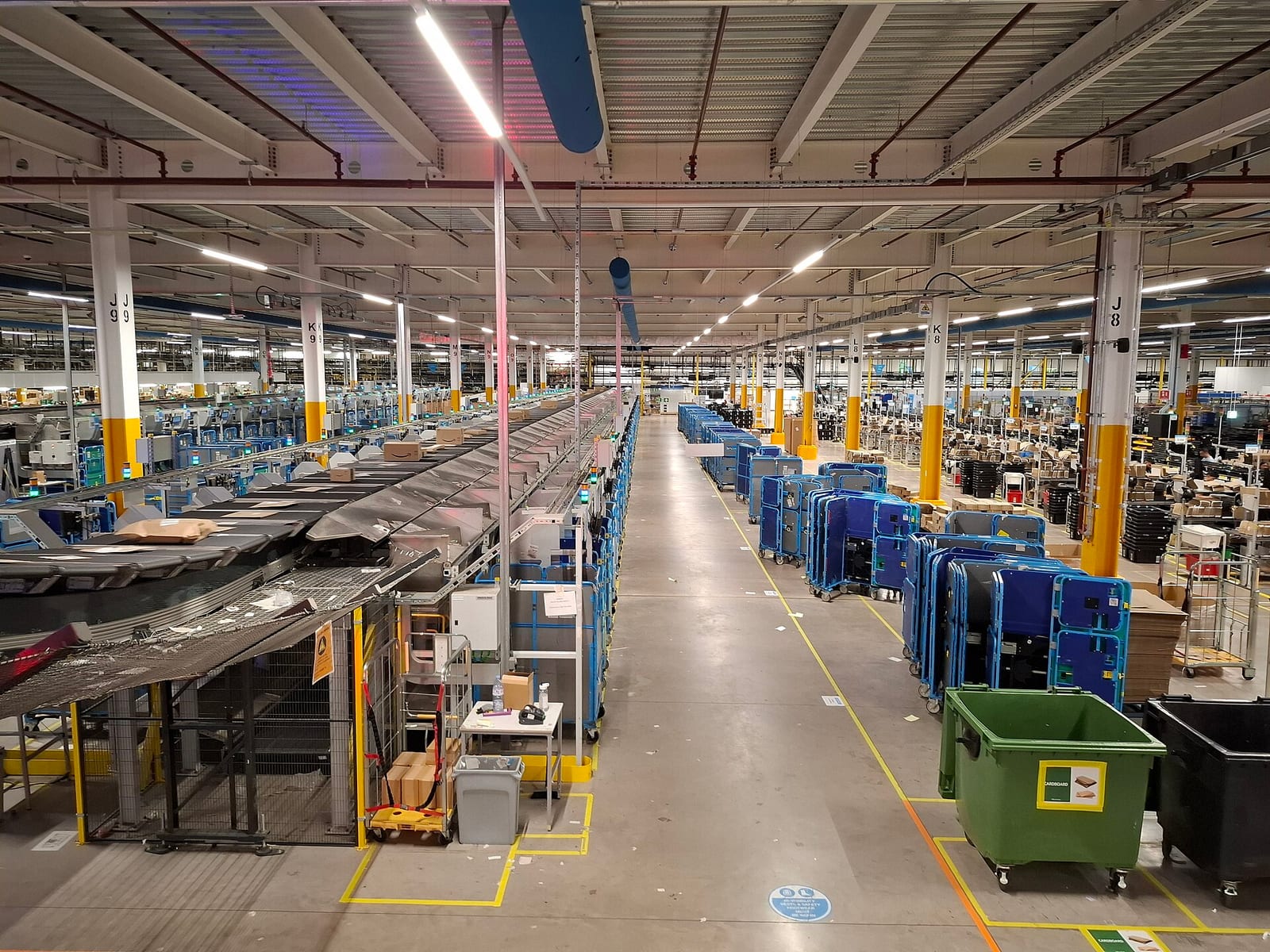
Every one of those taps had to work while millions of other people were tapping too. The cart had to accept Leo's writes from two devices at once, possibly reaching different servers, and end up with one sensible cart. There was a fixed number of deal units, so the system had to decide who got one without selling more than it had. And "Place your order" quietly started a chain of work: check the price, set a unit aside, ask Leo's bank whether the card is good, record the order, and later pick, pack and ship it. Any step could fail, time out or run twice.
In this case study we'll design the system behind Leo's cart and checkout the way an engineer would: start with the most obvious design, find exactly where it breaks, and fix it, step by step. We'll keep coming back to one question: when millions of people hit the same deals at the same moment, how does Amazon make sure Leo's cart never refuses him, and his order is taken exactly once, without selling headphones it doesn't have? Along the way we'll go from one database to a ring of storage nodes, vector clocks, Paxos groups, a checkout workflow, conditional writes, idempotency keys and the cells that stop one failure from reaching everyone.
01What we're building, and how big
1.1What it has to do
This case study covers the path from "I want this" to "your order is placed". It comes down to a short list:
- Keep a cart for each shopper: add an item, remove it, change a quantity, from any device, and show the same cart everywhere.
- Price the cart, including deals whose price depends on time and on stock.
- Hand out limited stock for deals like Leo's, without promising more units than exist.
- Take the payment: check that the card is good when the order is placed, and charge it when the goods ship.
- Create the order exactly once, however many times the button is pressed or the request is retried.
- Pass the order on to the warehouses that pick, pack and ship it.
And the qualities it needs while doing that:
- Writable, always: adding to the cart should work even when servers, disks and network links are failing, because a refused Add to Cart is a lost sale.
- Exact where money and stock are concerned: one order per Place your order, one charge per order, no more deal units sold than the seller has.
- Fast: every page is assembled from many services, so each one must answer quickly, even at the worst moment of the year.
- Contained: a failure in one part, or for one group of customers, mustn't take the whole store down.
Notice that the first and second qualities pull in opposite directions. "Always accept the write" and "never sell what you don't have" can't both hold for the same piece of data during a network failure, and much of this chapter is about deciding which data gets which promise.
1.2How big is it?
Amazon has published two kinds of numbers about this, years apart. Its Dynamo paper, presented at SOSP in 2007, describes the shopping cart service during a busy holiday shopping season: it "served tens of millions requests that resulted in well over 3 million checkouts in a single day". That paper also says Amazon's platform served "tens of millions customers at peak times using tens of thousands of servers located in many data centers around the world".
Newer numbers come from the posts AWS publishes after each Prime Day, describing how Amazon's own retail systems used AWS services during the event. They measure the infrastructure, not the cart alone, but they give the shape of the peak:
| Prime Day | DynamoDB peak | Other figures from the same post |
|---|---|---|
| 2019 (48 hours) | 45.4 million requests a second | 7.11 trillion DynamoDB calls; Aurora processed 148 billion transactions |
| 2021 (66 hours) | 89.2 million requests a second | From the DynamoDB paper: "trillions of API calls" from Alexa, the Amazon.com sites and the fulfilment centres |
| 2023 (2 days) | 126 million requests a second | CloudFront peaked at over 500 million HTTP requests a minute; SQS at 86 million messages a second |
| 2024 (2 days) | 146 million requests a second | Aurora processed over 376 billion transactions; 733 fault-injection experiments run beforehand |
| 2025 (4 days) | 151 million requests a second | CloudFront served over 3 trillion HTTP requests in the Prime Day week; SQS peaked at 166 million messages a second |
| 2026 (23–26 June) | 192 million requests a second | Over 59 trillion DynamoDB requests over the four days; SQS peaked at 213 million messages a second |
These are requests from all of Amazon's systems, including Alexa, the warehouses and every page of the store, so most of them have nothing to do with carts. Amazon doesn't publish its cart or checkout traffic.
Suppose 20 million people shop in the first hour of Prime Day, and each one adds, removes or changes cart items ten times. How many cart writes a second is that on average? And what happens if half of them arrive in the first five minutes?
02Version 1: one application, one database
2.1The obvious design
The most obvious design is one web application in front of one relational database. It has a carts table with a row per item in each cart, an inventory table with a stock count per product, and an orders table. Add to Cart inserts a row. Place your order runs a single database transaction: read the cart, check and decrement the stock, insert the order, and commit. If anything fails, the transaction rolls back and nothing has happened.
This is roughly how Amazon.com began. In a 2006 interview with Jim Gray in ACM Queue, Werner Vogels, Amazon's CTO, described it as "a monolithic application, running on a Web server, talking to a database on the back end", an application called Obidos that held "all the business logic, all the display logic, and all the functionality". For years, he said, the scaling work went into making the back-end databases hold more items, customers and orders, "until 2001 when it became clear that the front-end application couldn't scale anymore".
2.2Where it breaks
It breaks in three places, and each one matters for Leo.
The first is size. At the peak, every shopper's every click is a write or a read against the same database, and one database server has a ceiling. You can buy a bigger machine for a while, and you can add read copies, but every write to a cart, a stock count or an order still lands on the one primary.
The second is people. Many teams change one application and one schema. A change to the orders table for one team's feature can break another team's code that reads it, so every change needs coordination, and the whole thing ships together. Vogels described exactly this: the parts that needed to scale couldn't be scaled independently, because they were "shared by many different teams and processes".
The third is availability, and it's the one that hurts at midnight. When the database is slow or down, every part of the store is slow or down with it, including Add to Cart. Leo clicks, waits and sees an error. A database is right to refuse a write it can't make durable, but from Amazon's side, a refused Add to Cart is a sale that may never happen.
2.3Split it into services
Amazon's fix for the first two problems, starting around 2001, was to split the application into services: separate programs, each owned by one team, each with its own data, each reachable only through a published interface over the network. Vogels put the rule plainly in 2006: "No direct database access is allowed from outside the service, and there's no data sharing among the services." He also put the ownership rule plainly: "You build it, you run it."
There's a famous, harsher version of this story. In 2011 Steve Yegge, who had worked at Amazon and then at Google, wrote a long internal post about platforms and accidentally shared it publicly. In it he recalled a mandate from Jeff Bezos, "back around 2002 I think, plus or minus a year", that all teams must expose their data and functionality through service interfaces and communicate only through them, with no direct reads of another team's data store, and that anyone who didn't would be fired. Amazon has never published the memo, so treat Yegge's version as one engineer's recollection. Vogels' 2006 description is the primary source for what the rule was.
So the cart becomes a cart service with its own store, inventory becomes an inventory service, and so on. Each page is then assembled from many of them. In 2006 Vogels said the Amazon.com gateway page called "more than 100 services", and the Dynamo paper says a page request "typically requires the rendering engine to construct its response by sending requests to over 150 services".
Splitting into services solves the people problem and lets each service scale on its own. It doesn't solve the third problem by itself. A cart service still needs somewhere to keep carts, and if that store refuses writes when a server or a network link fails, Leo still sees an error at midnight. So the next step is a store that never refuses him.
03A cart that always accepts writes
3.1Why the cart can't say no
The Dynamo paper opens with the cart. Customers, it says, "should be able to view and add items to their shopping cart even if disks are failing, network routes are flapping, or data centers are being destroyed by tornados." The paper is careful about what that requirement means: the cart service needs a store it "can always write to and read from", and "an 'Add to Cart' operation can never be forgotten or rejected".
Here's why that's harder than it sounds. To survive a server failure, the store keeps each cart on several machines, called replicas. A common way to keep replicas in agreement is to accept a write only after a majority of them have stored it, so that any later read, which also asks a majority, is sure to reach at least one replica with the latest write. Chapter 28 works through why. But a majority rule has a cost: if Leo's phone can reach only one of three replicas, because the other two are down or cut off by a network failure, the write is refused.
For a bank balance, refusing is right. For a cart it's the wrong trade. If the cart briefly has two versions, the worst that happens is that Leo sees a cable he'd removed, and removes it again. If the cart refuses his write, he probably doesn't buy the headphones. Dynamo's authors put the conclusion in one phrase: Dynamo targets "the design space of an 'always writeable' data store", and pushes "the complexity of conflict resolution to the reads", so that a write is never rejected.
3.2Where Leo's cart lives
Dynamo spreads data over many storage nodes by consistent hashing, which chapter 29 covers in detail. In short: hash each key onto a circle of numbers, give each node several positions on the circle, and make each key belong to the first node clockwise from it. Leo's cart has a key, say his customer ID, and the hash of that key lands somewhere on the ring.
Dynamo stores each key on N nodes, the first one clockwise and the next N − 1 distinct nodes after it. This list of nodes for a key is called its preference list. A typical N was 3. Every node knows the whole ring, by gossiping with the others, so any node can work out Leo's preference list without asking anyone.
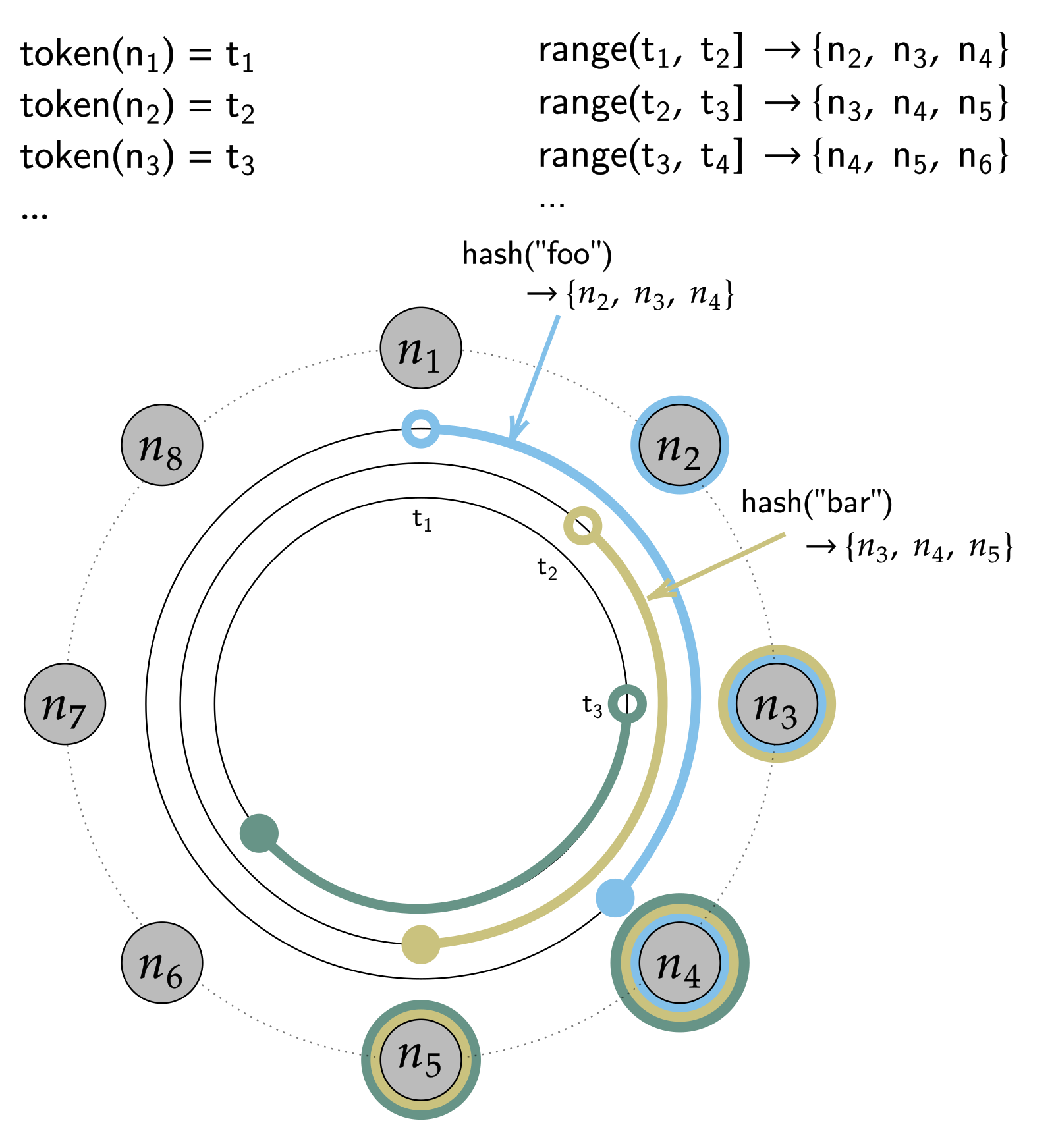
When the cart service writes Leo's cart, the request goes to a coordinator, usually the first node in his preference list. It writes the new version locally, sends it to the other N − 1 nodes, and reports success once W nodes in total have stored it. Reads work the same way with R. The paper gives (N, R, W) = (3, 2, 2) as the configuration several instances of Dynamo used, and says a typical service-level agreement was that 99.9% of reads and writes finish within 300 milliseconds.
3.3When a home node is down: sloppy quorums and hints
Now suppose one of the three nodes in Leo's preference list is down at midnight. A strict rule would still work with two of three, but if two are unreachable, a strict quorum write fails. Dynamo doesn't use a strict rule. It writes to "the first N healthy nodes from the preference list", walking further round the ring past nodes it can't reach. A quorum counted this way, partly from stand-ins, is called a sloppy quorum.
A stand-in keeps the replica with a hint attached, a note saying which node it belongs to, and keeps hinted replicas in a separate local store. When it sees the intended node come back, it hands the replica over and deletes its copy. This is hinted handoff. Chapter 28 animates both ideas on a different example; here's the same mechanism on Leo's cart.
Dynamo's authors are clear about the cost. A write acknowledged by stand-ins and a read answered by the home nodes needn't overlap, so a read can miss the newest version until the hints are delivered. For the rarer case where a stand-in itself fails before handing its hint over, Dynamo also runs a background repair: replicas compare their data using Merkle trees, trees of hashes where each parent is a hash of its children, so two nodes can find which keys differ by exchanging a few hashes instead of all their data.
Dynamo also places each key's replicas in more than one data centre, so that a whole data centre can fail without losing carts. According to the paper, its client applications "received successful responses (without timing out) for 99.9995% of its requests" over the two years before publication, with no data loss.
?Why not just set W to 1?
You can. With W = 1, a write succeeds as long as any single node in the system can store it. Dynamo's paper notes that this "ensures that a write is accepted as long as a single node in the system has durably written the key", and also that most Amazon services set W higher, because a write stored on one node is one disk failure away from being lost. W trades durability against availability, and (3, 2, 2) was the common middle.
So writes are never refused. That leaves the problem the paper said it had pushed to the reads: Leo's laptop and phone may now have written two different carts to two different sets of nodes, and the next read has to make sense of both.
04Two devices, two carts: vector clocks
4.1Leo's two carts
Go back to midnight. Leo's cart holds the headphones and a cable. Then the network between two of Amazon's data centres hiccups. His phone's request reaches node B on one side, and he adds a charger there. His laptop's request reaches node A on the other side, and he removes the cable there. Both writes are accepted, because the cart is always writeable. Now there are two versions of his cart, and neither one has seen the other's change.
Those labels on the versions are what make this work, and they're called vector clocks.
4.2What a vector clock records
A vector clock is a list of (node, counter) pairs attached to every version of an object. When a node coordinates a write, it takes the clock of the version the client says it's updating and adds one to its own counter. So {A:2} means "a version that includes two changes made at node A", and {A:1, B:1} means "one change made at A, then one made at B".
To compare two versions, compare their clocks counter by counter. Dynamo's rule is: "If the counters on the first object's clock are less-than-or-equal to all of the nodes in the second clock, then the first is an ancestor of the second and can be forgotten. Otherwise, the two changes are considered to be in conflict." Try it on Leo's two carts. {A:2} has a bigger A counter than {A:1, B:1}, but {A:1, B:1} has a bigger B counter. Neither is less than or equal to the other on every node, so neither version descends from the other.
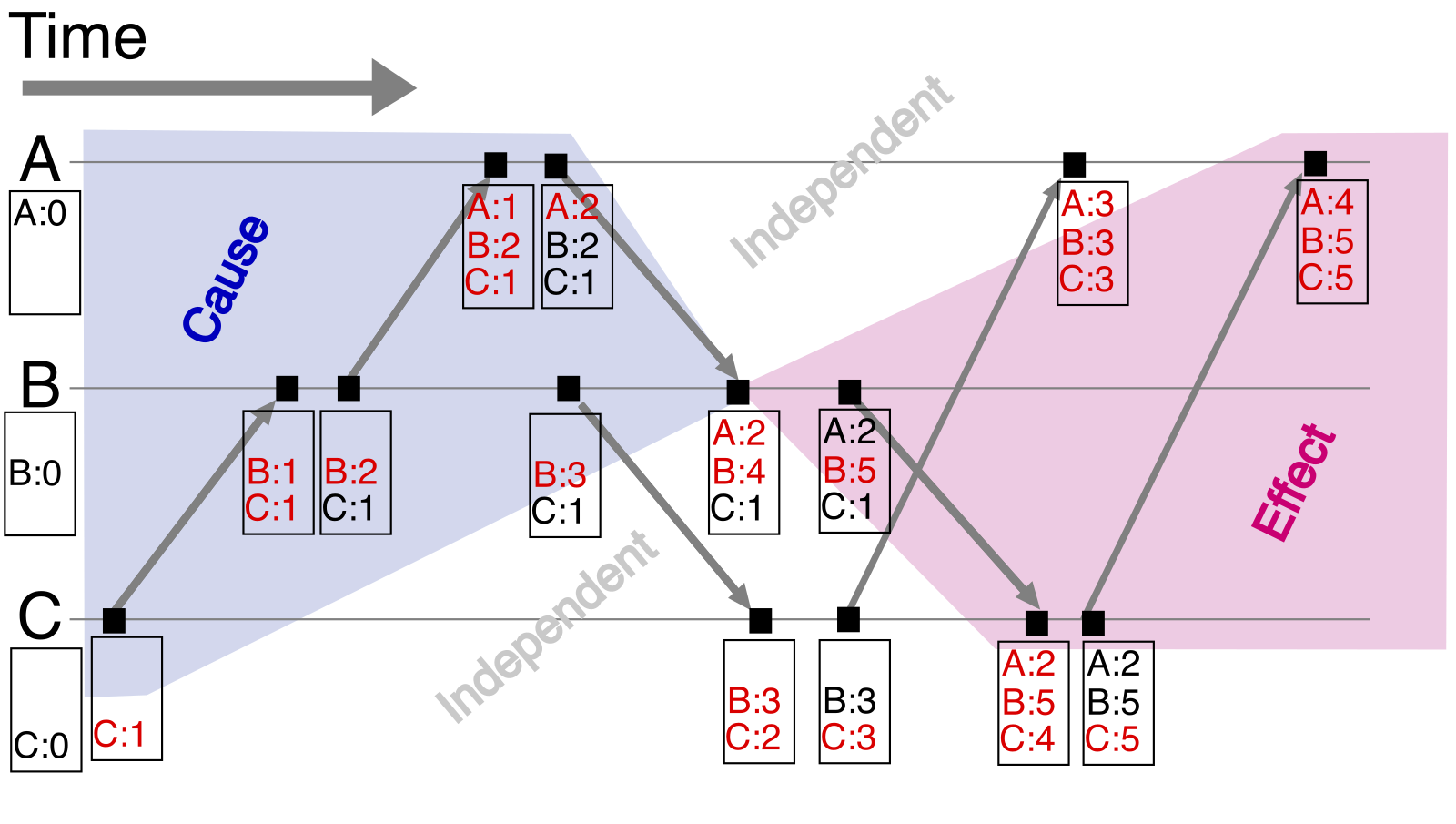
Leo's laptop wrote version {A:2} and his phone wrote version {A:1, B:1}. What does Dynamo do with them?
That's why a Dynamo get can return more than one object. Its interface is get(key), which returns "a single object or a list of objects with conflicting versions along with a context", and put(key, context, object). A context carries the clock information. When the client writes back a merged cart with the context from a read that saw both versions, the coordinator builds the new clock from both, adds one to its own counter, and the new version, {A:3, B:1} in Leo's case, descends from both siblings, which can then be dropped.
Clocks that keep growing are a cost. A clock gains an entry for each node that coordinates a write to the object, and during failures that can be many nodes. Dynamo stored a timestamp with each pair and, once a clock reached a threshold, "say 10", dropped the oldest pair. Its authors admit this could make the system mistake an old version for a conflicting one, and say the problem "has not surfaced in production". Chapter 26 covers vector clocks in general, including this truncation and the dotted version vectors that Riak later adopted to avoid clock growth.
4.3Merging two carts
Dynamo detects the conflict; it doesn't resolve it. Dynamo calls the two kinds of resolution syntactic and semantic. When one clock descends from the other, the system drops the older version itself. When the clocks are concurrent, the application has to merge, because only it knows what the data means. For the cart, the merge was to take the union: every item in either sibling goes into the merged cart.
A union has a consequence that the paper states in one sentence: "Using this reconciliation mechanism, an 'add to cart' operation is never lost. However, deleted items can resurface." Look at Leo's carts again. On the laptop's side the cable is gone, because he removed it. On the phone's side it's still there, because it never heard about the removal. A union can't tell "removed" from "never had", so the cable comes back.
This program builds Leo's two siblings with vector clocks, compares them, merges them by union the way the 2007 cart did, and then tries a better merge. A better merge tags every item with the clock entry of the write that added it, written as (node, counter). When an item is in one sibling but missing from the other, it checks whether the other sibling's clock has seen that add. If it has, the item is missing because it was removed, and the merge drops it. If it hasn't, the other sibling never heard of it, and the merge keeps it.
# Leo's cart on two devices, versioned with vector clocks

def descends(a, b):
    """True if clock a has seen everything clock b has."""
    return all(a.get(node, 0) >= n for node, n in b.items())

def compare(a, b):
    if a == b:
        return "same"
    if descends(a, b):
        return "a is newer"
    if descends(b, a):
        return "b is newer"
    return "concurrent"

def bump(clock, node):
    c = dict(clock)
    c[node] = c.get(node, 0) + 1
    return c

def merge_clocks(a, b):
    return {n: max(a.get(n, 0), b.get(n, 0)) for n in sorted(a.keys() | b.keys())}

# 1. Leo's cart, written through node A
v1 = ({"A": 1}, {"headphones", "cable"})

# 2. The network splits. His phone reaches node B and adds a charger.
phone = (bump(v1[0], "B"), v1[1] | {"charger"})

# 3. His laptop reaches node A and removes the cable.
laptop = (bump(v1[0], "A"), v1[1] - {"cable"})

print("phone :", phone[0], sorted(phone[1]))
print("laptop:", laptop[0], sorted(laptop[1]))
print("compare:", compare(phone[0], laptop[0]))

# 4. The next read gets both siblings. Merge by union, as the 2007 cart did.
union = (bump(merge_clocks(phone[0], laptop[0]), "A"), phone[1] | laptop[1])
print("union merge:", union[0], sorted(union[1]))

# 5. Better: tag every add with the clock entry that made it, and keep an
#    item only if both siblings have it, or the other sibling never saw it.
def tagged_add(cart, item, clock, node):
    clock = bump(clock, node)
    return clock, cart | {(item, node, clock[node])}

def tagged_merge(a, b):
    (ca, ia), (cb, ib) = a, b
    seen_by = lambda clock, tag: clock.get(tag[1], 0) >= tag[2]
    keep = (ia & ib) | {t for t in ia - ib if not seen_by(cb, t)} \
                     | {t for t in ib - ia if not seen_by(ca, t)}
    return merge_clocks(ca, cb), keep

c, cart = tagged_add(set(), "headphones", {}, "A")
c, cart = tagged_add(cart, "cable", c, "A")
start = (c, cart)                                     # clock {A: 2}
phone = tagged_add(start[1], "charger", start[0], "B")
laptop = (bump(start[0], "A"), {t for t in start[1] if t[0] != "cable"})
merged = tagged_merge(phone, laptop)
print("tagged merge:", merged[0], sorted(t[0] for t in merged[1]))phone : {'A': 1, 'B': 1} ['cable', 'charger', 'headphones']
laptop: {'A': 2} ['headphones']
compare: concurrent
union merge: {'A': 3, 'B': 1} ['cable', 'charger', 'headphones']
tagged merge: {'A': 3, 'B': 1} ['charger', 'headphones']Its first three lines are the situation from the diagram: two clocks, neither descending from the other, so compare says concurrent. On the fourth line, the union merge keeps the charger, which is right, and brings back the cable, which is the resurfacing the paper warned about. Last comes the tagged merge. Leo's cable carries the tag (A, 2): it was added by A's second write. The laptop's sibling has clock {A:3}, so it has seen that add, and the cable's absence there means Leo removed it. As for the charger, its tag is (B, 1), and the laptop's clock has no B entry at all, so the laptop never knew about the charger, and it stays. (The tagged version starts from clock {A:2} because adding the headphones and the cable were two separate writes at A.)
Tagging adds is the idea behind the observed-remove set, one of the data types called CRDTs (conflict-free replicated data types), whose merges are designed so that every replica ends up with the same answer whatever order it sees the changes in. Riak, an open-source database modelled on Dynamo, shipped CRDT sets and maps in its 2.0 release in 2014. Dynamo's 2007 cart used the plain union.
Two siblings of Leo's cart arrive at a read. How should they become one?
- No merge code
- Never more than one version to show
- Silently loses one of Leo's changes
- Trusts clocks on different machines to agree
- An Add to Cart is never lost
- Simple to write
- Removed items can come back
- Every reader must handle siblings
- Adds kept, removals respected
- Same answer on every replica
- More metadata per item
- Harder to get right; came later
Dynamo offered both of the first two: the paper says the session-state service used last-write-wins, while the cart used "business logic specific reconciliation" by merging. For a cart, a lost Add to Cart costs a sale, and a resurfaced item costs the shopper one click on the checkout page, where they review the cart anyway. That asymmetry made the union the right call in 2007.
4.4How often does this happen?
All this machinery is for a rare event. Dynamo's authors measured the versions returned to the shopping cart service over 24 hours: "99.94% of requests saw exactly one version; 0.00057% of requests saw 2 versions; 0.00047% of requests saw 3 versions and 0.00009% of requests saw 4 versions."
More surprising was the cause. You'd probably expect failures to create most siblings, but the paper reports that the increase in siblings came from "the increase in number of concurrent writers", which was "usually triggered by busy robots (automated client programs) and rarely by humans". Leo on two devices is the human case, and it seems to be rare. A script hammering one cart from many connections is the common one.
05From Dynamo to DynamoDB
5.1Dynamo was hard to run
Dynamo worked. It's also, by Amazon's own later account, a system few teams wanted to operate. In his January 2012 post announcing DynamoDB, Vogels wrote that Dynamo met the reliability, performance and scalability needs of its users but "did nothing to reduce the operational complexity of running large database systems". A 2022 paper on DynamoDB adds the detail: Dynamo "was a single-tenant system and teams were responsible for managing their own Dynamo installations", and that complexity "became a barrier to adoption". Engineers instead picked Amazon's managed services, S3 and SimpleDB, even when Dynamo fitted their problem better. "Ultimately," Vogels wrote, "developers wanted a service."
SimpleDB had its own lesson for consistency. Vogels' 2012 post lists among its problems that SimpleDB's consistency windows were "up to a second in duration", which developers used to traditional databases found hard to adapt to. So when AWS launched DynamoDB as a public service in January 2012, it took Dynamo's incremental scaling and hash partitioning and changed most of the rest. That paper says DynamoDB "shared most of the name of the previous Dynamo system but little of its architecture."
5.2One leader per partition
Its biggest change is where writes go, and the DynamoDB paper, presented at USENIX ATC in July 2022, describes it. A table is split into partitions, each holding a contiguous range of keys. Each partition has three replicas, in three different Availability Zones, which are separate data centres or groups of them within one AWS region. Those three replicas form a replication group that uses Multi-Paxos, a consensus protocol covered in chapter 27, to elect one of them leader.
Only the leader accepts writes and strongly consistent reads. For each write, it creates a record in its write-ahead log and sends the record to the other replicas, and the write is acknowledged "once a quorum of peers persists the log record", which the paper spells out as "two out of the three replicas from different AZs". Any replica can answer an eventually consistent read. A leader keeps its job by renewing a lease, a time-limited claim to be leader, and if the others decide it has failed and elect a new one, the new leader "won't serve any writes or consistent reads until the previous leader's lease expires", so two leaders never accept writes at once.
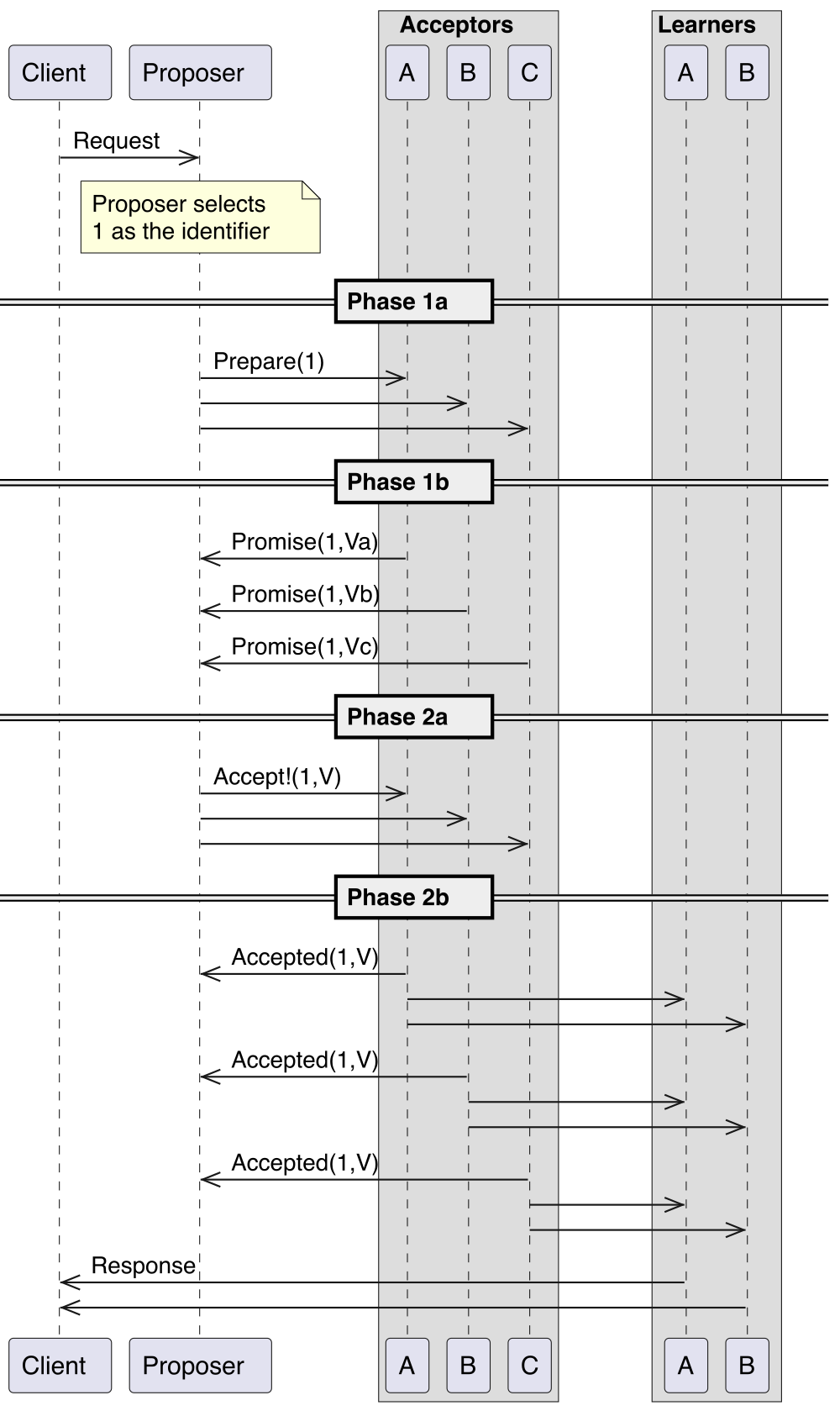
Leaders are what make vector clocks unnecessary. Every write to one key goes through one leader, one after another, so there's always a single latest version, and no siblings to merge. If the leader's zone fails, the group elects another, and the paper describes adding a log replica, which stores only recent log records, to keep a quorum available while a full replica is rebuilt. It reports running "millions of Paxos groups in a Region".
How should replicas of a partition agree on writes?
- Writes accepted even when most home replicas are unreachable
- No election pause
- Applications must handle siblings
- Reads can miss recent writes
- Hard for teams to reason about
- One version per item, no merge code
- Strongly consistent reads available
- Conditional writes and transactions become possible
- Writes pause briefly during a leader election
- A partition cut off from its quorum can't take writes
DynamoDB gave up Dynamo's promise to accept a write on any reachable node, and kept a narrower one: a partition accepts writes as long as two of its three Availability Zones are healthy. In return every item has one current version, which is what developers had asked for. DynamoDB's published targets are 99.99% availability for tables in one region and 99.999% for global tables, which are copied across regions.
5.3What this means for Leo's cart
Amazon hasn't published where today's cart is stored, or how. What it has published is that DynamoDB "powers multiple high-traffic Amazon properties and systems including Alexa, the Amazon.com sites, and all Amazon fulfillment centers", and that in October 2019 its consumer business turned off its last Oracle database, after moving about 75 petabytes of data from nearly 7,500 Oracle databases to DynamoDB, Aurora, RDS and Redshift.
So let's reason about how you'd keep Leo's cart in a store with one version per item. Storing the whole cart as one item would make his two devices' writes overwrite each other: the phone reads the cart, the laptop reads the cart, both write back, and one write wipes out the other's change. There are two standard fixes.
- One row per cart line. Make the partition key Leo's customer ID and the sort key the product. Adding a charger writes the charger's row; removing the cable deletes the cable's row. The two devices touch different rows, so neither can erase the other's change, and the removal stays removed.
- A version number and a conditional write. Keep a version attribute on the cart and write with a condition, "only if the version is still 7". If another device got there first, the write fails, and the cart service re-reads and retries. That's optimistic concurrency, and DynamoDB's conditional writes do the check on the leader, so it's exact.
Either way, the problem Dynamo solved with siblings is now solved by ordering writes at the leader, and the cart service's merge code disappears. What's been given up is the guarantee that a write succeeds on any reachable node; what's kept is that it succeeds whenever two of three zones are up. Global tables, which copy a table between regions and let each region accept writes, bring the concurrency question back across regions, and by default settle it with last write wins (chapter 28).
A leader also makes something possible that Dynamo couldn't do: a write that succeeds only if a condition holds, checked and applied atomically. That's exactly what Leo's checkout needs next.
06Checkout is a workflow
6.1Four services, no shared transaction
Leo taps Place your order. In version 1 this was one database transaction. Now the work belongs to several services, each with its own data: pricing decides what he pays, inventory decides whether a unit is his, payments asks his bank whether the card is good, and orders records the order. Section 2's rule says no service may reach into another's database, so there's no single database in which to run one transaction across all four.
A textbook way to make several databases commit together is two-phase commit: a coordinator asks every participant to prepare, and only when all say yes does it tell them all to commit. Chapter 31 walks through it and its main weakness: a participant that has prepared must wait, holding its locks, until it hears the outcome, so a coordinator that crashes at the wrong moment leaves everyone stuck. And one of Leo's participants can't take part at all. His bank doesn't offer to "prepare" a payment and wait for Amazon's say-so, so whatever Amazon asks the card network has to be handled on its own terms.
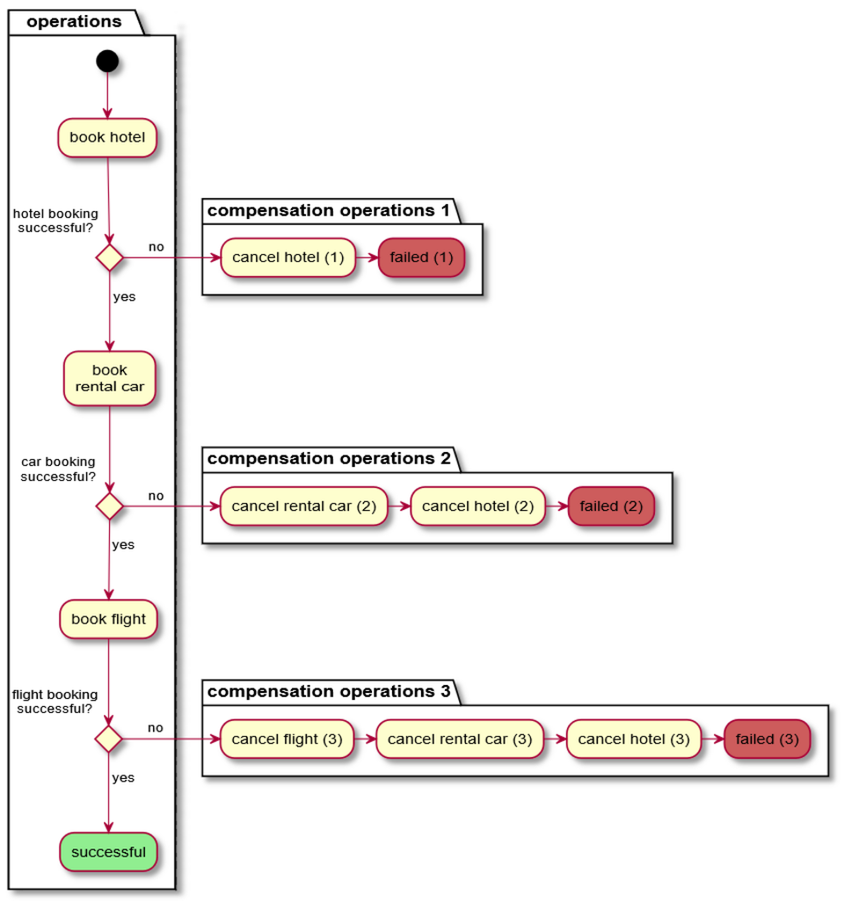
So checkout becomes a saga: a sequence of steps, each a local transaction in one service, where each step that can be undone has a compensation, an action that undoes it if a later step fails. Chapter 31 covers sagas in general. For Leo's order, the steps and their compensations are:
| Step | Service | If a later step fails |
|---|---|---|
| 1. Price the cart | Pricing | Nothing to undo: it only reads |
| 2. Claim a unit of each item | Inventory | Release the claim |
| 3. Authorise the payment | Payments | Void the authorisation, so the bank releases the hold |
| 4. Create the order | Orders | Not undone: from here on, problems are handled by cancelling the order |
Amazon hasn't published how its own checkout orchestrates these steps, or what it calls them. What follows is how you'd order them, and why.
6.2The order of the steps
That order isn't arbitrary. Steps go from cheap and easily undone to expensive and hard to undo. Pricing only reads. Releasing an inventory claim is a single write in Amazon's own systems. Voiding an authorisation means another round trip to the card network, and a shopper whose bank has already put a hold on their money may notice it for days. Creating the order sends a confirmation email to Leo, and an email can't be unsent.
Putting the irreversible step last means most failures happen before anything is visible outside Amazon. If inventory says no, nothing has been asked of the bank. If the bank says no, nothing has been promised to Leo. The point of no return, creating the order, comes only when everything before it has succeeded.
?Why not take the payment first, to be sure of the money?
Because then every out-of-stock deal would be a payment to undo. At midnight on Prime Day, many more people try to claim the headphones than there are units, so claiming the unit first means most of the losers never touch the payment system at all. So the cheap check that usually fails goes first; the expensive step that usually succeeds goes after it.
6.3Which price?
Step 1 looks the simplest and has a trap in it. Leo saw $149 when he added the headphones at midnight. What should he pay if he checks out at 12:20, after the deal has ended?
Amazon's cart answers part of this itself: when the price of an item changes after you've added it, the cart shows a message saying so, with the old and new prices. A cart is a list of things Leo wants, and the prices in it are reminders. The price is worked out again at checkout, from the pricing service, and the price Leo agrees to is the one on the final order-review page, which the order then records.
A Lightning Deal adds a time limit. Amazon's help pages say that once a Lightning Deal is in your cart, "the item will be available in your cart at the Lightning Deal price for 15 minutes". So the deal price belongs to Leo's claim on a unit, which expires, as much as to the product. Pricing has to ask whether Leo's claim is still live before it quotes $149.
Pricing mistakes in a sale are expensive in both directions. Flipkart, India's largest online store, ran its first Big Billion Day sale on 6 October 2014. A day later its founders, Sachin and Binny Bansal, wrote to customers that while preparing the deals, "the pricing of several products got changed to their non-discounted rates for a few hours". An opposite mistake, a deal price that leaks onto items that shouldn't have it, sells stock at a loss. Either way, the price is data that must be changed carefully and checked before the sale begins, and the price used at checkout must be the one the shopper confirmed.
07The deal: 1,000 units and a million taps
7.1When does a unit become Leo's?
Step 2 is where Prime Day is hardest. Say the seller has 1,000 pairs of headphones at the deal price. At midnight, many times that number of people tap Add to Cart within a second or two. The system must hand out at most 1,000 units, and should hand out all 1,000, and should tell everyone else quickly that they've missed out.
First, when does a unit become Leo's? There are three reasonable answers:
- When the order is placed. Adding to the cart claims nothing; checkout decrements the stock. That's how ordinary items work: an item sitting in a cart can still sell out before you check out. For a deal it's miserable: thousands of people put the headphones in their carts, fill in their details, and most find at the last step that they're gone.
- When it's added to the cart, for a while. Adding claims a unit and starts a timer. If the shopper checks out in time, the claim becomes an order; if not, the unit goes back.
- Never exactly. Take more orders than units and cancel the extras later, apologising. Some sellers do this for preorders. For a deal advertised as limited, it breaks the promise the deal makes.
Amazon's Lightning Deals take the second answer, and its help pages describe it: a status bar shows the percentage of the deal already claimed, and units sitting in someone's cart count, since the Join Waitlist button appears "when all Lightning Deals are bought or are in a customer cart"; the deal is "available one per customer"; and once it's in your cart you have 15 minutes to check out. When a claim expires, the unit goes to the next person on the waitlist, who gets an alert and their own time limit.
This is a reservation: a hold on stock that expires unless it's turned into an order. Ticketmaster does something similar for seats, and chapter 67 builds its seat holds in detail. What differs is what's being held. A concert seat is one particular thing, row F seat 7, so Ticketmaster holds rows. A deal unit is one of 1,000 identical things, so Leo doesn't need a particular unit, only a count that goes down by one. That difference turns out to matter a great deal when a million people arrive at once.
7.2Counting units without overselling
An obvious way to hand out units is the one every web developer writes first: read the stock count, and if it's above zero, decrement it. At Prime Day scale there's a second temptation, which is to read the count from a cache, because the deal page is being loaded millions of times and the "% claimed" bar needs the count anyway.
A safe version makes the check and the decrement one atomic step. In DynamoDB that's a conditional write, an update with a condition, like this:
UpdateItem  key: deal#headphones
            SET remaining = remaining - 1
            CONDITION remaining > 0
DynamoDB's partition leader checks the condition and applies the update together, so two claims can never both take the last unit. But it creates a new problem. Every claim for this deal is a write to one item, so every claim goes to one partition's leader. Chapter 29 gives DynamoDB's documented limit for one partition: 1,000 writes a second. A million taps a second against one item is a hot key, and no amount of extra hardware elsewhere helps it.
A usual fix is to split the count. Put the 1,000 units into ten counters of 100, on ten different keys, which DynamoDB will place on different partitions once they're busy. Each claim picks a counter at random and does a conditional decrement on it. If that counter is empty, try another. Ten counters take ten times the writes, and none of them can go below zero.
This program compares three designs for a crowd of 20,000 claims arriving in the first two seconds. Design A checks a cached count that refreshes every 250 milliseconds and then decrements. Design B does a conditional decrement on one counter whose partition applies 1,000 writes a second, one after another, and a shopper whose request would wait more than a second gives up. Design C splits the units across ten such counters, and a claim that lands on an empty counter tries one other.
import random
random.seed(7)

UNITS = 1_000                    # headphones at the deal price
CLAIMS = 20_000                  # people who tap "Add to cart" in the first 2 s
arrivals = sorted(random.uniform(0, 2.0) for _ in range(CLAIMS))

# A. Check a cached stock count, then decrement. The cache refreshes every 250 ms.
stock, granted, cached, next_refresh = UNITS, 0, UNITS, 0.0
for t in arrivals:
    if t >= next_refresh:
        cached, next_refresh = stock, next_refresh + 0.25
    if cached > 0:                       # looks available, so take one
        stock -= 1
        granted += 1
print(f"A cached count:  granted {granted:,}, oversold {granted - UNITS:,}")

# B and C. A conditional write per claim: "decrement if stock > 0".
# Each counter lives on one partition that applies 1,000 writes a second,
# one after another. A shopper whose request would wait over 1 s gives up.
def run(counters, rate=1_000, timeout=1.0):
    free_at = [0.0] * len(counters)      # when each partition is next idle
    sold, waits, gave_up_at, sold_out_at = 0, [], [], None
    for t in arrivals:
        i = random.randrange(len(counters))
        if counters[i] == 0:             # that slot is empty: try one other
            i = random.randrange(len(counters))
        start = max(t, free_at[i])
        if start - t > timeout:
            gave_up_at.append(t)
            continue
        free_at[i] = start + 1 / rate
        if counters[i] > 0:
            counters[i] -= 1
            sold += 1
            waits.append(start - t)
            if sum(counters) == 0:
                sold_out_at = start
    early = sum(1 for t in gave_up_at if t < sold_out_at)
    return (f"granted {sold:,}, oversold 0, sold out at {sold_out_at:.2f} s, "
            f"slowest winner waited {max(waits):.2f} s, "
            f"gave up before the sell-out: {early:,}")

print("B one counter:  ", run([UNITS]))
print("C ten counters: ", run([UNITS // 10] * 10))A cached count: granted 2,502, oversold 1,502
B one counter: granted 1,000, oversold 0, sold out at 1.00 s, slowest winner waited 0.90 s, gave up before the sell-out: 8,089
C ten counters: granted 1,000, oversold 0, sold out at 0.11 s, slowest winner waited 0.01 s, gave up before the sell-out: 0Design A sold 2,502 units of a deal that had 1,000, roughly two and a half times its stock. Every claim in the first 250 milliseconds saw "1,000 left" in the cache and went ahead, and so did the claims after each refresh until the cache finally caught up with a negative count. That's oversell, and at Prime Day arrival rates even a quarter-second of staleness is enough to more than double the units sold.
Design B never oversells, because the condition is checked where the count lives. But the single partition takes a full second to work through the first 1,000 claims, the last winner waits 0.9 seconds for an answer, and 8,089 people give up waiting before the deal has even sold out. Those people saw a spinner or an error, not "sold out", and in real life many of them tap again, which adds to the queue they're stuck in.
Design C is also exact, and sells out in roughly a tenth of a second, so almost everyone gets a fast, clear answer. It costs a little complexity: the "% claimed" bar has to add up ten counters, and near the end a claim may land on an empty counter and need a second try, which the program allows for. Real systems probably also put a limit in front of the counters, such as a waitlist or a rate limit, so that the millionth tap is turned away before it reaches storage at all.
7.3Claims that expire
A claim at add-to-cart lasts 15 minutes, so something has to give units back when claims run out. Store each claim as a record with Leo's customer ID, the deal, and an expiry time, written in the same transaction as the decrement. DynamoDB has offered transactions across items since 2018, described in a USENIX ATC paper in 2023, so the decrement and the claim record can commit together or not at all.
Expiry can be lazy, the same way chapter 67 handles seat holds: any check of Leo's claim treats it as gone once its time has passed. A background sweeper then finds expired claims, increments the counter by one for each, and offers the unit to the waitlist. This sweeper has to be careful about one race: Leo might be checking out at the very second his claim expires. So the checkout's confirmation of the claim and the sweeper's release must both be conditional writes on the claim record ("only if it's still live and still Leo's"), and whichever runs first wins.
Flipkart's first Big Billion Day is a reminder of what happens when this goes wrong. In their letter the next day, its founders wrote that stock for many products ran out "within a few minutes (and in some cases, seconds)" and that this "led to some instances of an order getting over-booked for a product that was sold out just a few seconds ago". That's design A from the program above, in production.
When should a deal unit become Leo's?
- No claims to expire
- Stock never tied up in abandoned carts
- Most shoppers find out they lost at the last step
- Checkout takes the whole midnight burst
- Shoppers know at once whether they got one
- Units return if they don't buy
- Units sit in carts unbought for up to 15 minutes
- Needs an expiry sweeper and a waitlist
- Simplest; no contention at all
- Breaks the promise of a limited deal
- Angry customers, as Flipkart found in 2014
Amazon's Lightning Deal rules describe the second option: units in carts count as claimed, the claim lasts 15 minutes, and returned units go to a waitlist. The cost, stock tied up in carts that never check out, is bounded by the time limit, and the one-per-customer rule stops a single account from claiming a pile of units.
08Taking the payment, once
8.1Authorise now, charge later
Step 3 of the saga asks Leo's bank about $161.42. It doesn't take the money. Amazon's help page on authorisations describes the two halves: "When you place an order, Amazon contacts the issuing bank to confirm the validity of the payment method," and the bank reserves the funds; then, when the order ships, "Amazon notifies your bank that the order is concluded and the amount can be charged." If the order is cancelled, Amazon tells the bank the authorisation is no longer needed.
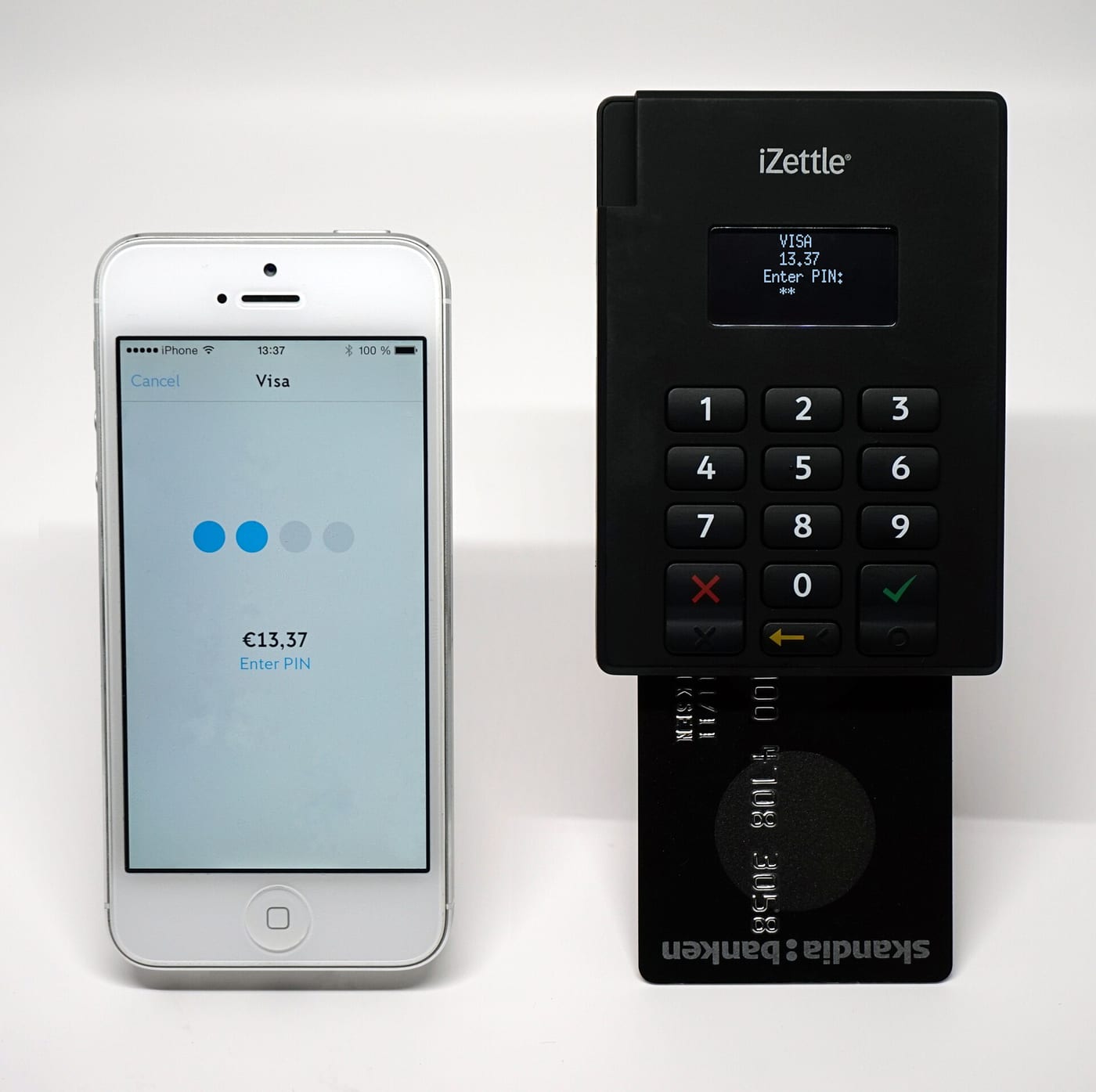
That split, authorisation now and capture later, is how card payments work in general, and the Stripe case study (chapter 52) explains the card network's side of it. For a store like Amazon it's a necessity. Leo's order may ship from two warehouses on two days, and each shipment is charged when it leaves; Amazon's help page on declined payments mentions the case where "part of your order was charged and dispatched". An item can turn out to be damaged or missing in the warehouse, and then it isn't charged. Capture at shipping means Leo pays only for what's on its way.
It also means the order can be placed without waiting for the payment to settle, and some payments fail after the order exists. An authorisation may be declined on a later retry, or expire before a slow item ships. Amazon's help pages describe what happens then: the order shows that the payment needs attention, the shopper can retry or choose another card, and "if your payment is declined again, we'll cancel the order".
8.2When the tap is retried
Here's the failure that makes payments hard. Leo taps Place your order. His phone's request reaches checkout, which claims, authorises and creates the order. Its response is on its way back when his phone switches from Wi-Fi to mobile data, and the response is lost. His phone shows an error. He taps again.
Without protection, the second tap is a new checkout: a second authorisation and a second order. The fix is an idempotency key: a unique ID for this one attempt to place this one order, created when the order-review page is rendered and sent with every tap and every retry of it. Checkout stores the key with the order. When a request arrives with a key it has already completed, it doesn't run the saga again; it returns the result of the first run.
Chapter 52 builds idempotency keys in detail for Stripe. Amazon's own version of the rules is in the Amazon Builders' Library, in an article by Malcolm Featonby on making retries safe. Amazon's preferred approach, it says, is "to incorporate a unique caller-provided client request identifier into our API contract". Two rules from it matter for Leo:
- The same key with different parameters is an error. If a request reuses Leo's key but asks for a different cart, it's safest to assume the caller meant something different, and refuse it, instead of returning the old order.
- A repeat gets a semantically equivalent response. The retry should look like the first success, "Order placed", with the order's current state, not an error such as "order already exists", which would leave Leo's phone unsure whether its own tap created the order.
AWS's own APIs work this way. EC2's RunInstances takes a ClientToken, and DynamoDB's TransactWriteItems takes a ClientRequestToken, which, its documentation says, makes repeat calls with the same token idempotent for 10 minutes after the first one completes.
?Why generate the key on the order-review page, and not when the tap arrives?
Because the server can't tell a retry from a second order by looking at it. Two identical requests to buy headphones might be Leo's phone retrying, or Leo deliberately buying a second pair. Only the client knows which, so the client must name the attempt. A key made when the page is rendered is the same for every tap on that page, and a fresh page, which is what Leo would load to buy again on purpose, gets a fresh key.
An idempotency key also protects each step inside the saga too. Leo's payment authorisation is sent to the payment processor with a key derived from the order's key, so if checkout crashes after asking the bank and retries the step, the bank sees a repeat, not a second authorisation.
09After Place your order: the asynchronous pipeline
9.1What has to happen before Leo sees 'Order placed'
Once the authorisation is approved, step 4 creates the order. Then there's a long list of things that must happen to it: a confirmation email, fraud checks, choosing which fulfilment centre ships it, telling that centre to pick and pack it, booking the delivery, capturing the payment when it ships, and updating Leo's order history. If checkout did all of that while Leo watched a spinner, his order would take minutes, and any slow downstream system would hold up every checkout.
So only a little is done synchronously. Checkout writes the order record, and in the same local transaction writes an event saying "order 114-… created" to an outbox, a table in the same database whose rows are later published to a queue. Chapter 31 explains why this is needed: writing the order and then sending a message are two separate actions, and a crash between them would leave an order nobody downstream hears about, or a message about an order that doesn't exist. With the outbox, both or neither are written. Then Leo sees "Order placed". Everything else reads the event from the queue and does its work later, at its own pace.
Every consumer here has to be idempotent too, because a queue delivers each event at least once: if a consumer crashes after doing its work but before recording that it did, it will see the same event again. Sending Leo two confirmation emails is a bit embarrassing; picking two pairs of headphones is a real cost. So each consumer records the event IDs it has handled, and skips repeats.
Amazon hasn't published the internals of its order pipeline. Its terms of sale in the UK, and for its Global Store, show the same split from the customer's side: the order confirmation email only acknowledges that the order was received, and the contract of sale is formed when the item is dispatched, with a separate dispatch confirmation for each package.
9.2Why the queue helps at midnight
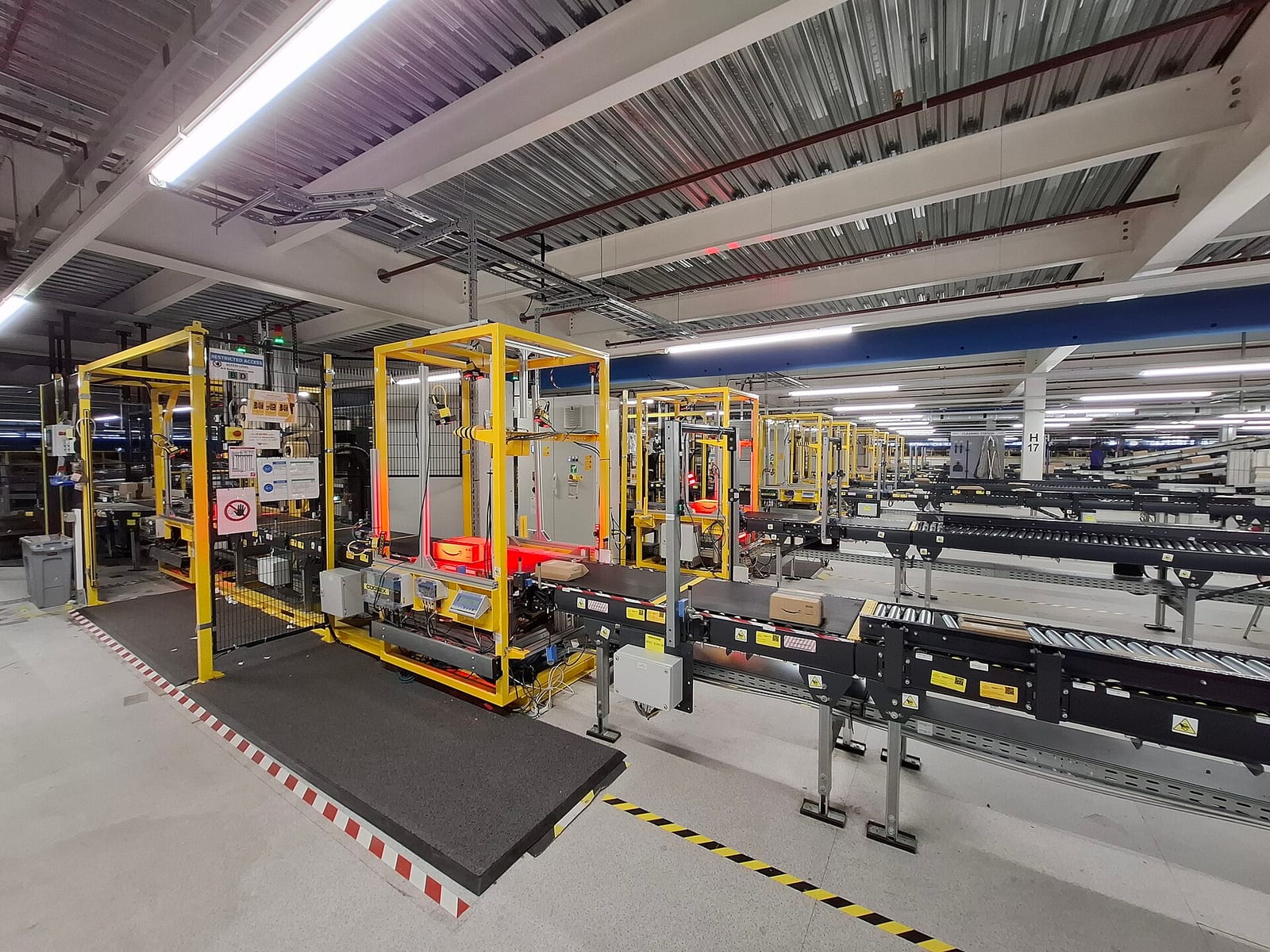
A queue does a second job on Prime Day. At 00:01, orders arrive far faster than warehouses can pick, and faster than the email and fraud systems would like to work. A queue between them absorbs the difference: orders pile up for a while and drain as the warehouses catch up. Checkout only has to be as fast as the order store, not as fast as the slowest thing downstream.
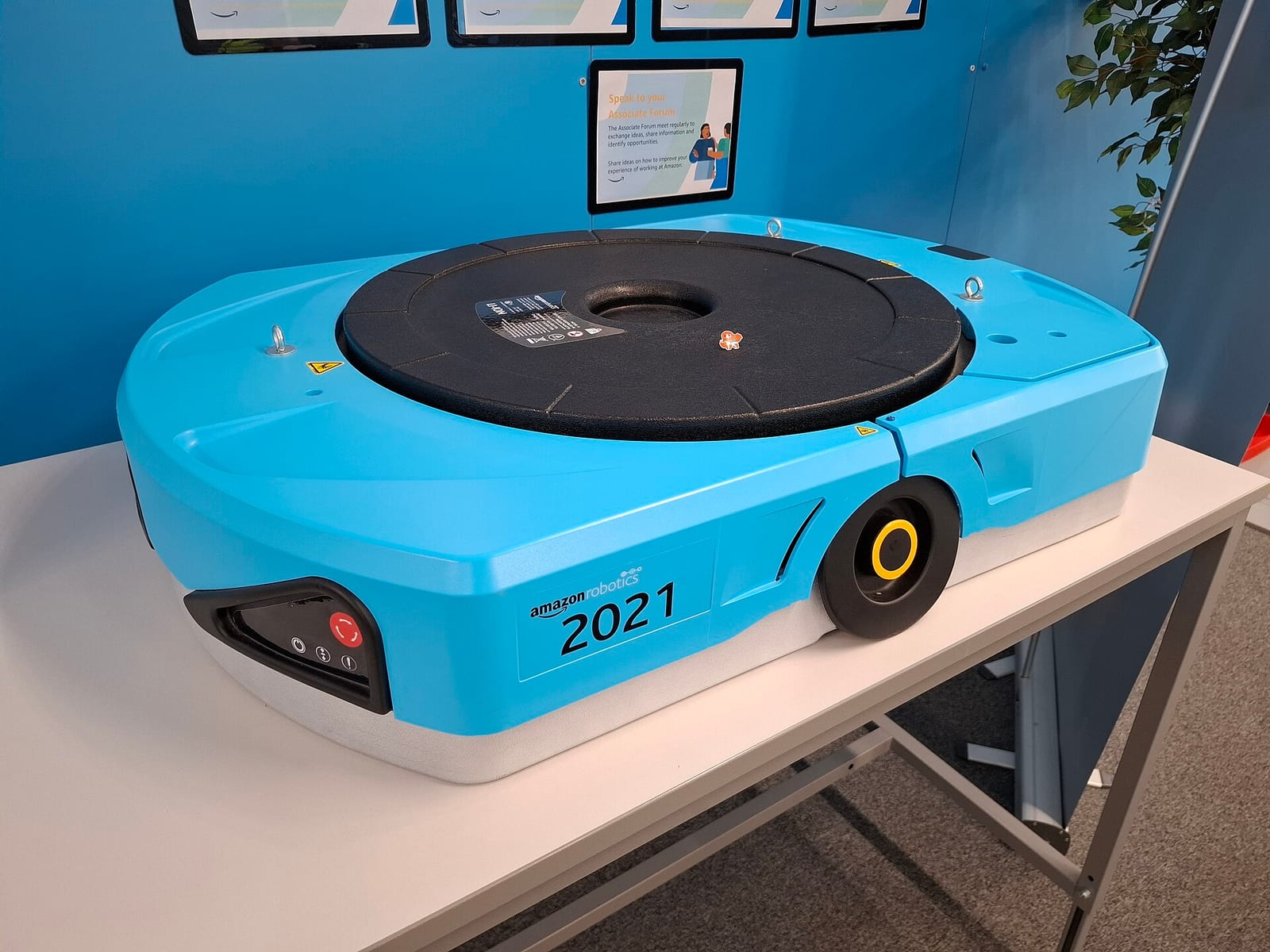
Prime Day posts give a sense of how much Amazon leans on queues. In Prime Day 2025, Amazon SQS, AWS's queue service, peaked at 166 million messages a second for Amazon's systems; in 2026, 213 million. Behind the queues, the warehouses are a distributed system of their own. The 2025 post says AWS Outposts racks in fulfilment centres sent "more than 524 million commands" to over 7,000 robots during the event, peaking at 8 million commands an hour.
That deals with the work after the order. What's left is the moment that decides whether any of it happens: the first minutes of Prime Day, when every service in this chapter sees its worst load of the year at once.
10The first minute of Prime Day
10.1Getting ready for a known peak
Prime Day has one advantage over most traffic spikes: everyone knows when it starts. That changes the job. Autoscaling, adding servers when load rises, reacts in minutes, and the first minute of Prime Day doesn't wait. So capacity is added before the event, sized from forecasts and load tests, and the systems are tested by breaking them on purpose.
AWS's posts show the second habit growing quickly. Amazon ran 733 experiments with AWS Fault Injection Service, a tool that injects failures such as stopped instances or slow network links into a running system, before Prime Day 2024; over 6,800 before Prime Day 2025; and over 44,000 before Prime Day 2026. The DynamoDB paper describes the same practice inside one service: "game days (chaos and load tests)" are among the mechanisms it lists for changing the system safely.
Even with all of that, the opening can go wrong. Prime Day 2018 began at 3 p.m. Eastern time on 16 July, and within minutes many shoppers saw error pages instead of deals. Amazon acknowledged on Twitter that "some customers are having difficulty shopping" and said it was working to fix it. It hasn't published what went wrong, so there's no root cause to learn from here, only the fact that preparation doesn't remove the need for a plan for overload.

10.2Shedding load to stay up
Suppose, despite the preparation, the cart service gets more requests at 00:01 than it can handle. A naive server accepts them all. Each request waits longer in the queue for a thread, latency climbs, and soon requests take longer than the caller's timeout, the time after which the caller gives up and treats the request as failed. From then on the server is doing work for requests whose callers have already gone, and the callers retry, adding more load.
David Yanacek's article in the Amazon Builders' Library on load shedding describes this spiral. It separates throughput, the rate of requests a server handles, from goodput, the part of that throughput "handled without errors" and fast enough to be useful. Under overload, throughput can stay high while goodput falls towards zero. It gives the turning point: once median latency reaches the client's timeout, about half of all requests time out, and "a latency increase transforms a latency problem into an availability problem".
The fix is load shedding: when a server is near its limit, it rejects extra requests immediately with a cheap error, so the requests it does accept still finish in time. Its practices include checking how much of the caller's deadline is left and dropping requests that can't finish in time, bounding how long a request may wait in a queue, and putting a priority on traffic, so the requests that matter most are the last to be dropped.
For Leo's midnight, the priorities follow from section 1. A request to place an order is worth more than a request to load a "customers also bought" widget, and an Add to Cart is worth more than a product-page view from a web crawler. A page that's missing a recommendations panel still lets Leo buy; a page that times out doesn't. Amazon hasn't published how its retail services rank their traffic. Yanacek's own examples are close to this: it prioritises a load balancer's health checks over normal requests, because dropping health checks makes the load balancer remove the server, and prefers human traffic over crawlers.
Load shedding keeps one service alive under too much traffic. It doesn't help with a different kind of trouble: a bad deployment, a poison request that crashes every server it reaches, or one customer whose traffic overwhelms a shared resource. Those don't need less load; they need a wall.
11Containing failure: cells and shuffle sharding
11.1Cells
So far each service has been one big pool of servers. If a bad change reaches that pool, or one request that crashes servers keeps being retried, the whole service fails, for every customer. Ships have the same problem with water, and solve it with bulkheads: walls that divide the hull into watertight compartments, so a hole floods one compartment and the ship stays afloat.
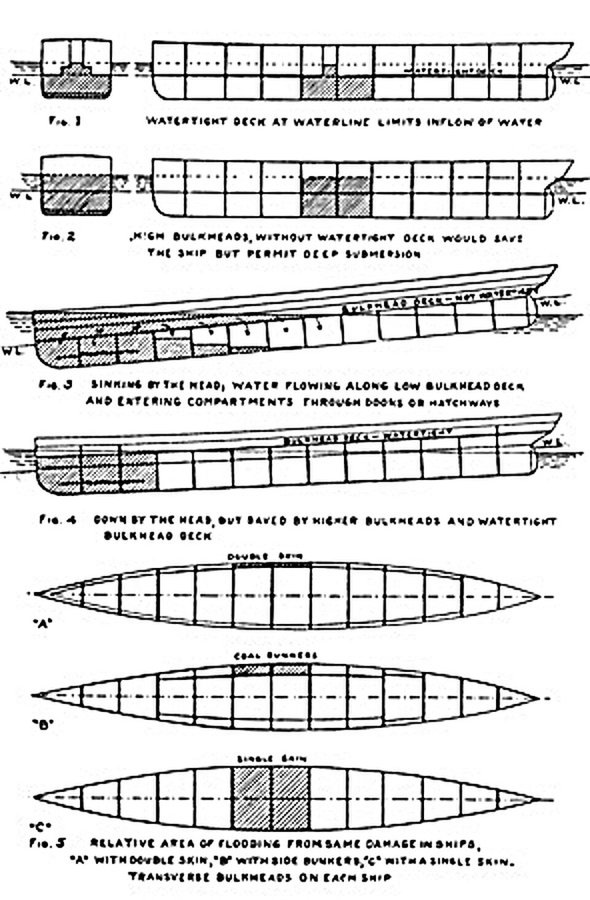
A cell is a bulkhead for a service. Instead of one pool, run several complete, independent copies of the service, each with its own servers and its own data, and give each a share of the customers. A thin cell router in front sends each request to the right cell using a partition key, such as the customer ID. AWS's 2023 whitepaper on cell-based architecture defines the router as "the thinnest possible layer, with the responsibility of routing requests to the right cell, and only that", and puts the effect in numbers: "If a workload uses 10 cells to service 100 requests, when a failure occurs in one cell, 90% of the overall requests would be unaffected by the failure." The same paper says AWS's service teams have used cell-based architecture "for more than a decade".
Cells cost something. Each cell must be big enough to stand alone, which probably wastes some capacity compared with one shared pool. Anything that needs data from many customers at once, such as a report across all carts, has to visit every cell. And choosing the partition key matters: the paper says it should match the "grain" of the service, the natural way it divides "with minimal cross-cell interactions". For a cart, the customer is the obvious grain, because a cart belongs to one customer. Amazon hasn't published which of its retail services are built from cells, or how many cells they use.
11.2Shuffle sharding
Cells contain a failure to a fraction of customers, but the fraction is fixed by the number of cells. With four cells, a poison request from one customer still takes down a quarter of everyone. Colm MacCárthaigh's article in the Amazon Builders' Library describes a way to make the fraction far smaller without adding servers, called shuffle sharding.
Take eight servers. Ordinary sharding splits them into four fixed shards of two, and puts each customer on one shard. A customer who sends a request that crashes servers takes down both servers in their shard, and with them every customer on that shard: a quarter of everyone. Shuffle sharding instead gives each customer their own pair of servers, chosen from all eight. There are 28 different pairs, so customers are spread across 28 combinations. When the bad customer's two servers go down, another customer loses both of their servers only if they were given exactly the same pair. Everyone else still has at least one working server, and a client that retries on the other server carries on.
This program assigns 1,000 customers both ways, lets one customer's poison request crash both of its servers, and counts how many customers lose every server they have. It also computes the number from Amazon's DNS service, Route 53, which the article uses as its example.
import random
from itertools import combinations
from math import comb
random.seed(3)

WORKERS = 8
customers = [f"c{i}" for i in range(1_000)]

# Plain sharding: 4 fixed shards of 2 workers; each customer gets one shard.
shards = [(0, 1), (2, 3), (4, 5), (6, 7)]
plain = {c: shards[i % 4] for i, c in enumerate(customers)}

# Shuffle sharding: each customer gets its own random pair out of the 8 workers.
pairs = list(combinations(range(WORKERS), 2))
shuffle = {c: random.choice(pairs) for c in customers}

def hurt(assign, bad):
    """A poison request from `bad` crashes both of its workers.
    A customer is down only if every one of its workers is down."""
    dead = set(assign[bad])
    return sum(1 for c in customers if set(assign[c]) <= dead) / len(customers)

print(f"possible pairs of 8 workers: {len(pairs)}")
print(f"plain shards:   {hurt(plain, 'c0'):.0%} of customers lose every worker")
print(f"shuffle shards: {hurt(shuffle, 'c0'):.1%} of customers lose every worker")

# Route 53's numbers: 2,048 virtual name servers, 4 per customer domain.
print(f"ways to choose 4 of 2,048: {comb(2048, 4):,}")possible pairs of 8 workers: 28
plain shards: 25% of customers lose every worker
shuffle shards: 3.3% of customers lose every worker
ways to choose 4 of 2,048: 730,862,190,080With plain shards, the bad customer takes out 25% of customers. With shuffle shards on the same eight servers, 3.3% lose both servers, roughly the 1 in 28 (3.6%) you'd expect, since each customer's random pair matches the bad customer's with probability 1/28. MacCárthaigh's article puts it the same way: one in 28 is "7 times better than regular sharding".
That last line is why the idea scales so well. Route 53 arranges its capacity as 2,048 virtual name servers and gives each customer's domain a shuffle shard of four. There are roughly 730 billion ways to choose four of 2,048, the article's "staggering 730 billion possible shuffle shards", enough that domains can be assigned so that, in the article's words, "no customer domain will ever share more than two virtual name servers with any other customer domain". An attack on one domain overloads its four servers; every other domain keeps at least two healthy ones.
How should the cart service's servers be shared between customers?
- Best use of capacity
- Simplest to run
- A poison request or bad deployment can reach every customer
- A failure stays in one cell
- Deploy one cell at a time
- Some spare capacity per cell
- Cross-customer work visits every cell
- Tiny overlap between any two customers
- No extra servers needed
- Clients must retry on another server
- Assignment must be stored and kept stable
These combine. AWS's whitepaper describes cells as the outer wall, so that a bad deployment or a broken dependency hurts one cell, and MacCárthaigh's article describes shuffle sharding inside services like Route 53, so that one customer's traffic barely touches anyone else's. Which of these Amazon's retail cart uses isn't published; the cart's natural partition key, the customer, suits both.
12The whole system
12.1Every box, and why it's there
| Component | What it does | Added because |
|---|---|---|
| Services with their own data | Each team owns one part and its store | One application and one database couldn't scale or change (§2) |
| Always-writeable cart store | Accepts writes on any reachable node; merges siblings | A refused Add to Cart is a lost sale (§3, §4) |
| Leader per partition (DynamoDB) | Orders writes to each item; conditional writes | Siblings were hard to program against; checkout needs exact checks (§5) |
| Checkout saga | Price, claim, authorise, create, with compensations | No transaction spans four services and a bank (§6) |
| Deal claims on split counters | Conditional decrements with 15-minute expiry | Cached counts oversell; one counter is a hot key (§7) |
| Authorise, then capture | Hold funds at order, charge at shipping | Orders ship in parts and items can turn out missing (§8) |
| Idempotency keys | A retried tap returns the first result | Responses get lost and taps get repeated (§8) |
| Outbox and queue | Order work happens after Leo sees "Order placed" | Downstream work is slow and the peak is spiky (§9) |
| Load shedding | Refuses extra work fast, by priority | Overload turns latency into outage (§10) |
| Cells and shuffle shards | Walls between groups of customers | One bad deploy or poison request shouldn't reach everyone (§11) |
12.2From top to bottom
| Level | The choice | Data structure or algorithm |
|---|---|---|
| Organisation | Services own their data; you build it, you run it | Published interfaces; no shared databases |
| Cart storage (2007) | Always writeable; merge on read | Consistent hash ring; preference lists; sloppy quorum (3, 2, 2); hinted handoff; Merkle trees |
| Cart versions (2007) | Detect concurrency, let the app merge | Vector clocks of (node, counter); siblings; union merge, or tagged adds (an observed-remove set) |
| Storage (2012 on) | One version per item | Partitions of key ranges; Multi-Paxos group of three across zones; leader leases; write-ahead log quorum of two |
| Deal inventory | Claim at add-to-cart, with expiry | Conditional decrement; counter split into slots; claim records with expiry; waitlist |
| Checkout | A saga, irreversible step last | Local transactions plus compensations; idempotency keys; outbox |
| Overload | Shed by priority | Deadlines, bounded queues, goodput |
| Isolation | Cells, then shuffle shards | Cell router by customer ID; random k-of-n server sets (C(2048, 4) ≈ 730 billion) |
13What goes wrong, and what it costs
13.1Failures this design has to survive
| What happens | What Leo sees | What the design does |
|---|---|---|
| A storage node holding his cart is down | Nothing | Dynamo: a stand-in takes the write with a hint. DynamoDB: two of three replicas still form a quorum |
| His two devices edit the cart during a network split | A removed item may reappear (Dynamo, union merge) | Siblings are merged on the next read; tagged adds or one row per line avoid resurfacing |
| A million people claim 1,000 deal units | "Added to cart", or a quick "join the waitlist" | Conditional decrements on split counters; claims expire after 15 minutes |
| His card is declined at checkout | "Payment declined", choose another card | The saga releases his claim; no order exists |
| The response to Place your order is lost and he taps again | One order | The idempotency key returns the first result |
| The authorisation fails after the order is placed | A request to update his payment | Retry or change the card; otherwise the order is cancelled |
| The email service is slow at midnight | The email arrives late | The order event waits in the queue; checkout isn't held up |
| The cart service is overloaded | A fast "try again" on low-priority parts of the page | Load shedding by priority and deadline |
| A bad deployment reaches one cell | Customers in that cell see errors; Leo, in another, doesn't | Cells deploy one at a time and fail alone |
13.2The tradeoffs, in one table
| Decision | Chosen | Given up | Why it was worth it |
|---|---|---|---|
| Architecture | Services with private data (from 2001) | Simple cross-team queries and transactions | Teams scale and ship independently |
| Cart writes (2007) | Always writeable, sloppy quorums | Reads that always see the latest write | A refused Add to Cart costs a sale |
| Cart conflicts (2007) | Union merge in the application | Removals that always stick | Adds are never lost; the shopper reviews the cart anyway |
| Storage (2012) | Paxos leader per partition | Writes during a partition that loses its quorum | One version per item; conditional writes and transactions |
| Deal stock | Claim at add-to-cart for 15 minutes | Units tied up in abandoned carts | Shoppers learn at once; no oversell |
| Hot deal counter | Split into slots | A simple single number | Many partitions share the burst |
| Payment | Authorise at order, capture at shipping | The certainty of money in hand at checkout | Charges match what ships |
| After the order | Asynchronous pipeline | Everything finished when Leo sees "Order placed" | Fast checkout; downstream absorbs the peak |
| Overload | Shed by priority | Some requests refused | The rest still finish in time |
| Isolation | Cells and shuffle shards | Some spare capacity; more routing | A failure reaches a fraction of customers |
14Summary
- A cart is a sale waiting to happen, so refusing a write to it costs money; a deal's stock and an order are promises, so they must be exact. The two kinds of data get different storage.
- Amazon split its monolith into services from 2001, each owning its data behind an interface; a page came to depend on over 150 of them, so each is measured at the 99.9th percentile.
- Dynamo (2007) made the cart always writeable: keys on a consistent hash ring, N replicas, quorums of (3, 2, 2), and sloppy quorums with hinted handoff so writes succeed even when home nodes are down.
- Vector clocks detect concurrent versions: one counter per coordinating node; if neither clock is at or above the other everywhere, both versions are kept as siblings.
- The cart merged siblings by union, so no Add to Cart was ever lost and deleted items could resurface; tagging each add with its clock entry lets a merge tell a removal from an item the other side never saw.
- Siblings were rare: 99.94% of cart reads in a day saw one version, and most conflicts came from robots, not people.
- DynamoDB (2012) kept Dynamo's partitioning and dropped its versioning: each partition is a Multi-Paxos group of three replicas in three zones, a leased leader orders writes, and two of three must store each one.
- Checkout is a saga: price, claim, authorise, create, ordered from cheap and reversible to irreversible, with compensations for each step that can be undone.
- Deal units are claimed at add-to-cart for 15 minutes, with conditional decrements on split counters, because a cached count oversells and one counter is a hot key.
- Payments are authorised at order and captured at shipping, and idempotency keys make a retried tap return the first result.
- Work after the order goes through an outbox and a queue, and overload is handled by shedding low-priority work, while cells and shuffle sharding keep any one failure to a fraction of customers.
15Build this
A Prime Day checkout simulator.
- Write a key-value store with three replicas and simulated network splits. Implement
getandputwith vector clocks, return siblings, and merge a cart by union. Show a deleted item resurfacing, then replace the union with tagged adds and show that it stays deleted. - Add a deal with 1,000 units as ten split counters with conditional decrements, claim records with a 15-minute expiry (speed up time), a sweeper that returns expired units, and a waitlist that gets them.
- Write a checkout saga with four steps and compensations. Inject failures at each step and check that no claim, authorisation or order is left behind.
- Add idempotency keys, then drop 10% of responses and have clients retry. Count orders and authorisations per key; both should be exactly one.
- Fire 50,000 simulated shoppers at it in two seconds. Add load shedding that refuses "recommendations" requests before "place order" requests, and plot goodput with and without it.
16Interview questions
beginnerWhy did Amazon want a shopping cart that never rejects a write?›
Because a rejected Add to Cart is a customer who might not buy. The Dynamo paper says the cart "must allow customers to add and remove items from their shopping cart even amidst network and server failures". Accepting every write means two versions can briefly exist, and the worst case is a removed item showing up again, which the shopper fixes in one click. That's a much smaller cost than a lost sale.
beginnerWhat's the difference between authorising and capturing a payment, and why does Amazon do both?›
Authorising asks the card's bank to confirm the card is good and reserve the amount, without moving money. Capturing tells the bank to take it. Amazon authorises when the order is placed and captures when each shipment leaves, so a shopper is charged only for what ships, and an order split across warehouses is charged in parts. If the order is cancelled, Amazon tells the bank the authorisation isn't needed.
intermediateTwo versions of a cart have vector clocks {A:2} and {A:1, B:1}. What does that tell you, and what happens next?›
Neither clock is at or above the other on every node: the first has more of A's changes, the second has a change from B the first never saw. So the versions are concurrent, and Dynamo keeps both as siblings. The next read returns both with a context; the cart service merges them (in 2007, by union) and writes the result back with a clock that covers both, such as {A:3, B:1}, which lets every node drop the two siblings.
intermediateA Lightning Deal has 1,000 units and a million people tap at once. How do you avoid overselling, and keep it fast?›
Grant units only with an atomic conditional decrement on the stored count, never from a cached number, which oversells badly at these arrival rates. One counter is a hot key, so split the units across several counters on different partitions and have each claim pick one, retrying on another if it's empty. Record each claim with an expiry, 15 minutes for Amazon's Lightning Deals, so unbought units return to a waitlist, and turn away excess taps early with a waitlist or rate limit.
intermediateLeo taps Place your order, the response is lost, and he taps again. How do you make sure he gets one order?›
Give the attempt an idempotency key when the order-review page is rendered, and send it with every tap. Checkout stores the key with the order; a request with a key it has already completed gets the original result back instead of running the saga again. Following Amazon's Builders' Library guidance, a repeat with different parameters is rejected, and the repeat's response is equivalent to the first success, not an "already exists" error. Each downstream call, such as the authorisation, carries a key derived from it.
deepWhy did DynamoDB drop Dynamo's vector clocks and sloppy quorums?›
Developers found siblings and eventual consistency hard to program against, and Dynamo was hard to operate, so few teams adopted it. DynamoDB makes each partition a Multi-Paxos group of three replicas in three Availability Zones with a leased leader that orders every write, so each item has one version and conditional writes and transactions are possible. The price is that a partition that can't reach two of its three replicas, or is between leaders, can't accept writes; DynamoDB judged that a narrower availability promise, backed by 99.99% and 99.999% targets, was worth the simpler programming model.
deepHow do cells and shuffle sharding limit the damage of a failure, and how do they differ?›
Cells are complete, independent copies of a service, each serving a fixed share of customers chosen by a partition key; a bad deployment or broken dependency in one cell affects only that share, so with ten cells 90% of requests are unaffected. Shuffle sharding works inside a shared pool: each customer gets a small random set of servers, so two customers rarely share all of theirs. With 8 servers in pairs, one customer's poison request takes out 1 in 28 customers instead of 1 in 4, and Route 53's 4-of-2,048 shards make full overlap practically impossible.
17Go deeper
A Dynamo cart write with N = 3 and W = 2 finds two of its three home nodes unreachable. Does it fail?›
No. Dynamo uses a sloppy quorum: it writes to the first N healthy nodes on the ring, so stand-ins take the missing copies with hints and hand them back when the home nodes return. The write succeeds once two nodes have it.
Why did Dynamo's cart sometimes show items the customer had deleted?›
Concurrent versions were merged by union. A sibling that never heard about the removal still had the item, and a union can't tell "removed" from "never had", so the item came back.
In DynamoDB, when is a write acknowledged?›
When the partition's leader has its log record stored by a quorum of the replication group: two of the three replicas, in different Availability Zones.
Why does checkout claim the deal unit before asking the bank?›
At a sale most claims fail, and failing at inventory costs nothing outside Amazon. Asking the bank first would mean voiding an authorisation, and a hold on the shopper's money, for every loser.
With 8 servers and shuffle shards of 2, what fraction of customers share both servers with a misbehaving one?›
About 1 in 28, since there are 28 possible pairs: roughly 3.6%, against 25% with four fixed shards of two.
The always-writeable cart, consistent hashing, vector clocks, sloppy quorums, hinted handoff, Merkle trees and the production numbers. PDF
Why DynamoDB kept little of Dynamo's design: Multi-Paxos groups, leases, log replicas, admission control, and Prime Day 2021's 89.2 million requests a second.
How transactions across items were added to DynamoDB without slowing single-item reads and writes.
The move from the Obidos monolith to services, "you build it, you run it", and why Dynamo became a managed service.
Colm MacCárthaigh on shuffle sharding and Route 53; David Yanacek on goodput and load shedding; Malcolm Featonby on client request tokens.
Cells, cell routers, partition keys and the bulkhead idea, from AWS's own practice.
Each year's DynamoDB, Aurora, SQS, CloudFront and fault-injection numbers for Amazon's own systems during Prime Day.
18Related chapters
Lamport clocks, vector clocks, version vectors and Dynamo's clock truncation, in general. Chapter 26.
Quorums, sloppy quorums, hinted handoff and siblings on a different running example. Chapter 28.
Consistent hashing, virtual nodes, hot keys and DynamoDB's per-partition limits. Chapter 29.
Two-phase commit, sagas, the outbox and idempotency keys for one checkout across two systems. Chapter 31.
Authorisation, capture and idempotency keys from the payment processor's side. Chapter 52.
Holds on unique seats under contention, waiting rooms and bot defences. Chapter 67.
Timeouts, retries with backoff, circuit breakers and load shedding. Chapter 40.