Your shop's checkout service has just taken an order: order-3, for $30. Two other services need to hear about it. Billing has to charge the card, and shipping has to pack the box. They work at different speeds, billing within a fraction of a second and shipping in a batch every few minutes. Next month an analytics team will join and ask to see every order since the shop opened.
The obvious tool is a queue, which works like a mailbox. Checkout drops the order in, a service takes it out, and it's gone. That serves one reader well and fails for the rest. Whichever service takes order-3 first removes it for the other, so you'd need a separate mailbox per service, and checkout would have to know about all of them, including the analytics team that doesn't exist yet. Once an order has been taken, nobody can go back and look at it again.
Apache Kafka answers with a different structure. It keeps orders in a log: a file that records are added to at the end and that is never emptied by reading. (A record here is one small piece of data, such as one order.) Any number of programs can read the same records, each at its own speed, and a new program can start from the very beginning. This chapter asks one question about order-3: when checkout sends it, where does it go, who can read it, and is it safe once Kafka says OK? We'll build a toy log first, then follow the record onto disk, across machines and out to its readers.
01A log you can build in twenty lines
1.1Append, read by number, keep your own bookmark
Before any Kafka, let's build the structure and see what it gives us. The toy is one file on one machine with no copies, so it shows the shape of the idea and nothing more. It needs three things. Appending adds a line at the end of the file. Reading takes a starting record number and returns the records from there on, without removing anything. And each reader keeps its own bookmark, a number saying where it should carry on next time.
Save the script below as toylog.py and run it with python3 toylog.py. In read_from, enumerate pairs every line with its line number, which is what lets a reader ask for "everything from record 2". Billing will read two records and stop, shipping will read four, and then a fifth order arrives.
import os

path = "orders.log"
if os.path.exists(path): os.remove(path)

def append(record):                              # the only way to write: add to the end
    with open(path, "a") as f: f.write(record + "\n")

def read_from(offset, max_records=10):           # read by record number; nothing is removed
    with open(path) as f: lines = f.read().splitlines()
    return list(enumerate(lines))[offset:offset + max_records]

for order in ("order-1", "order-2", "order-3", "order-4"):
    append(order)

billing_offset, shipping_offset = 0, 0           # each reader remembers its own position
batch = read_from(billing_offset, 2);  billing_offset += len(batch)
print("billing  reads :", batch)
batch = read_from(shipping_offset, 4); shipping_offset += len(batch)
print("shipping reads :", batch)
append("order-5")
print("billing  reads :", read_from(billing_offset), " <- carries on from offset", billing_offset)
print("replay from 0 :", [r for _, r in read_from(0)], " <- nothing was consumed")billing reads : [(0, 'order-1'), (1, 'order-2')]
shipping reads : [(0, 'order-1'), (1, 'order-2'), (2, 'order-3'), (3, 'order-4')]
billing reads : [(2, 'order-3'), (3, 'order-4'), (4, 'order-5')] <- carries on from offset 2
replay from 0 : ['order-1', 'order-2', 'order-3', 'order-4', 'order-5'] <- nothing was consumedLook at what billing and shipping did to each other: nothing at all. Both received order-1 and order-2, each at its own speed. Billing stopped after two records and, when it came back, picked up at record 2 exactly where it had left off, and it received order-5 along with the others that had arrived meanwhile. The last line replays all five orders from the start, because reading removed nothing. That last line is what the analytics team will do next month.
1.2Naming the pieces
The record number is called its offset: order-3 sits at offset 2 in the toy log because counting starts at 0. A reader's bookmark is the offset of the next record it wants. Kafka uses the same word and the same idea. The program that appends records is a producer, the program that reads them is a consumer, and the servers that hold the log are brokers. In the toy, checkout is the producer, billing and shipping are consumers, and the one machine holding orders.log is the only broker.
Jay Kreps, who co-created Kafka at LinkedIn, described the log in his essay The Log as "an append-only, totally-ordered sequence of records ordered by time". The structure is old. Postgres keeps one, its write-ahead log (chapter 21), and its standby servers stay up to date by replaying that log record by record. Kafka takes the same structure and turns it into a service that any program can append to and replay.
Here is how a log differs from the mailbox we started with:
| A queue (RabbitMQ, SQS) | A log (Kafka) | |
|---|---|---|
| What a read does | Removes or hides the message | Nothing; the reader moves its own offset |
| Several readers | Compete for messages | Each reads everything, at its own pace |
| Replay | Gone once acknowledged | Rewind the offset and read again |
| Ordering | Usually per queue, but a message that fails and is handed out again comes back out of order | Strict, by offset |
| Deletion | Per message, on acknowledgement | Old data deleted by age or size, a whole chunk at a time (section 10) |
The most important row is the first one. Because a read changes nothing, the broker doesn't have to remember who has read what. It doesn't need to know that billing has seen offset 41,902 and shipping hasn't. A consumer is just a number kept on its side of the connection, so adding a tenth consumer costs the broker almost nothing. That's why one log can feed billing, shipping, analytics and whatever comes next without checkout changing at all.
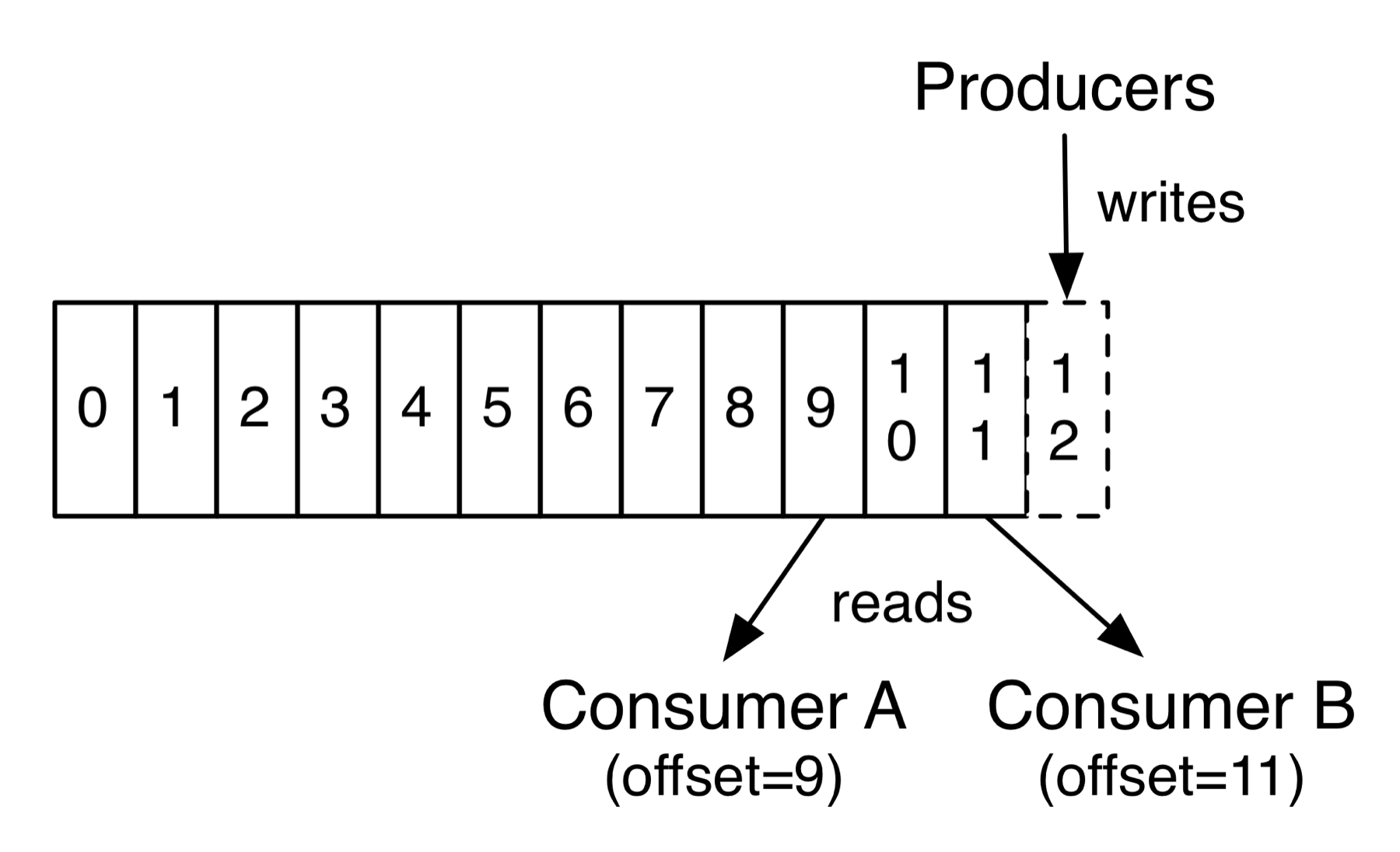
The toy has an obvious limit, though: one file on one machine. When checkout is busy, that machine's disk and network card become the ceiling for every order the shop takes. Kafka's answer is to split the log.
02Splitting the log: topics, partitions and keys
2.1Which partition gets order-3?
Kafka calls a named stream of records, such as all the shop's orders, a topic. It divides each topic into partitions, and every partition is an independent log with its own offsets starting at 0. Different partitions can live on different brokers, so the load of the topic spreads across machines.
That raises a question the toy never faced: when checkout sends order-3, which partition does it go to? The producer decides. Each record can carry a key, a label chosen by the sender. With a key, the default rule is to run it through a hash function (murmur2, which turns any key into a well-mixed number) and take the remainder after dividing by the number of partitions. So every record with the key order-3 goes to the same partition, always. Without a key, records are spread across the partitions.
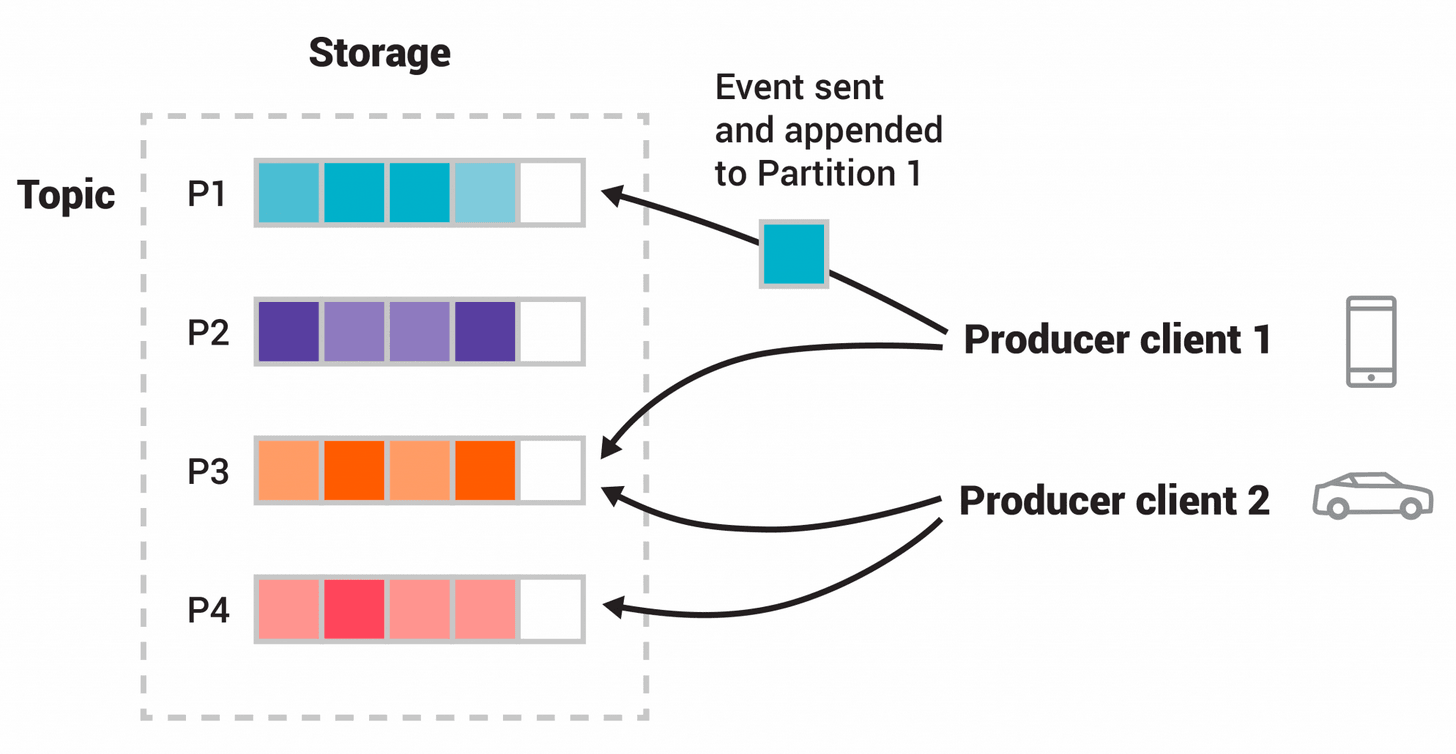
In the three-partition topic orders used throughout this chapter, the keys order-2 and order-3 both landed in partition 0. A consumer reads from a partition by sending its broker a fetch request: "send me records starting at offset n". Here's order-3 being sent and then fetched by billing and shipping:
order-3. The topic orders has three partitions, and partition 0 already holds order-2 at offset 0. Billing has read offset 0, so its bookmark says the next one it wants is 1. Shipping hasn't started.?Why does Kafka only promise ordering within one partition?
Because ordering across partitions would need every broker to agree on the position of every append, which is a round of agreement between machines for each record. Inside one partition there's one broker in charge, so the order is the order of appends. Kafka gives you ordering where it's cheap and lets you decide what has to share a partition by choosing the key.
A partition is still a log on one broker's disk, and how that disk is laid out decides how quickly order-3 can be found again. That's the next question.
03What a partition looks like on disk
A partition can't be one ever-growing file. Deleting old records from the front of a single file means rewriting it, and finding offset 5,000,000 would mean reading from the start. Kafka cuts the log into pieces and keeps a small index for each. Each partition gets its own directory on the broker's disk. Here is the one for partition 0 of orders, after five keyed records were written to the topic and two of them, order-2 and order-3, landed in this partition:
$ ls -la data1/orders-0/
-rw-r--r-- 1 root root 10485760 Sep 27 04:05 00000000000000000000.index
-rw-r--r-- 1 root root      123 Sep 27 04:05 00000000000000000000.log
-rw-r--r-- 1 root root 10485756 Sep 27 04:05 00000000000000000000.timeindex
-rw-r--r-- 1 root root        8 Sep 27 04:05 leader-epoch-checkpoint
-rw-r--r-- 1 root root 43 Sep 27 04:05 partition.metadata3.1Segments and their two indexes
The records are in the .log file, which is 123 bytes: our two records. The last two files are small bookkeeping. partition.metadata records which topic the directory belongs to, and section 6.3 explains leader-epoch-checkpoint. When a .log file grows past log.segment.bytes (1 GiB by default, or segment.bytes set per topic), Kafka closes it and starts a new file, called a segment. A segment is named after the first offset it holds, zero-padded, so the first one here is 00000000000000000000. A partition is a list of segments, and only the newest, the active segment, is ever written to. The older ones are fixed, which will matter in section 10.
Next to each segment sit two index files, small lookup tables that let the broker jump into the .log instead of reading it from the start:
| File | Entry | What it maps |
|---|---|---|
.index | 8 bytes: 4-byte offset relative to the segment's base, 4-byte file position | Offset → byte position in the .log |
.timeindex | 12 bytes: 8-byte timestamp, 4-byte relative offset | Timestamp → offset, for "seek to 09:00" |
Both are preallocated to log.index.size.max.bytes (10 MiB) and memory-mapped, meaning the kernel lets the broker treat the file as if it were ordinary memory (chapter 04). That's why a 123-byte log sits next to two files of about 10 MB. du reports 0 KB for both, because they're sparse files: the filesystem hands out disk blocks only for the stretches that have been written. The odd size of the time index, 10,485,756 bytes, is the largest multiple of 12 that fits in 10 MiB, so that it holds a whole number of entries.
An index doesn't need an entry for every record, and that's what keeps it small. Kafka adds one entry roughly every log.index.interval.bytes (4,096) of log. To find an offset, the broker binary-searches the index (the halving search you'd use on any sorted list) for the nearest entry at or below the target, then reads forward in the .log from that position, which is at most a few kilobytes of scanning. A small index can stay in memory, and a lookup costs one search and one short scan, wherever in the partition the offset is.
3.2The record batch
Kafka doesn't store records one at a time. The unit on disk is a record batch: a header followed by one or more records. The same batch, in the same format, is also what the producer sends over the network and what one broker sends to another when it copies the partition (section 5). The header looks like this in the source:
 * RecordBatch =>
 *  BaseOffset => Int64
 *  Length => Int32
 *  PartitionLeaderEpoch => Int32
 *  Magic => Int8
 *  CRC => Uint32
 *  Attributes => Int16
 *  LastOffsetDelta => Int32 // also serves as LastSequenceDelta
 *  BaseTimestamp => Int64
 *  MaxTimestamp => Int64
 *  ProducerId => Int64
 *  ProducerEpoch => Int16
 *  BaseSequence => Int32
 *  RecordsCount => Int32
 *  Records => [Record]
Most of the fields are bookkeeping. BaseOffset is the offset of the batch's first record, Magic is the format version, CRC is a checksum (a number computed from the bytes, so that a corrupted batch is detected), and Attributes holds flags such as the compression codec. The header adds up to 61 bytes. After it come the records, each storing its own offset and timestamp as small differences from the batch's base, written as variable-length integers (varints) so that small numbers take few bytes. Three fields are used later: PartitionLeaderEpoch in section 6, and ProducerId, ProducerEpoch and BaseSequence in section 9.
To see a real batch, we can ask Kafka's dump tool to print one segment. kafka-dump-log.sh reads a .log file directly, and --print-data-log makes it print each record's key and payload as well as the batch header.
kafka-dump-log.sh --files data1/orders-0/00000000000000000000.log --print-data-logDumping data1/orders-0/00000000000000000000.log
Log starting offset: 0
baseOffset: 0 lastOffset: 1 count: 2 baseSequence: 0 lastSequence: 1 producerId: 1000
producerEpoch: 0 partitionLeaderEpoch: 0 isTransactional: false isControl: false
position: 0 CreateTime: 1790481955153 size: 123 magic: 2 compresscodec: none crc: 2772778610
| offset: 0 keySize: 7 valueSize: 17 sequence: 0 key: order-2 payload: {"id":2,"amt":20}
| offset: 1 keySize: 7 valueSize: 17 sequence: 1 key: order-3 payload: {"id":3,"amt":30}There's order-3, at offset 1 right after order-2, in a single batch holding both. The header lines describe the batch: count: 2 records, starting at byte position: 0 of the file, with CreateTime being the producer's clock in milliseconds since 1970. The records carry 48 bytes of key and value between them (7 + 17 each), and the batch takes 123 bytes on disk: the 61-byte header plus roughly 31 bytes per record. Nobody asked the console producer for idempotence, yet the batch carries producerId: 1000 and sequence numbers. That's the default since Kafka 3.0, and section 9 explains what it's for.
Why does the broker keep the producer's batches intact? So that it has almost nothing to do to them. It checks the CRC, assigns offsets, and writes the bytes as they arrived. On the way out it sends those same bytes to consumers, and section 7 shows how much that saves.
3.3Finding offset N
Now we can follow a consumer's fetch all the way in. Billing asks for "partition 2, from offset 5,000", and the broker has to turn that into bytes:
max.partition.fetch.bytes, 1 MiB by default).A fetch returns whole batches, so a consumer asking for offset 5,000 may get a batch that starts at 4,960, and the client drops the records it didn't ask for.
That covers reading. Writing needs the same care, because sending order-3 on its own, in a request of its own, is a poor use of everything we just looked at.
04Sending records in batches
A call to producer.send() doesn't send anything. It appends the record to an in-memory batch for its partition and returns a future, an object that will hold the outcome once there is one. Sending each record on its own would be expensive: for a broker, handling a request means parsing it, checking the CRC, appending, and taking part in replication (section 5). Most of that is paid per request, and very little of it grows with the number of bytes. Two words will help us measure that. Throughput is how many records get through per second. Latency is how long one record takes from send() to being acknowledged.
4.1The accumulator, batch.size and linger.ms
The producer's record accumulator keeps one open batch per partition. A background thread ships a batch when it's full (batch.size, 16,384 bytes by default) or when it has waited linger.ms. That wait is how long the producer holds a batch open hoping more records arrive. Until Kafka 4.0, linger.ms defaulted to 0, which sends as soon as possible. It's now 5, and the upgrade notes give the reason: "the efficiency gains from larger batches typically result in similar or lower producer latency despite the increased linger."
?Why would waiting make things faster?
Because the broker's cost is per request and per batch, not per byte. If 150 records travel in one batch, the parsing, the checksum, the append and the replication round are paid once and shared by all 150, instead of 150 times. The producer's own wait of a few milliseconds is small next to what it saves.
Here is what batching does to throughput for one producer sending 100-byte records as fast as it can, with acks=all (section 5.2) into a three-partition topic whose partitions each have three copies:
| Producer settings | Records/s (median of 3) | MB/s | Records per batch |
|---|---|---|---|
| batch.size=100, linger.ms=0 | 2,457 | 0.23 | 1 |
| Defaults: batch.size=16384, linger.ms=5 | 153,022 | 14.6 | about 148 |
| batch.size=262144, linger.ms=20 | 233,645 | 22.3 | up to about 2,400 |
Batching is worth roughly 60× between the first two rows. The 148 comes from dumping a default run: batches of 148 records, 16,277 bytes each, which is roughly 110 bytes per 100-byte record. Run-to-run variation was large (the defaults ranged from 92k to 168k records a second), so trust the ratios more than the absolute numbers.
So a batch carries order-3 and its neighbours to the broker that holds partition 0, quickly. But then the record sits on exactly one machine, and a dead disk would take every order on it. Kafka's answer is to keep copies.
05Copies on other brokers
5.1Leader, followers and the high watermark
Each partition is stored on several brokers. The number of copies is the replication factor (RF), and each copy is a replica. With a factor of 3, one replica is the leader and the other two are followers. Producers and consumers talk only to the leader. Followers are consumers too, in a way: each one fetches from the leader, exactly as billing does, and writes what it receives into its own copy of the log.
This design has a consequence that surprises people. Nobody pushes order-3 to the followers. The leader has no message saying "I got it" coming back from them. Instead, the leader learns that a follower has the record from the follower's next fetch, which asks for a later offset. To describe what's happening we need two positions for each replica. Its log end offset (LEO) is the offset the next record will get. The replicas that are keeping up with the leader, the leader included, are the in-sync replicas, or ISR. The leader also tracks the high watermark (HW): the offset below which every member of the ISR has the data. Section 6 covers how a replica enters and leaves the ISR. For now, assume all three replicas are in it. A record below the HW is committed, and only committed records are shown to consumers.
Here is order-3 going from the producer to being visible, with acks=all meaning the producer wants to hear back only when the record is committed:
order-2 at offset 0, and it's committed. Each replica's LEO is 1, and the leader's HW is 1: everything below offset 1 is on every in-sync replica. Checkout is about to send order-3.?Why not let consumers read up to the leader's LEO?
Because records above the HW might not survive. If the leader died after appending order-3 but before any follower fetched it, a follower without the record would become leader, and order-3 would never have existed. A consumer that had already seen it would have acted on a phantom: billing would have charged a card for an order that Kafka then lost. Holding consumers to the HW means they only see records that will outlive the leader.
5.2acks: when the producer hears back
The scene waited for every in-sync replica before answering the producer. That's one choice among three, set by the producer's acks setting, and each choice decides how many copies must exist before checkout is told "OK":
acks | Leader replies when | You can lose an acknowledged record when |
|---|---|---|
0 | Never. The producer doesn't wait | Anything goes wrong, including the request never arriving |
1 | The leader has appended to its own log | The leader dies before a follower copies the record |
all (or -1) | Every replica in the ISR has it, and the ISR has at least min.insync.replicas members (a setting from section 6) | Every in-sync replica is lost at once |
all has been the default since Kafka 3.0. The price is latency. These figures were taken at a steady 3,000 records a second, slow enough that queueing doesn't swamp them. p50 is the median send, and p99 is the latency that 99 of every 100 sends beat:
| acks | p50 | p99 | What the wait covers |
|---|---|---|---|
| 0 | 1 ms | 20 ms | Handing the batch to the socket |
| 1 | 1 ms | 39 ms | One round trip and a leader append |
| all | 6 ms | 75 ms | Plus followers fetching the batch and the leader seeing their progress |
Even when all three brokers share one host, acks=all costs a few milliseconds more at the median. The scene above shows why: the leader can't answer until two more fetches have come back from the followers, and each of those travels the pull path of frames 3 to 6.
acks=all waits for "every replica in the ISR". We assumed that meant all three. What happens when a follower is dead?
06When a copy goes missing
6.1The in-sync replica set
The leader can't wait for a dead follower forever, or one broker's crash would stop every producer. So the ISR is allowed to shrink: it's the set of replicas the leader currently waits for, and a replica that stops keeping up gets removed from it. Someone has to keep track of which replicas are in each ISR. In Kafka that job belongs to a few servers called controllers, which keep the cluster's records of who leads each partition and which brokers are alive (section 11). The design docs give two ways to leave the ISR:
- The broker loses its session. A broker that doesn't send a heartbeat to the controller within
broker.session.timeout.ms(9 s) is fenced, meaning the cluster treats it as gone, and it's removed from every ISR it was in. - The follower falls behind. A replica that hasn't caught up to the leader's end within
replica.lag.time.max.ms(30 s) is dropped by the leader.
A replica rejoins when it has caught up. A follower killed with kill -9, which ends a process at once the way a crash would, left the ISR about 9.5 seconds later, observed by polling kafka-topics.sh --describe, which takes a second or two per call. That matches the 9-second session timeout.
?Why have an ISR instead of a fixed majority?
A majority quorum, as in the Raft consensus algorithm (chapter 27), needs 2f+1 copies to survive f failures, because a decision needs more than half of them. The ISR needs only f+1: the leader waits for all in-sync replicas, and a dead one is removed from the set instead of being counted against it. The price is that the set can shrink, possibly to the leader alone, and then "all of the ISR" means one copy. You have to say how small you'll let it get.
6.2min.insync.replicas and a record nobody can read
That's the job of min.insync.replicas: the smallest ISR that may accept an acks=all write. With replication factor 3 and min.insync.replicas=2, one broker can die with no pause and no loss of committed data, and a second failure makes writes fail instead of quietly accepting a single copy. Here is the check, in the leader's append path:
        case Some(leaderLog) =>
          val minIsr = effectiveMinIsr(leaderLog)
          val inSyncSize = partitionState.isr.size

          // Avoid writing to leader if there are not enough insync replicas to make it safe
          if (inSyncSize < minIsr && requiredAcks == -1) {
            throw new NotEnoughReplicasException(s"The size of the current ISR : $inSyncSize " +
              s"is insufficient to satisfy the min.isr requirement of $minIsr for partition $topicPartition, " +
              s"live replica(s) broker.id are : $inSyncReplicaIds")
          }

          val info = leaderLog.appendAsLeader(records, this.leaderEpoch, origin, requestLocal, verificationGuard, transactionVersion)

          // we may need to increment high watermark since ISR could be down to 1
          (info, maybeIncrementLeaderHW(leaderLog))
requiredAcks == -1 is acks=all, so only those writes are refused. An acks=1 write goes straight through to appendAsLeader and lands in the leader's log. Whether a consumer can then read it depends on the high watermark, and the HW can only move once enough replicas have the record. Try to work out the answer before reading it.
A topic has two replicas and min.insync.replicas=2. One replica's broker is killed, so the ISR is just the leader. A producer with acks=1 writes a record and gets success. What does a consumer see?
That guard is the first line of the function that moves the HW:
  private def maybeIncrementLeaderHW(leaderLog: UnifiedLog, currentTimeMs: Long = time.milliseconds): Boolean = {
    if (isUnderMinIsr) {
      trace(s"Not increasing HWM because partition is under min ISR(ISR=${partitionState.isr}")
      return false
    }
    // ...
    val leaderLogEndOffset = leaderLog.logEndOffsetMetadata
    var newHighWatermark = leaderLogEndOffset
    remoteReplicasMap.forEach { (_, replica) =>
      // ... the HW is the lowest LEO among the (maximal) ISR ...
    }
The experiment below creates a topic whose two replicas live on brokers 1 and 3, with min.insync.replicas=2, kills broker 3, and then sends one record with each acks setting. --replica-assignment 1:3 pins the partition's replicas to those two brokers, kafka-get-offsets.sh reports the end of the log as consumers see it (the HW), and kafka-dump-log.sh shows what the leader's disk holds.
kafka-topics.sh --create --topic strict --replica-assignment 1:3 --config min.insync.replicas=2
kill -9 <broker 3>          # wait for the ISR to shrink
kafka-topics.sh --describe --topic strict

echo hello | kafka-console-producer.sh --topic strict --command-property acks=all
echo hello | kafka-console-producer.sh --topic strict --command-property acks=1
kafka-get-offsets.sh --topic strict                     # reports the HW
kafka-dump-log.sh --files data1/strict-0/00000000000000000000.log | tail -2
kafka-console-consumer.sh --topic strict --from-beginning --timeout-ms 5000Topic: strict Partition: 0 Leader: 1 Replicas: 1,3 Isr: 1 Elr: 3
WARN ... Got error produce response ... on topic-partition strict-0, retrying (2 attempts left). Error: NOT_ENOUGH_REPLICAS
strict:0:0
baseOffset: 0 lastOffset: 0 count: 1 ... producerId: -1 ... size: 73
baseOffset: 1 lastOffset: 1 count: 1 ... producerId: -1 ... size: 74
Processed a total of 0 messagesThe acks=all write was refused with NOT_ENOUGH_REPLICAS. Two acks=1 writes are on the leader's disk, but the high watermark is still 0 and the consumer received nothing. After broker 3 restarted, the ISR went back to 1,3, kafka-get-offsets reported 2 and the consumer read both records. Elr: 3 is KIP-966's eligible leader replica: broker 3 is out of the ISR but known to hold everything up to the HW, so it may still be elected leader safely. Notice also producerId: -1 on both batches, which section 9 comes back to.
6.3When the leader dies: leader epochs
Suppose broker 1 is leader, appends order-3 at offset 1, and dies before any follower fetched it. The controller picks broker 2 as the new leader from the ISR, and broker 2 accepts a different record at offset 1. When broker 1 comes back, it holds order-3 at offset 1 where the rest of the cluster holds something else. Before it can follow the new leader, it has to cut its log back to the point where the two histories agree.
Kafka first tried truncating a returning follower to its own high watermark. That could lose data or leave replicas diverged in some double-failure cases, described in KIP-101, because a follower's HW lags the leader's: it only learns the new value in the next fetch response. Truncating to a stale HW could throw away committed records or leave two replicas with different data at the same offset.
KIP-101's fix was the leader epoch, a counter that goes up with each new leader and is stamped on every batch (the PartitionLeaderEpoch field in the header from section 3.2). Each replica keeps a small file, leader-epoch-checkpoint (the 8-byte file in the directory listing of section 3), recording the first offset of each epoch. In our story, say broker 1 led partition 0 in epoch 4 and broker 2 took over as epoch 5, starting at offset 1. When broker 1 returns, it asks broker 2, "where did epoch 4 end for you?" Broker 2 answers with the first offset of epoch 5 in its own log, which is 1, and broker 1 cuts its log back to offset 1, dropping its copy of order-3, before fetching broker 2's record in its place. Both logs now match up to there, whatever either high watermark said. Raft solves the same problem with its term numbers (chapter 27).
6.4Unclean leader election
If every member of the ISR is gone, there's a choice to make. Wait for one of them to come back, or elect a replica that was out of sync and accept the loss of whatever it didn't have. The setting unclean.leader.election.enable makes that choice, and it defaults to false (since Kafka 0.11): the partition stays offline instead of silently losing committed data.
| Setting | Topic stays available when all ISR members die? | Acknowledged data can be lost? |
|---|---|---|
unclean.leader.election.enable=false (default) | No: offline until an ISR member returns | No, while one ISR member's disk survives |
unclean.leader.election.enable=true | Yes: any live replica can lead | Yes, everything it hadn't copied |
This choice is where Kafka's replication story started. Kyle Kingsbury's Jepsen test of Kafka (2013), run against a pre-release Kafka 0.8, shrank the ISR to the leader alone and then partitioned that leader away. Of 1,000 writes sent, 987 were acknowledged, and 520 of those acknowledged writes were lost. One of his proposed fixes was a minimum ISR size, and min.insync.replicas is what Kafka later added.
All of these protections hold as long as at least one replica still has order-3. That raises a question we skipped: what does each broker do with the record on its own disk?
07Why the broker doesn't fsync
7.1No cache of its own, and no fsync per write
Chapter 08 showed what happens to a write: the kernel copies it into the page cache as a dirty page and returns, and it reaches the disk later, unless the program calls fsync and waits. A database calls fsync at every commit. Kafka's broker doesn't, and its design docs say why. They reject the usual plan of a big in-process cache flushed to disk "in a panic" when space runs out: "we invert that. All data is immediately written to a persistent log on the filesystem without necessarily flushing to disk. In effect this just means that it is transferred into the kernel's pagecache."
So the broker's write() for order-3 lands in the page cache and returns, and the kernel writes it back later. A cache inside the JVM, the docs add, would store objects at "often doubling the size of the data" and would start cold after every restart, while the page cache survives a broker restart.
That leaves the question of what makes an acknowledged record durable. The answer is replication. log.flush.interval.messages defaults to Long.MAX_VALUE, so Kafka never calls fsync on a segment because of a write. (It does flush a segment once it has closed it and moved on to a new one, and at a clean shutdown, but neither happens on the path of a produce request.) When order-3 is committed, it sits in the page cache of every ISR member. You lose it only if all of them lose power before writeback, which is why ISR members should sit in different racks or availability zones, meaning separate data centres with their own power and network. The docs also say why they refuse to fsync every write: it "can reduce performance by two to three orders of magnitude", meaning a hundred to a thousand times slower. And a replica that crashed and lost its unflushed data can't rejoin the ISR until it has fully re-synced from the leader. With that in mind, try this one.
order-3 is committed and acknowledged, and sits in the page cache of all three brokers, with no fsync anywhere. Broker 1 loses power. Is order-3 lost?
Here is order-3 in the page caches of three brokers, one of which loses power:
order-3 is committed and acknowledged, and it's a dirty page in the page cache of all three brokers. No fsync has happened. Each disk holds only order-2.To check that the broker leaves segments alone, we can watch it. strace prints every system call a process makes (chapter 07). Here it attaches to the running broker (-p), follows all its threads (-f), and traces only fsync and fdatasync, a close cousin of fsync that can skip writing some of the file's metadata. -y prints the file's path next to each file descriptor, -qq hides strace's own status messages, and -o writes the trace to sync.txt. Meanwhile kafka-producer-perf-test.sh sends 200,000 records of 100 bytes at up to 20,000 a second. At the end, grep pulls out the path from each sync call, sed trims the directory prefix, and sort | uniq -c counts how many syncs each file received.
strace -f -qq -y -e trace=fsync,fdatasync -p "$BROKER_PID" -o sync.txt &
kafka-producer-perf-test.sh --topic perf --num-records 200000 --record-size 100 \
  --throughput 20000 --producer-props acks=all
grep -oE 'sync\([0-9]+<[^>]*' sync.txt | sed 's#.*23-kafka-logs/##' | sort | uniq -c 50 data1/__cluster_metadata-0/00000000000000000000.log
5 data1/replication-offset-checkpoint.tmp
5 data1The run lasted about ten seconds and put about 20 MB of records into the perf topic, and not one fsync went to the topic's segment. Every sync went to the KRaft metadata log (section 11), which does sync, to the small checkpoint file where the broker records high watermarks, and to the data directory itself. The checkpoint is written to a .tmp file and renamed into place, and syncing the directory is what makes the rename durable, the same recipe chapter 08 used for saving a file safely.
7.2sendfile: from page cache to socket
So writes cost the broker little more than a copy into memory. On the read side, the cost to avoid is copying. Serving a fetch the ordinary way takes four copies, as the docs spell out: disk to page cache, page cache to a buffer in the broker, that buffer to the socket's buffer in the kernel, and the socket buffer to the network card. sendfile() is a system call that skips the middle two: an application names a file range and a socket, and the kernel moves the page-cache pages to the socket itself (chapter 10 follows that path through the network stack).
Kafka can use it because of section 3.2: the bytes on disk are already in the format that goes over the wire, so the broker has nothing to transform. Here is the call site:
    public long transferFrom(FileChannel fileChannel, long position, long count) throws IOException {
        return fileChannel.transferTo(position, count, socketChannel);
    }
FileChannel.transferTo is Java's name for sendfile on Linux. To see it from outside, we trace only sendfile calls on the broker while a console consumer reads 200,000 records from partition 2 of perf and throws them away (> /dev/null). The grep keeps the calls that moved at least five digits' worth of bytes, and head -3 shows the first three.
strace -f -qq -e trace=sendfile -p "$BROKER_PID" -o sf.txt &
kafka-console-consumer.sh --topic perf --partition 2 --offset 0 --max-messages 200000 > /dev/null
grep sendfile sf.txt | grep -E '= [0-9]{5,}' | head -312246 sendfile(233, 185, [0] => [433428], 1048576) = 433428
12246 sendfile(233, 185, [433428] => [739588], 615148) = 306160
12246 sendfile(233, 185, [739588] => [1048576], 308988) = 308988Each line reads as sendfile(socket, file, [from] => [to], bytes asked) followed by the bytes sent. The first line is socket 233 and segment file 185, starting at byte 0 of the segment, asking for 1,048,576 bytes, which is the consumer's max.partition.fetch.bytes. Linux sent as much as the socket buffer would take, 433,428 bytes, and the broker came back for the rest: the second line asks for the remaining 615,148 bytes from where the first stopped, and the third finishes the 1 MiB. In total, 23,075,872 bytes left through sendfile for the 200,000 records (roughly 115 bytes each), and none of them were copied into the JVM.
?Why does a lagging consumer hurt everyone?
A consumer reading the tail of the log gets pages that were written seconds ago and are still in the page cache. The docs put it this way: "on a Kafka cluster where the consumers are mostly caught up you will see no read activity on the disks whatsoever". Now suppose the analytics team replays last week's orders. Those reads have to come from the disk, and the pages they pull in push the recent ones out of the cache. The caught-up consumers and the followers, who were being served from memory, start missing the cache too. One backfill job can raise latency for every client on the broker.
7.3Why TLS turns the trick off
sendfile works because the kernel never has to change the bytes. TLS, the encryption that protects a connection, has to change every byte, and Kafka does that in Java with SSLEngine. The docs say it plainly: "sendfile is not used when SSL is enabled." The TLS transport layer reads the file into a buffer instead:
        if (fileChannelBuffer == null) {
            // Pick a size that allows for reasonably efficient disk reads, keeps the memory overhead per connection
            // manageable and can typically be drained in a single `write` call. The `netWriteBuffer` is typically 16k
            // and the socket send buffer is 100k by default, so 32k is a good number given the mentioned trade-offs.
            int transferSize = 32768;
            // Allocate a direct buffer to avoid one heap to heap buffer copy. SSLEngine copies the source
            // buffer (fileChannelBuffer) to the destination buffer (netWriteBuffer) and then encrypts in-place.
            // ...
            fileChannelBuffer = ByteBuffer.allocateDirect(transferSize);
With TLS, every fetched byte is read into user space in 32 KB pieces, encrypted by the JVM and written back out. Kernel TLS could in principle keep the zero-copy path, but the docs note that in-kernel SSL_sendfile "is currently not supported by Kafka". The practical consequence is that a cluster sized from a plaintext benchmark will need more CPU once TLS is switched on, and the gap is widest for topics with many consumers, since each consumer's fetch is copied and encrypted separately. Benchmark with the security settings you'll run in production.
The broker can now store order-3, replicate it and serve it. What's left is the reader's side: how a consumer keeps its bookmark safe, and what happens when several instances of billing share the work.
08Consumers and consumer groups
8.1Committed offsets
A consumer is a loop around poll(), the call that returns its next batch of records. The loop fetches batches from partition leaders and occasionally records how far it has got. In the toy, billing kept its bookmark in a variable, which is lost if billing crashes. Kafka stores the bookmark in Kafka itself, in an internal topic called __consumer_offsets, with one record per group, topic and partition. Saving the bookmark, called a commit, means producing a record to that topic. The topic is compacted, meaning old records for the same key are cleaned away so only the latest position per key survives (section 10).
When billing commits relative to processing decides what a crash does to order-3:
| Order | Crash between the two means | Guarantee |
|---|---|---|
| Commit, then process | The records are skipped | At most once |
| Process, then commit | The records are processed again | At least once, the default |
| Commit inside the same transaction as the output | Neither | Exactly once, within Kafka (section 9) |
"At most once" means a record is delivered zero or one times, and "at least once" means one or more. For billing, at-most-once means a crash could skip a charge, and at-least-once means it could charge twice. enable.auto.commit is true by default. With it on, each call to poll() commits the offsets of the records the previous poll() returned, at most every five seconds. That gives at-least-once as long as you finish processing a batch before calling poll() again, because a batch's offsets are only committed by the next call.
8.2Groups, and three generations of rebalancing
Billing will soon be too slow for one process, so you start three copies. They should share the work without any of them seeing order-3 twice, and without shipping losing its own view of the topic. Kafka does this with consumer groups. Consumers sharing a group.id split the topic's partitions between them, and each partition goes to exactly one member of the group. Billing and shipping use different group IDs, so each group gets every record, while the copies inside one group divide the partitions. Since a partition has only one reader per group, the useful number of consumers in a group is at most the number of partitions.
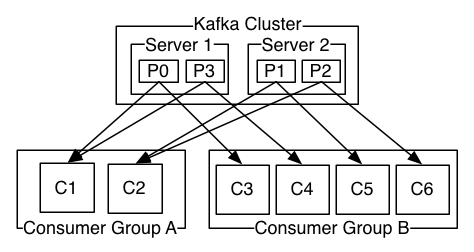
When members join or leave, partitions have to move between them. That is a rebalance, and its design has changed twice:
| Protocol | Where assignment happens | What stops during a rebalance |
|---|---|---|
| Classic, eager | A group leader among the clients | Every consumer revokes every partition, then waits for the new plan |
| Classic, cooperative (KIP-429, 2.4) | Still the client leader | Only partitions that move are revoked |
| Consumer protocol (KIP-848, GA in 4.0) | The broker's group coordinator | Nothing global. Each member reconciles on its own heartbeat |
The KIP-848 operations guide says it "no longer relies on a global synchronization barrier". Brokers enable it by default, but the Java client still defaults to group.protocol=classic, so you have to opt in per application.
?Why does a slow handler cause a rebalance?
Because a consumer that hasn't called poll() for max.poll.interval.ms (5 minutes) is treated as dead. A billing handler stuck on a slow database call for five minutes gets kicked out of the group, its partitions move, and another copy reprocesses the same records. Then the first one comes back and triggers another rebalance.
At-least-once delivery means billing might see order-3 twice after a crash or a rebalance. Duplicates can arise in a second place too, and Kafka has tools for both.
09Duplicates and exactly-once
A duplicate order-3 can happen in two places. A producer retries a batch whose acknowledgement was lost, and the broker, which did receive it the first time, writes it again. Or a consumer reprocesses records after a crash, as in section 8. Kafka closes the first with idempotence and the second, for pipelines that read from Kafka and write back to Kafka, with transactions. Both arrived in 0.11 (KIP-98).
9.1The idempotent producer
An operation is idempotent if doing it twice has the same effect as doing it once. To make appends idempotent, each producer gets a producer ID from the broker and numbers its records per partition: 0, 1, 2, and so on. Each batch carries the producer ID and the number of its first record, in the ProducerId and BaseSequence fields from section 3.2. The dump there showed order-2 with sequence 0 and order-3 with sequence 1. The leader remembers the last sequence number it accepted for each producer ID and rejects anything that doesn't follow:
    private boolean inSequence(int lastSeq, int nextSeq) {
        return nextSeq == lastSeq + 1L || (nextSeq == 0 && lastSeq == Integer.MAX_VALUE);
    }
A retried batch that the broker already has is recognised as a duplicate and acknowledged without being written again. To do that, the broker keeps the metadata of the last five batches per producer (NUM_BATCHES_TO_RETAIN = 5 in ProducerStateEntry.java), which is why idempotence requires max.in.flight.requests.per.connection of 5 or less.
Idempotence can also turn itself off, silently. The producer docs say: "If conflicting configurations are set and idempotence is not explicitly enabled, idempotence is disabled." Setting acks=1 is such a conflict. Look back at the dump in section 6.2: the acks=1 batches carry producerId: -1, which means no idempotence. The batches from the batching benchmark in section 4, where acks was passed explicitly, carried producerId: -1 as well. To find out whether a producer is idempotent, look for a producer ID in the dump instead of trusting the config.
9.2Transactions
Suppose billing reads order-3, writes a "charged" record to another topic, and has to commit its input bookmark as well. If it dies halfway, we'd want all of it to happen or none of it. A transaction gives a producer that: it can write to several partitions, and commit a consumer's offsets, atomically. It's run by a transaction coordinator, a broker that owns the producer's transactional.id, with its state kept in another internal topic, __transaction_state. Here is one read-process-write cycle:
transactional.id. Any older instance with the same ID is now fenced: its writes will be rejected.The markers are real records, and each takes an offset. The experiment below runs three transactions of about 1,000 records each, one per second, using the perf tool's --transactional-id and --transaction-duration-ms options, then lists the markers in the segment:
kafka-producer-perf-test.sh --topic txn --num-records 3000 --record-size 100 --throughput 1000 \
  --transactional-id perf-tx --transaction-duration-ms 1000
kafka-dump-log.sh --files data1/txn-0/00000000000000000000.log --print-data-log | grep endTxnMarker| offset: 1001 ... endTxnMarker: COMMIT coordinatorEpoch: 0
| offset: 2021 ... endTxnMarker: COMMIT coordinatorEpoch: 0
| offset: 3002 ... endTxnMarker: COMMIT coordinatorEpoch: 03,000 records were sent, and the partition ends at offset 3,003: three commit markers took three offsets. The batch headers also show producerEpoch going 1, 2, 3. With transaction version 2 (KIP-890), the epoch is bumped on every transaction.
That has a consequence for any code that does arithmetic on offsets. On a transactional topic, markers take up offsets, aborted records stay in the log, and compaction removes others, so offsets are increasing but not contiguous. Computing "records remaining" as end offset - committed offset gives the wrong answer.
9.3read_committed and the last stable offset
A consumer chooses what it's willing to see through isolation.level. A read_committed consumer reads only up to the last stable offset (LSO): the first offset of the oldest transaction that's still open. Nothing past it is delivered, even records from producers that aren't transactional at all. A default read_uncommitted consumer reads everything up to the high watermark, including records that might later be aborted.
The next experiment holds a transaction open for 40 seconds, then aborts it. Tx.java is a small program that begins a transaction, sends 10 records, flushes, sleeps and aborts. While it sleeps, we read the topic with each isolation level and ask kafka-transactions.sh who the open producers are:
java -cp "libs/*" Tx.java 40000 &      # begin, send 10 records, flush, sleep, abort
kafka-console-consumer.sh --topic txn4 --from-beginning --command-property isolation.level=read_uncommitted | wc -l
kafka-console-consumer.sh --topic txn4 --from-beginning --command-property isolation.level=read_committed | wc -l
kafka-transactions.sh describe-producers --topic txn4 --partition 010
0
ProducerId ProducerEpoch LatestCoordinatorEpoch LastSequence LastTimestamp CurrentTransactionStartOffset
1003 0 -1 9 1790482933080 0The read_uncommitted consumer saw all ten records of a transaction that was about to be aborted. The read_committed one saw nothing, and CurrentTransactionStartOffset: 0 is what holds the LSO there. After the abort, the partition's end offset was 11 (ten records and the ABORT marker), and read_committed still returned 0 records, because aborted records are skipped.
?Why is a hanging transaction an outage?
Because the LSO can't pass it. Until the transaction commits, aborts or times out (transaction.timeout.ms, 60 s by default on the producer), every read_committed consumer on that partition is stuck, and the consumer lag on that partition keeps growing. kafka-transactions.sh find-hanging and abort exist for exactly this case.
9.4What exactly-once covers
"Exactly once" in Kafka means a read-process-write loop where the input offsets and the output records commit together, all inside Kafka. It doesn't reach beyond that. In the design docs' words, "Exactly-once delivery for other destination systems generally requires cooperation with such systems". Billing's charge to a card processor is outside Kafka's reach:
| Side effect | Covered by Kafka transactions? | What to do instead |
|---|---|---|
| Records written to Kafka topics | Yes | Transactions with read_committed downstream |
| Consumer offsets | Yes | sendOffsetsToTransaction |
| A row in Postgres | No | Store the offset in the same database transaction, or an idempotency key |
| An email, a payment call | No | Idempotency keys at the receiver |
So "exactly-once" should be read as "exactly-once inside Kafka". Anything that leaves the cluster is at-least-once, and the receiving side needs to deduplicate. Billing should send the card processor an idempotency key built from the order, such as order-3, so that a replayed charge is recognised.
Everything so far has made the log longer. A log that only grows will eventually fill its disks, so something has to remove old data.
10Retention and compaction
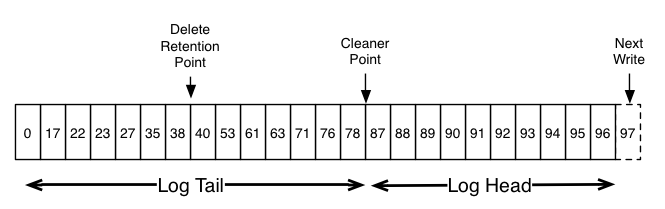
Kafka removes data in two ways, and both work on whole segments, never on single records. That's the reason segments were separate files in section 3.
10.1Deleting by time and size
With cleanup.policy=delete (the default), a closed segment is deleted once its newest record is older than retention.ms (7 days by default), or once the partition is over retention.bytes (unlimited by default). Active segments are never deleted. So order-3 stays readable for a week, and the analytics team's replay after a month would find it gone unless the retention was raised.
Retention sometimes keeps data far longer than configured. The active segment doesn't close until it reaches segment.bytes or segment.ms. On a quiet partition with 1 GiB segments, a segment can take weeks to fill, and none of it is eligible for deletion until it rolls. Lower segment.ms for quiet topics (segment.bytes can't go below 1 MiB since Kafka 4.0).
10.2Compaction: the latest value per key
Some topics don't need history, only the current state. A topic of user profiles, for example, is only ever read for each user's latest profile. With cleanup.policy=compact, Kafka keeps at least the last record for each key and throws older ones away. __consumer_offsets works this way, since only the latest committed offset per partition matters. The work is done by the log cleaner, a background thread in the broker that rewrites closed segments without their obsolete records. The scene below follows the experiment in the next TryIt: three keys, alice, bob and carol, each written with 61 versions, in a topic with short segments.
0 (offsets 0 to 89) and 90 (offsets 90 to 179). The active segment, 180, holds the newest three records.The experiment itself creates the topic with segment.ms=3000 so that segments roll every few seconds, and min.cleanable.dirty.ratio=0.01 so that the cleaner starts as soon as there's anything to clean. It writes the 183 records in three bursts and lists the directory before and 45 seconds later.
kafka-topics.sh --create --topic users2 --config cleanup.policy=compact \
  --config segment.ms=3000 --config min.cleanable.dirty.ratio=0.01
# alice, bob and carol, versions v1..v61, in three bursts: 183 records
ls data1/users2-0/          # before, then again 45 s later
kafka-console-consumer.sh --topic users2 --from-beginning --formatter-property print.offset=true ...00000000000000000000.log 00000000000000000090.log 00000000000000000180.log # before
00000000000000000000.log 00000000000000000180.log (and *.deleted files) # after
Offset:177 alice v60
Offset:178 bob v60
Offset:179 carol v60
Offset:180 alice v61
Offset:181 bob v61
Offset:182 carol v61183 records became 6. The cleaner merged the two closed segments into one that holds only offsets 177 to 179, and each surviving record keeps its original offset. Segment 180, still active, wasn't touched.
To delete a key outright, write a tombstone: a record with that key and a null value. Tombstones are kept for delete.retention.ms so that slow consumers still see the delete, and then the cleaner drops them.
11KRaft: the metadata is a log too
One decision has been left open since section 6: someone has to decide which broker leads each partition, who's in each ISR and which brokers are alive. For most of Kafka's life that was ZooKeeper, a separate coordination service. KIP-500 replaced it with a quorum of controllers that agree using Raft, a consensus algorithm (chapter 27), and Kafka 4.0 removed ZooKeeper mode entirely.
11.1A Raft log named __cluster_metadata
The controllers keep cluster state as a log: topic created, partition reassigned, ISR changed, broker fenced. That log is a Kafka partition, __cluster_metadata-0, with the same segment files as any other. One active controller appends to it, the other controllers replicate it with Raft, and brokers fetch it like followers to keep their own copy of the metadata up to date.
The metadata log fsyncs, even though topic data doesn't. In Raft, an entry counts as committed once a majority of the controllers have acknowledged it, and Raft's safety depends on each of them never forgetting what it acknowledged. If a majority lost unsynced entries in a power cut, they could elect a leader that is missing committed entries, and nothing outside them holds a copy to recover from. That's why the strace in section 7.1 found 50 fsyncs on __cluster_metadata-0 and none on the topic. Metadata is small and changes rarely, so the cost probably never shows up in your latency.
kafka-metadata-quorum.sh shows the quorum. On a cluster with three controllers it prints:
$ kafka-metadata-quorum.sh describe --status
LeaderId:               1
LeaderEpoch:            1
HighWatermark:          66
MaxFollowerLag:         0
CurrentVoters:          [{"id": 1, ...}, {"id": 2, ...}, {"id": 3, ...}]
The words are the ones from partitions, reused for the metadata log. Controller 1 is the active controller, and LeaderEpoch counts changes of leader just as a partition's leader epoch does. The log's high watermark is 66, so everything below offset 66 is committed, and MaxFollowerLag: 0 says the other two controllers have all of them. CurrentVoters lists the three controllers that vote in Raft.
11.2What changed for operators
| ZooKeeper era | KRaft | |
|---|---|---|
| Metadata store | A separate ZooKeeper ensemble | A Raft log inside Kafka's controllers |
| Broker liveness | ZooKeeper session | Heartbeats to the controller, broker.session.timeout.ms (9 s) |
| Controller failover | New controller reloads all state from ZooKeeper | Standby controllers already have the log |
| Brokers learn metadata | RPCs from the controller | Fetching the metadata log |
| Supported | Up to 3.9 | Only option since 4.0 |
We've now followed order-3 through every part of the system. Before turning to operating it, here's what all this costs, in numbers.
12What it all costs
12.1Batching and acknowledgements, side by side
The throughput figures from section 4 and the latency figures from section 5 come from the same three-broker cluster, so they can be read together. The first three are one producer sending 100-byte records as fast as it can, with acks=all. The last two are the latency at a steady 3,000 records a second.
The throughput gap is large and the latency gap is small, which is why the defaults batch and the default acks waits for every in-sync replica. Here's what the batching gap means for a realistic load: a back-fill job that has to publish a million orders.
| Orders to publish | target | 1,000,000 |
| One record per batch | 1,000,000 ÷ 2,457 | 407 s |
| Default batching | 1,000,000 ÷ 153,022 | 6.5 s |
| Large batches | 1,000,000 ÷ 233,645 | 4.3 s |
| why the producer holds records for a few milliseconds | 407 s → 6.5 s | |
Seven minutes against six and a half seconds is the same cluster doing the same work, with the per-request costs paid 148 times less often. The rest of the cost story is what Kafka avoids paying: per-write fsync, which its docs put at two to three orders of magnitude of performance, and the copies between the page cache and the JVM, which sendfile removes. TLS gives back part of that second saving (section 7.3).
13Operating Kafka
13.1Watching it
Each question this chapter raised has a tool that answers it on a running cluster.
# Is the ISR full, and who leads each partition? (sections 5 and 6)
kafka-topics.sh --describe --topic orders

# What is the high watermark, i.e. the end of the log consumers can see? (section 5)
kafka-get-offsets.sh --topic orders

# What is actually in a segment, batch by batch? (section 3)
kafka-dump-log.sh --files data1/orders-0/00000000000000000000.log --print-data-log

# How far behind is each consumer group? (section 8)
kafka-consumer-groups.sh --describe --group billing

# Is a transaction pinning the last stable offset? (section 9)
kafka-transactions.sh describe-producers --topic txn4 --partition 0
kafka-transactions.sh find-hanging ...    # then: kafka-transactions.sh abort ...

# Are the controllers healthy? (section 11)
kafka-metadata-quorum.sh describe --status

# Is the broker reading from disk instead of the page cache? (section 7)
iostat -x 1
Of the broker metrics, the ISR ones matter most. UnderReplicatedPartitions counts partitions whose ISR is smaller than their full set of replicas, UnderMinIsrPartitionCount counts those whose ISR has fallen below min.insync.replicas, and OfflinePartitionsCount counts those with no leader at all. Alert on the second, because that's when acks=all writes start failing, and treat the first as the warning before it.
13.2Settings that decide your guarantees
| Setting | Default | Set it to | Why |
|---|---|---|---|
| Replication factor | Per topic | 3 | Survive a broker loss with a spare |
min.insync.replicas | 1 | 2 with RF 3 | Otherwise acks=all can mean one copy |
acks | all | Leave it | 1 also silently disables idempotence |
enable.idempotence | true | true, explicitly | Fail loudly on a conflicting config |
unclean.leader.election.enable | false | Leave it, except for topics that prefer availability | Prevents silent loss |
isolation.level | read_uncommitted | read_committed downstream of transactional producers | Otherwise consumers see aborted data |
group.protocol | classic (client) | consumer on 4.x clusters | Incremental, broker-driven rebalances |
13.3Rules that hold up
- Pick the key as the thing whose events must stay in order, and pick the partition count early.
- Use replication factor 3 with
min.insync.replicas=2for anything you can't lose, and leaveacks=all. - Set
enable.idempotence=trueexplicitly, so a conflicting config fails loudly instead of dropping the guarantee. - Size broker RAM for the page cache, keep the heap modest, and treat rising disk reads as a lagging consumer until proven otherwise.
- Benchmark with the security settings you'll run, because TLS removes
sendfile. - Treat exactly-once as exactly-once inside Kafka, and give every outside side effect an idempotency key.
- Never compute "records remaining" from offsets on a transactional or compacted topic.
13.4What you trade for what
| You get | You pay | When the bill arrives |
|---|---|---|
| Readers that don't affect each other | Consumers must keep, and commit, their own offsets | As skipped or repeated records after a crash |
| Throughput from batching | A few milliseconds of linger.ms | As latency on sparse traffic |
Durability without fsync | Copies on several machines, ideally in separate racks or zones | As lost data if every replica loses power together |
acks=all safety | Extra latency, and writes that fail when the ISR is too small | As NOT_ENOUGH_REPLICAS during a broker failure |
| Zero-copy fetches from the page cache | Broker RAM, and no TLS shortcut | As a backfill that slows everyone, or CPU after enabling TLS |
| Exactly-once inside Kafka | Transaction coordination, and a LSO that one stuck producer can pin | As stalled read_committed consumers |
13.5Symptom, cause, fix
| Symptom | Likely cause | Fix |
|---|---|---|
NOT_ENOUGH_REPLICAS with one broker down | ISR below min.insync.replicas | Restore the broker; check RF and replica placement |
acks=1 writes succeed but consumers see nothing | HW frozen while the ISR is under min ISR | Same; it's the KIP-966 guard working |
UnderReplicatedPartitions above 0 | A follower is slow or down | Check its disk, network and GC; look for a hot partition |
| Consumer group keeps rebalancing | Processing exceeds max.poll.interval.ms | Lower max.poll.records, move slow work off the poll loop, or use the consumer protocol |
read_committed consumers stall on one partition | A hanging transaction pins the LSO | kafka-transactions.sh find-hanging, then abort |
| Produce latency rises when a backfill job starts | Old segments evicting the tail from page cache | Throttle the backfill, add RAM, or serve history from tiered storage (old segments kept in object storage such as S3) |
| Broker CPU jumps after enabling TLS | No more sendfile; the JVM copies and encrypts | Budget for it, or terminate TLS elsewhere where policy allows |
Disk usage far above retention.ms × write rate | Active segments too big to roll on quiet partitions | Lower segment.ms or segment.bytes for those topics |
| Duplicates after producer retries | Idempotence disabled by acks=1 or max.in.flight above 5 | acks=all, enable.idempotence=true |
14Summary
- A log is an append-only, numbered sequence, and reading doesn't change it. Each consumer keeps its own offset, so billing, shipping and a future analytics team can all read
order-3, which a queue can't offer. - A topic is split into partitions, and ordering holds within one. The key picks the partition, so choose it as the thing whose events must stay in order.
- A partition is a directory of segments. Each segment has a sparse offset index and time index, and a lookup is a floor search, a binary search and a short scan.
- The batch is the unit of everything. Batching was worth about 60× in throughput, and
linger.msnow defaults to 5 for that reason. - Followers pull, and the high watermark marks what is committed.
acks=allwaits for the in-sync replicas, and consumers see only records below the HW. - The ISR can shrink, so
min.insync.replicassets the floor. Pair replication factor 3 withmin.insync.replicas=2, oracks=allcan mean one copy. Since KIP-966 the HW stops moving when the ISR is under min ISR, even foracks=1writes. - Leader epochs tell a returning follower where to truncate. Truncating to a lagging high watermark was the flaw they fixed, and
unclean.leader.election.enable=falsekeeps a partition offline instead of losing committed data. - Durability comes from replication, not
fsync. The broker left 20 MB of writes in the page cache, and only the KRaft metadata log was synced. sendfilecarries fetches from page cache to socket. TLS turns it off, and a lagging consumer can evict everyone else's cache.- Idempotence and transactions give exactly-once inside Kafka only.
acks=1silently turns idempotence off, and transaction markers use offsets. - Retention and compaction work on closed segments. The active segment is never deleted or compacted.
15Build this
A one-partition log server in about 400 lines. Pick any language with sendfile access (Go, Rust, C, or Java's FileChannel.transferTo), and rebuild the pieces of this chapter in the order you met them.
- An append endpoint that writes length-prefixed batches to a segment file and returns the base offset. Roll to a new file at 64 MB, named by base offset.
- A sparse index: one (relative offset, position) pair every 4 KB, in an
mmaped file. Implement "fetch from offset N" as floor search, binary search, forward scan. - Serve fetches with
sendfile. Then serve them with read-into-buffer-and-write and compare CPU per GB withperf stat. - Add one follower that pulls from the leader, a high watermark, and an
acks=allmode. Kill the follower and watch your own HW stop.
16Interview questions
beginnerWhat's the difference between a Kafka topic and a message queue?›
A queue removes a message once it's consumed, and several consumers compete for messages. A Kafka topic is a set of append-only logs, one per partition. Reading doesn't change them, and each consumer group tracks its own offset. So several groups can each read everything, you can replay by resetting an offset, and data is removed only by retention or compaction, a whole segment at a time.
beginnerWhat do acks=0, acks=1 and acks=all mean?›
They set when the leader answers the producer: never, after the leader's own append, or after every in-sync replica has the record and the ISR has at least min.insync.replicas members. With acks=1, an acknowledged record is lost if the leader dies before a follower copies it. acks=all is the default since 3.0.
intermediateWhat is the high watermark, and why can't consumers read past it?›
It's the offset below which every in-sync replica has the data. Records above it exist only on some replicas and could vanish if the leader fails, so showing them would let a consumer act on a record that later never existed. The leader learns the followers' progress from the offsets in their next fetch requests, and since KIP-966 it only advances the HW while the ISR is at least min.insync.replicas.
intermediateYour consumer group rebalances every few minutes. What do you check?›
Whether processing a batch takes longer than max.poll.interval.ms (5 minutes by default). If it does, the consumer is treated as dead even though its heartbeats are fine. Lower max.poll.records, move slow work off the poll thread, or raise the interval. Also check for frequent deploys or autoscaling, and consider cooperative assignment or the KIP-848 consumer protocol, so each rebalance only moves the partitions that need to move.
intermediateWhy is Kafka fast even though it stores everything on disk?›
Appends are sequential and go to the page cache instead of straight to disk, and Kafka doesn't fsync per write because replication provides the durability. Batches are stored in the wire format, so fetches go from page cache to socket with sendfile and never enter the JVM. Batching spreads per-request costs over many records, and caught-up consumers are served from memory. TLS removes the sendfile part.
deepHow does Kafka prevent duplicates when a producer retries?›
An idempotent producer gets a producer ID and numbers its batches per partition. The leader keeps the last sequence and the metadata of the last five batches per producer ID. A retry that matches a stored batch is acknowledged without being written, and a gap raises OutOfOrderSequenceException. That five-batch window is why max.in.flight.requests.per.connection must be at most 5. Idempotence is disabled without warning if you set a conflicting config like acks=1 without setting enable.idempotence=true.
deepA read_committed consumer is stuck on one partition, and lag keeps rising. Other partitions are fine. What's going on?›
Probably an open transaction. A read_committed consumer can't read past the last stable offset, the start of the oldest open transaction on that partition. A producer that began a transaction and died or hung pins it until the transaction times out, or indefinitely if markers were never written. kafka-transactions.sh describe-producers shows the CurrentTransactionStartOffset, find-hanging lists stuck ones, and abort clears them.
deepWhy does Kafka use leader epochs for truncation instead of the high watermark?›
A follower's high watermark lags the leader's, because it only learns the HW in the next fetch response. Truncating to it after a leader change could throw away committed records or leave replicas with different data at the same offset, which KIP-101 documents. Leader epochs, stamped on every batch and checkpointed per replica, let a follower ask the new leader exactly where its previous epoch ended and truncate to that point.
17Go deeper
Three transactions of 1,000 records each commit on one partition. What's the end offset?›
3,003. Each commit writes a control record into the partition, and it takes an offset like any other record.
Why is a new segment's .index file 10 MB when the log is 123 bytes?›
Index files are preallocated to log.index.size.max.bytes and memory-mapped.
They're sparse on disk, and trimmed when the segment rolls.
RF 3, min.insync.replicas=2, two brokers down. Can acks=1 producers still write? Can consumers read what they write?›
Yes, and no. Leaders accept acks=1 writes, but the high watermark can't
move while the ISR is under min ISR, so the new records stay invisible.
What happens to sendfile when you enable TLS on the listener?›
It's not used. Kafka's TLS transport reads the file into a 32 KB direct buffer, encrypts in the JVM and writes it out.
The essay behind the idea: logs as the backbone of replication, data integration and stream processing.
The original paper. The PDF already has the page-cache and sendfile design, before replication existed.
Persistence, efficiency, replication and delivery semantics, from the project. Most of the quotes in this chapter come from it.
Kyle Kingsbury's test that lost 520 of 987 acknowledged writes with a
shrinking ISR, and the start of min.insync.replicas.
ISR shrink and expand, the high watermark and the min-ISR checks in one
file. Start at maybeIncrementLeaderHW.
Exactly-once and transactions; the broker-driven consumer protocol; eligible leader replicas and the new HW rule. Read these for most of what changed.
18Related chapters
Writeback, dirty pages and what fsync guarantees: the ground Kafka's durability model stands on. Chapter 08.
What sendfile does after Kafka calls it, and the socket buffers a fetch
fills. Chapter 10.
The write-ahead log, the other famous log, and how streaming replicas replay it. Chapter 21.
Another system whose replication acknowledges before copying, and what that costs in a failover. Chapter 22.