Kabir is building a site where friends play board games in the browser, and the first thing he wants is a die. It should be a white cube with black dots that sits on a green table, tumbles when you click Roll, and lets you drag to look at it from any side. He installs Three.js, copies about thirty lines from its docs, and there it is: a lit, shaded cube turning smoothly in the middle of his page, sixty times a second, on his laptop and on his phone.
Look at what the browser gave him to work with, though. A web page knows about rectangles of text, images and boxes laid out on a flat page. The one element that can show arbitrary pictures, <canvas>, is a flat grid of coloured dots. Nothing in the browser knows what a cube is, where a camera stands, which face of the die is in front of which, or how bright a face should be when a light shines on it from the left. Every one of those things has to be worked out by someone's code, for every dot on the screen, and done again every time the die moves.
In this case study we'll design that code the way an engineer would: start with the most obvious approach, find exactly where it breaks, and fix it, one step at a time. The question we'll keep coming back to is this: when Kabir's page calls renderer.render(scene, camera), what happens between that line and the coloured dots on the screen, and how does it fit into sixteen milliseconds? We'll start by drawing the die ourselves on the CPU, then move the work to the GPU, look at what WebGL and the browser do underneath each call, and finish with the renderer Three.js builds on top, and the newer WebGPU.
01What we're building, and how big
1.1What it has to do
Strip Kabir's die down to what the code underneath must do, and you get a short list:
- Draw a solid object from any angle, with the faces nearer the viewer hiding the ones behind.
- Move things: turn the die as it tumbles, and move the camera when Kabir's players drag.
- Make it look solid: faces facing a light are brighter than faces turned away, and the dots are an image painted onto the faces.
- Answer clicks: when someone clicks on the screen, say whether they clicked the die.
- Scale up: the landing page will later show a whole table of dice tumbling at once.
And the qualities it needs while doing that:
- Smooth: a new picture at least 60 times a second, or the motion stutters.
- Everywhere: the same code on a gaming PC, a five-year-old laptop and a cheap phone, across Chrome, Safari and Firefox.
- Safe: a web page is untrusted code from a stranger, so whatever it asks the graphics hardware to do mustn't crash the machine or read another program's memory.
That last line is the one that makes 3D in a browser different from 3D in a game you install, and it will come back in section 5.
1.2How big is it?
The screen sets the scale. Each picture shown on the screen is called a frame, and most screens show 60 frames a second, so each frame has about 16.7 milliseconds from start to finish. Some phones and gaming monitors refresh 120 times a second, which halves that to about 8 ms.
Each frame is a grid of pixels, the coloured dots, and there are more of them than the page's CSS size suggests. A canvas that's 1,000 by 600 CSS pixels on a phone or laptop with a high-density screen is drawn at two or three times that in each direction, because each CSS pixel covers a 2 by 2 or 3 by 3 block of the hardware's pixels. The browser reports that factor as window.devicePixelRatio.
Kabir's canvas is 1,000 by 600 CSS pixels, shown on a laptop with a devicePixelRatio of 2, at 60 frames a second. How many pixel colours does the code have to produce each second?
Hold on to that number, several billion small calculations a second. It decides where the work has to run, and we'll hit it the moment we try the obvious design.
02Version 1: draw it yourself
2.1A die is a list of points and triangles
Before we can draw the die, we need to describe it in numbers. Put the centre of the die at the origin, with three axes: x to the right, y up and z towards the viewer. A cube two units wide then has its eight corners at every combination of −1 and +1: (−1, −1, −1), (−1, −1, +1), and so on up to (+1, +1, +1). Each corner is called a vertex (plural vertices).
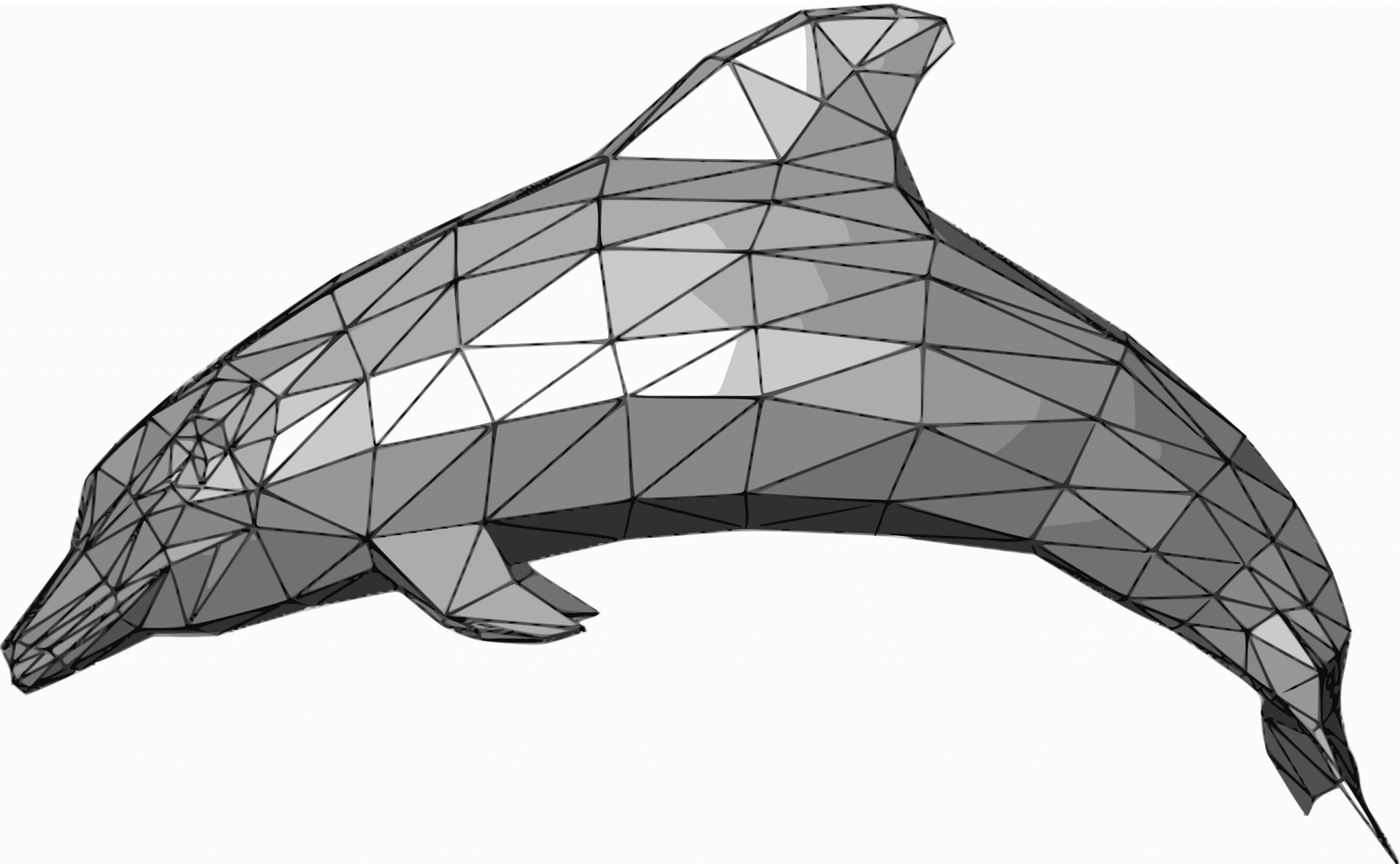
Corners alone don't make a solid; we also have to say which corners are joined into surfaces. Each square face of the die could be described by its four corners, but graphics code almost always splits it into two triangles instead. A triangle has two properties a square doesn't: its three corners always lie on one flat plane, however you place them, and it's never bent inwards. Code that fills a triangle can rely on both, so it stays short and fast. Any surface, however curved, can be approximated by enough small triangles. A cube needs twelve (six faces, two each); a character in a game might need a hundred thousand.
A list of vertices plus a list of triangles, each triangle naming three vertices by their position in the list, is called a mesh. So our die is a mesh with 8 vertices and 12 triangles. Hold that 8; it changes in section 6, for an interesting reason.
2.2From 3D points to a flat picture
Now picture the viewer's eye 5 units in front of the die, looking straight at it, with the screen as a window between the eye and the die. Where on that window does each corner appear?
Think about what happens to things that are further away: they look smaller, and they drift towards the middle of what you see. A tree 100 metres away and a pencil 30 centimetres away can cover the same part of your view. Behind this is the oldest rule in graphics: divide by the distance. A point that's x units to the side and z units in front of the eye shows up at x ÷ z across the window, and the same for its height. Double the distance and the point lands half as far from the centre. That division is called the perspective divide, and it's what makes a picture look 3D at all; without it, every edge of the die that runs away from you would stay the same size.
So drawing the die starts with three steps for each of its eight corners: turn the corner to match how the die is tumbling, divide its x and y by its distance from the eye, and scale the result to the size of the canvas. That gives eight dots on the screen.
2.3Filling the triangles
Eight dots aren't a die. We need to colour every pixel that falls inside each of the twelve triangles, and this step, turning a triangle on the screen into the set of pixels it covers, is called rasterization. (A grid of pixels is sometimes called a raster, from the scan lines of old televisions.)
Here's a test you can do for a single pixel. Take one edge of the triangle, from corner a to corner b, and ask which side of that line the pixel's centre is on. A small formula answers it: multiply out the edge's direction against the direction from a to the pixel, and the sign of the result says left or right. A pixel is inside the triangle when it's on the same side of all three edges. This is called the edge function test, and it's simple enough to run on millions of pixels.
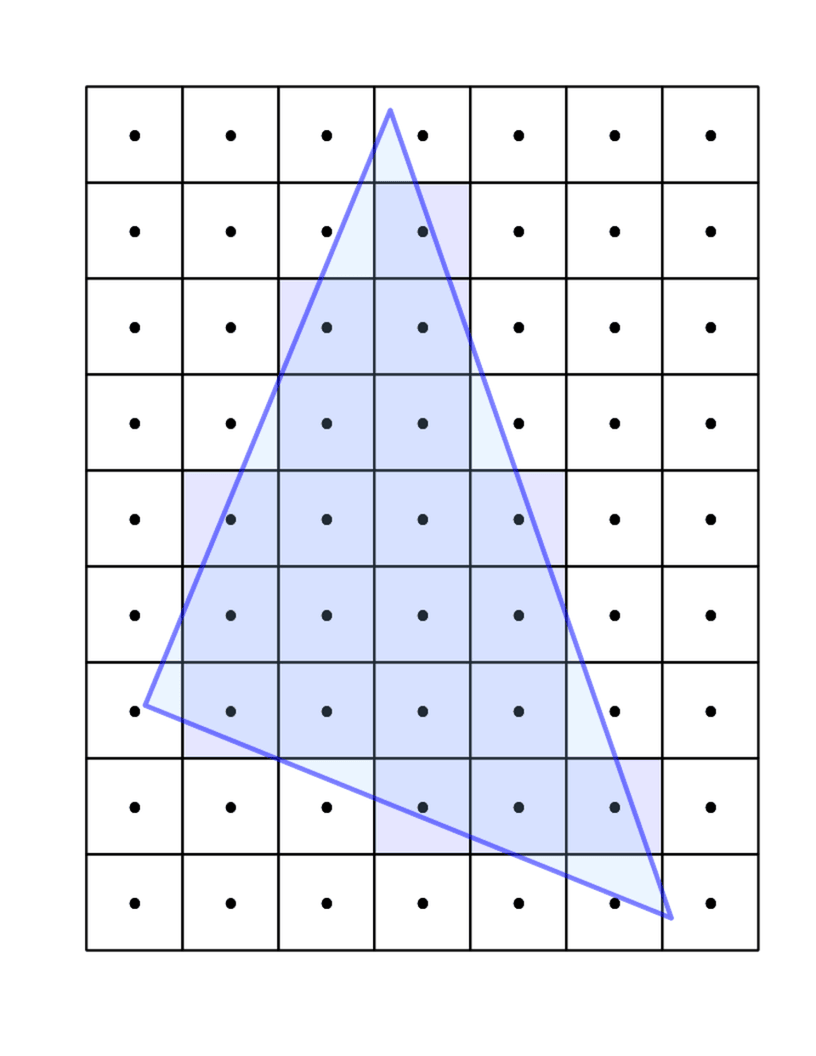
There's something else the three edge values give us for free. Divided by the triangle's total area, they say how close the pixel is to each corner, as three weights that add up to one; at a corner, that corner's weight is one and the others are zero. Those weights let us blend anything the corners carry, a colour, a depth, a position on an image, smoothly across the triangle. Hold on to that idea too: it's how the GPU will paint the dots onto the die in section 7.
2.4Which face is in front?
Fill all twelve triangles and a new problem appears. From most angles, you can see three faces of the die, and three are behind them. If we draw the triangles in the order they're listed, a back face drawn last will paint over a front face drawn first.
Most people's first idea is the one painters use: sort the triangles by distance and draw the furthest first, so nearer ones paint over them. That's called the painter's algorithm, and it works for one die. It breaks for scenes that are only slightly harder. Two triangles that pass through each other, like a pencil stuck through an eraser, are each partly in front of the other, so no order is right. Three long triangles can overlap in a cycle, each covering the next. And sorting thousands of triangles every frame costs time on its own.
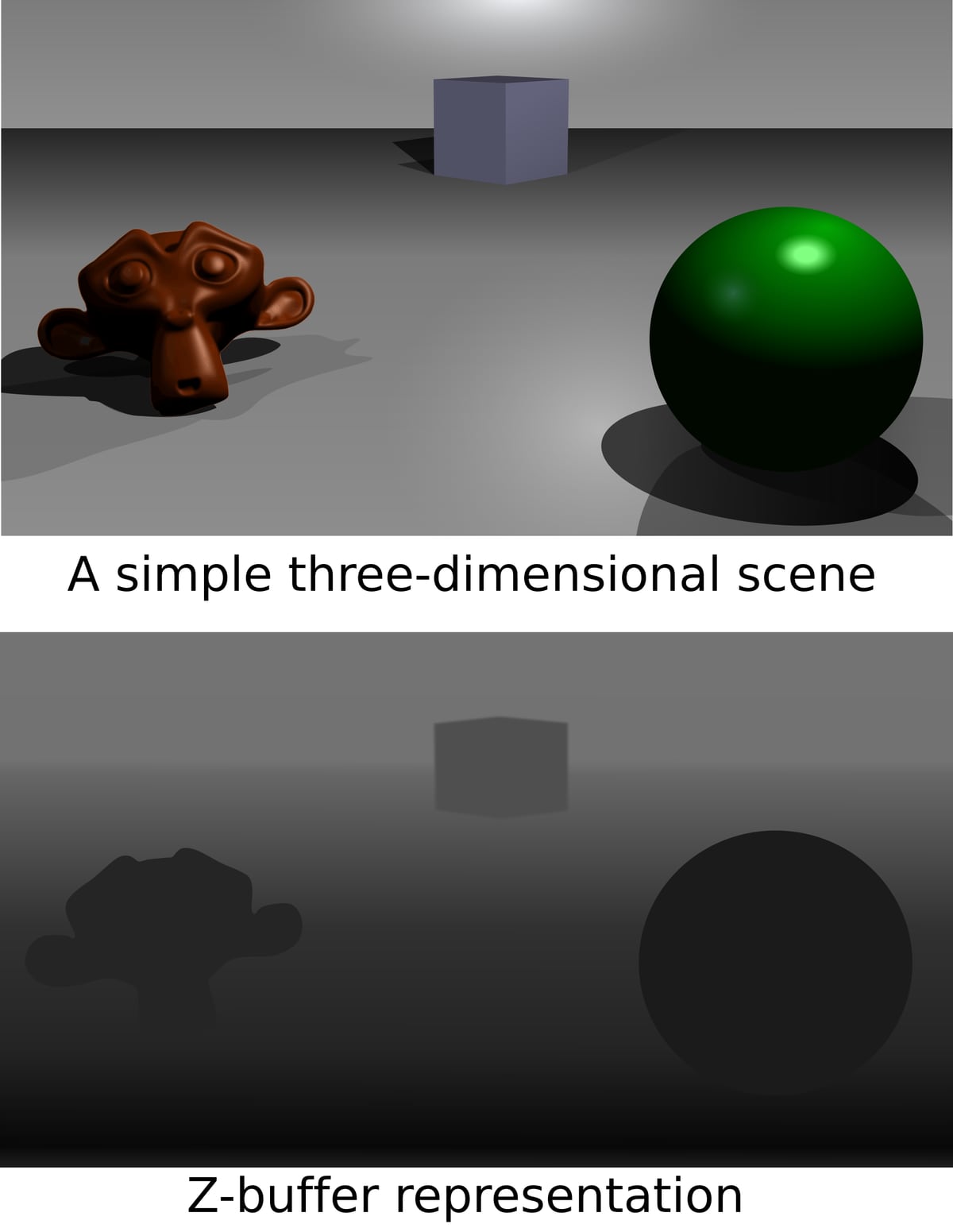
The fix that every GPU uses today is to stop sorting triangles and decide per pixel instead. Next to the picture, keep a second grid of the same size holding, for each pixel, the distance of whatever was last drawn there, starting at "infinitely far". When a triangle wants to colour a pixel, work out its distance at that pixel (by blending the corners' distances with the weights from 2.3), and only draw if it's nearer than the stored value, updating the stored value when it does. That second grid is called the depth buffer, or z-buffer, and the comparison is the depth test. Triangles can now arrive in any order, and interlocking shapes come out right, because every pixel ends up showing whatever is nearest at that exact spot.
This short program puts the whole of version 1 together: eight corners, twelve triangles, a rotation, the perspective divide, the edge test and a depth buffer, drawing the die into a 48 by 24 grid of characters, one letter per face. It also keeps a second picture drawn without the depth test, and counts how many pixels that one gets wrong.
Three faces show, D on top, E at the front left and B at the front right, just as you'd see a real die from slightly above. Now look at the last line. Without the depth test, 234 of the 496 covered pixels, almost half, would show a face from the back of the die, because those triangles happened to come later in the list. Notice also that 758 pixels were written to cover 496: hidden faces still get drawn, and then overdrawn. That waste has a name, overdraw, and it comes back in section 6.
2.5Where version 1 breaks
Now look at the first line of the stats, because it's the problem. To fill a 48 by 24 grid the program made 13,824 pixel tests, twelve triangles times every pixel. A real program checks only the pixels inside each triangle's bounding box, which cuts that a lot, but the work that's left still grows with the number of pixels covered, and real pixels need far more work than a letter: a depth, a lighting calculation, a lookup into the dot image. Section 1.2 put that at several billion small calculations a second for a 2.4-million-pixel canvas.
A single CPU core runs a few billion simple instructions a second at best, and JavaScript adds overhead on top of that. So drawing pixel by pixel on the CPU can probably manage a small, plain picture, and falls far short of a lit die with painted dots at 60 frames a second on a laptop's real screen, let alone a table of them. Spreading it over all of a laptop's CPU cores might buy eight or ten times, which still isn't enough, and would leave nothing for the rest of the page.
This isn't a hypothetical. When Ricardo Cabello first published Three.js in April 2010, it drew with the browser's DOM, SVG and 2D canvas, because nothing else was available to a web page. Its canvas renderer worked much like version 1: transform the corners in JavaScript, sort the triangles by depth like a painter, and fill each one as a flat 2D shape. It could draw small scenes, with the painter's algorithm's failures and no per-pixel lighting. Real 3D on the web had to wait for a way to reach the hardware that was built for this kind of work.
Before we move the work, though, there's a problem with version 1 that the GPU won't fix for us: the rotate function. It works for one die turning about two axes. It doesn't say how to move the die across the table, put it on a table that's itself turned, or move the camera. We need one general way to place things, and that's the next section.
03Placing things: matrices and the scene graph
3.1One operation for turning, moving and resizing
Look at what rotate in the program does to a corner. Each new coordinate is a weighted sum of the old ones: the new x is the old x times cos(angle) plus the old z times sin(angle), and so on. Any rotation, and any stretch or shrink, works like that. So we can write the operation as a 3 by 3 grid of weights, one row per output coordinate, and applying it to a corner means multiplying each row by the corner's three numbers and adding up. That grid is a matrix.
Matrices have one property that makes them worth the trouble: two of them can be multiplied into a single matrix that does both operations, one after the other. "Tilt 25 degrees, then spin 40 degrees" becomes one grid of nine numbers, and applying it to all eight corners costs the same as applying a single rotation. Chain twenty operations and it still costs the same per corner.
Moving the die across the table breaks this. Moving adds a constant, x + 3, and a weighted sum of x, y and z can't produce a constant from nothing. A standard trick fixes it: give every point a fourth number, always 1, written w. Now the matrix grows to 4 by 4, and its last column multiplies that 1, so whatever numbers sit there get added to the result: a move. The four-number form of a point is called homogeneous coordinates, and with it, every combination of turning, moving and resizing is one 4 by 4 matrix, sixteen numbers, applied to a vertex with sixteen multiplications and twelve additions.
3.2Things inside things
Kabir's die doesn't float alone. It sits on a table, which sits in a room, and when he tilts the table for a dramatic camera angle, the die should tilt with it without anyone recomputing its position by hand.
So we store each object's placement relative to whatever it sits on. The die says "3 units along the table, 1 unit up", and the table says "turned 30 degrees, 1 unit down" relative to the room. Each object turns its own position, rotation and scale into one matrix, its local matrix. To find where the die ends up in the room, multiply the table's matrix by the die's: the die's corners are first placed on the table, and then the table and everything on it is placed in the room. That product is the die's world matrix. A tree of objects, each placed relative to its parent like this, is called a scene graph, and it's the first thing Three.js gives you.
In Three.js every one of those boxes is an Object3D. It holds position, rotation and scale, and two matrices: matrix, the local one, and matrixWorld. Before each frame the renderer calls scene.updateMatrixWorld(), which walks the tree from the top, rebuilding each object's local matrix from its position, rotation and scale, and multiplying it by the parent's world matrix. Moving the table moves everything on it, because the die's world matrix is recomputed from the table's on the very next frame.
This short program builds Kabir's table and die in Node.js, with the real Three.js library (install it with npm i three and save the file as world.mjs, so Node treats it as a module). It puts the die on the turned table, asks where it ends up in the room, and then where it lands on an 800 by 600 canvas, which is the subject of the next subsection.
die.position (on the table): [ 3, 1, 0 ]
die in the world:            [ 2.598, 0, -1.5 ]
after projection: [ 0.3581, 0.0541, 0.9848 ]
on the canvas:    x = 543  y = 284
Those first two lines are the scene graph at work. The die thinks it's at (3, 1, 0), but the table is turned 30 degrees, so "3 along the table" is 3 × cos 30° ≈ 2.598 across the room and 3 × sin 30° = 1.5 back (negative z is away from the viewer). The table is 1 unit down, which cancels the die's 1 unit up, so it ends at height 0. Nobody wrote that arithmetic; it fell out of multiplying two matrices.
3.3The camera is a matrix too
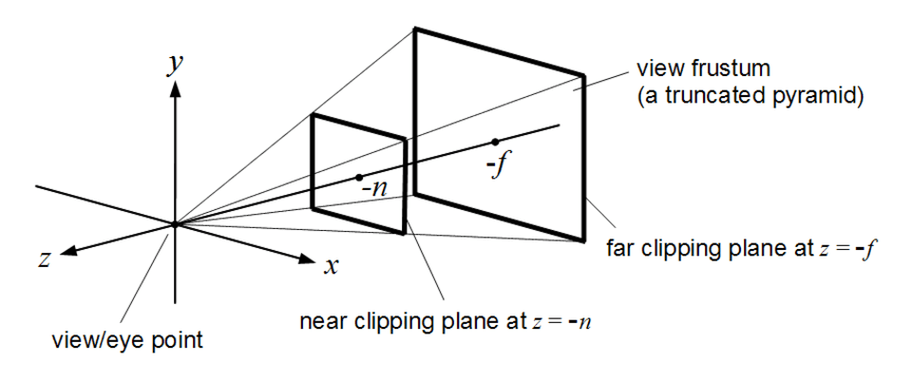
Here's something that surprises most people: there's no camera in the graphics hardware. It only ever draws as if the eye sits at the origin, looking down the negative z axis. So how do we look at the die from 10 units back and 2 up?
We move the whole world the opposite way. If the camera is 10 units back, shifting every object 10 units forward gives exactly the same picture; if the camera is turned left, turning the world right does the same. That opposite of the camera's world matrix is its inverse, and it's called the view matrix. In Three.js it's camera.matrixWorldInverse, recomputed every frame.
Then comes the perspective divide from section 2.2, with one twist. Dividing is done by the hardware, after the matrices, so the matrix's job is to set things up for it. The projection matrix does two things. It scales x and y so that whatever is inside the camera's field of view (50 degrees, in the program) ends up between −1 and 1. And its bottom row copies the point's distance into w, the fourth number. The hardware then divides x, y and z by w: the same divide-by-distance we wrote by hand in version 1.
After the divide, everything the camera can see sits inside a cube from −1 to 1 on every axis, the "after projection" line in the output: the die's centre is at 0.3581 across (right of centre), 0.0541 up, and at depth 0.9848. The last step stretches that cube onto the canvas: −1 to 1 across becomes 0 to 800 pixels, and −1 to 1 up becomes 600 to 0 (canvas y runs downwards). That's how 0.3581 becomes pixel 543.
So every vertex goes through the same three matrices: the object's world matrix, the camera's view matrix and the camera's projection matrix. All three can be multiplied into one per object, once per frame on the CPU, and then that one matrix is applied to every vertex of the object. Hold on to the shape of that split, because it's the whole design of the next section: a little work per object on the CPU, and a lot of identical work per vertex and per pixel somewhere else.
MathWhat's inside the perspective matrix, and why depth ends up as 1/distanceThree rows scale x and y and squeeze depth into a range; the fourth row copies −z into w, so the hardware's divide by w is the perspective divide, and stored depth becomes a function of 1/distance.OpenClose
Here's the matrix Three.js builds in Matrix4.makePerspective for WebGL, written for a camera with near plane n and far plane f. The x and y scales come from the field of view and the canvas's aspect ratio:
| xScale    0        0              0          |
|   0     yScale     0              0          |
|   0       0    -(f+n)/(f-n)   -2fn/(f-n)     |
|   0       0       -1              0          |
Multiply a point (x, y, z, 1) in the camera's space by it. The bottom row gives w = −z: the distance in front of the camera (the camera looks down negative z, so a point 5 units in front has z = −5). The third row gives a depth that's a constant plus a multiple of z. When the hardware divides by w, that depth becomes
depth = (f+n)/(f-n) - 2fn / ((f-n) · distance)which is −1 at the near plane and +1 at the far plane, and depends on 1 / distance, not on distance.
That looks like an accident of the algebra, but it's needed. After the divide, the GPU blends values across a triangle on the screen with the corner weights from section 2.3, and those weights are flat on the screen. Distance itself doesn't change linearly across the screen image of a slanted triangle, but 1 / distance does. So storing a function of 1 / distance is what lets the hardware blend depth correctly with plain screen-space weights. For the same reason, when the GPU blends other values, like positions on the dot image, it divides by w, blends, and multiplies back. That's called perspective-correct interpolation. Early 1990s PC games that skipped it are why their floors seemed to swim as you walked.
3.4Depth isn't spread evenly
That 1 / distance has a cost you can see on screen. The depth buffer stores each pixel's depth as a number with a fixed number of steps, usually 24 bits, so about 16.7 million distinct values. Because depth follows 1 / distance, most of those values are spent close to the camera.
This program works out the depth stored for points at different distances, with the WebGL formula from the box above, and then how far behind a surface a second surface has to be before it gets a different 24-bit value. Below that gap the depth test can't tell the two apart. It assumes one unit is a metre, and tries two near planes:
near = 0.1, far = 1000
    1 m away: stored depth 0.900090, surfaces within 0.000596 mm get the same value
   10 m away: stored depth 0.990099, surfaces within 0.0327 mm get the same value
  100 m away: stored depth 0.999100, surfaces within 3.01 mm get the same value
  500 m away: stored depth 0.999900, surfaces within 58 mm get the same value
near = 1, far = 1000
    1 m away: stored depth 0.000000, surfaces within 2.98e-05 mm get the same value
   10 m away: stored depth 0.900901, surfaces within 0.00292 mm get the same value
  100 m away: stored depth 0.990991, surfaces within 0.351 mm get the same value
  500 m away: stored depth 0.998999, surfaces within 7.59 mm get the same value
Read the first block. With the near plane at 10 cm, a point just one metre away already has a stored depth of 0.90: ninety per cent of all the depth values are used up in the first metre. At 500 metres, two surfaces less than about 6 centimetres apart get the same value, so the depth test can't decide which is in front, and the winner flips from pixel to pixel and frame to frame as the camera moves. You see it as two surfaces flickering through each other in stripes. It's called z-fighting.
Now the second block. Moving the near plane from 0.1 to 1 makes the depth buffer about eight times more precise at 500 metres, which is probably more than you'd guess, without touching the far plane. So the near plane matters far more than the far one, because the 1 / distance curve is steepest right next to it.
04Version 2: hand the repetitive work to the GPU
4.1Why a GPU
Look again at what version 1 does per frame. For each vertex, multiply by one matrix; the same sixteen multiplications for all eight corners, independent of each other. For each covered pixel, run the edge test, blend the depth, compare and store; the same few steps for millions of pixels, each independent of its neighbours. A CPU core is built to run one long, branching stream of instructions as fast as possible. This work is the opposite: a tiny program, repeated millions of times, where no copy needs the result of any other.
A GPU (graphics processing unit) is built for exactly that shape. It has thousands of simple arithmetic units, grouped so that dozens of them run the same instruction at once on different data, and it hides the wait for memory by switching between thousands of copies of the program instead of making any single one fast. Chapter 45 goes into the hardware. For us, the consequence is simple: per-vertex and per-pixel work belongs on the GPU, and the CPU's job shrinks to deciding what to draw and handing over the data.
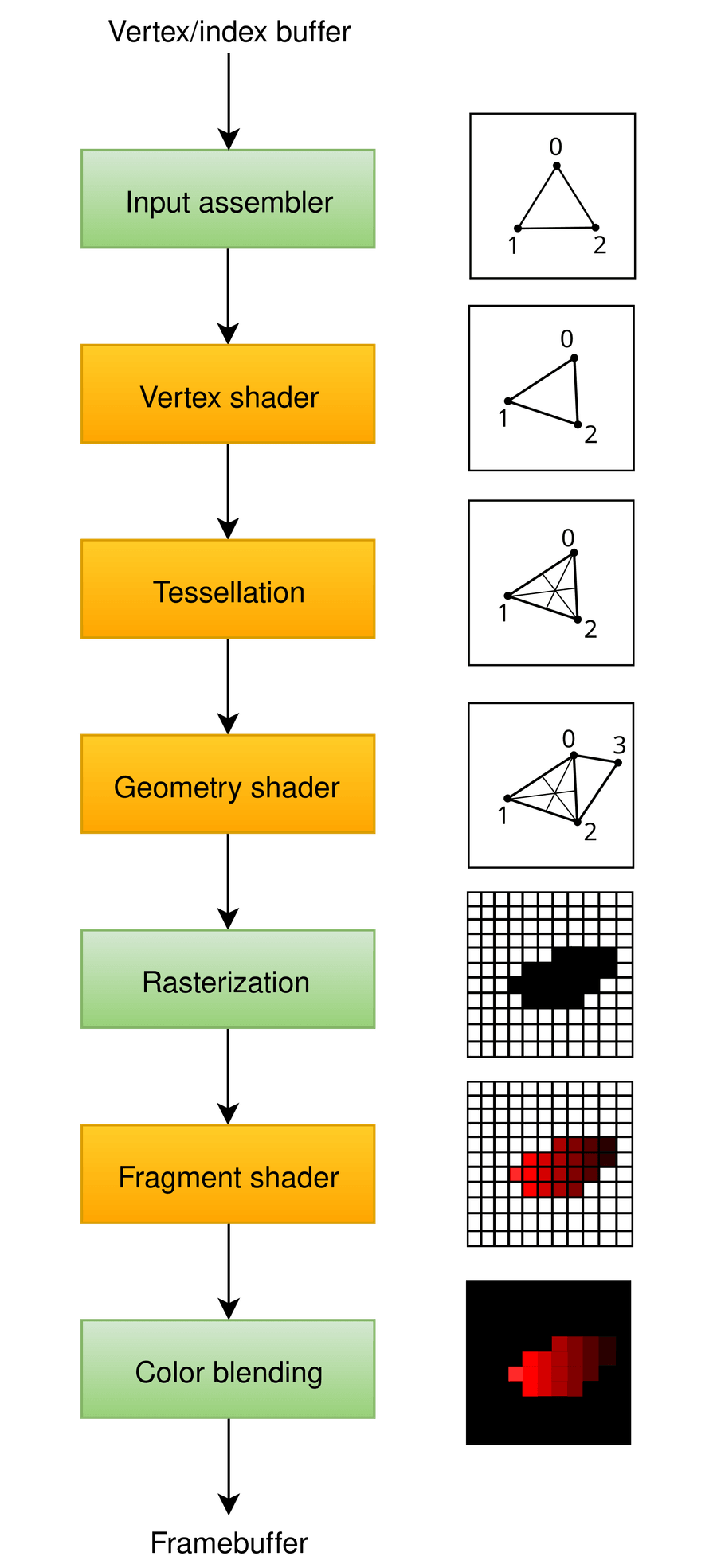
4.2The pipeline a triangle goes through
Every GPU since the early 2000s draws triangles through the same sequence of stages, called the graphics pipeline. Some stages run small programs that you write; the rest are fixed hardware. Let's push one triangle of Kabir's die, from the face nearest the camera, through it:
That's version 1 again, rearranged. Our project function became the vertex shader, our edge-test loop became the rasterizer, our letter-per-face became the fragment shader, and our depth array became the depth buffer. What changed is who does it: thousands of GPU lanes, and fixed hardware for the parts that never change.
?Why are some stages fixed and others programmable?
Rasterizing and depth testing are the same in every program ever written, so GPU makers build them as dedicated circuits, which are far faster and use less power than general code doing the same job. Positioning corners and choosing colours differ from scene to scene: a waving flag moves its corners differently from a die, and a metal die is lit differently from a plastic one. So those two stages run programs you supply. Until about 2001, they were fixed too, with a menu of built-in lighting options, and making anything that wasn't on the menu was very hard. Programmable stages are what made modern real-time graphics possible.
One stage in the diagram happens before the depth test even though it's drawn after it. Modern GPUs run the depth test early, before the fragment shader, whenever the shader can't change a fragment's depth. A fragment that's already hidden is thrown away before anyone pays for its lighting. That's called early depth testing, and it's why the order objects are drawn in still matters even with a depth buffer. We'll see Three.js exploit it in section 6.
4.3Shaders: the programs you hand the GPU
The programs that run in those two stages are called shaders, and for WebGL they're written in GLSL, a small C-like language. Here's a complete pair for a plain die, with a single directional light:
// Vertex shader: runs once per corner
uniform mat4 modelViewMatrix;      // same for every corner of the die
uniform mat4 projectionMatrix;
in vec3 position;                  // different for every corner
in vec3 normal;
out vec3 vNormal;                  // handed on to the fragment shader

void main() {
  vNormal = mat3(modelViewMatrix) * normal;
  gl_Position = projectionMatrix * modelViewMatrix * vec4(position, 1.0);
}// Fragment shader: runs once per covered pixel
precision highp float;
uniform vec3 lightDirection; // the same for every pixel
in vec3 vNormal; // blended from the three corners
out vec4 colour;
void main() {
float brightness = max(dot(normalize(vNormal), lightDirection), 0.0);
colour = vec4(vec3(0.2 + 0.8 * brightness), 1.0);
}The whole API is organised around three kinds of input, so let's name them. An attribute (in in the vertex shader) is per-vertex data, read from a buffer in GPU memory: each corner's position and normal (we'll meet normals in section 7). A uniform is the same for every vertex and pixel in one draw: the matrices from section 3, the light's direction. A varying (out from the vertex shader, in to the fragment shader) is a value each corner outputs, which the rasterizer blends across the triangle with the corner weights from section 2.3, so each pixel gets its own in-between value. That blend is the same trick we used for depth in version 1, now done by hardware for anything you like.
gl_Position is the vertex shader's one required output: the position after the three matrices, with w still in it. Everything after that, the divide, the mapping onto the canvas, the rasterizing, is the hardware's job.
So now we know what the GPU wants: buffers of vertex data in its memory, a compiled pair of shaders, uniforms, and a command to draw. The question is how a web page gets any of that to it. That's WebGL's job, and it's more interesting than it looks.
05Talking to the GPU: WebGL and the browser
5.1What drawing one triangle takes
WebGL is the browser's API for the GPU. You ask a <canvas> for a "webgl2" context, and you get an object with a few hundred methods, almost all of them copied from OpenGL ES, the cut-down OpenGL used on phones. WebGL 1.0 arrived in 2011, based on OpenGL ES 2.0, and WebGL 2.0 in 2017, based on OpenGL ES 3.0. Three.js has used WebGL 2 by default since 2020 and dropped WebGL 1 in 2024.
Here's roughly the least code that draws one triangle of the die with the shaders from 4.3 (the shader sources, which need a #version 300 es line at the top, are left out):
Every piece of section 4 is there. bufferData copies the corners into GPU memory, the box on the left of the pipeline diagram. vertexAttribPointer says how to cut that buffer into per-vertex attributes. uniformMatrix4fv sets the matrices from section 3. drawArrays is a draw call: "run the pipeline over these vertices, with everything as currently set up".
Notice the word currently. bufferData doesn't take the buffer as an argument; it acts on whichever buffer was last bound with bindBuffer. drawArrays doesn't take the program or the uniforms; it uses whatever was last chosen. WebGL is one big set of global settings, called a state machine, that every call reads or changes. It's a design OpenGL took on in the early 1990s, when a program drew one thing at a time, and it has two consequences for everything above it. A library has to remember what's currently set, or it'll keep making calls that change nothing, and a forgotten bind somewhere makes a later draw use the wrong buffer, with no error. And the browser has to check the whole current state again on every draw call, because any of it might have changed since the last one.
5.2What happens underneath one WebGL call
It's tempting to picture gl.drawArrays as a function that tells the GPU to draw. It's much further away than that, because of the "Safe" requirement from section 1.1.
A web page is untrusted code. Graphics drivers are large, complicated programs written in C and C++, running with high privileges, and historically one of the easier ways to crash a computer. So no modern browser lets a page's JavaScript touch the driver. In Chrome, your page runs in a renderer process, locked down in a sandbox that can't open the GPU device at all. One separate GPU process owns the driver for the whole browser. Firefox and Safari split things the same way, with their own names.
So a WebGL call is turned into a message. Chrome writes each call, its name and arguments, into a command buffer, a block of memory shared between the two processes, and returns at once. The GPU process reads the commands, checks each one, and passes it to ANGLE, a translation layer Google started for Chrome on Windows that every major browser now uses. ANGLE turns the OpenGL-style calls into whatever the operating system's own graphics API is: Direct3D on Windows, Metal on a Mac, Vulkan or OpenGL on Linux and Android. That native API hands the work to the driver, which builds the commands the GPU hardware reads.
gl.drawElements. The call is written into the command buffer with its arguments, and returns immediately. Kabir's code carries on with the next object.?Why go through all those layers?
Each one buys something the web needs. The process split means a page can't attack the driver directly, and a driver crash takes down the GPU process, which the browser restarts, without the tabs. ANGLE means a page written once against WebGL behaves the same on Windows, where OpenGL drivers have long been unreliable, and on Macs, where Apple deprecated OpenGL in favour of Metal. And the checking in the GPU process is where WebGL's safety rules are enforced, which the box below goes through.
BrowserWhat WebGL checks so a page can't read memory it shouldn'tNew buffers and textures are filled with zeros, every index is checked against the buffer it points into, shaders are parsed and rewritten before the driver sees them, and a GPU that hangs is reset, which the page sees as a lost context.OpenClose
Native graphics APIs trust the program. Ask OpenGL for a new texture and you may get whatever was in that memory before, which could be pixels from another application's window. Draw with an index that points past the end of a buffer and the GPU may read whatever lies beyond it. For an installed game that's a bug; for a web page it would be a way to steal data. So WebGL adds rules that native APIs don't have:
- No uninitialised memory. The WebGL spec requires buffers, textures and the canvas itself to start out zeroed, so a page can never see leftovers. Browsers clear them, on the CPU or the GPU, before the page gets them.
- Bounds checks on every draw. Before a draw call reaches the driver, the browser checks that every index used is inside the vertex buffers bound to the attributes. That's real work per draw call, and it's one of the reasons WebGL draw calls cost more than native ones. Browsers cache the result per buffer to avoid redoing it.
- Shader rewriting. Your GLSL never goes straight to the driver. ANGLE parses it, rejects anything the spec doesn't allow, and writes a new version in the platform's own language (HLSL for Direct3D, the Metal Shading Language on Macs), adding safety checks where needed. Only that rewritten source is compiled by the driver. This is part of why compiling a shader in a browser is slow.
- Watchdogs. A shader can loop for a very long time, and a GPU busy with one can freeze the whole screen. Operating systems reset a GPU that stops responding for a couple of seconds. The browser then tells every page using it that its context is lost: a
webglcontextlostevent fires, and everything the page had uploaded to GPU memory is gone and has to be uploaded again afterwebglcontextrestored.
None of this exists in Three.js; it's all in the browser. But it explains costs that Three.js is built around: draw calls are expensive, and shader compiles are slow.
5.3What that means for the cost of a call
Since most calls are only written into the command buffer, they return quickly, and the CPU races ahead while the GPU process and the GPU work through the queue behind it. That's good: the CPU can prepare the next object while the GPU draws the last one.
Calls that need an answer are where it goes wrong. gl.readPixels asks for pixels the GPU hasn't finished drawing. gl.getError, gl.getParameter and checking a shader's compile status all ask the GPU process a question. Each one makes your JavaScript stop and wait while the whole queue in front of it drains and the answer travels back. That's called a sync point (or a stall), and one in the middle of a frame can cost more than everything else in it.
Then there's the cost of the draw call itself. Each one is a trip through every layer in the diagram: JavaScript, the command buffer, validation, ANGLE, the driver. None of them cares much how many triangles the draw contains, so drawing one die with 12 triangles costs about as much CPU time as drawing a statue with 50,000. In WebGL, the number of draw calls per frame usually runs out long before the GPU runs out of triangles. Keep that in mind for section 8, when Kabir wants two thousand dice.
5.4The frame loop
One more piece connects all this to the screen. The browser calls a function you give to requestAnimationFrame once before each screen refresh, about every 16.7 ms on a 60 Hz screen. Inside it, Kabir updates the die's rotation and calls render; the draw calls go into the queue; the GPU works through them; and the browser combines the finished canvas with the rest of the page and shows it.
If the JavaScript and the GPU's work for a frame don't finish before the next refresh, the screen shows the old frame again. That's a dropped frame, and a few in a row are the stutter people notice. The CPU work and the GPU work overlap, so the slower of the two sets the frame rate, which means a page can be slow because of too many draw calls (CPU) or too many pixels (GPU), and the fixes are different. When the tab is hidden, the browser stops calling the function at all, so a die in a background tab costs next to nothing. Three.js wraps this loop as renderer.setAnimationLoop(callback), which also works inside VR headsets, where the headset sets the timing.
- A die described as vertices and triangles, placed by a chain of 4 by 4 matrices: world, view, projection
- A GPU pipeline that runs a vertex shader per corner and a fragment shader per pixel, with hardware rasterizing and depth testing in between
- WebGL to reach it, through a sandboxed command buffer, the browser's GPU process and ANGLE
Check yourself: Why is calling gl.readPixels in every frame slow, even for a single pixel?
Because it needs an answer from the GPU. The call can't return until every command queued before it has been carried out by the GPU process and the GPU, and the pixel has been copied back. The CPU and GPU, which normally work in parallel a little apart, are forced to wait for each other.
06What Three.js adds: the renderer
6.1Kabir's thirty lines
Here's Kabir's die in Three.js, close to what he copied from the docs:
Every line maps onto something we've built. The Scene, the Mesh and the lights are boxes in the scene graph from 3.2. The camera holds the view and projection matrices from 3.3. A Mesh is a geometry plus a material, and those are the two halves of what the GPU needs: a geometry is the vertex buffers from 2.1 and 5.1, and a material is a description from which Three.js produces the shaders from 4.3. And setAnimationLoop is the frame loop from 5.4. What's left to explain is what render does with all of it, and that's most of what Three.js is.
6.2Geometry: typed arrays, ready for the GPU
In Three.js a geometry is a BufferGeometry: a set of named attributes, each a typed array of numbers laid out exactly as WebGL wants them, so it can be handed to bufferData without any conversion. This program asks the die's geometry what it holds:
import * as THREE from "three";

const g = new THREE.BoxGeometry(2, 2, 2);
console.log("vertices:", g.attributes.position.count, " indices:", g.index.count,
            " triangles:", g.index.count / 3);
console.log("per-vertex data:", Object.keys(g.attributes).join(", "));

// Every vertex that sits at the corner (1, 1, 1) of the die
const pos = g.attributes.position, nrm = g.attributes.normal, uv = g.attributes.uv;
for (let i = 0; i < pos.count; i++) {
  if (pos.getX(i) === 1 && pos.getY(i) === 1 && pos.getZ(i) === 1) {
    console.log(` vertex ${i}: normal (${nrm.getX(i)}, ${nrm.getY(i)}, ${nrm.getZ(i)})`,
                ` uv (${uv.getX(i)}, ${uv.getY(i)})`);
  }
}
console.log("bytes per vertex:", (3 + 3 + 2) * 4, " index type:", g.index.array.constructor.name);vertices: 24 indices: 36 triangles: 12
per-vertex data: position, normal, uv
vertex 0: normal (1, 0, 0) uv (0, 1)
vertex 11: normal (0, 1, 0) uv (1, 0)
vertex 17: normal (0, 0, 1) uv (1, 1)
bytes per vertex: 32 index type: Uint16ArrayTwenty-four vertices, not eight. Here's why. To the GPU, a vertex is a bundle of everything the vertex shader reads for one corner of one triangle: a position, a normal (the direction the surface faces, which lighting needs, section 7) and a uv (where on the dot image this corner lands, also section 7). The corner at (1, 1, 1) is shared by three faces, the right one, the top one and the front one, and each of them faces a different way and shows a different part of the image. So that corner has to be stored three times, as vertices 0, 11 and 17, with the same position and different normals and uvs. Eight corners times three faces each makes 24.
Then the twelve triangles don't repeat whole vertices; they name them, through an index buffer of 36 small integers, three per triangle. Each vertex is 32 bytes (eight 4-byte numbers), and each index is 2 bytes (Uint16Array, since there are fewer than 65,536 vertices). For a die the saving is small, but on a smooth curved surface each vertex is shared by about six triangles, so indexing stores each one once instead of six times, and the GPU can reuse a vertex shader result it has just computed for the same index.
Each attribute is uploaded once. It keeps a map from each attribute to the WebGL buffer holding it, and on every frame compares the attribute's version number with the version it last uploaded. Setting attribute.needsUpdate = true bumps that number, and only then is the data copied again. That's why changing a vertex position in JavaScript does nothing on screen until you set the flag.
6.3Materials: shader generators
A MeshStandardMaterial contains no shader code. It's a set of settings: a colour, a roughness, an optional image. The first time render meets a mesh with that material, Three.js writes the shaders for it.
It starts from a template, one per material type, made mostly of lines like #include <map_fragment> and #include <lights_fragment_begin>. Each include is replaced with a chunk of GLSL from Three.js's ShaderChunk library. Then it puts a block of #define lines on top, one for each feature in use. Kabir set map, so the shader gets #define USE_MAP, and the chunk that samples the image is wrapped in #ifdef USE_MAP, so a material without an image doesn't pay for it. The scene has one directional light, so the count of directional lights is written into the source as a constant, and the lighting loop is unrolled for exactly one. The result is a shader written for this material, in this scene, with nothing unused in it. Then it's compiled and linked through the WebGL calls from 5.1, and through ANGLE and the driver behind them.
Compiling is slow, perhaps tens of milliseconds for a typical material and maybe far more for a big shader on a phone, so Three.js caches programs. For every material it builds a program cache key, a string of every setting that changes the generated source: the material type, which images it uses, how colours are encoded for the screen, whether it receives shadows, and how many lights of each type the scene has. Two materials with the same key share one compiled program, so a hundred dice with the same kind of material compile once.
GPUWhen does Three.js recompile shaders, and how do you avoid stalls?Whenever a material's program cache key changes: a new material type or option, an image added or removed, or a change in the number of lights. Compile up front with compileAsync, and keep the light count fixed.OpenClose
Because the cache key includes the number of each kind of light, adding a light to the scene changes the key for every lit material, and each of them is recompiled on the next frame. That's a classic source of a long freeze the moment something in a scene switches on. The same happens when you toggle material.map between an image and null, or switch transparent, because those change the #defines. Three.js notices by checking a material's version (bumped by material.needsUpdate = true) and comparing the new key with the old one.
The first frame that shows a new material pays for its compile. That's why a 3D page often hitches the first time you open a menu or a new object appears. Two tools help:
// compile every program the scene needs, before showing it
await renderer.compileAsync(scene, camera);

// how many programs exist right now
console.log(renderer.info.programs.length);
compileAsync uses the KHR_parallel_shader_compile WebGL extension where the browser offers it. That lets the GPU process compile in the background while the page keeps running, and Three.js polls for completion without asking for the compile status, which would be a sync point (5.3).
If you need to change a built-in material's shader, material.onBeforeCompile hands you the generated source to edit before it's compiled. If you change the edit's behaviour based on some variable, give the material a customProgramCacheKey, or Three.js will think two different shaders are the same program.
6.4One call to render()
Now we can follow renderer.render(scene, camera) all the way through. This is a single frame of Kabir's page, the die on the table with one light, drawn after everything has been uploaded and compiled on earlier frames:
updateMatrixWorld walks the tree and recomputes every world matrix, because the die has turned since the last frame.Most of render is bookkeeping in JavaScript, and most of that bookkeeping exists to avoid WebGL calls. Three.js keeps its own copy of the WebGL state, the current program, the depth settings, the blending mode, the bound buffers, and every time it's about to make a call, it checks whether the state already has that value. useProgram with the program that's already in use returns without calling WebGL at all. Since every real call is a message across processes (5.2), skipping the redundant ones is one of the cheapest speed-ups there is.
?Why sort see-through objects the other way?
Opaque objects are drawn nearest first, so hidden pixels get rejected early. A see-through object, a glass die, say, can't work like that. Its colour has to be blended with whatever is behind it, so whatever is behind must already be drawn, which means far ones first. And the depth buffer can't help here, because a glass face in front doesn't hide what's behind it. So Three.js draws all the opaque objects first, then the transparent ones sorted furthest first, by the centre of each object.
That's the painter's algorithm from section 2.4, with all its old failures. Two glass dice that overlap, or one large glass object with parts both in front of and behind another, can come out in the wrong order, and the order can flip as the camera moves, so parts pop in and out of view. Three.js gives you renderOrder to force an order when the automatic one is wrong, and depthWrite: false on the transparent material, so one see-through surface doesn't block another one behind it from being drawn at all. Graphics programmers still don't have a cheap, general fix for this; the exact methods are expensive enough that real-time renderers mostly avoid them.
07Making it look solid: light and images
7.1How bright is a face?
So far our die is one flat colour, and a flat-coloured cube on screen looks like a hexagon, not a solid. What makes it read as 3D is that each face is a slightly different brightness, because each one is turned at a different angle to the light.
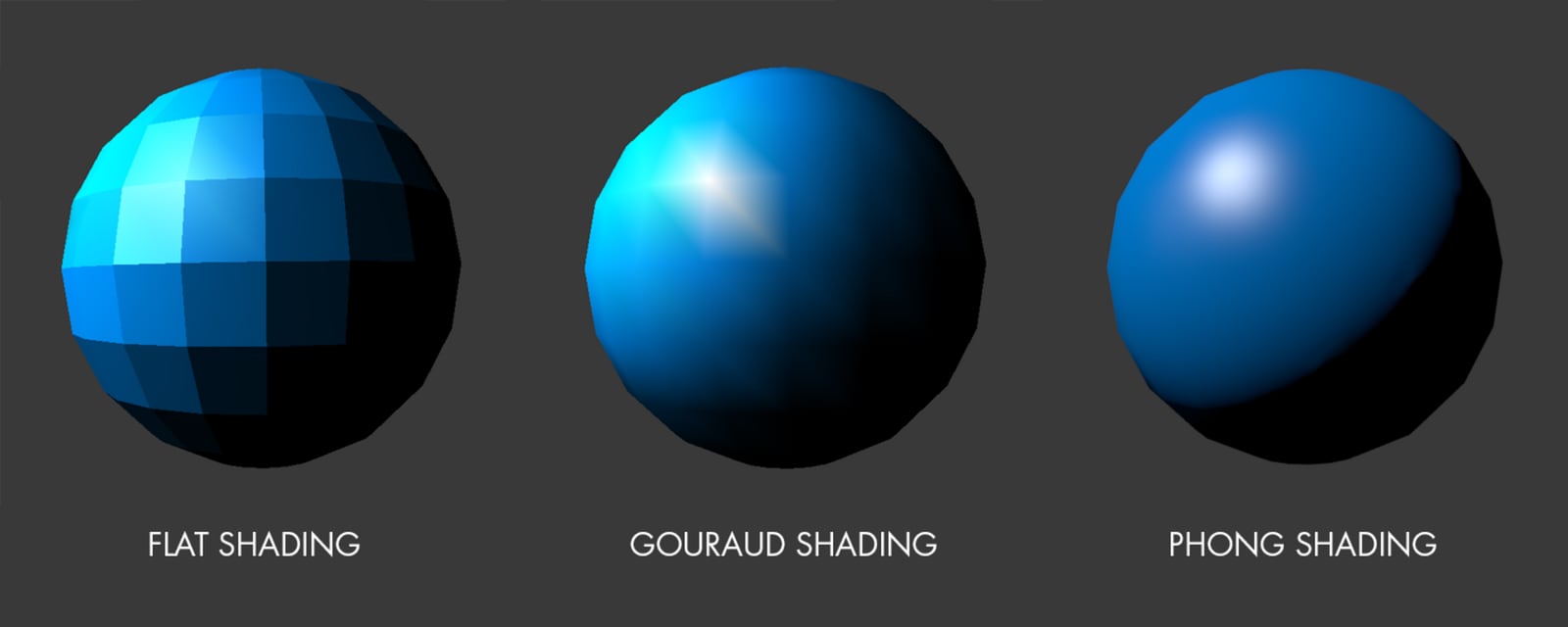
A matte surface, like chalk or plastic, is brightest when it faces the light head-on and gets darker as it turns away, until it's edge-on and gets none. The amount is the cosine of the angle between the direction the surface faces and the direction to the light. To get that angle, every vertex carries its normal, an arrow of length 1 pointing straight out of the surface, and the cosine is the dot product of the normal and the light direction: multiply the matching coordinates and add them up. That's the dot(normalize(vNormal), lightDirection) in the fragment shader from 4.3, and this matte rule is called Lambert's law, after the 18th-century scientist who described it.
Now the 24 vertices from 6.2 make sense from the other side. Every vertex on the die's top face carries the normal (0, 1, 0), so the blend across that face gives the same normal everywhere, and the face comes out one even brightness, a hard edge from its neighbour. A ball is the opposite case: its triangles share vertices, each vertex's normal points straight out from the ball's centre, and the blend across each triangle changes smoothly, so the shading looks round even though the surface is made of flat pieces. Which look you get is decided entirely by the normals in the geometry, not by the triangles.
7.2Rough plastic and shiny metal
Lambert's law only describes matte surfaces. Kabir's die is glossy plastic, so it should also show a bright highlight where the light reflects towards the camera, and a real die picks up a faint reflection of the room around it.
MeshStandardMaterial handles that with what's called physically based rendering: lighting formulas that follow how light behaves on real surfaces, driven by two settings an artist can reason about. roughness says how scattered the surface's tiny bumps are: 0 is a mirror with a sharp, small highlight, 1 is chalk with none. metalness says whether it's a metal, which tints its reflections, or not. The formulas are built so a surface never reflects more light than it receives, so a die set up once looks right under a desk lamp, in sunlight or in an image-based environment, without retuning. That's the main reason almost every Three.js scene today uses this material, and the reason its shader is one of the longest in the library.
7.3Painting the dots on: textures
You could model the dots as tiny dents, but that's hundreds of extra triangles for something that's mostly paint. It's far cheaper to paint them: draw the six faces' dot patterns into one image, and have the fragment shader look up each pixel's colour from it. An image used this way is called a texture, and its pixels are called texels, to keep them apart from the screen's pixels.
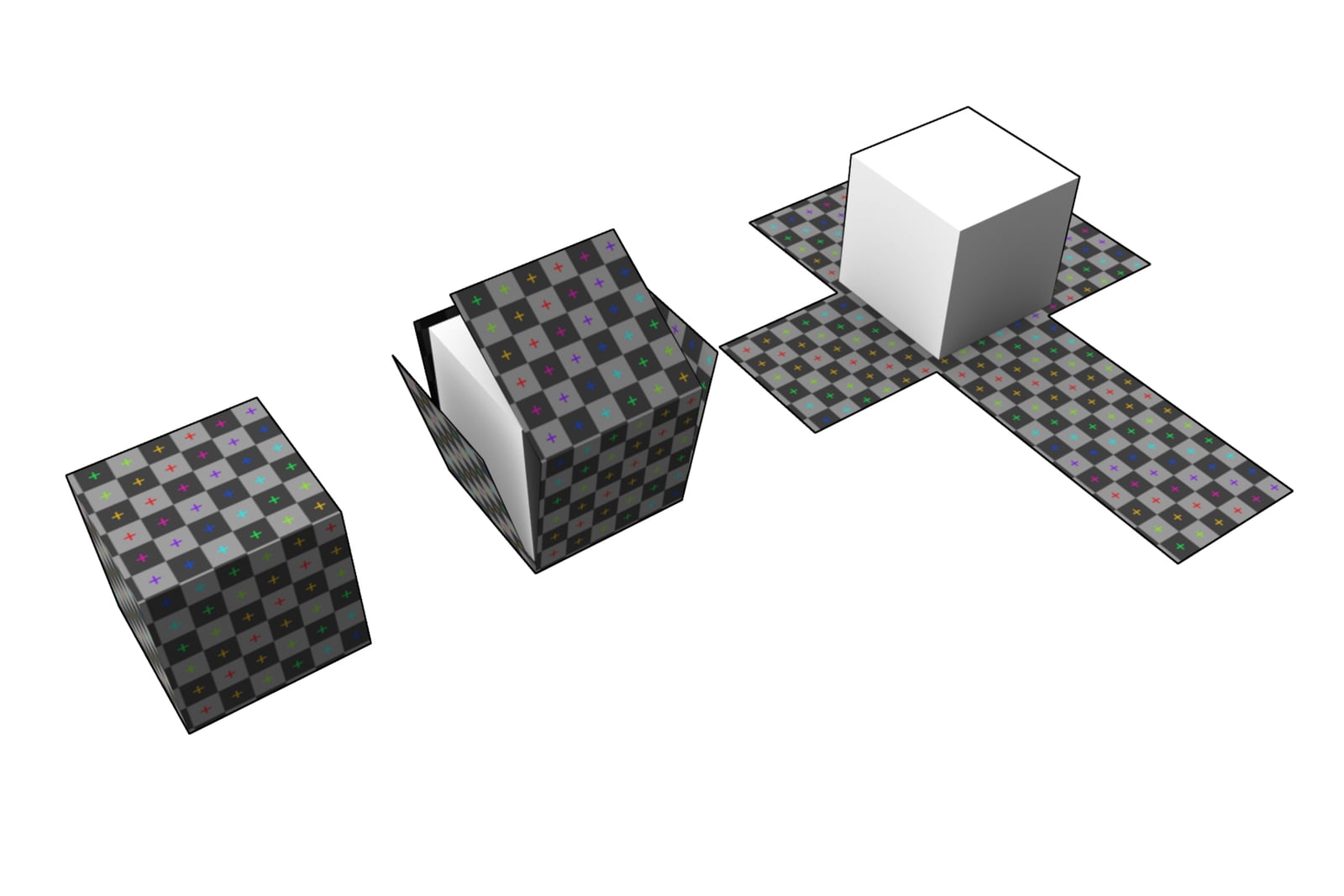
Each vertex says where it lands on the image with its uv coordinates, from (0, 0) at one corner of the image to (1, 1) at the opposite one. They're the third attribute in 6.2. The rasterizer blends the uvs across each triangle, like depth (with the perspective correction from the box in 3.3), and the fragment shader reads the texture at that blended position. Three.js's map_fragment chunk is exactly this: texture2D( map, vMapUv ), multiplied into the colour.
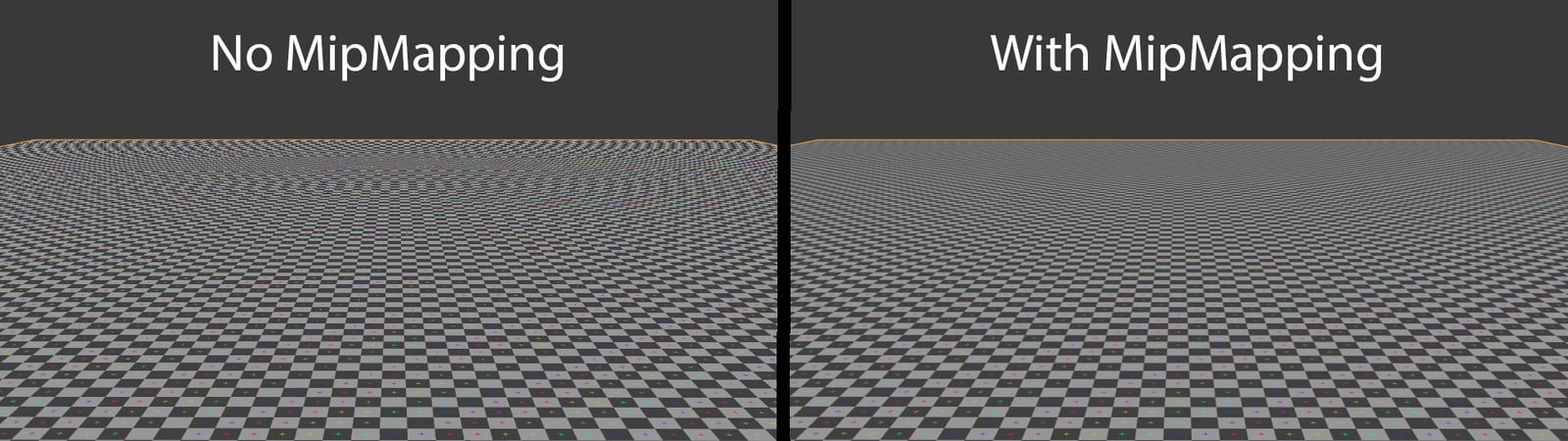
Now push the die away from the camera. Its 1,024 by 1,024 image ends up covering maybe 40 by 40 pixels on screen, so each screen pixel spans about 25 by 25 texels, and the shader samples just one of them. Which one it lands on changes with every tiny movement, so the dots flicker and crawl as the die tumbles. That flicker is called aliasing: sampling a detailed signal too sparsely.
To fix it, prepare smaller copies of the image in advance, each half the width and height of the one before (512, 256, and so on down to 1 by 1), where each texel is the average of four in the level above. The GPU works out how many texels one pixel spans, and reads from the copy where that's about one, so each sample is already an average of everything under the pixel. That chain of smaller images is called a mipmap. The GPU even blends between the two nearest levels so there's no visible jump as the die moves away. The cost is memory: the smaller copies add up to a third of the original image's size (1/4 + 1/16 + ... = 1/3).
Kabir's dot image is a 2,048 by 2,048 PNG, about 200 KB on disk. How much GPU memory does it take once it's a texture with mipmaps?
7.4Shadows
A die that casts no shadow looks pasted onto the table. The GPU, though, has no idea what's between a pixel and the light; each fragment shader runs knowing only about its own pixel.
Renderers get around that by drawing the scene twice. First, render it from the light's point of view, keeping only the depth buffer: for every direction from the light, how far away the nearest surface is. That depth image is called a shadow map. Then, in the normal render, each fragment works out where it would appear in the light's view and compares its distance from the light with the shadow map's value there. If something nearer to the light was recorded, the fragment is in shadow.
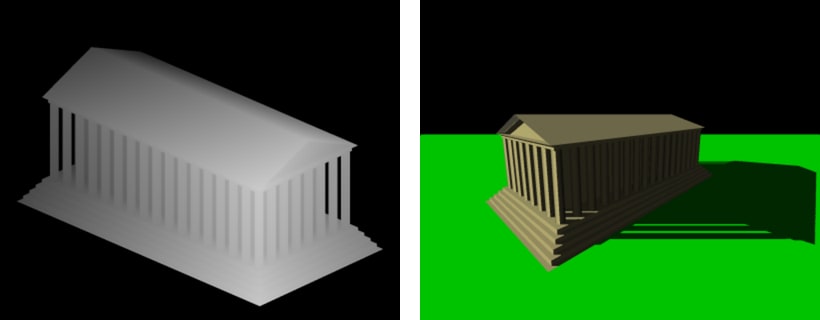
That's exactly what render does before the main pass, in the shadowMap.render step: one extra render of every shadow-casting object, for every light that casts shadows, every frame. It also brings its own artefacts. The shadow map has a limited resolution, so shadow edges are blocky unless they're blurred, and a surface can wrongly shadow itself in stripes (called shadow acne) because its own depth was rounded when stored. Which objects cast and receive shadows is opt-in in Three.js (castShadow, receiveShadow), because every caster costs another draw call in the extra pass.
- Three.js's renderer: a scene graph, a render list sorted for fewer state changes and less overdraw, and caches for buffers, programs and WebGL state
- Geometries as typed arrays uploaded once; materials that generate their own shaders, cached by a key
- Lighting from normals, dots from a mipmapped texture, and shadows from an extra depth pass
Check yourself: Why does a cube need 24 vertices and not 8?
Because a vertex is a bundle of everything the shader needs at one corner of one face: position, normal and uv. Each corner of the cube touches three faces that face different ways and show different parts of the texture, so it has to be stored three times with different normals and uvs. Eight corners times three is 24.
08A table of two thousand dice
8.1The obvious way: one Mesh per die
For the landing page, Kabir wants two thousand dice pouring onto a table. The obvious code is a loop: create two thousand Mesh objects sharing one geometry and one material, add them all to the scene, and update each one's position every frame.
Two thousand dice is 24,000 triangles, fewer than one detailed character in a game. On a mid-range phone, what's most likely to stop this from running at 60 frames a second?
This is the most common performance problem in WebGL. A desktop browser can probably manage a few thousand draw calls a frame, and phones maybe a few hundred, though it varies a lot with the device, the browser and how much state changes between calls. renderer.info.render.calls tells you how many you're making, and it's the first number to check when a Three.js page is slow.
8.2Instancing: one draw call, two thousand dice
Look at what differs between two dice: only the matrix. Same triangles, same material, same shader. So instead of two thousand draws that each set a matrix uniform, we can put all two thousand matrices in one buffer and ask the GPU, in a single call, to draw the die two thousand times, each copy reading its own matrix. That's called instancing, and WebGL 2 has a call for it, drawElementsInstanced.
In Three.js it's an InstancedMesh:
const dice = new THREE.InstancedMesh(dieGeometry, dieMaterial, 2000);
const m = new THREE.Matrix4();

function frame() {
  for (let i = 0; i < 2000; i++) {
    m.compose(positions[i], rotations[i], one);   // from the physics simulation
    dice.setMatrixAt(i, m);
  }
  dice.instanceMatrix.needsUpdate = true;          // re-upload 2000 x 64 bytes
  renderer.render(scene, camera);
}
The matrices live in an attribute that advances once per copy of the die instead of once per vertex, called an instanced attribute. When it changes, Three.js re-uploads 2,000 × 16 numbers × 4 bytes, 128 KB, in one bufferSubData, and that's nothing for the bus between CPU and GPU. Inside the shader, Three.js's project_vertex chunk gains one line, mvPosition = instanceMatrix * mvPosition;, so each copy is placed by its own matrix before the usual camera matrices. One draw call, and the CPU's per-die work shrinks to filling in a matrix.
GPUWhat an instanced attribute looks like at the WebGL levelA normal vertex attribute with gl.vertexAttribDivisor(location, 1), so it advances once per instance; a 4 by 4 matrix takes four attribute slots, one per column.OpenClose
In raw WebGL 2, the only difference between a per-vertex attribute and a per-instance one is a single call. After vertexAttribPointer, call gl.vertexAttribDivisor(location, 1), and the GPU moves to the next value in that buffer once per instance instead of once per vertex. Three.js does exactly this in its WebGLBindingStates module when it meets an InstancedBufferAttribute.
An attribute slot holds at most four numbers, so instanceMatrix, a mat4 of sixteen, occupies four consecutive slots, one per column, each with its own vertexAttribPointer at a 16-byte offset into the same 64-byte stride. GPUs guarantee at least 16 attribute slots, so position, normal, uv and an instance matrix (1 + 1 + 1 + 4 = 7) fit comfortably, with room for an instance colour.
Three.js also stores which buffers are bound to which slots in a vertex array object (VAO), one per combination of geometry and program. Switching between the table and the die then costs one bindVertexArray instead of re-describing every attribute: another of the redundant-call savings from 6.4.
The cost is flexibility. Every instance has to share the same geometry and material. Per-instance colour is allowed (setColorAt), because it's just one more instanced attribute. And Three.js culls an InstancedMesh as one object: if any die is on screen, all two thousand are drawn, and the GPU discards the off-screen ones after their vertex shaders have run.
8.3When the objects aren't identical
Kabir's table later gets a mix: dice, chips and meeples, three different shapes with the same material. Three.js has two more tools for that, and the choice between all of them is a real trade-off:
How should we draw thousands of objects?
- Each object fully independent: own material, own culling, easy to click
- Simplest code
- One draw call per object; CPU-bound in the hundreds on phones
- One draw call, any mix of shapes
- Best for things that never move: walls, scenery
- Moving one object means rewriting its vertices
- Culled as a whole
- Memory grows with every copy
- One draw call
- Each instance moves by changing 16 numbers
- All instances identical in shape and material
- Culled as a whole
- Different shapes, one call from JavaScript
- Culls and sorts each object separately
- Needs the WEBGL_multi_draw extension to be fast
- One material for all
For two thousand identical dice, InstancedMesh is the clear choice: one draw call, and movement costs a matrix per die. For the mixed table, BatchedMesh keeps the shapes separate while still making one call into WebGL. Merging is right for the static table and room, which never move. Real scenes use all three at once.
8.4The other limit: pixels
Draw calls are the CPU's limit. The GPU's is the number of fragments it has to shade: pixels on screen, times how many times each is drawn over (the overdraw from 2.4), times the cost of the fragment shader. The standard material's lighting is far heavier than the one-line shader in 4.3, so this limit is real, especially on phones.
Kabir's setup already has the biggest lever, in one line: renderer.setPixelRatio(Math.min(window.devicePixelRatio, 2)). On a phone with a ratio of 3, rendering at 2 instead shades 4 pixels for every 9 it would have, under half the work, and on a small screen held at arm's length you probably won't see the difference. Antialiasing, which smooths jagged triangle edges by taking several samples per pixel, adds its own cost on top, so antialias is an option you choose, not a default.
ScalingWhere do the 16.7 milliseconds go, and how do you measure them?Time the JavaScript in render() with performance.now(), count draw calls with renderer.info, and time the GPU separately with a timer query, because the GPU runs behind the CPU and a CPU timer only sees the queueing.OpenClose
Wrapping renderer.render in performance.now() measures only the CPU side: matrix updates, culling, sorting and writing commands into the command buffer. The GPU does the actual drawing later, in parallel, so a page can spend 2 ms in render and still miss frames because the GPU needs 25 ms. Three numbers tell the story:
| Measure | How | What a high value means |
|---|---|---|
CPU time in render | performance.now() before and after | Too many objects or draw calls: instance, batch, merge |
| Draw calls, triangles | renderer.info.render.calls, .triangles | Calls in the thousands on a phone: the CPU limit from 8.1 |
| GPU time | the EXT_disjoint_timer_query_webgl2 extension, where the browser exposes it | Too many pixels or heavy shaders: pixel ratio, materials, overdraw |
The GPU timer is asynchronous on purpose: you start and end a query around the draw calls, and read the result a frame or two later, so measuring doesn't create the sync point from 5.3. Some browsers limit or disable it, because precise GPU timings can be used to fingerprint a machine. The browser's own performance profiler shows the GPU process's work too, and it's often the quickest way to see whether the CPU or the GPU is late.
09Which die did they click?
9.1Shooting a ray
Kabir's players click a die to hold it. Here's the snag: the GPU produced a grid of coloured pixels, and it kept no record of which object made which pixel. A click arrives as a position on the canvas, and something has to work out what's under it.
Three.js answers it on the CPU, by running the camera backwards. Section 3.3 took a point in the room and ended at a pixel. A click starts at a pixel, so turn it into the −1 to 1 coordinates of 3.3, then push it back through the inverse of the projection and view matrices. You don't get a single point back, because depth was the part the click didn't say; you get a line from the camera through the room, every point of which lands on that pixel. That line is a ray, and testing what it hits is called raycasting.
For each object, the Raycaster first tests the ray against the object's bounding sphere, which rules out almost everything with a few multiplications. For objects that pass, it moves the ray into the object's own coordinates (by the inverse of its world matrix, so the geometry doesn't have to be moved) and tests every triangle, with a short calculation that solves for where the ray crosses the triangle's plane and whether that point is inside, the edge-test idea from 2.3 again. Hits are sorted by distance, nearest first.
ray starts at [ 0, 0, 10 ] heading [ 0, 0, -1 ]
hit: triangle 8, 8.685 units away, face normal (0,0,1)
A click at the centre becomes a ray starting at the camera and heading straight into the screen. It hits triangle 8, the first triangle of the die's front face (normal pointing towards the camera, in the die's own coordinates), 8.685 units away: a bit less than the 10 units to the die's centre, since the front face is closer and the die is tilted.
But the ray goes straight through the die and out of the back, so why is there only one hit? Because a triangle seen from behind doesn't count. Triangles have a front and a back, set by the order their corners are listed: anticlockwise as seen from the front. A closed solid's back faces are always hidden behind its front faces, so both the GPU and the raycaster skip any triangle whose corners appear clockwise. On the GPU this is called backface culling, and it halves the triangles a solid object sends to the rasterizer. Materials use it unless you set side: THREE.DoubleSide, and the raycaster follows the same setting so that it agrees with what's drawn.
9.2When raycasting gets slow
For two thousand dice, raycasting is cheap: two thousand sphere tests and a few dozen triangle tests. Raycasting an InstancedMesh tests each instance in turn and reports which one was hit as instanceId. The trouble starts with big models. If Kabir's artist sends a scanned, ornate die with maybe a million triangles, every click tests a million triangles, and highlighting whatever is under the mouse as it moves means doing that on every mouse move.
How do we find what's under the mouse in a large scene?
- Exact, no setup, works for any geometry
- Cost grows with triangle count; too slow for hover over big meshes
- Tests only the triangles in the boxes the ray passes through
- Fast enough for hover on million-triangle meshes
- Building the tree takes time and memory
- Must be rebuilt if the shape deforms
- Cost doesn't depend on triangle count
- Exactly matches what's drawn
- An extra render pass
- Reading back pixels is a sync point unless done asynchronously, a frame late
For most pages, the default raycast is probably fine. When it isn't, a BVH is the usual next step because it keeps everything on the CPU and exact. GPU picking wins for scenes with huge numbers of objects, provided it uses readRenderTargetPixelsAsync so the read doesn't stall the frame (5.3).
- One die, lit, textured and shadowed, drawn by a renderer that caches nearly everything
- Two thousand dice in one draw call with InstancedMesh, and a pixel ratio cap for phones
- Clicks answered by a ray through the inverse camera matrices, with bounding spheres first
Check yourself: Why doesn't a click ray report the back face of the die it passes through?
Because the die's material only draws front faces. A triangle's front is the side from which its corners appear anticlockwise; seen from the camera, the back faces of a closed solid appear clockwise, so the GPU culls them when drawing and the raycaster skips them when testing, so the two agree.
10Getting the die onto the page
10.1A file format shaped like GPU memory
Kabir's artist models a better die in Blender, with rounded edges and engraved dots, and exports it. Which file format?
Older formats like OBJ are text: a line per vertex with its numbers written out as decimals. Loading one means reading every character, parsing millions of numbers and building typed arrays, all in JavaScript, before anything reaches the GPU. glTF (GL Transmission Format), published by the Khronos Group in 2017 as glTF 2.0, takes the opposite approach. It's a JSON file describing the scene graph, the materials and the cameras, plus binary buffers whose bytes are already laid out the way vertex and index buffers want them. Khronos calls it "the JPEG of 3D". Loading the geometry is: fetch the binary file, make a typed array that looks at the right byte range, and pass it straight to bufferData. There's nothing to parse per vertex. A .glb file packs the JSON and the binary into one file.
glTF's materials are the same physically based roughness-and-metalness model as MeshStandardMaterial (7.2), so a die that looked right in Blender looks the same in the browser, and Three.js's GLTFLoader turns the file straight into the Object3D tree from 3.2.
StorageMaking the download small and the GPU memory smallerDraco or meshopt to shrink geometry on the wire, and KTX2 textures with Basis Universal, which stay compressed in GPU memory, so a 21 MiB texture can become about 5 MiB.OpenClose
There are two different sizes to shrink: what's downloaded, and what sits in GPU memory once loaded.
Geometry
Vertex data compresses well, because positions are smooth and neighbouring vertices are similar. glTF has two extensions for it. Draco, from Google, quantises positions to fewer bits and encodes the mesh's connectivity compactly; it shrinks geometry a lot but needs a decoder (compiled to WebAssembly, the browser's compact binary code format, and run in a background worker) and some CPU time to unpack. meshopt reorders and quantises the data so it decodes very fast and compresses well with the gzip or Brotli the server already applies. Either way, once decoded, the GPU sees ordinary vertex buffers.
Textures
As 7.3 worked out, a PNG or JPEG is small to download and huge on the GPU, because it has to be decoded to raw texels. GPUs have their own compressed formats that they can sample directly, because they compress in fixed blocks: every 4 by 4 group of texels becomes 8 or 16 bytes, so the GPU can find any texel's block with arithmetic. At 16 bytes per block that's 1 byte per texel instead of 4, so the 2,048-square dot image takes 4 MiB, or about 5 MiB with mipmaps, instead of 21.
The catch is that each kind of GPU supports different block formats: BC on desktop GPUs, ASTC and ETC on phones. KTX2 files with Basis Universal data solve that by storing an intermediate form that can be transcoded quickly, at load time, into whichever format this device supports. Three.js's KTX2Loader does that transcoding in a worker. For a page with many large textures, this is probably the single biggest saving in both GPU memory and upload time.
| Texture as | Download | GPU memory (2,048², with mipmaps) |
|---|---|---|
| PNG or JPEG | small | about 21 MiB, decoded to 4 bytes per texel |
| KTX2 / Basis, transcoded to a block format | small | about 5 MiB at 1 byte per texel |
10.2GPU memory isn't garbage collected
When a player leaves a game, Kabir removes its dice from the scene and drops every reference to them. JavaScript's garbage collector frees the JavaScript objects. It doesn't free the vertex buffers, textures and compiled programs those objects stood for, because those live in GPU memory, which the collector knows nothing about. Each game played leaks a little more, until the tab slows down or the GPU process gives up.
11WebGPU: fixing the API underneath
11.1What WebGL can't fix
Everything so far works around WebGL's design more than it uses it. Three.js keeps its own copy of WebGL's global state to avoid redundant calls (6.4). Instancing and batching exist mainly because each draw call is so expensive (8.1). And some of that expense is built into the API: since any setting might have changed since the last draw, the browser has to re-check the whole state on every draw call (5.1).
There are also things WebGL can't do at all. It has no compute shaders, programs that run on the GPU without drawing anything. You'd want those for simulating two thousand tumbling dice on the GPU instead of the CPU. It's frozen at the feature level of OpenGL ES 3.0, from 2012. And the native APIs underneath it moved on long ago: Direct3D 12, Metal and Vulkan all replaced the global state machine with a different model, so ANGLE spends effort imitating an old design on top of new ones.
11.2What WebGPU changes
WebGPU is the browser API designed after those modern native APIs. Three changes matter for us. First, everything a draw needs that rarely changes, the shaders, the layout of the vertex buffers, the depth and blending settings, is bundled into one render pipeline object, created and checked once, up front. A draw names a pipeline instead of relying on whatever global state happens to be set, so there's much less to validate per draw. Second, draw commands are recorded into a command list and handed to the GPU together, instead of one call at a time. Third, it has compute shaders, written in a new language called WGSL.
It took years to arrive everywhere. Chrome shipped WebGPU in version 113 in 2023 on Windows, macOS and ChromeOS, and on Android in Chrome 121. Safari shipped it in Safari 26 in 2025, on macOS and iOS. Firefox shipped it on Windows in version 141 in July 2025, with Macs following later that year. Linux support was still in progress in several browsers at the end of 2025.
Three.js's answer is a second renderer, WebGPURenderer. It uses WebGPU where the browser has it and falls back to a WebGL 2 backend where it doesn't (you can force that with forceWebGL: true), so the same page runs everywhere. Its materials aren't built from GLSL strings and #includes. They're written in TSL, the Three.js Shading Language: JavaScript functions that build a graph of operations, which Three.js then turns into WGSL for WebGPU or GLSL for the WebGL fallback.
Which renderer should Kabir's site use?
- Mature, runs on every browser that matters
- Every tutorial and example targets it
- Draw calls cost more
- No compute shaders
- Cheaper draws, compute shaders for GPU simulation
- One shader description for both backends
- Newer, with less community code
- Custom GLSL ShaderMaterials have to be rewritten in TSL
For one die and a table of instanced dice, WebGLRenderer is likely plenty and has the largest body of examples. If the landing page grows into a GPU physics simulation with tens of thousands of dice, compute shaders become the reason to move, and WebGPURenderer's WebGL fallback means moving doesn't lock out older browsers.
12The whole system
12.1Every box, and why it's there
Here's one frame of Kabir's landing page from start to finish, with everything we've added:
12.2From top to bottom
| Level | The choice | Data structure or algorithm |
|---|---|---|
| Page | Redraw everything every frame | requestAnimationFrame loop, 16.7 ms budget |
| Scene | Objects placed relative to parents | Tree of Object3D; world = parent world × local |
| Placement | One matrix per object | 4 by 4 homogeneous matrices; view = inverse of camera's world matrix |
| Visibility | Skip what the camera can't see | Bounding sphere against six frustum planes |
| Ordering | Fewer switches, less overdraw | Render list sorted by material, then depth (transparent reversed) |
| Shaders | Generate per feature set, compile once | Template + #include chunks + #defines; map from cache key to program |
| GPU data | Upload once, re-upload on change | Typed arrays; map from attribute to WebGL buffer, keyed by version |
| Drawing | Per vertex, then per pixel | Vertex shader, edge-function rasterization, perspective-correct interpolation, depth buffer |
| Clicks | Run the camera backwards | Ray from inverse matrices; sphere test, then ray–triangle tests (or a BVH) |
13What goes wrong, and why
13.1Symptoms you'll meet
Nearly every common Three.js bug report is one of the mechanisms in this chapter showing through:
| Symptom | Cause | Fix |
|---|---|---|
| Two surfaces flicker through each other in stripes | Z-fighting: depth precision used up near a tiny near plane (3.4) | Raise near; logarithmicDepthBuffer or reversedDepthBuffer for huge scenes |
| The model is completely black | No lights for a lit material, or missing or inverted normals (7.1) | Add lights or an environment map; recompute normals |
| Textures shimmer and crawl in the distance | Aliasing: no mipmaps, or mipmaps disabled (7.3) | Keep generateMipmaps on; use KTX2 with mipmaps |
| The page freezes the first time something appears | A new shader program compiling (6.3) | renderer.compileAsync before showing it; keep the light count fixed |
| Memory climbs every time a view is opened | Geometries, materials or textures never disposed (10.2) | dispose() everything you remove; watch renderer.info.memory |
| Fast on a laptop, slow on phones | Too many draw calls, or too many pixels at a ratio of 3 (8.1, 8.4) | Count calls and instance; cap the pixel ratio at 2 |
| Glass objects pop in and out as the camera turns | Transparent objects sorted by centre, painter's-algorithm style (6.4) | renderOrder, depthWrite: false, or avoid overlapping transparency |
| Changing vertex data does nothing on screen | The attribute's version didn't change, so nothing was re-uploaded (6.2) | attribute.needsUpdate = true |
| Clicks miss an object that's clearly there | Back faces skipped, or a stale bounding sphere after moving vertices (9.1) | side: DoubleSide if needed; computeBoundingSphere() |
| The canvas goes blank after a long, heavy frame | The GPU was reset; the WebGL context was lost (5.2) | Handle webglcontextlost and webglcontextrestored |
13.2The trade-offs, in one table
| Decision | Chosen | Given up | Why it was worth it |
|---|---|---|---|
| Where pixels are computed | GPU | Easy debugging and control | Only a GPU does billions of small calculations a second |
| Hidden surfaces | Depth buffer per pixel | Memory for a second grid, precision far away | Any draw order, interlocking shapes come out right |
| How the page reaches the GPU | WebGL through a sandboxed GPU process | Cheap draw calls, synchronous reads | A stranger's page can't attack the driver or read leftovers |
| Shaders | Generated per material variant | First-use compile stalls | Each shader contains only what it uses |
| Transparency | Sort objects furthest first | Correctness for overlapping glass | Exact methods cost far too much per frame |
| Many objects | Instancing and batching | Per-object freedom of shape and material | Draw calls stop being the limit |
| Textures | GPU block compression (KTX2) | A conversion step in the asset pipeline | About a quarter of the GPU memory |
14Summary
- A browser knows nothing about 3D: a canvas is a grid of pixels, and a 1,000 by 600 canvas at a pixel ratio of 2 needs 144 million pixel colours a second at 60 frames a second.
- A 3D object is a mesh: vertices and triangles, because a triangle is always flat and never bent inwards.
- Drawing comes down to projecting and filling: divide by distance to project, test pixels against each triangle's three edges, and use the edge values as weights to blend anything across the triangle.
- A depth buffer decides visibility per pixel, so triangles can arrive in any order; because it stores 1 / distance, its precision is spent near the camera, and a tiny near plane causes z-fighting.
- 4 by 4 matrices place everything: an object's world matrix, the camera's view matrix and its projection matrix combine into one per object, and the hardware's divide by w does the perspective.
- The GPU runs the per-vertex and per-pixel work through a pipeline of programmable shaders and fixed hardware for rasterizing and depth testing.
- WebGL is a global state machine behind a sandbox: calls become messages to the browser's GPU process, which validates them and translates them through ANGLE, so draw calls are expensive and any call that needs an answer stalls the pipeline.
- Three.js's renderer is mostly caches: world matrices, uploaded buffers keyed by version, shader programs generated from chunks and keyed by their settings, and a copy of WebGL's state, so each frame sends only what changed.
- A cube has 24 vertices, because a vertex is a bundle of position, normal and uv, and lighting and textures are blended from those per pixel.
- Draw calls run out before triangles do: instancing, batching and merging draw thousands of objects in a few calls, while the pixel ratio controls the GPU's share.
- Clicks run the camera backwards into a ray, tested against bounding spheres and then triangles; WebGPU replaces WebGL's state machine with pipelines checked once, and Three.js's WebGPURenderer falls back to WebGL where needed.
15Build this
A software rasterizer, then the same scene in Three.js.
- Start from the Python program in 2.4. Add a per-face normal and a light direction, and print a brightness character (
.:-=+*#%@) instead of a letter, using Lambert's law from 7.1. Turn the die frame by frame and print each frame. - Add perspective-correct uv interpolation: give each corner a uv, blend u/w, v/w and 1/w with the edge weights, and divide. Sample a 6 by 6 checkerboard and compare it with plain linear blending on a face seen at a steep angle.
- Build the same die in Three.js in a web page. Log
renderer.info.render.callsandrenderer.info.programs.length, then add a second light and watch the program count change on the next frame. - Make 5,000 dice as separate meshes, then as one
InstancedMesh. Compare draw calls and the time spent inrenderon a laptop and on a phone. Then halve the pixel ratio and see which version gets faster. - Click a die with a
Raycasterand highlight it withsetColorAt, so you can see the instance ID from section 9.2 at work.
16Interview questions
beginnerWhat does a depth buffer do, and why not just sort triangles by distance?›
It's a grid the size of the screen holding, for each pixel, the distance of the nearest surface drawn there so far. A new fragment is drawn only if it's nearer than the stored value. Sorting triangles (the painter's algorithm) fails when triangles pass through each other or overlap in a cycle, since no order is correct, and it costs a sort every frame. A depth buffer gets the right answer per pixel in any draw order, at the cost of memory and limited precision far from the camera.
beginnerWhy does a BoxGeometry have 24 vertices when a cube has 8 corners?›
A vertex is everything the vertex shader reads at one corner of one triangle: a position, a normal and texture coordinates. Each corner of a cube belongs to three faces that point in different directions and show different parts of the texture, so each corner is stored three times with different normals and uvs. An index buffer of 36 entries then lists the 12 triangles by vertex number.
intermediateA Three.js scene with 3,000 simple objects runs slowly on phones even though it has few triangles. What's going on and how do you fix it?›
Each object is a separate draw call, and each draw call has a fixed CPU cost: Three.js's per-object work (matrix update, culling, sorting, uniforms), then the trip through the browser's command buffer, validation in the GPU process and translation by ANGLE. Thousands of those exceed a phone's frame budget before the GPU is busy. Check renderer.info.render.calls, then reduce calls: InstancedMesh for identical objects, BatchedMesh for different shapes with one material, and merged geometry for anything static.
intermediateWhy does a Three.js page sometimes freeze for a moment when a new object or light first appears?›
Three.js generates and compiles a shader program the first time it sees a new combination of material settings, and the number of lights of each type is part of that combination. Compiling goes through the browser's shader translator and the driver's compiler, which can take tens of milliseconds or more. Adding a light changes the key for every lit material, so all of them recompile. Pre-compile with renderer.compileAsync(scene, camera), which uses parallel shader compilation where available, and keep the light setup stable.
deepWalk through what happens between a WebGL drawElements call in JavaScript and pixels on the screen.›
In Chrome, the call is serialized into a command buffer shared with the GPU process and returns immediately. The GPU process validates it against the current state, including checking that indices stay within the bound buffers, and passes it to ANGLE, which translates it to Direct3D, Metal or Vulkan; shaders were translated similarly at compile time. The driver builds hardware commands. On the GPU, the vertex shader transforms each vertex by the combined matrices, the hardware divides by w and maps to the viewport, the rasterizer finds covered pixels with edge tests, early depth testing discards hidden fragments, the fragment shader computes colours with perspective-correct interpolated inputs, and survivors are written to the framebuffer, which the compositor shows at the next refresh.
deepWhat problems does WebGPU solve that WebGL can't, and how does Three.js handle the transition?›
WebGL inherits OpenGL's global state machine, so every draw call must be re-validated against whatever state is current, which makes draws expensive, and it has no compute shaders. WebGPU, modelled on Vulkan, Metal and Direct3D 12, bundles shaders and fixed settings into render pipeline objects checked once, records commands into command buffers submitted together, and adds compute shaders in WGSL. Three.js added a WebGPURenderer that uses WebGPU where available and a WebGL 2 backend elsewhere, with materials written in TSL, a node-based shading language that compiles to WGSL or GLSL, so the same scene runs on both.
17Go deeper
A camera has near = 0.01 and far = 100,000. Distant buildings flicker where walls meet. What's the first change to try?›
Raise the near plane as far as the scene allows. Depth is stored as a function of 1 / distance, so a tiny near plane spends almost all the depth values close to the camera; raising near improves precision far away much more than lowering far does.
Which costs more CPU time in WebGL: one draw call with 100,000 triangles, or 1,000 draw calls with 100 triangles each?›
The 1,000 draw calls, almost always. Each call has a fixed cost in JavaScript, the command buffer, validation and translation, regardless of how many triangles it carries, while the GPU processes 100,000 triangles easily.
Why does Three.js draw opaque objects nearest first but transparent ones furthest first?›
Nearest first lets early depth testing discard hidden fragments before their fragment shaders run. Transparent surfaces must be blended over whatever is behind them, so the things behind have to be drawn first, and the depth buffer can't sort them.
The render function, projectObject, the render lists, WebGLPrograms (the cache key) and WebGLState (the state cache) are all readable in an afternoon, and everything in sections 6 to 9 is in there.
Raw WebGL from one triangle upwards: buffers, attributes, uniforms, matrices and textures, the layer under section 5.
The edge functions, barycentric weights, perspective-correct interpolation and the projection matrix, derived step by step.
How Chrome's renderer process talks to the GPU process, and how ANGLE translates OpenGL ES and GLSL to Direct3D, Metal and Vulkan.
The security rules WebGL adds over OpenGL ES (initialised memory, bounds checks), and the glTF buffer, accessor and material model.
Pipelines, bind groups, command encoders and compute shaders, then how WebGPURenderer and TSL map onto them.
The standard reference for everything here and beyond: the pipeline, physically based shading, shadows, transparency and acceleration structures.
18Related chapters
Warps, SIMT and memory bandwidth: why a GPU is shaped for exactly the per-vertex and per-pixel work in section 4. Chapter 45.
Why a CPU core is built for one fast, branching stream of instructions, the opposite of what rasterizing needs. Chapter 1.
A whole design tool drawn through WebGL and now WebGPU, with its own renderer compiled to WebAssembly. Chapter 64.
A real-time game where the 16 ms frame budget meets the network. Chapter 57.
The spatial-index idea behind a BVH, in two dimensions: test only what's near. Chapter 50.